Note_Tech
All technological notes.
Project maintained by simonangel-fong Hosted on GitHub Pages — Theme by mattgraham
AWS - Infrastructures Access and Management
- AWS - Infrastructures Access and Management
AWS Access Fundamental
Account ID
-
Every AWS Account has a unique Account ID.
-
The Account ID can be easily found by dropping down the current user in the Global Navigation.
-
The AWS Account ID is composed of 12 digits.
-
The AWS Account ID is used:
- When logging in with a non-root user account
- Cross-account roles
- Support cases
-
Example: role
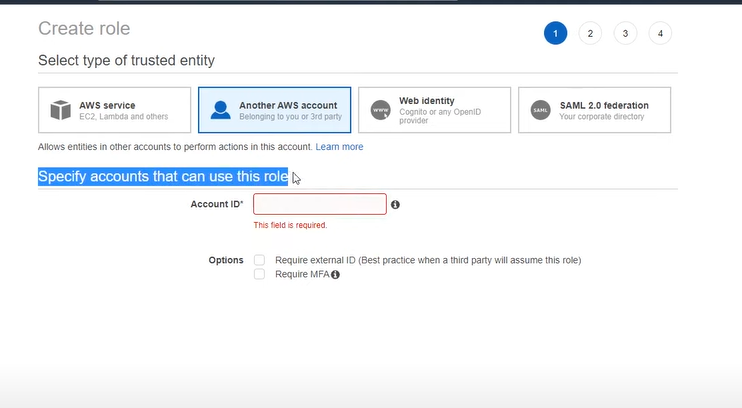
-
Example: policy
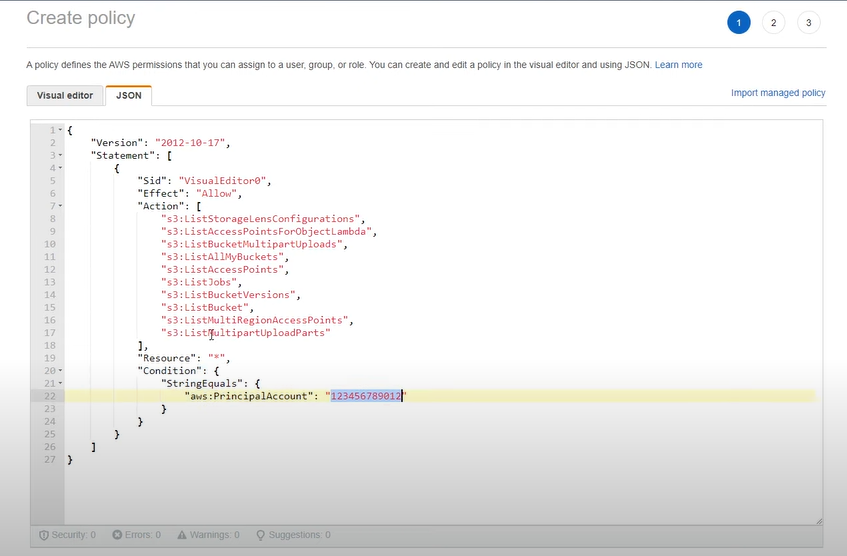
Amazon Resource Name (ARN)
-
Amazon Resource Name (ARN)- uniquely identify AWS resources.
ARNsare required to specify a resource unambiguously across all of AWS.
-
ARNs format variations:
arn.partition:service:region:account-id:resource-idarn.partition:service:region:account-id:resource-type/resource-idarn.partition:service:region:account-id:resource-type:resource-id
-
Partitionaws: AWS Regionsaws-cn: China Regionsaws-us-gov: AWS GovCloud (US) Regions
-
Service: Identifies the service- ec2
- s3
- iam
-
Region: which AWS resource- us-east-1
- ca-cetral-1
-
Account ID -
Resource ID: could be a number name or path- user: Bob
- instance name
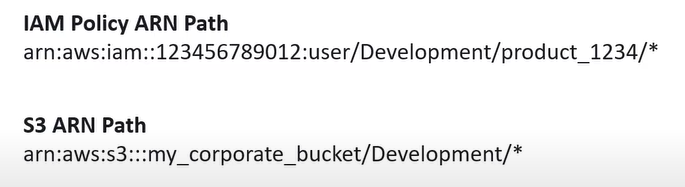
- Resource ARNs can include a path
-
Paths can include a wildcard character, namely an asterisk (
*)
AWS Documentation
-
AWS Documentation- a large collection of technical documentation on how to use AWS Services.
-
AWS Documentation: https://docs.aws.amazon.com/
-
AWS Labs(examples and tutorial): https://github.com/awslabs
API
-
Application Programming Interface(API)- a software that allows two application/services to talk to each other.
- The most common type of API is via
HTTPrequests.
-
AWS API- an
HTTP APIand user can interact by sendingHTTPSrequests - Rarely do users directly send HTTP requests directly to the AWS API. Its much easier to interact with the API via a variety of Developer Tools.
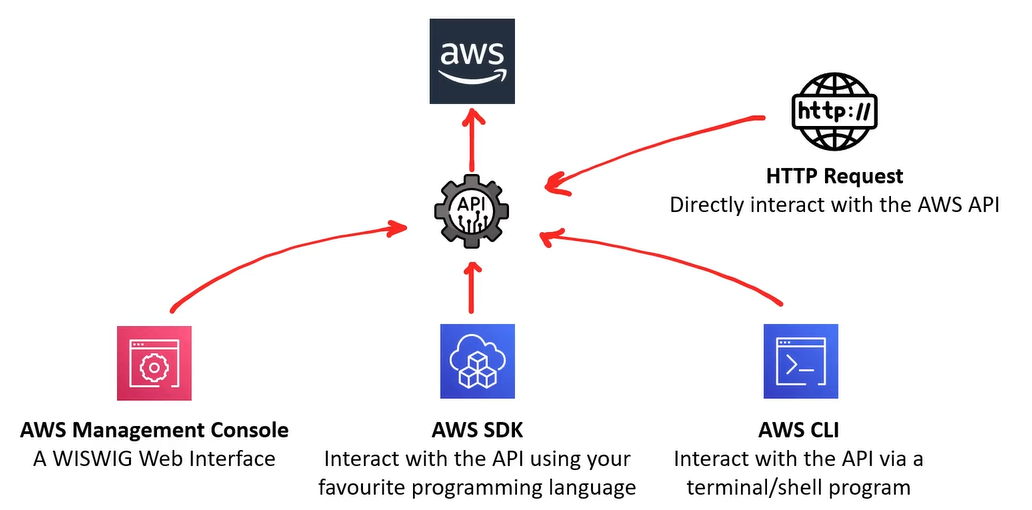
- an
-
Example:
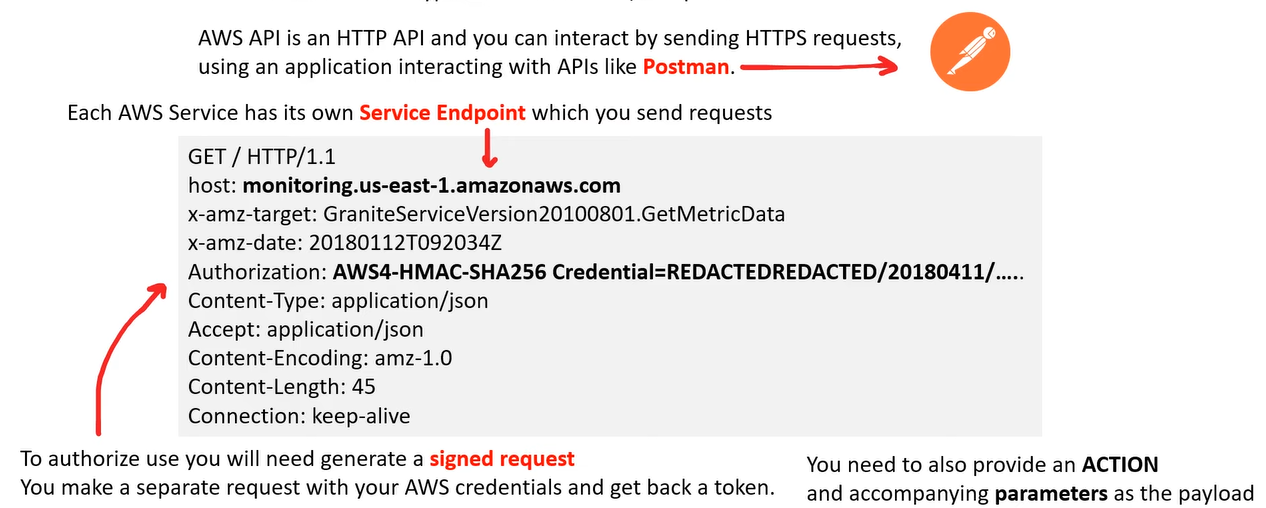
-
List of Service endpoints: https://docs.aws.amazon.com/general/latest/gr/aws-service-information.html
Access AWS
- To access AWS, you have three options:
| Access | protected by |
|---|---|
AWS Management Console |
password + MFA |
AWS Command Line Interface (CLI) |
access keys |
AWS Software Developer Kit (SDK) |
access keys |
AWS Console
-
Management Console- a web-based unified console to build, manage, and monitor resources from simple web apps to complex cloud deployment.
-
Service Console- AWS Service each have their own customized console.
- User can access these consoles by searching service name.
- Some AWS Service Consoles contain many AWS Sevices.
AWS CLI
-
Command Line Interface (CLI)- processes commands to a computer program in the form of lines of text.
- OS implement a command-line interface in a shell.
-
Terminal- a text only interface (input/output environment)
-
Console- a console is a physical computer to physically input information into a terminal.
-
Shell- the command line program that users interact with to input commands.
-
AWS Command Line Interface (CLI)- allow users to programmatically interact with the
AWS APIvia entering single or multi-line commands into a shell or terminal. - a python executable program.
- Python is required to install AWS CLI.
- need to be instelled on OS
- The name of the CLI program is
aws - Important!: CLI is available for a few region.
- allow users to programmatically interact with the
-
About AWS CLI: https://docs.aws.amazon.com/cli/latest/userguide/cli-chap-getting-started.html
AWS CloudShell
AWS CloudShell- a browser based shell built into the AWS Management Console.
- is scoped per region
- Only available in some regions
- same credentials as logged in user
- Free Service
- Include 1GB of storage free per AWS region
- Saved files and settings
- files saved in home directory are available in future sessions for the same AWS region.
- Preinstalled Tools
- AWS CLI, Python, Node.js, git, make,pip, sudo, tar, tmux,vim wget, and zip and more.
AWS Tools for Powershell
Powershell- a task automation and configuration management framework.
- A command-line shell and a scripting lauguage.
-
Unlinke most shells, which accept and return text, PowerShell is built on top of the
.NETCommon Language Runtime (CLR), and accepts and returns.NETobjects. -
Cmdlet- a special type of command in PowerShell in the form of capitalized verb-and-noun e.g.
New-S3Bucket
- a special type of command in PowerShell in the form of capitalized verb-and-noun e.g.
-
AWS Tools for Powershelllets user interact with the AWS API via PowerShellCmdlets. -
pwsh: Command to Switch to PowerShell in AWS CloudShell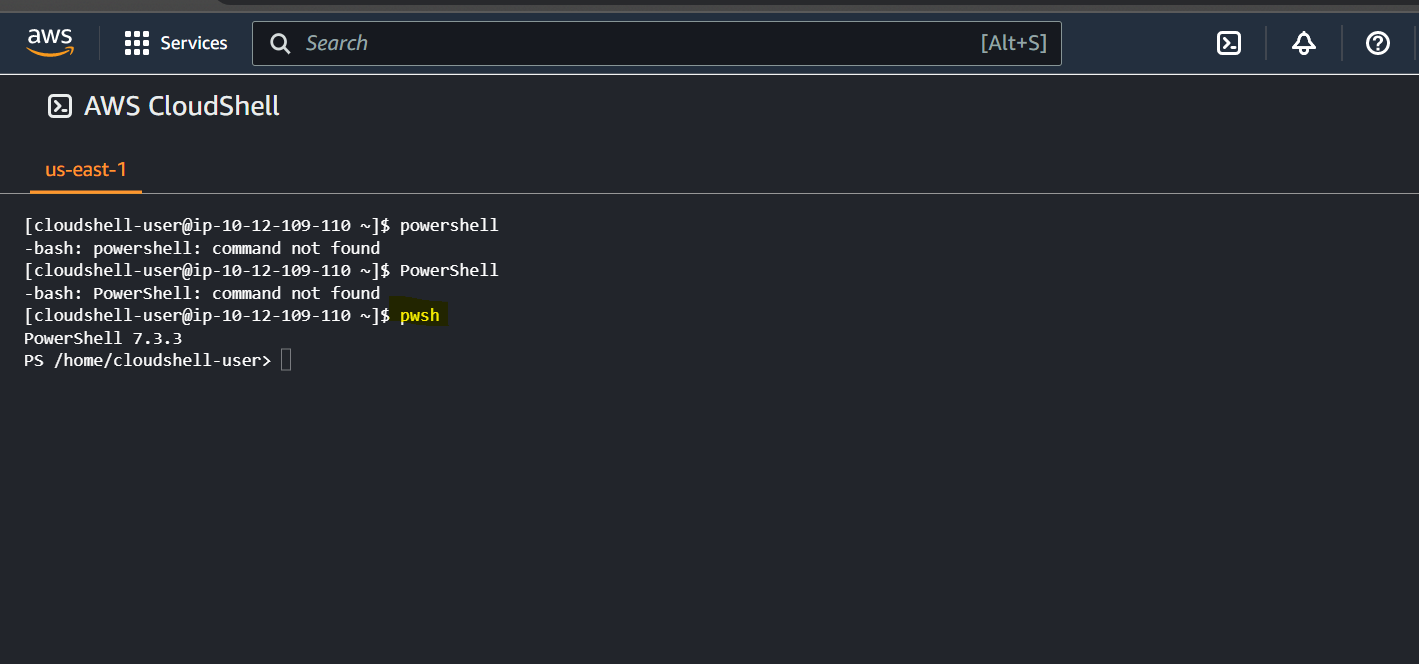
- Documentation: https://docs.aws.amazon.com/powershell/index.html
AWS SDK
-
Software Developement Kit (SDK)- a collection of software development tools in one installable package.
-
AWS SDK- a package used to create, modify, delete or interact with AWS resources.
-
AWS SDK for Python: https://aws.amazon.com/sdk-for-python/
-
AWS Cloud9- An AWS cloud IDE for writing, running, and debugging code
Manage Infrastructure
Infrastructure as Code (IaC)
-
Infrastructure as Code (IaC)- user write a configuration script to automate creating, updating or destroying cloud infrastrure.
- is a blueprint of infrastructure.
- allow to easily share, version or inventory cloud infrastructure.
-
AWS has two offering for writing Infrastructure as Code.
AWS CloudFormation (CFN): CFN is a Declarative IaC tool- Declarative
- What user see is what user get. Explicit
- More verbose, but zero chance of mis-configuration
- Users scripting language. e.g., JSON, YAML, XML
- Declarative
AWS Cloud Development Kit (CDK): CDK is an Imperative IaC tool.- Imperative
- User say what user want, and the reset is filled in. Implicit
- Less verbose, user could end up with misconfiguration
- Does more than Declarative
- Users programming languages. e.g., Python, Ruby, JS
- Imperative
CloudFormation - Free, IaC, template
-
AWS CloudFormation- allows user to write
Infrastructure as Code (IaC)as either aJSONorYAMLfile. - a declarative way of outlining your AWS Infrastructure, for any resources (most of them are supported).
- allows user to write
-
CloudFormationis simple but it can lead to large files or is limited in some regard to creating dynamic or repeatable infrastructure compared to CDK. -
CloudFormationcan be easier for DevOps Engineers who do not have a background in web programming languages. -
CloudFormation creates those for you, in the right order, with the exact configuration that you specify
-
Since CDK generates out
CloudFormation, it’s still important to be able to read and understandCloudFormationin order to debug IaC stacks. -
Benefits
-
Infrastructure as code- No resources are manually created, which is excellent for control
- Changes to the infrastructure are reviewed through code
-
Cost
- Each resources within the stack is tagged with an identifier so you can easily see how much a stack costs you
- You can estimate the costs of your resources using the CloudFormation template
- Savings strategy: In Dev, you could automation deletion of templates at 5 PM and recreated at 8 AM, safely
-
Productivity
- Ability to destroy and re-create an infrastructure on the cloud on the fly
- Automated generation of Diagram for your templates!
- Declarative programming (no need to figure out ordering and orchestration)
-
Don’t re-invent the wheel
- Leverage existing templates on the web!
- Leverage the documentation
-
Supports (almost) all AWS resources:
- Everything we’ll see in this course is supported
- You can use “custom resources” for resources that are not supported
-
-
Create a
CloudFormationStack:- Cloud9 + CLI
- CloudFormation console
-
AWS CloudFormation: https://aws.amazon.com/cloudformation/
CloudFormation Templates
- AWS CloudFormation templates are JSON or YAML-formatted text files. - They are declarations of the AWS resources that make up a stack.
CloudFormation Stack Designer - 可视化
- We can see all the resources
- We can see the relations between the components
Cloud Development Kit (CDK)- programming language, IaC
-
AWS CDK- allows to user user’s favortite programming language to write Infrastructure as Code (IaC)
- e.g.: TypeScript, Node.js, Python, Java, .NET
-
You can therefore deploy infrastructure and application runtime code together
- Great for Lambda functions
- Great for Docker containers in ECS / EKS
-
CDKis powered by CloudFormation (it generates out CloudFormation templates)- The result of CDK execution will display in CloudFormation console.
-
CDK Construct: a large library of reusable cloud components. https://constructs.dev -
CDKcomes with its own CLI -
CDKPiplines to quickly setup CI/CD pipelines for CDK projects. -
CDKhas a testing framework for Unit and Integration Testing. -
CDK documentation: https://docs.aws.amazon.com/cdk/api/v2/
-
About CDK: https://aws.amazon.com/cdk/