Note_Tech
All technological notes.
Project maintained by simonangel-fong Hosted on GitHub Pages — Theme by mattgraham
AWS - Identity and Access Management (AWS IAM)
- AWS -
Identity and Access Management (AWS IAM)
IAM
User & Group
-
IAM:Identity and Access Management- Global service
-
Root account- Account created by default, shouldn’t be used or shared.
-
User- People within an organization, and can be grouped.
-
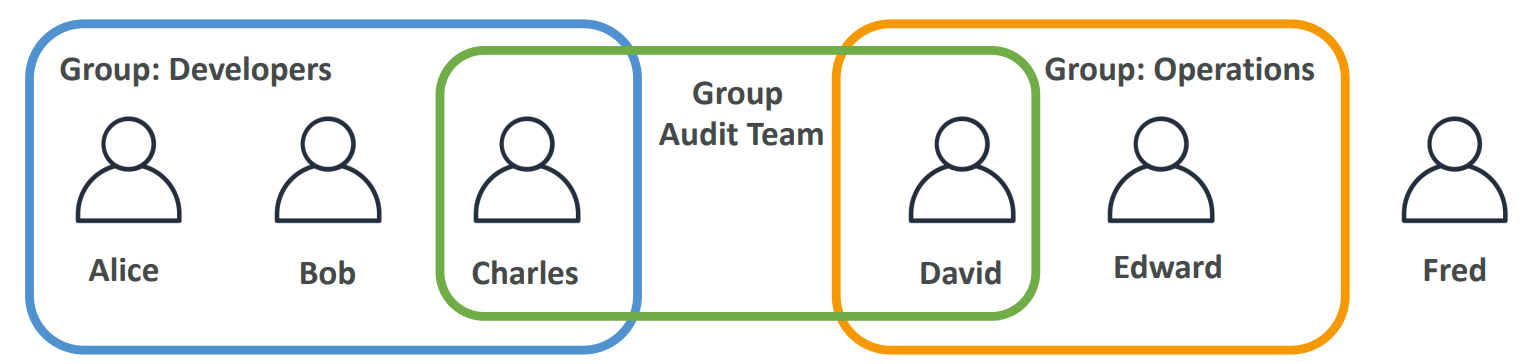
Groups- a collection of users who have the same level of permissions.
- contain users only, not other groups
-
Usersdon’t have to belong to agroup, andusercan belong to multiplegroups
Security
Password Policy
- Strong passwords = higher security for your account
-
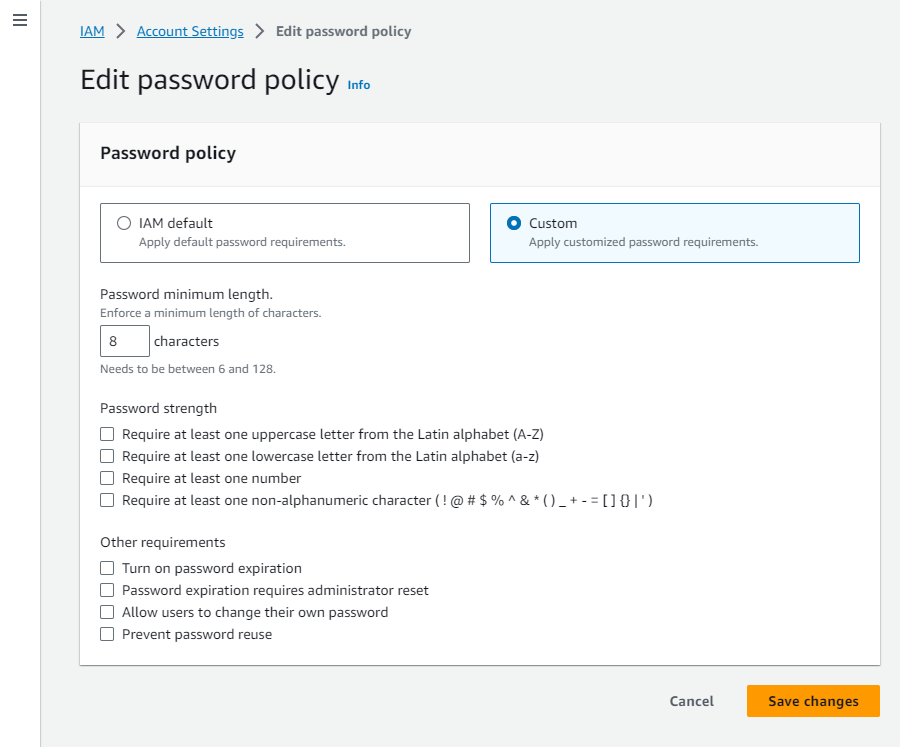
In AWS, you can setup a password policy:
- Set a minimum password length
- Require specific character types:
- including uppercase letters
- lowercase letters
- numbers
- non-alphanumeric characters
- Allow all IAM users to change their own passwords
- Require users to change their password after some time (password expiration)
- Prevent password re-use
Hands-on
IAMConsole ->Account settings->Password policy->Edit
MFA
-
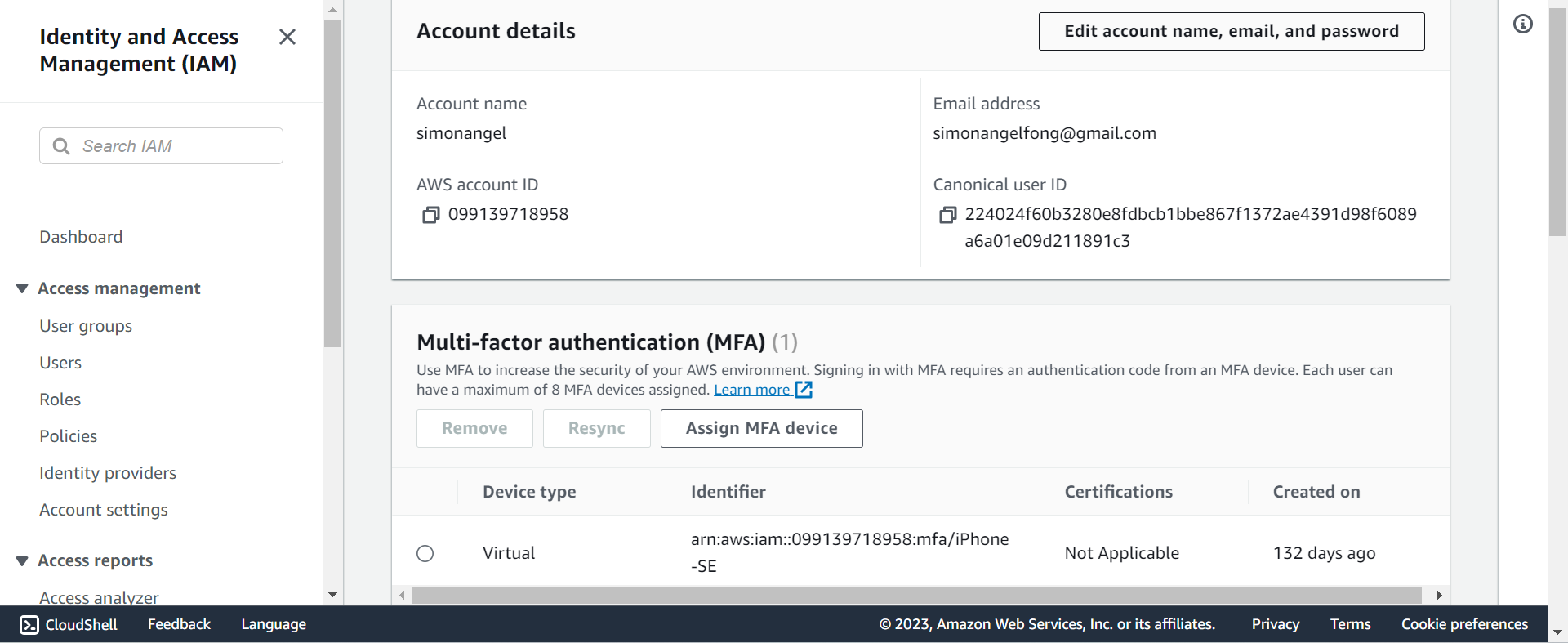
MFAMulti Factor Authentication
-
MFA = password you know + security device you own
-
Main benefit of MFA:
- if a password is stolen or hacked, the account is not compromised
-
MFA devices options
- Virtual MFA device,
Google Authenticator,Authy,Microsoft Authenticator - U2F(Universal 2nd Factor) Security Key. U 盾
- Hardware Key Fob MFA Device. 口令牌
- Hardware Key Fob MFA Device for
AWS GovCloud(US)
- Virtual MFA device,
Security Tools
-
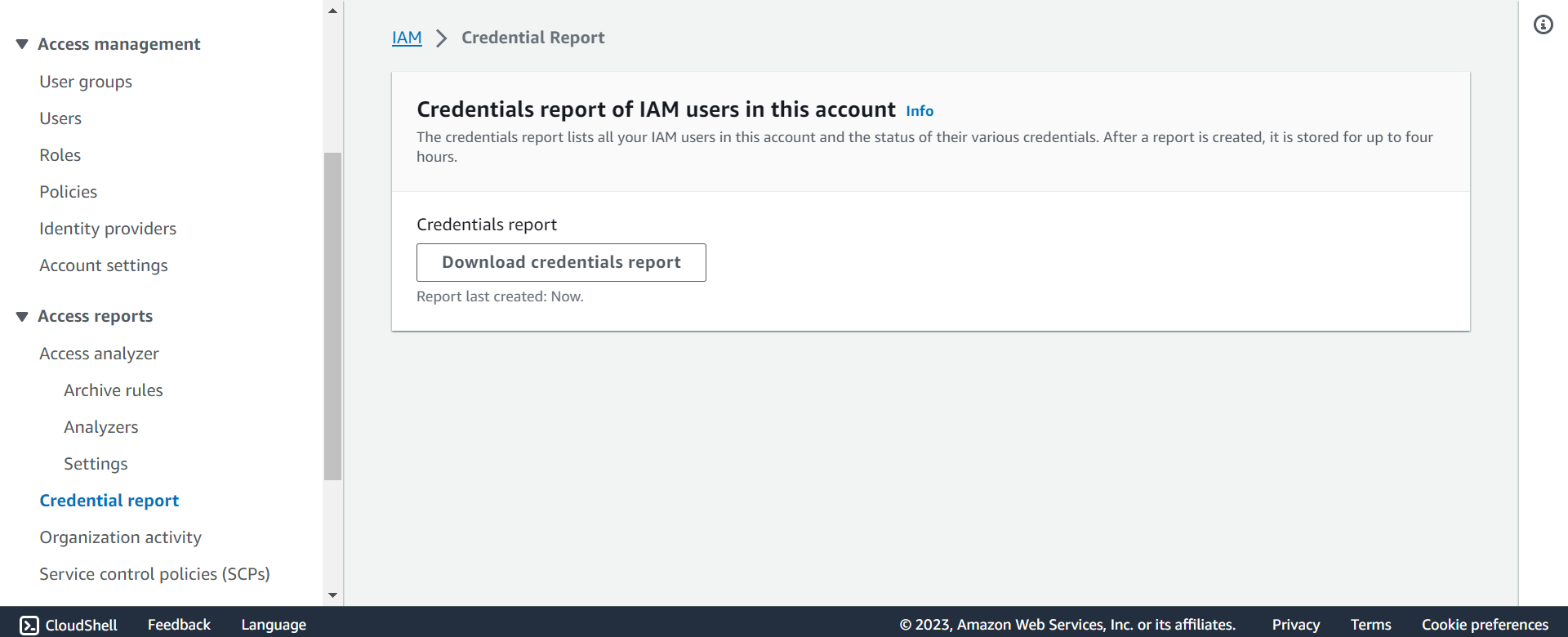
IAM Credentials Report(account-level)- a report that lists all your account’s users and the status of their various credentials
-
IAM Access Advisor(user-level)- Access advisor shows the service permissions granted to a user and when those services were last accessed.
- You can use this information to revise your policies.
Hands-on
IAM>Credential Report> download
IAM>Usesr> select user >Access Advisortab
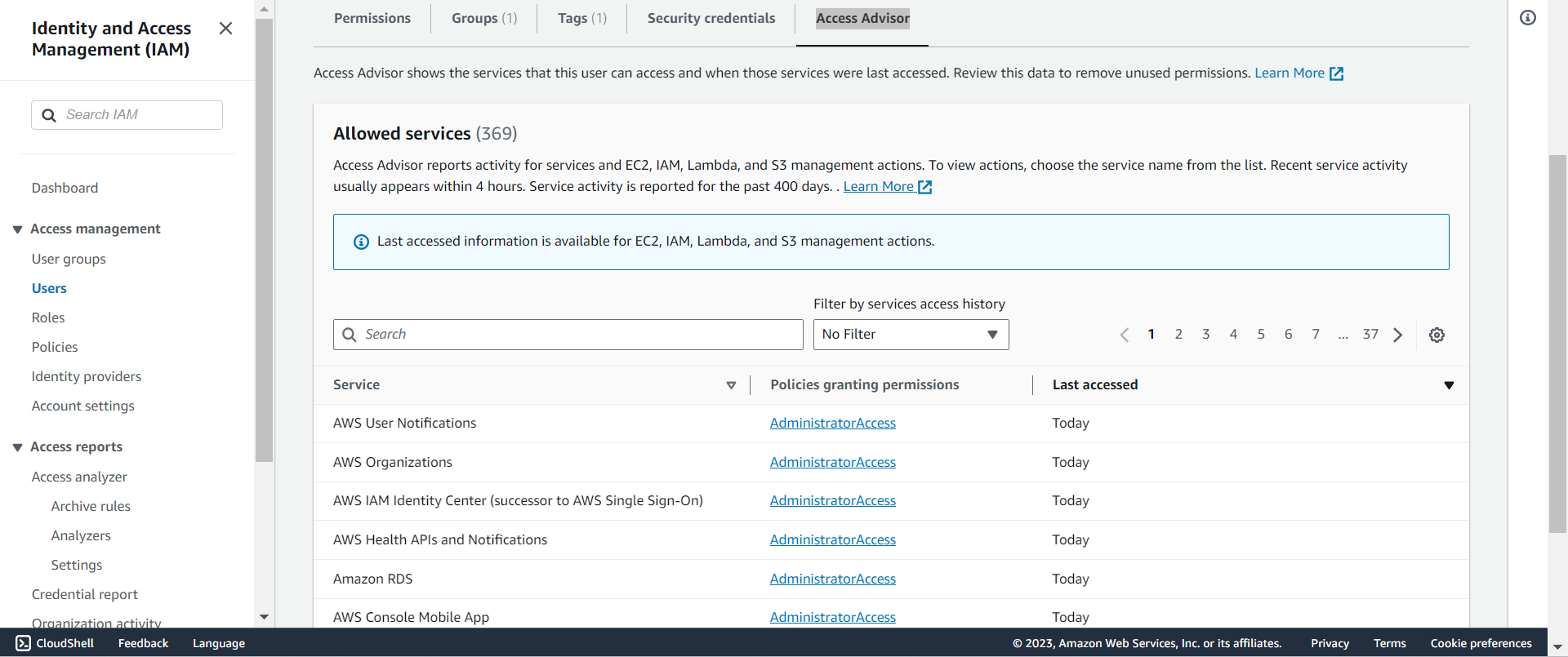
Access of user
-
To access AWS, you have three options:
AWS Management Console(protected by password + MFA)AWS Command Line Interface (CLI): protected by access keysAWS Software Developer Kit (SDK)- for code: protected by access keys
-
Access Keys
- the account secret, just like a password
- generated through the AWS Console
- Users manage their own access keys.
- Don’t share them
Access Key ID~= usernameSecret Access Key~= password
AWS CLI
-
AWS CLI: AWS Command Line Interface- A tool that enables you to interact with AWS services using commands in your command-line shell
- Alternative to using AWS Management Console
- Direct access to the public APIs of AWS services
- You can develop scripts to manage your resources
- It’s open-source https://github.com/aws/aws-cli
Hands-on
-
Install
- https://docs.aws.amazon.com/cli/latest/userguide/getting-started-install.html
-
Configure
-
- Create access key:
- You can have a maximum of two access keys (active or inactive) at a time.
IAM>Users> select user >Security credentials>Access keys>Create access key- download .csv file and do not share.
-
- Local configure
-
aws configure
# AWS Access Key ID: input id
# AWS Secret Access Key [None]: input secret
# Default region name [None]: input a region, eg: us-east-1
# Default output format [None]: press enter

# to test if configureation correct, use the following command:
aws iam list-users  # list users in iam
# if success:
# {
#     "Users": [
#         {
#             "Path": "/",
#             "UserName": userName,
#             "UserId": userId,
#             "Arn": arn,
#             "CreateDate": "2023-04-30T20:12:05+00:00",
#             "PasswordLastUsed": "2023-09-10T02:19:21+00:00"
#         }
#     ]
# }
AWS SDK
-
AWS SDK: AWS Software Development Kit- Language-specific APIs (set of libraries)
- Enables you to access and manage AWS services programmatically
- Embedded within your application
-
Supports
- SDKs (JavaScript, Python, PHP, .NET, Ruby, Java, Go, Node.js, C++)
- Mobile SDKs (Android, iOS, …)
- IoT Device SDKs (Embedded C, Arduino, …)
-
Example: AWS CLI is built on AWS SDK for Python
IAM Policy
-
Permission- whether an action is allowed or not.
-
Policy- define the permissions of the users
-
UsersorGroupscan be assigned JSON documents calledpolicies -
Principle of permission in AWS:
the least privilege principle:- don’t give more permissions than a user needs
{
  "Version": "2012-10-17",
  "Statement": [
    {
      "Effect": "Allow",
      "Action": "ec2:Describe*",
      "Resource": "*"
    },
    {
      "Effect": "Allow",
      "Action": "elasticloadbalancing:Describe*",
      "Resource": "*"
    },
    {
      "Effect": "Allow",
      "Action": [
        "cloudwatch:ListMetrics",
        "cloudwatch:GetMetricStatistics",
        "cloudwatch:Describe*"
      ],
      "Resource": "*"
    }
  ]
}
IAM Policy Evaluation Logic
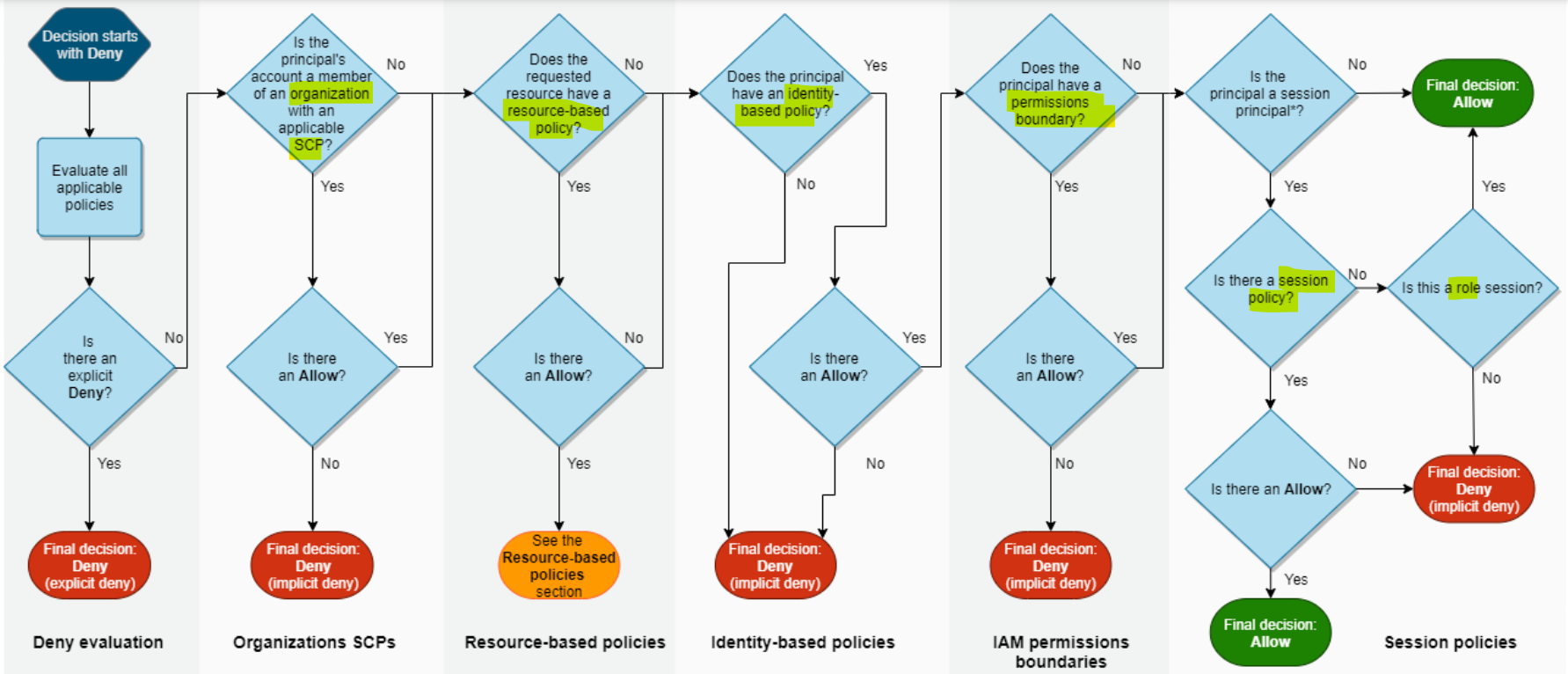
- When a specific IAM action is made, the following are evaluated:
- explicit deny
- Organ SCP(principal account)
- resource-based policy(requested resource)
- identity-based policy(principal)
- permission boundary(principal)
- session(principal>policy>role)
- Example: Policy
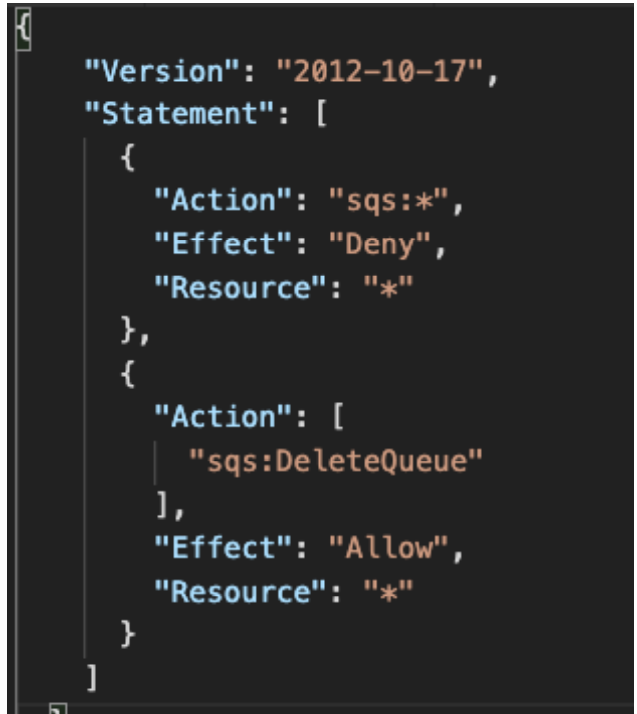
- Can you perform sqs:CreateQueue?
- No, explicit deny.
sqs:*,Deny,#
- No, explicit deny.
- Can you perform sqs:DeleteQueue?
- No, explicit deny > explicit allow
- Can you perform ec2:DescribeInstances?
- No, in this policy, no explicit allow or deny. But by default, deny everything.
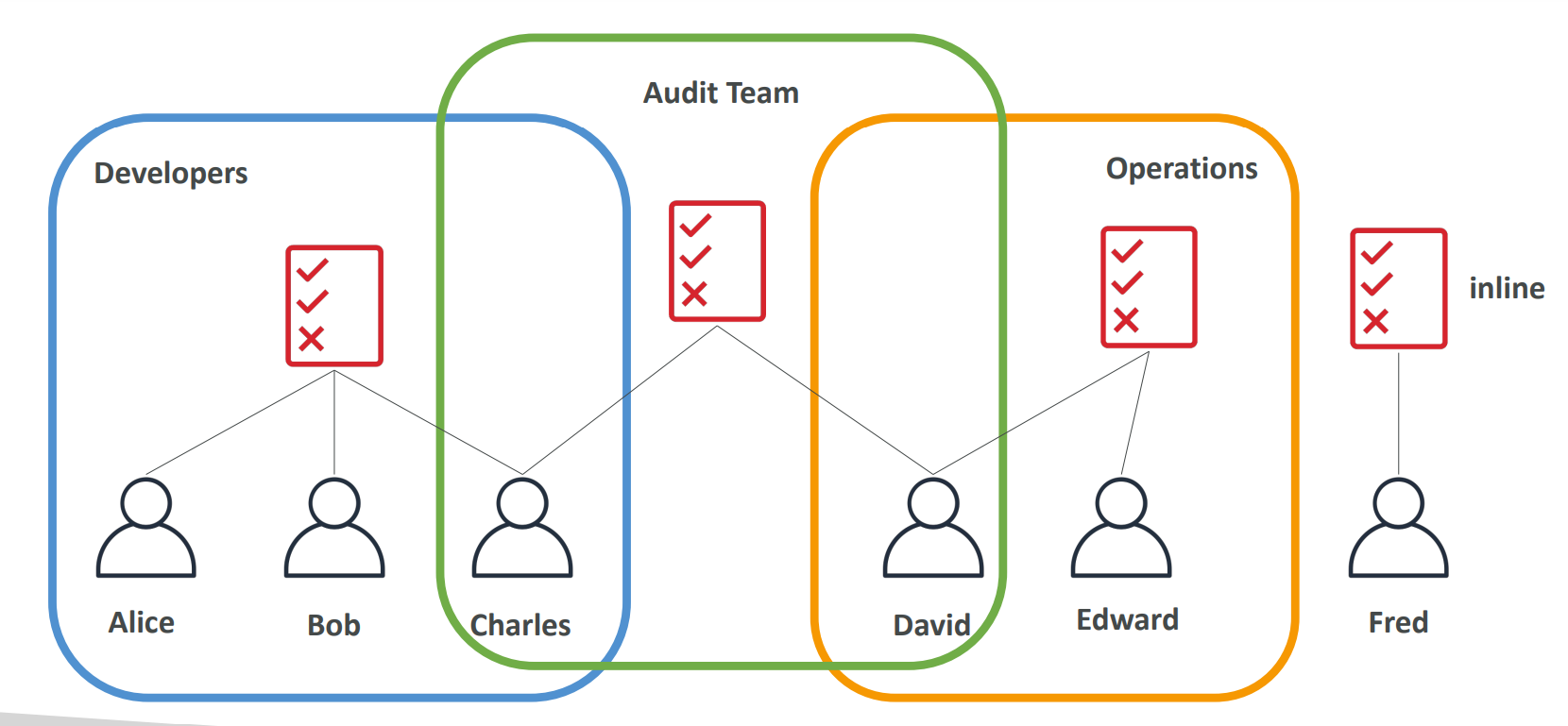
Policies inheritance
- David has permissions both in Operation and Audit Team.
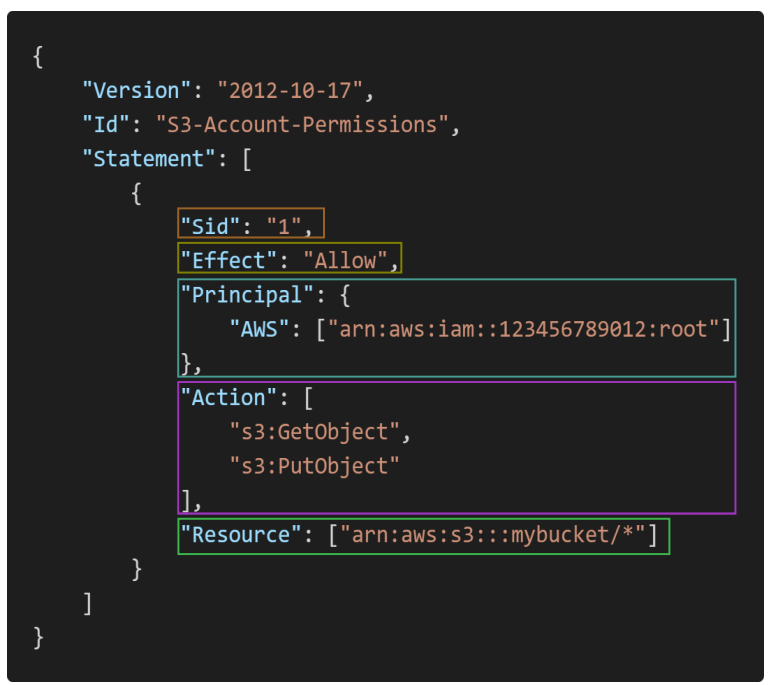
Policies Structure
- Version: policy language version, always include
"2012-10-17" - Id: an identifier for the policy (optional)
-
Statement: one or more individual statements (required)
- Sid: an identifier for the statement (optional)
- Effect: whether the statement allows or denies access (Allow, Deny)
- Principal: account/user/role to which this policy applied to
- Action: list of actions this policy allows or denies
- Resource: list of resources to which the actions applied to
- Condition: conditions for when this policy is in effect (optional)
Policy Conditions
IAM Conditions- specify conditions for when a policy is in effect.
- Can apply to policy for users, resource, endpoint, and so on.
Common Policy Conditions
aws:SourceIp- restrict the client IP from which the API calls are being made
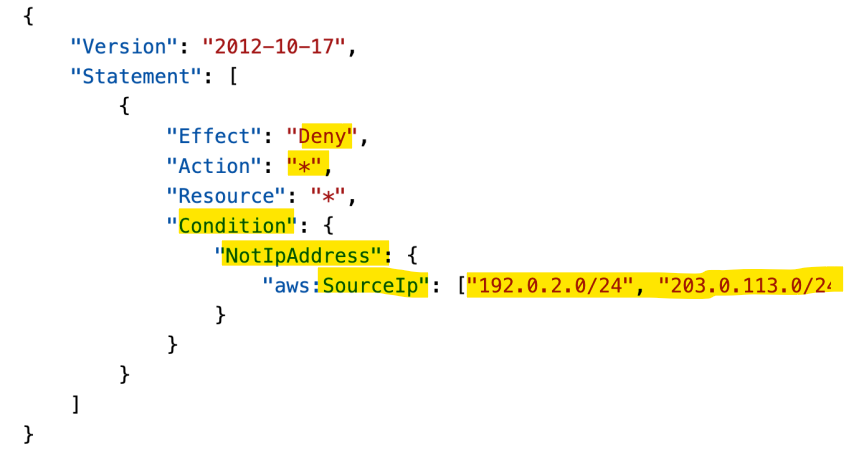
Deny any action unless client calls are made from the a range IP.
- Only API calls are made within these IP addresses.
- Use case:
- limit access to AWS environment only from user’s company network.
aws:RequestedRegion- restrict the region the API calls are made to
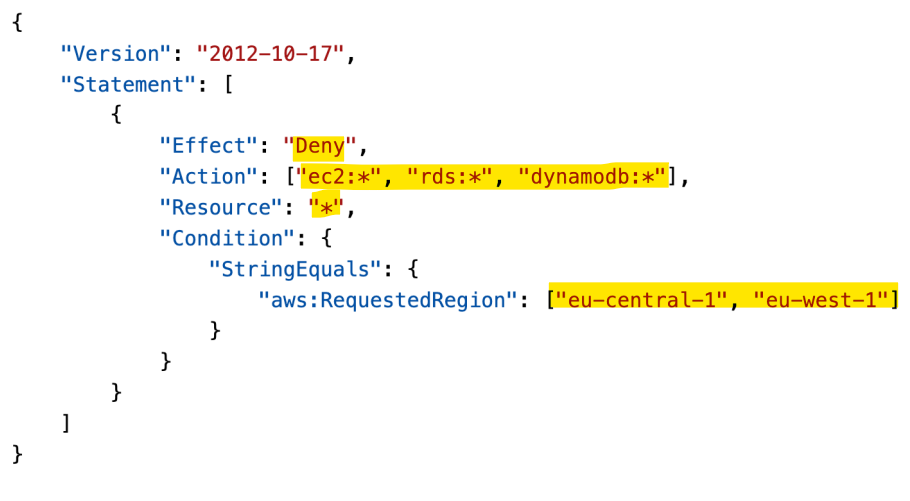
Deny access if API calls are made from these regions.
Use case:
- Global company want to restrict access to aws resources from some regions.
- Sample:
- Which of the following IAM condition key you can use only to allow API calls to a specified AWS region?
RequestedRegion, notRequiredRegion
- Which of the following IAM condition key you can use only to allow API calls to a specified AWS region?
ec2:ResourceTag- restrict based on tags
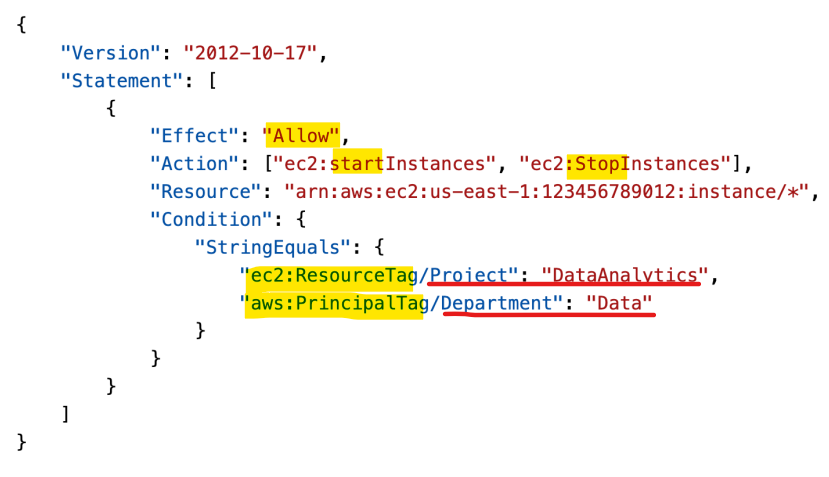
- Only the PrincipalTag(user tag) ,Department, which is Data and ResourceTag, Project, which is DataAnalytics, can perform start and stop instances.
- Restrict based on both resource and user tags
- aws:MultiFactorAuthPresent
- to force MFA
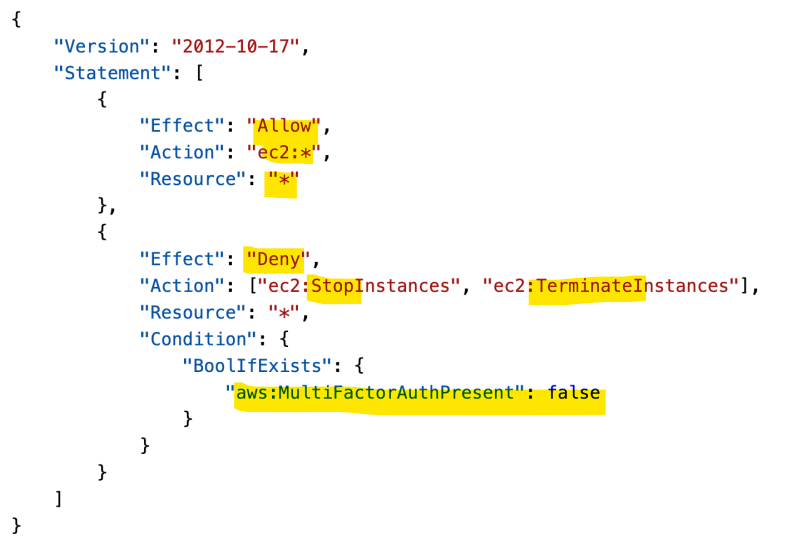
- Allow all action on all ec2 instances.
- Deny stop and terminate actions if has not MFA.
aws:PrincipalOrgID- can be used in any resource policies to restrict access to accounts that are member of an AWS Organization. (与 Organ 连结)
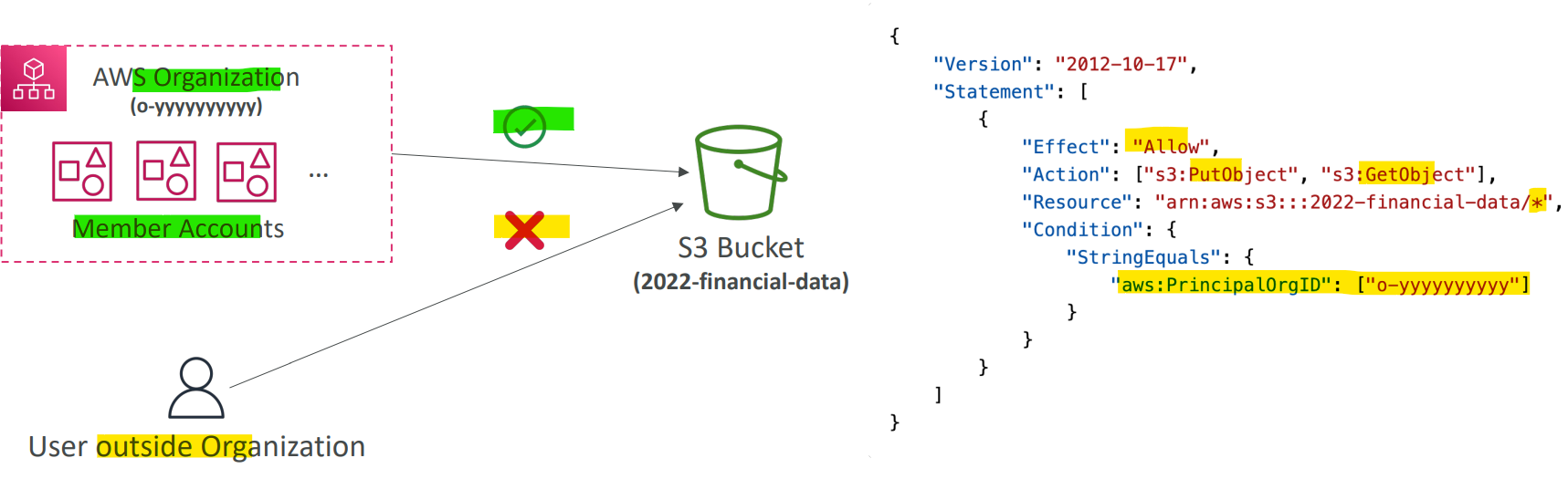
- S3 object operation are limited to the member within an organization.
Example: IAM policy for S3
-
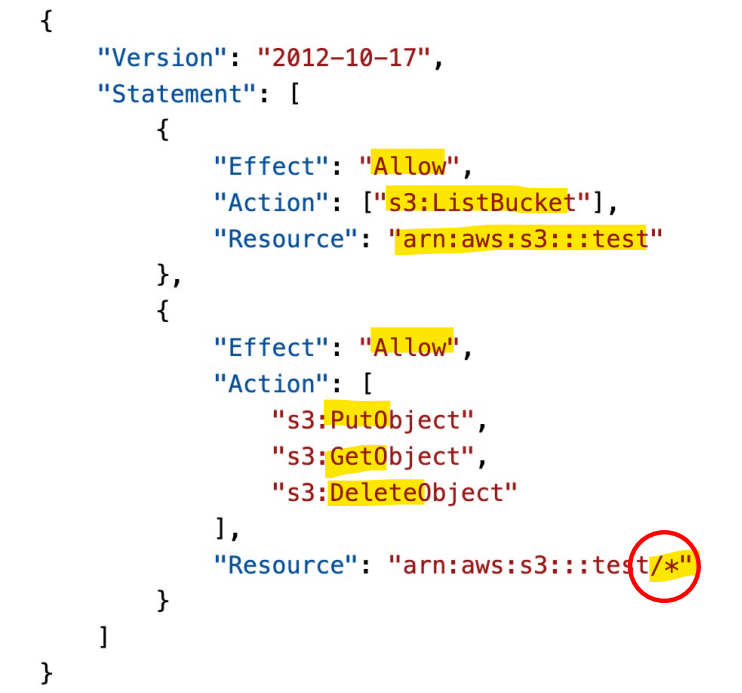
s3:ListBucketpermission applies toarn:aws:s3:::test- enable to list buckets
ListBucketis abucket level permission.- In the arn, it only need to specify the bucket name(test).
-
s3:GetObject,s3:PutObject,s3:DeleteObjectapplies toarn:awn:s3:::test/*- enable to get,put,and delete objects.
- They are
object level permission- Arn need to specify
bucket_name/*
- Arn need to specify
- Sample:
- You are managing the AWS account for your company, and you want to give one of the developers access to read files from an S3 bucket. You have updated the bucket policy to this, but he still can’t access the files in the bucket. What is the problem?
{
  "Version": "2012-10-17",
  "Statement": [
    {
      "Sid": "AllowsRead",
      "Effect": "Allow",
      "Principal": {
        "AWS": "arn:aws:iam::123456789012:user/Dave"
      },
      "Action": "s3:GetObject",
      "Resource": "arn:aws:s3:::static-files-bucket-xxx"
    }
  ]
}
- Should change to
-xxx/#, because this is an object-level permission.
Role
-
role- the permissions assigned to AWS services to perform anctions on user’s behalf.
-
Common roles:
- EC2 Instance Roles
- Lambda Function Roles
- Roles for CloudFormation
IAM Roles vs Resource Based Policies
-
Cross account:
- ie. want to make an API calls on S3 bucket cross account
-
2 Options:
- OR using a role as a proxy

- attaching a resource-based policy to a resource (example: S3 bucket policy)

-
Difference
- When you assume a
role(user, application or service), you give up your original permissions and take the permissions assigned to the role - When using a
resource-based policy, the principal doesn’t have to give up his permissions
- When you assume a
-
Example:
- User in account A needs to scan a DynamoDB table in Account A and dump it in an S3 bucket in Account B.
- Using
resource-based policy, as not to give up any permission.
- Using
- User in account A needs to scan a DynamoDB table in Account A and dump it in an S3 bucket in Account B.
-
Reousrce-based policyis supported by:- Amazon
S3buckets,SNStopics,SQSqueues, etc…记住
- Amazon
Example: Amazon EventBridge (记住服务)
-
When a rule runs, it needs permissions on the target
-
Services supporting
Resource-based policy:Lambda,SNS,SQS,CloudWatchLogs,API Gateway…
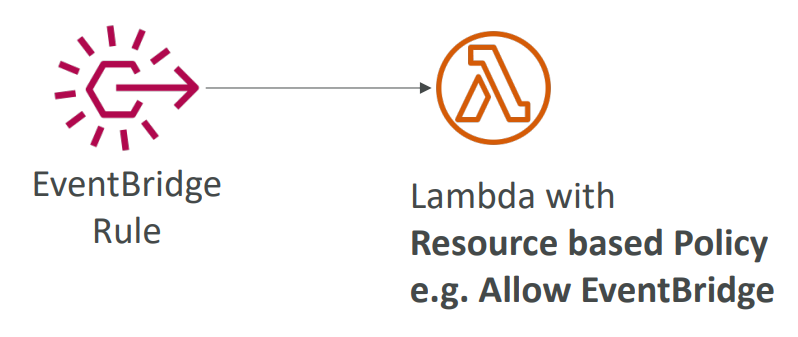
- Services supporting
IAM role:Kinesisstream,Systems Manager Run Command,ECStask…
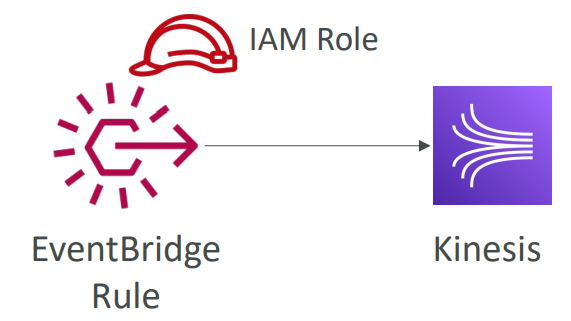
- Sample:
- When configuring permissions for EventBridge to configure a Lambda function as a target you should use ………………….. but when you want to configure a Kinesis Data Streams as a target you should use …………………..
- Resource-Based Policy, Identity-based policy.
- When configuring permissions for EventBridge to configure a Lambda function as a target you should use ………………….. but when you want to configure a Kinesis Data Streams as a target you should use …………………..
IAM Permission Boundaries
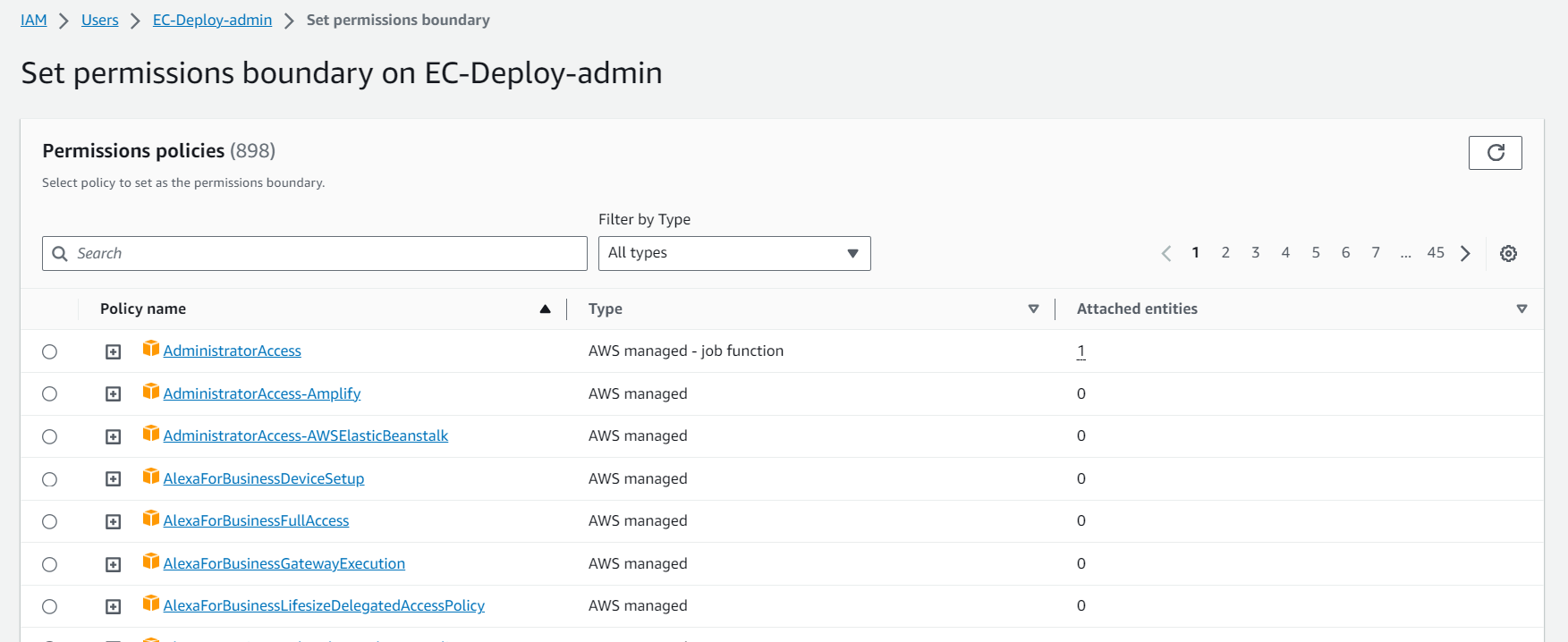
IAM Permission Boundariesare supported forusersandroles(notgroups)- Advanced feature to use a managed policy to set the maximum permissions an IAM entity can get.
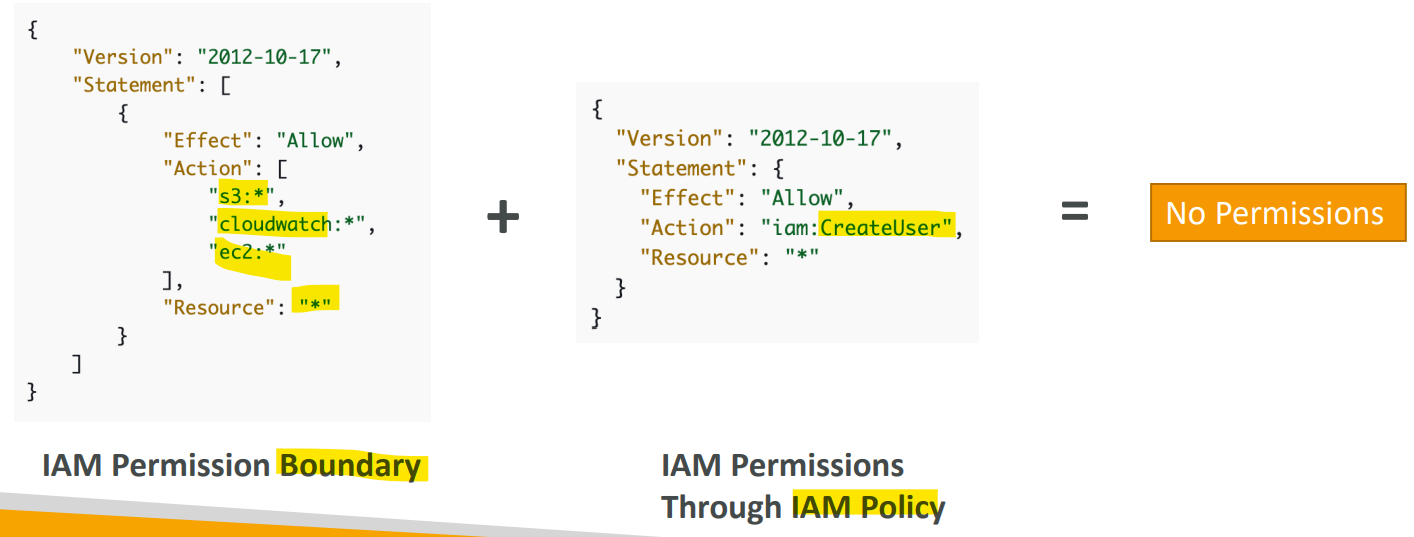
- Permission Boundary defines permission on s3, cloudwatch, and ec2. But attach a policy defining permission on iam.
- Because the attached policy is outside the permission boudary, there is no permission.
- Permission boudary 只是定义范围,不定义具体权限. 只有附加的 policy 才是实质赋权.
- 注意:
- 即使 user 被授权是 fullaccess 或 Admin, 如果设置了 boundary, 则其权限只限于 boundaries 内容
Use Case
- Can be used in combinations of AWS
Organizations SCP
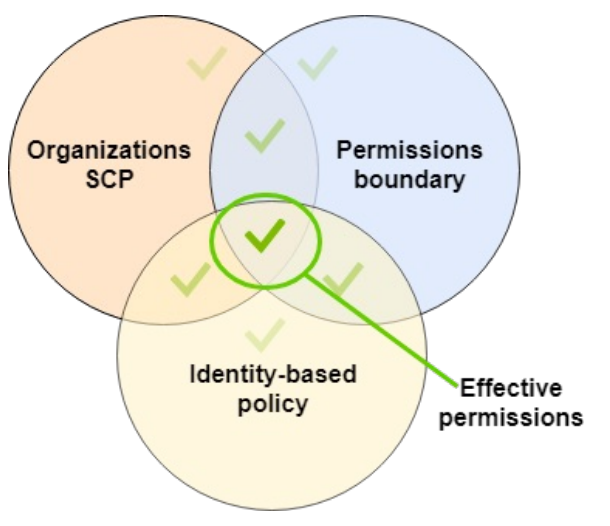
只有三方重合的权限才有效
- Use cases
- Delegate responsibilities to non administrators within their
permission boundaries,- e.g.: create new IAM users
- Allow developers to self-assign policies and anage their own permissions, while making sure they can’t “escalate” their privileges (= make themselves admin)
- Useful to restrict one specific user特定用户
- instead of a whole account using
Organizations&SCP
- instead of a whole account using
- Delegate responsibilities to non administrators within their
Hands-on
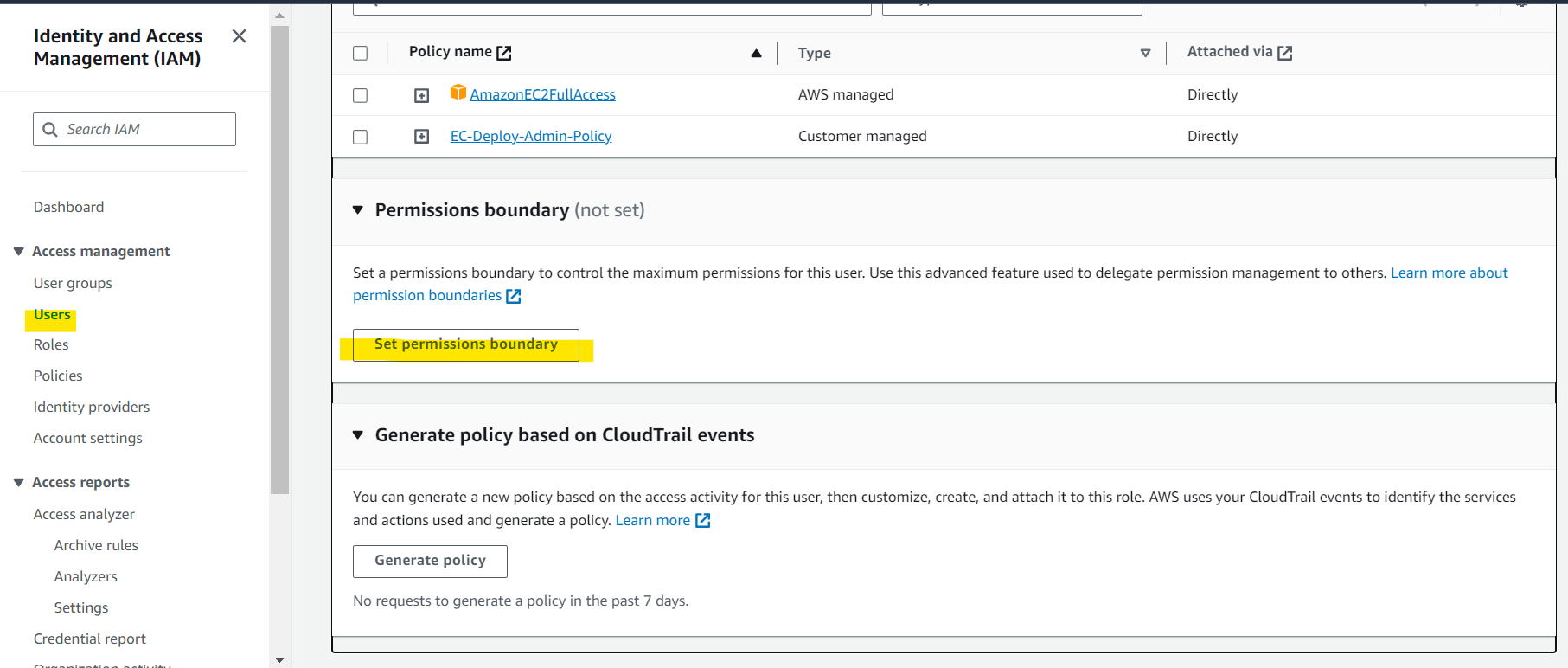
Best Practice
- IAM Guidelines & Best Practices
- Don’t use the root account except for AWS account setup
- One physical user = One AWS user
- Assign users to groups and assign permissions to groups
- Create a strong password policy
- Use and enforce the use of Multi Factor Authentication (MFA)
- Create and use Roles for giving permissions to AWS services
- Use Access Keys for Programmatic Access (CLI / SDK)
- Audit permissions of your account using IAM Credentials Report & IAM Access Advisor
- Never share IAM users & Access Keys
Summary: IAM Section
-
Term
Users:- mapped to a physical user, has a password for AWS Console
Groups:- contains users only
Policies:- JSON document that outlines permissions for users or groups
Roles:- for EC2 instances or AWS services
-
Security:
MFA+ Password Policy
-
Access of User
AWS CLI: manage your AWS services using the command-lineAWS SDK: manage your AWS services using a programming language
Access Keys:- access AWS using the CLI or SDK
- Audit:
IAM Credential Reports: users + credential statusIAM Access Advisor: permission of a user + last access