Note_Tech
All technological notes.
Project maintained by simonangel-fong Hosted on GitHub Pages — Theme by mattgraham
DBA - Oracle Net Services
- DBA - Oracle Net Services
Oracle Net Services
-
Oracle Net Services- enables network connections from a client or middle-tier application to the Oracle server.
- the interface between the database and the network communication protocols that facilitate distributed processing and distributed databases.
- Oracle Net Services supports communications on all major network protocols, including
TCP/IP,HTTP,FTP, andWebDAV.
-
Communication protocols- define the way that data is transmitted and received on a network.
-
Oracle Net- a component of Oracle Net Services, establishes and maintains a network session from a client application to a database server.
- After a network session is established,
Oracle Netacts as the data courier for both the client application and the database server, exchanging messages between them.
-
It can perform these jobs because it is located on each computer that needs to talk to the database server. 包括客户端
- On the client computer,
Oracle Netis a background component for application connections to the database. - On the database server,
Oracle Netincludes an active process calledOracle Net Listener, which is responsible for coordinating connections between the database and external applications.
- On the client computer,
Oracle Net Listener
-
Oracle Net Listener/ thelistener- A process that listens for incoming client connection requests and manages network traffic to the database.
- the gateway to the Oracle instance for all nonlocal user connections.
- An important component of Net Services.
-
When a client requests a network session with a database,
Oracle Net Listener(typically called the listener) receives the request.- If the client information matches the listener information, then the listener grants a connection to the database server.
- When a connection is established, the client and database communicate directly.
-
A single listener can service multiple
database instancesand thousands ofclientconnections -
Tools to configure the listener and specify log file locations
Enterprise Manager Cloud ControlorOracle Net Manager.
Default Listener
-
During an Oracle Database installation,
Oracle Universal InstallerlaunchesOracle Net Configuration Assistantand creates a local listener namedLISTENER.LISTENERis automatically populated with available database services through a feature called dynamic service registration.
-
LISTENERlistens on the following TCP/IP protocol address:
ADDRESS=(PROTOCOL=tcp)(HOST=host_name)(PORT=1521)
- Without any configuration, you can access your database instance immediately through LISTENER.
- If the listener name is LISTENER and it cannot be resolved, a protocol address of
TCP/IPand a port number of 1521 is assumed.
Establishing Oracle Network Connections
-
To make a client or middle-tier connection, Oracle Net requires the client to know the:
- the
addressorhostwhere the listener resides - Port that the listener is monitoring
- the
protocolthat the listener accepts - Name of the service to which it wants to connect.
- parameter name:
SERVICE_NAMES
- parameter name:
- the
-
Oracle Net names resolution- the process of determining this connection information.
SERVICE_NAMES
-
An Oracle database is represented to a client as a service.
- A database can have one or more services associated with it.
-
Databases are identified by a service name that is specified by the
SERVICE_NAMESparameter in the initialization parameter file. - defaults to the global database name, which is a name that comprises the database name (
DB_NAMEparameter value) and the domain name (DB_DOMAINparameter value). DB_NAME+DB_DOMAIN
-
connect descriptor- To connect to a database service, clients use a
connect descriptorthat provides the location of the database and the name of the database service. - Clients can use the connect descriptor or a name that resolves to the connect descriptor (as discussed later in this lesson).
- To connect to a database service, clients use a
-
Example:
# connect descriptor
#   enables clients to connect to a database service called finance.us.flowers.com
finflowers =  # net service name
  (DESCRIPTION=
      (ADDRESS=(PROTOCOL=tcp)(HOST=flowers-server)(PORT=1521))
      (CONNECT_DATA=(SERVICE_NAME=finance.us.flowers.com))
)
Connect string
-
Users can initiate a connection request to the Oracle database by sending a
connect string. -
connect string- includes a username and password, along with a connect identifier.
-
A
connect identifiercan be- the
connect descriptoritself Name Resolution, a name that resolves to a connect descriptor.
- the
- The most common
connect identifiersis anet service name, which is a simple name for a service. -
When a net service name is used, connection processing takes place by mapping the
net service nameto aconnect descriptor.- The mapping information can be stored in one or more repositories of information and is resolved by using a naming method.
Name Resolution= the method to mapnet service nametoconnect descriptor.
Example: Name Resolution Connection
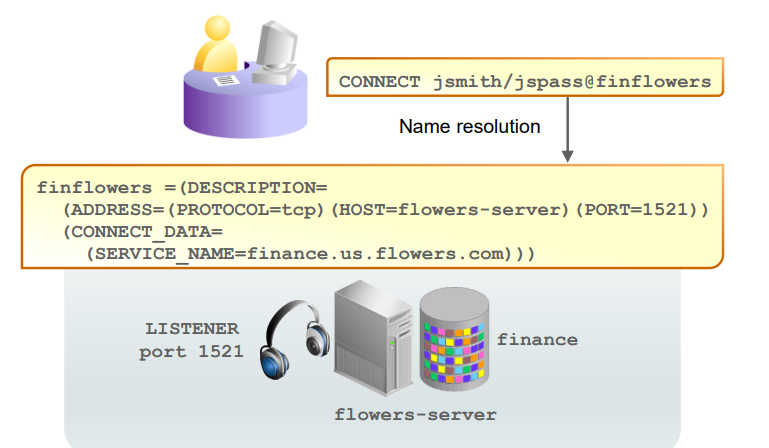
- Client:
# Using connect string
# provide username, password, and a net service name(finflowers)
CONNECT jsmith/jspass@finflowers
- Server:
# A connect descriptor
# provide protocol, host/address, port, service name
finflowers =(
    DESCRIPTION=
      (ADDRESS=(PROTOCOL=tcp)(HOST=flowers-server)(PORT=1521))
      (CONNECT_DATA=
        (SERVICE_NAME=finance.us.flowers.com)
      )
  )
Establishing a Connection
name resolution » listener » validate service name » spawn server process » lsnr pass initialization info server_pro » server_pro authenticate credentials » create user process
-
After Oracle Net
names resolutionis complete, a connection request is passed from the user or middle-tier application (hereafter referred to as theuser process) to thelistener. -
The listener receives a
CONNECTpacket and checks whether thatCONNECTpacket is requesting a valid Oracle Net service name.- If the
service nameis not requested (as in the case of atnsping request), the listener acknowledges the connect request and does nothing else. - If an invalid
service nameis requested, the listener transmits an error code to the user process. - If the CONNECT packet requests a valid
service name, the listener spawns a new process,server process, to deal with the connection.
- If the
-
The
listenerconnects to the process and passes the initialization information, including the address information for the user process.- At this point, the listener no longer deals with the connection, and all work is passed to the
server process.
- At this point, the listener no longer deals with the connection, and all work is passed to the
-
The
server processchecks the user’s authentication credentials (usually a password), and if the credentials are valid, auser sessionis created. -
Dedicated server process:
- With the session established, the
server processnow acts as the user’s agent on the server. - The
server processis responsible for:- Parsing and running any SQL statements issued through the application
- Checking the
database buffer cachefor data blocks required to perform SQL statements - Reading necessary data blocks from data files on the disk into the
database buffer cacheportion of the System Global Area (SGA), if the blocks are not already present in the SGA - Managing all sorting activity.
- The
Sort Areais a memory area that is used to work with sorting; it is contained in a portion of memory that is associated with theProgram Global Area (PGA).
- The
- Returning results to the user process in such a way that the application can process the information
- Reading auditing options and reporting user processes to the audit destination
- With the session established, the
Service Registration
Dynamic Service Registration
-
Dynamic Service Registration- Deault method
- allows the Oracle database to identify its available services to listeners automatically.
-
PDB service
- By default,
Dynamic service registrationregisters all PDB services to the same listener. - If you stop that listener, you stop access to all the PDB services.
- By default,
-
Benefits
- Connect-time failover:
- Because the listener always monitors the state of the instances, service registration facilitates automatic failover of a client connect request to a different instance if one instance is down.
- Connection load balancing:
- Service registration enables the listener to forward client connect requests to the least-loaded instance and dispatcher or dedicated server. Service registration balances the load across the service handlers and nodes.
- High availability for Oracle
Real Application Clustersand OracleData Guard
- Connect-time failover:
-
Configuration of dynamic service registration:
- Make sure that the
INSTANCE_NAME,LOCAL_LISTENER,REMOTE_LISTENER, andSERVICE_NAMESinitialization parameters are properly configured. - Configure protocol addresses (end points) in the server-side
tnsnames.orafile.
- Make sure that the
-
The Role of the
LREG Process-
The
LREG processpolls the listeners to see if they’re running and, if so, registers database service information to them:- Database
instance name - Database
service namesavailable on the database instance (for example, ORCL.example.com and PDB1.example.com) - Current and maximum load for the
database instance Service handlers(dispatchers and dedicated servers) available to the database instance
- Database
-
LREGregisters with the listeners after the database instance mounts the database and every60seconds afterward
-
Static Service Registration
-
Static service registration- a method for configuring listeners to obtain their service information manually.
-
Advantages of Static Service Registration
- Static service registration enables you to create a listener for a particular PDB. 专属 listener
- Sometimes you may need the database instance up and running without anyone being able to log in.
- As soon as it is started up, dynamic service registration will automatically start registering all the database services to the listener, making the database instance available to users.
- There is also a difference in error messages returned between a
static listener(which can point to a database service that is down) and a dynamic listener entry (which shows nonexistence) when the database instance is shut down.- The first case knows about the database service’s existence and gives you an error message with useful information.
- The second case has no information and can’t distinguish between a typo you may have made in the service name and whether it actually even exists.
-
With static registration, the listener has no knowledge of whether its database services exist or not.
- It only knows that it supports them.
- The Listener Configuration utility shows the services status as
UNKNOWN.
-
You can have both
static listenersanddynamic listenersconfigured at the same time. -
General steps to configure static service registration:
- In
listener.ora, define alistenerand itsprotocoladdresses. - In
listener.ora, also create aSID_LIST_<listener name>section that lists thedatabase servicesfor the listener.
- In
-
Required Use of Static Service Registration:
- Use of external procedure calls
- Use of Oracle Heterogeneous Services
- Use of Oracle Data Guard
- Remote database startup from a tool other than Oracle Enterprise Manager Cloud Control
Naming Methods
-
Naming Methods- the methos Oracle Net supports to resolve connection information
Easy Connect
-
Easy connect naming:- Is enabled by default
- enables clients to connect to an Oracle Database server by using a TCP/IP connect string consisting of a host name, optional port, and service name
- Requires no client-side configuration
- Supports only TCP/IP (no SSL)
-
Easy Connect
connection strings:<username>/<password>@<hostname>:<listener port>/<service name>
-
Example:
# SERVICE_NAMES=db
# DB_DOMAIN=us.oracle.com
connect hr/hr@db.us.oracle.com
- Offers no support for advanced connection options such as:
- Connect-time failover
- Source routing
- Load balancing
Local Naming
-
Local naming:- Requires a client-side names-resolution file
- Supports all Oracle Net protocols
- stores
connect descriptors(identified by theirnet service name) in a local configuration file namedtnsnames.oraon the client. 客户端 - appropriate for organizations in which Oracle Net service configurations do not change often.
-
One advantage of local naming is that the database users need to remember only a short alias rather than the long connect string required by Easy Connect.
-
The local list of known services is stored in the following text configuration file:
<oracle_home>/network/admin/tnsnames.ora- path:
TNS_ADMINenvironment variable.
-
Supports advanced connection options such as:
- Connect-time failover
- Source routing
- Load balancing
-
Example:
CONNECT hr/hr@orcl
Directory Naming
-
Directory naming:- Uses a centralized LDAP-compliant directory server
- stores connect identifiers in a centralized directory server that is compliant with the Lightweight
Directory Access Protocol (LDAP).
-
Requires
LDAPwith Oracle Net names resolution information loaded:- Oracle Internet Directory
- Microsoft Active Directory Service
-
advantage of directory naming:
- the service name is available for users to connect with as soon as a new service name is added to the LDAP directory.
- With local naming, the database administrator (DBA) must first distribute updated
tnsnames.orafiles containing the changed service name information before users can connect to new or modified services.
-
Directory naming is appropriate for organizations in which Oracle Net service configurations change frequently
Oracle Net Services Components
| Component | Description | File |
|---|---|---|
Listeners |
A process to listen for incoming client connection requests and manage traffic to the server. | listener.ora |
| Naming methods | A resolution method to resolve a connect identifier to a connect descriptor | |
Naming (net service name) |
A simple name (connect identifier) to resolve a connect descriptor . | tnsnames.ora (local configuration) |
| Profiles | Parameters that specifies preferences for enabling and configuring Oracle Net features. | sqlnet.ora |