Note_Tech
All technological notes.
Project maintained by simonangel-fong Hosted on GitHub Pages — Theme by mattgraham
DBA - Backup
- DBA - Backup
- Backup Strategies and Terminology
- Backup Terminology
- Balancing Backup and Restore Requirements
- Backup Strategies
- Backing Up Read-Only Tablespaces
- Backup Terminology
- Whole Database Backup
- Full Backup VS Whole Backup
- Case Study 1: How to Protect an OLTP Database
- Case Study 2: How to Protect a DSS Database
- Case Study 3: How to Protect the Recovery Catalog Database
Backup Strategies and Terminology
Backup Solutions
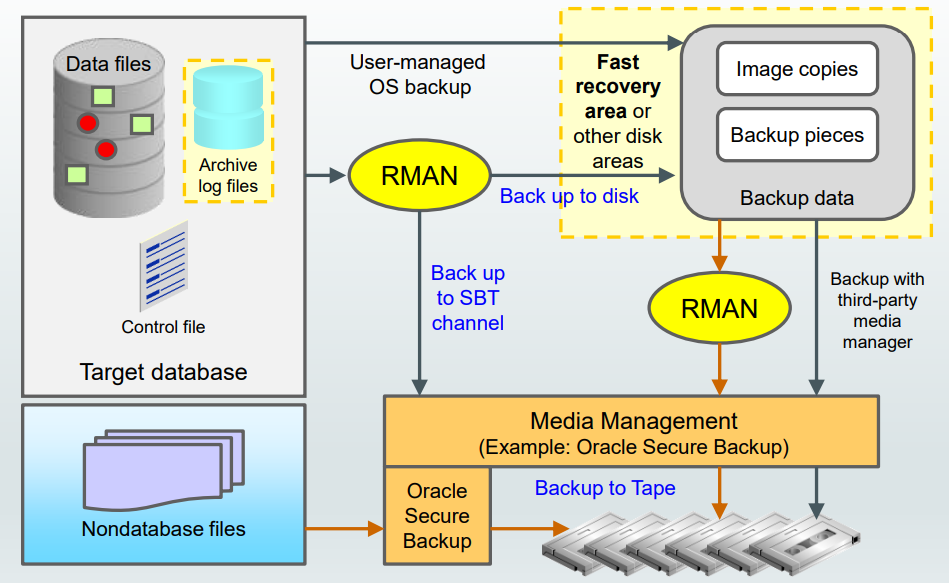
Fast recovery area
Backup Terminology
-
Backup strategy may include:
- Entire database (whole)
- Portion of the database (partial)
- Backup type may indicate inclusion of:
- All data blocks within your chosen files (full)
- Only information that has changed since a previous backup (incremental)
Cumulative(changes since last level 0)Differential(changes since last incremental)
- Backup mode may be:
Offline(consistent, cold)Online(inconsistent, hot)
Balancing Backup and Restore Requirements
-
Incremental Backup Strategy:
- Improves backup performance, with trade-off in recovery performance
Block change trackingfor fast incremental backupsCumulativeanddifferentialincremental backups- “Incremental forever” requires an initial full backup.需要初始完整备份
-
Multiplexing
- Back up files in parallel per channel to improve performance.多通道并行
- Multiplexing level =
min (FILESPERSET, MAXOPENFILES). - Set
MAXOPENFILES = 1for SAME or ASM data files. - Set # of RMAN channels = # of tape drives.
-
Hardware/Network/Storage
- Assesses host resources, production disk I/O, HBA/network, tape drive throughput.
- Minimum performing component of these will be a performance bottleneck.
Backup Strategies
Full and Incremental Backups:- Backup Factors:
- Fast incremental backups
- Save space with backup compression.
- Cost-effective tape storage
- Recovery Factors
Full backuprestored first and thenincremental backupsandarchived logs. 有顺序- Tape backups read sequentially有次序读取
- Backup Factors:
Incrementally Updated Disk Backups- Backup Factors:
Incremental+roll forwardto create up-to-date copy- Requires 1x production storage for copy
- Recovery Factors
- Backups read via random access Restore-free recovery with
SWITCHcommand
- Backups read via random access Restore-free recovery with
- Backup Factors:
Backups to Physical Standby Database- Backup Factors
- Above benefits + primary database free to handle more workloads主 DB 不用负责 backup 的负载
- Requires 1X production hardware and storage for standby database
- Recovery Factors
- Fast failover to standby database in the event of any failure
- Backups are last resort, in the event of double site failure
- Backup Factors
Full and Incremental Backups
-
Use Case:
- Databases that can tolerate hours/days
RTO(goal = maximum length of time taken to restore) - Environments where disk is premium硬盘贵
- Low-medium change frequency between backups (<20%)备份之间差距小
- Databases that can tolerate hours/days
-
Backup strategy:
- Weekly
level 0and dailydifferential incremental backupsets to tape, with optional backup compression - Enable
block change trackingso that only changed blocks are read and written during incremental backup.只关注 bct - Back up archived logs and retain on-disk, as needed.
- Weekly
Incrementally Updated Disk Backups
-
Use Case:
- Databases that can tolerate no more than a few hours RTO
- Environments where disk can be allocated for 1x size of database or most critical tablespaces. 有硬盘可以分配
-
Backup strategy:
- Initial image copy to
FRA, daily incremental backups - New on-disk copy by using
incrementals to roll forwardcopy Full backuparchived to tape as neededArchived logsbacked up and retained on-disk as neededFast recoveryfrom disk or SWITCH to use image copies
- Initial image copy to
Offloading Backups to Physical Standby Database
-
Use Case:
- Databases that require no more than several minutes of recovery time in the event of any failure
- Environments that can preferably allocate symmetric hardware and storage for physical standby database有后备实例资源
- Environments with tape infrastructure that can be shared between primary and standby database sites.磁带可共享
-
Backup strategy:
Fullandincrementalbackups offloaded to physical standby database后备实例负责备份- Fast incremental backup on standby with
Active Data Guard(can backup and query, read-only;Data Guard: backup only, no query) - Backups restored to primary or standby database
- Backups taken at each database for optimal local protection 分布式备份
Backing Up Read-Only Tablespaces
-
Considerations for backing up
read-only tablespaces:- Backup optimization causes RMAN to back up read-only tablespaces only when no backup exists that satisfies the
retention policy.只在政策不满足情况下. - If you change the tablespace to read/write, back it up immediately.一旦非只读, 马上被备份
- You can use the
SKIP READONLYoption of theRMAN BACKUPcommand to skip readonly tablespaces or data files. 可以跳过.
- Backup optimization causes RMAN to back up read-only tablespaces only when no backup exists that satisfies the
-
只读 tbsp 原因是分配的磁盘空间已经占满 full
- 即一旦 full -> read-only -> can skip
SKIP READONLY
- 即一旦 full -> read-only -> can skip
Data Warehouse Backup and Recovery: Best Practices
- Exploit partitioning and read-only tablespaces:
- Older partitions can be moved to
read-only tablespaces.旧分区转移到只读, 可以 skip - Back up
read-only tablespacesonce and then periodically depending on tape retention policy. 只读策略:一次+定期
- Older partitions can be moved to
- Divide full backup workload across multiple days
- Leverage database and backup compression
- Save time with tablespace-level backups
- Back up
index tablespacesless frequently than data tablespaces. - Back up scarcely used tablespaces less frequently.
- Reduce restore time for most critical tablespaces, by grouping them together in separate backup sets.分组以减少恢复时间
- Back up
- Take incremental backup when
NOLOGGINGoperations finish to ensure recoverability- normally when loading a big tb, db will take redo log / archive log
- nologging 可以提高效率, 但有丢失风险,因为没有 logging
- 所以在 nologging 执行后, 马上备份, 以减少风险.
Backup Terminology
-
Image copies:- the same as datafiles
- An image copy of the datafile is the copy of this datafile
- Duplicate data and log files in OS format
- advantages:
- used by RMAN to check the content of the datafile for corruption.可以被 RMAN 使用作检查用途
- used to quickly switch to a datafile copy without having to actually restore the copy to the expected location of a datafile.可以快速转换
- disadvantage:
- occupies much space and does not skip unused data blocks.占用空间
- can be written only to disk.
# command is to create a physical copy of the specified datafile
BACKUP AS COPY DATAFILE '/ORADATA/users_01_db01.dbf';
# to create physical copies of archivelogs that match the specified pattern.
BACKUP AS COPY ARCHIVELOG LIKE '/arch%';
Backup sets- Binary files in Oracle proprietary format
- a RMAN specific format in which RMAN backs up the datafiles, control file, archived log files, and server parameter files
- only created and accessed through RMAN
- the only form in which RMAN can write backups to media managers such as tape drives and tape libraries.
- Default
- compress, no empty block
# perform a backup of a specific tablespace
BACKUP AS BACKUPSET
FORMAT '/BACKUP/df_%d_%s_%p.bus'
TABLESPACE hr_data;

# default backup type, which is a backup set.
# 等效
BACKUP
FORMAT '/BACKUP/df_%d_%s_%p.bus'
TABLESPACE hr_data;
Whole Database Backup
whole database backup- back up all datafiles and control files.
# perform a complete database backup, including both datafiles and archived redo logs.
BACKUP DATABASE PLUS ARCHIVELOG;
# DATABASE: backup of the entire database
#  all datafiles, control files, and the server parameter file
Full Backup VS Whole Backup
-
Whole backup- includes backups of the current
control filealong with alldatafiles. - Backs up all database files.
- this backup is not cataloged, which means that you cannot use it as a reference backup for an
incremental backupwith RMAN.
- includes backups of the current
# backs up all datafiles, control files, and the server parameter file.
BACKUP DATABASE

# if the database is in ARCHIVELOG mode
BACKUP DATABASE PLUS ARCHIVELOG;
# The backup is typically stored in the Fast Recovery Area (FRA) or another designated location.
-
Full backup- all datafile blocks are backed up
- can use this backup as a reference backup for an
incremental backupwith RMAN.
-
A
level 0 incremental backupis physically identical to afull backup.- The only difference is that the
level 0 backupis recorded as anincremental backupin the RMAN repository. 记录不同,实际上一样. - can be used as the parent for a level 1 backup.
- The only difference is that the
# perform a Level 0 backup
BACKUP LEVEL 0 DATABASE;

# perform a Level 1 backup
BACKUP INCREMENTAL LEVEL 1 DATABASE;
Case Study 1: How to Protect an OLTP Database
- The first case is an online transaction processing (OLTP) database, handling a large number of transactions per day. The business requirements are no data loss, with minimal downtime. The time to restore and recover must be less than an hour. The database is 300 GB. Several TB of disk space is available for backups. All the available disks have the same properties (size, I/O rate, and latency). Tape backup is available.
- Standy Instance
Case Study 2: How to Protect a DSS Database
- The database is a Decision Support System (DSS). Data is loaded via SQL*Loader files each night from several transaction databases. The database DSS keeps data for 10 years. The transaction databases keep only one year worth of data. The data is updated only in the transaction databases and is replaced in the DSS database. Only new and updated records are transferred to the DSS database. The DSS database is 10 TB. Separate tablespaces are used to hold the data by year. There are approximately 200 tablespaces.
- Full + incremental
Case Study 3: How to Protect the Recovery Catalog Database
- The database is a
recovery catalog, holding the RMAN catalog information for more than 20 databases in the company. Backups and restore operations may be going on at any time. The databases are mission critical.- Incrementally Updated Disk Backups