Note_Tech
All technological notes.
Project maintained by simonangel-fong Hosted on GitHub Pages — Theme by mattgraham
DBA: Instance - Startup
Instance and Database Startup
-
start an instance:- start an instance from a shutdown state, and then mount and open the database, making it available for users.
-
Methods 方法:
- the
SQL*Plus STARTUPcommand, Oracle Enterprise Manager(Enterprise Manager),- the
SRVCTLutility.
- the
-
Prerequisites:
- The database is statically 静态地 registered with an
Oracle Net listener. - Client is connected to the database with the
SYSDBAprivilege.
- The database is statically 静态地 registered with an
-
The
listenercreates a dedicated server, which can start the database instance.- listener 是前提: lsnr -> server -> database instance
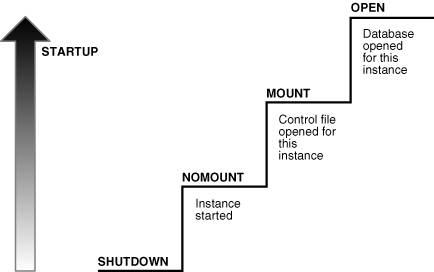
- Steps in instance startup
| Database | Files | User | sqlplus Command | Use Case | |
|---|---|---|---|---|---|
| 1 | NOMOUNT: not yet associated | parameter file | N/A | STARTUP NOMOUNT |
Create DB/BK/REC |
| 2 | MOUNTED: associated | control file | closed | STARTUP MOUNTED |
Full REC/Maintaince |
| 3 | OPEN: associated,accessible | data file | accessible | STARTUP OPEN |
Normal operation |
Phase: No mount
-
No mount:- instance is started but not associated with a database.
- the memory is up but not associated with any database.
-
The instance performs: 搜索 SPF/PF>读取初始化参数>加载内存+背景进程>打开 alert log+trace file
- Searches for a
server parameter file(SPFILE)that contains database’s parameters, such as the SGA size, in a platform-specific default location.- if not found, for a
text initialization parameter file(PFILE) - specifying
STARTUPwith theSPFILEorPFILEparameters overrides the default behavior
- if not found, for a
- Reads the parameter file to determine the values of initialization parameters
- Allocates the
SGAbased on the initialization parameter settings. - Start the background process.
- Starts the Oracle background processes
- Opens the alert file (
alert log) and the trace filetrace filesand writes all explicit parameter settings to the alert log in valid parameter syntax
- Searches for a
-
Use case:
- database creation
- certain backup and recovery operations.
Phase: Mounted
-
Mounted- The instance is started and associated with the database by reading its
control file. - The database is closed to normal user and only accessible only to DBA.
- The database is not available for normal operations.
- The instance is started and associated with the database by reading its
-
The instance performs: 联系之前的实例>获取 cf 名>读取 cf 文件>获取 df+redo log
- associates the database (
CDB) with the previously started database instance - obtains the names of the
database control filesspecified in theCONTROL_FILESinitialization parameter and opens the files. -
read the
control filesto find:- the names of the
data files - the
online redo log filesthat it will attempt to access when opening the database. - No checks, however, are performed to verify the existence of the
data filesandonline redo log filesat this time. 只获取,不验证.
- the names of the
- associates the database (
-
Use case:
- complete specific maintenance operations.
- such as renaming data files and performing full database recoveries.
- If Oracle Database allows multiple instances to mount the same database concurrently, then the
CLUSTER_DATABASEinitialization parameter setting can make the database available to multiple instances. Database behavior depends on the setting:- If
CLUSTER_DATABASEisfalse(default) for the first instance that mounts a database, then only this instance can mount the database. - If
CLUSTER_DATABASEistruefor the first instance, then other instances can mount the database if theirCLUSTER_DATABASEparameter settings are set totrue. - The number of instances that can mount the database is subject to a predetermined maximum specified when creating the database.
- If
Phase: Open
-
Open:- the instance is started and assosicated with an open database.
- the database is available for normal database operation.
- The data contained in the data files is accessible to valid users.
- By default, the
CBDis started, butPDBsare not when you open the database.
-
The instance performs: 打开 DF>获取 undo tbsp> 打开 redo log
- Opens the
online data filesin tablespaces other than undo tablespaces- If a tablespace was offline when the database was previously shut down, then the tablespace and its corresponding
data fileswill be offline when the database reopens.
- If a tablespace was offline when the database was previously shut down, then the tablespace and its corresponding
-
Acquires an
undo tablespace- If multiple undo tablespaces exists, then the
UNDO_TABLESPACEinitialization parameter designates the undo tablespace to use. - If this parameter is not set, then the first available undo tablespace is chosen.
- If multiple undo tablespaces exists, then the
- Opens the
online redo log files
- Opens the
- Database File Checks
- the database returns an error
- If any of the
data filesorredo logfiles are not present when the instance attempts to open the database, 文件不存在 - or if the files are present but fail consistency tests, 不一致
- If any of the
Media recoverymay be required.
- the database returns an error
Connection with Administrator Privileges
-
Database startup and shutdown are restricted to users who connect to Oracle Database with
administrator privileges. -
Depending on the operating system, one of the following conditions establishes administrator privileges for a user:
- The operating system privileges of the user enable him or her to connect using administrator privileges. 操作系统权限
- The user is granted
special system privileges, and the database uses password files to authenticate database administrators over the network.授权+密码文件认证
-
The following
special system privilegesenable access to a database instance even when the database is not open: 即使 DB 未打开也可以 access- the authentication happened using the password file, not through the database.
| privilege | Description | Schema |
|---|---|---|
SYSDBA(System Database Administrator) |
full control over the Oracle Database instance | SYS |
SYSOPER(System Operator) |
a subset of SYSDBA privileges, can perform basic operational tasks, cannot look as user data | SYS |
SYSBACKUP |
can perform backup and recovery operations. | |
SYSDG(System Data Guard) |
can perform operations related to Data Guard | |
SYSKM(System Key Management) |
can manage encryption keys used for TDE(Transparent Data Encryption) |
-
SYS:- the administrative account automatically created when a database is created.
- the account that can perform all database adminstrative functions
SYSschema stored the base tables and vies for the data dictionary.
-
Command
CONNECT sys as sysdba:- connect with the highest privilege.
Commands to alter status
| SQL | Description |
|---|---|
ALTER DATABASE MOUNT; |
associate the database instance with a specific database without fully opening it |
ALTER DATABASE OPEN; |
open a previously mounted database. |
-
Command to get the status of the instance
SELECT INSTANCE_NAME, HOST_NAME, STATUS, DATABASE_STATUS FROM V$instance;:- retrieve name of the instance, host machine name, current status of the database instance, and Additional status information about the database
- current status of the database instance:
OPEN, MOUNTED, NOMOUNT - status information about the database:
ACTIVE, INACTIVE)