Note_Tech
All technological notes.
Project maintained by simonangel-fong Hosted on GitHub Pages — Theme by mattgraham
DBA - Physical Storage Architecture: Online Redo Log
Online Redo Log
online redo log- the most crucial structure for recovery
- records changes to the
data files. - consists of two or more preallocated files that store changes to the database as they occur.
Use of the Online Redo Log
-
The database maintains
online redo log filesto protect against data loss.- after an instance failure, the
online redo log filesenable Oracle Database to recover committed data that it has not yet written to the data files.
- after an instance failure, the
Server processeswrite every transaction synchronously to theredo log buffer-
Then the
LGWR processthen writes to theonline redo log.- Contents of the online redo log include uncommitted transactions, and schema and object management statements.
-
As the database makes changes to the undo segments, the database also writes these changes to the online redo logs.
- Consequently, the
online redo logalways contains the undo data for permanent objects. - DBA can
- configure the database to store all undo data for
temporary objectsin atemporary undo segment, which saves space and improves performance, - or allow the database to store both
permanent and temporary undo datain theonline redo log.
- configure the database to store all undo data for
- Consequently, the
- Oracle Database uses the
online redo logonly for recovery.- However, administrators can query
online redo log filesthrough a SQL interface in the Oracle LogMiner utility (see “OracleLogMiner”). - Redo log files are a useful source of historical information about database activity.
- However, administrators can query
How Oracle Database Writes to the Online Redo Log
-
redo thread:- The
online redo logfor a database instance
- The
- In single-instance configurations, only one instance accesses a database, so only one
redo threadis present. -
In an
Oracle Real Application Clusters (Oracle RAC)configuration, however, multiple instances concurrently access a database, with each instance having its ownredo thread. A separateredo threadfor each instance avoids contention for a single set of online redo log files. - An
online redo logconsists of two or moreonline redo log files.- Oracle Database requires a minimum of two files to guarantee that one file is always available for writing in case the other file is in the process of being cleared or archived.
Online Redo Log Switches
-
Oracle Database uses only one
online redo log fileat a time to store records written from the redo log buffer.唯一 -
the current online redo log file- the online redo log file to which the
log writer process (LGWR)process is actively writing 当前写入的文件
- the online redo log file to which the
-
log switch- occurs when the database stops writing to one
online redo log fileand begins writing to another.
- occurs when the database stops writing to one
-
Scenario: 发生情况
- Normally: when the
current online redo log fileis full and writing must continue. - DBA can configure log switches to occur at regular intervals, regardless of whether the current online redo log file is filled, and force log switches manually.
- Normally: when the
-
Log writerwrites to online redo log files circularly. When log writer fills the last available online redo log file, the process writes to the first log file, restarting the cycle.循环写入
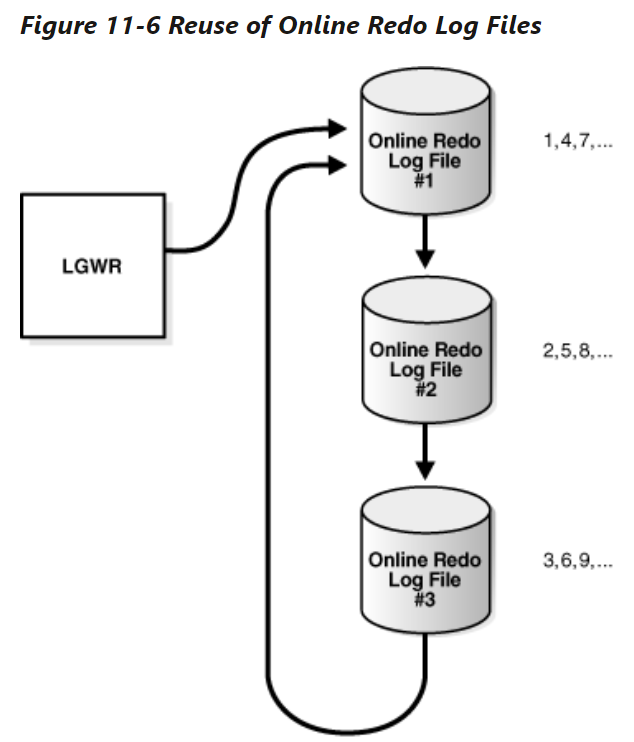
LGWRwrites to each online redo log file.- The database assigns each file a new
log sequence numberwhen a log switches and log writers begins writing to it.- When the database reuses an online redo log file, this file receives the next available
log sequence number.
-
Filled online redo log files are available for reuse depending on the archiving mode:
NOARCHIVELOGmode:- the archiving is disabled
- a filled
online redo log fileis available after the changes recorded in it have been checkpointed (written) to disk bydatabase writer (DBW). 检查点被写入
-
ARCHIVELOGmode:- archiving is enabled
- a filled online redo log file is available to log writer after the changes have been written to the
data filesand the file has been archived. 写入到 df 而且 文件被存储.
Multiple Copies of Online Redo Log Files
-
Oracle Database can automatically maintain two or more identical copies of the
online redo login separate locations. -
online redo log group- consists of an online redo log file and its redundant copies.
- Each group is defined by a number, such as group 1, group 2, and so on.
-
Purpose:
- Maintaining multiple members of an online redo log group protects against the loss of the redo log.
- Ideally, the locations of the members should be on separate disks so that the failure of one disk does not cause the loss of the entire online redo log.
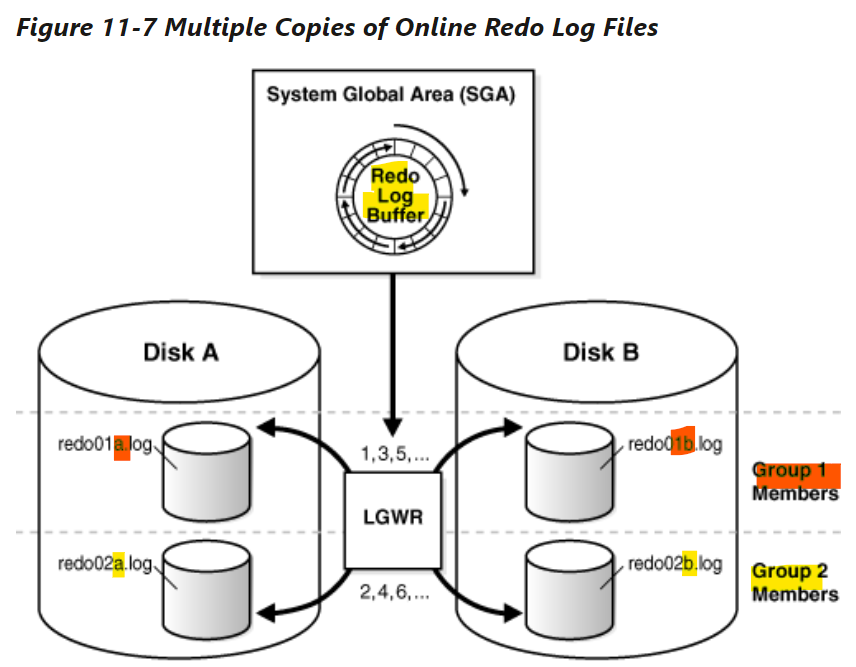
- Each member in a group must be the same size.
- group 1: 2 members, 01a,01b
- group 2: 2 members, 02a, 02b
- LGWR never writes concurrently to members of different groups. 每次指挥写入同一组.
LGWRwrites concurrently to group 1, then writes concurrently to group 2, then writes to group 1, and so on.
Archived Redo Log Files
-
archived redo log file- a copy of a filled member of an
online redo log group.
- a copy of a filled member of an
-
The file is not considered part of the database, but is an offline copy of an
online redo log filecreated by the database and written to a user-specified location. 不认为是 db 的一部分, 只是另外存储的离线副本. -
Purpose: a crucial part of a backup and recovery strategy.
- Recover a database backup
- Update a standby database
- Obtain information about the history of a database using the
Oracle LogMinerutility
-
archiving:- The operation of generating an
archived redo log file - either automatic or manual.
- only possible when the database is in
ARCHIVELOGmode.
- The operation of generating an
-
An
archived redo log fileincludes- the
redo entries - the
log sequence numberof the identical member of the online redo log group.
- the
-
If the database is in
ARCHIVELOGmode, and if automatic archiving is enabled, then thearchiver process (ARCn)will archive one of these files.- If A_LOG1 is corrupted, then the process can archive B_LOG1. 举例, 如果一组其中一个日志 corrupt, 会 archive 另一个日志.
- The
archived redo logcontains a copy of everyredo log groupthat existed starting from the time that you enabled archiving.
Structure of the Online Redo Log
-
Online redo log files contain
redo records. -
redo record- made up of a group of change vectors, each of which describes a change to a data block.
- e.g., an update to a salary in the employees table generates a redo record that describes changes to the data segment block for the table, the undo segment data block, and the transaction table of the undo segments.
-
The
redo recordshave all relevant metadata for the change, including the following:SCNand time stamp of the change- Transaction ID of the transaction that generated the change
SCNand time stamp when the transaction committed (if it committed)- Type of operation that made the change
- Name and type of the modified data segment
Lab: Query redo log file
- redo log files store all changes made to the database as they occur.
-
The database maintains online redo log files to protect against data loss. Specifically,after an instance failure.
- the online redo log files enable Oracle Database to recover committed data that it has not yet written to the data files.
- we need minimum 2 redo log files
- one is always available for wrtiting , while the other is being archived
- very imprtant note: redo log files exists in the whole instance, not for particular container
- connect to root
- open all pdb
- query all containers.
SHOW con_name

alter pluggable database all open;

select con_id,name,open_mode from v$containers;
#1	CDB$ROOT	READ WRITE
#2	PDB$SEED	READ ONLY
#3	ORCLPDB	READ WRITE
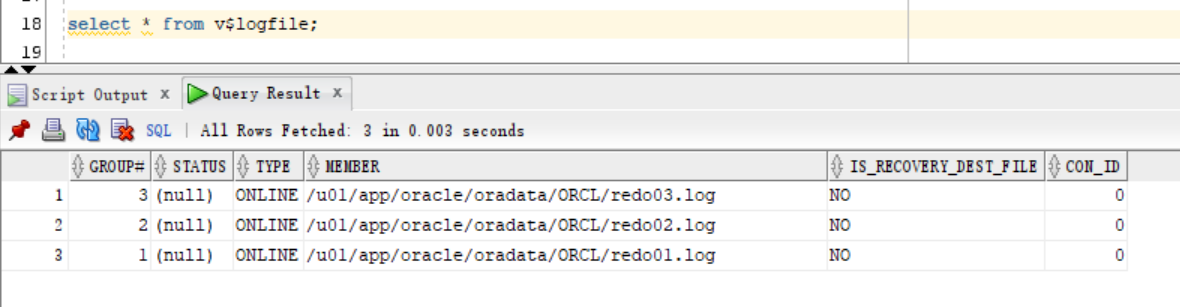
- Query redo log file
select * from v$logfile;