Note_Tech
All technological notes.
Project maintained by simonangel-fong Hosted on GitHub Pages — Theme by mattgraham
DBA - Privileges and Roles
- DBA - Privileges and Roles
Privileges
-
Privileges- used to control access to database objects
- controls whether a user can modify an object owned by another user.
- granted or revoked
- either by the instance administrator, a user with the ADMIN privilege
- or by the owner of the object.
- 要么是 dba, 要么是拥有者
-
two main types of user privileges:
- System privileges
- Object privileges
Data Dictionary View
- System privileges for the current user
| View | System privileges |
|---|---|
SESSION_PRIVS |
available for current session. |
USER_SYS_PRIVS |
granted to user |
- Roles for the current user
| View | Description |
|---|---|
USER_ROLE_PRIVS |
current user’s accessible roles |
ROLE_SYS_PRIVS |
System privilege granted to current user’s accessible roles. |
ROLE_TAB_PRIVS |
Table privilege granted to current user’s accessible roles. |
- Table and column privileges
| View | Description |
|---|---|
USER_TAB_PRIVS |
Object grants related to the current user. |
USER_TAB_PRIVS_MADE |
object grants for which the current user is the object owner.甲方 |
USER_TAB_PRIVS_RECD |
object grants for which the current user is the grantee.乙方 |
USER_COL_PRIVS_MADE |
column object grants for which the current user is the object owner.甲方 |
USER_COL_PRIVS_RECD |
column object grants for which the current user is the grantee. 乙方 |
System privileges
-
System privileges: admin 权限- enable users to perform specific database operations.
- the permission
- to perform a particular action 特定操作
- or to perform an action on any object of a particular type.特定类型对象的操作
-
privileges can be granted only by:
- DBA
- a user with
ADMINprivilege
-
The dba has high-level system privileges for critical tasks
- e.g., create or remove users, remove tb, backup tb.
-
system_privilege_maptable:- contains all the
system privilegesavailable. based on the version release.
- contains all the
-
some prvileges:
CREATE TABLE: only can create table in user’s shcema.CREATE ANY TABLE: only can create table in any shcema.
-
DBA can gran specific
system privilegesto a user.
- DBA can grant specific system privileges to a user.
# grant privilege(s) to a user
GRANT privilege, privilege, ...
TO user_name, user_name, ...;

# grant privilege(s) to a role
GRANT privilege, privilege, ...
TO role_name, role_name, ...;

# grant privilege(s) to the public
GRANT privilege, privilege, ...
TO role_name, role_name, ...;
Object privileges
-
Object privileges: admin + user 权限- controls access to a specific object.对单一对象.
- the permission
- to perform a particular action on an object 一个对象的特定操作
- or to access another user’s object. 访问其他用户对象.
-
An object’s owner has all
object privilegesfor that object, and those privileges cannot be revoked.拥有者有所有权限, 权限不能被褫夺. -
The object’s owner can grant
object privilegesfor that object to other users.拥有者可以授权. -
A user with
ADMINprivilege can grant and revokeobject privilegesfrom users who do not own the objects on which the privileges are granted. Admin 可以授权或褫夺对象权限.
-
The owner can grant specific privileges on owner’s object to another user.
-
Grant:
# grant object privilege to user
GRANT obj_privilege, obj_privilege, ...
ON oject_name
TO user_name, user_name, ...
WITH GRANT OPTION;

# grant object privilege to role
GRANT obj_privilege, obj_privilege, ...
ON oject_name
TO role_name, role_name, ...
WITH GRANT OPTION;

# grant object privilege to the public
GRANT obj_privilege, obj_privilege, ...
ON oject_name
TO PUBLIC
WITH GRANT OPTION;
WITH GRANT OPTION: enables the grantee to grant object privileges to other users and roles.转授权.
- Revoke
- privileges granted to other through the
WITH GRANT OPTIONare also revoked.
- privileges granted to other through the
REVOKE obj_privilege, obj_privilege, ...
ON oject_name
FROM user_name | role_name | PUBLIC;
- Example:
GRANT select
ON employees
TO demo;

GRANT update(department_name, location_id)
ON departments
TO demo, manager;

GRANT select
ON departments
TO PUBLIC;

REVOKE select, insert
ON departments
FROM demo;
Lab: User and Privileges
Create a Local User
CONNECT sys AS SYSDBA;
show con_name;
ALTER session SET container=orclpdb;
show con_name;

# Create a local user.
CREATE USER demo IDENTIFIED BY demo1234;
User Change his own password
- Connect as new user.
show con_name;
alter user demo identified by welcome;
System Privileges: Grant
# session
GRANT create session TO demo;

# grant tbsp in which table can be created.
GRANT UNLIMITED TABLESPACE TO demo;

# grant privileges
GRANT
  create table,
  create sequence,
  create view,
  create synonym
TO demo;
System Privileges: Test
- Create connection as new user
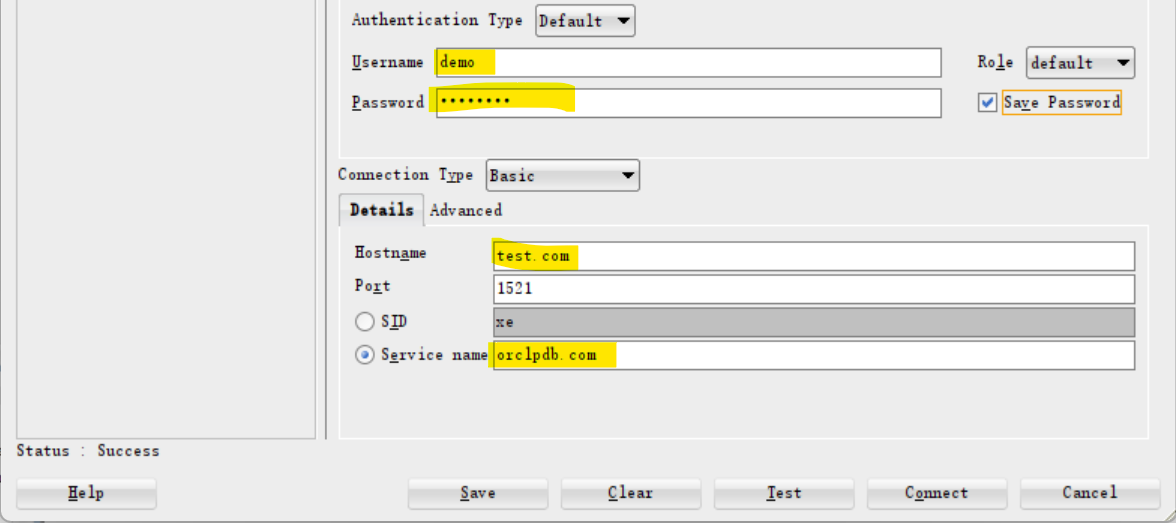
- test system privileges with operations.
# ========Test for create table
create table emp
( empid number constraint emp_pk primary key,
  ename varchar2(100)
);

# demo is the owner of emp, he has all  pris on this tb.
insert into emp values (1,'khaled');

select * from emp;

alter table emp
add (salary number);

select * from emp;

# demo owns tb, so he can create index
create index ename_ind on emp (ename);

# ========Test CREATE SEQUENCE
create sequence emp_s;

# ========Test CREATE SEQUENCE
create index ename_ind on emp (ename);

# ========Test CREATE VIEW
create or replace view emp_v
as
select empid, ename
from emp;
System Privilege: List
- Create connection as new user
# show privileges the user has for the current session, regardless if these privileges direct from a role. 包括从角色获取的权限
select * from session_privs;
# CREATE SESSION
# UNLIMITED TABLESPACE
# CREATE TABLE
# CREATE SYNONYM
# CREATE VIEW
# CREATE SEQUENCE

# show privileges that come direct to the user.
select * from user_sys_privs;
# DEMO	CREATE SESSION	NO	NO	NO
# DEMO	CREATE TABLE	NO	NO	NO
# DEMO	UNLIMITED TABLESPACE	NO	NO	NO
# DEMO	CREATE SEQUENCE	NO	NO	NO
# DEMO	CREATE VIEW	NO	NO	NO
# DEMO	CREATE SYNONYM	NO	NO	NO
Object Privileges: DBA Grant
- Connect as sys
CONNECT sys AS SYSDBA;
show con_name;
ALTER session SET container=orclpdb;
show con_name;

# Grant Object Privileges
grant select on hr.employees to demo;

grant update (salary)  on hr.employees to demo;

grant delete on hr.employees to demo;

grant all on hr.locations to demo;

grant select, insert
on hr.jobs to demo;

grant select
on hr.countries
to public;
Object Privileges: Test
- Connect as new user.
# ===== test select
# must with 'hr.', because it is granted.
#
select * from hr.employees;

# the demo user can make select * from employees without hr. only if there is public syonym for hr.employees
select * from all_synonyms
where table_name='EMPLOYEES';
# return none, because no sysnoym is created named EMPLOYEES.

# ======== test update
# cannot, because only salary column is granted.
update hr.employees
set department_id =null
where employee_id=1;
/* SQL Error: ORA-01031: insufficient privileges
01031. 00000 -  "insufficient privileges"
*Cause:    An attempt was made to perform a database operation without
           the necessary privileges.
*Action:   Ask your database administrator or designated security
           administrator to grant you the necessary privileges */

update hr.employees
set salary =500
where employee_id=1;
Object Privileges: List
- Connect as new user.
# object priviledges granted to the user.
# note: privileges are consistent with grant statement
# the granters are HR, that is, sys grant act like the owner.
select * from user_tab_privs_recd
order by 2;
# HR	EMPLOYEES	HR	DELETE	NO	NO	NO	TABLE	NO
# HR	EMPLOYEES	HR	SELECT	NO	NO	NO	TABLE	NO
# HR	JOBS	HR	INSERT	NO	NO	NO	TABLE	NO
# HR	JOBS	HR	SELECT	NO	NO	NO	TABLE	NO
# HR	LOCATIONS	HR	SELECT	NO	NO	NO	TABLE	NO
# HR	LOCATIONS	HR	UPDATE	NO	NO	NO	TABLE	NO
# HR	LOCATIONS	HR	REFERENCES	NO	NO	NO	TABLE	NO
# HR	LOCATIONS	HR	READ	NO	NO	NO	TABLE	NO
# HR	LOCATIONS	HR	ON COMMIT REFRESH	NO	NO	NO	TABLE	NO
# HR	LOCATIONS	HR	QUERY REWRITE	NO	NO	NO	TABLE	NO
# HR	LOCATIONS	HR	DEBUG	NO	NO	NO	TABLE	NO
# HR	LOCATIONS	HR	INSERT	NO	NO	NO	TABLE	NO
# HR	LOCATIONS	HR	INDEX	NO	NO	NO	TABLE	NO
# HR	LOCATIONS	HR	FLASHBACK	NO	NO	NO	TABLE	NO
# HR	LOCATIONS	HR	ALTER	NO	NO	NO	TABLE	NO
# HR	LOCATIONS	HR	DELETE	NO	NO	NO	TABLE	NO

# show obj privileges on specific columns
select * from user_col_privs_recd;
# HR	EMPLOYEES	SALARY	HR	UPDATE	NO	NO	NO
Object Privileges: Owner Grant
grant select on emp to hr;

# show tb privilege that the owner gives to another user.
select * from user_tab_privs_made;
# HR	EMP	DEMO	SELECT	NO	NO	NO	TABLE	NO
# PUBLIC	DEMO	DEMO	INHERIT PRIVILEGES	NO	NO	NO	USER	NO
# INHERIT PRIVILEGES to PUBLIC: any object demo creaated can be granted to public. Here the talbe name demo means any table created by user demo.

grant update (ename) on emp to hr;

# show the privileges for column that the owner gives to another user.
select * from user_col_privs_made;
# HR	EMP	ENAME	DEMO	UPDATE	NO	NO	NO
Roles
-
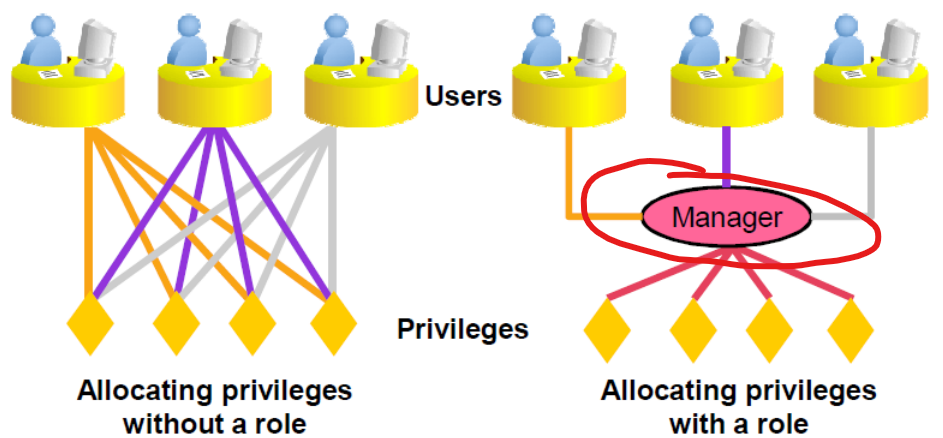
roles- A group of privileges or other roles. 权限/角色组, 权限/角色的集合.
- Unlike
schema objects,rolesare not contained in anyschema. 权限不是 schema 对象, 不属于任何 schema
-
some predefined roles:
DBA,- enables a user to perform most administrative functions
- not include the privileges to start up or shut down the database
CONNECT:- has the
CREATE SESSIONprivilege.
- has the
RESOURCE- extends the privileges of a user beyond those granted by the
CONNECTrole.
- extends the privileges of a user beyond those granted by the
-
A
usercan have severalroles, and serveraluserscan be assigned the samerole.
- example:
- DBA create
roles, grantsystem privilegesandobject privilegesto theroles, and then grantrolestousers. 先创建权限集合, 再将权限集合授予用户.
# create a role
CREATE ROLE manager;
# grant privileges to the role
GRANT create table, create view TO manager;
# grant role to a user;
GRANT manager TO alice;
Lab: Role
Create Role and Grant System Privileges
- Conn as sysdba
-- con as sysdba
show con_name
alter session set container=orclpdb;
show con_name

# create manager role
create role manager;
# grant system privileges
grant create table, create view, create sequence
to manager;

# create query only role
CREATE ROLE QONLY;
GRANT SELECT ANY TABLE TO QONLY;    # can query any table
Create Role and Grant Object Privileges
# create role on emp table wiht insert, update, and delete privileges
CREATE ROLE IUD_EMP;
GRANT INSERT,UPDATE, DELETE
ON
HR.EMPLOYEES
TO IUD_EMP;
Create User and Grant Privileges and Role
CREATE USER staffadam identified by staffadam123;

# grant privilage without role
grant create session to staffadam;
grant unlimited tablespace to staffadam;

# grant privileges from a role
grant manager to staffadam;
grant QONLY to staffadam;
GRANT IUD_EMP TO staffadam;
List System Privileges for Roles
- Conn as the new user.
- System Privileges
# query all avaiable system privileges
select * from session_privs;
-- CREATE SESSION
-- UNLIMITED TABLESPACE
-- CREATE TABLE
-- SELECT ANY TABLE
-- CREATE VIEW
-- CREATE SEQUENCE

# query direct system privilegs, no from any role
select * from user_sys_privs;
-- STAFFADAM	UNLIMITED TABLESPACE	NO	NO	NO
-- STAFFADAM	CREATE SESSION	NO	NO	NO

# query roles granted to current user
select * from user_role_privs;
-- STAFFADAM	IUD_EMP	NO	NO	YES	NO	NO	NO
-- STAFFADAM	MANAGER	NO	NO	YES	NO	NO	NO
-- STAFFADAM	QONLY	NO	NO	YES	NO	NO	NO

# query system privileges for roles granted to the current user.
select * from role_sys_privs;
-- MANAGER	CREATE TABLE	NO	NO	NO
-- MANAGER	CREATE VIEW	NO	NO	NO
-- QONLY	SELECT ANY TABLE	NO	NO	NO
-- MANAGER	CREATE SEQUENCE	NO	NO	NO
List Object Privileges for Roles
# query table privileges for a role
SELECT * FROM ROLE_TAB_PRIVS
WHERE ROLE='IUD_EMP';
-- IUD_EMP	HR	EMPLOYEES		DELETE	NO	NO	NO
-- IUD_EMP	HR	EMPLOYEES		INSERT	NO	NO	NO
-- IUD_EMP	HR	EMPLOYEES		UPDATE	NO	NO	NO
Test
-- =========== Test create table
create table studnet
( student_id number,
  studnet_name varchar2(100)
);

# ========Test select any select
select * from hr.locations
select * from demo.emp

-- ========Test update
update hr.employees
set salary=salary+10
where employee_id=100;
Object Grant by Owner
# Grant on table to the public by owner.
grant select on studnet
to public;

SELECT *
FROM USER_TAB_PRIVS_MADE;
-- PUBLIC	STUDNET	STAFFADAM	SELECT	NO	NO	NO	TABLE	NO
-- PUBLIC	STAFFADAM	STAFFADAM	INHERIT PRIVILEGES	NO	NO	NO	USER	NO
Lab: Grant a Role to another Role
- Connect with sys
show con_name;
--CON_NAME
----------------------------
--ORCLPDB
show user;

alter session set container=orclpdb;
show con_name
--CON_NAME
----------------------------
--ORCLPDB

-- Create a role
create role master_role;
grant create session to master_role;
grant create table to master_role;

-- Confirm sys privis on role
SELECT * FROM ROLE_SYS_PRIVS
where role= upper('master_role');
--MASTER_ROLE	CREATE TABLE	NO	NO	NO
--MASTER_ROLE	CREATE SESSION	NO	NO	NO

-- create a subrole
create role sub_master_role;
grant create view to sub_master_role;

-- gran a role to another role
grant sub_master_role to master_role;

-- Confirm sys privis of the master role
-- here shows only the privis granted directly
SELECT * FROM ROLE_SYS_PRIVS
where role= upper('master_role');
--MASTER_ROLE	CREATE TABLE	NO	NO	NO
--MASTER_ROLE	CREATE SESSION	NO	NO	NO

-- query the role of the master role
select * from DBA_role_PRIVS
where GRANTEE=upper('master_role');
--MASTER_ROLE	SUB_MASTER_ROLE	NO	NO	YES	NO	NO

SELECT * FROM ROLE_SYS_PRIVS
where role= upper('SUB_MASTER_ROLE');
--SUB_MASTER_ROLE	CREATE VIEW	NO	NO	NO

-- create user and grant
create user kh111 identified by kh111;
grant master_role to kh111;
- Connect using the new user
connect kh111/kh111@orclpdb;
show con_name;
show user;

SELECT * FROM session_privs;