Note_Tech
All technological notes.
Project maintained by simonangel-fong Hosted on GitHub Pages — Theme by mattgraham
Backup - Channels and Devices
Channels and Devices
- The RMAN-supported device types are
DISKandSBT(system backup to tape).
Disk
DISK- Default Device Type
- If you use a
DISKchannel for a backup, then the channel creates the backup on disk in the file name space of the target database instance creating the backup. - RMAN does not call a media manager when making DISK backups.
System Backup to Tape(SBT)
-
SBT device- controlled by a third-party media management software.
- Typically, SBT devices are tape libraries and tape drives.
-
RMAN contacts the
media managerwhenever the channel type allocated is not DISK.- To create backups on
non-disk media, you must usemedia management softwaresuch asOracle Secure Backupand allocate channels supported by this software. - How and when the SBT channels cause the media manager to allocate resources is vendor-specific.
- To create backups on
-
To use tape storage for your database backups, RMAN requires
Oracle Secure Backupor amedia manager.
Media Manager
-
Media manager- is a utility that loads, labels, and unloads
sequential media(such as tape drives) for the purpose of backing up, restoring, and recovering data.
- is a utility that loads, labels, and unloads
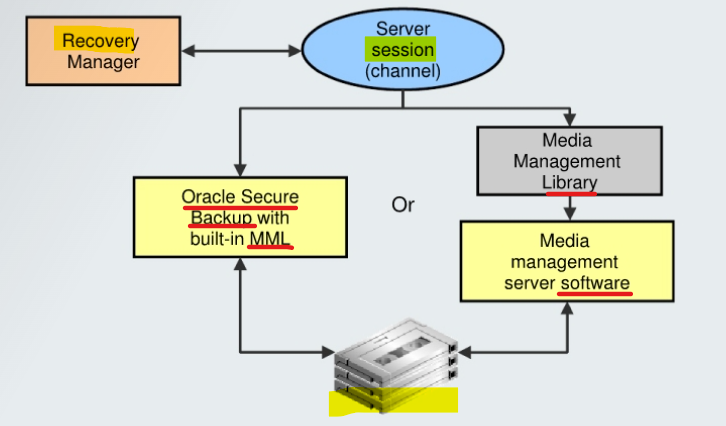
MML + Media manager software
-
Media Management Library (MML)- software routines called by the Oracle Database server to back up and restore data files to and from media that is controlled by the
media manager. 一个包 - Oracle Database server does not need to connect to the
MMLsoftware when it backs up to disk. 备份到磁盘时, 无需连接 MML
- software routines called by the Oracle Database server to back up and restore data files to and from media that is controlled by the
-
media management software- An application required for RMAN to interact with
sequential media devicessuch astape libraries. - Before you can begin using RMAN with a
media manager, you must install themedia manager softwareand make sure that RMAN can communicate with it.
- An application required for RMAN to interact with
BSP
-
Oracle Backup Solutions Program (BSP)- provides a range of media management products that are compliant with Oracle’s
MMLspecification. - Software that is compliant with the
MML interfaceenables an Oracle database session to back up data to amedia managerand request themedia managerto restore backups. Check with your media vendor to determine whether it is a member of Oracle BSP.
- provides a range of media management products that are compliant with Oracle’s
Example: Backup with Media Manager
- RMAN script to performs a data file backup to a tape drive controlled by a
media manager:
run {
# Allocating a channel of type 'sbt' for serial device
ALLOCATE CHANNEL chl DEVICE TYPE sbt;

BACKUP DATAFILE 3;
}
This command sends the backup request to the Oracle database session performing the backup. The Oracle database session identifies the output channel as a
media management deviceand requests themedia managerto load a tape and write the output..
Commands
-- configured default device type:
CONFIGURE DEFAULT DEVICE TYPE TO DISK; # default
CONFIGURE DEFAULT DEVICE TYPE TO sbt;

-- override the default device
BACKUP DEVICE TYPE sbt DATABASE;
BACKUP DEVICE TYPE DISK DATABASE;