Note_Tech
All technological notes.
Project maintained by simonangel-fong Hosted on GitHub Pages — Theme by mattgraham
DBA - Backup: Full Backup and Incremental Backup
Full Backup
-
Full Backups- different from a
whole database backup. - a backup that includes every used
data blockin the file.
- different from a
-
Features:
- RMAN makes
full backupsby default if neitherFULLnorINCREMENTALis specified. 默认备份类型 - RMAN copies
all blocksinto thebackup setorimage copy, skipping only those data file blocks that are not part of an existing segment.image copy: the entire file contents are reproduced exactly.backup sets:Unused block compressioncauses never-written blocks to be skipped.注意, 忽略未用 block;忽略不在 segment 的 block.
- RMAN makes
-
vs
incremental backup strategy- Diff:没有关系和影响
- A
full backup- cannot be part of an
incremental backup strategy - cannot be the parent for a subsequent
incremental backup. - has no effect on subsequent
incremental backups
- cannot be part of an
- A
- Sim:
- physically identical to
level 0 backup物理上相同 - a
full image copy backupcan be incrementally updated by applyingincremental backupswith theRECOVERcommand.恢复时, 映像备份可以加载
- physically identical to
- Diff:没有关系和影响
-
NOARCHIVELOGmode- It is possible to perform any type of backup (
fullorincremental) of a database that is inNOARCHIVELOGmode, if the database is not open. - recovery is limited to the time of the last backup.
- It is possible to perform any type of backup (
Incremental Backups
-
Incremental Backuplevel 0 backuplevel 1 backupDifferential: defaultCumulative
-
Incremental Backups- is either a
level 0 backupor alevel 1 backup.
- is either a
-
level 0 backup:- A backup that includes every block in the
data filesexcept blocks that have never been used. - physically identical to a
full backup.
- A backup that includes every block in the
-
VS
Full backup: 对 level 1 的影响- the
level 0 backup(as well as animage copy) can be used as the base for alevel 1 backup - a
full backupcan never be used as the base for alevel 1 backup.
- the
-
level 1 backup:- A backup that includes only blocks that have been changed since a previous backup was taken.
-
Differential:- default type of
incremental backup - backs up all blocks changed after the most recent
incremental backupat eitherlevel 1orlevel 0.
- default type of
-
Cumulative:- backs up all blocks changed after the most recent backup at
level 0
- backs up all blocks changed after the most recent backup at
- Syntax:
-- To perform an incremental backup at level 0
BACKUP INCREMENTAL LEVEL 0 DATABASE;

-- To perform a differential incremental backup
BACKUP INCREMENTAL LEVEL 1 DATABASE;

-- To perform a cumulative incremental backup
BACKUP INCREMENTAL LEVEL 1 CUMULATIVE DATABASE;

-- to apply incremental backups to data file image copies.
BACKUP AS COPY INCREMENTAL LEVEL 0 DATABASE;
Incrementally Updated Backups
Image copiesare updated with all changes up to theincremental backupSCN.Incremental backupreduces the time required formedia recovery.- With
incrementally updated backups, you can use theSWITCHcommand during the recovery operation.
-
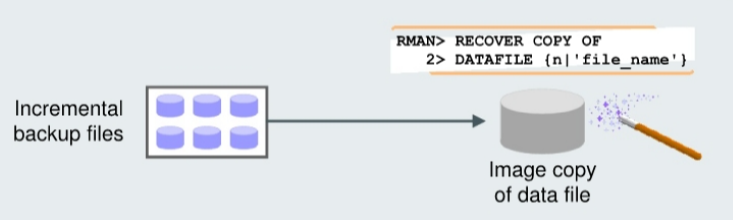
Applying
incremental backupstodata file image copies:- Solution
- RMAN can
roll forward (recover)animage copyto the specified point in time by applying theincremental backupsto theimage copy. 可以将增量备份适用到映像备份上 - The
image copyis updated with all changes up through theSCNat which the incremental backup was taken. 通过 SCN, 最终将映像备份更新到增量备份的时间点. - RMAN uses the resulting updated data file in
media recoveryjust as it would use afull image copytaken at thatSCN结果与全映像相同
- RMAN can
-
Benefits:
- without the overhead of performing a
full image copyof the database every day.好处是减少日常开销 -
reduce the time required for
media recovery(usingarchive logs)恢复时, 用时短,因为减少使用 archivelog- because you need to apply
archive logsonly since the lastincremental backup.
- because you need to apply
- do not need to perform a
full image copyafter the incremental restoration.
- without the overhead of performing a
- Solution
- If the recovery process fails during the application of the
incremental backup file, you simply restart the recovery process. RMAN automatically determines the required incremental backup files to apply, from before the image data file copy until the time at which you want to stop the recovery process. 如果恢复失败, 则只需重启恢复即可. 将会自动决定适用文件. - If there is more than one version of an image copy recorded in the RMAN
catalog, RMAN automatically uses the latest version of theimage copy. 自动选择最新的映像备份- RMAN reports an error if it cannot merge an incremental backup file with an
image copy.不能合并时,会报错.
- RMAN reports an error if it cannot merge an incremental backup file with an
Example
- If you execute these commands daily:
recover copy of database with tag 'daily inc';
backup incremental level 1 for recover of copy with tag 'daily inc' database;
- result:
| RECOVER | BACKUP | |
|---|---|---|
| Day 1 | Nothing | Create image copies |
| Day 2 | Nothing | Create incremental level 1 |
| Day 3 and onward | Recover copies based on incremental | Create incremental level 1 |
- Day 1:
- The
RECOVERcommand does nothing. - There are no
image copiesto recover. - The
BACKUPcommand creates theimage copies.
- The
- Day 2:
- The
RECOVERcommand, again, does nothing. This is because there is no incremental backup yet. - The
BACKUPcommand creates theincremental backup, now that baselineimage copieshave been created on day 1. 产生第一个增量备份
- The
- Day 3:
- The
RECOVERcommand applies the changes from theincremental backupto theimage copies. - The
BACKUPcommand takes anotherincremental backup, which will be used to recover the image copies on day 4. - The cycle continues like this.
- The
Lab: Applying the incremental backup to the level 0 image copies
Setup
- Setting up tbsp using script
- Create a tbsp INVENTORY and commit
#!/bin/sh

sqlplus /nolog <<EOF
connect / as sysdba

ALTER SESSION set container=pdb1;

DROP TABLESPACE INVENTORY INCLUDING CONTENTS and DATAFILES CASCADE CONSTRAINTS;

CREATE SMALLFILE TABLESPACE "INVENTORY"
 DATAFILE '/u01/app/oracle/oradata/ORCL/pdb1/inventory01.dbf' SIZE 30M,
          '/u01/app/oracle/oradata/ORCL/pdb1/inventory02.dbf' size 40M REUSE
 AUTOEXTEND ON NEXT 1M MAXSIZE UNLIMITED LOGGING
 EXTENT MANAGEMENT LOCAL SEGMENT SPACE MANAGEMENT AUTO;

drop user inventory cascade;

create user inventory identified by pass4INV
default tablespace inventory;

grant connect, resource to inventory;
ALTER USER inventory QUOTA UNLIMITED ON INVENTORY;

exit;
EOF


sqlplus / as sysdba <<EOF

ALTER SESSION set container=pdb1;

CREATE TABLE INVENTORY.PRODUCT_MASTER
( PRODUCT_ID NUMBER(7)
, PRODUCT_NAME VARCHAR2(50) NOT NULL
, CODE VARCHAR2(10) NOT NULL
, REORDER_THRESHOLD NUMBER(5)
, COST NUMBER(5, 2)
, PRICE NUMBER(5, 2)
, CONSTRAINT PK_INV PRIMARY KEY (PRODUCT_ID) VALIDATE ,
CONSTRAINT CHK_GT_0 CHECK (reorder_threshold > 0) VALIDATE ) TABLESPACE INVENTORY;

CREATE TABLE INVENTORY.PRODUCT_ON_HAND
(
WAREHOUSE_ID NUMBER(3),
PRODUCT_ID NUMBER(7),
QUANTITY NUMBER(5),
WAREHOUSE_CITY VARCHAR2(30),
LAST_UPDATE DATE,
  CONSTRAINT PK_POH
    PRIMARY KEY (WAREHOUSE_ID, PRODUCT_ID) VALIDATE,
  CONSTRAINT FK_PROD_ON_HAND_PROD_ID
    FOREIGN KEY (PRODUCT_ID) REFERENCES
      INVENTORY.PRODUCT_MASTER (PRODUCT_ID) VALIDATE
);

CREATE TABLE INVENTORY.OBSOLETE_PRODUCTS
AS select product_id, product_name, code, cost, price
from inventory.product_master;

CREATE INDEX INVENTORY.OBS_CODE ON INVENTORY.OBSOLETE_PRODUCTS (CODE);

create index inventory.prod_name_code
on inventory.product_master(product_name,code);

create index inventory.poh_prod_id_qty on
inventory.product_on_hand(product_id, quantity);


set echo on
alter table inventory.product_master nologging
/
insert /*+ append */ into INVENTORY.PRODUCT_MASTER
select
100000 + rownum,
'NAME' || dbms_random.string('a',mod(abs(dbms_random.random),30) + 16),
dbms_random.string('a',10),
mod(abs(dbms_random.random),1000) + 100,
25.25,
50.88
from dba_objects
/
commit
/
insert /*+ append */ into inventory.product_master
select
200000 + rownum,
'NAME' || dbms_random.string('a',mod(abs(dbms_random.random),30) + 16),
dbms_random.string('a',10),
mod(abs(dbms_random.random),1000) + 100,
25.25,
50.88
from dba_objects
/
commit
/
insert /*+ append */ into inventory.product_master
select
300000 + rownum,
'NAME' || dbms_random.string('a',mod(abs(dbms_random.random),30) + 16),
dbms_random.string('a',10),
mod(abs(dbms_random.random),1000) + 100,
25.25,
50.88
from dba_objects
/
commit
/
alter table inventory.product_master logging
/

create index inventory.code_func on inventory.product_master (upper(substr(code,5,2)));

alter table inventory.product_master add (primary_source varchar2(50), secondary_source varchar2(50));

alter table inventory.product_master add (obsoleted date);

exit
EOF
- Create a directory for backup
mkdir -p /home/oracle/backup/orcl
Perform Level 0 incremental Backup
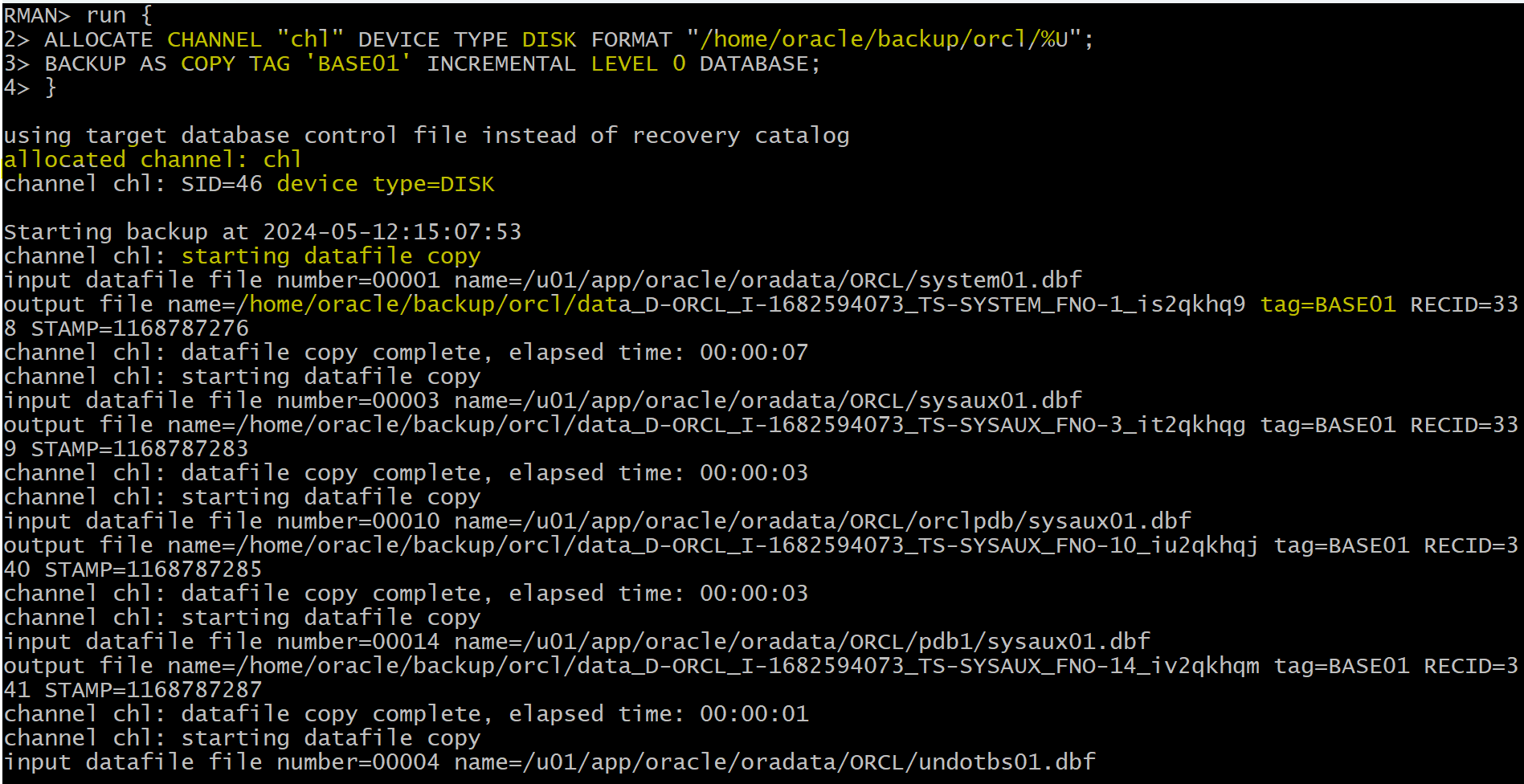
- Run script in RMAN
run {
-- set channel's name, device type as DISK, set path to store backup
  ALLOCATE CHANNEL "chl" DEVICE TYPE DISK FORMAT "/home/oracle/backup/orcl/%U";

-- implement incremental level 0 bacup db as image copies, add tag,
  BACKUP AS COPY TAG 'BASE01' INCREMENTAL LEVEL 0 DATABASE;
}
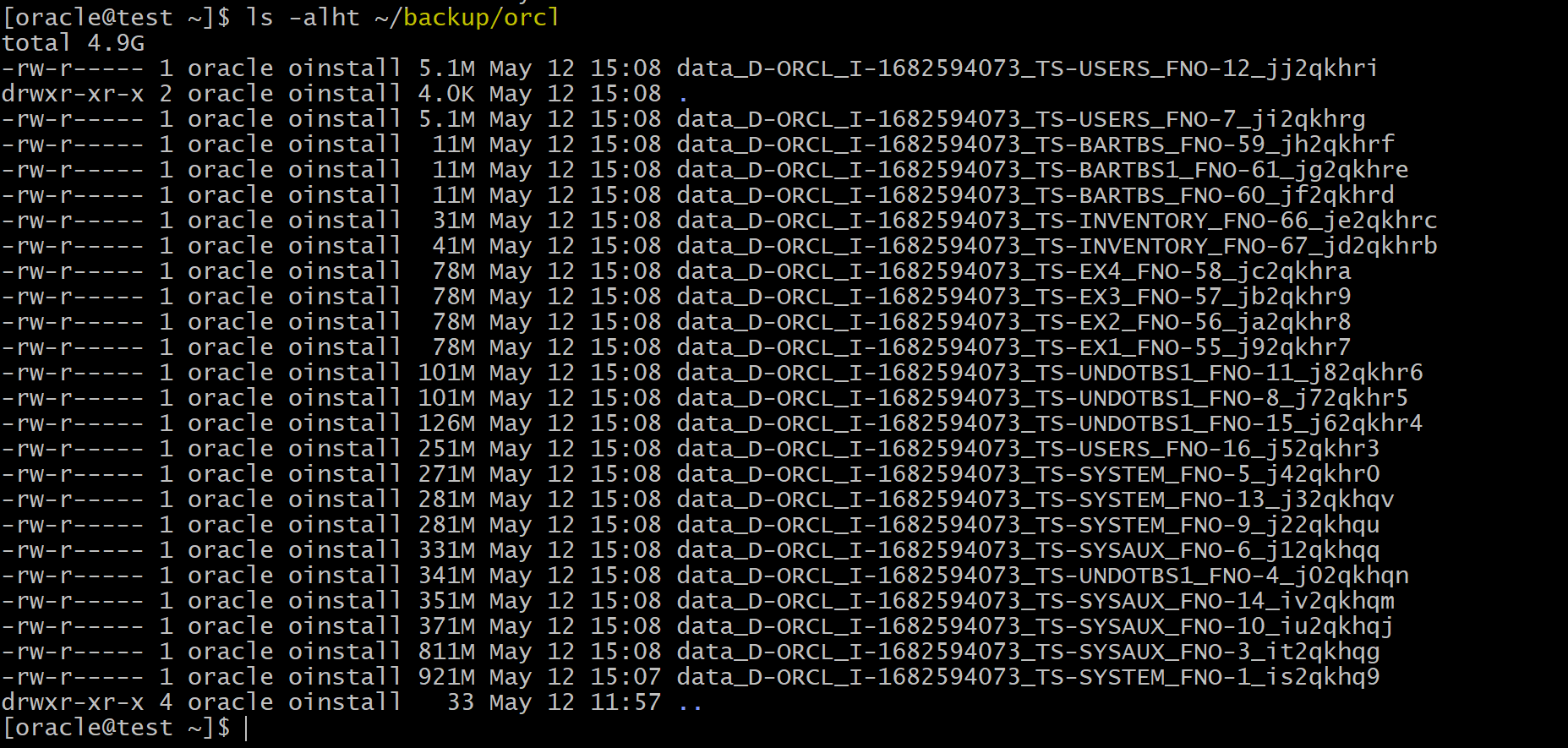
The script performs an incrimental level 0 backup to a specific directory.
- Confirm
Perform Level 1 Incremental Backup
- Run script to update records
#!/bin/sh

sqlplus / as sysdba<<EOF
ALTER SESSION set container=pdb1;
CONNECT inventory/pass4INV@pdb1
/* retrieve a random integer between 1 an 100 use that as a mod function */
/* to change the obsolete date for product ids in the table */


update product_master set obsoleted = SYSDATE
where mod(product_id,100) IN (
  select (round(dbms_random.value(1,100))) from dual)
/
commit;
exit
EOF
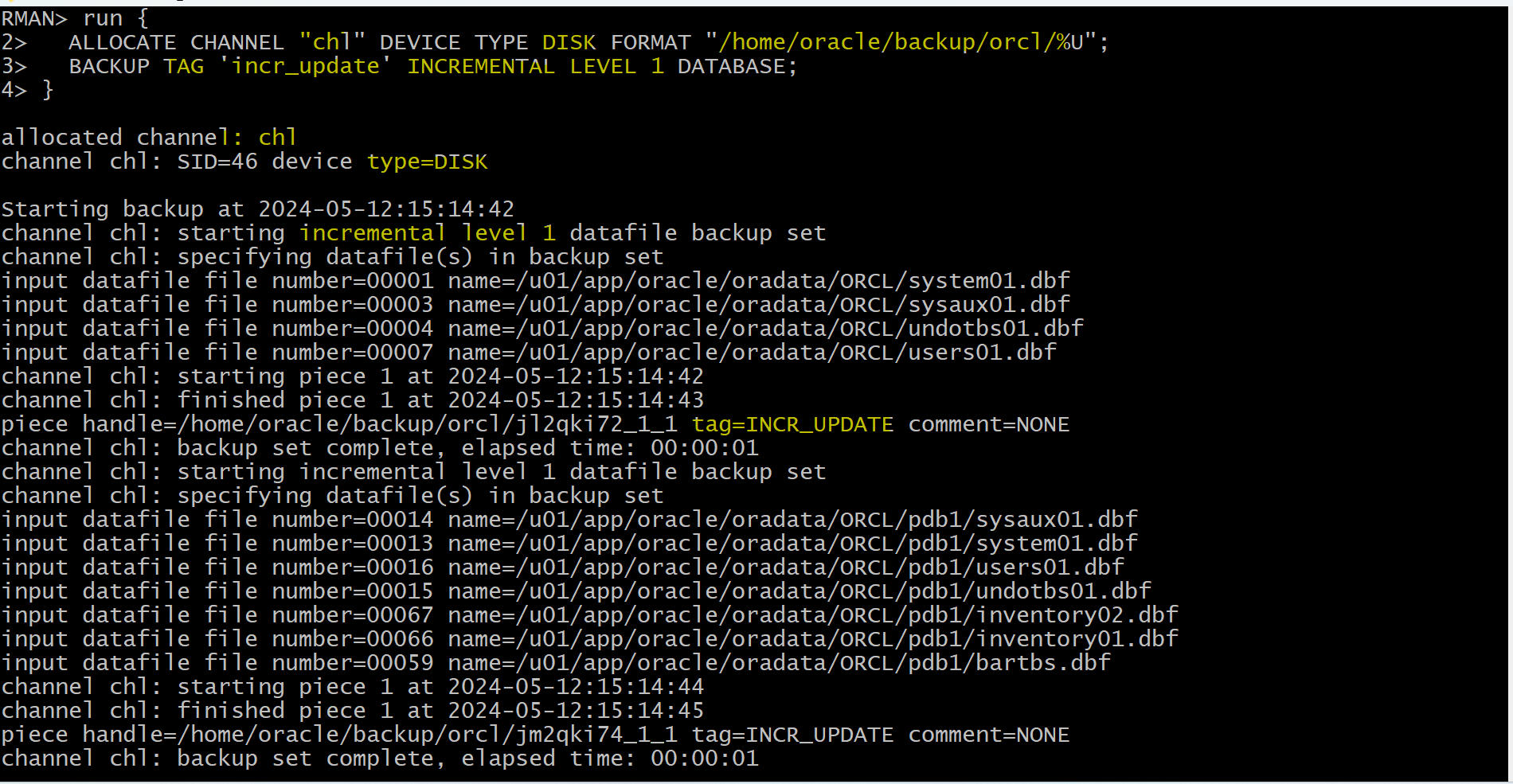
- Run script to perform incremental level 1 backup
run {
-- set channel's name, device type as DISK, set path to store backup
  ALLOCATE CHANNEL "chl" DEVICE TYPE DISK FORMAT "/home/oracle/backup/orcl/%U";

-- implement incremental level 1 backup, add tag,
  BACKUP TAG 'incr_update' INCREMENTAL LEVEL 1 DATABASE;
}
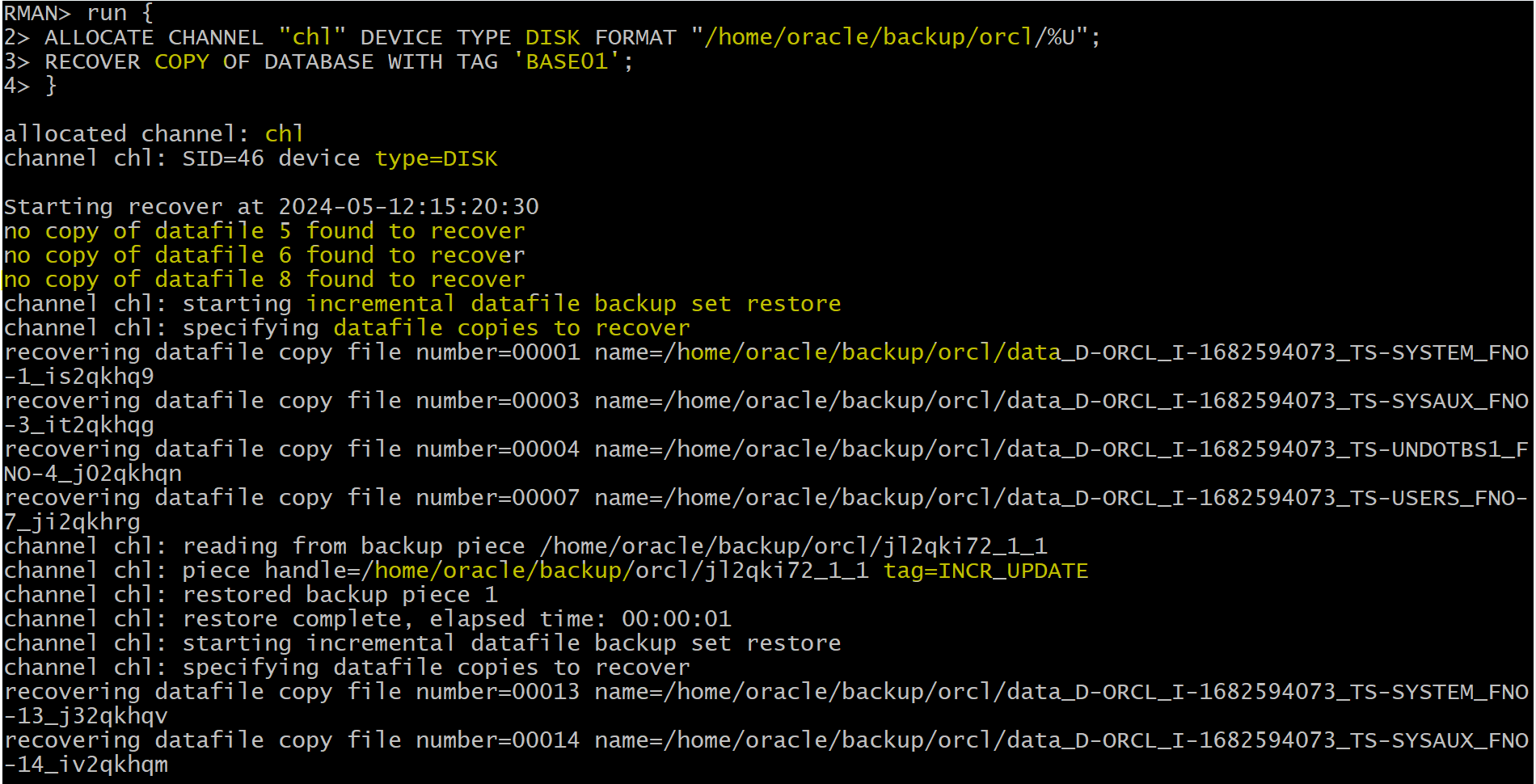
Recovery from Level 0 Backup
run {
ALLOCATE CHANNEL "chl" DEVICE TYPE DISK FORMAT "/home/oracle/backup/orcl/%U";
RECOVER COPY OF DATABASE WITH TAG 'BASE01';
}
Clear up
#!/bin/sh

rman target "'/ as sysdba'"<<EOF
delete NOPROMPT backup of tablespace pdb1:INVENTORY;
exit;
EOF

sqlplus /nolog >> /tmp/cleanup.log 2>&1 <<EOF
connect / as sysdba
alter session set container=pdb1;
DROP USER inventory cascade;
DROP TABLESPACE INVENTORY INCLUDING CONTENTS and DATAFILES;
exit
EOF