Note_Tech
All technological notes.
Project maintained by simonangel-fong Hosted on GitHub Pages — Theme by mattgraham
DBA - Backup Rentention Policy
Take-Away:
| Command | Description |
|---|---|
SHOW RETENTION POLICY; |
Show the current retention policy |
CONFIGURE RETENTION POLICY CLEAR; |
To revert to the default value |
CONFIGURE RETENTION POLICY TO REDUNDANCY 1; |
Default, Enable Redundancy Retention Policy |
CONFIGURE RETENTION POLICY TO RECOVERY WINDOW OF <days> DAYS; |
Enable Recovery Window Retention Policy |
CONFIGURE RETENTION POLICY TO NONE; |
Disable Retention Policy |
REPORT OBSOLETE; |
Report obsolete backup |
DELETE OBSOLETE; |
Delete obsolete backup |
Retention Policy
-
retention policy- determines how long backups are kept for and how many copies are retained.
- can set the value of the retention policy by using the
RMANCONFIGUREcommand orEnterprise Manager.
-
There are two types of retention policies:
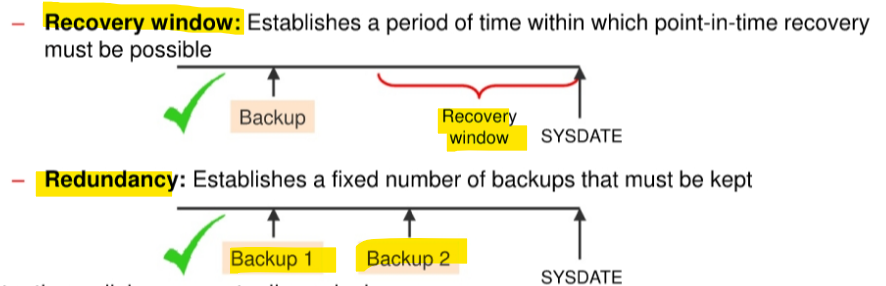
Recovery window: Establishes a period of time within whichpoint-in-time recoverymust be possibleRedundancy: Establishes a fixed number of backups that must be kept
-
Retention policies are mutually exclusive.
Recovery Window Retention Policy
-
Recovery Window- a period of time during which it will be possible to discover logical errors and fix the affected objects by doing a
point-in-time recoveryto just before the error occurred.
- a period of time during which it will be possible to discover logical errors and fix the affected objects by doing a
-
Recovery Window Retention Policy- specified in number of days.
-
If configure the
RECOVERY WINDOW OF <days> DAYS, the window stretches- from the current time, which is the value of
SYSDATE - to the
point of recoverability, which is the earliest date to which you want to recover. point of recoverability:SYSDATE-<days>
- from the current time, which is the value of
- For each
data file, there must always exist at least one backup that satisfies the following condition:SYSDATE-backup_checkpoint_time>=recovery_window
-
To prevent the record of older backups from being overwritten in the control file.
recovery catalog |
CONTROL_FILE_RECORD_KEEP_TIME parameter |
|---|---|
| not using | >=recovery window |
| using | >=the time period between catalog resynchronizations |
-
Resynchronizations happen when:
- Create a backup. In this case, the synchronization is done implicitly.
- Execute the
RESYNC CATALOGcommand.
-
Command:
-- where <days> is the size of the recovery window.
CONFIGURE RETENTION POLICY TO RECOVERY WINDOW OF <days> DAYS;
- Disadvantage:
- Although the
recovery windowis the best practice for specifying a retention policy, it can complicate disk space usage planning because the number of backups that must be kept by therecovery windowis not constant and depends on thebackup schedule. 原因在于恢复窗口期内备份的个数受到备份日程的影响, 从而造成磁盘空间难以计划. - 此时可以使用 Redundancy
- Although the
-
Example:
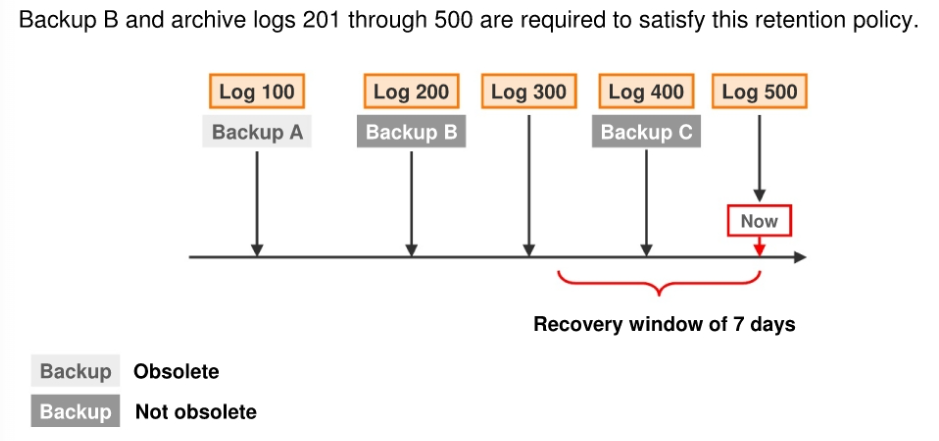
- a retention policy requiring recovery capability for any point within the last seven days.
- Configuring policy:
CONFIGURE RETENTION POLICY TO RECOVERY WINDOW OF 7 DAYS;
-
Q: for point-in-time recovery, which file is needed?
- Some backups and logs are now obsolete because they are unnecessary for recovery within the seven-day window.
- Based on the backups and archived log files available, only Backup B and logs 201 through 500 are needed to recover to any point within the recovery window.
- Backup A is not required because there is a later backup (Backup B) that was taken before the recovery window.
- Backup C alone does not suffice because it doesn’t allow recovery to points in time at the beginning of the recovery window.
-
Take away
- The needed backup for point-in-time recovery:
- The most recent backup taken before the start of the
recovery window, along with all subsequent logs, is necessary for complete recovery.SYSDATE-backup_checkpoint_time>=recovery_window恢复窗口外- the most recent one. 最近的备份
- The most recent backup taken before the start of the
- The needed backup for point-in-time recovery:
Redundancy Retention Policy
-
Redundancy-based retention policy- specifies how many backups of each datafile must be retained.
- Used to maintain a specific number of backups.
- requires cataloging a specified number of backups before any backup is considered obsolete.
- A backup is considered obsolete when a newer version of the same file has been backed up.新版本
- Default:
1
-
Command:
-- Replace <copies> with the desired number of copies to meet your policy requirements.
CONFIGURE RETENTION POLICY TO REDUNDANCY <copies>;
Disabling the Retention Policy
-
Disabling the Retention Policy if:
- using a separate system outside of RMAN to back up your disk backups to tape.
-
Consequences of disabling the retention policy:
- RMAN will never mark a backup as obsolete.
- Since RMAN won’t need to decide when to remove a backup from disk (as another utility will manage that), it doesn’t need to be configured for this decision.
- RMAN will retain records of each backup for the duration specified by the
CONTROL_FILE_RECORD_KEEP_TIMEinitialization parameter.
- RMAN will never mark a backup as obsolete.
-
Exceptions:
- You can make a backup an exception to the
retention policyby creating anarchival backup.
- You can make a backup an exception to the
-
Command:
CONFIGURE RETENTION POLICY TO NONE;
Batch Deletes of Obsolete Backups
-
Backup files can be marked as
expiredorobsolete. 备份文件标记Expired:- RMAN has performed a crosscheck and the file cannot be found
Obsolete- based on the retention policy the file is not needed for recovery
-
The
backup retention policyonly applies to- backup type:
fullorlevel 0
- File type:
datafileandcontrol file.
- backup type:
-
The
retention policydoes not directly affectarchived redo logsandincremental level 1 backups.- These files become obsolete when no
full backupsexist that need them. 当其需要的父备份不存在时
- These files become obsolete when no
-
Datafile backup setscannot be deleted until all datafile backups within the backup set are obsolete. 整体性
-- identify which backups are obsolete
REPORT OBSOLETE;

-- Deletes obsolete data file backups, copies, archived redo log files and log backups.
DELETE OBSOLETE;
- Best practice:
- should run
DELETE OBSOLETEperiodically to minimize space wasted by storing obsolete backups.- e,g,.can run
DELETE OBSOLETEin a weekly script.
- e,g,.can run
- should run