Note_Tech
All technological notes.
Project maintained by simonangel-fong Hosted on GitHub Pages — Theme by mattgraham
DBA - Backup: Strategies
Oracle-Suggested Backup
- Integrated disk-to-disk backup and recovery:
- Low-cost disks used for
fast recovery area
- Low-cost disks used for
Fast incremental backups:- Back up only changed blocks
- Nightly
incremental backuprolls forward recovery area backup:- No need to do full backups
-
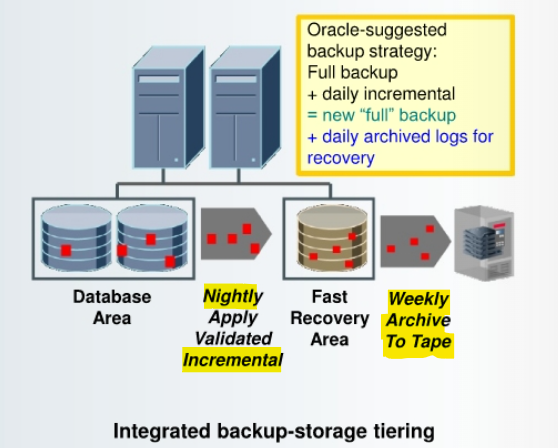
tiered storage configuration:(as shown in the slide)- used by RMAN to fully automates disk-based backup and recovery
- You can use different types of storage for the
database filesand thefast recovery area (FRA).
-
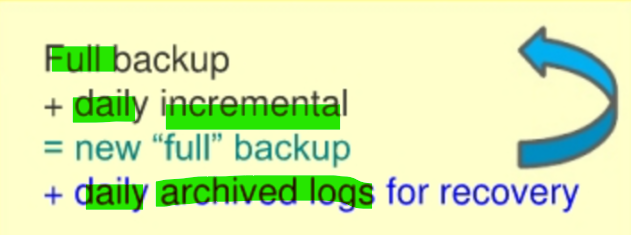
Oracle-suggested backup strategy:- perform a
full backupof your database (animage copyof each data file). - set up automated nightly
incremental backups, stored in theFRA.- Only changed data blocks are backed up, which save considerable storage space.
- You can implement
block change trackingto track the changed blocks more efficiently. - The nightly
incremental backupscan be used to roll forward the database backup (by applying an incrementallevel 1 backup) and automatically create afull backup.- This procedure enables
faster backupsby propagating changes to theFRA. - In addition, restores are faster because backup files are copied from the
FRAor a copy of the file in the FRA. (If recovery is needed, then only the dailyarchived redo logsneed to be applied to yesterday’s full backup.) 可以提高恢复效率,因为只适用前一日的 redo log
- This procedure enables
- perform a
-
Oracle-suggested backup strategywithEnterprise Manager- By default, there is a 24-hour
recovery windowfrom disk. - uses the
incremental backupandincrementally updated backupfeatures, providing faster recoverability than is possible when applying database changes from thearchived log files. 比使用 archive log 的恢复快.
- By default, there is a 24-hour
-
Enterprise Manager’s Schedule Backup function:- The Oracle-suggested strategy takes a
full database copyas the first backup.第一次备份=full&whole- Because it is a
whole database backup, you might want to consider taking this at a period of least activity.
- Because it is a
- An
incremental backupto disk is taken every day. - Optionally, a weekly
tape backupcan be made, which backs up all recovery-related files.
- The Oracle-suggested strategy takes a
Backup Strategies
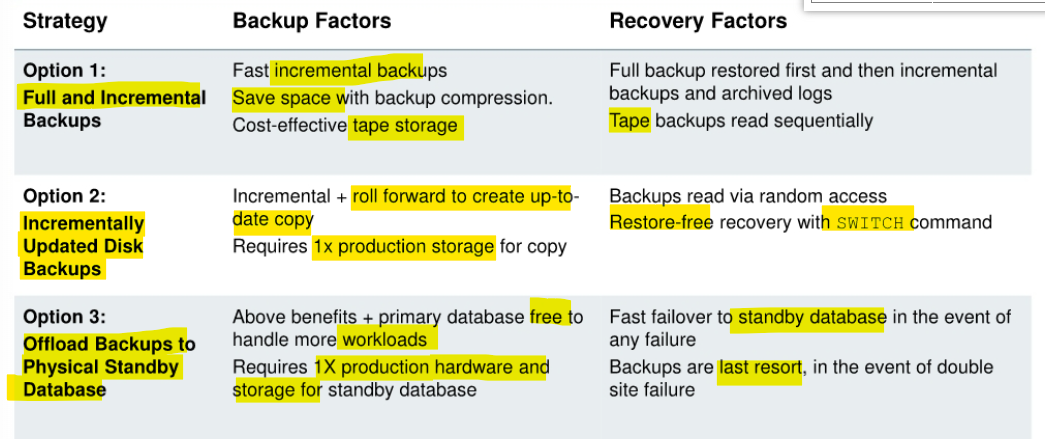
Full and Incremental Backups
-
Well suited for:
- Databases that can tolerate hours/days
RTO日级恢复时间 - Environments where disk is premium 磁盘不足
- Low-medium change frequency between backups (<20%) 备份间变化不大
- Databases that can tolerate hours/days
-
Backup strategy:
- Weekly
level 0and dailydifferential incremental backup setsto tape, - optional backup compression
- Enable
block change trackingso that only changed block chunks are read and written during incremental backup. - Back up
archived logsand retain on-disk, as needed.
- Weekly

- take advantage of RMAN support for binary compression of
backup sets. 可以利用压缩,除非以下情况- if your tape device performs its own compression, you should not use both
RMANbackup set compression and themedia manager vendor’s compression. - In most cases, the
media managercompression provides better results.
- if your tape device performs its own compression, you should not use both
- When you enable
block change tracking, RMAN uses ablock change tracking fileto identify modified block chunks, and backs up only those blocks.- Instead of scanning every block in the
data filethat is being backed up, RMAN reads the small bitmap file to determine which blocks have changed.
- Instead of scanning every block in the
Incrementally Updated Disk Backups
-
Well suited for:
- Databases that can tolerate no more than a few hours
RTO小时级恢复时间 - Environments where disk can be allocated for 1x size of database or most critical tablespaces 磁碟可用
- Databases that can tolerate no more than a few hours
-
Backup strategy:
- Initial
image copytoFRA, dailyincremental backups - New on-disk copy by using
incrementalsto roll forward copy 磁碟拷贝 Full backuparchived to tape as neededArchived logsbacked up and retained on-disk as needed- Fast recovery from disk or
SWITCHto use image copies
- Initial

- Create an
image copyof each data file and then apply dailylevel 1 incremental backupsto roll forward theimage copy.- avoid the overhead of creating multiple full image copies of your data files,
- can take advantage of using
image copiesduring a recovery operation to minimize recovery time.
Offloading Backups to Physical Standby Database in Data Guard Environment
-
Well suited for:
- Databases that require no more than several minutes of recovery time in the event of any failure 分钟级恢复时间
- Environments that can preferably allocate symmetric hardware and storage for
physical standby database镜像备用实例 - Environments with tape infrastructure that can be shared between primary and standby database sites 共享磁盘
-
Backup strategy:
Full and incremental backupsoffloaded to physical standby databaseFast incremental backupon standby withActive Data Guard- Backups restored to primary or standby database
- Backups taken at each database for optimal local protection
-
In a
Data Guardenvironment, you can offloadincremental backupsto aphysical standby database.Incremental backupsof a standby and primary database are interchangeable.- You can apply an
incremental backupof a standby database to a primary database or apply anincremental backupof a primary database to a standby database. 备份可以互换
-
Note: The
Oracle Active Data Guardoption is required for the use ofblock change trackingon thephysical standby database. 需要使用到 ADG
Backing Up Read-Only Tablespaces
- Backup optimization causes RMAN to back up
read-only tablespacesonly when no backup exists that satisfies the retention policy.- Because
read-only tablespacesare not being written to, there is no need to continually back them up as you do read/write tablespaces. - If you change the tablespace to read/write, back it up immediately.
- Because
-
You can use the
SKIP READONLYoption of the RMANBACKUPcommand to skipread-only tablespacesordata files. - 备份可以略过只读.一旦变为可读写, 则需立即备份
Data Warehouse Backup and Recovery
- Exploit partitioning and read-only tablespaces:
- Older partitions that contain data that is no longer changing can be moved to read-only tablespaces.
- Back up
read-only tablespacesonce and then periodically depending on tape retention policy.
- Divide
full backupworkload across multiple days. 全备份需数日 - Leverage database and backup compression.压缩
- Save time with
tablespace-level backups.- Back up
index tablespacesless frequently thandata tablespaces. - Back up scarcely used tablespaces less frequently.
- Reduce restore time for most critical tablespaces, by grouping them together in separate
backup sets.
- Back up
- Take incremental backup when
NOLOGGINGoperations finish to ensure recoverability.
- To divide the full backup workload across multiple:
BACKUP DATABASE NOT BACKED UP SINCE 'SYSDATE-3' DURATION 06:00 PARTIAL
MINIMIZE TIME;
- When you execute the command on the first day, a
full backupbegins.- It executes for six hours.
- On the next day when the command executes again, the backup starts with the last file not backed up and resumes the full backup, again in a six-hour backup window.
- Over the course of a few days, the entire database will be backed up.