Note_Tech
All technological notes.
Project maintained by simonangel-fong Hosted on GitHub Pages — Theme by mattgraham
Backup - Tuning Backup Performance
Views to Diagnose RMAN Performance
| View | Use |
|---|---|
V$SESSION_LONGOPS |
Monitoring the progress of backups and restore jobs |
V$BACKUP_SYNC_IO |
Determining whether the tape is streaming when the I/O is synchronous |
V$BACKUP_ASYNC_IO |
Determining the rate of asynchronous I/O |
-- Determine the value in EFFECTIVE BYTES PER SECOND < storage media throughput
SELECT DEVICE_TYPE, TYPE ,BYTES, EFFECTIVE_BYTES_PER_SECOND
FROM V$BACKUP_ASYNC_IO
WHERE TYPE = UPPER('aggregate');

-- Monitor the progress of backup and restore operations
-- 未验证
SELECT SID,SERIAL#,CONTEXT,SOFAR, TOTALWORK,
ROUND (SOFAR/TOTALWORK*100,2) "%_COMPLETE"
FROM V$SESSION_LONGOPS
WHERE OPNAME LIKE 'RMANS'
AND OPNAME NOT LIKE '%aggregate%'
AND TOTALWORK != 0
AND SOFAR <> TOTALWORK;
--  OPNAME: A text description of the row.
--      Detail rows include RMAN:datafile copy, RMAN:full datafile backup, and RMAN:full datafile restore.
-- CONTEXT: For backup output rows, the value of this column is 2.
--      For all the other rows except proxy copy (which does not update this column), the value is 1.
VALIDATE Command
-
BACKUP VALIDATEcommand- perform all steps of the backup up to the point of writing the data to the output device; then the data is discarded, and nothing is written.执行直到输出
- Compression: inclusive
- Best practice:
- Run without compression first, to measure the speed of reading the input files
- Run with compression
- Best practice:
- Encryption: exclusive
-
RESTORE VALIDATE:- perform all the steps of a restore, up to the point where it is about to write the restored data to disk; then the data is discarded, and nothing is written.
- used to
- validate the integrity of
backup media - diagnose performance problems with the read and processing operations of a
RESTOREcommand.
- validate the integrity of
- Inclusive: both decryption and decompression if the backup was created with those options.
Identify read or write bottleneck
- Query the
EFFECTIVE_BYTES_PER_SECONDcolumn inV$BACKUP_SYNC_IOorV$BACKUP_ASYNC_IOforaggregaterow.- if the value < storage media throughput, then it indicates problem, because they should be the same.
-
By comparing the time of your backup operations with the time taken by the
BACKUP VALIDATEcommand, you should be able to determine whether the bottleneck is due to reads or writes. 通过对比备份时间与BACKUP VALIDATE的时间, 从而决定是读取还是写入问题. -
If the execution time of the
BACKUP VALIDATEcommand approximates the actual backup time, the read phase is most likely the bottleneck. 读取时间占比大: 读取- Solution:Vy adjusting the multiplexing level:
- Implement appropriate RMAN multiplexing and buffer usage guidelines.
- Investigate slow performing files:
- Find the data file with the highest
LONG_WAITS/IO_COUNTratio.- If
ASM, add disk spindles and/or rebalance disks. - Move the file to a new disk or multiplex with another slow file.
- If
- Find the data file with the highest
- Solution:Vy adjusting the multiplexing level:
-
If the execution time for the
BACKUP VALIDATEcommand is significantly less than the actual backup time, writing to the output device is most likely the bottleneck.-
Solution:
- Implement backup compression and encryption guidelines:
- Verify that uncompressed backup performance scales properly, as channels are added
- If you are using compression, set the compression to
LOWorMEDIUM - Use the AES128 encryption algorithm because it is the least CPU intensive
- If tape backup, check media management (MML) settings:
- TCP/IP buffer size
- Media management client/server buffer size
- Client/socket timeout
- Media server hardware, connectivity to tape
- Enable tape compression (but not RMAN compression)
- Implement backup compression and encryption guidelines:
-
-
Additional Methods to Analyze write process
-
Method 1:
- create a new tablespace with a data file on the disk and time the operation.
- If the same issues occur, general Oracle performance to this device should be tuned, not RMAN-specific parameters.
-
Method 2: a write I/O driver
- The write driver is invoked by calling the
DBMS_BACKUP_RESTORE.SETPARMSfunction with parameters:- p0=>6
- p1=>buffer size in bytes (specify NULL or 0 to use default)
- p2 => number of buffers (specify NULL or 0 to use default)
- p3 => number of blocks to write
- p4 => block size in bytes (must be specified, 8192 is a good choice)
- p5 => file name to write
- p6=>1
- The write I/O driver is also helpful when you are tuning disk channel output by executing commands with varying buffer sizes and counts.
- The write driver is invoked by calling the
Identify Backup and Restore Bottlenecks
-
Use to determine the source of bottlenecks and backup job progress:
V$BACKUP_SYNC_IOV$BACKUP_ASYNC_IO
-
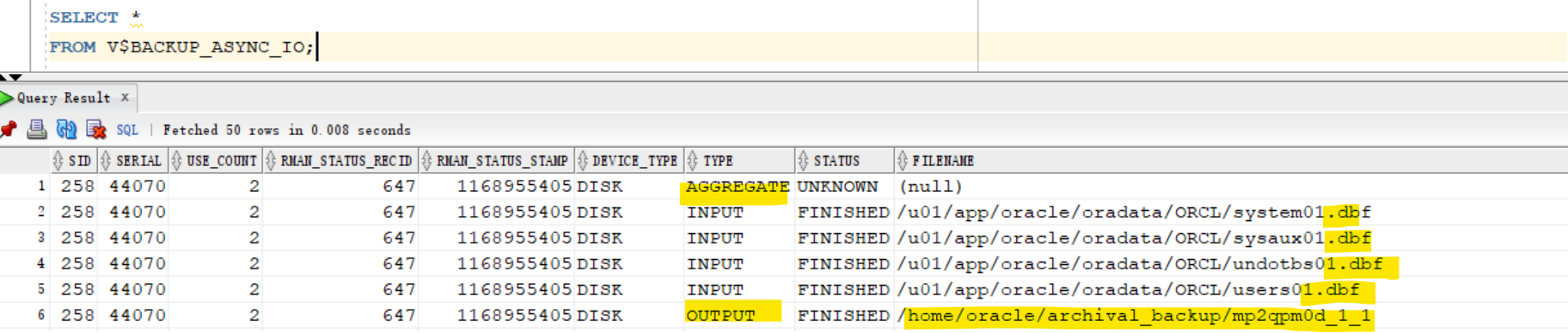
The following rows exist for a backup or restore:
- One row for each data file
- One aggregate data file row
- One row for each backup piece
-
The maximum backup speed is limited by the available hardware.
- It is not possible to back up any faster than the aggregate tape bandwidth.
- One exception to this is if there are many empty blocks in the data files that need not be backed up.
-
One of the components of the backup system will be a bottleneck-which one depends on the relative speeds of the disk, tape drive, and any other transport components such as the network.
- As an example, if the bottleneck is the tape drive, and the tape is streaming, then the backup cannot possibly proceed any faster.
Asynchronous I/O Bottlenecks
-
Use
V$BACKUP_ASYNC_IOto monitor asynchronous I/O.IO_COUNT: Number ofI/Os performed on the fileLONG_WAITS: Number of times the backup/restore process directed the OS to wait until I/O was complete
-
Wait times should be zero to avoid bottlenecks.
- SHORT_WAIT_TIME_TOTAL
- LONG_WAIT_TIME_TOTAL
-
The file that has the largest ratio of
LONG_WAITStoIO_COUNTis probably the bottleneck.
Synchronous I/O Bottlenecks
Synchronous I/O is considered to be a bottleneck.
- Query the
DISCRETE_BYTES_PER_SECONDcolumn fromV$BACKUP_SYNC_IOto view the I/O rate.- Compare this rate with the device’s maximum rate.
- If the rate is lower than what the device specifies, this is a tuning opportunity.
Tuning RMAN Backup Performance
To tune RMAN backup performance, perform the following steps:
- Remove
RATEsettings from configured and allocated channels.- The
RATEparameter is used to set the maximum number of bytes (default), kilobytes (K), megabytes (M), or gigabytes (G) that RMAN reads each second on the channel. - It sets an upper limit for bytes read so that RMAN does not consume too much disk bandwidth and degrade performance.
- If your backup is not streaming to tape, ensure that the
RATEparameter is not set on theALLOCATE CHANNEL Of CONFIGURE CHANNELcommand.
- The
- Set the
DBWR_IO_SLAVESparameter if you use synchronous disk I/O.- If your disk does not support
asynchronous I/O, try setting theDBWR_IO_SLAVESinitialization parameter to a nonzero value.- Any nonzero value for
DBWR_IO_SLAVEScauses a fixed number (four) of disk I/O slaves to be used for backup and restore, simulating asynchronous I/O. - If I/O slaves are used, I/O buffers are obtained from the SGA.
- The
large poolis used if configured.- Otherwise, the
shared poolis used.
- Otherwise, the
- Any nonzero value for
- Note: By setting
DBWR_IO_SLAVES, the database writer processes will use slaves as well. You may need to increase the value of thePROCESSESinitialization parameter.
- If your disk does not support
- If there is failure in shared memory allocation, set the
LARGE_POOL_SIZEinitialization - Tune the RMAN read, write, and copy phases.
Parallelization of Backup Sets
-
Parallelization of backup sets is achieved by:
-
- Configuring
PARALLELISMto greater than 1 or allocating multiplechannels
- Configuring
-
- Specifying many files to back up
-
-
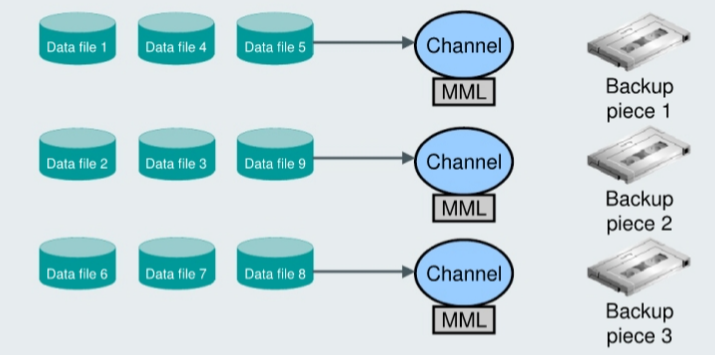
When you create multiple
backup setsand allocate multiplechannels, RMAN automatically parallelizes its operation and writes multiple backup sets in parallel.- The allocated
server sessionsshare the work of backing up the specified data files, control files, and archived redo logs. - You cannot stripe a single
backup setacross multiplechannels. 一个渠道处理一个备份 set
- The allocated
- Example
- There are nine files that need to be backed up (data files 1 through 9).
- Assign the data files to a backup set so that each set has approximately the same number of data blocks to back up (for efficiency).
- Datafiles 1, 4, and 5 are assigned to backup set 1.
- Datafiles 2, 3, and 9 are assigned to backup set 2.
- Datafiles 6, 7, and 8 are assigned to backup set 3.
RUN {
  ALLOCATE CHANNEL cl DEVICE TYPE sbt;
  ALLOCATE CHANNEL c2 DEVICE TYPE sbt;
  ALLOCATE CHANNEL c3 DEVICE TYPE sbt;
  BACKUP
  INCREMENTAL LEVEL = 0
  (DATAFILE 1,4,5 CHANNEL cl)
  (DATAFILE 2,3,9 CHANNEL c2)
  (DATAFILE 6,7,8 CHANNEL c3);
  SQL 'ALTER SYSTEM ARCHIVE LOG CURRENT';
}
Multiplexing
-
RMAN uses two different types of buffers for I/O:
disktape.
-
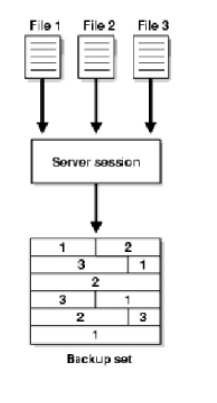
RMAN
multiplexing- determines how RMAN allocates disk buffers.
- the number of files in a backup read simultaneously and then written to the same backup piece.
-
The degree of multiplexing depends on
- the
FILESPERSETparameter of theBACKUPcommand - the
MAXOPENFILESparameter of theCONFIGURE CHANNELOrALLOCATE CHANNELcommand.
- the
-
Note: RMAN multiplexing is set at the channel level. For ASM or RAID1, set MAXOPENFILES to 1 or 2.
-
Multiplexing level:- Maximum number of files read by one channel, at any time, during backup 单渠道读取文件最大个数
-
Value:
Min (MAXOPENFILES, FILESPERSET)- Default for
MAXOPENFILESis8. - Default for
FILESPERSETdefault is64.
- Default for
-
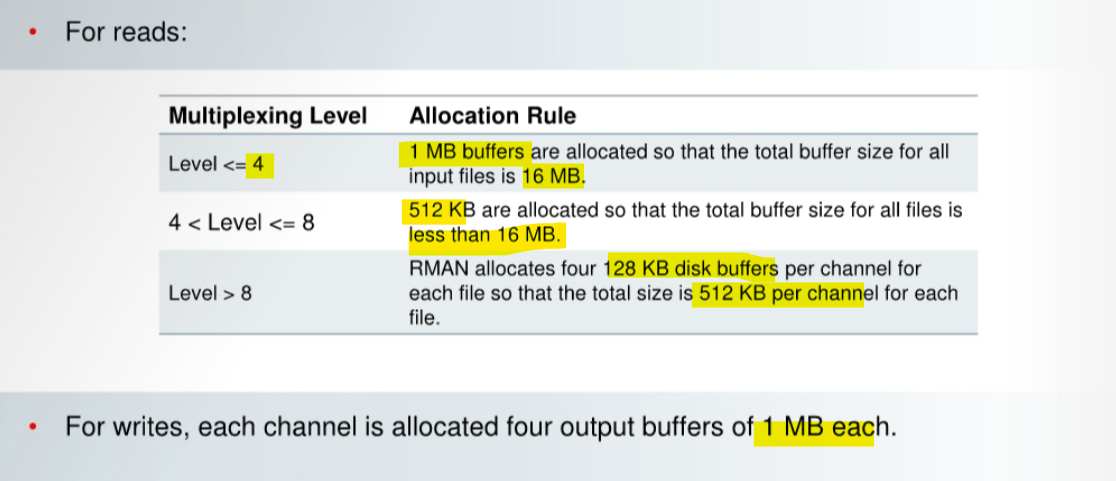
MAXOPENFILESdetermines the number and size of input buffers.- All buffers allocated from
PGA, unless disk or tape I/O slaves, are enabled.
- All buffers allocated from