Note_Tech
All technological notes.
Project maintained by simonangel-fong Hosted on GitHub Pages — Theme by mattgraham
DBA2 - Backup-Based Duplicate Database
- DBA2 - Backup-Based Duplicate Database
- Backup-Based Duplicate Database Overview
- Duplicating Selected PDBs in a CDB
- Lab: Duplicating a Database
- Lab: Duplicating a PDB into an Existing CDB
Backup-Based Duplicate Database Overview
- basic steps:
- Create an Oracle
password filefor theauxiliary instance. - Establish Oracle Net connectivity to the
auxiliary instance. - Create an
initialization parameter filefor theauxiliary instance. - Start the
auxiliary instanceinNOMOUNTmode. - Mount or open the
target database. - Ensure that
backupsandarchived redo log filesare available. - Allocate
auxiliary channelsif needed. - Execute the
DUPLICATEcommand.
- Create an Oracle
Creating an Initialization Parameter File for the Auxiliary Instance
- must create a
text initialization parameter filefor theauxiliary instance. -
The
text initialization parameter filemust reside on the same host as the RMAN client that you use to execute the DUPLICATE command. -
Specify parameters as follows:
-
DB_NAME(required):- If the
target databaseand theduplicate databaseare in the sameOracle home, you must setDBE_NAMEto a different name. - If they are in different
Oracle homes, you must ensure that the name of the duplicate database differs from the other names in itsOracle home. - Be sure to use the same database name that you set for this parameter when you execute the
DUPLICATEcommand.
- If the
-
CONTROL_FILES- required when you are not using the
SET NEWNAMEoption and Oracle Managed Files (OMF).
- required when you are not using the
-
- Be sure to verify the settings of all initialization parameters that specify path names.
- Verify that all specified paths are accessible on the
duplicate database host.
Specifying New Names for Your Destination
- Available techniques to specify new names for
data files:SET NEWNAMEcommand:- Include the
SET NEWNAME FOR DATAFILEcommand within a RUN block to specify new names for thedata files.
- Include the
CONFIGURE AUXNAMEcommand (deprecated for recovery set data files)- Specify the
DB_FILE NAME CONVERTparameter with theDUPLICATEcommand.
Using the SET NEWNAME Clauses
-
SET NEWNAMEclauses:- specify a default name format for all files in a
databaseor in a namedtablespace. - The default name is used for
DUPLICATE,RESTORE, andSWITCHcommands in the RUN block. - to set file names with a single command rather than setting each file name individually.
- specify a default name format for all files in a
-
The order of precedence for the
SET NEWNAMEcommand is as follows:SET NEWNAME FOR DATAFILEandSET NEWNAME FOR TEMPFILESET NEWNAME FOR TABLESPACESET NEWNAME FOR DATABASE
-
Example:
RUN {
    SET NEWNAME FOR DATABASE TO '/uOl/app/oracle/oradata/dupldb/%b';
    DUPLICATE TARGET DATABASE TO dupldb
    LOGFILE
    GROUP 1 ('/u0l/app/oracle/oradata/dupldb/redo0Ola.log', '/u0l/app/oracle/oradata/dupldb/redo0lb.log') SIZE 50M REUSE,
    GROUP 2 ('/u0l/app/oracle/oradata/dupldb/redo02a.log', '/u0l/app/oracle/oradata/dupldb/redo02b.log') SIZE 50M REUSE,
    GROUP 3 ('/u0l/app/oracle/oradata/dupldb/redo03a.log"', '/u0l/app/oracle/oradata/dupldb/redo03b.log') SIZE 50M REUSE;
}
Substitution Variables for SET NEWNAME
| Syntax Element | Description |
|---|---|
%b |
Specifies the file name without the directory path *NEW* |
%f |
Specifies the absolute file number of the data file for which the new name is generated |
%I |
Specifies the DBID |
%N |
Specifies the tablespace name |
%U |
Specifies a system-generated file name of the format: data-D-%d_id-%I_TS-%N_FNO-%f |
- To avoid possible name collisions when restoring to another location, use the
substitution variablesof theSET NEWNAMEcommand.- Specify at least one of the following substitution variables:
%b,%f, and$U. %Iand%Nare optional variables.
- Specify at least one of the following substitution variables:
-- The example shows the SET NEWNAME FOR TABLESPACE command to set default names with a substitution variable, together with explicit SET NEWNAME clauses.
RUN
{
    SET NEWNAME FOR DATAFILE 1 TO '/oradatal/system0l.dbf';
    SET NEWNAME FOR DATAFILE 2 TO '/oradata2/sysaux0l.dbf';
    SET NEWNAME FOR DATAFILE 3 TO '/oradata3/undotbs0l.dbf';
    SET NEWNAME FOR DATAFILE 4 TO '/oradatad/usersOl.dbf';
    SET NEWNAME FOR TABLESPACE example TO '/oradata5/%b'; --

    DUPLICATE TARGET DATABASE TO dupldb;
  }
Specifying Parameters for File Naming
-
Alternatively, specify the following parameters to explicitly control the naming of the files of your auxiliary database:
CONTROL_FILESDB_FILE_NAME_CONVERTLOG_FILE_NAME_CONVERT
- RMAN generates names for the required
database fileswhen you execute theDUPLICATEcommand. -
You can control the naming of the files by specifying the following
initialization parametersin theauxiliary instanceinitialization parameter file:-
CONTROL_FILES:- Specify the names of the
control filesin this parameter. - If you do not set the names via this parameter, the Oracle server creates an Oracle-managed
control filein a defaultcontrol destination. - Refer to the SQL
CREATE CONTROLFILEcommand in the SQL Reference manual for specific information.
- Specify the names of the
-
DB_FILE_NAME_CONVERT:- Specify the names of
data filesfor theauxiliary database. - It has the format
DB_FILE_NAME_CONVERT='stringl','string2',string1: the pattern of thetarget databasefile namestring2: the pattern of theauxiliary databasefile name.
- can also specify the
DB_FILE_NAME_CONVERTparameter as an option to theDUPLICATE DATABASEcommand.
- Specify the names of
-
LOG_FILE_NAME_CONVERT:- Specify the names of the
redo log filesfor theauxiliary database. - It has the format
LOG_FILE_NAME_CONVERT='stringl','string2',string1: the pattern of thetarget databasefile namestring2: the pattern of theauxiliary databasefile name.
- You can also use the
LOGFILEclause of theDUPLICATE DATABASEcommand to specifyredo log filenames.
- Specify the names of the
-
- Alternatively using the
initialization parametersto control the naming of the files, you can use the following techniques to rename theredo log files:- Use the
LOGFILEclause of theDUPLICATEcommand. - Set the Oracle Managed Files
initialization parameters:DB_CREATE_FILE_DEST,DB_CREATE_ONLINE_DEST_n,DB_RECOVERY_FILE_DEST.
- Use the
CONTROL_FILES='/u0l/app/oracle/oradata/aux/control0l.ctl"', '/u0l/app/oracle/oradata/aux/control02.ctl', '/u0l/app/oracle/oradata/aux/control03.ctl'

DB_FILE NAME CONVERT='/u0l/app/oracle/oradata/orcl','/u0l/app/oracle/oradata/aux'

LOG_FILE_NAME CONVERT='/u0l/app/oracle/oradata/orcl','/u0l/app/oracle/oradata/aux'
Starting the Instance in NOMOUNT Mode
- After you have created the
text initialization parameter file, invoke SQL*Plus to start theauxiliary instanceinNOMOUNTmode. -
RMAN creates a default
server parameter filefor theauxiliary instanceif the following conditions are true:- Duplication does not involve a
standby database. Server parameter filesare not being duplicated.- The
auxiliary instancewas not started with aserver parameter file.
- Duplication does not involve a
- If these conditions are not met, create a
server parameter file (SPFILE)from yourtext initialization parameter file. - You can execute
CREATE SPFILEbefore or after you have started the instance.
-- start up nomount
startup nomount pfile='$HOME/auxinstance/initAUX.ora'

create spfile from pfile='$HOME/auxinstance/initAUX.ora';
Ensuring That Backups and Archived Redo Log Files Are Available
- Backups of all target database data files must be accessible on the
duplicate host.- The backup copies must be available on local storage or on a networked storage solution such as a
network file system (NFS)mounted file system or astorage area network (SAN) LUN.
- The backup copies must be available on local storage or on a networked storage solution such as a
- Backups can be a combination of
full and incremental backupsduring the duplication process. Archived redo log filesneeded to recover the duplicate database to the desired point in time must be accessible on theduplicate host.Archived redo log filescan be:- Backups on a media manager
- Image copies
- Actual archived redo log files
- The backups or copies can be transferred to the
local diskof theduplicate databasenode or mounted across a network by some means such asnetwork file system (NFS).要么传输到本地或 mount
Allocating Auxiliary Channels
-
Auxiliary channels:- specify a connection between
RMANand anauxiliary database instance.
- specify a connection between
-
If automatic channels are not configured, can manually allocate auxiliary channels:
- Start RMAN with a connection to the
target database instance,the auxiliary instance, andrecovery catalogif applicable. - Allocate at least one
auxiliary channelwithin the RUN block.
- Start RMAN with a connection to the
- The channel type specified on the
ALLOCATE AUXILIARY CHANNELcommand must match the media where the backups of the target database are located.备份能被渠道接触- If the backups reside on disk, you can allocate more than one channel to reduce the time it takes for the duplication process.
- For tape backups, you can specify the number of channels that correspond to the number of devices available.
- The
auxiliary instancemust be started with theNOMOUNToption, and thetarget databasemust be mounted or open.
rman target sys@trgt auxiliary sys@auxdb
RUN
{
    -- multiple channel
    ALLOCATE AUXILIARY CHANNEL auxl DEVICE TYPE DISK;
    ALLOCATE AUXILIARY CHANNEL aux2 DEVICE TYPE DISK;
    DUPLICATE TARGET DATABASE to auxdb;
    -- ...
}
RMAN Duplication Operation
-
When you execute the
DUPLICATEcommand, RMAN performs the operations:- 1A. RMAN creates a default
server parameter filefor theauxiliary instanceif the following conditions are true:- Duplication does not involve a standby database.
Server parameter files are not being duplicated.- The
auxiliary instancewas not started with aserver parameter file.
- 1B. RMAN restores from backup
- for the standby database
- for backup-based duplication without
target connection.
-
- RMAN mounts the restored or the copied backup
control filefrom the active database.
- RMAN mounts the restored or the copied backup
-
- For backup-based duplication:
- RMAN uses the RMAN repository to select the backups for restoring the
data filesto theauxiliary instance.
- RMAN uses the RMAN repository to select the backups for restoring the
- For backup-based duplication:
-
- RMAN restores and copies the duplicate
data files.
- RMAN restores and copies the duplicate
-
- RMAN recovers the
data fileswithincremental backupsandarchived redo log filesto a noncurrent point in time.- RMAN must perform database point-in-time recovery, even when no explicit point in time is provided for duplication.
- because the
online redo log filesin thesource databaseare not backed up and cannot be applied to the duplicate database.
- because the
- The farthest point of recovery of the duplicate database is the most recent
redo log filearchived by the source database. 最近的恢复点是最新近的 redo log
- RMAN must perform database point-in-time recovery, even when no explicit point in time is provided for duplication.
- RMAN recovers the
-
- RMAN shuts down and restarts the
auxiliary instanceinNOMOUNTmode.
- RMAN shuts down and restarts the
-
- RMAN creates a new
control file, which then creates and stores the new,unique database identifier DBIDin the data files of the duplicated database.
- RMAN creates a new
-
- RMAN opens the
duplicate databasewith theRESETLOGSoption.
- RMAN opens the
-
- RMAN creates the
online redo log filesfor the duplicate database.
- RMAN creates the
- 1A. RMAN creates a default
-
Note: If the
DUPLICATE DATABASEcommand fails, you can re-execute theDUPLICATE DATABASEcommand and the duplication process attempts to resume from the point of failure. 如果失败, 可以重新执行.将从失败点开始.
Specifying Options for the DUPLICATE Command
| Option | Purpose |
|---|---|
SKIP READONLY |
Excludes read-only tablespaces |
SKIP TABLESPACE |
Excludes named tablespaces |
TABLESPACE |
Includes named tablespaces |
NOFILENAMECHECK |
Prevents checking of file names |
OPEN RESTRICTED |
Enables RESTRICTED SESSION automatically |
NOOPEN |
Leaves duplicate database in MOUNT mode |
NOREDO |
Signals RMAN that the application of redo logs should be suppressed during recovery |
UNDO TABLESPACE |
Must be specified when target database is not open and there is no recovery catalog connection |
-
SKIP TABLESPACE:- cannot exclude the
SYSTEMtablespace or tablespaces containing undo or rollback segments.
- cannot exclude the
-
NOFILENAMECHECK:- Use to prevent RMAN from checking whether
target databasedata files with the same name asduplicate databasedata files are in use. - You must specify this option when the
target databaseandduplicate databasedata files and redo log files use the same names. - You would typically use this when you create a duplicate database on a host that has the same disk configuration, directory structure, and file names as the
target databasehost.- If you do not specify
NOFILENAMECHECKin this situation, RMAN returns an error.
- If you do not specify
- Use to prevent RMAN from checking whether
-
NOOPEN:- Use to finish with the duplicate database in
MOUNTmode. - Use this option before:
- Modifying
block change tracking - Configuring
fast incremental backupsorflashback databasesettings - Moving the location of the database (for example, to ASM)
- Upgrading a database
- Modifying
- Use to finish with the duplicate database in
-
NOREDO:- used to signal RMAN that
redo logsshould not be applied during the recovery phase of the duplication operation. - This option should be specified when the database was in
NOARCHIVELOGmode at the time of the backup or when the archivedredo log filesare not available for use during the duplication operation. - This option is appropriate if a database that is currently in
ARCHIVELOGmode is being duplicated to a point in time when it was inNOARCHIVELOGmode. - If you are planning a targetless
DUPLICATEoperation and the database is inNOARCHIVELOGmode, you must use theNOREDOoption to inform RMAN of the database mode.- Without a connection to the target database, RMAN cannot determine the mode.
- used to signal RMAN that
-
UNDO TABLESPACE:- RMAN checks that there are no objects belonging to the
sysuser in any of the duplicated tablespaces during nonwhole database duplication. - The
SYSTEM,SYSAUX, andundo segment tablespacesare excluded from this check. - However, if the
target databaseis not open and arecovery catalogis not being used during the duplication, RMAN cannot obtain theundo tablespacenames.- So you must use the
UNDO TABLESPACEoption to provide the names of undo segment tablespaces.
- So you must use the
- RMAN checks that there are no objects belonging to the
Duplicating Selected PDBs in a CDB
-
You must be logged in to the
CDB rootas a user who is granted theSYSDBAorSYSBACKUProle. - RMAN enables you to duplicate
multitenant container databasesincluding all or individualPDBsby using the DUPLICATE command. - To duplicate PDBs, you must create the
auxiliary instanceas aCDB.- start the instance with the
ENABLE_PLUGGABLE_DATABASE=TRUEin theinitialization parameter file. - When you duplicate one or more
PDBs, RMAN also duplicates theCDB root (CDESR0OOT)and thePDB seed (pDB$ SEED). - The resulting duplicate database is a fully new, functional
CDBthat contains theCDB root, theCDB seed, and the duplicatedPDBs. 会复制 CDB+seed+pdb
- start the instance with the
-- duplicate a single PDB
DUPLICATE DATABASE TO cdbl
PLUGGABLE DATABASE pdbl;

-- duplicate a set of PDBs
DUPLICATE DATABASE TO cdbl
PLUGGABLE DATABASE pdbl, pdb3;

-- duplicate all the databases in the CDB, except a PDB
DUPLICATE DATABASE TO cdbl
SKIP PLUGGABLE DATABASE pdb3;

-- duplicate a PDB and tablespaces of other PDBs
DUPLICATE DATABASE TO cdbl
PLUGGABLE DATABASE pdbl TABLESPACE pdb2:users;
Cloning an Active PDB into an Existing CDB
-
Duplicate a PDB or PDB tablespaces in active mode to an existing opened CDB.
- Clone only one
PDBat a time. - Set the
COMPATIBLEinitialization parameter to18.1or higher. - Set the
destination CDBinREAD WRITEmode. - Set the
REMOTE_RECOVERY_FILE_DESTinitialization parameter in thedestination CDBto the location where to restore foreignarchive log files.
- Clone only one
- An active
PDBcan be duplicated directly into an openCDB. -
The passwords for
targetandauxiliaryconnections must be the same when using active duplicate. -
RMAN should be connected to the
CDB rootof thetargetandauxiliary instances. - Limitations:
Non-CDBtoPDBduplication is not supported.- Encryption is not supported for PDB cloning.
SPFILE,NO STANDBY,FARSYNC STANDBY, andLOG_FILE_NAME_CONVERTkeywords are not supported.
NORESUME,DB_FILE_NAME_CONVERT,SECTION SIZE, andUSING COMPRESSED BACKUPSETkeywords are supported.
Example: Duplicating PDB1 from CDB1 to CDB2 as PDB1

- Set the
REMOTE_RECOVERY_FILE_DESTinitialization parameter inCDB2.
ALTER SYSTEM
SET REMOTE_RECOVERY_FILE_DEST='/dir_to_restore_archive log files';
- Connect to the source (
TARGETfor DUPLICATE command): CDB1
CONNECT TARGET "sys@cdbl AS SYSDBA"
- Connect to the existing CDB2 that acts as the
auxiliary instance- CDB2 needs to be opened in
read/writemode.
- CDB2 needs to be opened in
CONNECT AUXILIARY "sys@cdb2 AS SYSDBA"
- Start the duplication.
- the source PDB1 is opened.
DUPLICATE PLUGGABLE DATABASE pdbl TO cdb2 FROM ACTIVE DATABASE;
Example: Duplicating PDB1 from CDB1 to CDB2 as PDB2
- Set the
REMOTE_RECOVERY_FILE_DESTinitialization parameter in CDB2.
ALTER SYSTEM SET REMOTE_RECOVERY_ FILE DEST='/dir_to_restore_archive log files';
- Connect to the source (
TARGETfor DUPLICATE command): CDB1
CONNECT TARGET "sys@cdb1 AS SYSDBA"
- Connect to the existing CDR2 that acts as the
auxiliary instance:- CDB2 needs to be opened in
read/writemode.
- CDB2 needs to be opened in
CONNECT AUXILIARY "sys@cdb2 AS SYSDBA"
- Start the duplication.
- the source PDB1 is opened.
DUPLICATE PLUGGABLE DATABASE pdbl AS pdb2 TO cdb2 FROM ACTIVE DATABASE;
Lab: Duplicating a Database
- Goal:
- to duplicate an active database.
ORCLCDE: the active databaseDBTEST: the aulilary database- Steps:
- Prepare the destination for the future
DETESTdatabase- password file
- a minimal initialization parameter file (
initdbtest.ora).
- Confirm source database configuration settings.
- Duplicate the ORCLCDE database by using RMAN.
- Test access to the cloned database.
- Prepare the destination for the future
Configuration for Duplicated Database
- Create new directories for the dbtest database.
-- create dir for df of dbtest database
mkdir -p /u01/app/oracle/oradata/dbtest

-- create dir for fra of dbtest database
mkdir -p /u01/app/oracle/dbtest_fra

-- create dir for cdb in dbtest'fra
mkdir -p /u01/app/oracle/dbtest_fra/orclcdb
- Prepare Oracle Net connectivity by using the Oracle Net Manager utility.
- Add a service named dbtest to the tnsnames.ora file.
# Launch the Oracle Net Manager utility.
netmgr
- Add Service Naming
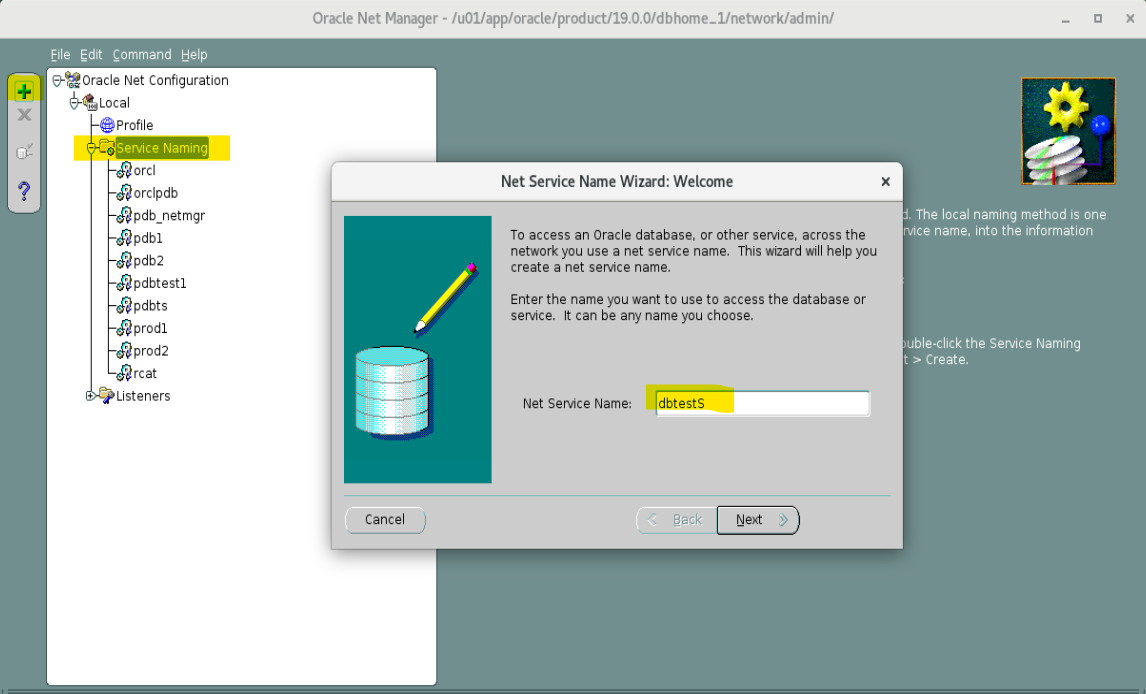
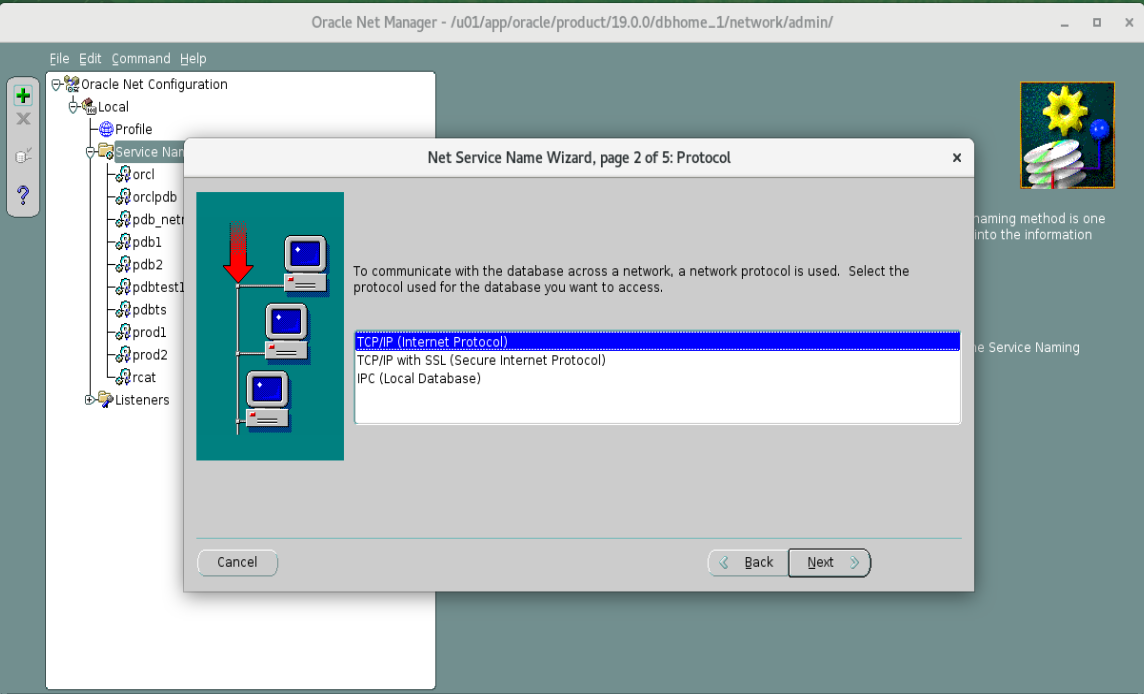
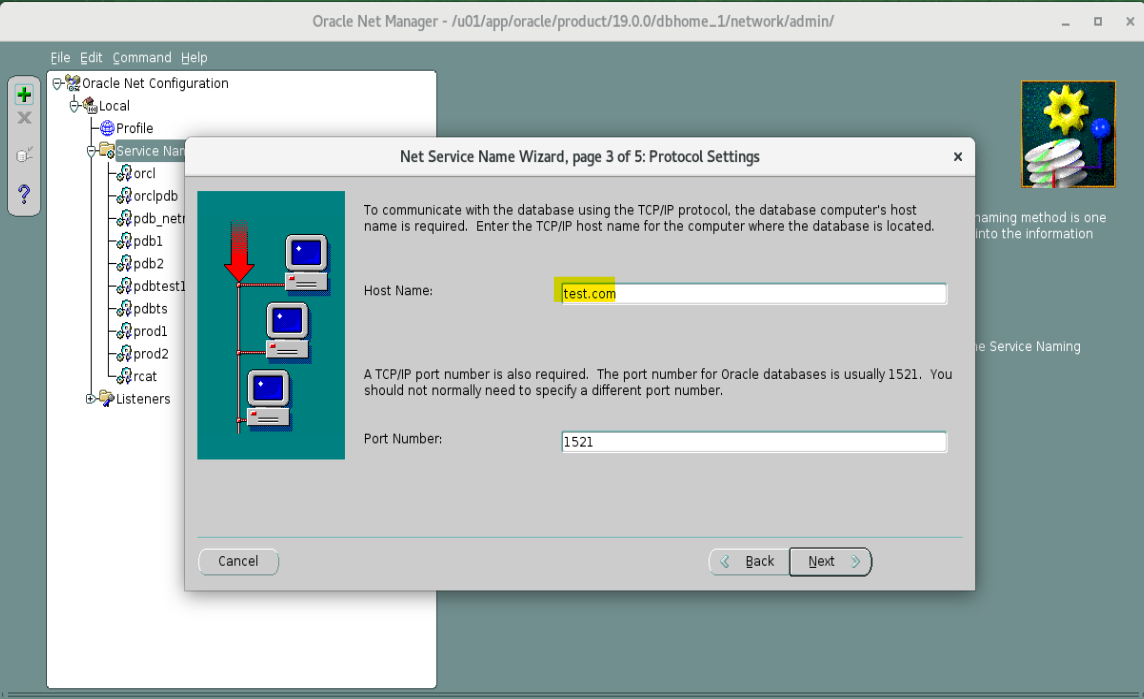
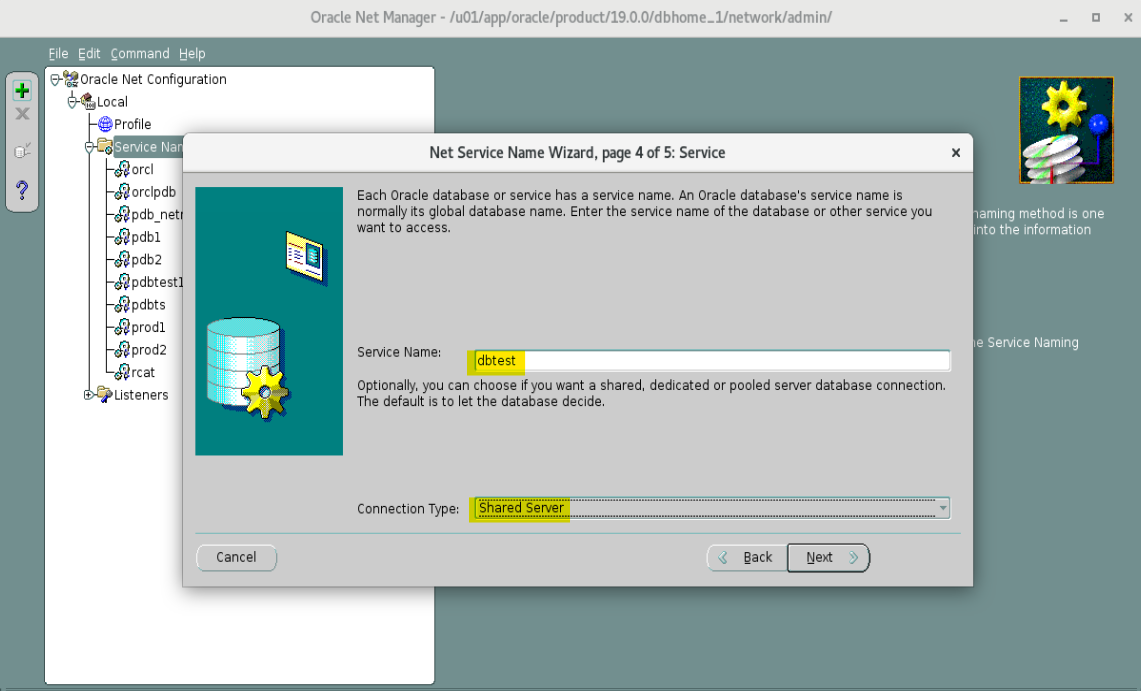
- Add Listener
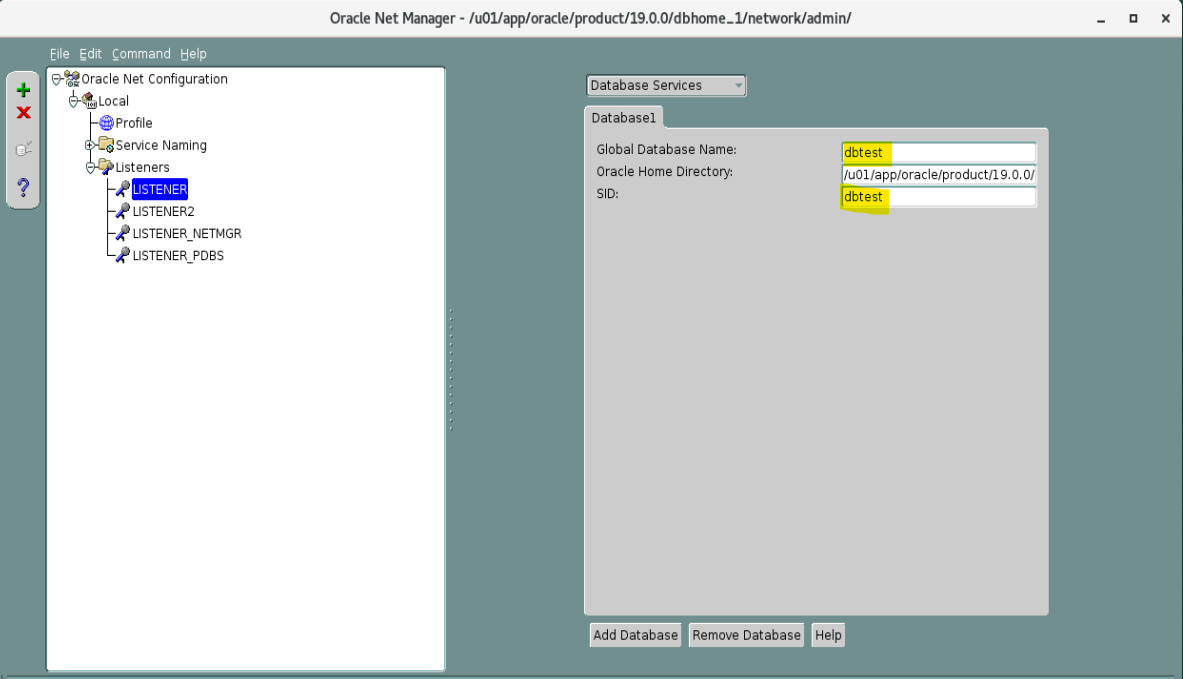
- Confirm in tnsnames.ora file.
cat $ORACLE_HOME/network/admin/tnsnames.ora
- Reload listener
# reload listener
lsnrctl reload

# check listener status
lsnrctl status
- set environment variables to dbtest
. oraenv

# ORACLE_SID = [orclcdb] ? dbtest
# ORACLE HOME = [/home/oracle] ? /u01/app/oracle/product/19.0.0/dbhome_1
- Create password file
orapwd file=$ORACLE_HOME/dbs/orapwdbtest entries=15
# welcome!23

ls $ORACLE_HOME/dbs/*pwdbtest*
- Create a minimal initialization parameter file
-- create spfile
vi $ORACLE_HOME/dbs/initdbtest.ora
# db_name=dbtest
# remote_login_passwordfile=exclusive

-- confirm
cat $ORACLE_HOME/dbs/initdbtest.ora
- start dbtest instance in
MOUNTmode with pfile
sqlplus / as sysdba

startup NOMOUNT pfile='/u01/app/oracle/product/19.0.0/dbhome_1/dbs/initdbtest.ora'

exit

-- confirm: show how many instance is running by smon
pgrep -lfa smon
- Confirm the ORCLCDB source database configuration settings
. oraenv
-- ORACLE_SID = [dbtest] ? orcl

sqlplus / as sysdba

-- confirm compatible
show parameter compatible

-- Confirm your backup location and size.
show parameter db_recover

-- confirm archive log mode
ARCHIVE LOG LIST
- Use RMAN to duplicate the ORCLCDE database as the DBTEST database.
rman target sys@orcl auxiliary sys@dbtest
- Duplicate the
ORCLdatabase as theDETESTdatabase
DUPLICATE TARGET DATABASE TO dbtest FROM ACTIVE DATABASE
SPFILE PARAMETER_VALUE_CONVERT
'/u01/app/oracle/oradata/ORCL', '/u01/app/oracle/oradata/dbtest',
'/u01/app/oracle/fast_recovery_area','/u01/app/oracle/dbtest_fra',
'ORCL', 'DBTEST'
SET DB_RECOVERY_FILE_DEST_SIZE='10G'
SET DB_FILE_NAME_CONVERT='ORCL', 'DBTEST';
- Confirm the information of dbtest
. oraenv

# ORACLE_SID = [orclcdb] ? dbtest
# ORACLE HOME = [/home/oracle] ? /u01/app/oracle/product/19.0.0/dbhome_1

sqlplus / as sysdba

-- get cdb
SELECT NAME, CDB, CON_ID FROM V$DATABASE;

-- get db and mode
select dbid, name, created, open_mode from v$database;

-- list pdb
show pdbs
Lab: Duplicating a PDB into an Existing CDB
- Confirm table data in a pdb
. oraenv
-- ORACLE_SID = [dbtest] ? orcl
sqlplus hr@ORCLPDB

SELECT * FROM regions;

exit
- Configuration of aulilary database
# Create dir to Set the initialization parameter `REMOTE_RECOVERY_FILE_DEST` to restore foreign archive logs.
mkdir -p /home/oracle/labs/fra

# Create the directory for the new PDB data files.
mkdir -p /u01/app/oracle/oradata/DBTEST/dbtestpdb1
- Create dir to Set the initialization parameter
REMOTE_RECOVERY_FILE_DEST
. oraenv
-- ORACLE_SID = [dbtest] ? dbtest
-- ORACLE HOME = [/home/oracle] ? /u01/app/oracle/product/19.0.0/dbhome_1

sqlplus / AS SYSDBA

ALTER SYSTEM SET
REMOTE_RECOVERY_FILE_DEST='/home/oracle/labs/fra'
SCOPE=BOTH;

EXIT
- Duplicate a pdb as a new pdb in DBTEST
rman

-- connect target
CONNECT TARGET sys@ORCL

-- Connect to the auxiliary instance DBTEST into which you will duplicate ORCLPDE1 as DBTESTPDBI.
CONNECT AUXILIARY sys@DBTEST

-- duplicate a pdb
DUPLICATE PLUGGABLE DATABASE orclpdb AS dbtestpdb1
FROM ACTIVE DATABASE
DB_FILE_NAME_CONVERT
('/u01/app/oracle/oradata/ORCL/orclpdb/', '/u01/app/oracle/oradata/DBTEST/dbtestpdb1/');

exit
- Confirm in auxiliary database
sqlplus / AS SYSDBA

SHOW PDBS

ALTER SESSION SET CONTAINER=DBTESTPDB1;
SELECT * FROM hr.regions;

EXIT
Clean up
- Remove backup and database
rman TARGET "'sys@dbtest AS sysdba'"

STARTUP FORCE MOUNT
ALTER SYSTEM ENABLE RESTRICTED SESSION;
DROP DATABASE INCLUDING BACKUPS NOPROMPT;
- Remove listener
vi /u01/app/oracle/product/19.0.0/dbhome_1/network/admin/listener.ora

vi /u01/app/oracle/product/19.0.0/dbhome_1/network/admin/tnsnames.ora

lsnrctl reload
lsnrctl status
- Remove dir
rm -rf /home/oracle/labs/fra
rm -rf /u01/app/oracle/oradata/dbtest
rm -rf /u01/app/oracle/dbtest_fra