Note_Tech
All technological notes.
Project maintained by simonangel-fong Hosted on GitHub Pages — Theme by mattgraham
Flashback - Flashback Database
- Flashback -
Flashback Database
Flashback Database
-
Flashback Database:- a unique database
point-in-time recoverycapability, which enables the database to be quickly “rewound” to a previous point in time. - Flashback Database restores the database more quickly than traditional restore and recovery methods, because only the affected data blocks are restored and recovered.
- a unique database
-
Features:
- Is a fast point-in-time recovery strategy
- Eliminates the need to restore a whole database backup
- Provides continuous data protection for the database
- Optimized: Before-change block logging
- Restores just changed blocks
- Replays log to restore the database to the desired time
- Provides fast recovery: Minutes, not hours
- Requires a single command to restore:
- e.g.,
FLASHBACK DATABASE TO '2:05 PM'
- e.g.,
-
flashback logs- used by
Flashback Databaseto record old block versions.
- used by
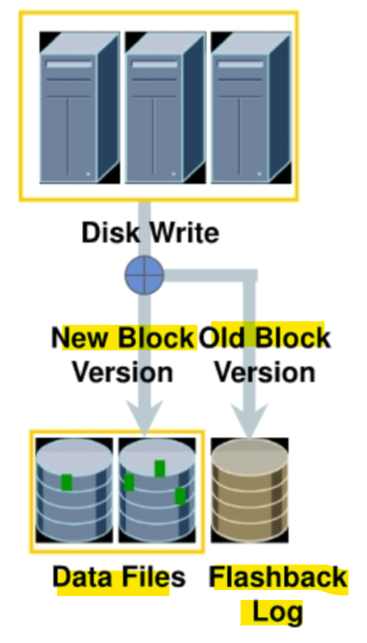
- When writes are issued to disk and Flashback Database is enabled:
- old block version is written to the flashback log
- the new block version is written to the data file
- When the
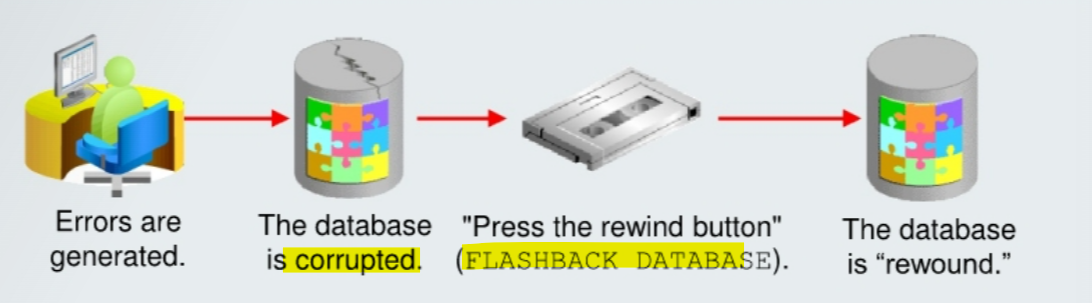
FLASHBACK DATABASEcommand is issued, only the changed blocks are retrieved from theflashback logs.- The blocks are then recovered with the appropriate
archived logsto the required point in time.
- The blocks are then recovered with the appropriate
-
With Flashback Database, you can quickly bring your database to an earlier point in time by undoing all the changes that have taken place since that time.
- This operation is fast because you do not need to restore backups.
- You can use this feature to undo changes that have resulted in logical data corruptions.可以解决逻辑错误
- When you use Flashback Database, Oracle Database server uses past block images to back out changes to the database.
- During normal database operation, Oracle Database server occasionally logs these block images in
flashback logs.
- During normal database operation, Oracle Database server occasionally logs these block images in
Flashback logsare written sequentially and are not archived.-
Oracle Database server automatically creates, deletes, and resizes
flashback logsin thefast recovery area.- You need to be aware of flashback logs only for monitoring performance and deciding how much disk space to allocate for them in the fast recovery area.需要注意性能和磁碟空间
- The time it takes to rewind a database with Flashback Database is proportional to how far back in time you need to go and the amount of database activity after the target time.
- The time it would take to restore and recover the whole database could be much longer.
- The
before imagesin theflashback logsare used only to restore the database to a point in the past, and forward recovery is used to bring the database to a consistent state at some time in the past.
Architecture
-
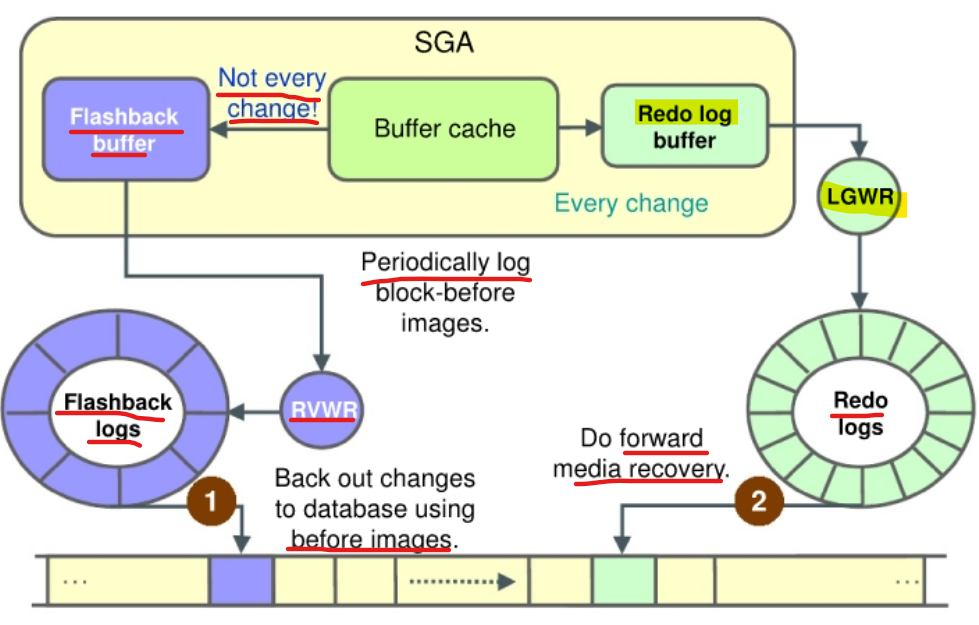
When you enable
Flashback Database, theRVWR (Flashback Writer)background process is started.- This background process sequentially writes
Flashback Databasedata from theflashback bufferto theFlashback Database logs, which are circularly reused. - Subsequently, when a
FLASHBACK DATABASEcommand is issued, theflashback logsare used to restore to the blocks’before images, and thenredo datais used to roll forward to the desired flashback time. - 左边是 RVWR, 周期性生成 before image; 右边的 redo, 平时与一般 redo 一样.
- 恢复时, 先恢复 before image, 然后用 redo 前滚
- 与 restore+recovery 类似, 但由于 before image 是周期性形成,而 redo 中的数据是新近的数据, 所以 flashback 恢复快
- 但会有开销问题, 因为要周期性生成. 而开销只与写有关, 写越多, 开销越大.
- This background process sequentially writes
-
The overhead of enabling Flashback Database depends on the read/write mix of the database workload.
- Because queries do not need to log any flashback data, the more write-intensive the workload, the higher the overhead of turning on Flashback Database. 查询无需记录到闪回; 写越多, 开销越大
Flashback CDB and PDB
CDB:
- cannot flash back the
CDB rootwithout flashing back the entireCDB.CDB 整体性
PDB:
- can flash back a
PDB. - All
datafilesbelonging to a PDB can be flashed back and recovered in place. - All
undoapplication that is needed to make a PDB consistent after flashback is applied in place. - After a
PDBflashback operation, the old backup of the PDB is still valid. 闪回后,旧备份还可用.
CONN sys@pdbl
-- close pdb
ALTER PLUGGABLE DATABASE CLOSE;
-- flashback pdb to a scn
FLASHBACK PLUGGABLE DATABASE pdbl TO SCN 411010;
-- open pdb resetlogs
ALTER PLUGGABLE DATABASE pdbl OPEN RESETLOGS;
OPEN RESETLOGScreates a new incarnation for thePDB.- The
CDBroot must be opened when the PDBOPEN RESETLOGSis performed, except that recovering a PDB to a point in time does not affect all parts of theCDB. The whole CDB and all other PDBs are opened.- After recovering a PDB to a specified point in time, when you open the PDB by using the RESETLOGS option, a new incarnation of the PDB is created.
-
PDB RESETLOGS 原理:
- The PDB
RESETLOGSoption does not perform aRESETLOGSfor theCDB.独立性- A PDB record in the
control fileis updated.
- A PDB record in the
-
Each
redo logrecord carries thePDB IDin the redo header.头会记录 pdb_ID- This is how recovery knows which redo applies to which PDB.
- Redo logs are shared by all PDBs;
- redo from each PDB is written to a** single set** of redo logs.
- Conceptually, a PDB
OPEN RESETLOGSis similar to a databaseOPEN RESETLOGS.
- This is very useful when a user error has been issued, for example, a DROP USER.
- Instead of restoring and recovering the PDB, flashback to the time before the user error had been issued is easy.基于以上原理, 可以容易恢复用户错误.
- The PDB
-
V$PDB_INCARNATIONview:- displays information about all PDB incarnations.
-
Alternative solution
- In situations where you cannot use the
Flashback Databasefeature, you should use anincomplete recoveryoperation to return the database to a specific time. 如果不能闪回, 则执行 PITR - After the Flashback Database operation is complete, you can open the database in read-only mode to verify that the correct target time or SCN was used.
- If not, you can flash back the database again or perform a recovery to roll forward the database. 如果只读打开后发现不正确, 可以再次闪回或前滚恢复.
- In situations where you cannot use the
-
When the Flashback Database operation completes, open the database:
- In read-only mode, to verify that the correct target time or SCN was used
- With a
RESETLOGSoperation to allow DML
- Cannot Flashback when:
- The
control filehas been restored or re-created. - A
tablespacehas been dropped.- You cannot use
Flashback Databaseto recover adata filethat was dropped during the span of time you are flashing back. - The dropped data file is added to the
control fileand marked offline, but it is not flashed back.
- You cannot use
- A
data filehas been reduced in size. 减少不能
- The
- You can use Flashback Database with
data filesthat you have configured for automatic extension. 自动扩展可以 -
Use the
TO BEFORE RESETLOGSclause to flash back to before the lastRESETLOGSoperation. - The
flashback retention targetis not an absolute guarantee that flashback will be available.- If space is needed for required files in the
fast recovery area,flashback logsmay be deleted automatically. 如果 fra 空间不足, log 可能被删除
- If space is needed for required files in the
Monitoring Flashback Database Information
- Must monitor space usage of the
fast recovery areato know how well you are meeting yourretention target. FRA 的空间大小直接影响 retention target
-
V$FLASHBACK_DATABASE_LOGview-
monitor the Flashback Database retention target:
-
ESTIMATED_FLASHBACK_SIZE:- uses previously logged flashback data to provide an estimate of how much disk space is needed in the
fast recovery areafor flashback logs to meet the current flashback retention target. -
The estimate is based on the workload since the instance was started or during the most recent time interval equal to the flashback retention target, whichever is shorter.
FLASHBACK_SIZE:- gives you the current size, in bytes, of the flashback data.
- uses previously logged flashback data to provide an estimate of how much disk space is needed in the
-
OLDEST_FLASHBACK_SCNandOLDEST FLASHBACK_TIME:- display the approximate lowest SCN and time to which you can flash back your database.
-
-- View the fast recovery area disk quota:
SELECT estimated_flashback_size, flashback_size
FROM V$FLASHBACK_DATABASE_LOG;

-- Determine the current flashback window:
SELECT oldest _flashback_scn, oldest_flashback_time
FROM V$FLASHBACK DATABASE_LOG;
V$FLASHBACK_DATABASE_STATview- monitor the overhead of logging flashback data in the Flashback Database logs.
- contains 24 hours of information, with each row representing a one-hour time interval.
- You can use this view to determine rate changes in the flashback data generation.
-- Monitor logging in the Flashback Database logs:
SELECT *
FROM V$FLASHBACK DATABASE_STAT;
Example:
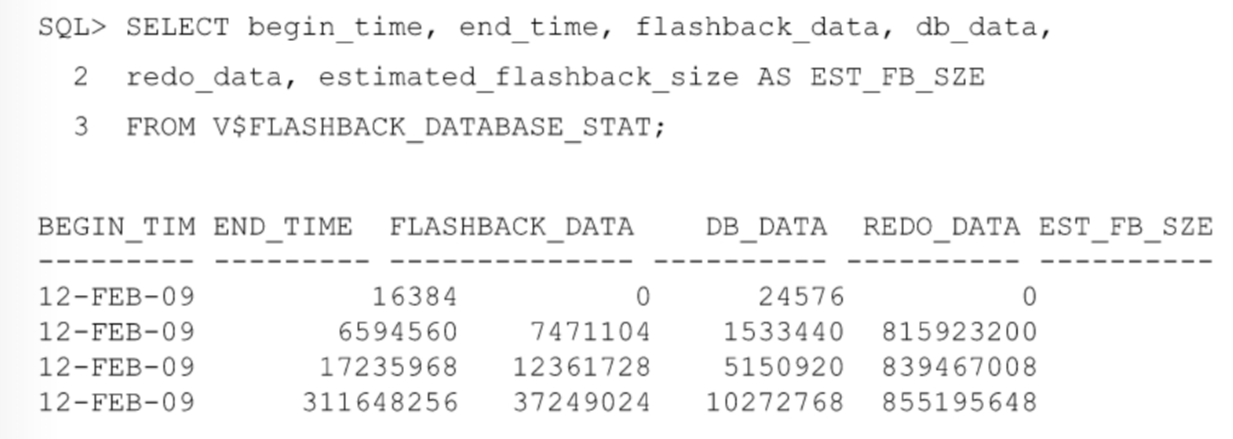
- Based on this information, you may need to adjust the
retention timeor thefast recovery areasize. FLASHBACK_DATAandREDO_DATArepresent the number of bytes of flashback data and redo data written, respectively, during the time intervalDB_DATAgives the number of bytes of data blocks read and written.- This view also contains the estimated flashback space needed for the interval.
V$RECOVERY_FILE_DESTview:- display information regarding the fast recovery area.
| Column | Description |
|---|---|
NAME |
Fast recovery area name, indicating location string |
SPACE_LIMIT |
Disk limit specified in the DB_RECOVERY_FILE_DEST_SIZE parameter |
SPACE_USED |
Space used by fast recovery area files (in bytes) |
SPACE_RECLAIMABLE |
Amount of space that can be reclaimed by deleting obsolete, redundant, and other low-priority files through the space management algorithm |
NUMBER_OF_FILES |
Number of files |
Configuration for Flashback Database
-
Configuaration to enable flashback features for an application:
- Grant
FLASHBACKprivileges.- Grant flashback privileges to users, roles, or applications that need to use flashback features
undosettings:UNDO_TABLESPACE='UNDOTBSL1': Setup undo tbspUNDO_MANAGEMENT='AUTO'UNDO_RETENTION=900: define what is the amount of time to keep data in your undo tablespace- Guaranteeing undo retention
- Grant
-
Have an undo tablespace with enough space to keep the required data for flashback operations.
- The more often users update the data, the more space is required.
-
Undo retention:
-
- For an automatically extensible undo tablespace (default), the Oracle database retains undo data to satisfy at a minimum: 最小保留期由以下两个决定
- the retention periods needed by the longest-running query
- the threshold of
undo retention, specified by theUNDO_RETENTION parameter.
-
-
V$UNDOSTAT.TUNED_UNDORETENTION:- determine the amount of time for which undo is retained for the current undo tablespace.
SELECT TUNED_UNDORETENTION
FROM V$UNDOSTAT
WHERE rownum = 1;
-
UNDO_RETENTIONparameter:- specifies (in seconds) the low threshold value of undo retention.
- Default:
900
show parameter undo_retention
-- NAME           TYPE    VALUE
-- -------------- ------- -----
-- undo_retention integer 14400

ALTER SYSTEM SET UNDO_RETENTION=900 SCOPE=BOTH;
Guaranteed retention
-
Setting the
UNDO_RETENTIONparameter does not guarantee that unexpired undo data is not overwritten.- The default undo behavior is to overwrite committed transactions that have not yet expired rather than to allow an active transaction to fail because of lack of undo space.
- In case of conflict, transactions have precedence over queries.
- This behavior can be changed by
guaranteeing retention.事务优先于查询, 除非保证保留
- This behavior can be changed by
-
guaranteed retention:- ensure that unexpired undo data is not discarded.
undo retentionsettings are enforced even if they cause transactions to fail.- So in case of conflict, queries have precedence over transactions. 结果: 查询优先
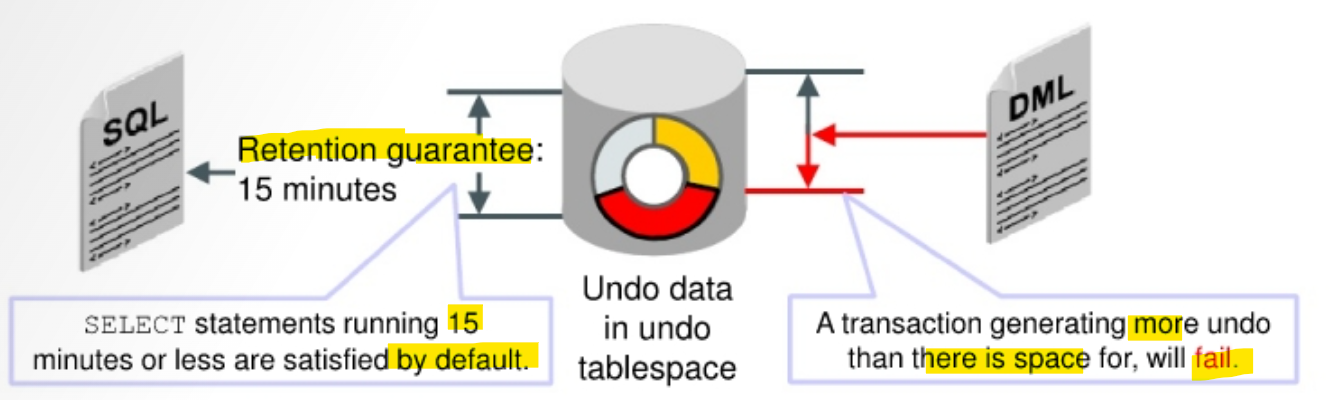
- By configuring
retention guarantee, ongoing operations that need undo space in the segments of the tablespace may fail due to lack of space. -
To satisfy long retention requirements, create a
Temporal History. RETENTION GUARANTEE:- a tablespace attribute rather than an initialization parameter.
-- Enable guaranteed retention
ALTER TABLESPACE undotbsl RETENTION GUARANTEE;

-- Disable guaranteed retention
ALTER TABLESPACE undotbsl RETENTION NOGUARANTEE;
Enabling Flashback Database
-
Flashback DatabaseConfiguration:- Configure the fast recovery area (FRA).
-
Set the retention target with the
DB_FLASHBACK_RETENTION_TARGETinitialization parameter.- can specify an upper limit, in minutes, on how far back you want to be able to flash back the database.
- This parameter is only a target and does not provide any guarantee.
- The
flashback time intervaldepends on how much flashback data has been kept in thefast recovery area.
-- uses 2,880 minutes, which is equivalent to two days. ALTER SYSTEM SET DB_FLASHBACK_RETENTION_TARGET=2880 SCOPE=BOTH; -
Enable Flashback Database
-- enable flashback database
ALTER DATABASE FLASHBACK ON;

-- disable flashback database
ALTER DATABASE FLASHBACK OFF;

-- query whether Flashback Database is enabled
SELECT flashback_on
FROM v$database;
-
FLASHBACK DATABASEcommand:- to execute the Flashback Database operation.
-
RMAN Command:
SEQUENCEandTHREADoption:- to specify a
redo log sequencenumber andthreadas a lower limit. - RMAN selects only files that can be used to flash back to, but not including, the specified sequence number.
- to specify a
-- rman, moun the database
-- to time
FLASHBACK DATABASE TO TIME = "TO_DATE('2009-05-27 16:00:00", 'YYYY-MM-DD HH24:MI:SS')";
-- to scn
FLASHBACK DATABASE TO SCN=23565;
-- to sequence and thread
FLASHBACK DATABASE TO SEQUENCE=223 THREAD=1;
- SQL Command:
-- sql
-- to timestampe
FLASHBACK DATABASE TO TIMESTAMP (SYSDATE-1/24) ;
-- to scn
FLASHBACK DATABASE TO SCN 53943;
--  to restore point
FLASHBACK DATABASE TO RESTORE POINT bd_load;

-- To review changes: Open in read-only mode.
-- To finalize: Open in read/write mode with RESETLOGS.
Guaranteed Restore Points
-
Guaranteed Restore Points:- An aliases for SCNs in recovery operations.
- used to ensure that you can perform a FLASHBACK DATABASE command to that SCN at any time.
-
restore pointsvsguaranteed restore points:- Both alias
- Difference:
guaranteed restore pointsnever age out of thecontrol file不会自动过期guaranteed restore pointsmust be explicitly dropped. 必须显示删除
-
Creating a
guaranteed restorepoint at a particular SCN enforces the requirement强制要求 that you can perform a Flashback Database operation to return your database to its state at that SCN, even ifflashback loggingis not enabled for your database. 即使没有 logging, 都强制要求可以闪回到那个点.- If
flashback loggingis enabled, creating aguaranteed restore pointenforces the retention offlashback logsrequired for Flashback Database back to any point in time after the creation of the earliest guaranteed restore point.可以返回最早返回点之后任意时间点.
- If
- A
guaranteed restore pointcan be used to revert a whole database to a known good state days or weeks ago, as long as there is enough disk space in thefast recovery areato store the needed logs.只要空间足够, 可以长达数周 -
As with normal
restore points,guaranteed restore pointscan be used to specify a point in time forRECOVER DATABASEoperations. 可以用作恢复点 - Limitations that apply to Flashback Database also apply to guaranteed restore points.
- For example, shrinking a data file or dropping a tablespace can prevent flashing back the affected data files to the guaranteed restore point. 闪回的适用性前置与恢复点.
CREATE RESTORE POINT before upgrade
GUARANTEE FLASHBACK DATABASE;
-
Prerequisites to use guaranteed restore points:
- The database must be in
ARCHIVELOGmode. FLASHBACK DATABASErequires the use ofarchived redo logsstarting from the time of the restore point.- A
fast recovery areamust be configured.- because Oracle Database server stores the required logs in the fast recovery area.
- The database must be in
-
When creating the first
guaranteed restore point(or if all previously created guaranteed restore points have been dropped) and Flashback Database is not enabled- the database must be mounted, not open.
Loggingfor Flashback Database andguaranteed restore pointsinvolves capturing images ofdata file blocksbefore changes are applied.- The FLASHBACK DATABASE command can use these images to return the data files to their previous state.
-
The main difference between normal
flashback loggingand logging forguaranteed restore pointsis whether the logs can be deleted in response to space pressure in the fast recovery area. 普通的闪回 logging 会被删除; 保证恢复点的 logging 不会, 即使 fra 空间不够.- This difference affects space usage for logs and database performance.
- If you enable Flashback Database and define one or more
guaranteed restore points, then the database performs normalflashback logging.- In this case, the recovery area retains the
flashback logsrequired to flash back to any arbitrary time between the present and the earliest currently definedguaranteed restore point. Flashback logsare not deleted in response to space pressure if they are required to satisfy the guarantee.
- In this case, the recovery area retains the
PDB Flashback and Clean Restore Point
Normal and Guaranteed Restore Points
-
PDBnormal andguaranteed restore pointsare restore points that pertain to only a specific PDB and are visible within the PDB only. 只作用于 PDB- Normal
PDB restore pointis essentially a bookmark for a past point for that PDB. guaranteed PDB restore pointguarantees a PDB flashback to that restore point.
- Normal
PDB flashbackusesPDB point-in-time recoveryto recover theshared undo.- RMAN automatically restores the
shared undoand certain tablespaces in a clone instance and recovers the data to the same point in time.
Clean Restore Points
-
clean PDB restore point:- can be created after a PDB is closed with no outstanding transactions and ONLY in
shared undomode.- Thus, flashing back a PDB to a
clean restore pointis faster than other types of flashback - because it does not require restoring backups or creating a clone instance.
- e.g., a DBA expecting to roll back an application upgrade should consider creating a clean PDB guaranteed restore point before the application upgrade.
- Thus, flashing back a PDB to a
- can be created after a PDB is closed with no outstanding transactions and ONLY in
-
Benefits:
- Faster than other types of PDB flashback
- No restore of any backup
- No clone instance created
- No need to take a new backup
- Faster than other types of PDB flashback
-
CDB restore point:- A restore point that is created while being connected to the CDB root without specifying the new
FOR PLUGGABLE DATABASEclause.
- A restore point that is created while being connected to the CDB root without specifying the new
-
If the
PDBis the application root of an application container, allrestore pointsare “clean” with local undo- because the availability of local undo means that the effects of active transactions at the time of the restore point can be undone.
-
Caution:
PDB guaranteed restore pointscan potentially result in Oracle running out of space in the FRA. The DBA should remove PDB guaranteed restore points when the PDB flashback operations are completed. 必须在恢复后删除保证点 -
Example:
-- sql
CONNECT / AS SYSDBA
ALTER PLUGGABLE DATABASE pdbl CLOSE;
-- create clean restore point
CREATE CLEAN RESTORE POINT start_stepl
FOR PLUGGABLE DATABASE pdbl
GUARANTEE FLASHBACK DATABASE;

ALTER PLUGGABLE DATABASE pdbl OPEN;
/*
some issues
*/
ALTER PLUGGABLE DATABASE pdbl CLOSE;

-- rman
rman target /
FLASHBACK PLUGGABLE DATABASE pdbl TO RESTORE POINT start_stepl;
ALTER PLUGGABLE DATABASE pdbl OPEN RESETLOGS:
Best Practices
- Tune
fast recovery areastorage.- Use
ASM, configure enough disk spindles, and so forth.
- Use
- Use physical standby database to test flashback logging.
- Use
V$FLASHBACK_DATABASE_LOGto size log space, after running workload that runs longer than the flashback retention period. -
Create
guaranteed restore point (GRP)without enabling flashback logging.- It saves disk space for workloads where the same blocks are repeatedly updated.
- Drop GRP to immediately reclaim space.
-
To achieve good performance for large production databases by using Flashback Database, Oracle recommends the following:
- Use a fast file system for your
fast recovery area, preferably without operating system file caching.- Files that are stored in the
fast recovery area, includingflashback logs, are typically large. - Operating system file caching is typically not effective for these files and may actually add CPU overhead due to reading from and writing to these files.
- Use a file system such as ASM.
- Files that are stored in the
- Configure enough disk spindles 纺锤 for the file system that will hold the fast recovery area.
- Multiple disk spindles may be needed to support the disk throughput required for Oracle Database server to write the flashback logs effectively.
- If the storage system used to hold the
fast recovery areadoes not have nonvolatile RAM, try to configure the file system on top of striped storage volumes with a relatively small stripe size such as 128 K.- This enables each write to the
flashback logsto be spread across multiple spindles, thereby improving performance.
- This enables each write to the
- Set the
LOG_BUFFERinitialization parameter to at least 8 MB.- This ensures that Oracle Database server allocates the maximum amount of memory (typically 16 MB) for writing
flashback database logs.
- This ensures that Oracle Database server allocates the maximum amount of memory (typically 16 MB) for writing
- Use a fast file system for your
-
Flashback retentionshould be set to at least 60 minutes.- Oracle Database server writes a metadata marker into the flashback logs approximately every 30 minutes.
- If the flashback retention is set to less than 60 minutes, a needed marker could be deleted if there is space pressure in the flashback log.
- Oracle Database server writes a metadata marker into the flashback logs approximately every 30 minutes.
- A
restore pointis a user-defined name that is associated with a database point in time.- It is used with Flashback Database, Flashback Table, and RMAN.
- A
guaranteed restore point (GRP)is a special type ofrestore pointthat ensuresflashback logsare kept until the restore point is used or deleted.- When flashback logging is enabled,
flashback logsare generally created in proportion toarchived redo logsgenerated during the same retention period. - When flashback logging is disabled and a
GRPis created, each changed block is logged only once to maintain the GRP. - There is continuous logging of blocks when flashback logging is enabled.
- To save space, you can create a
GRPfor fast recovery of a specific set of transactions such as a batch job and then delete the GRP to reclaim the space.
- When flashback logging is enabled,
Lab: Enabling Flashback Logging
- Query whether flashback logging is enabled
sqlplus / as sysdba

SELECT flashback_on
FROM v$database;
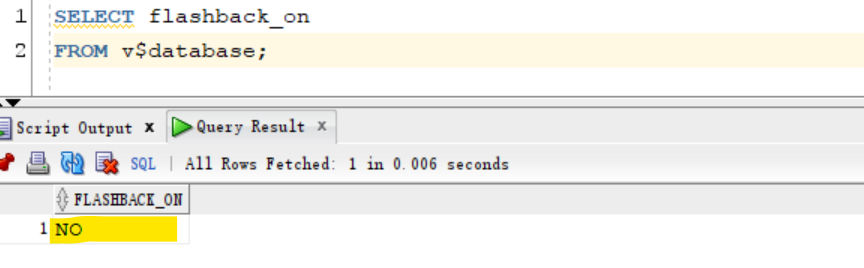
- Enable flashback logging and verify
- files are created in FRA
sqlplus / as sysdba
-- enable flashback
ALTER DATABASE FLASHBACK ON;

-- query
SELECT flashback_on
FROM v$database;
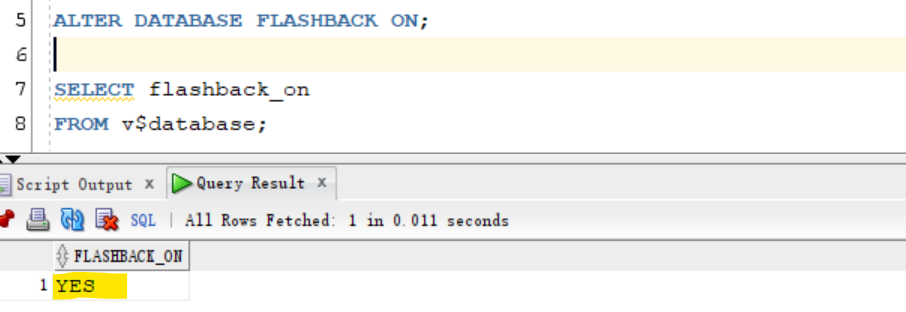
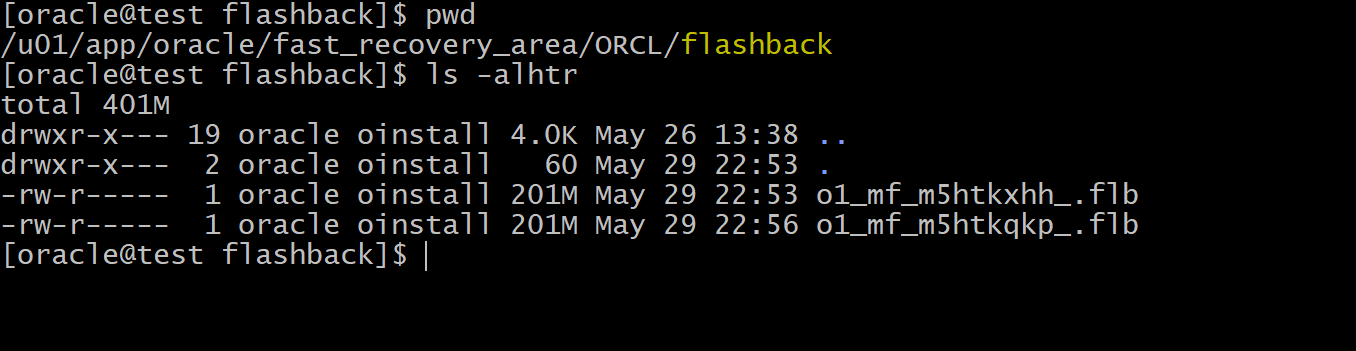
- back up your orclpdb database, remove obsolete backups, and ensure that no failures are listed. Then exit RMAN.
rman target "'/ as sysbackup'"

BACKUP DATABASE PLUS ARCHIVELOG DELETE INPUT;
delete noprompt obsolete;

list failure;
exit
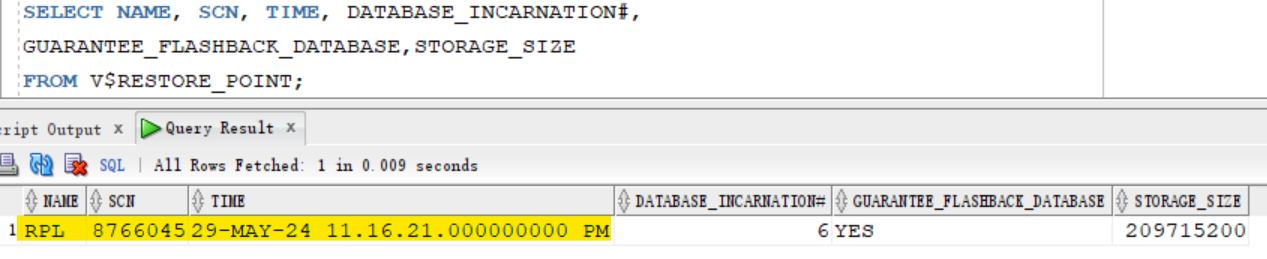
- create a guaranteed restore point
-- create guarenteed restore point
CREATE RESTORE POINT rpl GUARANTEE FLASHBACK DATABASE;

-- confirm
SELECT NAME, SCN, TIME, DATABASE_INCARNATION#,
GUARANTEE_FLASHBACK_DATABASE,STORAGE_SIZE
FROM V$RESTORE_POINT;
Lab: Performing Flashback Database
- perform flash back pluggable database after some incorrect updates to the database.
- Get the current SCN
sqlplus / as sysdba

ALTER SESSION set container=orclpdb;

SELECT current_scn
FROM v$database;
-- 8767254
- Query column before lab
SELECT sum (salary)
FROM hr.employees;

SELECT count (*)
FROM hr.employees
WHERE department_id=90;
- Update tables in the HR schema.
update hr.employees
set department_id = 90
where job_id = 'IT_PROG';
-- 5 rows updated.

update hr.employees e
set salary = least(e.salary,
(select (min_salary + max_salary)/2 * 1.10
from hr.jobs j
where j.job_id = e.job_id))
where job_id not like 'AD_%';
-- 103 rows updated.

COMMIT;

SELECT current_scn
FROM v$database;
-- 8767447
- Query after transactions
SELECT sum(salary)
FROM hr.employees;
-- 679092.4

SELECT count(*)
FROM hr.employees
WHERE department_id=90;
-- 8
- Close pdb
ALTER SESSION set container=cdb$root;

ALTER PLUGGABLE DATABASE orclpdb CLOSE;
- Flashback database
FLASHBACK PLUGGABLE DATABASE orclpdb TO SCN 8767254;
- Open pluggable database
-- Attempt to open the pluggable database orclpdbl.
ALTER PLUGGABLE DATABASE orclpdb OPEN;
/* Error starting at line : 87 in command -
ALTER PLUGGABLE DATABASE orclpdb OPEN
Error report -
ORA-01113: file 109 needs media recovery
ORA-01110: data file 109: '/u01/app/oracle/oradata/ORCL/orclpdb/bctbs01.dbf'
01113. 00000 -  "file %s needs media recovery"
*Cause:    An attempt was made to online or open a database with a file that
           is in need of media recovery.
*Action:   First apply media recovery to the file. */


-- optional: open in read-only mode to verify
ALTER PLUGGABLE DATABASE orclpdb OPEN READ ONLY;
ALTER SESSION set container=orclpdb;
-- do som query to verify

-- Open the pluggable database orclpdbl using the reset logs option.
ALTER PLUGGABLE DATABASE orclpdb OPEN RESETLOGS;
- Verify data to confirm flashback
ALTER SESSION set container = orclpdb;
show con_name

SELECT sum(salary)
FROM hr.employees;
-- 691416

SELECT count(*)
FROM hr.employees
WHERE department_id=90;
-- 3
- Cleanup
- drop grp
ALTER SESSION set container=cdb$root;

-- drop restore point
DROP RESTORE POINT rpl;
-- note: rpl is in cdb root.

-- confirm
SELECT NAME, SCN, TIME, DATABASE_INCARNATION#,
GUARANTEE_FLASHBACK_DATABASE,STORAGE_SIZE
FROM V$RESTORE_POINT;