Note_Tech
All technological notes.
Project maintained by simonangel-fong Hosted on GitHub Pages — Theme by mattgraham
Flashback - Flashback Table
Flashback Table
-
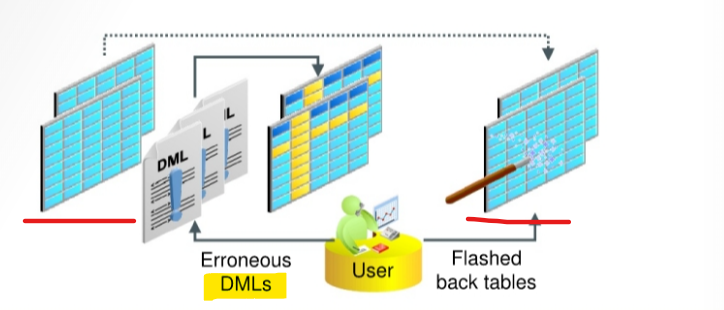
Flashback Table:- can recover a set of tables to a specific point in time without having to perform traditional
point-in-time recoveryoperations.
- can recover a set of tables to a specific point in time without having to perform traditional
-
Prerequisite
- must enable
row movementon a table to be able to flash back the table.- When you enable
row movement, the Oracle server can move a row in the table.
- When you enable
- must enable
-
Characteristics:
- Using data from the
undo tablespace从 undo tbsp 去回数据 - the data in
tablesand their associated objects (indexes,constraints,triggers, and so on) is restored. 恢复相关对象 - Flashback Table is an in-place operation.就地操作, 即无需离线
- The database stays online.保持在线.
- by rolling back only the changes that are made to the given tables and their dependent objects. 只回滚改变及其依赖.
- A Flashback Table statement is executed as a single transaction.视作单一操作.
- All tables must be flashed back successfully, or the entire transaction is rolled back.
- Using data from the
-
Method to determine the appropriate flashback time:
Flashback Version QueryFlashback Transaction Query
-
Can recover from accidental modifications without a database administrator’s involvement.
- DBA must grant the
FLASHBACK TABLEorFLASHBACK ANY TABLEsystem privilege to any user that uses the Flashback Table feature. - DBA must grant the
SELECT,INSERT,DELETE, andALTERobject privileges to the user.
- DBA must grant the
-
Example:
FLASHBACK TABLE hr.departments
TO_TIMESTAMP ('2019-01-25 21:00:00', 'YYYY-MM-DD HH24:MI:SS');
- The
FLASHBACK TABLEcommand executes as a single transaction- All or none of the specified tables are flashed back.
- acquires exclusive
data manipulation language (DML) lockson all tables that are specified in the statement over the period of time the operation is in progress.
- Statistics of impacted objects are not flashed back.
- Current
indexesand dependent objects are maintained.- All existing
indexesare maintained. - Dropped
indexesare not re-created. - Dependent on-commit
materialized viewsare also maintained automatically. - If any
constraintsare violated during flashback execution, the operation is aborted and thetablesare left in the same state as they were just before theFLASHBACK TABLEstatement invocation. 闪回不能违反约束
- All existing
- Flashback Table operations:
- cannot be performed on
system tables,remote tables, andfixed tables. - Cannot span
DDLoperations- cannot perform
Flashback Tableto a particular time that is older than the time of the execution of adata definition language (DDL)operation that altered the structure of or shrunk a table that would be involved in the flashback operation. - This restriction does not apply to DDL statements that only change storage attributes of the tables.
- cannot perform
- Generate
undoandredodata
- cannot be performed on
Lab: Restoring a Dropped Table
Setup Environment
sqlplus / as sysdba
ALTER SESSION SET container=orclpdb;

-- CLEANUP from previous run
DROP USER bar CASCADE;
DROP TABLESPACE bartbs INCLUDING CONTENTS AND DATAFILES;

-- Create tablespace
CREATE TABLESPACE bartbs
DATAFILE '/u01/app/oracle/oradata/ORCL/orclpdb/bartbs1.dbf' SIZE 10M REUSE
SEGMENT SPACE MANAGEMENT MANUAL;

-- Create user
CREATE USER BAR IDENTIFIED BY pass4BAR
DEFAULT TABLESPACE bartbs
QUOTA UNLIMITED ON bartbs;

GRANT CREATE SESSION TO BAR;

-- create table and populate
-- be sure table is at least 2 blocks long
CREATE TABLE BAR.barcopy
TABLESPACE bartbs
AS SELECT * FROM HR.EMPLOYEES;

INSERT INTO BAR.BARCOPY
SELECT * FROM BAR.BARCOPY;

INSERT INTO BAR.BARCOPY
SELECT * FROM BAR.BARCOPY;
- Create backup
#-- Create backup of the bartbs tablespace
rman target /
BACKUP AS COPY TABLESPACE orclpdb:bartbs;
- Update tb
#-- update the table
sqlplus / as sysdba
ALTER SESSION set container=orclpdb;

UPDATE BAR.BARCOPY SET salary = salary+1;
COMMIT;
- Create table
sqlplus / as sysdba

alter session set container=orclpdb;

-- create tb bar101
create table bar.bar101
as select * from BAR.BARCOPY;

ALTER TABLE BAR.BAR101
add (address_line1 VARCHAR2(200), address_line2 VARCHAR2(200));

-- create tb bar102
create table bar.bar102
as select * from BAR.BARCOPY;

ALTER TABLE BAR.BAR102
add (address_line1i VARCHAR2(200), address_line2 VARCHAR2(200));

-- drop tb bar102
drop table BAR.BAR102;

-- create new tb bar102
create table bar.bar102
as select * from BAR.BARCOPY;

ALTER TABLE BAR.BAR102
add (location_id NUMBER(12));

-- drop tb bar102
drop table bar.bar102;

-- drop tb bar101
drop table bar.bar101;

-- create new tb bar102
create table bar.bar102
as select * from BAR.BARCOPY;

ALTER TABLE BAR.BAR102 add (photo BLOB);
Flashback dropped table
Requirement:
- A developer, who has been using the BAR Oracle user account comes to you and asks you to restore a table that was dropped.
- This table has had several iterations but the one the developer needs was named EAR102 in the BAR schema. It should have 12 columns, one of which was named LOCATION ID.
- There is currently a BAR102 table in the BAR schema.
-
Restore the requested table to BAR102A.
- Attempt to use the
SHOW RECYCLEBINcommand to view the contents of the recycle bin for orclpdbl.
sqlplus sys@orclpdb as sysdba;

SHOW RECYCLEBIN
-- return none
Note: The
SHOW RECYCLEBINcommand shows only those objects that belong to the current user. Because you are logged in as the sys user, theSHOW RECYCLEBINcommand does not show the dropped tables you are interested in restoring.
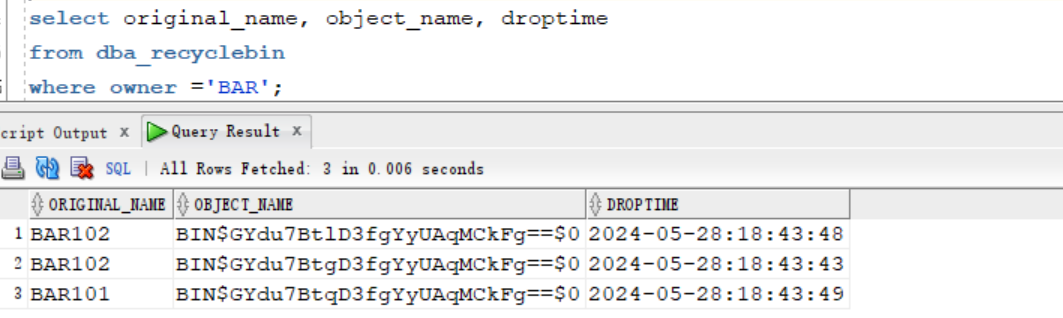
- Examine the objects in the
DBA_RECYCLEBINview.
select original_name, object_name, droptime
from dba_recyclebin
where owner ='BAR';
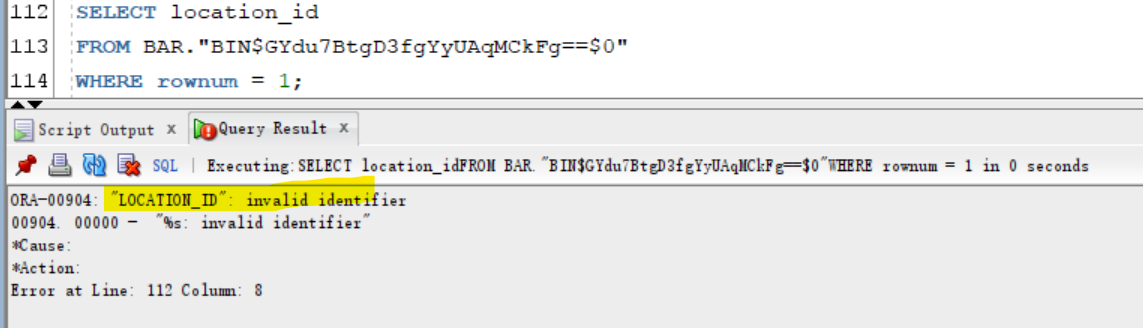
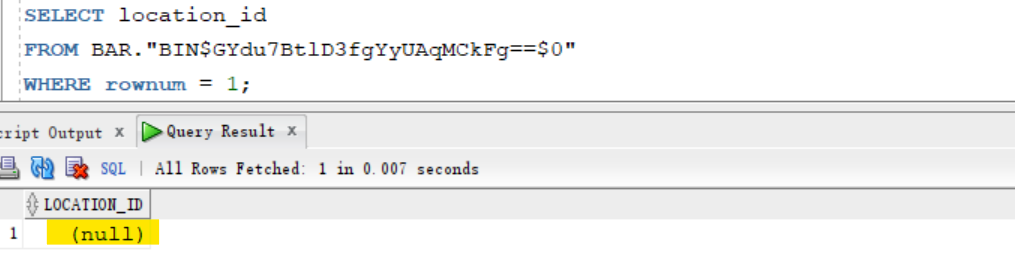
- Determine which object contains the column of interest.
- Select the column from the tables, the one which does not report an error is the one you want.
- The object name from the recycle bin must be in double quotation marks because it may contain special characters.
-- find the correct object with experted column
SELECT location_id
FROM BAR."BIN$GYdu7BtlD3fgYyUAqMCkFg==$0"
WHERE rownum = 1;
- Restore the object that has the correct columns.
FLASHBACK TABLE BAR."BIN$GYdu7BtlD3fgYyUAqMCkFg==$0"
TO BEFORE DROP
RENAME TO BAR102A;
-- Flashback succeeded.
- Confirm that the BAR. BAR102A table has been restored by selecting the first row.
select *
from BAR.BAR102A
where rownum = 1;

Clean up
- Delete tbsp backup
rman target /
delete NOPROMPT copy of tablespace orclpdb:bartbs;
exit;
- Clean up user and tbsp
sqlplus / as sysdba

ALTER SESSION set container=orclpdb;

-- CLEANUP from previous run
DROP USER bar CASCADE;
DROP TABLESPACE bartbs INCLUDING CONTENTS AND DATAFILES;
PURGE DBA_RECYCLEBIN;