Note_Tech
All technological notes.
Project maintained by simonangel-fong Hosted on GitHub Pages — Theme by mattgraham
DBA - Fundamemtal
- DBA - Fundamemtal
DBA Responsibilities
-
The database administrator (DBA) is typically responsible for ensuring that the database is open and available when users need it. To achieve that goal, the DBA (working with the system administrator):
- Protect the database from failure wherever possible.
- Protect critical components by using redundancy.
- Minimize the loss of data.
- Entities:
- Archive log files (discussed later in this lesson)
- Flashback technology
- Standby databases and Oracle Data Guard
- Entities:
-
Increase the
mean time between failures(MTBF).- advanced configuration options to increase MTBF:
Real Application ClustersOracle Data Guard
- advanced configuration options to increase MTBF:
-
Decrease the
mean time to recover(MTTR).- by practicing recovery procedures in advance and configuring backups so that they are readily available when needed
-
Separation of DBA Duties
-
The
SYSBACKUPadministrative privilege:- Includes permissions for backup and recovery (connecting to a closed database)
- Does not include data access privileges such as
SELECT ANY TABLE - Is granted to the
SYSBACKUPuser that is created during database installation - Can be explicitly used in
RMANconnections by aSYSBACKUPprivileged user
-
# Explicitly connect with the SYSDBA role:
$ rman target "'/ as sysbackup'"
# connected to target database: ORCL (DBID=1297344416)

# For backward compatibility
rman target / connects as SYSDBA.
-
Identify and prioritize critical data. 需求+错误类型
-
Base recovery requirements on data criticality.(first determine how critical a database that is lost or unavailable is to your business.)
Recovery Point Objective(RPO):- Tolerance for
data loss - How frequently should backups be taken?
- Is point-in-time recovery required?
- example: a company has a large
data warehousingreporting system that can tolerate 12 hours worth of lost data, because batch loads can be rerun with a few hours of downtime that is acceptable to the user community. A disk and tape backup strategy may be appropriate for this type of system.
- Tolerance for
-
Recovery Time Objective(RTO):- Tolerance for down time
- Downtime: Problem identification + recovery planning + systems recovery
- Tiered RTO per level of granularity (database, tablespace, table, row)
- Example: A company has a critical OLTP system that can tolerate no more than a few minutes worth of lost data and several minutes of acceptable down time, because a down database translates into $100,000 per hour of lost revenue. For this system, a traditional backup and recovery solution will not suffice. The company needs to consider a “minimal downtime solution” such as
Oracle Data Guard.
- Determine
backup retention policyfor on-site, off-site, and long-term backups.
-
Assess data protection requirements.
- determine which failures you need to protect against.
- Physical: Disasters, outages, failures, corruptions
- Logical: Human errors, application errors
-
Categories of Failure
Failures can generally be divided into the following categories:
- Statement failure
- A single database operation (select, insert, update, or delete) fails.
- User process failure
- A single database session fails.
- Network failure
- Connectivity to the database is lost.
- User error
- A user successfully completes an operation, but the operation (dropping a table or entering bad data) is incorrect.
- Instance failure
- The database instance shuts down unexpectedly.
- Media failure
- A loss of any file that is needed for database operation (that is, the files have been deleted or the disk has failed).
Statement Failure
| Typical Problems | Possible Solutions |
|---|---|
| Attempts to enter invalid data into a table | Work with users to validate and correct data. |
| Attempts to perform operations with insufficient privileges | Provide the appropriate object or system privileges. |
| Attempts to allocate space that fails | Enable resumable space allocation. Increase owner quota. Add space to the tablespace. |
| Logic errors in applications | Work with developers to correct program errors. |
User Process Failure
| Typical Problems | Possible Solutions |
|---|---|
| A user performs an abnormal disconnect. | A DBA’s action is not usually needed to resolve user process failures. |
| A user’s session is abnormally terminated. | Instance background processes roll back uncommitted changes and release locks. |
| A user experiences a program error that terminates the session. | The DBA should watch for trends. |
User processesthat abnormally disconnect from the instance may have uncommitted work in progress that needs to be rolled back.-
The
Process Monitor (PMON)background process periodically polls server processes to ensure that their sessions are still connected.- If PMON finds a server process whose user is no longer connected, PMON recovers from any ongoing transactions; it also rolls back uncommitted changes and releases any locks that are held by the failed session.
-
A DBA’s intervention should not be required to recover from user process failure, but the administrator must watch for trends.
- One or two users disconnecting abnormally is not a cause for concern. A small percentage of user process failures may occur from time to time.
- But consistent and systemic failures indicate other problems.
- A large percentage of abnormal disconnects may indicate a need for user training (which includes teaching users to log out rather than just terminate their programs). It may also be indicative of network or application problems.
Network Failure
| Typical Problems | Possible Solutions |
|---|---|
| Listener fails | Configure a backup listener and connect-time failover. |
| Network interface card (NIC) fails | Configure multiple network cards. |
| Network connection fails | Configure a backup network connection. |
- best solution: provide redundant paths for network connections.
- Backup
listeners,network connections, andnetwork interface cardsreduce the chance that network failures will affect system availability.
- Backup
User Error
| Typical Problems | Possible Solutions |
|---|---|
| User inadvertently(疏忽地) deletes or modifies data | Roll back a transaction and dependent transactions or rewind the table |
| User drops a table | Recover the table from recycle bin; Recover the table from a backup |
- Users may inadvertently(疏忽地) delete or modify data.
- If they have not yet committed or exited their program, they can simply roll back.
- can use
Oracle LogMinerto query youronline redo logsandarchived redo logsthrough anEnterprise ManagerorSQLinterface. - Transaction data may persist in
online redo logslonger than it persists inundo segments; if you have configured archiving of redo information, redo persists until you delete the archived files.
-
Users who drop a table can recover it from the
recycle binby flashing back the table to before the drop. 回收垃圾箱- If the recycle bin has already been purged, or if the user dropped the table with the
PURGEoption, the dropped table can still be recovered by usingpoint-in-time recovery(PITR) if the database has been properly configured. 也可以用 PITR RMANenables you to recover one or more tables or table partitions to a specified point in time without affecting the remaining database objects.
- If the recycle bin has already been purged, or if the user dropped the table with the
- 疏忽删除数据, 恢复数据方法
- 没有 commited, rollback
- query redo,
LogMiner - flash back from recycle bin
- PITR, rman
Instance Failure
-
Instance failure- occurs when the database instance is shut down before synchronizing all database files.
-
Typical Causes
- Power outage
- Hardware failure
- Failure of one of the critical background processes
- Emergency shutdown procedures(
SHUTDOWN ABORTandSTARTUP FORCE)
-
Possible Solutions
- Restart the instance by using the
STARTUPcommand. Recovering from instance failure is automatic, including rolling forward changes in the redo logs and then rolling back any uncommitted transactions. - Investigate the causes of failure by using the
alert log,trace files, andEnterprise Manager.
- Restart the instance by using the
-
Administrator involvement in recovering from instance failure is rarely required if Oracle Restart is enabled and is monitoring your database.
- Oracle Restart attempts to restart your database instance as soon as it fails.
- If manual intervention is required, then there may be a more serious problem that prevents the instance from restarting, such as a memory CPU failure.
Media Failure
-
media failure- any failure that results in the loss or corruption of one or more database files (data, control, or redo log file).
- Recovering from media failure requires that you restore and recover the missing files.
-
Typical Causes:
- Failure of a disk drive
- Failure of a disk controller -
- Deletion or corruption of a file needed for a database operation
- Storage network failure
- Solid state storage corruption
-
Possible Solution
-
- Restore the affected file from backup.
-
- Inform the database server of a new file location (if necessary).
-
- Recover the file by applying
redoinformation (if necessary).
- Recover the file by applying
-
Data Failures
- Inaccessible components:
- Missing data files at the OS level, incorrect access permissions, offline tablespace
- Physical corruptions:
- Block checksum failures, invalid block header field values
- Logical corruptions:
- Inconsistent dictionary, corrupt row piece, index entry, or transaction
- Inconsistencies:
- Control file older or newer than the data files and online redo logs
- I/O failures:
- Limit on the number of open files exceeded, inaccessible channels, network or I/O error
Instance Recovery
- You can understand instance recovery by becoming familiar with the following concepts and procedures:
- The
checkpoint(CKPT) procoss Rodo log filesand theLog Writer(LGWR) process- Automatic instance or crash recovery
- Phases of instance recovery
- Tuning instance recovery
- Using the MTTR Advisor
- The
The Checkpoint (CKPT) Process
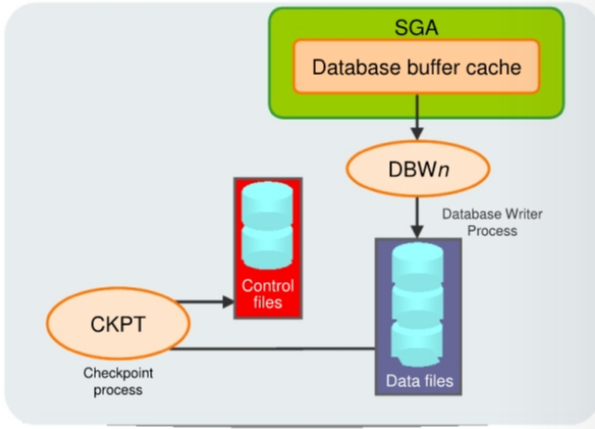
-
CKPTis responsible for:- Updating
data file headerswith checkpoint information - Updating
control fileswith checkpoint information - Signaling
DBWnat full checkpoints
- Updating
-
incremental checkpoint:- Every three seconds (or more frequently), the
CKPTprocess stores data in acontrol fileto document the modified data blocks thatDBWnhas written from theSGAto disk. -
The purpose of a
checkpointis to identify that place in theonline redo log filewhere instance recovery is to begin(checkpoint position). - In the event of a
log switch, theCKPTprocess also writes this checkpoint information to the headers of data files.
- Every three seconds (or more frequently), the
-
Checkpoints exist for the following reasons:
- To ensure that modified data blocks in memory are written to the disk regularly so that data is not lost in case of a system or database failure
- To reduce the time required for instance recovery (only the
online redo log fileentries following the last checkpoint need to be processed for recovery) - To ensure that all committed data has been written to data files during shutdown
-
The
checkpoint informationwritten by theCKPTprocess includes:- checkpoint position,
system change number(SCN),- location in the
online redo log fileto begin recovery, - information about logs,
- and so on.
-
Note: The
CKPTprocess does not write data blocks to the disk or redo blocks to the online redo log files.
Redo Log Files and the Log Writer (LGWR) Process
-
Redo log files- record changes to the database as a result of
transactionsand internal Oracle server actions.transaction: a logical unit of work consisting of one or more SQL statements.
- protect the database from loss of integrity because of system failures caused by power outages, disk failures, and so on.
- should be multiplexed to ensure that the information stored in them is not lost in the event of a disk failure.
- record changes to the database as a result of
-
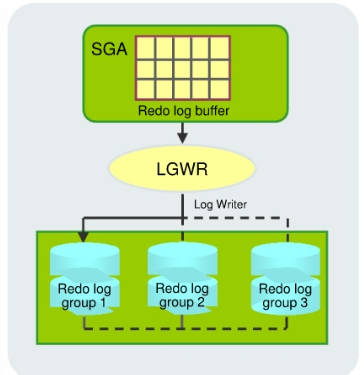
Log Writer(LGWR) writes:- At commit
- When the redo log buffer is one-third full
- Every three seconds
- Before
DBWnwrites - Before clean shutdowns
-
redo logconsists of groups ofredo log files.- A group consists of a
redo log fileand its multiplexed copies.- identified by a number.
- Each identical copy is said to be a member of that group
- A group consists of a
-
Log Writer(LGWR) process- writes redo records from the
redo log bufferto all members of aredo log groupuntil the files are filled or alog switchoperation is requested.一个组一个组地写入, 写入一个组中的所有文件 - It then switches and writes to the files in the next group.
- Redo log groups are used in a circular fashion.
- writes redo records from the
-
Best practice tip: If possible, multiplexed redo log files should reside on different disks.
Database Log Mode
-
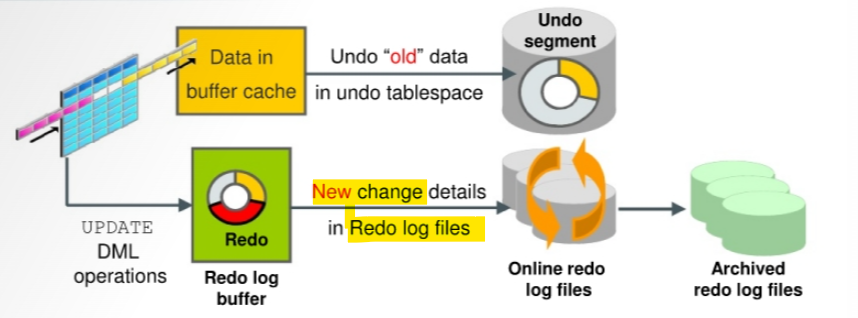
As modifications are made to data in the database, the “old” data is stored in the
undo tablespaceand the new change details inonline redo logfiles (as shown in the graphic).- The undo is also in the redo stream.
- Contents of the online redo log include uncommitted transactions and schema and object management statements.
-
The database maintains online redo log files to protect against data loss.
- Specifically, after an instance failure the online redo log files enable Oracle Database to recover committed data that it has not yet written to the data files.未写入的 committed data 可以从 redo log file 恢复.
-
Because the
online redo log filesare reused in a circular fashion, there is a protocol for controlling when one is allowed to be reused.-
In
ARCHIVELOGmode, the database only begins writing to anonline redo log fileif it has been archived.This ensures that every redo log file has a chance to be archived. - It is possible to perform any type of backup (full or incremental) of a database that is in
NOARCHIVELOGmode-if, of course, the database is not open. - When the database is in
NOARCHIVELOGmode, you must restore alldata filesbefore executing a recovery operation.- Note also that recovery is limited to the time of the last backup.
- The database can be recovered to the last committed transaction only when the database is in
ARCHIVELOGmode.
-
-
Use cases
| NOARCHIVELOG mode | ARCHIVELOG mode |
|---|---|
| Closed database | Open database |
| Recovery to the last backup | Recovery to last committed transaction |
| Suitable for training and test environments, for data warehouses with infrequent loads | Suitable for production environments |
Automatic Instance Recovery or Crash Recovery
- Is caused by attempts to open a database whose files are not synchronized on shutdown
- Uses information stored in redo log groups to synchronize files
-
Involves two distinct operations:
- Rolling forward: Redo log changes (both committed and uncommitted) are applied to data files.
- Rolling back: Changes that are made but not committed are returned to their original state.
- The Oracle Database server automatically recovers from instance failure.
- when the instance to be started normally.
- The instance mounts the
control filesand then attempts to open thedata files.
-
When it discovers that the data files have not been synchronized during shutdown, the instance uses information contained in the
redo log groupsto roll thedata filesforward to the time of shutdown.- Then the database is opened, and any uncommitted transactions are rolled back.
Crash recovery- The automatic application of
online redo recordsto a database after either a single instance database crashes or all instances of anOracle Real Applications Clusterconfiguration crash. - only requires
redofrom theonline logs; 只需要 online redo archived redo logsare not required.- Often this is referred to as “instance recovery.”
- The automatic application of
Instance recovery:- In an
Oracle RACconfiguration, the application ofredo datato an open database by an instance when this instance discovers that another instance has crashed
- In an
Phases of Instance Recovery
- Instance startup (data files are out of sync)
- Roll forward (redo)
- Committed and uncommitted data in files
- Database opened
- Roll back (undo)
- Committed data in files
-
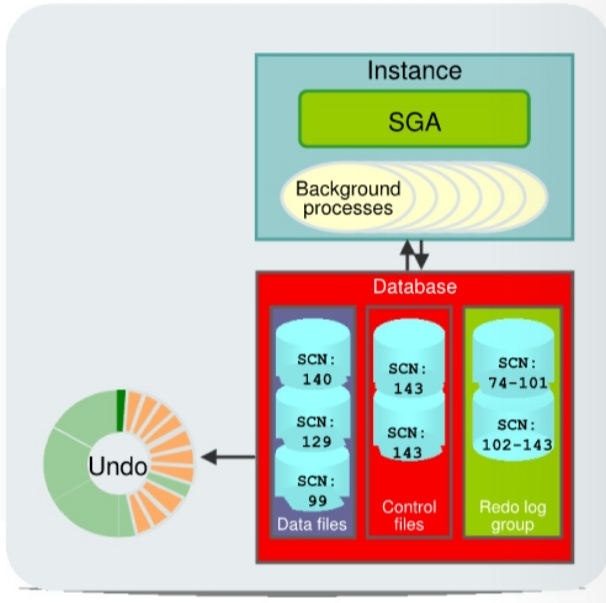
For an instance to open a data file, the
system change number(SCN) contained in the data file’s header must match thecurrent SCNthat is stored in the database’scontrol files.- If the numbers do not match, the instance applies redo data from the
online redo logs, sequentially “redoing” transactions until thedata filesare up-to-date.- When redo logs are applied, all transactions are applied to bring the database up to the state as of the time of failure. This usually includes transactions that are in progress but have not yet been committed.
- After all
data fileshave been synchronized with thecontrol files, the database is opened, and users can log in.- After the database has been opened, those uncommitted transactions are rolled back.
- Blocks from uncommitted transactions remain locked until the undo has been applied and committed.
- At the end of the rollback phase of instance recovery, the data files contain only committed data.
- If the numbers do not match, the instance applies redo data from the
-
unmatch -> redo -> open -> rollback -> committed data
Tuning Instance Recovery
- During instance recovery, the transactions between the
checkpointposition and the end of theredo logmust be applied todata files. -
You tune instance recovery by controlling the difference between the
checkpoint positionand the end of theredo log. -
Transaction information- is recorded in the
redo log groupsbefore the instance returns “commit complete” for a transaction.先于返回信息 - in the
redo log groupsguarantees that the transaction can be recovered in case of a failure.在 redo log 中的信息保证可以恢复 -
must also be written to the
data file.- The data file write usually happens at some time after the information is recorded in
redo log groups- because the
data file writeprocess is much slower than theredo writes. - Random writes for data files are slower than serial writes for redo log files.
- because the
- The data file write usually happens at some time after the information is recorded in
- 交易信息先记录在 redo log => 因此可以凭 redo log 信息恢复
- 交易信息最终会写入 data file; 但后于写入 redo log, 因为 df 写入是随机写入, redo 写入是连续写入.
- is recorded in the
- Every three seconds, the
checkpoint processrecords information in thecontrol fileabout thecheckpoint positionin theredo log.- Therefore, the Oracle Database server knows that all redo log entries recorded before this point are not necessary for database recovery.
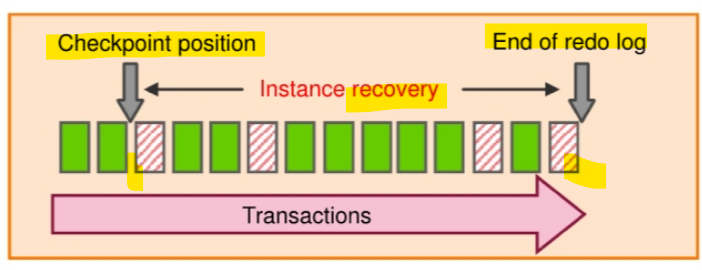
- In the graphic in the slide, the striped blocks have not yet been written to the disk.
-
The time required for
instance recoveryis the time required to bringdata filesfrom their lastcheckpointto the latestSCNrecorded in thecontrol file. - The administrator controls that time by setting an
MTTRtarget (in seconds) and through the sizing of redo log groups.- For example, for two redo groups, the distance between the checkpoint position and the end of the redo log group cannot be more than 90% of the smallest redo log group.
Using the MTTR Advisor
- Specify the desired time in seconds or minutes.
- The default value is
0(disabled). -
The maximum value is
3,600seconds (one hour). - The
FAST_START_MTTR_TARGETinitialization parameter simplifies the configuration of recovery time from instance or system failure. -
The
MTTR Advisorconverts theFAST_START_MTTR_TARGETvalue into several parameters to enable instance recovery in the desired time (or as close to it as possible).- explicitly setting the
FAST_START_MTTR_TARGETparameter to0disables theMTTR Advisor.
- explicitly setting the
- The
FAST_START_MTTR_TARGETparameter must be set to a value that supports the service level agreement for your system.- A small value for the MTTR target increases I/O overhead
- because of additional data file writes (affecting the performance).
- if set the MTTR target too large, the instance takes longer to recover after a crash.
- For assistance in setting the MTTR target by using
Enterprise Manager Cloud Control, navigate as follows:- Performance > Advisors Home > MTTR Advisor
- Availability > Backup & Recovery > Recovery Settings
- A small value for the MTTR target increases I/O overhead
Restoring and Recovering
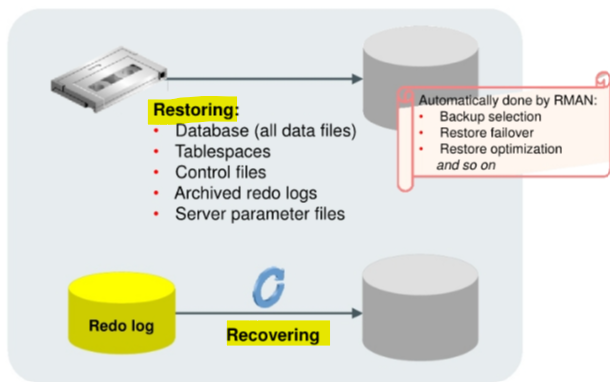
- The
recovery unitincludes two major types of activities:restoringandrecovering. - In the database industry, these two operations are often referred to, collectively, with the single term “recovery.”
-
Restoringa file:- the process of copying a backup into place to be used by the database.
- e.g.:
- when a file is damaged because the physical disk it is on fails.
- when due to hardware problems, such as disk write errors or controller failure, a backup of the file needs to be copied on to a new (or repaired) disk.
- RMAN:
RMANuses the records of availablebackup setsorimage copiesin the RMAN repository to select the best available backups. - If two backups are from the samepoint in time, then RMAN prefersimage copiesover backup sets because RMAN can restore them more quickly (similar for disk versus tape). -RMANautomatically uses restore failover to skip corrupted or inaccessible backups and look for usable backups.- By default,
RMANskips restoring a data file if the file is present in the correct location and its header contains the expected information, and so on.
-
Recoveringthe file entails applying redo such that the state of the file is brought forward in time, to whatever point you want.- That point is usually as close to the time of failure as possible.
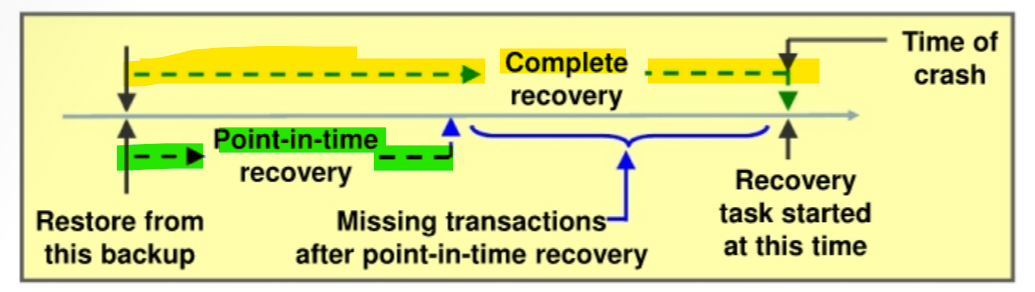
Comparing Complete and Incomplete Recovery
-
Recoverycan have two kinds of scope:Complete recovery:- Brings the
databaseortablespaceup to the present, including all committed data changes made to the point in time when the recovery was requested
- Brings the
Incompleteorpoint-in-time recovery(PITR):- Brings the
databaseortablespaceup to a specified point in time in the past, before the recovery operation was requested - It means there are missing transactions:
- any data modifications done between the recovery destination time and the present are lost.
- Recovering to a point in the past is a way to remove the unwanted changes.
- Brings the
The Complete Recovery Process
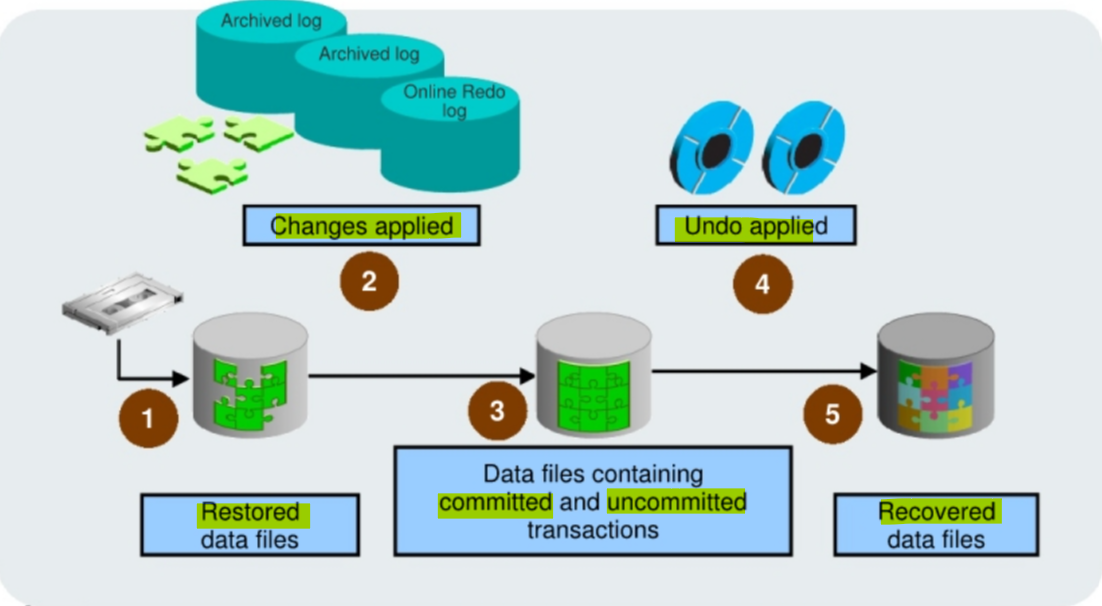
The following steps describe what takes place during complete recovery:
- Damaged or missing files are restored from a backup.
- Changes from
incremental backups,archived redo log files, andonline redo log filesare applied as necessary.- The
redo logchanges are applied to thedata filesuntil the current online log is reached and the most recent changes have been reapplied. Undo blocksare generated during this entire process.- This is referred to as
rolling forwardorcache recovery.
- The
- The restored
data filesmay now contain committed and uncommitted changes. - The
undo blocksare used to roll back any uncommitted changes.- This is sometimes referred to as
transaction recovery.
- This is sometimes referred to as
- The
data filesare now in arecovered stateand are consistent with the otherdata filesin the database.
The Point-in-Time Recovery Process
-
Incomplete recovery, ordatabase point-in-time recovery (DBPITR)- uses a backup to produce a noncurrent version of the database.
- do not apply all the
redorecords generated after the most recent backup. - Perform this type of recovery only when absolutely necessary.
-
To perform
point-in-time recovery, you need:- A valid offline or online
backupof all thedata filesmade before the recovery point - All
archived logsfrom the time of the backup until the specified time of recovery
- A valid offline or online
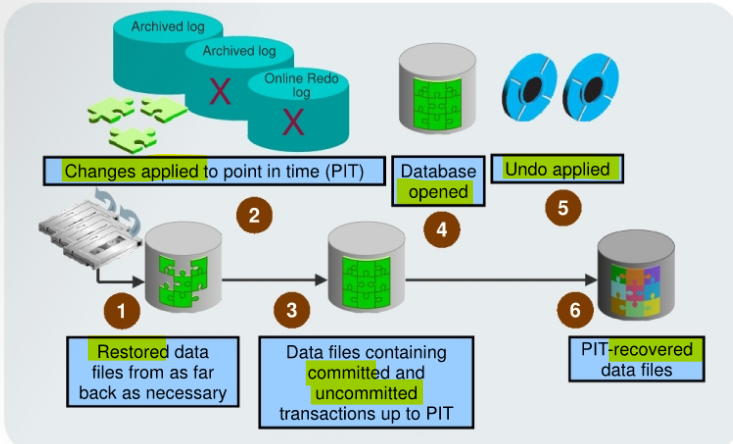
-
The steps to perform a point-in-time recovery are as follows:
-
Restore the
data filesfrom backup:- The backup that is used must be from before your target recovery point.
- This entails either copying files using
OS commandsor using theRMAN RESTOREcommand.
-
Use the
RECOVERcommand:- Apply
redofrom thearchived redo log files, including as many as necessary to reach the restore point destination.
- Apply
-
State of over-recovery:
- Now the data files contain some committed and some uncommitted transactions because the redo can contain uncommitted data.
-
Use the
ALTER DATABASE OPENcommand:- The database is opened before undo is applied.
- This is to provide higher availability.
-
Apply
undodata:- While the redo was being applied, redo supporting the undo data files was also applied. So the undo is available to be applied to the data files in order to undo any uncommitted transactions.
-
Process complete:
- The data files are now recovered to the point in time that you chose.
-
-
Oracle Flashback Databaseis the most efficient alternative toDBPITR.- Unlike the other flashback features, it operates at a physical level and reverts the current
data filesto their contents at a past time - The result is like the result of a
DBPIIR, including theOPEN RESETLOGS, - but
Flashback Databaseis typically faster- because it does not require you to restore
data filesand requires only limited application ofredocompared to media recovery.
- because it does not require you to restore
- Unlike the other flashback features, it operates at a physical level and reverts the current
Oracle Data Protection Solutions
| Backup and Recovery Objective | Recovery Time Objective (RTO) | Oracle Solution |
|---|---|---|
| Physical data protection | Hours/Days | Recovery Manager; Oracle Secure Backup |
| Logical data protection | Minutes/Hours | Flashback Technologies |
| Recovery analysis | Minimize time for problem; identification and recovery planning | Data Recovery Advisor |
| Disaster Recovery Objective | Recovery Time Objective (RTO) | Oracle Solution |
|---|---|---|
| Physical data protection | Seconds/Minutes | Data Guard;Active Data Guard |
- Oracle provides an appropriate data protection solution depending on your backup and recovery
objective and
RTO:Oracle Recovery Manager (RMAN)- the core Oracle Database software component that manages database backup, restore, and recovery processes.
Oracle Secure Backup (OSB):- Oracle’s enterprise-grade tape backup management solution for both database and file system data.
Oracle Database Flashbacktechnologies:- a set of data recovery solutions that enable human errors to be reversed by selectively and efficiently undoing the effects of a mistake.
Data Recovery Advisor:- provides intelligent database problem identification and recovery capabilities.
Data GuardandActive Data Guard:- enable physical
standby databasesto be open for read access while being kept synchronized with the production database throughmedia recovery.
- enable physical
Flashback Technology
-
Oracle Flashback technology:- a group of features that support viewing past states of data and winding data back and forth in time, without requiring the restoration of the database from backup.
- With this technology, you help users analyze and recover from errors.
-
Use
Flashbacktechnology for:- Viewing past states of data
- Winding data back and forth in time
- Assisting users in error analysis and recovery
-
For error analysis:
- Oracle Flashback Query
- Oracle Flashback Versions Query
- Oracle Flashback Transaction Query
-
For users who have committed erroneous changes, use the following to analyze the errors:
Flashback Query:- View committed data as it existed at some point in the past.
- The
SELECTcommand with theAS OFclause references a time in the past through a time stamp orsystem change number (SCN).
Flashback Version Query:- View committed historical data for a specific time interval.
- Use the
VERSIONS BETWEENclause of theSELECTcommand (for performance reasons with existing indexes).
Flashback Transaction Query:- View all database changes made at the transaction level.
-
For error recovery:
- Oracle Flashback Transaction Backout
- Oracle Flashback Table
- Oracle Flashback Drop
- Oracle Flashback Database
-
Possible solutions to recover from user error:
Flashback Transaction Backout:- Rolls back a specific transaction and dependent transactions
Flashback Table:- Rewinds one or more tables to their contents at a previous time without affecting other database objects