Note_Tech
All technological notes.
Project maintained by simonangel-fong Hosted on GitHub Pages — Theme by mattgraham
DBA2 - Enable Archived Redo Log
Creating Archived Redo Log Files
-
Place your database in
ARCHIVELOGmode.- In all cases, you will be able to recover the database either completely or incompletely depending on which database files have been damaged or lost.
-
Configure redundant
archive logdestinations.- In cases where you lost archive log files and you need them to recover the database, you will be able to perform an incomplete recovery, unless you have a duplicate version of the archive log in another destination.
-
The Oracle Database server treats the
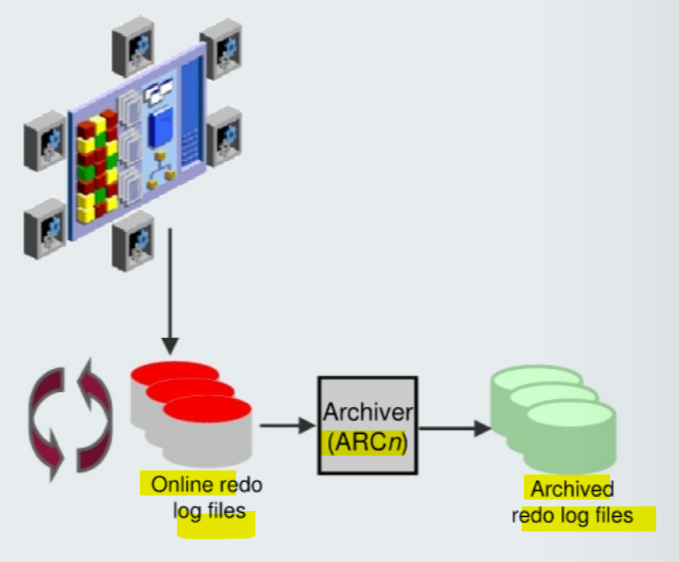
online redo log groupsas a circular buffer in which to store transaction information, filling one group and then moving on to the next.- After all groups have been written to, the Oracle Database server begins overwriting information in the first
log group.
- After all groups have been written to, the Oracle Database server begins overwriting information in the first
-
archived redo log files- a copy of the
online redo log groupbefore allowing it to be overwritten.
- a copy of the
-
To facilitate the creation of
archived redo log files:- Specify a naming convention for your
archived redo log files. - Specify a destination or destinations for storing your archived redo log files.
- Place the database in
ARCHIVELOGmode.
- Note: Steps 1 and 2 are not necessary if you are using a
fast recovery area.
- Specify a naming convention for your
-
The destination should exist before placing the database in
ARCHIVELOGmode. When a directory is specified as a destination, there should be a slash at the end of the directory name.
Archiver (ARCn) Process
-
log switch:- When an
online redo log groupgets filled, the Oracle Database server begins writing to the nextonline redo loggroup. - the process of switching from one
online redo log groupto another
- When an
-
Archiver (ARCn):- Automatically archives
online redo log fileswhen the database is inARCHIVELOGmode - Preserves a record of all changes made to the database
- Automatically archives
-
The
ARCnprocess initiates archiving of the filled log group at everylog switch.- It automatically archives the
online redo log groupbefore the log group can be reused so that all the changes made to the database are preserved. - This enables recovery of the database to the point of failure even if a disk drive is damaged.
- It automatically archives the
-
One of the important decisions that a DBA must make is whether to configure the database to operate in
ARCHIVELOGmode or inNOARCHIVELOGmode.- In
NOARCHIVELOGmode, theonline redo log filesare overwritten each time alog switchoccurs. - In
ARCHIVELOGmode, inactive groups of filledonline redo log filesmust be archived before they can be used again.
- In
-
Notes:
ARCHIVELOGmode is essential for most backup strategies.- If the
archived redo log filedestination fills up or cannot be written to, thedatabasewill eventually come to a halt停机.- Remove
archived redo log filesfrom the archived redo log file destination and the database will resume operations.移除存档
- Remove
Archived Redo Log Files: Naming and Destinations
-
Destination:
- single destination:
- parameter
LOG_ARCHIVE_DEST
- parameter
- Multiple destination:
- parameters
LOG_ARCHIVE_DEST_n - can be
31different destinations. - may be local (a directory) or remote (an Oracle Net alias for a standby database).
- parameters
- If using
file system storage, it is recommended that you add multiple locations across different disks. 分散分布 - If the
fast recovery areais enabled, by defaultDB_RECOVERY_FILE_DESTis specified as an archived redo log file destination.
- single destination:
-
Naming:
- Each
archived redo log filemust have a unique name to avoid overwriting older log files. -
To help create unique file names, Oracle Database allows several wildcard characters in the name format:
%s: Includes the log sequence number as part of the file name%t: Includes the thread number as part of the file name%r: Includes the resetlogs ID to ensure that the archive log file name remains unique (even after certain advanced recovery techniques that reset log sequence numbers)%d: Includes the database ID as part of the file name
- best practice:
- should include
%s,%t, and%ras . %dcan also be included if multiple databases share the same archive log destination.
- should include
- Each
Configuring ARCHIVELOG Mode
-
Using SQL commands:
-
- Shut down the database instance if it is open.
-
- Mount the database.
-
- Issue the
ALTER DATABASE ARCHIVELOGcommand.
- Issue the
-
- Open the database.
-
shutdown immediate
startup mount
alter database archivelog;
alter database open;
-
can use
Enterprise Manager Cloud Controlto place the database inARCHIVELOGmode. -
ARCHIVELOGmode:- prevents redo logs from being overwritten until they have been archived.
- To put the database in
ARCHIVELOGmode, the database must be inMOUNTmode.- If the database is currently open, you must shut it down cleanly (not abort) and then mount it.
- recovery is possible until the time of the last commit.
- Most production databases are operated in
ARCHIVELOGmode. - Back up your database after switching to
ARCHIVELOGmode because your database is recoverable only from the first backup taken in that mode. 模式转变后,必须备份一次; 从转变后第一次备份开始可恢复性.
-
NOARCHIVELOGmode- Default mode
- recovery is possible only until the time of the last backup.
- All transactions made after that backup are lost.
Lab: ArchivedLog mode
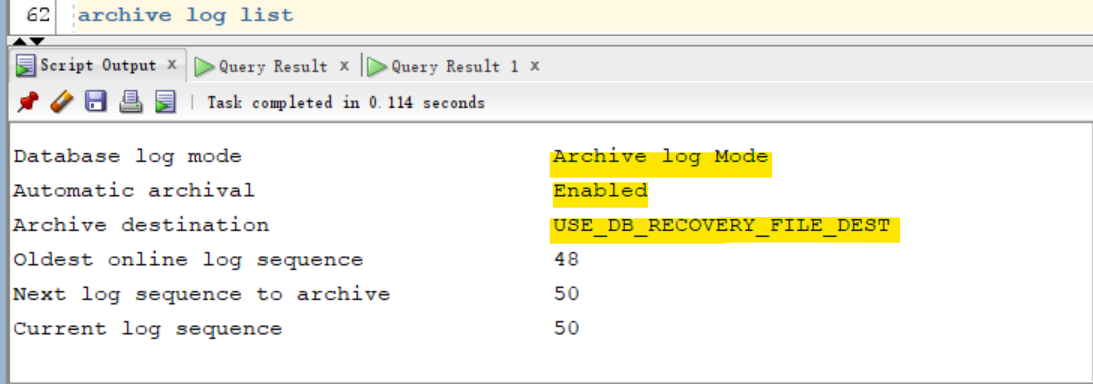
Query whether in ARCHIVELOG mode
archive log list
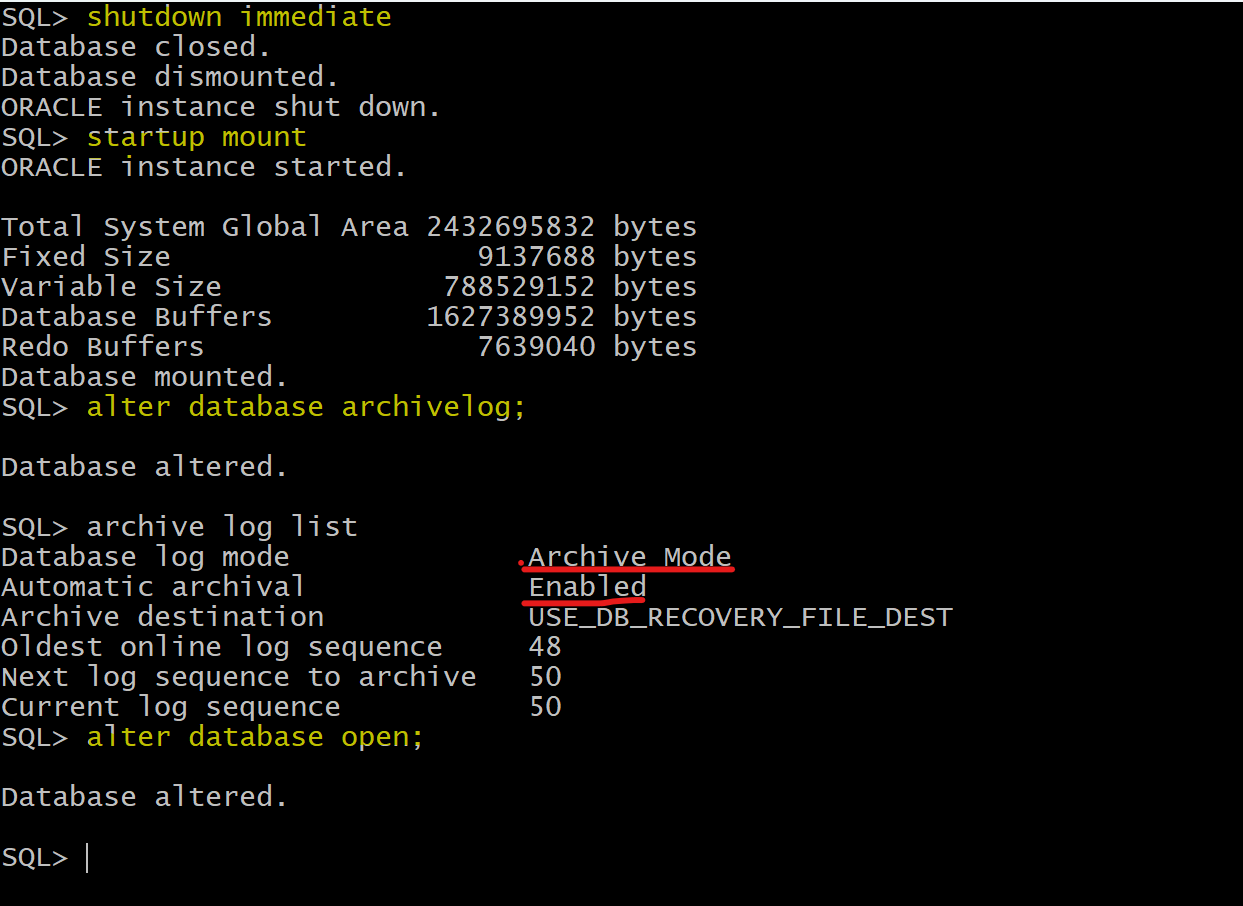
Enable ARCHIVELOG mode
- must put the database in
MOUNTmode to enable archiving.
shutdown immediate
startup mount
alter database archivelog;
archive log list
alter database open;
Stop and Disable ArchiveLog mode
-- when the db is up and running
alter system archive log stop;
shutdown immediate

-- Startup in exclusive mount mode.
startup mount restrict
-- if flashback database is enabled, it cannot disable
alter database noarchivelog;
alter database open;
archive log list

--Shutdown Oracle and startup normally
shutdown immediate
startup