Note_Tech
All technological notes.
Project maintained by simonangel-fong Hosted on GitHub Pages — Theme by mattgraham
Recovery - Catalog
- Recovery - Catalog
Recovery Catalog
-
The RMAN repository data is
- always stored in the
control fileof the target database. - can also, additionally, be stored in a separate database in a
recovery catalog.
- always stored in the
-
recovery catalog- preserves backup information in a separate database, which is useful in the event of a lost control file.
-
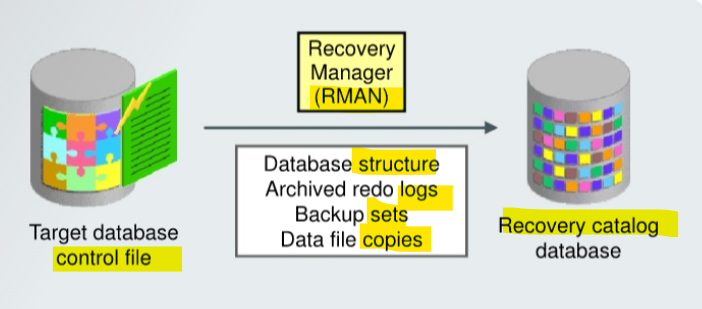
RMAN propagates information about target database into the
recovery catalogfrom the target database’scontrol fileafter any operation that updates the repository and also before certain operations, including:database structure,archived redo logs,backup sets,data file copies
-
是 RMAN 更新目标信息; 从 cf 提取; 时机:任何更新之后; 文件: 结构, log, bs, copy
-
Prerequisites: 前设:同时连接两个实例
- For information propagation to take place, the RMAN client must be connected to both
- the
target database instance - the
catalog database instance
- the
- For information propagation to take place, the RMAN client must be connected to both
Pros and Cons
Benefits
- Stores more historical information than the
control fileCFhas finite space for records of backup activities.- enables you to perform a recovery that goes back further in time than the history in the control file.
- Enables you to use RMAN-stored scripts
- Enables you to create customized reports for all registered targets
- A single
recovery catalogis able to store information for multiple target databases. 一对多 - the backup and recovery information for all registered targets is contained in one place, allowing you to create customized reports by connecting as the recovery catalog owner and querying the various RC views.
- Note:
Enterprise Manager Cloud Controlalso enables you to view backup information for multiple databases without the use of a recovery catalog.
- A single
- Enables you to use the
KEEP FOREVERclause of theBACKUPcommand- Usage of
KEEP FOREVERclause can create a backup that is retained for a different period of time from that specified by the configuredretention policy.
- Usage of
- Allows you to list the
data filesandtablespacesthat are or were in the target database at a given time- The
REPORT SCHEMAcommand lists the tablespaces and data files in the target database. - If you add the option of
AT [time |scn|logseq], you can see the information at some time in the past. - You can use the
AToption only if you are using a recovery catalog.
- The
- Enables you to restore and recover following the loss of the
control filebecause it preserves RMAN repository metadata
Disadvantage of recovery catalog
- need to manage and back up another database
Control File vs Catalog
Control File:- Default
- Simpler administration
- simple backup management requirements
recovery catalog:- longer backup retention.
- when you use RMAN in a Data Guard configuration
- Replicates
control filedata - Stores more backup history
- Services many targets
- Stores RMAN scripts
- Provides more protection options for metadata
Creating a Recovery Catalog
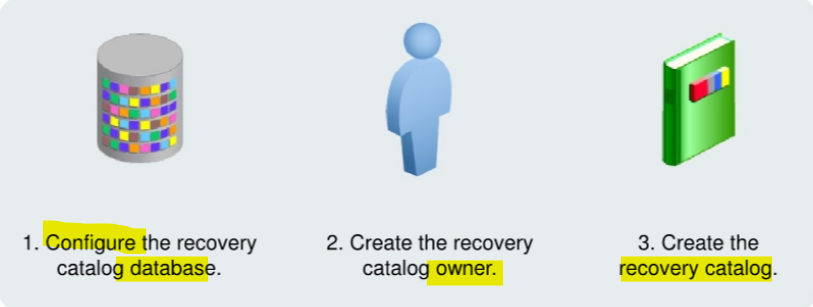
To create a recovery catalog, perform the following three steps:
- Configure the database in which you want to store the recovery catalog.
- Create the recovery catalog owner.
- Create the recovery catalog.
Configuring the Recovery Catalog Database
-
Allocate space for the recovery catalog.
- Consider:
- Number of databases supported by the recovery catalog
- amount of space required by the recovery catalog schema depends on the number of databases monitored by the catalog.
- Number of
archived redo log filesand backups recorded- The space increases as the number of archived redo log files and backups for each database increases.
- Use of RMAN-stored scripts
- space must be allocated for those scripts.
- Number of databases supported by the recovery catalog
- Consider:
-
Create a
tablespacefor therecovery catalog, which will be designated as the default tablespace for the recovery catalog owner.
-- request 15 MB for each database registered in the recovery catalog.
CREATE TABLESPACE rcat_ts DATAFILE <data file name> SIZE 15M;
Creating the Recovery Catalog Owner
- Create the recovery catalog owner.
- user as the recovery catalog owner
- Set the default
tablespacefor this user to the tablespace you created for the recovery catalog. - provide
UNLIMITEDquota on this tablespace for the user.
- Grant the
RECOVERY_CATALOG_OWNERrole.RECOVERY_CATALOG_OWNERrole:- provides privileges for the owner of the recovery catalog.
- includes:
CREATE SESSIONALTER SESSIONCREATE CLUSTERCREATE DATABASE LINKCREATE PROCEDURECREATE SEQUENCECREATE SYNONYMCREATE TRIGGERCREATE TYPECREATE TABLECREATE VIEW
CREATE USER rcowner IDENTIFIED BY rcpass
TEMPORARY TABLESPACE temp
DEFAULT TABLESPACE rcat_ts
QUOTA UNLIMITED ON rcat_ts;

GRANT recovery_catalog_owner TO rcowner;
Creating the Recovery Catalog
- After creating the catalog owner, use the RMAN
CREATE CATALOGcommand to create the catalog tables in the defaulttablespaceof thecatalog owner.
Note: As with any database, if the ORACLE_SID environment variable is set to the SID for the recovery catalog database, there is no need to supply the service name in the CONNECT statement.
-- Connect to the recovery catalog database as the catalog owner:
-- rman
CONNECT CATALOG username/password@net_service_name

-- Execute the CREATE CATALOG command:
CREATE CATALOG;
Lab: Create a Recovery Catalog
- In this lab, it should use a differenct database instance that has a different ORACLE_SID, as the recovery catalog.
- to make it simple, this lab uses only one database instance but different pdb.
-- create a pdb as a rcat
CREATE PLUGGABLE DATABASE rcat
  ADMIN USER rcatadmin IDENTIFIED BY welcome
  ROLES = (dba)
  DEFAULT TABLESPACE users
  DATAFILE '/u01/app/oracle/oradata/ORCL/RCAT/users01.dbf'
  SIZE 250M
  AUTOEXTEND ON
  FILE_NAME_CONVERT = ('/u01/app/oracle/oradata/ORCL/pdbseed/',
                       '/u01/app/oracle/oradata/ORCL/RCAT/');

-- update tnsname
- create tbsp and user
-- Connect to rcat
CONNECT sys@rcat as sysdba;

-- Create default tbsp for rcat
CREATE TABLESPACE rcat_ts
DATAFILE '/u01/app/oracle/oradata/ORCL/RCAT/rcat01.dbf'
SIZE 15M
REUSE;

-- create user
CREATE USER rcowner IDENTIFIED BY welcome
DEFAULT TABLESPACE rcat_ts
TEMPORARY TABLESPACE temp
QUOTA UNLIMITED ON rcat_ts;

-- grant role
GRANT recovery_catalog_owner TO rcowner;
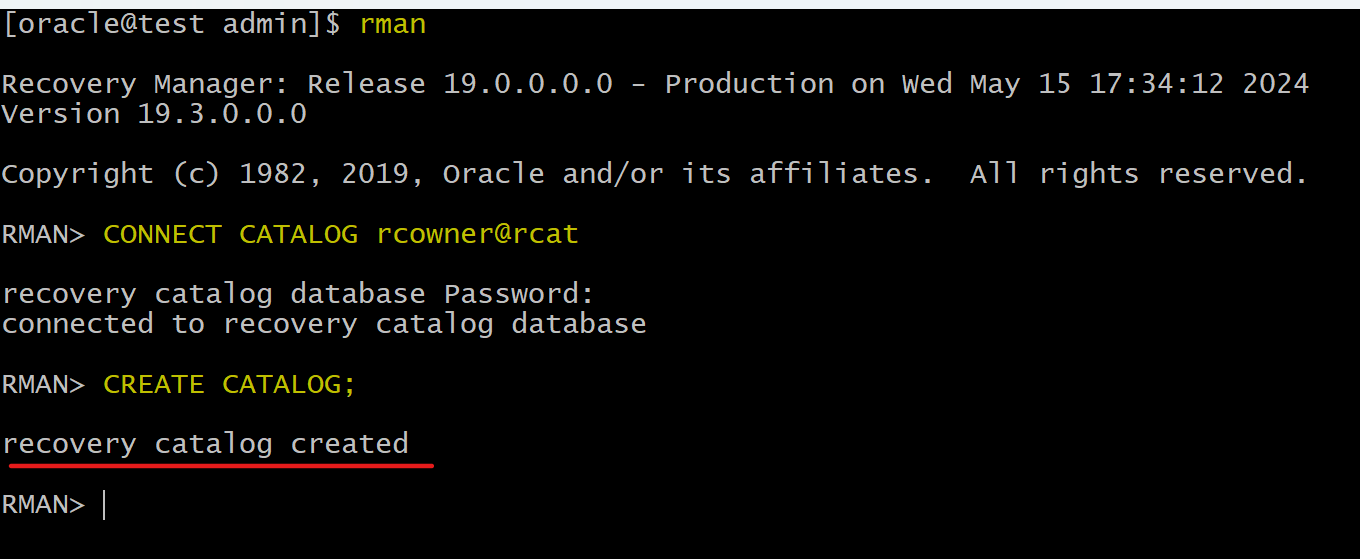
- Connect with RMAN
-- connect with catalog
CONNECT CATALOG rcowner@rcat

-- build catalog
CREATE CATALOG;
- Tables created in catalog:
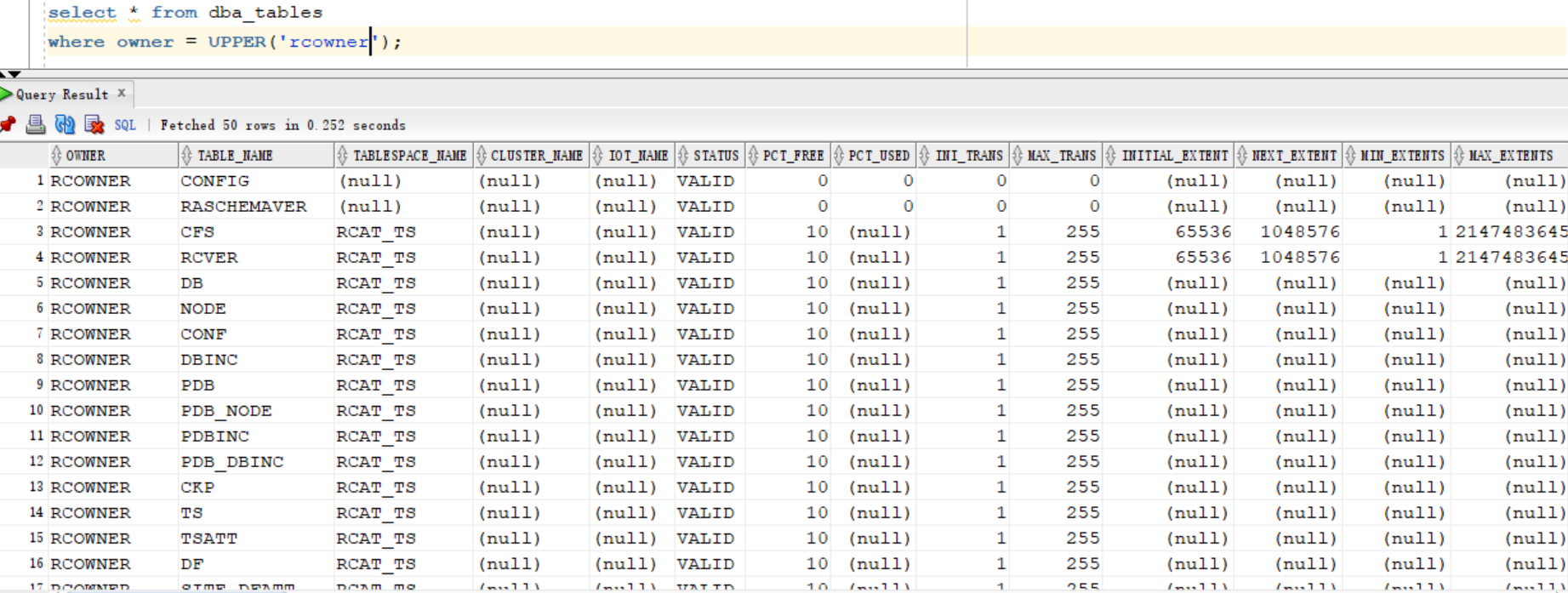
Lab: Configuring the Recovery Catalog
- 该 lab 使用 rman 设置 catalog 的备份, 即备份 catelog; 也涉及启用 archivelog mode(略);
- configure the
retention policy
-- Note: login using the rcat sid, not the target db sid
rman target sys

-- show current policy
show retention policy;

-- update policy
configure retention policy to redundancy 2;
- configure the
fast recovery areaforRecovery Catalog, enable archive log mode, and back up.
-- Note: login using the rcat sid, not the target db sid
sqlplus / as sysdba

ALTER SYSTEM SET db_recovery_file_dest_size=12G SCOPE=BOTH;
Registering a Target Database
-
When a database is registered:
- Creates rows in the
recovery catalog tablesfor the target database - Copies data from the target database
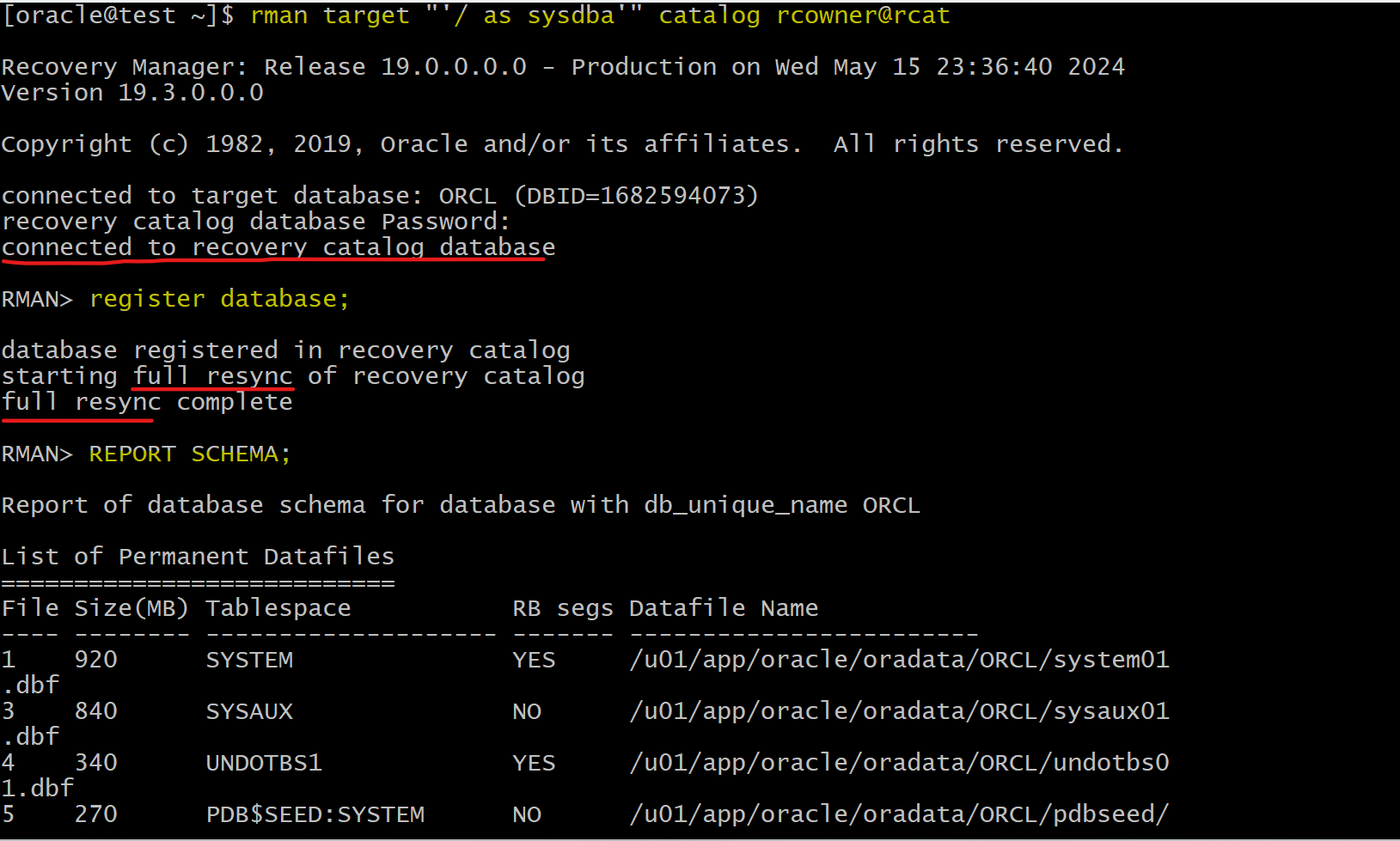
control fileto the recovery catalog tables - Full Synchronizes the recovery catalog with the control file
- Creates rows in the
-
Steps to register database in the Recovery Catalog:
-
- Ensure that the target database is mounted or open.
-
- Connect to the
recovery catalog databaseand to thetarget database:
- Connect to the
-
-- connect
rman TARGET / CATALOG rman/rman@reccatdb

-- register
REGISTER DATABASE;
-
Register a database with
Enterprise Manager:-
even if you have previously executed the RMAN
REGISTER DATABASEcommand, you must- first add the
recovery catalogto theEnterprise Manager configuration. - select that
recovery catalogto be the recovery catalog for thetarget database.
- first add the
-
Lab: Registering a Database
-- Connect
rman target "'/ as sysbackup'" catalog rcat_owner@rcat_service

-- register target database
register database;

-- list all of the data files associated with the target database that have registered in the recovery catalog.
REPORT SCHEMA;
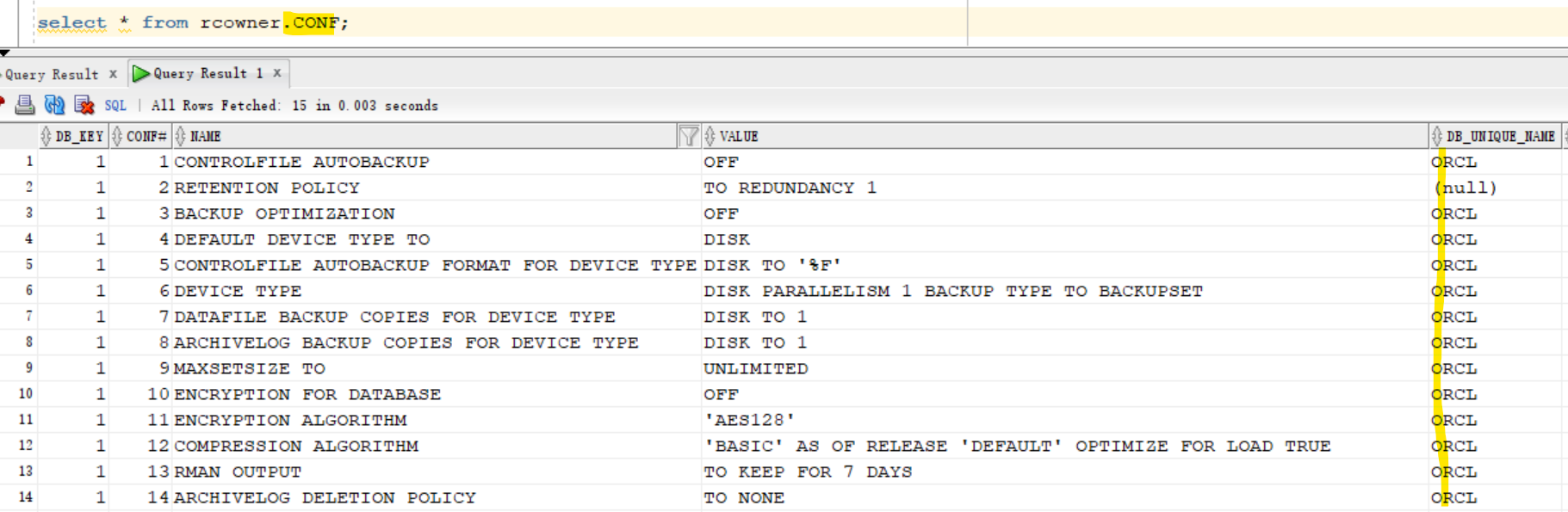
- The target database updates to catalog
Unregistering a Target Database
-
Typically, you would unregister a
target databaseonly if you no longer want to use the recovery catalog for that database or the database no longer exists. - When you unregister a database from the recovery catalog, all RMAN repository records in the recovery catalog are lost.
-
You can re-register the database.
- The recovery catalog records for that database are then based on the contents of the
control fileat the time of re-registration.
- The recovery catalog records for that database are then based on the contents of the
- Note: If you have used
Enterprise Manager Cloud Controlto register your database, you must use it again to unregister your database.
rman TARGET / CATALOG username/password@rcat_service
UNREGISTER DATABASE;
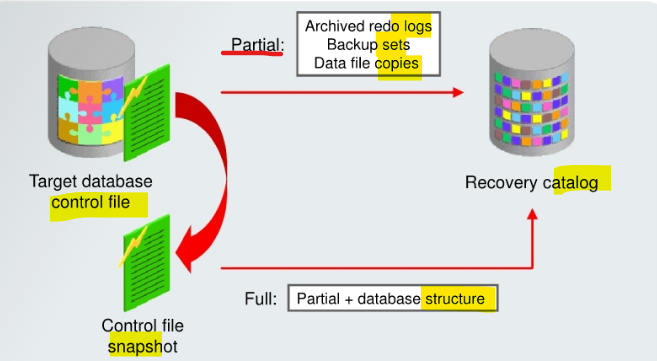
Recovery Catalog Resynchronization
-
resynchronization- RMAN updates the
recovery catalogby comparing to- either the current
control fileof thetarget database - or a backup/standby
control file
- either the current
- RMAN updates the
-
Two types of resynchronization:
partialandfull. -
partial resynchronization- RMAN compares the
control fileto therecovery catalogand updates therecovery catalogwith any metadata concerningbackups,archived redo logs,data file copies, and so on. - 只着重于三种文件, 不产生 snapshot
- RMAN compares the
-
full synchronization,- RMAN first creates a
control filesnapshot, which is simply a temporary copy of thecontrol file. - It uses the snapshot to make the comparison to the
recovery catalog. - It compares and updates the same data as a
partial resynchronization, but it also includes any database structure changes.- e.g., database schema changes or new tablespaces are included in a full resynchronization.
- snapshot + 3 文件 + structure change
- RMAN first creates a
-
SNAPSHOT CONTROLFILE NAMEconfiguration setting- specify the location for the snapshot control file
- default value: Oracle home of each target database
- In an
Oracle RACconfiguration, the snapshot control file needs to be globally available to all instances in the RAC configuration.
-
CONTROL_FILE_RECORD_KEEP_TIMEinitialization parameter- determines the minimum number of days that records are retained in the
control filebefore they are candidates for being overwritten. - Ensure its value is longer than the interval between
resynchronizations.- If less than this interval, control file records could be reused before they are propagated to the recovery catalog.
- determines the minimum number of days that records are retained in the
Manually Resynchronizing
- Situations for manual resynchronization:
- If the
recovery catalogwas unavailable when you issued RMAN commands that cause apartial resynchronization - If you perform infrequent backups of your target database because the recovery catalog is not updated automatically when a
redo logswitch occurs or when aredo logis archived - After making any change to the physical structure of the
target database
- If the
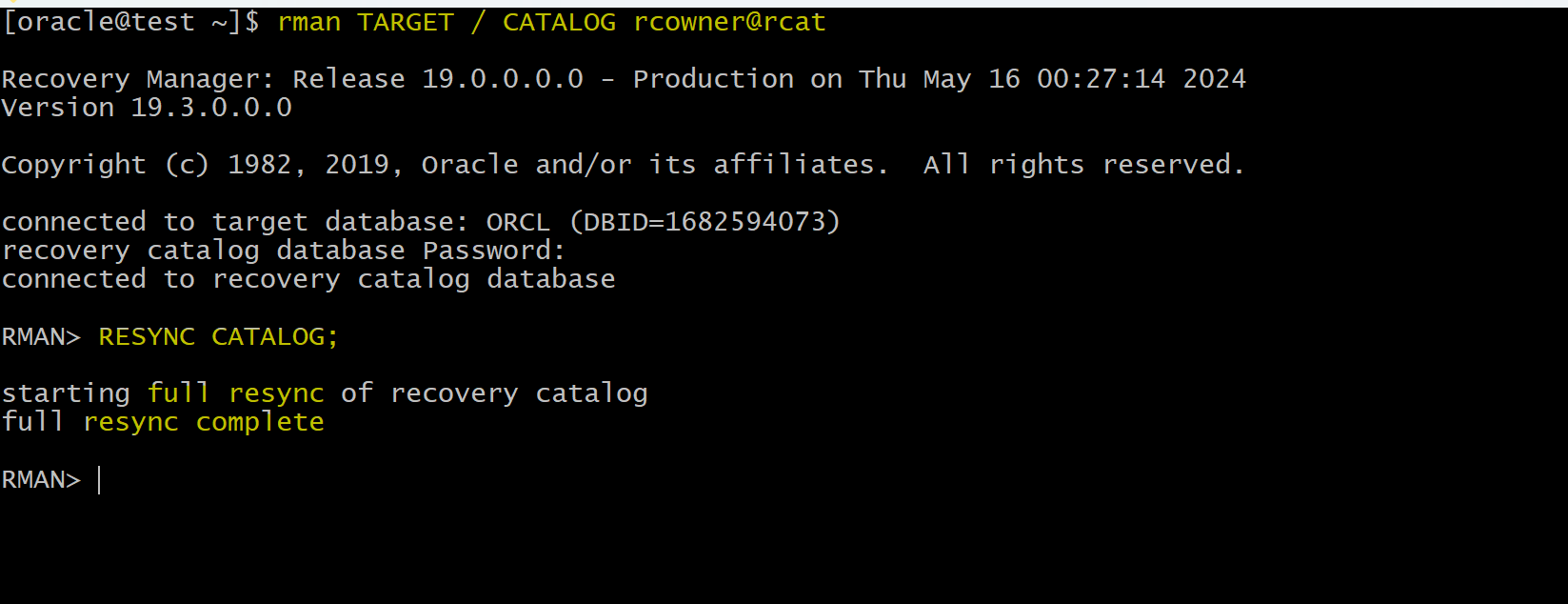
RESYNC CATALOG;
Lab: Manually Resynchronizing
-- connect
rman TARGET / CATALOG username/password@rcat_service

-- resync
RESYNC CATALOG;
-- automatically full resync