Note_Tech
All technological notes.
Project maintained by simonangel-fong Hosted on GitHub Pages — Theme by mattgraham
Recovery - Complete Recovery: Using Image Copy
Fast Recovery using SWITCH command
-
SWITCHcommand:-
updates the names of the files in the RMAN repository, but the database does not rename the files at the operating system level.
- Update the file names for a
database,tablespace, ordata fileto the latestimage copiesavailable for the specified files - Update the file names for
data filesandtemp filesfor which you have issued aSET NEWNAMEcommand
- Update the file names for a
-
-
Prerequisites:
- RMAN must be connected to a target database.
- When switching
tablespaces,data files, ortemp files, the files must be offline. - When switching the whole
database, the database must not be open.
-
Steps
- Take the
data fileoffline. - Usethe
SWITCH TO ... COPYcommand to point to theimage copyof the files. - Recover the data files.
- Bring the data files online.
- At this point, the database is usable, and the data files are recovered.
- Take the
SWITCH DATAFILE 'filename' TO COPY;
Switch back to original location
-
Steps to put the
data filesback into their original location: 注意, 该步骤不同于上一节- Use the
BACKUP AS COPYcommand to create animage copyof the data files in the original location. - Take the
data filesoffline. - Use the
SWITCH TO COPYcommand to switch to thecopy youmade in step 1 - Recover the data files.
- Bring the data files online.
- Use the
-
与上一节区别仅仅在于, 为保证转换后的文件还在原有路径, 将映像备份的保存在原有路径中. 则恢复时仅需将不工作的数据文件转换到原有路径的映像备份即可.
Restoring Datafiles to a Nondefault Location Using SET NEWNAME
-
If you cannot restore
data filesto their default locations, then you must update thecontrol fileto reflect the new locations of thedata files. 当无法使用默认路径恢复数据文件时, 必须更新 cf -
SET NEWNAMEcommand:- to specify the new file name
- equivalent to using the SQL statement
ALTER DATABASE RENAME FILE, to update the names of the data files in the control file. - Afterward, use
SWITCH DATAFILE ALLcommand to update thecontrol fileto reflect the new names for all data files. - used only inside a
RUNblock
-
Example:
RUN
{
    ALLOCATE CHANNEL devl DEVICE TYPE DISK;
    ALLOCATE CHANNEL dev2 DEVICE TYPE sbt;
    SQL "ALRER TABLESPACE users OFFLINE IMMEDIATE";
    SET NEWNAME FOR DATAFILE '/diskl/oradata/prod/users01l.dbf"'
                        TO '/disk2/users0l.dbf';
    RESTORE TABLESPACE users;
    SWITCH DATAFILE ALL;
    RECOVER TABLESPACE users;
    SQL "ALTER TABLESPACE users ONLINE";
}
-
Instead of individual names, a more efficient way is to use the SET NEWNAME clause to specify the default name format for all
data filesin a namedtablespaceand alldata filesin the database.- SET NEWNAME FOR DATAFILE and SET NEWNAME FOR TEMPFILE
- SET NEWNAME FOR TABLESPACE
- SET NEWNAME FOR DATABASE
- The default name is used for
DUPLICATE,RESTORE, andSWITCHcommands in the RUN block.该默认名将被用于同一个代码中
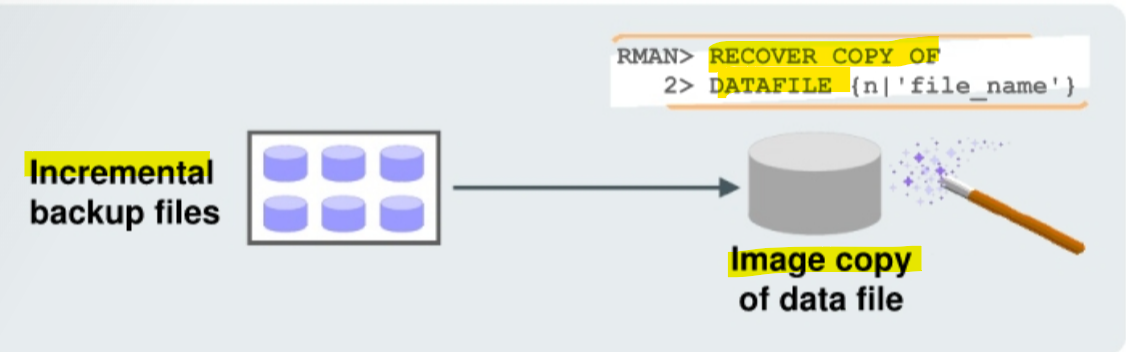
Applying Incremental backups to data file Image copies
-
To recover
Image Copies+incremental backups:Image copiesare updated with all changes up to theincremental backup SCN.- reduces the time required for media recovery.
- no need to perform an
image copyafter theincremental restoration.
-
Applying
incremental backupsto data fileimage copies:- roll forward (recover) the
image copyto the specified point in time- update the
image copywith all changes up through theSCNat which theincremental backupwas taken.
- update the
- the resulting updated data file just as a
full image copytaken at thatSCN, without the overhead of performing afull image copyof the database every day.
- roll forward (recover) the
-
Benefits:
- reduce the time required for
media recovery(usingarchive logs)减少恢复时间- because you need to apply
archive logsonly since the lastincremental backup.
- because you need to apply
- do not need to perform a
full image copyafter theincremental restoration.无需全备份
- reduce the time required for
-
Characteristics:
-
If the recovery process fails during the application of the
incremental backup file, you simply restart the recovery process. 如果恢复操作出错, 仅需重启- RMAN automatically determines the required
incremental backup filesto apply, from before theimage data file copyuntil the time at which you want to stop the recovery process. 自动适用自增备份
- RMAN automatically determines the required
-
If there is more than one version of an
image copyrecorded in the RMAN catalog 如果有多个备份- RMAN automatically uses the latest version of the image copy. 自动适用最后一个
-
-
RMAN reports an error if it cannot merge an
incremental backup filewith animage copy.
Example: continuously updated image copies(略, 查看 strategy)