Note_Tech
All technological notes.
Project maintained by simonangel-fong Hosted on GitHub Pages — Theme by mattgraham
Recovery - Redo Log
Recover from Loss of a Redo Log File 单一文件
-
When a member of a
redo log file groupis lost and if the group still has at least one member:- Normal operation of the instance is not affected.不影响正常操作
- You receive a message in the alert log notifying you that a member cannot be found.会收到警告
-
Solution:
- Determine whether there is a missing log file by examining the
alert log. -
Restore the missing file by first dropping the lost
redo log member, Then add a new member to replace the lost redo log member.ALTER DATABASE DROP LOGFILE MEMBER '';ALTER DATABASE ADD LOGFILE MEMBER '' TO GROUP n
- If the
media failureis due to the loss of adisk drive or controller, rename the missing file.如果磁盘驱动问题, 需要重命名 -
If the group has already been archived, or if you are in
NOARCHIVELOGmode, you may:如果是 noarchivelog, 可以清除组- choose to solve the problem by clearing the
log groupto re-create the missing file or files - can also clear the affected group manually with the following command
ALTER DATABASE CLEAR LOGFILE GROUP # - To clear an unarchived log group, use the following command
ALTER DATABASE CLEAR UNARCHIVED LOGFILE GROUP #
- choose to solve the problem by clearing the
- Immediately take a
full database backupof the whole database.
- Determine whether there is a missing log file by examining the
Recovering from the Loss of a Redo Log Group 一个组
Log Group Status
-
Redo log groupscycle through three different states as part of the normal running of the Oracle database:-
CURRENT:- The
LGWRprocess is currently writingredo datato it for any transactions going on in the database. - remains in this state until there is a switch to another log group.
- The
-
ACTIVE:- It is no longer being written to
- remains in this state during the time when a checkpoint has not yet executed that would write out to the
data filesall data changes that are represented in the redo log group. - still contains
redo datathat is required for instance recovery.
-
INACTIVE:- It is no longer being written to
- it is no longer required for instance recovery.
- free to become the next
CURRENTlog group.
-
Recovery
-
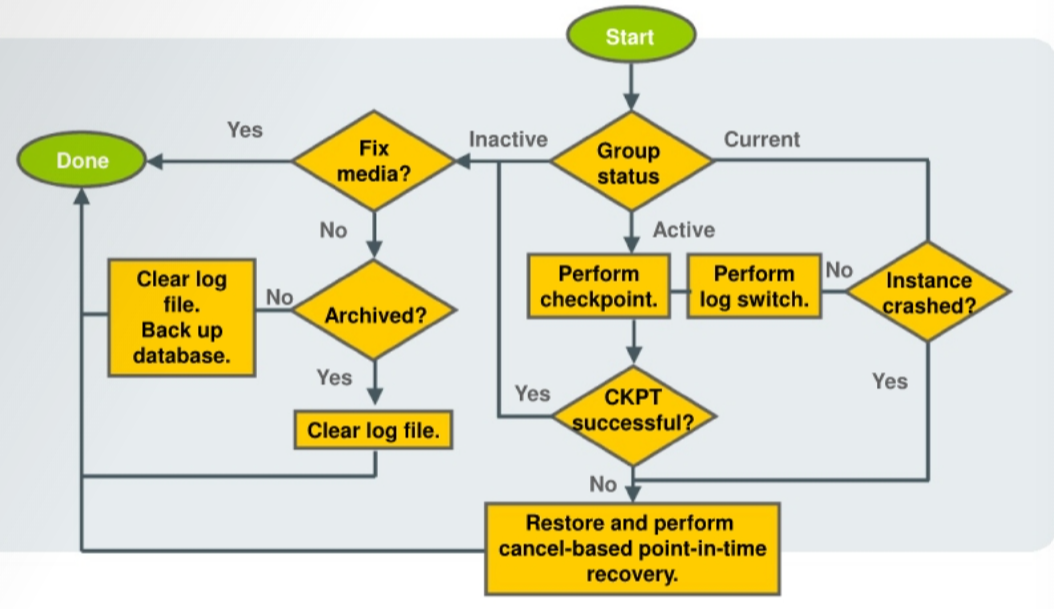
If you have lost an entire
redo log group, then all copies of thelog filesfor that group are unusable or gone. 所有 redo 文件都不可用 -
When in the
INACTIVEstate:- If the problem is temporary, or you are able to fix the media,
- then the database continues to run normally, and the group is reused when enough
log switch eventsoccur. 如果可以修复, 整个组可以重用
- then the database continues to run normally, and the group is reused when enough
- Otherwise, if the media cannot be fixed, you can clear the
log file.如果不能修复,清除 log 文件- When you clear a log file, you are indicating that it can be reused.
- If the problem is temporary, or you are able to fix the media,
-
When in the
ACTIVEstate:- it is still needed for
instance recovery. 无论当前是否正在写入, 只要在该状态都需要恢复. - If you are able to perform a checkpoint,
- then the
log file groupis no longer needed for instance recovery, and you can proceed as if the group were in theinactivestate. 如果可以对齐, 则组状态相当于 inactive.
- then the
- it is still needed for
-
When in the
CURRENTstate:- may even see the
LGWRprocess fail in this case.- If this happens, the instance crashes.
- only option at this point is to restore from backup, perform cancel-based
point-in-time recovery, and then open the database with theRESETLOGSoption.
- may even see the
Clearing a Log File
- Method to determine which log groups have been archived
SELECT GROUP#, STATUS, ARCHIVED FROM V$LOG;
-
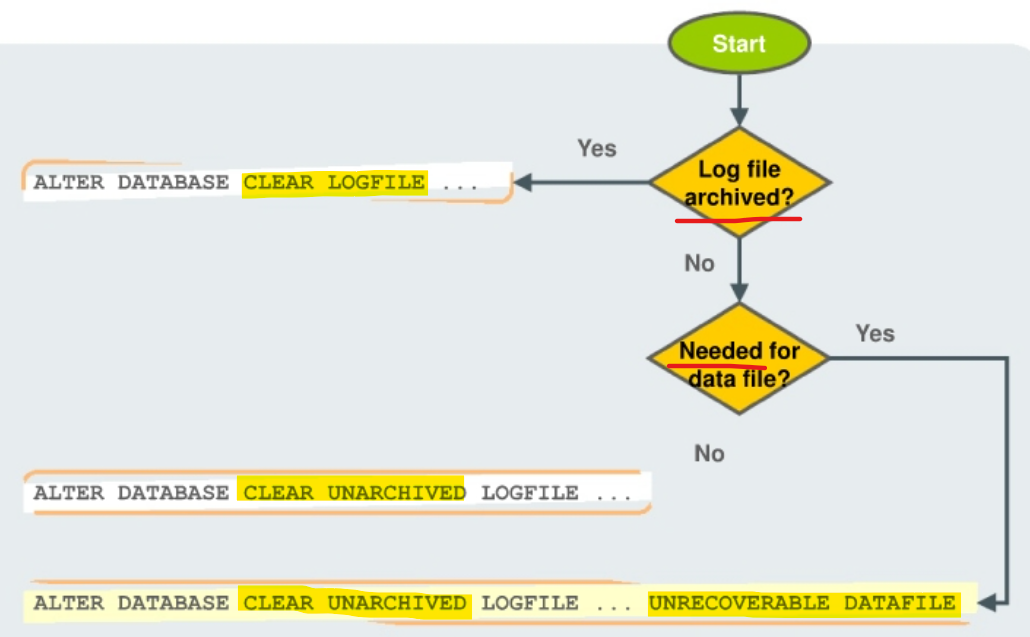
When you clear a
log file, you are indicating that it can be reused. -
If the
redo log grouphas not been archived,- it is possible that there are backups that rely on that
redo logfor recovery. 没有 archive 时, 意味着有备份依赖该组 - you have decided to forgo 放弃 that recovery opportunity.
- needs to take another backup right after you correct the redo log group problem; then no longer need that
redo log file. 需要立即备份, 然后 log file 不能再用
- it is possible that there are backups that rely on that
-
It is possible that the
redo logis required to recover an offline data file. -
Command
-- If the log file has already been archived
ALTER DATABASE CLEAR LOGFILE GROUP <n>;

-- if not been archived and not needed
ALTER DATABASE CLEAR UNARCHIVED LOGFILE GROUP <n>

-- if not been archived and needed for data file
ALTER DATABASE CLEAR UNARCHIVED LOGFILE GROUP <n>
UNRECOVERABLE DATAFILE