Note_Tech
All technological notes.
Project maintained by simonangel-fong Hosted on GitHub Pages — Theme by mattgraham
Recovery - Server Parameter File & Control File
- Recovery -
Server Parameter File\&Control File
Recovery from Loss of Server Parameter File
Recover from current system: FROM MEMORY
-
FROM MEMORYclause:- creates a
text initialization parameter file (PFILE)orserver parameter file (SPFILE)by using the current system wide parameter settings.
- creates a
-
In a RAC environment, the created file contains the parameter settings from each instance. 包含每个实例的参数
-
During instance startup, all parameter settings are logged in to the
alert.logfile.- The
alert.logparameter dump text is written in valid parameter syntax.- This facilitates cutting and pasting of parameters into a separate file and then using it as a
PFILEfor a subsequent instance. 原理: 实例启动时, 参数以合规的语法记录在 log, 所以可以剪切和复制到新文件.
- This facilitates cutting and pasting of parameters into a separate file and then using it as a
- The name of the
PFILEorSPFILEis written toalert.logat instance startup time.- In cases when an unknown client-side
PFILEis used, the alert log indicates this as well.也会记录参数文件名, 所以可以在命令中加入文件名
- In cases when an unknown client-side
- The
-
Syntax:
-------- Create PFILE --------

-- creates a PFILE from the default SPFILE used by the current instance
CREATE PFILE
FROM SPFILE;

-- creates a PFILE with a specified name from the default SPFILE:
CREATE PFILE='/u01/app/oracle/product/19.0.0/dbhome_1/dbs/initORCL_custom.ora'
FROM SPFILE;

-- creates a PFILE(for current instance) from a specified SPFILE
CREATE PFILE='/u01/app/oracle/product/19.0.0/dbhome_1/dbs/initORCL.ora'
FROM SPFILE='/u01/app/oracle/product/19.0.0/dbhome_1/dbs/spfileORCL.ora';

-- specifies both the input SPFILE and the output PFILE explicitly
CREATE PFILE='/u01/app/oracle/product/19.0.0/dbhome_1/dbs/initORCL_custom.ora'
FROM SPFILE='/u01/app/oracle/product/19.0.0/dbhome_1/dbs/spfileORCL.ora';

-- creates a PFILE based on the current parameter values in memory (the running instance's settings):
CREATE PFILE FROM MEMORY;


-------- Create SPFILE --------

-- Create SPFILE from default PFILE
CREATE SPFILE
FROM PFILE;

-- Create SPFILE from specified PFILE
CREATE SPFILE='/u01/app/oracle/product/19.0.0/dbhome_1/dbs/spfileORCL.ora'
FROM PFILE='/u01/app/oracle/product/19.0.0/dbhome_1/dbs/initORCL.ora';

-- Create SPFILE from memory
CREATE SPFILE
FROM MEMORY;

-- Create SPFILE with specified name from default PFILE
CREATE SPFILE='/u01/app/oracle/product/19.0.0/dbhome_1/dbs/spfileORCL_custom.ora'
FROM PFILE;

-- Create SPFILE with specified input PFILE and output SPFILE
CREATE SPFILE='/u01/app/oracle/product/19.0.0/dbhome_1/dbs/spfileORCL_custom.ora'
FROM PFILE='/u01/app/oracle/product/19.0.0/dbhome_1/dbs/initORCL.ora';
Restore from Autobackup
-
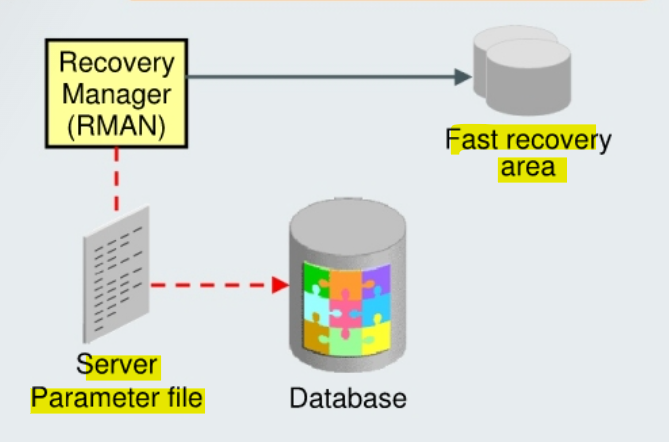
Scenario:
- lost the
server parameter fileand cannot use theFROM MEMORYclause
- lost the
-
Solution:
- restore it from the autobackup
- Syntax:
-- Restore the SPFILE from auto backup
RESTORE SPFILE
FROM AUTOBACKUP

-- Restore the SPFILE from auto backup to a nondefault location
RESTORE SPFILE TO <file name>
FROM AUTOBACKUP

-- Restore the SPFILE from the fast recovery area
run {
    restore spfile from autobackup
    recovery area = '<flash recovery area destination>'
    db_name = '<db_name>';
}
- Example
STARTUP FORCE NOMOUNT;
RESTORE SPFILE FROM AUTOBACKUP;
STARTUP FORCE;
Lab: Restore the parameter file
Setup Environment
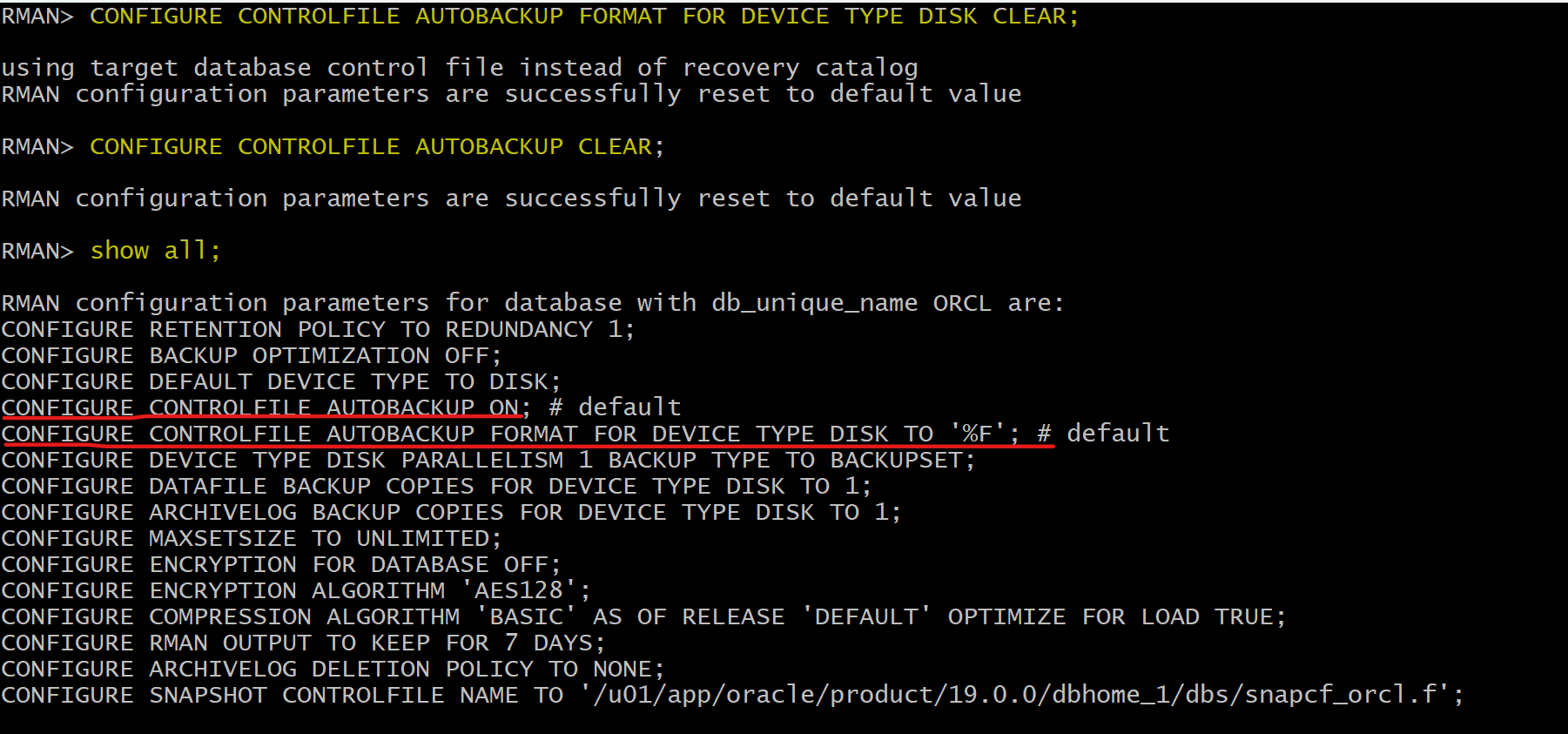
- Confirm auto backup control file configuration
- Perform full backup
rman target /

-- clear configuration for the control file autobackup location on disk.
-- RMAN creates control file autobackups in the fast recovery area when no other destination is configured.
-- /u01/app/oracle/fast_recovery_area/ORCL/autobackup
CONFIGURE CONTROLFILE AUTOBACKUP FORMAT FOR DEVICE TYPE DISK CLEAR;
CONFIGURE CONTROLFILE AUTOBACKUP CLEAR;

-- confirm
show all;

BACKUP DATABASE;
- Create user and tbsp
sqlplus / as sysdba

ALTER SESSION SET container=orclpdb;
show con_name

-- CLEANUP from previous run
DROP USER bar CASCADE;
DROP TABLESPACE bartbs INCLUDING CONTENTS AND DATAFILES;

-- Create tablespace
CREATE TABLESPACE bartbs
DATAFILE '/u01/app/oracle/oradata/ORCL/orclpdb/bartbs.dbf' SIZE 10M
SEGMENT SPACE MANAGEMENT MANUAL;

-- Create user
CREATE USER BAR IDENTIFIED BY pass4BAR
DEFAULT TABLESPACE bartbs
QUOTA UNLIMITED ON bartbs;

GRANT CREATE SESSION TO BAR;

-- create table and populate
-- be sure table is at least 2 blocks long
CREATE TABLE BAR.barcopy
TABLESPACE bartbs
AS SELECT * FROM HR.EMPLOYEES;

INSERT INTO BAR.BARCOPY
SELECT * FROM BAR.BARCOPY;

INSERT INTO BAR.BARCOPY
SELECT * FROM BAR.BARCOPY;
- Backup tbsp
-- Create backup of the bartbs tablespace
rman target "'sys@orclpdb as sysdba'"

BACKUP AS COPY TABLESPACE bartbs;
- Update the table
-- update the table
sqlplus / as sysdba

ALTER SESSION SET container=orclpdb;
UPDATE BAR.BARCOPY SET salary = salary+1;
COMMIT;
- Shutdown instance
sqlplus / as sysdba

shutdown abort
exit
- Remove PFile and SPFile
# copy the existing spfile
cp /u01/app/oracle/product/19.0.0/dbhome_1/dbs/spfileorcl.ora /home/oracle/backup/spfileorcl.ora

# remove spfile
rm -f /u01/app/oracle/product/19.0.0/dbhome_1/dbs/spfileorcl.ora

# remove pfile
if [ -e /u01/app/oracle/product/19.0.0/dbhome_1/dbs/initorcl.ora ]
then
	cp /u01/app/oracle/product/19.0.0/dbhome_1/dbs/initorcl.ora /home/oracle/backup/initorcl.ora
	rm -f /u01/app/oracle/product/19.0.0/dbhome_1/dbs/initorcl.ora
fi

# copy file back to oracle db
# cp /home/oracle/backup/initorcl.ora /u01/app/oracle/product/19.0.0/dbhome_1/dbs/initorcl.ora
# cp /home/oracle/backup/spfileorcl.ora /u01/app/oracle/product/19.0.0/dbhome_1/dbs/spfileorcl.ora
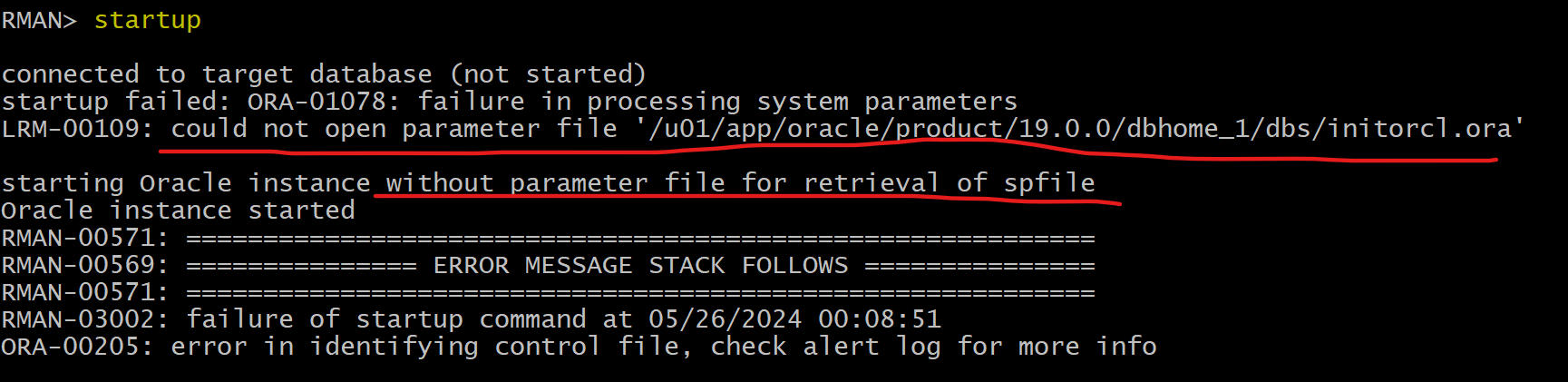
- Try to startup instance
- Note: The database has been started with a dummy parameter file to allow the SPFILE to be restored.
rman target "'/ as sysbackup'"
startup
Restore SPFile
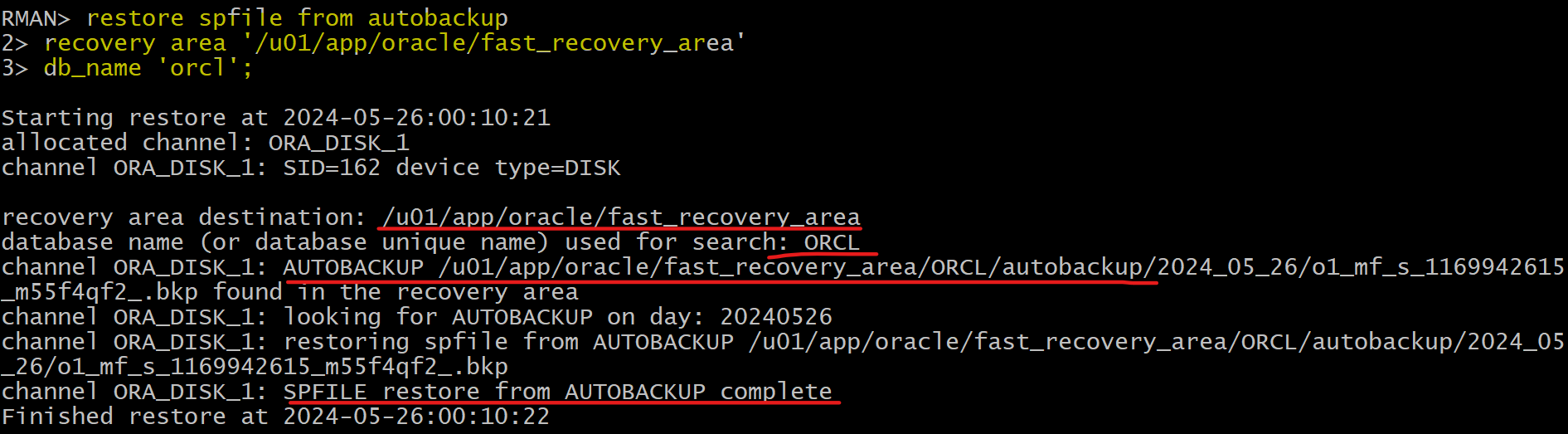
- Restore the sPFILE.
- use the
fast recovery areaandDB_NAMEoptions to specify where the autobackups can be found.
- use the
rman target /

restore spfile from autobackup
recovery area '/u01/app/oracle/fast_recovery_area'
db_name 'orcl';
- re-startup instance
-- rman
shutdown

-- startup instance using the restored spfile
startup
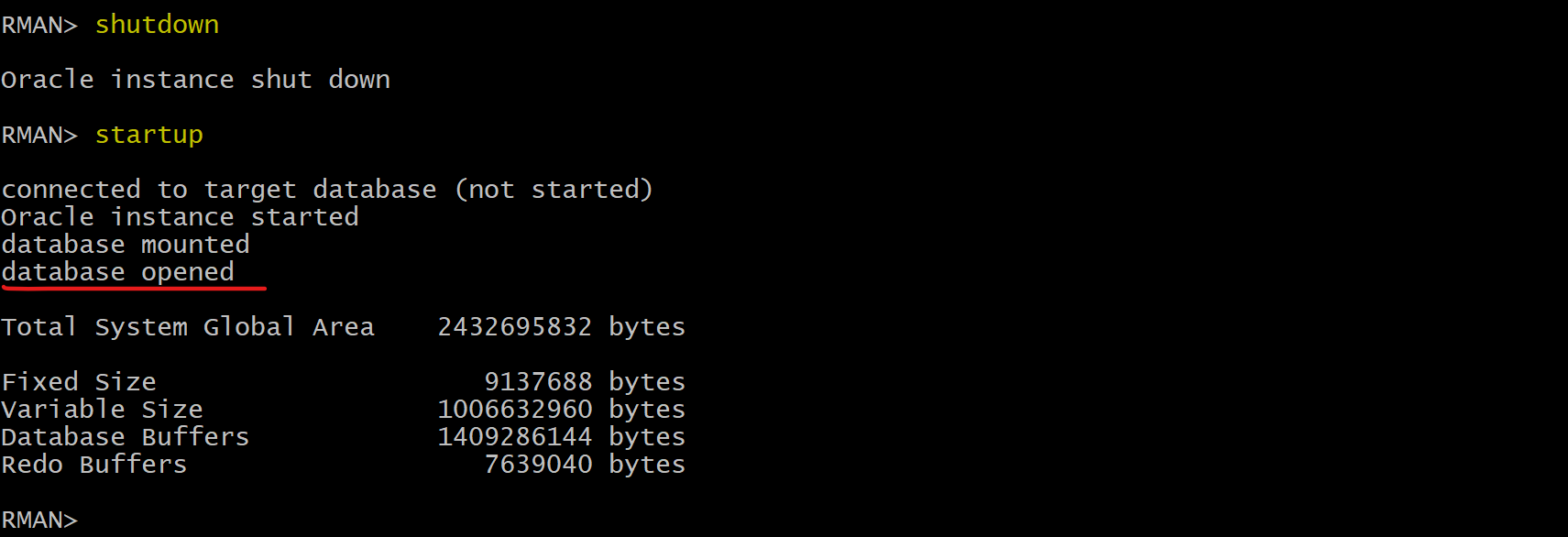
- Confirm instance can be opened.
sqlplus / as sysdba
alter session set container=orclpdb;
alter pluggable database open;

select * from BAR.BARCOPY;
- Backup after recovery
-- rman
-- confirm no failure
list failure;

BACKUP DATABASE PLUS ARCHIVELOG DELETE INPUT;
delete noprompt obsolete;
Clean up
rman target "'sys@orclpdb as sysdba'"
delete NOPROMPT copy of tablespace bartbs;
exit;

sqlplus / as sysdba
ALTER SESSION SET container=orclpdb;

-- CLEANUP from previous run
DROP USER bar CASCADE;
DROP TABLESPACE bartbs INCLUDING CONTENTS AND DATAFILES;

EXIT;
Recovery from Loss of Control File
- In general, the options for recovery from the loss of a control file depend on the storage configuration of the
control filesand on whether at least one control file remains or all have been lost. 总体而言, 基于存储设置和 cf 损失程度
Remain at least one control file copy
- Scenario:
- using
ASMstorage
- using
- Solution:
- Put the database in
NOMOUNTmode. - Connect to RMAN and issue the
RESTORE CONTROLFILEcommand to restore thecontrol filefrom an existing control file
- Put the database in
restore controlfile
from '+DATA/orcl/controlfile/current.260.695209463"';
- Solution:
- can also use the ASMCMD cp command to restore the control file.
- Scenario:
control filesare stored as regular file system files
- Solution:
- shutdown database,
- copy one of the remaining control files to the missing file’s location.
- Solution:
- if the media failure is due to the loss of a disk drive or controller
-
- Copy one of the remaining control files to some other location
-
- update the instance’s parameter file to point to the new location.
- Alternatively, you can delete the reference to the missing control file from the initialization parameter file.
Loss of All Control File Copies
- Scenario:
- have a backup control file
- Solution:
- depends on the status of the
online log filesand thedata files:
- depends on the status of the
| Online log status | Data file status:Current | Data file status:Backup |
|---|---|---|
| Available | Restore backup cf, complete recovery,OPEN RESETLOGS |
Restore backup cf, complete recovery, OPEN RESETLOGS |
| Unavailable | Re-create cf,, OPEN RESETLOGS |
Restore backup cf, pitr, OPEN RESETLOGS |
- Scenario:
- do not have a backup of the control file
- but have a text file created with the
ALTER DATABASE BACKUP CONTROLFILE TO TRACEcommand
- Solution:
- use it to re-create the control file.
Restore from Autobackup
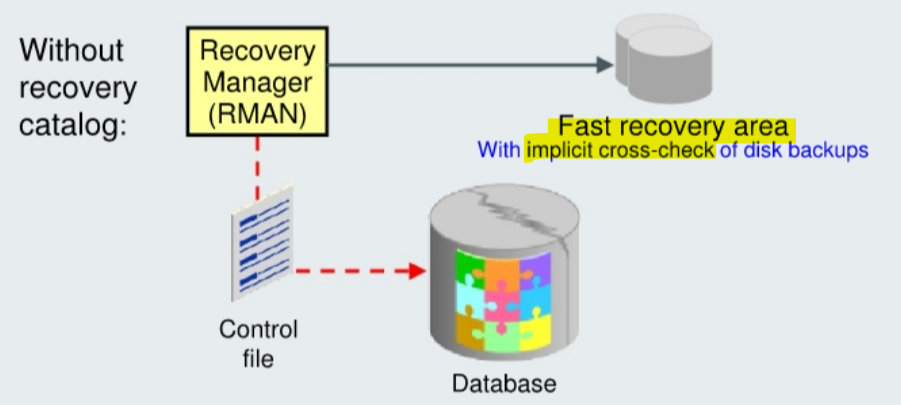
-
The commands used for restoring your control file are the same, whether or not you are using a
fast recovery area. -
If you are using a
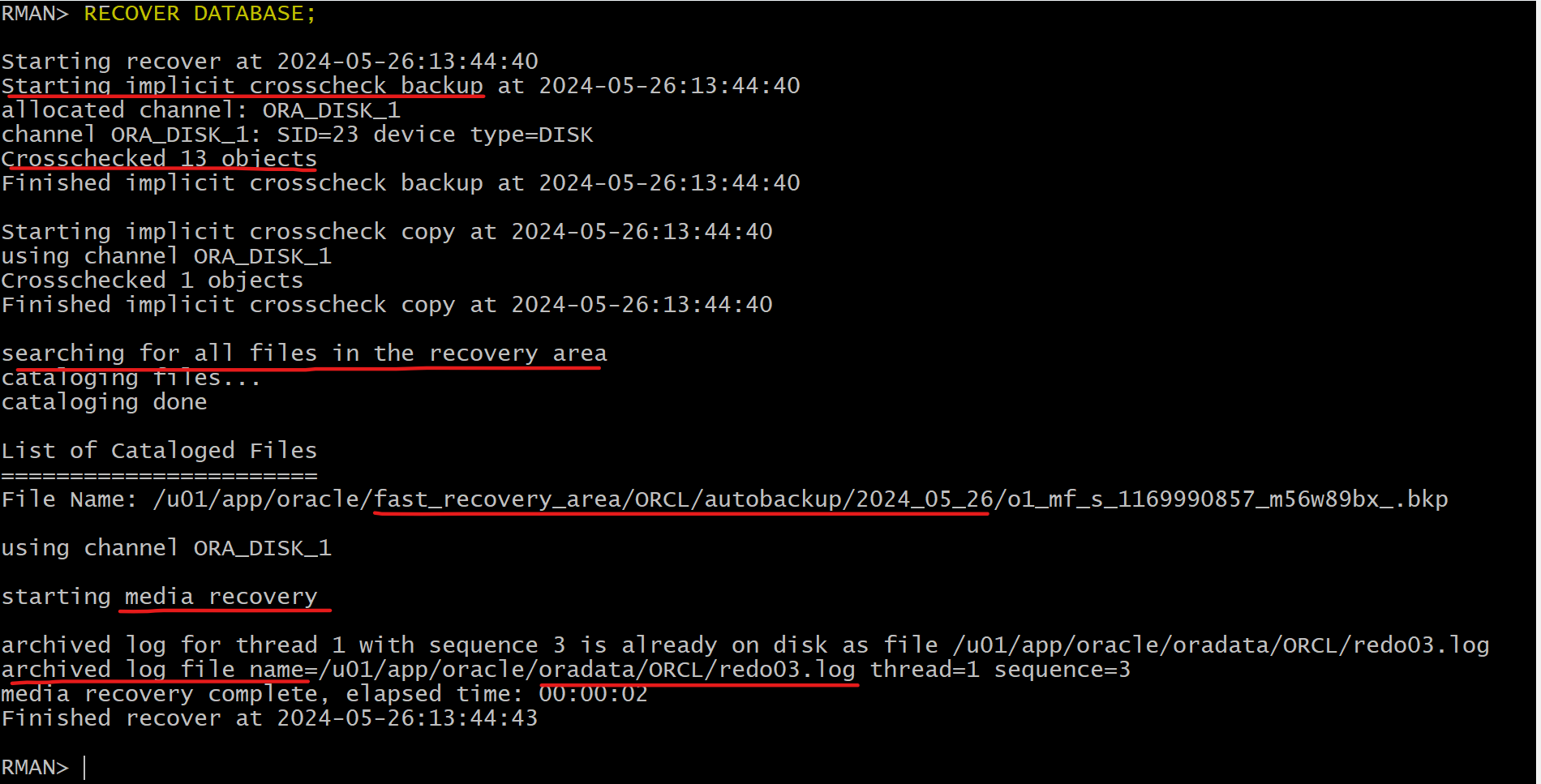
fast recovery area, RMAN implicitly cross-checks backups and image copies listed in the control file and catalogs any files in the fast recovery area that are not recorded in the restored control file, thereby improving the usefulness of the restored control file in the restoration of the rest of your database. 恢复的 CF 与 FRA 的备份可能有差异, 所以恢复 CF 时会交叉检查. -
Tape backupsare not automatically cross-checked after the restoration of a control file.- After restoring the control file and mounting the database, you must cross-check the backups on tape.
-
Example:
STARTUP NOMOUNT;
RESTORE CONTROLFILE FROM AUTOBACKUP;
ALTER DATABASE MOUNT;
-- must recover the database, because now have a backup control file that contains information about an older version of the database.
RECOVER DATABASE;
-- must specify RESETLOGS because the new control file represents a different instantiation of the database.
ALTER DATABASE OPEN RESETLOGS;
Using Recovery Catalog
-
Prerequisites:
- target instance must be in the
NOMOUNTstate - RMAN must be connected to the
recovery catalog
- target instance must be in the
-
No need to set the
DBIDor use the control file autobackup to restore the control file. 使用备份时, 需要表明 dbid; 使用 catalog 时, 不需要. -
The restored control file is written to all locations listed in the
CONTROL_FILESinitialization parameter. 恢复的 CF 会写到 target db 的这个参数指定的路径.
-- restore control file using catalog
RESTORE CONTROLFILE

-- restore the control file to a non-default location.
RESTORE CONTROLFILE... TO <destination>
- After you restore and mount the control file, you have the backup information necessary to restore and recover the database.
Lab: Restore single loss of control file
Setup Environment
- Confirm auto backup control file configuration
- Perform full backup
rman target /

BACKUP DATABASE;
- Create user and tbsp
sqlplus / as sysdba

ALTER SESSION SET container=orclpdb;
show con_name

-- CLEANUP from previous run
DROP USER bar CASCADE;
DROP TABLESPACE bartbs INCLUDING CONTENTS AND DATAFILES;

-- Create tablespace
CREATE TABLESPACE bartbs
DATAFILE '/u01/app/oracle/oradata/ORCL/orclpdb/bartbs.dbf' SIZE 10M
SEGMENT SPACE MANAGEMENT MANUAL;

-- Create user
CREATE USER BAR IDENTIFIED BY pass4BAR
DEFAULT TABLESPACE bartbs
QUOTA UNLIMITED ON bartbs;

GRANT CREATE SESSION TO BAR;

-- create table and populate
-- be sure table is at least 2 blocks long
CREATE TABLE BAR.barcopy
TABLESPACE bartbs
AS SELECT * FROM HR.EMPLOYEES;

INSERT INTO BAR.BARCOPY
SELECT * FROM BAR.BARCOPY;

INSERT INTO BAR.BARCOPY
SELECT * FROM BAR.BARCOPY;
- Backup tbsp
-- Create backup of the bartbs tablespace
rman target "'sys@orclpdb as sysdba'"

BACKUP AS COPY TABLESPACE bartbs;
- Update the table
-- update the table
sqlplus / as sysdba

ALTER SESSION SET container=orclpdb;
UPDATE BAR.BARCOPY SET salary = salary+1;
COMMIT;
- Shutdown instance
sqlplus / as sysdba

shutdown abort
exit
- Remove Control File
if [ -e /u01/app/oracle/fast_recovery_area/ORCL/control02.ctl ]
then
  rm -f /u01/app/oracle/fast_recovery_area/ORCL/control02.ctl
fi
- Try to startup instance
- Note: The database has been started with a dummy parameter file to allow the SPFILE to be restored.
sqlplus / as sysdba
startup
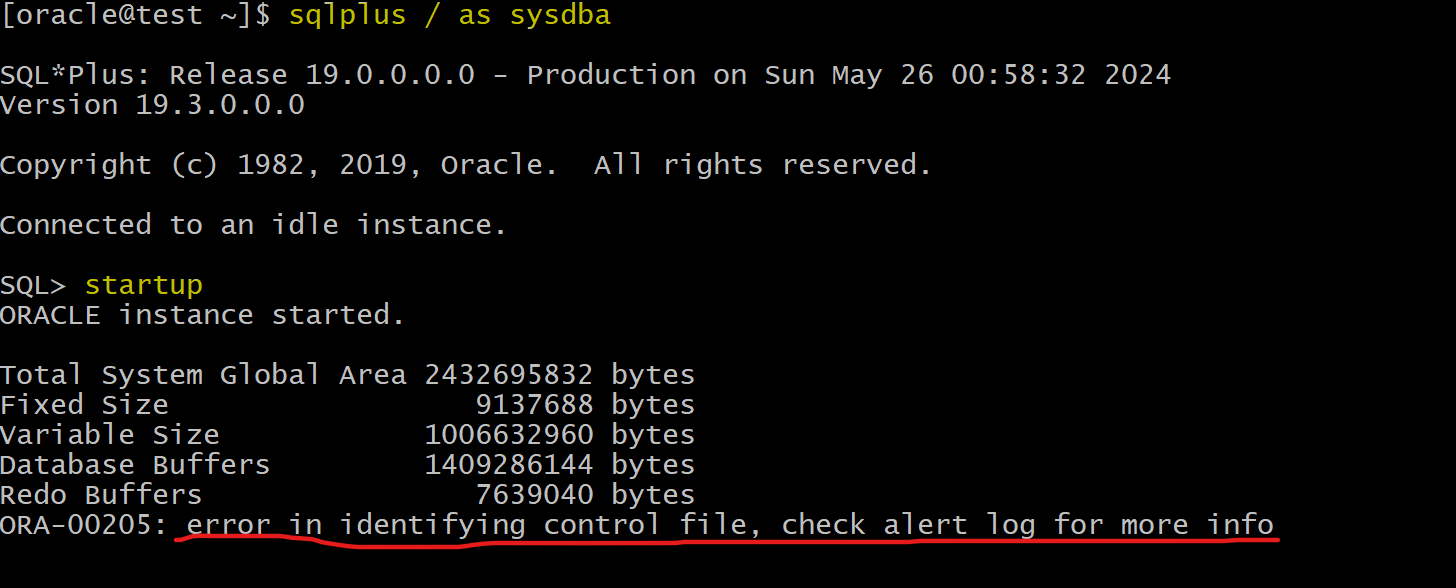
Restore Control File
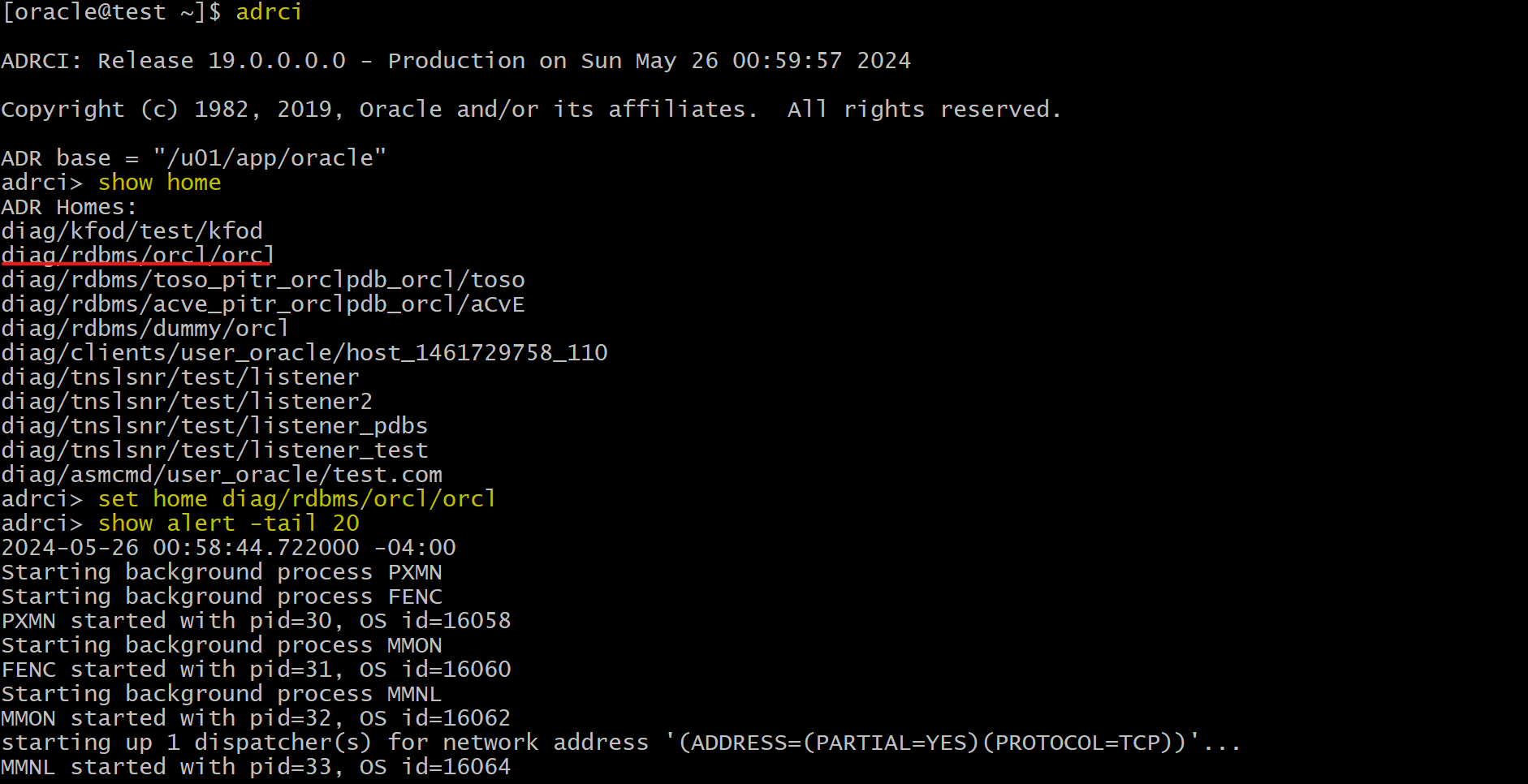
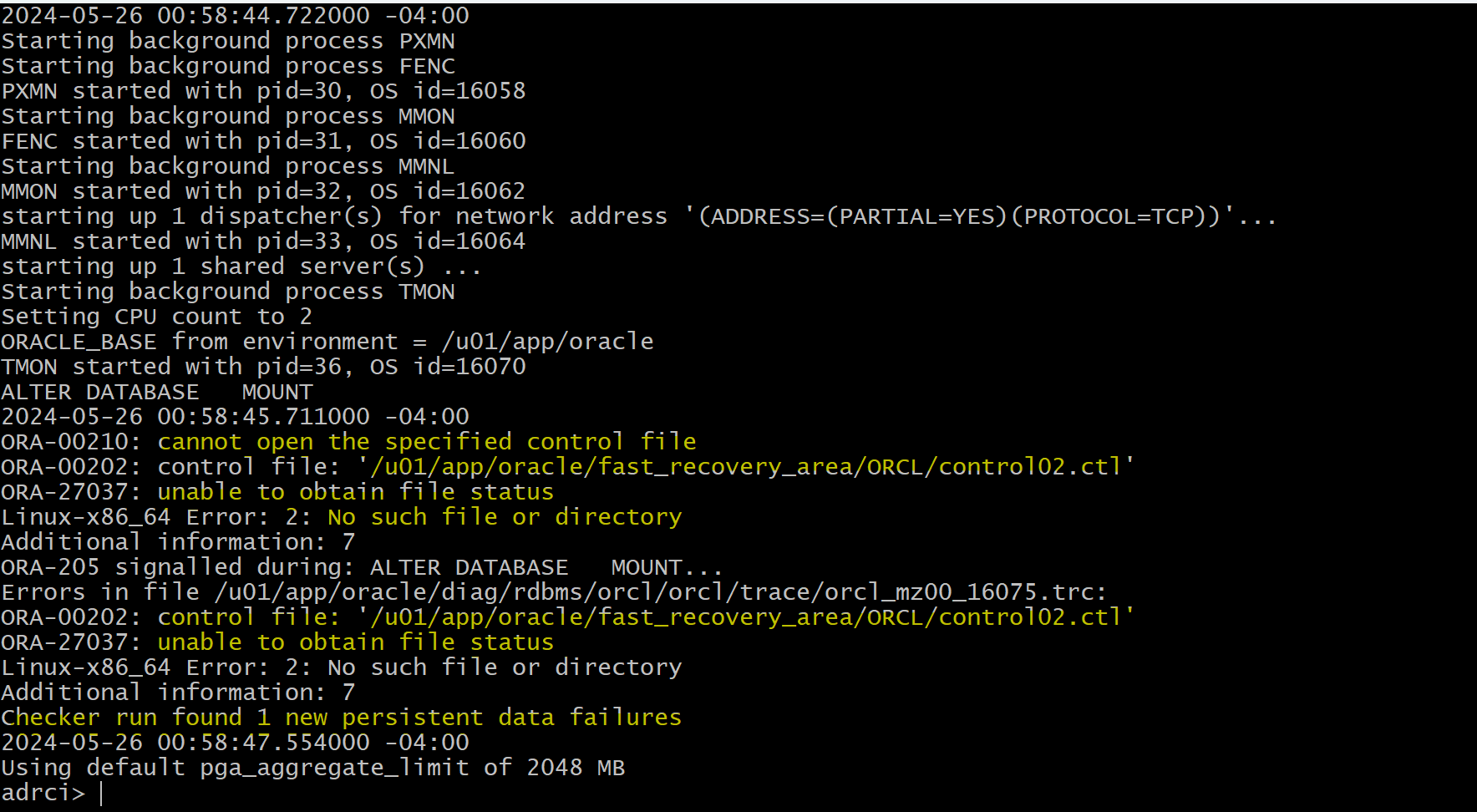
- Option: Use
adrcito view thealert log
adrci

show home
set home home_str
# set home diag/rdbms/orcl/orcl

show alert -tail 20

exit
- Check the
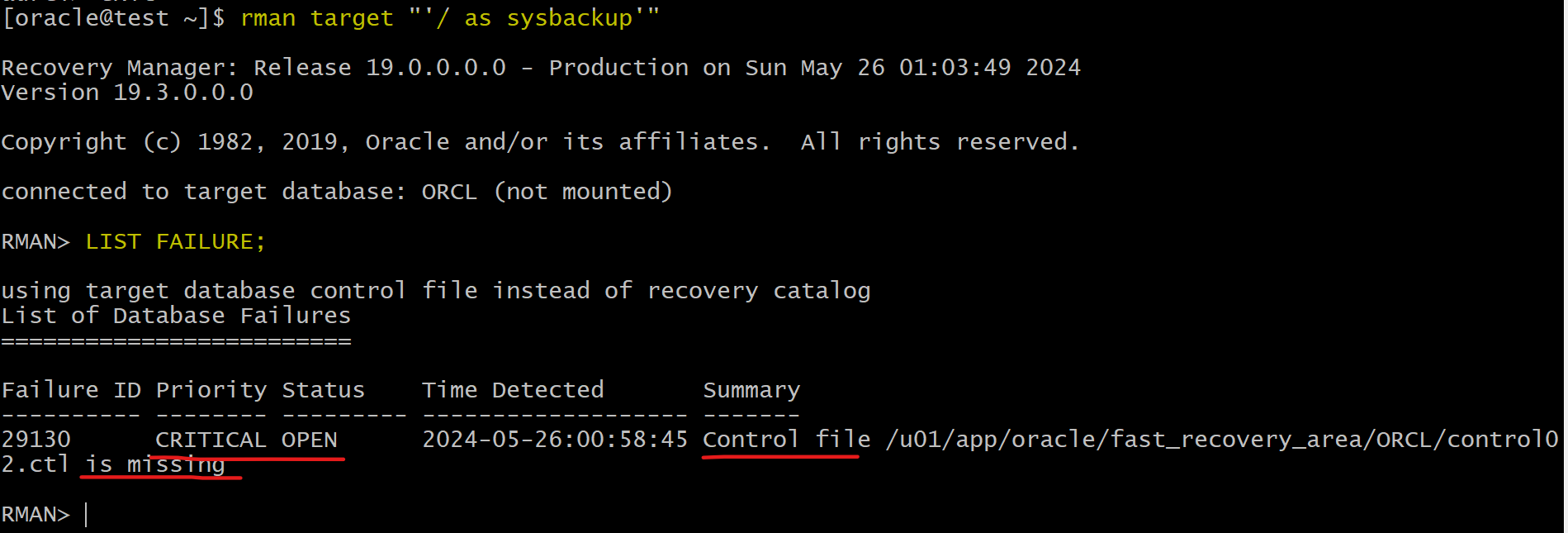
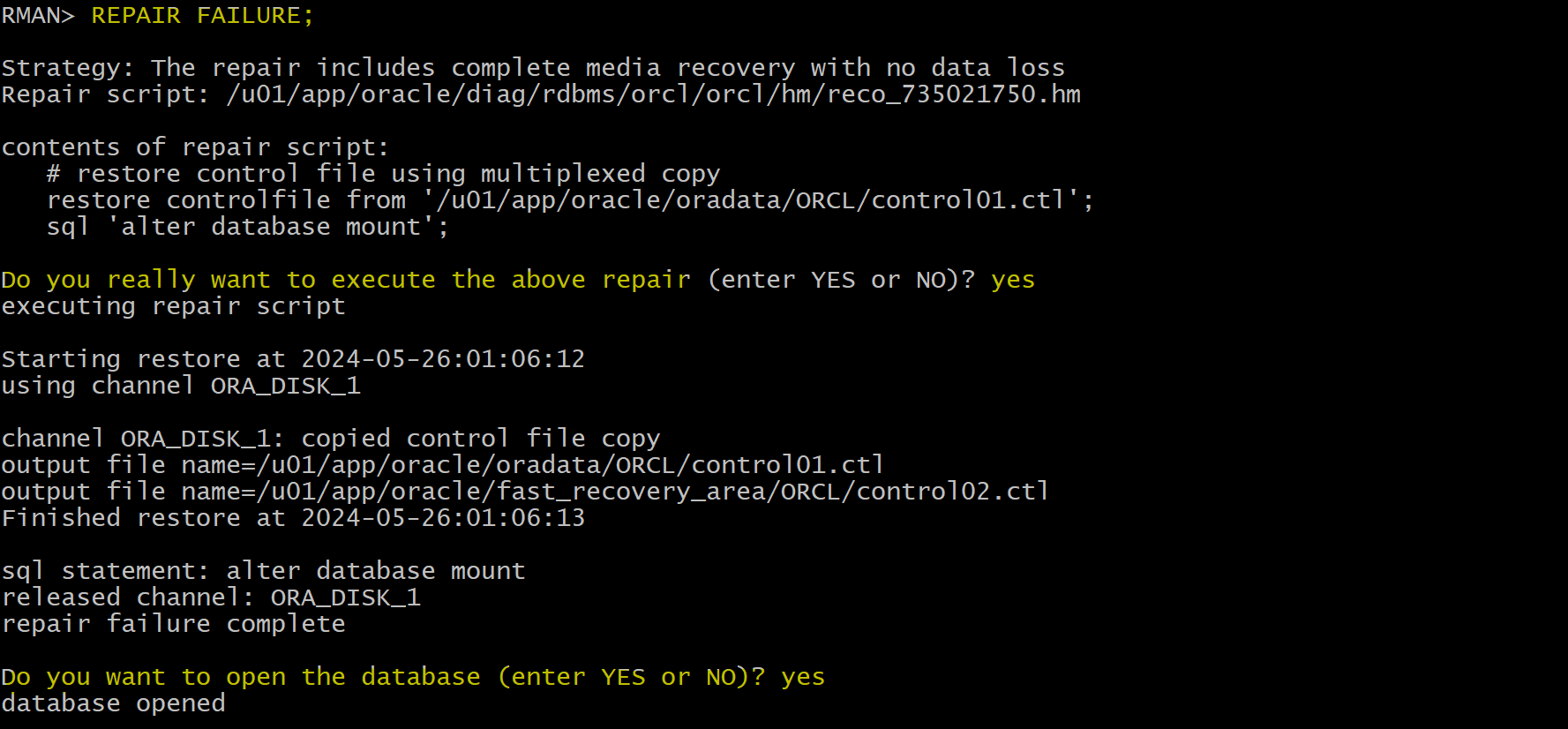
Data Recovery Advisorfor a solution.
rman target "'/ as sysbackup'"

LIST FAILURE;
ADVISE FAILURE;
-- preview rman command line
REPAIR FAILURE PREVIEW;
REPAIR FAILURE;

-- confirm failure has been repaired
LIST FAILURE;

- Confirm the data by querying table
ALTER SESSION SET container=orclpdb;
alter pluggable database open;
select * from BAR.BARCOPY;
- Backup after recovery
-- rman
-- confirm no failure
list failure;

BACKUP DATABASE PLUS ARCHIVELOG DELETE INPUT;
delete noprompt obsolete;
exit
Clean up
rman target "'sys@orclpdb as sysdba'"
delete NOPROMPT copy of tablespace bartbs;
exit;

sqlplus / as sysdba
ALTER SESSION SET container=orclpdb;

-- CLEANUP from previous run
DROP USER bar CASCADE;
DROP TABLESPACE bartbs INCLUDING CONTENTS AND DATAFILES;

EXIT;
Lab: Restore loss of all control files
Setup Environment
- Confirm auto backup control file configuration
- Perform full backup
rman target /

BACKUP DATABASE;
- Create user and tbsp
sqlplus / as sysdba

ALTER SESSION SET container=orclpdb;
show con_name

-- CLEANUP from previous run
DROP USER bar CASCADE;
DROP TABLESPACE bartbs INCLUDING CONTENTS AND DATAFILES;

-- Create tablespace
CREATE TABLESPACE bartbs
DATAFILE '/u01/app/oracle/oradata/ORCL/orclpdb/bartbs.dbf' SIZE 10M
SEGMENT SPACE MANAGEMENT MANUAL;

-- Create user
CREATE USER BAR IDENTIFIED BY pass4BAR
DEFAULT TABLESPACE bartbs
QUOTA UNLIMITED ON bartbs;

GRANT CREATE SESSION TO BAR;

-- create table and populate
-- be sure table is at least 2 blocks long
CREATE TABLE BAR.barcopy
TABLESPACE bartbs
AS SELECT * FROM HR.EMPLOYEES;

INSERT INTO BAR.BARCOPY
SELECT * FROM BAR.BARCOPY;

INSERT INTO BAR.BARCOPY
SELECT * FROM BAR.BARCOPY;
- Backup tbsp
-- Create backup of the bartbs tablespace
rman target "'/ as sysdba'"

BACKUP AS COPY TABLESPACE orclpdb:bartbs;
- Update the table
-- update the table
sqlplus / as sysdba

ALTER SESSION SET container=orclpdb;
UPDATE BAR.BARCOPY SET salary = salary+1;
COMMIT;
- Shutdown instance
sqlplus / as sysdba

shutdown abort
exit
- Remove all Control File
# copy control01
cp /u01/app/oracle/oradata/ORCL/control01.ctl /home/oracle/backup
# remove control01
rm -f /u01/app/oracle/oradata/ORCL/control01.ctl

if [ -e /u01/app/oracle/fast_recovery_area/ORCL/control02.ctl ]
then
  # copy control02
	cp /u01/app/oracle/fast_recovery_area/ORCL/control02.ctl /home/oracle/backup
  # remove control02
	rm -f /u01/app/oracle/fast_recovery_area/ORCL/control02.ctl
fi

# confirm all control files are removed
ls /u01/app/oracle/oradata/ORCL/control01.ctl
ls /u01/app/oracle/fast_recovery_area/ORCL/control02.ctl

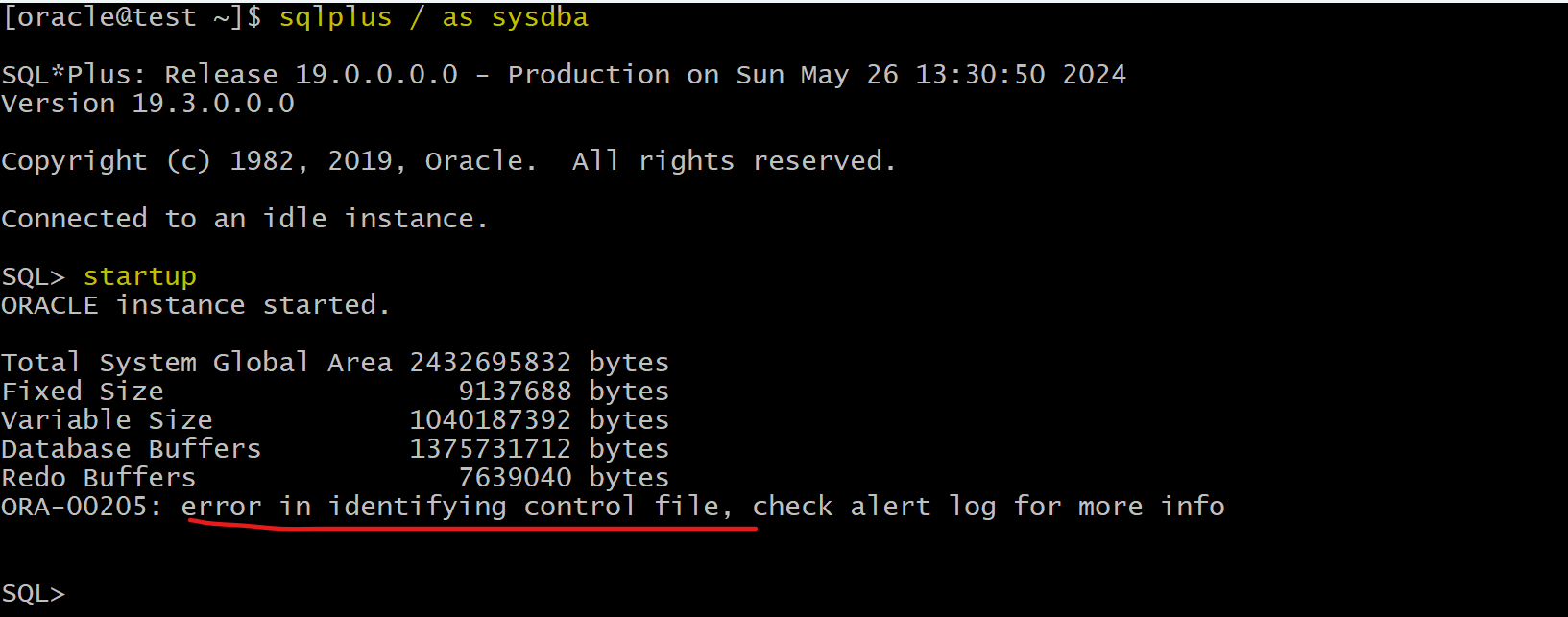
- Try to startup instance
sqlplus / as sysdba
startup
-- ORA-00205: error in identifying control file, check alert log for more info
Restore Control File
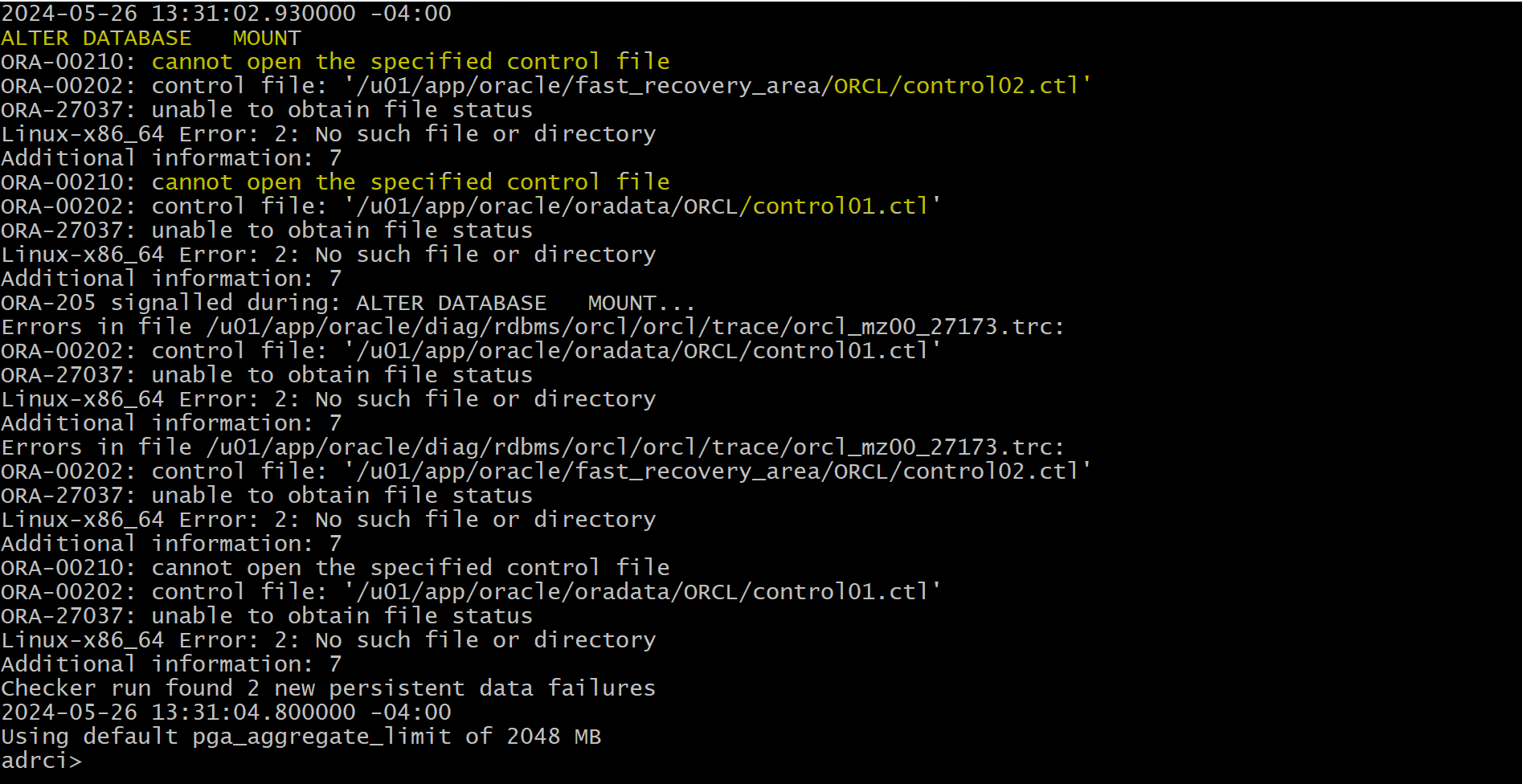
- Option: Use
adrcito view thealert log
adrci

show home
set home home_str
# set home diag/rdbms/orcl/orcl

show alert -tail 30

exit
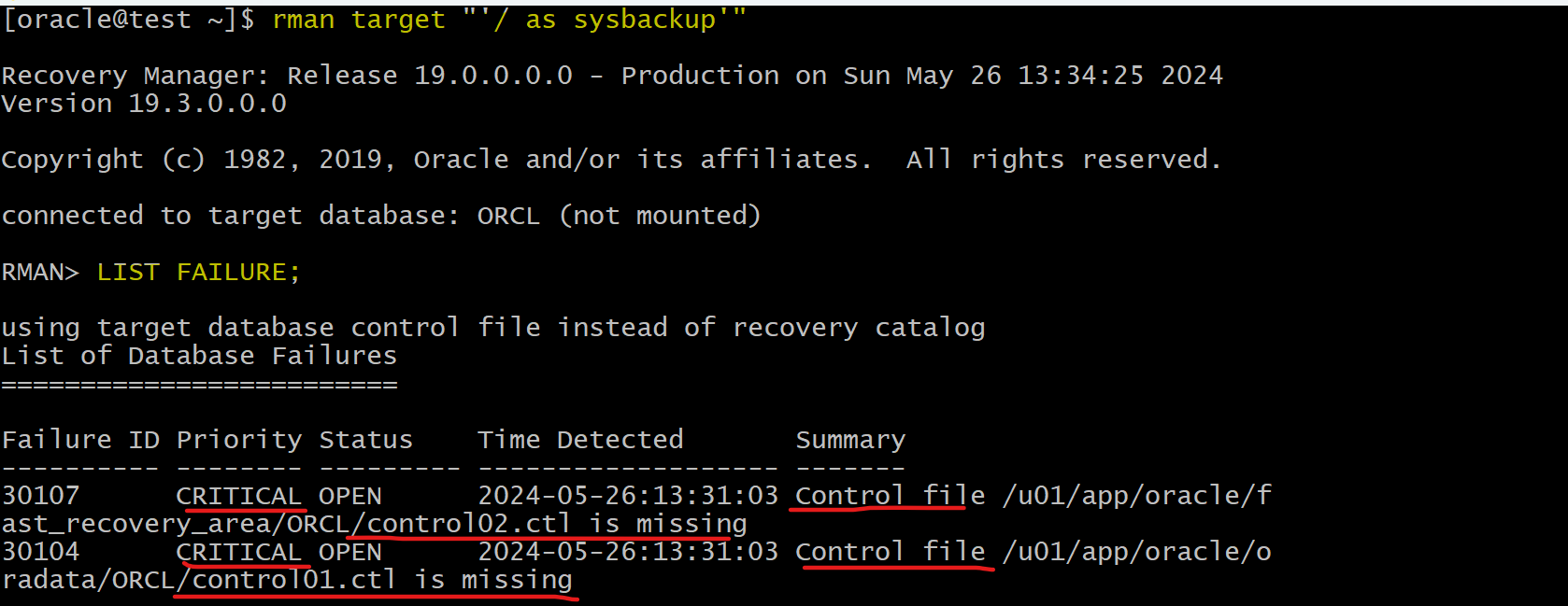
- Diagnose using
rda
rman target "'/ as sysbackup'"

LIST FAILURE;
ADVISE FAILURE;
REPAIR FAILURE PREVIEW;
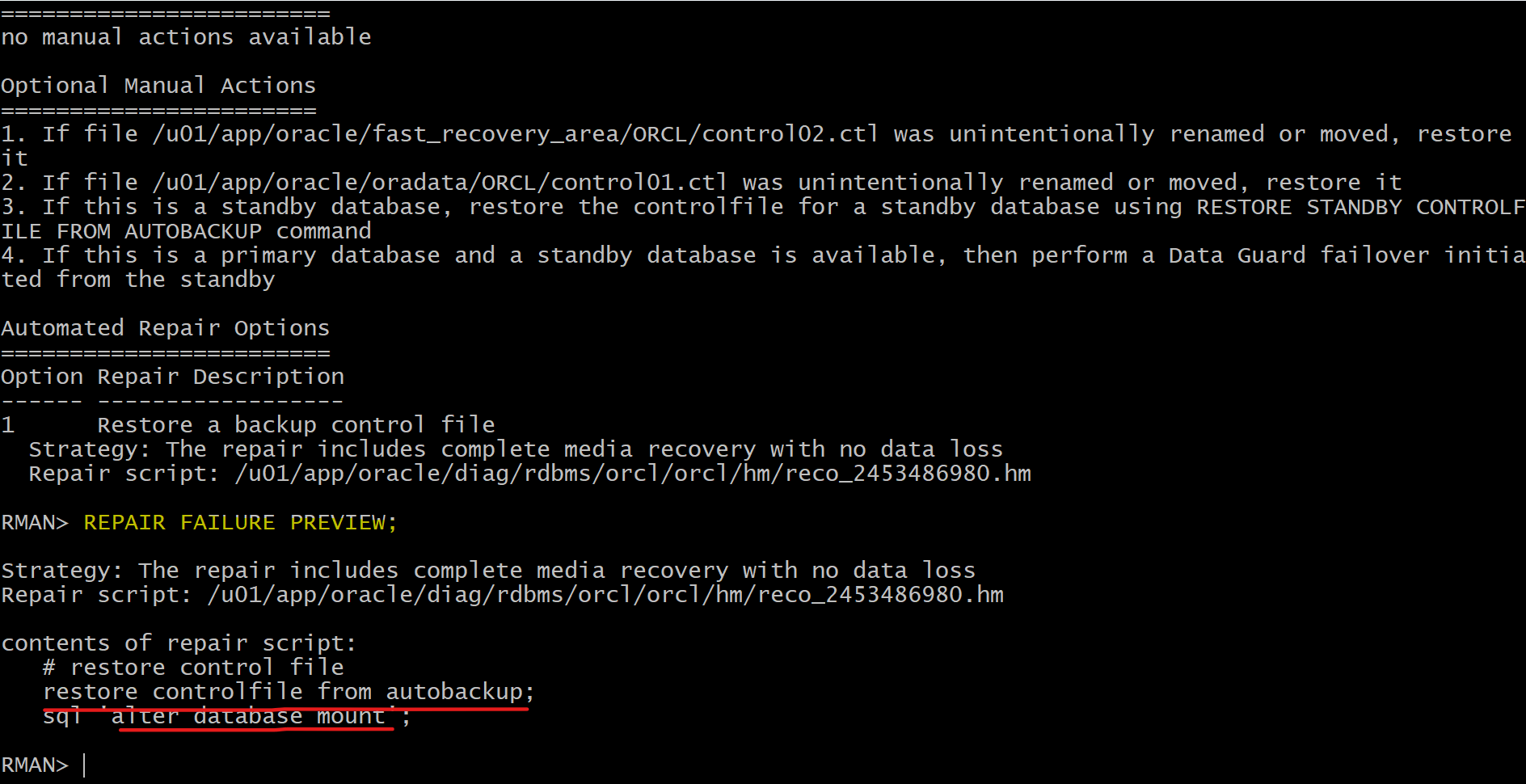
Option 1:
- use the automated recovery command
REPAIR FAILURE. - However, doing so introduces new failures, such that you would subsequently need to run these RMAN commands in a series, repeated as needed to correct the failures:
LIST FAILURE;
ADVISE FAILURE;
REPAIR FAILURE PREVIEW;
REPAIR FAILURE;
Option 2: Manually recover
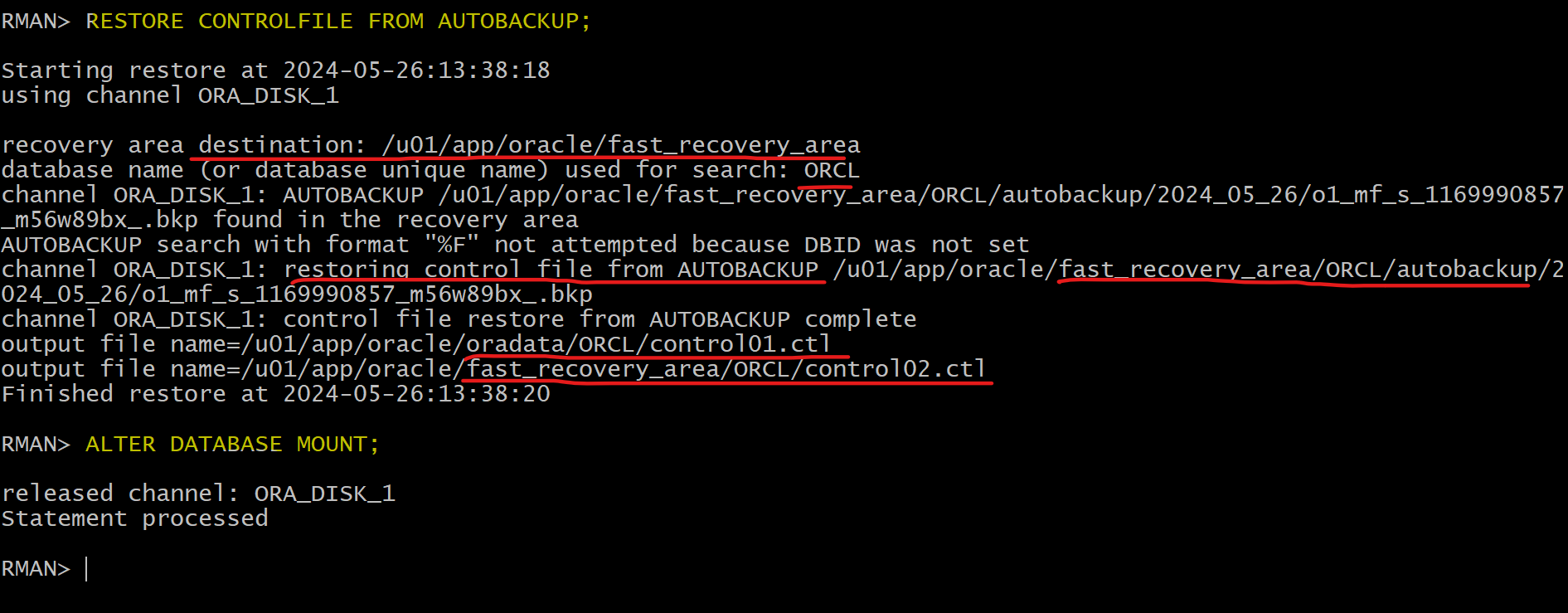
- Recover control file
RESTORE CONTROLFILE FROM AUTOBACKUP;
ALTER DATABASE MOUNT;
- Try to open
- fails, because SCN in CF does not match with SCN in DF
- Attempt to open with the
RESETLOGSoption.- fails, because the SCN in the
control fileis older than the SCN in thedata filesand the data files have not been restored with theUNTILcause. - The database needs to be recovered so that the control file can be synchronized with the data files.
- fails, because the SCN in the
ALTER DATABASE OPEN;
-- ORA-01589: must use RESETLOGS or NORESETLOGS option for database open
ALTER DATABASE OPEN RESETLOGS;
-- ORA-01194: file 1 needs more recovery to be consistent
-- ORA-01110: data file 1: '/u01/app/oracle/oradata/ORCL/system01.dbf'


Solution:
- Recover database
- All SCNs in DF, CF, and reset log are synchronized
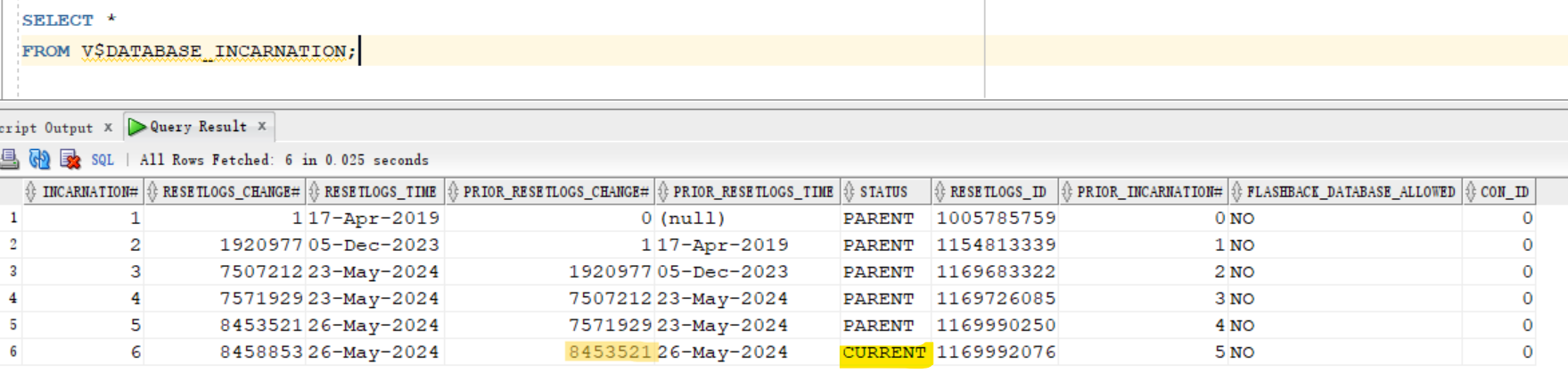
- Open with resetlogs to create a new carnation to track synchronation among files.
RECOVER DATABASE;
ALTER DATABASE OPEN RESETLOGS;

-- confirm issue gets fixed
LIST FAILURE;

- Confirm the data by querying table
ALTER SESSION SET container=orclpdb;
alter pluggable database open;
select * from BAR.BARCOPY;
- Query incarnations
SELECT *
FROM V$DATABASE_INCARNATION;
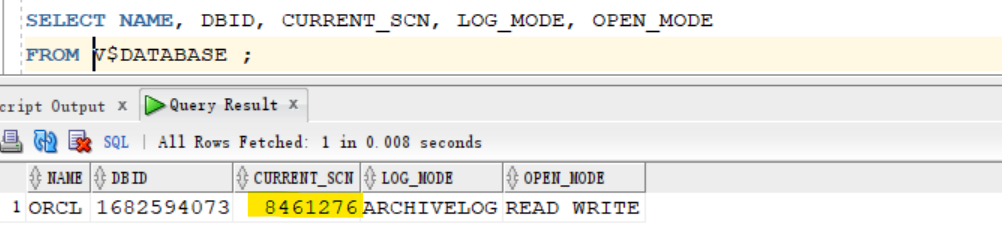
- Query current SCN
SELECT NAME, DBID, CURRENT_SCN, LOG_MODE, OPEN_MODE
FROM V$DATABASE ;
- Backup after recovery
-- rman
BACKUP DATABASE PLUS ARCHIVELOG DELETE INPUT;
delete noprompt obsolete;
exit
Clean up
rman target "'/ as sysdba'"
delete NOPROMPT copy of tablespace orclpdb:bartbs;
exit;

sqlplus / as sysdba
ALTER SESSION SET container=orclpdb;

-- CLEANUP from previous run
DROP USER bar CASCADE;
DROP TABLESPACE bartbs INCLUDING CONTENTS AND DATAFILES;

EXIT;
Recover from loss of both SPFILE and Control File
- Steps:
- Set the
DBIDor userecovery catalog. - Restore the
SPFILEfrom the autobackup. - Start the instance with the restored
SPFILE. - Restore the
control filefrom the autobackup. - Mount the database with the restored
control file. - Restore and recover the database.
- Open the database with the
RESETLOGSoption.