Note_Tech
All technological notes.
Project maintained by simonangel-fong Hosted on GitHub Pages — Theme by mattgraham
Linux - File System: Fundamental
File System
File System- a system used by an operating system to manage files.
- The system controls how data is saved or retrived.
- OS stores files and directory in an organized and structred way
File Metadata
$ ls -l
# -rw-rw-r-- 1 jason users 10400 Sep 27 08:52 sales.data
- Permissions:
-rw-rw-r-- - Number of links:
1 - Owner name:
jason - Group name:
users - Number of bytes in the file:
10400 - Last modification time:
Sep 27 08:52 - File name:
sales.data
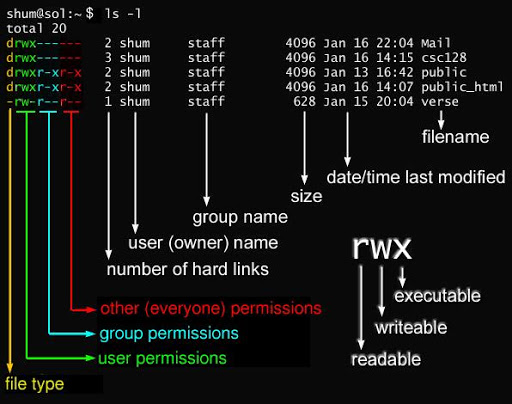
File name
- No spaces!
- For some reason, some file names include spaces:
- encapsulate the entire file name in quotes
- e.g.,
ls "my file",ls 'my file'
- e.g.,
- escape spaces using backslash(
\)- e.g.,
ls my\ file
- e.g.,
- encapsulate the entire file name in quotes
- For some reason, some file names include spaces:
- Can include
-: Hyphens_: Underscores
- CamelCase: capitalize the first letter of each word.
File type
-: Regular filed: Directoryl: Symbolic linkc:Character special file/Character device files- provide access to devices that transfer data character by character
- Character devices example:
- audio or graphics cards,
- input devices like keyboard and mouse.
b:Block special file- a special type of file that provides an interface to block devices, such as hard drives, SSDs, USB drives, and optical drives.
Block deviceshandle data in fixed-size chunks or “blocks” (usually512bytes or more), making them suitable for storage operations.
n: Network file- refers to a file or resource located on a remote system but accessed over a network as though it were local.
- commonly accessed via protocols like
NFS(Network File System),SMB(Server Message Block), or similar technologies that enable file sharing over a network.
p: FIFOs: Socket
Hidden files
- Hidden files begin with a period.
.file_name
- can use
ls -ato list all hidden files.
Symbolic Links
-
Symbolic Links- a shortcut to another file or directory
- symbol
lin the long list
ll /etc/yum.conf
# lrwxrwxrwx. 1 root root 12 Aug  6  2024 /etc/yum.conf -> dnf/dnf.conf

file /etc/yum.conf
# /etc/yum.conf: symbolic link to dnf/dnf.conf

stat /etc/yum.conf
#   File: /etc/yum.conf -> dnf/dnf.conf
#   Size: 12              Blocks: 0          IO Block: 4096   symbolic link
# Device: fd00h/64768d    Inode: 33685685    Links: 1
# Access: (0777/lrwxrwxrwx)  Uid: (    0/    root)   Gid: (    0/    root)
# Context: system_u:object_r:etc_t:s0
# Access: 2025-02-11 18:11:09.760730884 -0500
# Modify: 2024-08-06 07:11:09.000000000 -0400
# Change: 2025-01-27 17:00:18.975901543 -0500
#  Birth: 2025-01-27 17:00:18.970901461 -0500
-
2 Type of link:
- Hard Link, default
- Symbolic Link
-
inodeindex node- pointer or number of a file on the hard disk.
Hard Link
-
Hard Links- connections made via
inode numbersin the Linux file system. - Every
filein a Linux filesystem is associated with anindex node (inode), which is a data structure containing metadata about the file.
- connections made via
-
In a
hard link, multiple filenames can point to the same inode number.- Example: If file A is a hard link to file B, both A and B share the same inode number and are equal in the file system.
- Feature:
- Equality:
- A and B are treated equally by the file system.
- Independence on Deletion:
- Deleting one does not affect the other.
- The file’s data and inode persist until all associated hard links are deleted.
- Multiple Path Names:
- A single file can have multiple valid path names via hard links.
- Equality:
-
Advantages:
- Protects against accidental deletion:
- As long as one hard link remains, the file’s data is preserved.
- When Files Are Deleted:
- The file’s data blocks and inode are released only after the last hard link is removed.
- Protects against accidental deletion:
- Permission:
- same as regular file
-rw-rw-r--
- same as regular file
Symbolic Links
-
Soft Links/Symbolic Links- special files that act as shortcuts to another file.
- They store the path to the target file rather than pointing to the same inode.
- Example: If file A is a soft link to file B, their inode numbers are different, and A points to a different data block containing the path to B.
- Features:
- Shortcut-Like Behavior
- Similar to shortcuts in Windows, they simply redirect to the target file.
- Shortcut-Like Behavior
- Separate Inodes:
- The inode numbers of the link and the target file are different.
- Dependency:
- If the target file (B) is deleted, the soft link (A) remains but points to an invalid location.
- Advantages:
- Can link to directories or files on different filesystems.
- Useful for creating flexible paths without duplicating data.
-
Limitations:
- If the target is deleted or renamed, the soft link becomes broken (invalid).
- Permission:
lrwxrwxrwx
Hard vs soft
| Feature | Hard Links | Soft Links |
|---|---|---|
| Inode | Share the same inode with the target file. |
Have a different inode from the target file. |
| Filesystem | Must be on the same filesystem as the target. | Can span across different filesystems. |
| Deletion | Effect Target file deletion doesn’t affect hard links. | Becomes invalid if the target file is deleted. |
| Directory | Support Cannot link to directories. | Can link to directories. |
- Use Cases
Hard Links:- Best for maintaining multiple valid references to critical files within the same filesystem.
Soft Links:- Ideal for creating shortcuts or referencing files across different filesystems.
Command
- List inode
| CMD | DESC |
|---|---|
ls -i |
list inode numbers and identify linked files |
- Hard link
| CMD | DESC |
|---|---|
ln file hlink |
Create a hard link with different file name |
ln target_file |
Create a hard link with the same file name |
- Soft link
| CMD | DESC |
|---|---|
ln -s file slink |
Create a soft link with different file name |
ln -s target_file |
Create a soft link with the same file name |
Lab: Hard Link
- Create hard link
mkdir -p /root/lndir/hardlink
mkdir -p /root/lndir/hardlink/testdir
touch /root/lndir/hardlink/onefile

# create hard link for a file
ln /root/lndir/hardlink/onefile /root/lndir/oneln

# confirm
ll -i /root/lndir/oneln /root/lndir/hardlink/onefile
# 20538441 -rw-r--r--. 2 root root 0 Feb 12 20:21 /root/lndir/hardlink/onefile
# 20538441 -rw-r--r--. 2 root root 0 Feb 12 20:21 /root/lndir/oneln

# try to create hard link for a directory
ln /root/lndir/hardlink/testdir /root/lndir/onetestln
# ln: /root/lndir/hardlink/testdir: hard link not allowed for directory
- Test file content
echo "this is oneln" > /root/lndir/oneln
cat /root/lndir/oneln
# this is oneln
cat /root/lndir/hardlink/onefile
# this is oneln

echo "update: onefile" >> /root/lndir/hardlink/onefile
cat /root/lndir/oneln
# this is oneln
# update: onefile
cat /root/lndir/hardlink/onefile
# this is oneln
# update: onefile
- Create new hard link pointing to file
ln /root/lndir/hardlink/onefile /root/lndir/oneln2
ln /root/lndir/hardlink/onefile /root/lndir/oneln3
ln /root/lndir/hardlink/onefile /root/lndir/oneln4

ll -i /root/lndir
# total 16
# 20538440 drwxr-xr-x. 3 root root 36 Feb 12 20:21 hardlink
# 20538441 -rw-r--r--. 5 root root 30 Feb 12 20:32 oneln
# 20538441 -rw-r--r--. 5 root root 30 Feb 12 20:32 oneln2
# 20538441 -rw-r--r--. 5 root root 30 Feb 12 20:32 oneln3
# 20538441 -rw-r--r--. 5 root root 30 Feb 12 20:32 oneln4
- Delete file
rm /root/lndir/hardlink/onefile
# rm: remove regular file '/root/lndir/hardlink/onefile'? y

ll -i /root/lndir
# total 16
# 20538440 drwxr-xr-x. 3 root root 21 Feb 12 20:37 hardlink
# 20538441 -rw-r--r--. 4 root root 30 Feb 12 20:32 oneln
# 20538441 -rw-r--r--. 4 root root 30 Feb 12 20:32 oneln2
# 20538441 -rw-r--r--. 4 root root 30 Feb 12 20:32 oneln3
# 20538441 -rw-r--r--. 4 root root 30 Feb 12 20:32 oneln4

cat /root/lndir/oneln
# this is oneln
# update: onefile
Lab: Soft Link
- Create soft link
mkdir -p /root/lndir/softlink
mkdir -p /root/lndir/softlink/softdir
touch /root/lndir/softlink/softdir/softfile
echo "this is softfile" >> /root/lndir/softlink/softfile

# create soft link
ln -s /root/lndir/softlink/softdir /root/lndir/softdirln
ln -s /root/lndir/softlink/softfile /root/lndir/softfileln

ll -i /root/lndir/
# total 0
# 20538440 drwxr-xr-x. 3 root root 21 Feb 12 20:37 hardlink
# 2039722 lrwxrwxrwx. 1 root root 28 Feb 12 21:00 softdirln -> /root/lndir/softlink/softdir
# 2039723 lrwxrwxrwx. 1 root root 29 Feb 12 21:00 softfileln -> /root/lndir/softlink/softfile
# 20538441 drwxr-xr-x. 3 root root 37 Feb 12 20:59 softlink

cat /root/lndir/softfileln
# this is softfile

cd /root/lndir/softdirln
pwd
# /root/lndir/softdirln
ll
# total 0
# -rw-r--r--. 1 root root 0 Feb 12 20:59 softfile
- Delete dir
ll  /root/lndir/
# total 0
# drwxr-xr-x. 3 root root 21 Feb 12 20:37 hardlink
# lrwxrwxrwx. 1 root root 28 Feb 12 21:00 softdirln -> /root/lndir/softlink/softdir
# lrwxrwxrwx. 1 root root 29 Feb 12 21:00 softfileln -> /root/lndir/softlink/softfile

cat /root/lndir/softfileln
# cat: /root/lndir/softfileln: No such file or directory

cd /root/lndir/softdirln
# -bash: cd: /root/lndir/softdirln: No such file or directory
file: Display the file type
| Command | Desc |
|---|---|
file filename |
Display type of a file |
file * |
Display each file’s type in current directory |
Lab: Display File Type
file /root/anaconda-ks.cfg
# /root/anaconda-ks.cfg: ASCII text

stat /root/anaconda-ks.cfg
#   File: /root/anaconda-ks.cfg
#   Size: 983             Blocks: 8          IO Block: 4096   regular file
# Device: fd00h/64768d    Inode: 16777347    Links: 1
# Access: (0600/-rw-------)  Uid: (    0/    root)   Gid: (    0/    root)
# Context: system_u:object_r:admin_home_t:s0
# Access: 2025-02-11 19:29:16.921673803 -0500
# Modify: 2025-01-27 02:32:44.652168357 -0500
# Change: 2025-01-27 02:32:44.652168357 -0500
#  Birth: 2025-01-27 02:32:44.571167174 -0500

file /root/Desktop/
# /root/Desktop/: directory

stat /root/Desktop/
#   File: /root/Desktop/
#   Size: 6               Blocks: 0          IO Block: 4096   directory
# Device: fd00h/64768d    Inode: 17645509    Links: 2
# Access: (0755/drwxr-xr-x)  Uid: (    0/    root)   Gid: (    0/    root)
# Context: unconfined_u:object_r:admin_home_t:s0
# Access: 2025-02-11 17:59:12.994301344 -0500
# Modify: 2025-02-11 17:24:49.403729585 -0500
# Change: 2025-02-11 17:24:49.403729585 -0500
#  Birth: 2025-02-11 17:24:49.403729585 -0500
Device File
- a
major numberpoints to the device driver -
a
minor numberpoints to a unique device or partition that the device driver controls. c: character devcie file
ll /dev/console
# crw--w----. 1 root tty 5, 1 Feb 10 22:28 /dev/console

file /dev/console
# /dev/console: character special (5/1)

stat /dev/console
#   File: /dev/console
#   Size: 0               Blocks: 0          IO Block: 4096   character special file
# Device: 5h/5d   Inode: 12          Links: 1     Device type: 5,1
# Access: (0620/crw--w----)  Uid: (    0/    root)   Gid: (    5/     tty)
# Context: system_u:object_r:console_device_t:s0
# Access: 2025-02-10 22:28:25.029000147 -0500
# Modify: 2025-02-10 22:28:25.029000147 -0500
# Change: 2025-02-10 22:28:25.029000147 -0500
#  Birth: 2025-02-10 22:28:21.209000000 -0500
b: block devcie file
ll /dev/nvme0n1
# brw-rw----. 1 root disk 259, 0 Feb 10 22:28 /dev/nvme0n1

file /dev/nvme0n1
# /dev/nvme0n1: block special (259/0)

stat /dev/nvme0n1
#   File: /dev/nvme0n1
#   Size: 0               Blocks: 0          IO Block: 4096   block special file
# Device: 5h/5d   Inode: 261         Links: 1     Device type: 103,0
# Access: (0660/brw-rw----)  Uid: (    0/    root)   Gid: (    6/    disk)
# Context: system_u:object_r:fixed_disk_device_t:s0
# Access: 2025-02-11 17:28:54.759067590 -0500
# Modify: 2025-02-10 22:28:25.062000149 -0500
# Change: 2025-02-10 22:28:25.062000149 -0500
#  Birth: 2025-02-10 22:28:23.114000067 -0500