Note_Tech
All technological notes.
Project maintained by simonangel-fong Hosted on GitHub Pages — Theme by mattgraham
Linux - File System: File Permission
- Linux - File System: File Permission
Permissions
File permissions
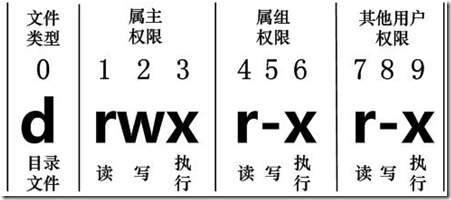
- three levels of permissions
| Symbol | Category |
|---|---|
u |
User |
g |
Group |
o |
Other |
a |
All |
- 3 types of permissions
| Symbol | Number | Permission on file | On Directory |
|---|---|---|---|
r |
4 | Allow to read a file | Allow to read file names |
w |
2 | Allow to write a file | Allow to modified entries |
x |
1 | Allow to execute a file | Allow to access to the contents and metadata for entries |
- By default:
-rw-rw-r--664
Directory Permissions
- Permissions on a directory can effect the files in the directory.
- Incorrect permissions on a directory can prevent the execution of a file.
- If the file permissions look correct, start checking directory permissions.
- Work your way up to the root.
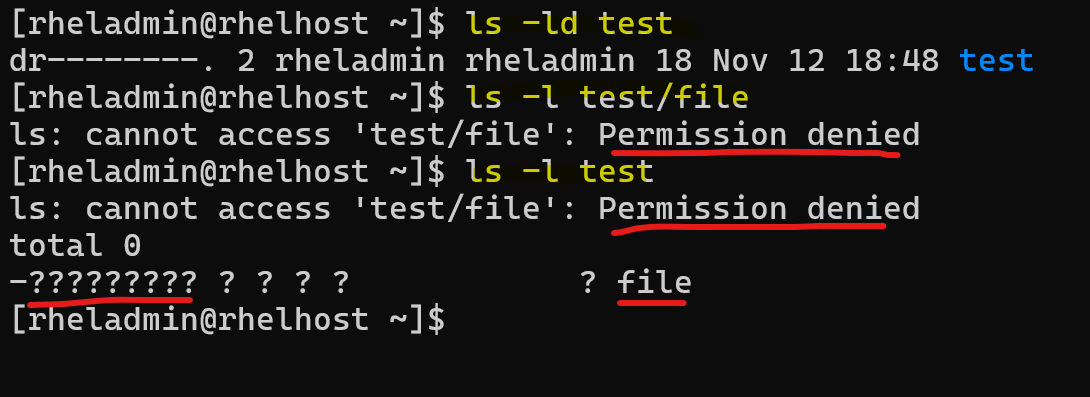
Directory permission prevents access to the file. Directory permission have read permission, allowing list file name, but cannot access to the metadata of the file.
- Example
# run command via sudo

# create user dirowner
sudo useradd dirowner
echo "dirowner:dirowner4Test" | sudo chpasswd

# create user otheruser
sudo useradd otheruser
echo "otheruser:otheruser4Test" | sudo chpasswd

# switch to dirowner
su - dirowner
whoami
# dirowner

# create dir
mkdir -p /tmp/dir
# create file within the dir and change mode
touch /tmp/dir/file
chmod o-x /tmp/dir

# create script file and change mode
cat <<EOF > /tmp/dir/script.sh
#!/bin/bash
echo "Hello world"
EOF
cat /tmp/dir/script.sh
# #!/bin/bash
# echo "Hello world"
chmod o+x /tmp/dir/script.sh

ls -ld /tmp/dir
# drwxrwxr--. 2 dirowner dirowner 35 Nov 20 18:38 /tmp/dir
ls -l /tmp/dir/file
# -rw-rw-r--. 1 dirowner dirowner 0 Nov 20 18:38 /tmp/dir/file
ls -l /tmp/dir/script.sh
# -rw-rw-r-x. 1 dirowner dirowner 31 Nov 20 18:38 /tmp/dir/script.sh

# Test as otheruser
su - otheruser
whoami
# otheruser
ls /tmp/dir
# ls: cannot access '/tmp/dir/file': Permission denied
# ls: cannot access '/tmp/dir/script.sh': Permission denied
# file  script.sh
ls -dl /tmp/dir
# drwxrwxr--. 2 dirowner dirowner 35 Nov 20 18:38 /tmp/dir
ls -l /tmp/dir
# ls: cannot access '/tmp/dir/file': Permission denied
# ls: cannot access '/tmp/dir/script.sh': Permission denied
# total 0
# -????????? ? ? ? ?            ? file
# -????????? ? ? ? ?            ? script.sh
ls /tmp/dir/file
# ls: cannot access '/tmp/dir/file': Permission denied
ls -l /tmp/dir/file
# ls: cannot access '/tmp/dir/file': Permission denied
ls -l /tmp/dir/script.sh
# ls: cannot access '/tmp/dir/script.sh': Permission denied
bash /tmp/dir/script.sh
# bash: /tmp/dir/script.sh: Permission denied

# Correct the directory permission
# switch to dirowner
su - dirowner
whoami
# dirowner
chmod o+x /tmp/dir
ls -dl /tmp/dir
# drwxrwxr-x. 2 dirowner dirowner 35 Nov 20 18:38 /tmp/dir
ls -l /tmp/dir
# -rw-rw-r--. 1 dirowner dirowner  0 Nov 20 18:38 file
# -rw-rw-r-x. 1 dirowner dirowner 31 Nov 20 18:38 script.sh

# Verify
# switch to otheruser
su - otheruser
whoami
# otheruser
ls -l /tmp/dir
# -rw-rw-r--. 1 dirowner dirowner  0 Nov 20 18:38 file
# -rw-rw-r-x. 1 dirowner dirowner 31 Nov 20 18:38 script.sh

bash /tmp/dir/script.sh
# Hello world
Effects of Permission
- If a file / directory has no
wpermission, when try to remove it byrmcommand, terminal launch remove write-protected regular empty file prompt
su - rheladmin
touch /home/rheladmin/nowrite /home/rheladmin/withwrite
ll /home/rheladmin/nowrite /home/rheladmin/withwrite
# -rw-rw-r--. 1 rheladmin rheladmin 0 Nov 25 19:06 /home/rheladmin/nowrite
# -rw-rw-r--. 1 rheladmin rheladmin 0 Nov 25 19:06 /home/rheladmin/withwrite

chmod u-w /home/rheladmin/nowrite
ll /home/rheladmin/nowrite /home/rheladmin/withwrite
# -r--rw-r--. 1 rheladmin rheladmin 0 Nov 25 19:06 /home/rheladmin/nowrite
# -rw-rw-r--. 1 rheladmin rheladmin 0 Nov 25 19:06 /home/rheladmin/withwrite

rm /home/rheladmin/nowrite
# prompt:
# rm: remove write-protected regular empty file '/home/rheladmin/nowrite'?
rm /home/rheladmin/withwrite
# with no prompt


mkdir /home/rheladmin/nowrite /home/rheladmin/withwrite
ll -d /home/rheladmin/nowrite /home/rheladmin/withwrite
# drwxrwxr-x. 2 rheladmin rheladmin 6 Nov 25 19:14 /home/rheladmin/nowrite
# drwxrwxr-x. 2 rheladmin rheladmin 6 Nov 25 19:14 /home/rheladmin/withwrite

chmod u-w /home/rheladmin/nowrite
ll -d /home/rheladmin/nowrite /home/rheladmin/withwrite
# dr-xrwxr-x. 2 rheladmin rheladmin 6 Nov 25 19:14 /home/rheladmin/nowrite
# drwxrwxr-x. 2 rheladmin rheladmin 6 Nov 25 19:14 /home/rheladmin/withwrite

rm -r /home/rheladmin/nowrite
# rm: remove write-protected directory '/home/rheladmin/nowrite'?
rm -r /home/rheladmin/withwrite
- When a directory without the
xpermission, it is not accessible.- It wil prompt
Permission denied - commands:
cd,ls,rm -r
- It wil prompt
chmod: Changing file Permissions
- Permission is also known as mod
| Command | Desc |
|---|---|
chmod u+x file_name |
Add execute permission to the user |
chmod g+w file_name |
Add write permission to the group |
chmod o+r file_name |
Add read permission to other |
chmod a+rwx file_name |
Add all permission to all |
chmod a-rwx file_name |
Revoke all permission from all |
chmod a=x file_name |
Set all permission to all |
chmod a= file_name |
Set none permission to all |
chmod u+rwx,g-x,o+w file_name |
set Different permission |
chmod u=rw,g=r,o= file_name |
set Different permission |
chmod 664 file_name |
set permission with number |
chmod 000 file_name |
set permission with number |
chmod 777 file_name |
set full access for everyone |
=: set exact permission, no mentioned permission will be revoke.-/+: grant or revoke.- 褫夺原来没有的权限不会有错误信息。
- 添加原来有的权限也不会有错误信息。
File Creation Mask
File creation mask- When a file is created, it is assigned initial access permissions.
- If you want to control the permissions that a program can set when it creates a file or directory, you can set a
file mode creation maskusing theumaskcommand. - If no mask were used permissions would be:
777for directories666for files
umask: set file creation mask
- Sets the file creation mask to mode, if given.
-
Use
-Sto for symbolic notation. -
vs
chmodchmod: adding, setting permissionsumask: turn off, subtract, or take away permissions.
- Special Modes:
- umask
0022is the same as umask022 - chmod
0644is the same as chmod644
- umask
- The special modes are:
- setuid
- setgid
- sticky
| Command | Desc |
|---|---|
umask |
display the umask |
umask -S |
display the umask in symbolic mode |
umask 007 |
set the umask |
- 即默认权限:文件夹 777, 文件 666
- 通过设置 mask 007, 则新建文件夹是 770, 新建文件是 660.
- 通过 mask 遮挡而自定义默认的权限。
- redhat 8 默认 mask: 002
- 所以默认文件夹是 775, 文件是 664
- default umask value:
0022 -
predefined initial permission
- files:
666 (rw-rw-rw-) - directories:
777 (rwxrwxrwx)
- files:
-
Calculating Default Permissions
Default Permissions=Initial Permissions-umask- File default permission = 666 - 022 = 644
- dir default permission = 777 - 022 = 755
- The umask value set at the command line will be lost as soon as you log off.
su - root
whoami
# root
umask
# 0022
umask -S
# u=rwx,g=rx,o=rx

# default permission
touch defaultfile
ll defaultfile
# -rw-r--r--. 1 normaluser normaluser 0 Feb 14 23:44 defaultfile

mkdir defaultdir
ll -d defaultdir
# drwxr-xr-x. 2 normaluser normaluser 6 Feb 14 23:45 defaultdir
- Modify umask
umask 027
umask
# 0027

umask u=rwx,g=xr,o=
umask
# 0027

touch newfile1
ll newfile1
# -rw-r-----. 1 normaluser normaluser 0 Feb 14 23:48 newfile1

mkdir newdir
ll -d newdir
# drwxr-x---. 2 normaluser normaluser 6 Feb 14 23:51 newdir
Special File Permissions
-
setuid bits- defined on binary executable files to provide non-owners and non-group members the ability to run them with the privileges of the owner or the owning group, respectively.
setgid bit- defined on binary executable files to provide non-owners and non-group members the ability to run them with the privileges of the owner or the owning group, respectively.
- set on shared directories for group collaboration.
sticky bit- set on public directories for inhibiting file erasures by non-owners.
Setuid mode: execute as the owner’s permission
-
setuidmode- set user identifier bit
- a Linux file permission setting that allows a user to execute that file or program with the permission of the owner of that file.
- primarily used to elevate the privileges of the current user.
- If the file already has the “x” bit set for the group, the long listing will show a lowercase “s”, otherwise it will list it with an uppercase “S”.
- The setuid bit has no effect on directories.
- Example of setuid:
sudoandsucommand
su - root
# show full path of sudo command

which sudo
# /usr/bin/sudo
# list the metadata of command
ll /usr/bin/sudo
# ---s--x--x. 1 root root 190992 Jan 26  2024 /usr/bin/sudo

which su
# /usr/bin/su
ll /usr/bin/su
# -rwsr-xr-x. 1 root root 50160 Feb  8  2024 /usr/bin/su
Note:
- this command is owned by root.
- The
sin the permission indicates that when a user executes this program, the operating system will execute that file not as the user, but as ‘root’.- this allows a normal user to perform elevated system functions without having to log in as the root user.
- Same servers the command
su.
commands
| CMD | DESC |
|---|---|
chmod -v u+s /usr/bin/su |
Enable setuid |
chmod -v +4000 /usr/bin/su |
Enable setuid |
chmod -v u-s /usr/bin/su |
Disable setuid |
chmod -v -4000 /usr/bin/su |
Disable setuid |
Lab: Change change setuid on su
- Revoke setuid
su -
whoami
# root
chmod -v u-s /usr/bin/su
# mode of '/usr/bin/su' changed from 4755 (rwsr-xr-x) to 0755 (rwxr-xr-x)

# switch from root to normal user
su - rheladmin
whoami
# rheladmin

# switch from normal user to root
su -
# Password:
# su: Authentication failure
- Regrant setuid
# as root
chmod -v u+s /usr/bin/su
# mode of '/usr/bin/su' changed from 0755 (rwxr-xr-x) to 4755 (rwsr-xr-x)
ll /usr/bin/su
# -rwsr-xr-x. 1 root root 56944 Aug 24  2023 /usr/bin/su
Set Up Setuid for a file
# create myfile
touch myfile
# list permissions
ll /home/rheladmin/myfile
# -rw-rw-r--. 1 rheladmin rheladmin 0 Nov 13 19:45 /home/rheladmin/myfile

# set setuid
chmod u+s /home/rheladmin/myfile
ll /home/rheladmin/myfile
# -rwSrw-r--. 1 rheladmin rheladmin 0 Nov 13 19:45 /home/rheladmin/myfile

#  add execute permission
chmod u+x /home/rheladmin/myfile
ll /home/rheladmin/myfile
# -rwsrw-r--. 1 rheladmin rheladmin 0 Nov 13 19:45 /home/rheladmin/myfile

#  revoke setuid
chmod u-s /home/rheladmin/myfile
ll /home/rheladmin/myfile
# -rwxrw-r--. 1 rheladmin rheladmin 0 Nov 13 20:32 /home/rheladmin/myfile
Note:
- The capital
Ssignifies that the setuid IS set, but the user that owns the file does not have execute permissions.
- Set up setuid with one line command
chmod u+xs /home/rheladmin/myfile
ll /home/rheladmin/myfile
# -rwsrw-r--. 1 rheladmin rheladmin 0 Nov 13 19:48 /home/rheladmin/myfile
Setgid mode: execute as group permission
-
Setgid- set group identifier bit
- A process, when executed, will run as the group that owns the file.
-
set on binary executable files at the group level.
- the file is executed by non-owners with the exact same privileges as that of the group members.
- Example:
locatecommand
which locate
# /usr/bin/locate
ll /usr/bin/locate
# -rwx--s--x. 1 root slocate 47128 Aug 12  2018 /usr/bin/locate
- Example:
writecommand
ll /usr/bin/write
# -rwxr-sr-x. 1 root tty 23800 Aug 24  2023 /usr/bin/write
Shared Directories
setgid bitcan be set on group-shared directories to allow files and subdirectories created underneath to automatically inherit the directory’s owning group
Command
| CMD | DESC |
|---|---|
chmod -v g+s /usr/bin/write |
Enable setgid |
chmod -v +2000 /usr/bin/write |
Enable setgid |
chmod -v g-s /usr/bin/write |
Disable setgid |
chmod -v -2000 /usr/bin/write |
Disable setgid |
Lab: Set Up Setgid for a file
# create myfile2
touch myfile2
# list permissions
ll /home/rheladmin/myfile2
# -rw-rw-r--. 1 rheladmin rheladmin 0 Nov 13 19:49 /home/rheladmin/myfile2

# set setgid
chmod g+s /home/rheladmin/myfile2
ll /home/rheladmin/myfile2
# -rw-rwSr--. 1 rheladmin rheladmin 0 Nov 13 19:49 /home/rheladmin/myfile2

#  add execute permission
chmod g+x /home/rheladmin/myfile2
ll /home/rheladmin/myfile2
# -rw-rwsr--. 1 rheladmin rheladmin 0 Nov 13 19:49 /home/rheladmin/myfile2

#  revoke setgid
chmod g-s /home/rheladmin/myfile2
ll /home/rheladmin/myfile2
# -rw-rwxr--. 1 rheladmin rheladmin 0 Nov 13 20:34 /home/rheladmin/myfile2
Note:
- The capital
Ssignifies that the setuid IS set, but the user that owns the file does not have execute permissions.
- Set up setuid with one line command
chmod g+xs /home/rheladmin/myfile2
ll /home/rheladmin/myfile2
# -rw-rwsr--. 1 rheladmin rheladmin 0 Nov 13 19:51 /home/rheladmin/myfile2
Lab: Set GID on a share file
# create group
groupadd -g 9999 sgrp

# create 2 members
useradd -G sgrp user100
useradd -G sgrp user200

# create dir and change ownership
mkdir /sdir
chown -v root:sgrp /sdir
# changed ownership of '/sdir' from root:root to root:sgrp

# set setgid bit
chmod -v g+s /sdir
# mode of '/sdir' changed from 0755 (rwxr-xr-x) to 2755 (rwxr-sr-x)

# change permission, group member can write
chmod -v g+w,o-rwx /sdir
# mode of '/sdir' changed from 2755 (rwxr-sr-x) to 2770 (rwxrws---)

# confirm
ll -d /sdir
# drwxrws---. 2 root sgrp 6 Feb 15 13:08 /sdir
- switch and create file to confirm
su - user100
touch /sdir/file100
ll /sdir/file100
# -rw-r--r--. 1 user100 sgrp 0 Feb 15 13:11 /sdir/file100

su - user200
touch /sdir/file200
ll /sdir/file200
# -rw-r--r--. 1 user200 sgrp 0 Feb 15 13:11 /sdir/file200
Both file created by different users has the same group
Set Up Setgid for a directory
mkdir /home/rheladmin/mydir
ll -d /home/rheladmin/mydir
# drwxrwxr-x. 2 rheladmin rheladmin 6 Nov 13 19:58 /home/rheladmin/mydir

sudo chgrp root /home/rheladmin/mydir/
sudo chmod g+s /home/rheladmin/mydir/   # sudo is required. Otherwise, it doesnot work without any error.
ll -d /home/rheladmin/mydir/
# drwxrwsr-x. 2 rheladmin root 6 Nov 13 20:47 /home/rheladmin/mydir/

# test by creating a file in mydir
touch /home/rheladmin/mydir/myfile3
ll /home/rheladmin/mydir/myfile3
# -rw-rw-r--. 1 rheladmin root 0 Nov 13 20:49 /home/rheladmin/mydir/myfile3
# note: the group of the file inherit from the directory.

# revoke
chmod g-s /home/rheladmin/mydir/
ll -d /home/rheladmin/mydir/
# drwxrwxr-x. 2 rheladmin root 21 Nov 13 20:49 /home/rheladmin/mydir/
Sticky Bit
-
sticky bit- When this is set on a directory, the files in that directory can only be removed by the owner.
-
A typical use of this is
/tmp/. The/tmpdirectory can be written to by any user, but other users cannot delete the files of others. -
If the directory already has the “x” bit set for public, the long listing will show a lowercase “t”, otherwise it will list it with an uppercase “T”.
ll -d /tmp/
# drwxrwxrwt. 18 root root 4096 Nov 13 20:09 /tmp/
Notice that /tmp can be written to by everyone but has the
tin place of thexat the end of the permissions list. This means it has thesticky bit.
Command
| CMD | DESC |
|---|---|
chmod -v o+t /tmp |
Enable Sticky |
chmod -v +1000 /tmp |
Enable Sticky |
chmod -v o-t /tmp |
Disable Sticky |
chmod -v -1000 /tmp |
Disable Sticky |
Set Up A Sticky Bit
mkdir /home/rheladmin/mydir2
ls -ld /home/rheladmin/mydir2
# drwxrwxr-x. 2 rheladmin rheladmin 6 Nov 13 20:12 /home/rheladmin/mydir2

# setup
chmod +t /home/rheladmin/mydir2
ls -ld /home/rheladmin/mydir2
# drwxrwxr-t. 2 rheladmin rheladmin 6 Nov 13 20:12 /home/rheladmin/mydir2

# revoke
chmod -t /home/rheladmin/mydir2
ls -ld /home/rheladmin/mydir2
# drwxrwxr-x. 2 rheladmin rheladmin 6 Nov 13 20:51 /home/rheladmin/mydir2
Lab: sticky bit
# login as user100
su - user100
# create a file
touch /tmp/stickyfile
ll /tmp/stickyfile
# -rw-r--r--. 1 user100 user100 0 Feb 15 13:24 /tmp/stickyfile

# login as user200
su - user200
# try to remove file
rm /tmp/stickyfile
# rm: remove write-protected regular empty file '/tmp/stickyfile'? y
# rm: cannot remove '/tmp/stickyfile': Operation not permitted
- Change permission on /tmp
su -
chmod o-t /tmp
# confirm
ll -d /tmp
# drwxrwxrwx. 22 root root 4096 Feb 15 13:27 /tmp

# login as user200
su - user200
rm /tmp/stickyfile
# rm: remove write-protected regular empty file '/tmp/stickyfile'? y
- Restore sticky bit on /tmp
su -
chmod -v +1000 /tmp
# mode of '/tmp' changed from 0777 (rwxrwxrwx) to 1777 (rwxrwxrwt)
Setting Special Permissions With Number Notation
- Number:
setuid:4setgid:2sticky bit:1
rm -f myfile
touch myfile
rm -rf mydir
mkdir mydir

# setuid for file
chmod 4755 myfile
ls -l myfile
# -rwsr-xr-x. 1 rheladmin rheladmin 0 Nov 13 20:19 myfile

# setgid for a file
chmod 2755 myfile
ls -l myfile
# -rwxr-sr-x. 1 rheladmin rheladmin 0 Nov 13 20:19 myfile

# setgid for a dir
chmod 2755 mydir
ls -ld mydir
# drwxr-sr-x. 2 rheladmin rheladmin 6 Nov 13 20:23 mydir

# setuid and setgid for a file
chmod 6755 myfile
ls -l myfile
# -rwsr-sr-x. 1 rheladmin rheladmin 0 Nov 13 20:19 myfile

# set sticky bit for dir
chmod 1755 mydir
ls -ld mydir
# drwxr-xr-t. 2 rheladmin rheladmin 6 Nov 13 20:23 mydir
File Ownership
- 2 levels of ownership for file or directory
- User: the creator
- Group: the group to which a user belongs
chown: change file owner and group
- 更改文件所有者(owner),也可以同时更改文件所属组。
| Command | Desc |
|---|---|
chown new_owner file_name |
Change the file’s owner |
chown -R new_owner dir |
Change the directory’s owner recursively |
chown owner:group file |
Change the file’s owner and group |
chown :group file |
Change the file’s group |
chgrp: change group ownership
- New files belong to current user’s primary group.
| Command | Desc |
|---|---|
chgrp group_name file_name |
change a file’s group ownership |
chgrp -R group_name file_name |
change directory’s group ownership recursively |
Directory Permission and Ownership
- exmaple1
whoami
# rheladmin
touch /home/rheladmin/rhcsa/todel
sudo chown root:root /home/rheladmin/rhcsa/todel
ll /home/rheladmin/rhcsa/todel
# -rw-rw-r--. 1 root root 0 Nov 25 19:44 /home/rheladmin/rhcsa/todel

whoami
# rheladmin
rm /home/rheladmin/rhcsa/todel
# rm: remove write-protected regular empty file '/home/rheladmin/rhcsa/todel'?
# input y can remove the file

ll -d /home/rheladmin/rhcsa
# drwxrwxr-x. 3 rheladmin rheladmin 17 Nov 25 19:45 /home/rheladmin/rhcsa
- Why user rheladmin can delete a file owned by root?
- The parant directory
/home/rheladminis owned by rheladmin, who has full permissions, includingx. - Thus, this user can execute
rmcommand in its home directory.
- The parant directory
- Example2
whoami
# rheladmin
cd /etc
touch todel
# touch: cannot touch 'todel': Permission denied

ll -d /etc
# drwxr-xr-x. 149 root root 8192 Nov 25 18:36 /etc
- Why user rheladmin can cd to
/etcbut cannot create a file - The
/etcis owned by root user, other user hasx, which is the reason user rheladmin can traverse to/etc - Other user in
/etchas notw, which is the reason user rheladmin cannot create a file.
- Example3
su -
whoami
# root
touch /etc/todel

su - rheladmin
whoami
# rheladmin
rm /etc/todel
# rm: remove write-protected regular empty file '/etc/todel'?
# rm: cannot remove '/etc/todel': Permission denied

ll -d /etc
# drwxr-xr-x. 149 root root 8192 Nov 25 18:36 /etc
- Why user rheladmin cannot remove a file in
/etc - Other user in
/etchas notw, which is the reason user rheladmin cannot remove a file.