Note_Tech
All technological notes.
Project maintained by simonangel-fong Hosted on GitHub Pages — Theme by mattgraham
Linux - Network: Configuration
- Linux - Network: Configuration
Networking Fundamental
Terminologies
IP (Internet Protocol)- A set of rules governing the format of data sent over the internet or a local network.
- It assigns unique addresses to devices and ensures data packets are routed to their correct destination.
Private IP- An IP address used within a private network (e.g., home, school, or office LAN) that is not accessible directly from the internet.
Public IP- An IP address that is accessible over the internet and is assigned by an Internet Service Provider (ISP) to a device or network for communication outside the private network.
Static IP- An IP address that is manually configured and remains constant over time.
- It is commonly used for servers and devices requiring a permanent address.
Dynamic IP- An IP address assigned automatically by a
Dynamic Host Configuration Protocol (DHCP)server. - These addresses can change over time as devices connect to and disconnect from the network.
- An IP address assigned automatically by a
Network Components
- Components
Network Interface- a hardware or software component that connects a device to a network.
- It’s the point where two pieces of network equipment or protocol layers connect.
MAC address- a unique identifier assigned to a
network interface controller (NIC)for use as a network address in communications within a network.
- a unique identifier assigned to a
Subnet mask- a 32-bit binary number that’s used to determine the destination of a network packet.
- It’s part of a network address and is always used with an Internet Protocol (IP) address.
Gateway- a piece of networking hardware or software used in telecommunications networks that allows data to flow from one discrete network to another.
DNS (Domain Name System)- The DNS translates human-readable domain names (e.g., www.example.com) into IP addresses (e.g., 192.0.2.1) that computers use to identify each other on a network.
- It serves as the “phonebook” of the internet, enabling users to access websites using easy-to-remember names instead of numerical IP addresses.
Network Configuration Tools
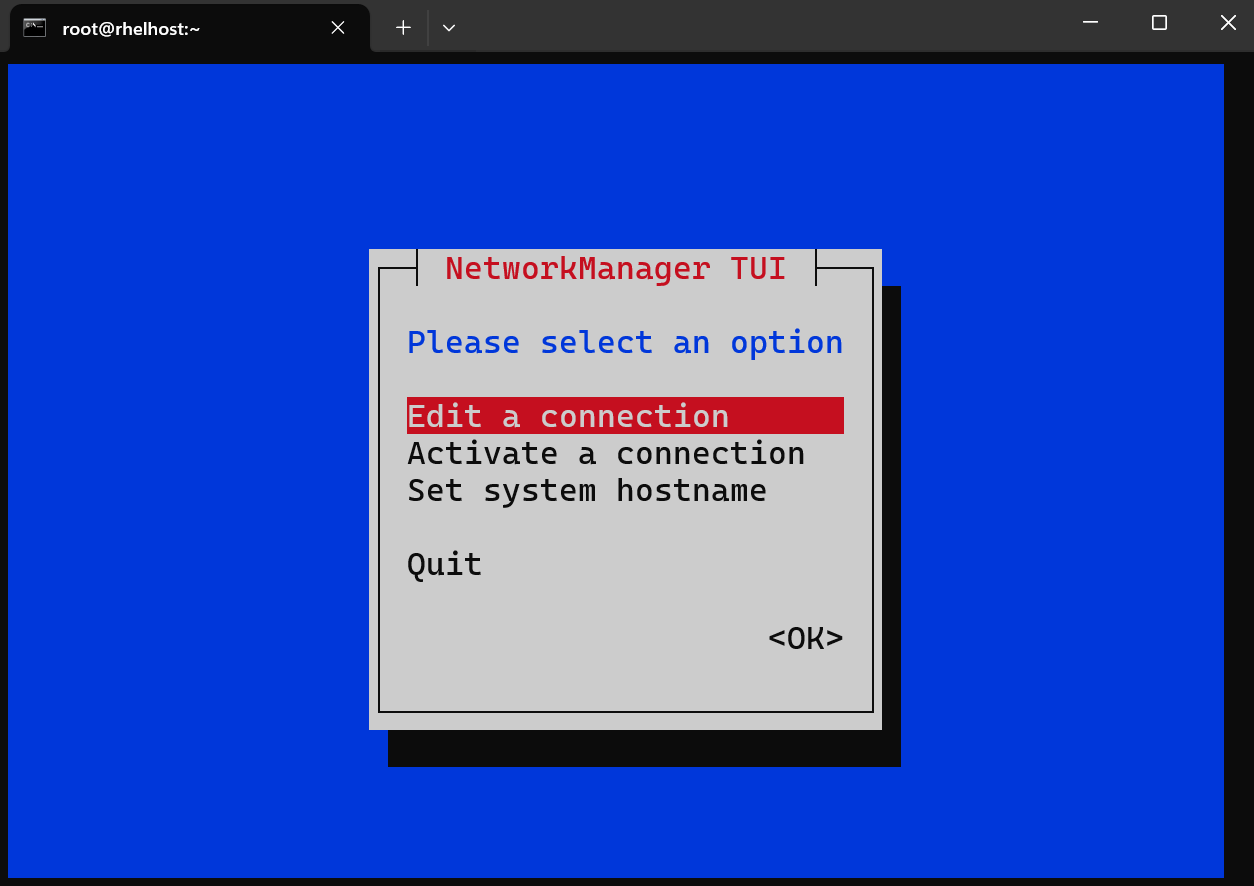
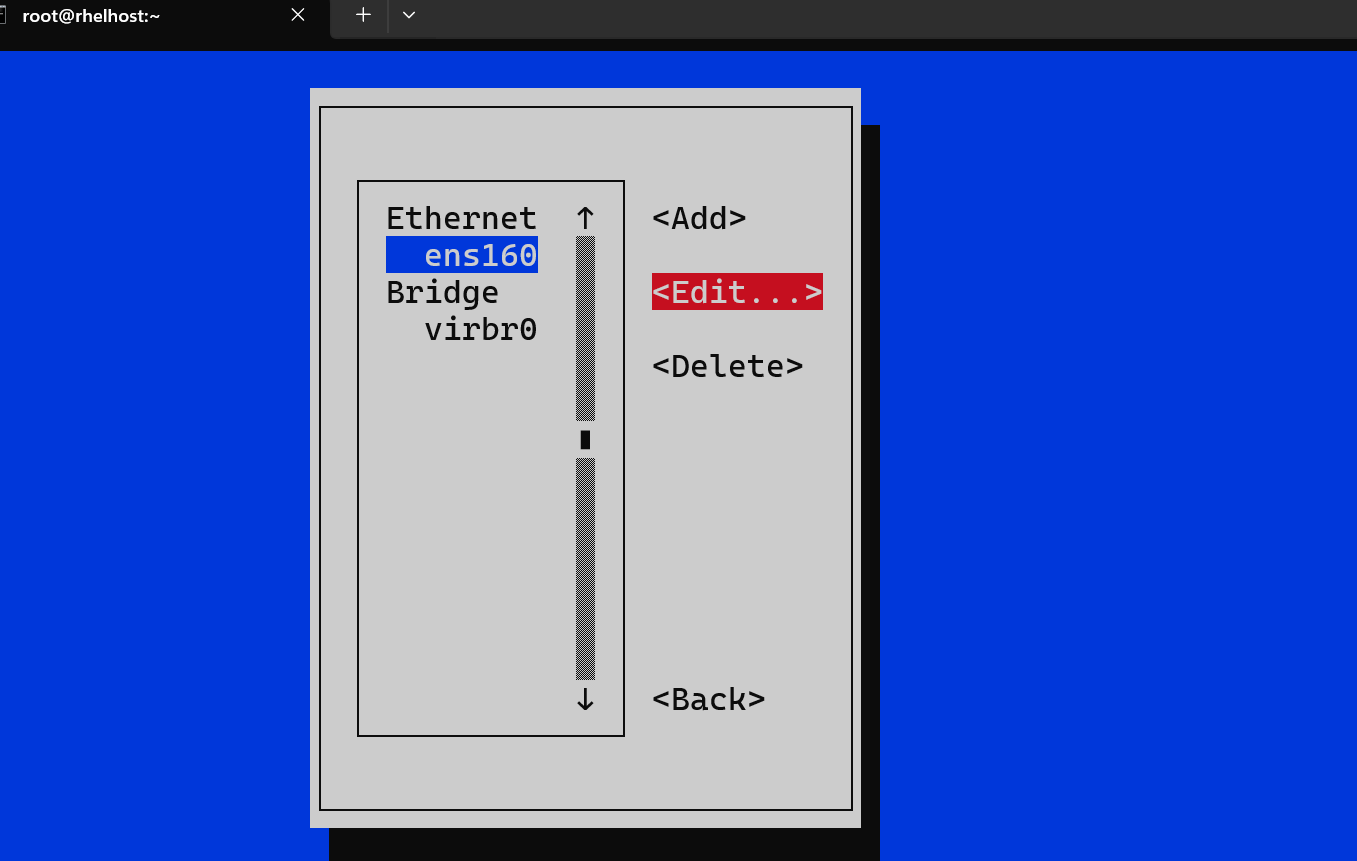
nmtui: Text Interface
- Use command
nmtui- can access via ssh
- Must as
root
nm-connection-editor
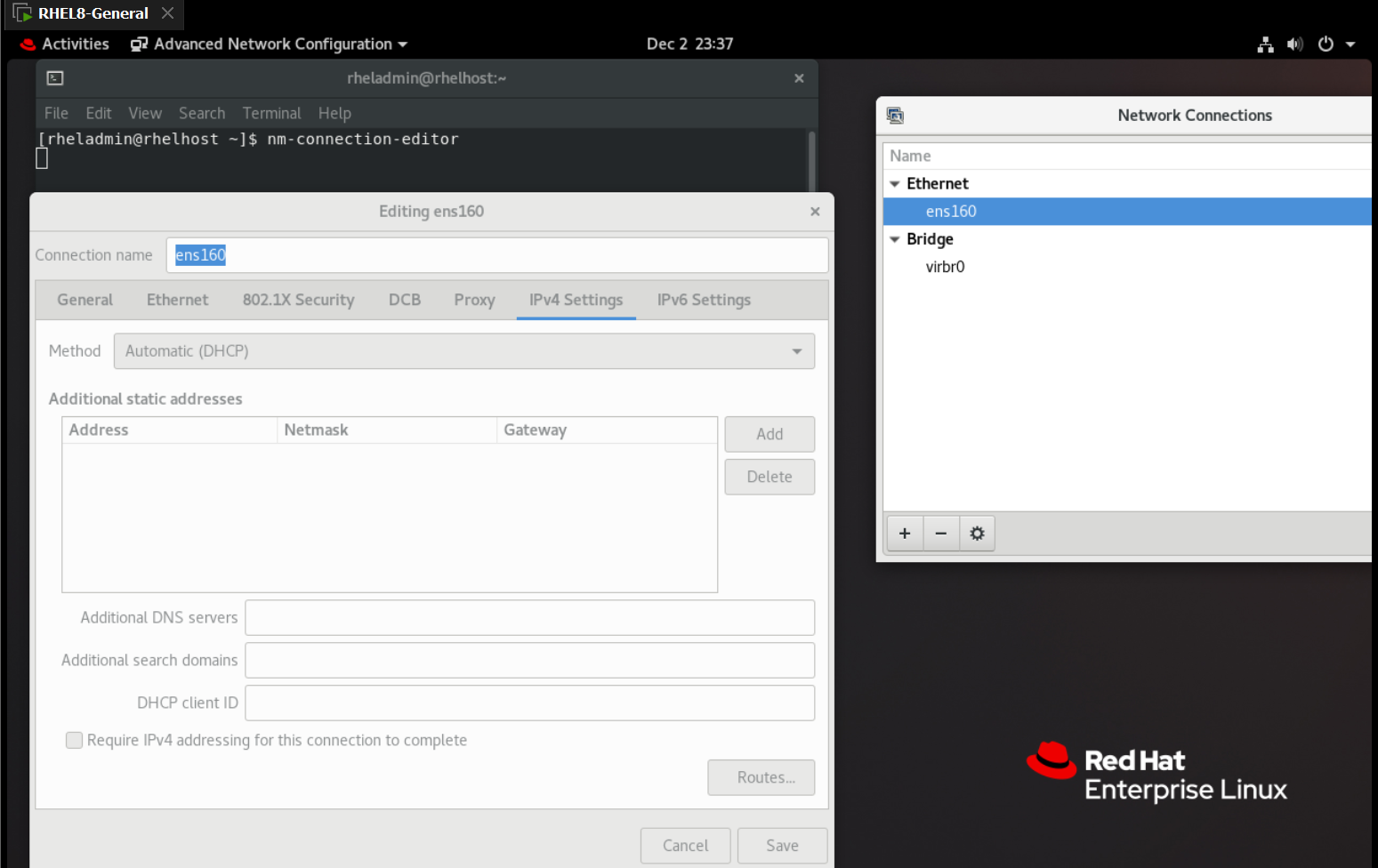
- user command
nm-connection-editor- cannot access via ssh
- only via console
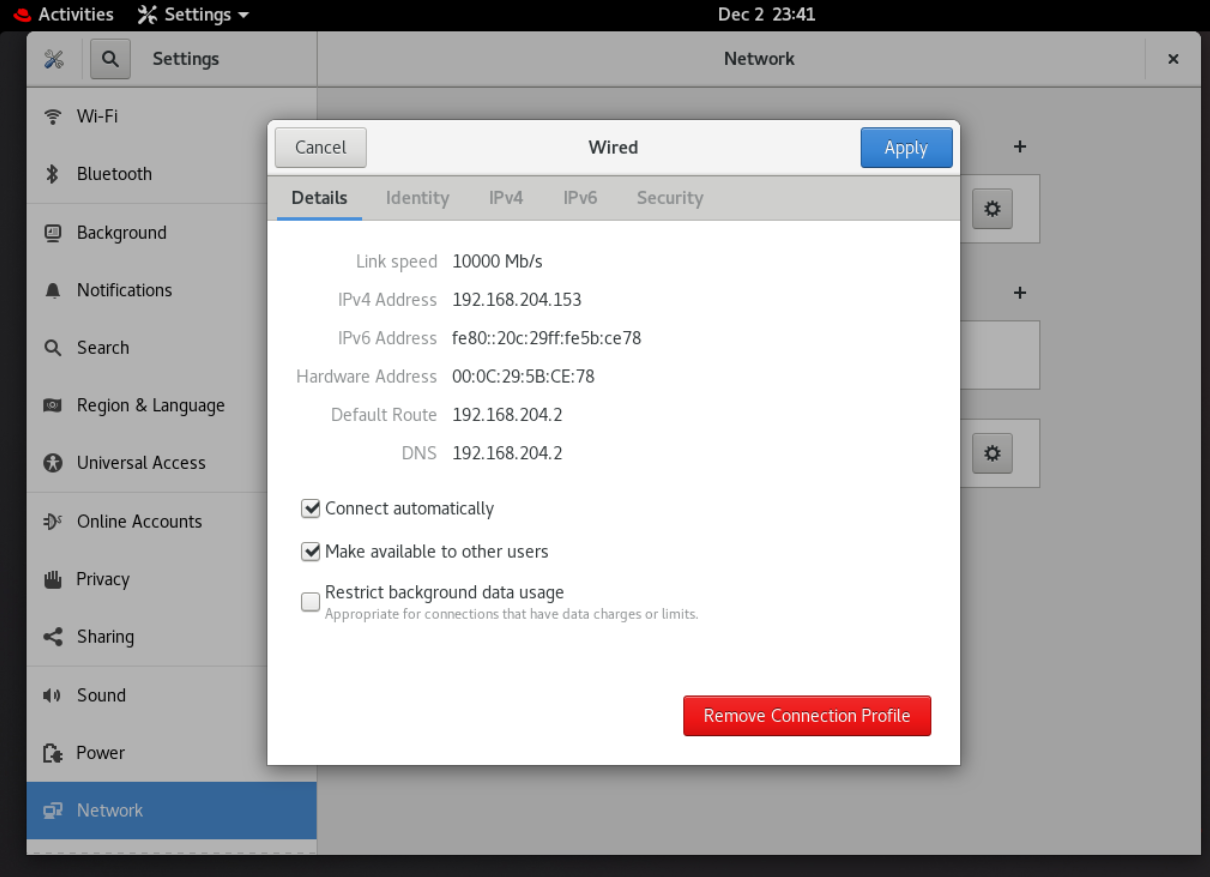
GNOME Settings
Hostname
/etc/hostname
/etc/hostname- a simple text file that contains the system’s hostname, which is a unique identifier for the machine on a network.
- the hostname written as a single line.
- Stores the static hostname for the system.
- Used during system boot to set the hostname.
- a simple text file that contains the system’s hostname, which is a unique identifier for the machine on a network.
hostname
Command
| CMD | Desc |
|---|---|
hostname |
Display the Current Hostname |
hostname -a |
Display the alias name |
hostname -i |
Display IPv4 and IPv6 of the host. |
hostname -I |
Display IPv4 of the host. |
sudo hostname newhostname |
Set a Temporary Hostname |
hostnamectl |
Display Hostname Information |
sudo hostnamectl set-hostname newhostname |
Sets a new hostname and updates the /etc/hostname |
sudo hostnamectl set-hostname "pretty_name" --pretty |
Set the Pretty Hostname |
sudo hostnamectl set-hostname newstatichostname --static |
set a static hostname |
sudo hostnamectl set-hostname newtransienthostname --transient |
set a transient hostname (temporary hostname for the current session) |
-
hostnamecommand- only changes the hostname in the current session.
- Changes made with the
hostnamecommand are not persistent after a reboot unless explicitly configured in/etc/hostnameand/etc/hosts.
-
hostnamectlcommand- a
systemd-based utility for managing the hostname. - hostname information:
Static hostname: The permanent hostname set in/etc/hostname.Pretty hostname: An optional, human-readable version of the hostname.Transient hostname: A temporary hostname assigned dynamically (e.g., by DHCP).Icon name: An optional system identifier, usually for graphical systems.
- a
Lab: Change Hostname
- Display current hostname
# display hostname
hostname
# rhelhost.localdomain

# display hostname info
hostnamectl
#  Static hostname: rhelhost.localdomain
#        Icon name: computer-vm
#          Chassis: vm
#       Machine ID: ca299475723c4510bf96994f9b0391d6
#          Boot ID: 8236fb4874fc4e958e092424c1617a84
#   Virtualization: vmware
# Operating System: Red Hat Enterprise Linux 8.10 (Ootpa)
#      CPE OS Name: cpe:/o:redhat:enterprise_linux:8::baseos
#           Kernel: Linux 4.18.0-553.30.1.el8_10.x86_64
#     Architecture: x86-64
- Change hostname only for current session
# Display hostname
hostname
# rhelhost.localdomain

# Change hostname temporarily
sudo hostname newhost

# view the hostname in cf
cat /etc/hostname
# rhelhost.localdomain

# reboot
systemctl reboot

# Display hostname
hostname
# rhelhost.localdomain

# view the hostname in cf
cat /etc/hostname
# rhelhost.localdomain
- Change hostname permanently
# Display hostname info
hostnamectl
#  Static hostname: rhelhost.localdomain
#        Icon name: computer-vm
#          Chassis: vm
#       Machine ID: ca299475723c4510bf96994f9b0391d6
#          Boot ID: db70d05de8e7435798baa3b443c97ea7
#   Virtualization: vmware
# Operating System: Red Hat Enterprise Linux 8.10 (Ootpa)
#      CPE OS Name: cpe:/o:redhat:enterprise_linux:8::baseos
#           Kernel: Linux 4.18.0-553.30.1.el8_10.x86_64
#     Architecture: x86-64


# Change the static hostname
sudo hostnamectl set-hostname newhostname

# Change pretty name
sudo hostnamectl set-hostname "pretty_name" --pretty

# Change transient name
sudo hostnamectl set-hostname newtransienthostname --transient

# Confirm
# hostname for current session
hostname
# newhostname

# confirm
cat /etc/hostname
# newhostname

hostnamectl
#    Static hostname: newhostname
#    Pretty hostname: pretty_name
# Transient hostname: newtransienthostname
#          Icon name: computer-vm
#            Chassis: vm
#         Machine ID: ca299475723c4510bf96994f9b0391d6
#            Boot ID: db70d05de8e7435798baa3b443c97ea7
#     Virtualization: vmware
#   Operating System: Red Hat Enterprise Linux 8.10 (Ootpa)
#        CPE OS Name: cpe:/o:redhat:enterprise_linux:8::baseos
#             Kernel: Linux 4.18.0-553.30.1.el8_10.x86_64
#       Architecture: x86-64


# reboot
systemctl reboot

# show hostname
hostname

cat /etc/hostname
# newhostname

hostnamectl
#  Static hostname: newhostname
#  Pretty hostname: pretty_name
#        Icon name: computer-vm
#          Chassis: vm
#       Machine ID: ca299475723c4510bf96994f9b0391d6
#          Boot ID: 5a82a02c3a634367991075db25be1cf1
#   Virtualization: vmware
# Operating System: Red Hat Enterprise Linux 8.10 (Ootpa)
#      CPE OS Name: cpe:/o:redhat:enterprise_linux:8::baseos
#           Kernel: Linux 4.18.0-553.30.1.el8_10.x86_64
#     Architecture: x86-64
DNS Service
Configuration File
/etc/hosts
/etc/hosts- a simple text file used for
hostname-to-IPaddress mapping. - used to resolve hostnames to IP addresses before querying a DNS server.
- resolve hostnames without relying on DNS.
- Override DNS for specific hostname-IP mappings.
- setting custom hostname resolutions
- a simple text file used for
IP_address hostname [aliases...]
/etc/resolv.conf
-
/etc/resolv.conf- a file used to configure DNS (
Domain Name System) settings. - It defines how the system resolves domain names to IP addresses by specifying the DNS servers and search domains.
- It specifies:
- The DNS servers to use for resolving domain names.
- The search domains to append to unqualified hostnames.
- a file used to configure DNS (
-
File format
option value
nameserver 8.8.8.8
-
Common options:
search: Defines a list of domain names to append to unqualified hostnames for resolution.nameserver: Specifies a DNS server by its IP address.domain: Specifies the default search domain.options: Allows additional resolver options, such as timeouts.options timeout:2 attempts:3
-
Example:
domain example.com
search example.net example.org example.edu example.gov
nameserver 192.168.0.1
nameserver 8.8.8.8
nameserver 8.8.4.4
- On a system with this file absent, the resolver utilities
- only query the
nameserverconfigured on the localhost, - determine the domain name from the hostname of the system,
- and construct the search path based on the domain name.
- only query the
/etc/nsswitch.conf
-
/etc/nsswitch.conffile- a system configuration file that defines the order and methods used by the system to resolve various types of information, such as hostnames, user accounts, and network services.
- It specifies the name service switch configuration, which dictates how Linux queries different databases like DNS, NIS, and local files to obtain information.
-
File Structure:
- Each line consists of a database name followed by a list of sources and services to use in order.
database: source1 source2 source3
-
Common databases:
passwd: Resolves user account information.shadow: Resolves user password information.hosts: Resolves hostnames to IP addresses.networks: Network names and numbersgroup: Resolves group account information.services: Resolves network service names to port numbers.ethers: Resolves Ethernet address to hostnames.netgroup: Resolves NIS netgroups.protocols: Resolves network protocols.aliases: Resolves mail aliases.
-
Common sources:
files: Refers to local files (e.g., /etc/hosts, /etc/passwd).dns: Refers to DNS servers.nis: Refers to NIS (Network Information Service).mdns: Refers to Multicast DNS.ldap: Refers to LDAP (Lightweight Directory Access Protocol).
-
Default
Host- system will first check the
/etc/hostsfile for hostname resolution. - If it doesn’t find the entry there, it will then query DNS.
- system will first check the
hosts: files dns
Lab: Step-by-Step Domain Name Resolution
- Configuration
cat /etc/nsswitch.conf | grep dns
# hosts:      files dns myhostname
# networks:   files dns

cat /etc/resolv.conf
# search localdomain
# nameserver 192.168.204.2
# nameserver 8.8.8.8

cat /etc/hosts
# 192.168.204.10 localdomain

hostname
# localdomain
- Ping hostname
ping localdomain
-
Step-by-Step Domain Name Resolution
-
- Kernel looks the file
/etc/nsswitch.conf
hosts: files dns myhostname:- indicates that the system will resolve names in the following order
files: Local files like/etc/hosts.dns: Queries DNS servers specified in/etc/resolv.conf.myhostname: Resolves using the local machine’s hostname.
- Kernel looks the file
-
- Check
/etc/hosts:- The system first checks the
/etc/hostsfile for the localdomain hostname. 192.168.204.10 localdomain- Since localdomain is explicitly mapped to
192.168.204.10, the system uses this entry and resolves localdomain without further queries.
- Since localdomain is explicitly mapped to
- The system first checks the
- Check
-
- Ping a domain
ping abc.com
-
Step-by-Step Domain Name Resolution
-
- Kernel looks the file
/etc/nsswitch.confhosts: files dns myhostname:- indicates that the system will resolve names in the following order
files: Local files like/etc/hosts.dns: Queries DNS servers specified in/etc/resolv.conf.myhostname: Resolves using the local machine’s hostname.
- Kernel looks the file
-
- Check
/etc/hosts:- this file does not contain the target domain
- the system moves to the next method.
- Check
-
- Check
/etc/resolv.confsearch localdomain: directive appends localdomain to single-label hostnames (e.g., resolving abc asabc.localdomainbefore querying DNS).- specify the DNS servers the system queries in order
nameserver 192.168.204.2: the gateway, possibly a local DNS server or resolvernameserver 8.8.8.8: Google’s public DNS
- Check
-
-
Result Handling:
- If a DNS server returns an IP address for abc.com, the system uses that IP.
- If no DNS server can resolve abc.com, the resolution fails, and ping outputs an error like “unknown host.”
Lab: Setup DNS using nmcli
- Setup DNS
nmcli device status
# DEVICE  TYPE      STATE                   CONNECTION
# ens160  ethernet  connected               ens160
# ens224  ethernet  connected               static_con

nmcli connection down ens160
nmcli connection modify ens160 ipv4.dns 8.8.4.4
nmcli connection show ens160 | grep "ipv4.dns:"
# ipv4.dns:                               8.8.4.4
nmcli connection up ens160

# confirm
grep "nameserver" /etc/resolv.conf
# nameserver 8.8.4.4
# nameserver 192.168.204.2
DNS Lookup
| CMD | Desc |
|---|---|
nmcli connection modify "id_name" ipv4.dns "dns_ip" |
Set the DNS ip |
sudo nano /etc/resolv.conf |
Configure DNS server |
grep "nameserver" /etc/resolv.conf |
Get DNS server |
nslookup target_domain |
DNS lookup a domain name |
nslookup target_domain nameserver |
DNS lookup a domain name with a nameserver |
dig target_domain |
DNS lookup a domain name |
host target_domain |
DNS lookup a domain name |
dig -x ip_address |
Reverse lookup |
host -v ip_address |
Reverse lookup |
nslookup ip_address |
Reverse lookup |
Lab: Lookup and Reverse Lookup Domain Name
# Get DNS server
grep "nameserver" /etc/resolv.conf
# nameserver 192.168.128.2

# query a domain name
nslookup google.com
# Server:         192.168.128.2
# Address:        192.168.128.2#53

# Non-authoritative answer:
# Name:   google.com
# Address: 142.251.32.78
# Name:   google.com
# Address: 2607:f8b0:400b:807::200e

# DNS lookup using a specific nameserver
nslookup google.com 192.168.128.2
# Server:         192.168.128.2
# Address:        192.168.128.2#53

# Non-authoritative answer:
# Name:   google.com
# Address: 142.251.41.78
# Name:   google.com
# Address: 2607:f8b0:400b:807::200e

dig google.com
# ; <<>> DiG 9.16.23-RH <<>> google.com
# ;; global options: +cmd
# ;; Got answer:
# ;; ->>HEADER<<- opcode: QUERY, status: NOERROR, id: 48899
# ;; flags: qr rd ra; QUERY: 1, ANSWER: 1, AUTHORITY: 0, ADDITIONAL: 1

# ;; OPT PSEUDOSECTION:
# ; EDNS: version: 0, flags:; MBZ: 0x0005, udp: 4000
# ;; QUESTION SECTION:
# ;google.com.                    IN      A

# ;; ANSWER SECTION:
# google.com.             5       IN      A       172.217.165.14

# ;; Query time: 17 msec
# ;; SERVER: 192.168.128.2#53(192.168.128.2)
# ;; WHEN: Sat Feb 08 17:22:12 EST 2025
# ;; MSG SIZE  rcvd: 55

host google.com
# google.com has address 142.251.32.78
# google.com has IPv6 address 2607:f8b0:400b:807::200e
# google.com mail is handled by 10 smtp.google.com.
- perform a reverse lookup
# perform a reverse lookup
dig -x 172.217.165.14
# ; <<>> DiG 9.16.23-RH <<>> -x 172.217.165.14
# ;; global options: +cmd
# ;; Got answer:
# ;; ->>HEADER<<- opcode: QUERY, status: NOERROR, id: 7501
# ;; flags: qr rd ra; QUERY: 1, ANSWER: 1, AUTHORITY: 0, ADDITIONAL: 1

# ;; OPT PSEUDOSECTION:
# ; EDNS: version: 0, flags:; MBZ: 0x0005, udp: 4000
# ;; QUESTION SECTION:
# ;14.165.217.172.in-addr.arpa.   IN      PTR

# ;; ANSWER SECTION:
# 14.165.217.172.in-addr.arpa. 5  IN      PTR     yyz12s06-in-f14.1e100.net.

# ;; Query time: 8 msec
# ;; SERVER: 192.168.128.2#53(192.168.128.2)
# ;; WHEN: Sat Feb 08 17:26:16 EST 2025
# ;; MSG SIZE  rcvd: 95

host -v 8.8.8.8
# Trying "8.8.8.8.in-addr.arpa"
# ;; ->>HEADER<<- opcode: QUERY, status: NOERROR, id: 63281
# ;; flags: qr rd ra; QUERY: 1, ANSWER: 1, AUTHORITY: 0, ADDITIONAL: 0

# ;; QUESTION SECTION:
# ;8.8.8.8.in-addr.arpa.          IN      PTR

# ;; ANSWER SECTION:
# 8.8.8.8.in-addr.arpa.   5       IN      PTR     dns.google.

# Received 62 bytes from 192.168.128.2#53 in 9 ms

nslookup 8.8.8.8
# 8.8.8.8.in-addr.arpa    name = dns.google.
# Authoritative answers can be found from:
Connection
/etc/sysconfig/network-scripts/
-
/etc/sysconfig/network-scripts/directory- directory in primarily Red Hat-based distributions such as CentOS, Fedora, and RHEL
- a directory contains configuration files and scripts used to manage network interfaces and related settings.
-
Configuration Files
-
Network Interface Configuration Files
- File name:
ifcfg-<interface_name> - define the settings for each network interface, such as IP address, subnet mask, gateway, DNS servers, and whether the interface is enabled on boot.
-
Common fields:
TYPE: The type of connection (e.g., Ethernet, Bridge).BOOTPROTO: The method of assigning an IP address (none, dhcp, static).NAME: Interface name.DEVICE: Name of the physical device (matches the interface name).ONBOOT: Whether to activate the interface during boot (yes or no).
TYPE=Ethernet
PROXY_METHOD=none
BROWSER_ONLY=no
BOOTPROTO=dhcp
DEFROUTE=yes
IPV4_FAILURE_FATAL=no
IPV6INIT=yes
IPV6_AUTOCONF=yes
IPV6_DEFROUTE=yes
IPV6_FAILURE_FATAL=no
IPV6_ADDR_GEN_MODE=eui64
NAME=ens160
UUID=bea1745d-c7f0-430a-a575-9c06f5d420a7
DEVICE=ens160
ONBOOT=yes
DNS1=8.8.4.4
- File name:
- Network Management Scripts
- used to start, stop, and manage network interfaces
- Route Configuration Files
- File name:
route-<interface>orroute6-<interface> - define static IPv4 or IPv6 routes for the associated interface.
- File name:
-
Commond
- Use
nmcli connectioncommand