Note_Tech
All technological notes.
Project maintained by simonangel-fong Hosted on GitHub Pages — Theme by mattgraham
Linux - Shell: Automation
Cron
-
CRON/command run on notice- a time-based job scheduler that automates the execution of tasks (commands or scripts) at specified intervals.
- It allows users and system administrators to schedule repetitive tasks like backups, system updates, or cleaning temporary files.
-
The cron system consists of the crond daemon, configuration files, and user-specific tools like
crontab.
crond Daemon
-
crond- the cron daemon that runs in the background on Linux
- starts automatically at boot time (if enabled) and keeps running in the background.
-
Service
systemctl status crond.service - Configuration Files:
- reads all cron job definitions from:
/etc/crontab/etc/cron.d/- User-specific
crontabs(/var/spool/cron/username)
- reads all cron job definitions from:
- Execution:
- Every minute, crond checks all the defined schedules and matches tasks whose time matches the current time.
- Logging:
crondrecords task executions and errors in the system log file.(e.g.,/var/log/cronorjournalctl -u crond).
Crontab Format
-
2 parts:
- when to run
- match definition with current date and time.
- what command to run
- when to run
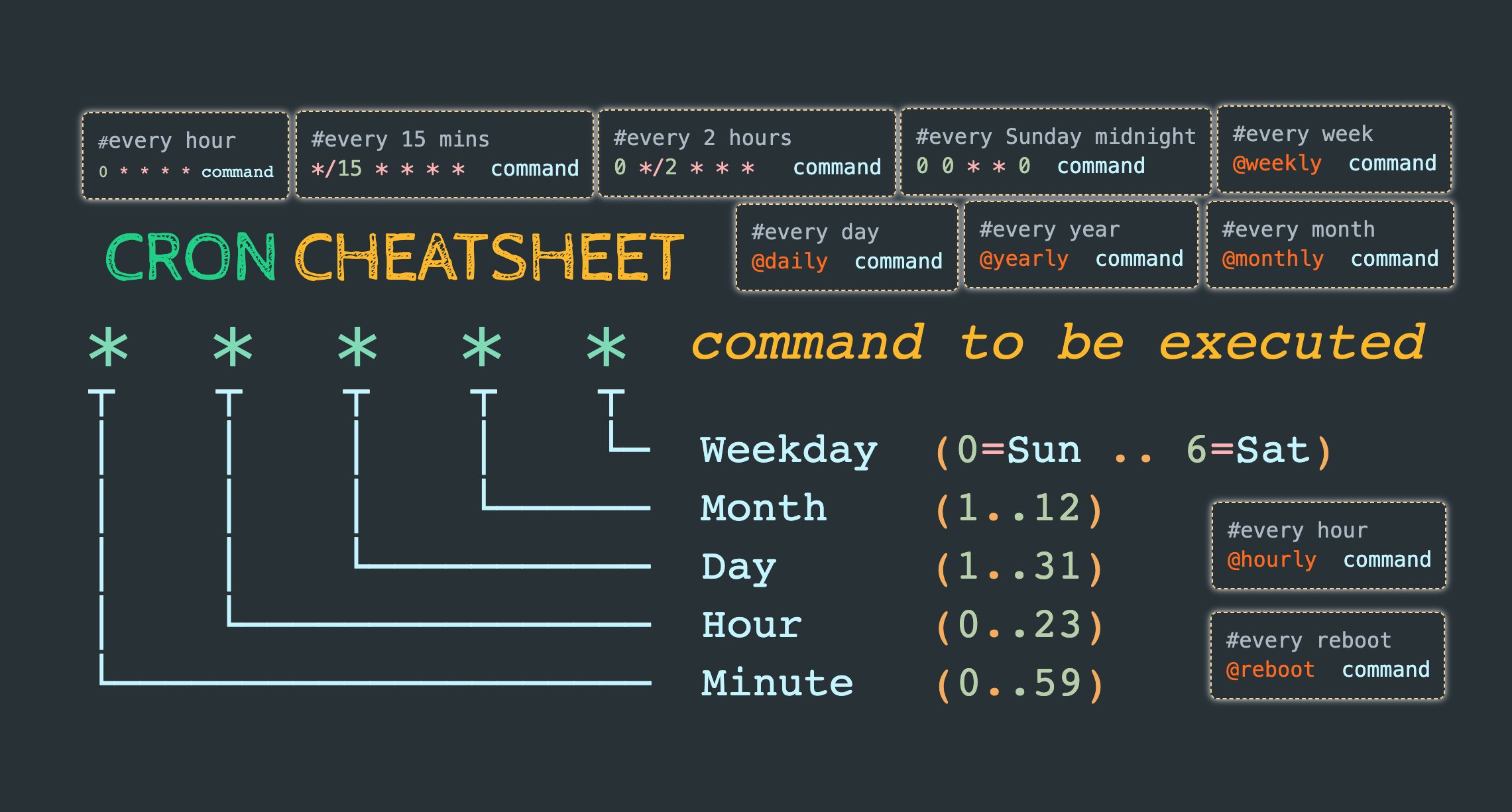
-
* * * * * command- Minute (0-59)
- Hour (0-23)
- Day of the Month (1-31)
- Month of the Year (1-12)
- Day of the Week (0-6)
0: Sunday
Special Time Keywords
| Keyword | Equivalent Schedule |
|---|---|
@reboot |
Runs once after the system starts. |
@hourly |
0 * * * * |
@daily |
0 0 * * * (Midnight every day). |
@weekly |
0 0 * * 0 (Midnight every Sunday). |
@monthly |
0 0 1 * * (Midnight on the 1st). |
@yearly/@annually |
0 0 1 1 * (Midnight on January 1). |
Special Characters
| Character | Meaning |
|---|---|
* |
Matches all values for that field (e.g., every minute, every hour, etc.). |
, |
Specifies multiple values (e.g., 1,5,10 for minutes). |
- |
Specifies a range of values (e.g., 1-5 for minutes 1 to 5). |
/ |
Specifies intervals (e.g., */5 for every 5 minutes). |
- Example
# Run every Monday at 07:00.
0 7 * * 1 /opt/sales/bin/weekly-report

# Run at 02:00 every day and
# send output to a log file.
0 2 * * * /root/backupdb > /tmp/db.log 2>&1

# Run every 15 minutes.
0,15,30,45 * * * * /opt/acme/bin/15-min-check
# Run every 15 minutes.
*/15 * * * * /opt/acme/bin/15-min-check

# Run every 30 minutes.
0,30 * * * * /opt/acme/bin/half-hour-check

# Another way to do the same thing.
* */2 * * * /opt/acme/bin/half-hour-check

# Run for the first 5 minutes of the hour
0-4 * * * * /opt/acme/bin/first-five-mins
Cron Job Definitions
System-Wide Crontab: /etc/crontab
-
System-Wide Cron Jobs- define jobs for all users and system tasks.
- allows the specification of environment variables like
SHELL,PATH, andMAILTO.
-
Format:
MIN HOUR DOM MON DOW USER COMMAND
/etc/crontabfile- the system-wide crontab configuration file on Linux systems.
- It defines scheduled tasks (cron jobs) that are executed by the
cron daemon (crond).
# Specifies the default shell used to execute the commands in the crontab.
SHELL=/bin/bash
# Specifies the environment variable PATH, which defines the directories where executable files are searched for when a command is run.
PATH=/sbin:/bin:/usr/sbin:/usr/bin
# Specifies the email address (or user) where the output (both standard output and error) of the cron jobs will be sent.
MAILTO=root

# For details see man 4 crontabs

# Example of job definition:
# .---------------- minute (0 - 59)
# |  .------------- hour (0 - 23)
# |  |  .---------- day of month (1 - 31)
# |  |  |  .------- month (1 - 12) OR jan,feb,mar,apr ...
# |  |  |  |  .---- day of week (0 - 6) (Sunday=0 or 7) OR sun,mon,tue,wed,thu,fri,sat
# |  |  |  |  |
# *  *  *  *  * user-name  command to be executed

# example
0 5 * * *   root    /usr/local/bin/daily-backup.sh
15 3 * * 7  root    /usr/local/bin/weekly-cleanup.sh
Modular Configuration: /etc/cron.d/
-
/var/spool/cron -
/etc/cron.d/directory- a system directory used for managing cron jobs.
- It provides a way to define cron jobs without modifying the main
/etc/crontabfile
-
Format of
/etc/cron.d/Files:
m h dom mon dow user command
-
How It Works
- The
cron daemon (crond)reads files in/etc/cron.d/in addition to/etc/crontaband user-specific crontabs. - Any valid file inside
/etc/cron.d/will be included in the system’s cron scheduling.
- The
-
File requirements:
- should have a unique name and follow a simple naming convention (e.g.,
backup_jobs,web_tasks). - should have proper permissions to prevent unauthorized modifications (e.g.,
644) - should be owned by
root(root:root) - Incorrect syntax in any file in
/etc/cron.d/will cause thecron daemonto skip the entire file.
- should have a unique name and follow a simple naming convention (e.g.,
Special Directories for Periodic Tasks
- managed automatically by the system and include:
/etc/cron.hourly//etc/cron.daily//etc/cron.weekly//etc/cron.monthly/
crontab: Per-User Crontabs
| CMD | DESC |
|---|---|
crontab -e |
Edit the current user’s crontab file. |
crontab -l |
List the current user’s crontab entries. |
crontab -ir |
Prompt for confirmation before removing a crontab |
crontab -r |
Remove the current user’s crontab file. |
crontab -u username |
Specify a user whose crontab is to be managed (requires root). |
crontab file |
Install a new crontab from file. |
Lab: Create a cron job
# create a cron file
vi 5-min-log-cron

# run every 5 minutes
*/5 * * * * echo "$(date) hello world" >> /home/rheladmin/log

# create a cron job
crontab 5-min-log-cron

# list all cron job
crontab -l
# # run every 5 minutes
# */5 * * * * echo "$(date) Hello world" >> /home/rheladmin/log

# remove all cron jobs
crontab -r
Lab: Add, List, and Remove a Cron Job
useradd user100
passwd user100

su -

# add user
echo "user100" >> /etc/cron.allow

# create job
crontab -e -u user100
*/2 10-23 * * * echo "Hello, this is a cron test." > /tmp/hello.ouot

# confirm
crontab -l -u user100
# */2 10-23 * * * echo "Hello, this is a cron test." > /tmp/hello.out
# confirm in spool
ll /var/spool/cron
# total 8
# -rw-------. 1 root root 27 Feb 16 15:34 root
# -rw-------. 1 root root 68 Feb 16 15:47 user100

ll /var/spool/cron/user100
# -rw-------. 1 root root 68 Feb 16 15:47 /var/spool/cron/user100

# trace by log
grep user100 /var/log/cron
# Feb 16 15:52:01 ServerB CROND[105447]: (user100) CMD (echo "Hello, this is a cron test." > /tmp/hello.out)
# Feb 16 15:52:01 ServerB CROND[105420]: (user100) CMDEND (echo "Hello, this is a cron test." > /tmp/hello.out)
# Feb 16 15:54:01 ServerB CROND[105488]: (user100) CMD (echo "Hello, this is a cron test." > /tmp/hello.out)
# Feb 16 15:54:01 ServerB CROND[105462]: (user100) CMDEND (echo "Hello, this is a cron test." > /tmp/hello.out)

# remove
crontab -l -u user100
# */2 10-23 * * * echo "Hello, this is a cron test." > /tmp/hello.out
crontab -ir -u user100
# crontab: really delete user100's crontab? y
# confirm
crontab -l -u user100
# no crontab for user100
Schedule One-time Tasks: at
-
atcommand- a tool used to schedule one-time tasks for a specific time in the future.
- at command is used to schedule a one-time execution of a program in the future
- job dir:
/var/spool/at
-
daemon
atd
- Package:
yum install -y at
- Service:
atddaemon
systemctl status atd.service
- Command
| CMD | DESC |
|---|---|
at -l |
List spooled job |
at -c jobID |
Display content of job file |
at -d jobID |
Remove content of job file |
at -f ~/.bash_profile now +5 hours |
Execute file in next 5 hours |
Lab: at
at 03:20pm 2/16/25
# warning: commands will be executed using /bin/sh
# at> date &>/tmp/date.out
# at> <EOT>
# job 2 at Sun Feb 16 15:20:00 2025

# list jobs in dir
ll /var/spool/at
# -rwx------. 1 root root 2670 Feb 16 15:19 a0000201ba7024

# list at job
at -l
# 2       Sun Feb 16 15:20:00 2025 a root

# display content
at -c 2
# #!/bin/sh
# # atrun uid=0 gid=0
# # mail rheladmin 0
# umask 22
# SHELL=/bin/bash; export SHELL
# HISTCONTROL=ignoredups; export HISTCONTROL
# HISTSIZE=1000; export HISTSIZE
# ...

# confirm execution
cat /tmp/date.out
# Sun 16 Feb 2025 03:20:00 PM EST

# confirm after execution
# at job has been removed
at -l
# 1       Sun Mar 16 15:11:00 2025 a root

# confirm
# note: removed
ll /var/spool/at

# confirm by log
tail /var/log/cron
# Feb 16 15:20:00 ServerB atd[6593]: Starting job 2 (a0000201ba7024) for user 'root' (0)
Job Scheduling
-
two service daemons:
atd: manages the jobs scheduled to run one time in the futurecrond: responsible for running jobs repetitively at pre-specified times.
-
For any additions or changes, neither daemon needs a restart.
Controlling User Access
- listing users in the allow or deny file
at:/etc/at.allow/etc/at.deny
cron/etc/cron.allow/etc/cron.deny
- By default, the deny files exist and are empty, and the allow files are non-existent.
Scheduler Log File
- All activities for atd and crond services are logged to the
/var/log/cronfile.