Note_Tech
All technological notes.
Project maintained by simonangel-fong Hosted on GitHub Pages — Theme by mattgraham
Linux - Software: Package
- Linux - Software: Package
- Package \& Package Manager
- Local Repository
- System Upgrade/Patch Management
- RPM(Red Hat Package Manager)
- YUM (Yellowdog Updater, Modified)
- Individual Package Management
- Package Group Management
- Module Management
- DNF(Dandified Yum)
DEBDistro
Package & Package Manager
-
Software- a set of instructions, programs, or data used to operate computers and execute specific tasks.
- It is intangible, meaning you cannot physically touch it.
- categorized into:
- System Software
- Application Software
- Utility Software
-
Package- a bundled collection of files, scripts, and metadata that makes it easier to distribute, install, and manage software or libraries.
- Usually contains executable files, libraries, configuration files, and dependencies.
- use
package managersto handle packages
-
Package Manager- used to installs, upgrades, and removes packages
- Manages dependencies
- Keeps track of what is installed
- Types:
- RPM distros:
yum/dnf(RHEL, CentOS)
- DEB distros
apt(Unbuntu)
- Programming languages:
pipfor python
- RPM distros:
Local Repository
Local Repository- a repository stored on a local filesystem or within a local network (e.g., an NFS share or HTTP server) that allows to manage software packages for RPM-based Linux systems.
- It acts as a private repository for installing, updating, or distributing RPM packages without relying on external or remote repositories.
createrepo Tool
-
createrepo- a command-line utility used to create the metadata files required to turn a directory of RPM files into a usable YUM/DNF repository.
-
Features
- Metadata Generation
- Generates a repodata directory containing repomd.xml and related metadata files for dependency resolution.
- Incremental Updates
- Efficiently updates metadata when new RPMs are added without regenerating everything.
createrepo --update /repo/local/
- GPG Key Integration
- Can sign metadata with GPG keys for secure package management.
- Metadata Generation
-
Commands
| Command | Description |
|---|---|
createrepo /path/to/repo |
Creates a repository in the specified directory. |
createrepo --update /path/to/repo |
Updates the repository metadata when new RPMs are added. |
createrepo --checksum sha256 /path/to/repo |
Changes the checksum type used in metadata. |
!Lab: Create a Local Repository
- Create a dir for repo and copy packages
su -

# create dir for repo
mkdir /localrepo

# copy the package to the repo dir
- Configure
# remove the package info in yum cf
rm -rf /etc/yum.repos.d/*

# create a local repo cf
vi /etc/yum.repos.d/local.repo

# [centos7]
# name=cento7
# baseurl=file:///localrepo/
# enabled=1
# gpgcheck=0
- Install and create repo
# install
yum install -y createrepo

# create repo
createrepo /localrepo/

# clean old repo
yum clean all

# list all repo pacakges
yum repolist all

# install a package from a local repo
yum install tomcat
System Upgrade/Patch Management
- For Major version, like 5,6,7, system upgreade command is not available.
- For Minor version, like 7.3 to 7.4, system can be upgreaded.
yum update -y
yum update vs yum upgrade
update: preserve packages- Updates all installed packages to their latest versions without removing any obsolete packages.
- Upgrades existing packages to newer versions.
- Does not remove old dependencies or obsolete packages automatically.
- Retains compatibility and avoids potentially disruptive changes.
- Updates all installed packages to their latest versions without removing any obsolete packages.
upgrade: delete packages- Performs a more comprehensive update by upgrading packages and removing obsolete packages or dependencies that are no longer needed.
- Similar to yum update, but it also removes older dependencies or packages that are replaced or made obsolete by the update.
- This can potentially break compatibility with some software.
- Performs a more comprehensive update by upgrading packages and removing obsolete packages or dependencies that are no longer needed.
dnf update and dnf upgrade
- In DNF, the commands
updateandupgradeare aliases;- they perform the exact same operation.
- Both commands:
- Update all installed packages to the latest version available in the configured repositories.
- Remove obsolete packages and handle dependencies automatically.
RPM(Red Hat Package Manager)
-
RPM(Red Hat Package Manager)- a package management system used in Linux distributions like
Red Hat Enterprise Linux (RHEL),CentOS,Fedora, and others. - It helps install, update, remove, and manage software packages on Linux systems.
- a lower level command
- a package management system used in Linux distributions like
-
Features:
- Binary Packages
- RPM packages typically come in binary form (
.rpmfiles), containing precompiled software and metadata like dependencies and versioning.
- RPM packages typically come in binary form (
- Dependency Resolution
- RPM packages specify their dependencies, but the tool itself does not resolve them automatically. Tools like
yumordnfhandle this.
- RPM packages specify their dependencies, but the tool itself does not resolve them automatically. Tools like
- Database of Installed Packages
- RPM maintains a local database of installed packages, which makes it easy to query and verify installations.
- Binary Packages
Configuration File
- Configuration File Path:
/etc/rpm/- used to store configuration files and macros related to the RPM (Red Hat Package Manager).
- These files influence how RPM behaves during package installation, query, build, and other operations.
Common Command
- Query
| CMD | DESC |
|---|---|
rpm -qa |
Lists all installed RPM packages. |
rpm -q chrony |
Display full package name |
rpm -qip /mnt/BaseOS/Packages/zsh-5.8-9.el9.x86_64.rpm |
Query an (uninstalled) package file |
rpm -qi chrony |
Display installable package information about an installed package. |
rpm -ql chrony |
Lists all files installed by a package. |
rpm -qf /var/log/chrony |
Display package to which the file belong |
rpm -qc chrony |
List configuration file for an installed package |
rpm -qd chrony |
Lists documentation files files in a package |
rpm -qR chrony |
Lists all dependenies of a package. |
rpm -q --whatrequires bash |
Query all packages that require |
- Manage
| CMD | DESC |
|---|---|
rpm -i /mnt/BaseOS/Packages/zsh-5.8-9.el9.x86_64.rpm |
Installs an RPM package. |
rpm -ivh /mnt/AppStram/Packages/zsh-5.8-9.el9.x86_64.rpm |
Installs a package with a progress bar. |
rpm -Fvh --replacepkgs /mnt/BaseOS/Packages/zsh-5.8-9.el9.x86_64.rpm |
Overwrite the existing package. |
rpm -Uvh /mnt/AppStream/Packages/sushi-3.38.1-2.el9.x86_64.rpm |
Upgrades an existing package or installs it. |
rpm -Fvh /mnt/AppStream/Packages/sushi-3.38.1-2.el9.x86_64.rpm |
Upgrades an existing package. |
rpm -ev sushi |
Removes (erases) a package. |
- Validate
| CMD | DESC |
|---|---|
rpm --import /etc/pki/rpm-gpg/RPM-GPG-KEY-redhat-release |
import the GPG key |
rpm -q gpg-pubkey |
List keys |
rpm -K /mnt/BaseOS/Packages/zsh-5.8-9.el9.x86_64.rpm |
Validates the signature and package integrity. |
rpm -V at |
Verifying Package Attributes |
- Extracting
| CMD | DESC |
|---|---|
rpm2cpio /mnt/BaseOS/Packages/chrony-4.3-1.el9.x86_64.rpm |
Extract cpio archive from RPM |
cpio -id cpio_archive |
Extract all files from cpio archive,create dir, retain time of files |
Lab: validate a package
rpm -K /mnt/BaseOS/Packages/zsh-5.8-9.el9.x86_64.rpm --nosignature
# /mnt/BaseOS/Packages/zsh-5.8-9.el9.x86_64.rpm: digests OK

rpm --import /etc/pki/rpm-gpg/RPM-GPG-KEY-redhat-release
rpm -K /mnt/BaseOS/Packages/zsh-5.8-9.el9.x86_64.rpm
# /mnt/BaseOS/Packages/zsh-5.8-9.el9.x86_64.rpm: digests signatures OK

rpm -q gpg-pubkey
# gpg-pubkey-fd431d51-4ae0493b
# gpg-pubkey-5a6340b3-6229229e

# query key
rpm -qi gpg-pubkey-fd431d51-4ae0493b
# Name        : gpg-pubkey
# Version     : fd431d51
# Release     : 4ae0493b
# Architecture: (none)
# Install Date: Sun 16 Feb 2025 03:37:00 PM
# Group       : Public Keys
# Size        : 0
# License     : pubkey
# Signature   : (none)
# Source RPM  : (none)
# Build Date  : Thu 22 Oct 2009 07:59:55 AM
# Build Host  : localhost
# Packager    : Red Hat, Inc. (release key 2) <security@redhat.com>
# Summary     : Red Hat, Inc. (release key 2) <security@redhat.com> public key
# Description :
# -----BEGIN PGP PUBLIC KEY BLOCK-----
# Version: rpm-4.16.1.3 (NSS-3)
# ...


rpm -V at
# note: return nothing if no changes in the attributes

# make change
ll /etc/sysconfig/atd
# -rw-r--r--. 1 root root 403 Apr  4  2022 /etc/sysconfig/atd
chmod -v 770 /etc/sysconfig/atd
# mode of '/etc/sysconfig/atd' changed from 0644 (rw-r--r--) to 0770 (rwxrwx---)
ll /etc/sysconfig/atd
# -rwxrwx---. 1 root root 403 Apr  4  2022 /etc/sysconfig/atd

#  verification check on package
# M: permission or file type is altered
# c: cf
rpm -V at
# .M.......  c /etc/sysconfig/atd

#  verification check on file
rpm -Vf /etc/sysconfig/atd
# .M.......  c /etc/sysconfig/atd

# reset
chmod -v 0644 /etc/sysconfig/atd
# mode of '/etc/sysconfig/atd' changed from 0770 (rwxrwx---) to 0644 (rw-r--r--)

# check
rpm -V at
Lab: Package Management Tasks
# list rpm file and file path
ll /mnt/AppStream/Packages/dcraw*
# -r--r--r--. 1 root root 281589 Nov 20  2021 /mnt/AppStream/Packages/dcraw-9.28.0-13.el9.x86_64.rpm

# verify the integrity
rpm -K /mnt/AppStream/Packages/dcraw-9.28.0-13.el9.x86_64.rpm
# /mnt/AppStream/Packages/dcraw-9.28.0-13.el9.x86_64.rpm: digests signatures OK

# install
rpm -ivh /mnt/AppStream/Packages/dcraw-9.28.0-13.el9.x86_64.rpm
# Verifying...                          ################################# [100%]
# Preparing...                          ################################# [100%]
# Updating / installing...
#    1:dcraw-9.28.0-13.el9              ################################# [100%]

# get info
rpm -qi dcraw
# Name        : dcraw
# Version     : 9.28.0
# Release     : 13.el9
# Architecture: x86_64
# Install Date: Sun 16 Feb 2025 06:42:33 PM
# Group       : Unspecified
# Size        : 567034
# License     : GPLv2+
# Signature   : RSA/SHA256, Sat 20 Nov 2021 11:33:10 PM, Key ID 199e2f91fd431d51
# Source RPM  : dcraw-9.28.0-13.el9.src.rpm
# Build Date  : Mon 09 Aug 2021 05:25:43 PM
# Build Host  : x86-vm-54.build.eng.bos.redhat.com
# Packager    : Red Hat, Inc. <http://bugzilla.redhat.com/bugzilla>
# Vendor      : Red Hat, Inc.
# URL         : http://www.dechifro.org/dcraw/
# Summary     : Tool for decoding raw image data from digital cameras
# Description :
# This package contains dcraw, a command line tool to decode raw image data
# downloaded from digital cameras.

# list all files
rpm -ql dcraw
# /usr/bin/dcraw
# /usr/lib/.build-id
# /usr/lib/.build-id/c3
# /usr/lib/.build-id/c3/6a86661b1ecf227ea635d79eeb1e4da9b36ed4
# /usr/share/locale/ca/LC_MESSAGES/dcraw.mo
# /usr/share/locale/cs/LC_MESSAGES/dcraw.mo
# /usr/share/locale/da/LC_MESSAGES/dcraw.mo
# /usr/share/locale/de/LC_MESSAGES/dcraw.mo
# /usr/share/locale/eo/LC_MESSAGES/dcraw.mo
# /usr/share/locale/es/LC_MESSAGES/dcraw.mo
# ...

# list all document
rpm -qd dcraw
# /usr/share/man/ca/man1/dcraw.1.gz
# /usr/share/man/cs/man1/dcraw.1.gz
# /usr/share/man/da/man1/dcraw.1.gz
# /usr/share/man/de/man1/dcraw.1.gz
# ...

# Verify the attributes of each file
rpm -Vv dcraw
# .........    /usr/bin/dcraw
# .........  a /usr/lib/.build-id
# .........  a /usr/lib/.build-id/c3
# .........  a /usr/lib/.build-id/c3/6a86661b1ecf227ea635d79eeb1e4da9b36ed4
# .........    /usr/share/locale/ca/LC_MESSAGES/dcraw.mo
# .........    /usr/share/locale/cs/LC_MESSAGES/dcraw.mo
# ...

# remove package
rpm -ev dcraw
# Preparing packages...
# dcraw-9.28.0-13.el9.x86_64

rpm -qa | grep dcraw
Lab: restore a corrupted package
- Assuming you have lost the /etc/chrony.conf configuration file and want to retrieve it from its installable package and put it back.
# determine what package
rpm -qf /etc/chrony.conf
# chrony-4.5-3.el9.x86_64

# create dir for process
mkdir /tmp/chrony_rpm
cd /tmp/chrony_rpm

rpm2cpio /mnt/BaseOS/Packages/chrony-4.3-1.el9.x86_64.rpm | cpio -idm
# 1253 blocks

ll
# total 0
# drwxr-xr-x. 5 root root 92 Feb 16 18:14 etc
# drwxr-xr-x. 6 root root 53 Feb 16 18:14 usr
# drwxr-xr-x. 4 root root 28 Feb 16 18:14 var

# locate the chrony.conf file
find . -name chrony.conf
# ./etc/chrony.conf
# ./usr/lib/sysusers.d/chrony.conf

# overwrite corrupted file
cp ./etc/chrony.conf /etc/chrony.conf
# cp: overwrite '/etc/chrony.conf'? y
Lab: Install, Get CF, and Remove nginx Manually
- Download
nginxmanually or get the downloading url
cd ~
wget https://nginx.org/packages/rhel/8/x86_64/RPMS/nginx-1.26.2-1.el8.ngx.x86_64.rpm
# --2024-12-07 23:49:28--  https://nginx.org/packages/rhel/8/x86_64/RPMS/nginx-1.26.2-1.el8.ngx.x86_64.rpm
# Resolving nginx.org (nginx.org)... 52.58.199.22, 3.125.197.172, 2a05:d014:5c0:2600::6, ...
# Connecting to nginx.org (nginx.org)|52.58.199.22|:443... connected.
# HTTP request sent, awaiting response... 200 OK
# Length: 985716 (963K) [application/x-redhat-package-manager]
# Saving to: ‘nginx-1.26.2-1.el8.ngx.x86_64.rpm’

# nginx-1.26.2-1.el8.ngx.x 100%[=================================>] 962.61K  1.51MB/s    in 0.6s

# 2024-12-07 23:49:29 (1.51 MB/s) - ‘nginx-1.26.2-1.el8.ngx.x86_64.rpm’ saved [985716/985716]

ll
# -rw-r--r--. 1 root root 985716 Aug 14 02:04 nginx-1.26.2-1.el8.ngx.x86_64.rpm
- Install rpm package
rpm -hiv nginx-1.26.2-1.el8.ngx.x86_64.rpm
# warning: nginx-1.26.2-1.el8.ngx.x86_64.rpm: Header V4 RSA/SHA256 Signature, key ID 7bd9bf62: NOKEY
# Verifying...                          ################################# [100%]
# Preparing...                          ################################# [100%]
# Updating / installing...
#    1:nginx-1:1.26.2-1.el8.ngx         ################################# [100%]
# ----------------------------------------------------------------------

# Thanks for using nginx!

# Please find the official documentation for nginx here:
# * https://nginx.org/en/docs/

# Please subscribe to nginx-announce mailing list to get
# the most important news about nginx:
# * https://nginx.org/en/support.html

# Commercial subscriptions for nginx are available on:
# * https://nginx.com/products/

# ----------------------------------------------------------------------

# Confirm
rpm -qai | grep nginx
# Name        : nginx
# Source RPM  : nginx-1.26.2-1.el8.ngx.src.rpm
# Vendor      : NGINX Packaging <nginx-packaging@f5.com>
# URL         : https://nginx.org/
# nginx [engine x] is an HTTP and reverse proxy server, as well as
- Get CF
rpm -qc nginx
# /etc/logrotate.d/nginx
# /etc/nginx/fastcgi.conf
# /etc/nginx/fastcgi.conf.default
# /etc/nginx/fastcgi_params
# /etc/nginx/fastcgi_params.default
# /etc/nginx/koi-utf
# /etc/nginx/koi-win
# /etc/nginx/mime.types
# /etc/nginx/mime.types.default
# /etc/nginx/nginx.conf
# /etc/nginx/nginx.conf.default
# /etc/nginx/scgi_params
# /etc/nginx/scgi_params.default
# /etc/nginx/uwsgi_params
# /etc/nginx/uwsgi_params.default
# /etc/nginx/win-utf
- Remove the package
rpm -e nginx

# Confirm
rpm -qai | grep nginx
YUM (Yellowdog Updater, Modified)
-
YUM (Yellowdog Updater, Modified):- a command-line package manager used to manage packages in the
.rpmfile format on RPM-based Linux distributions such asRed Hat Enterprise Linux (RHEL),CentOS, andFedora. - It simplifies the management of software packages by automatically resolving dependencies and fetching packages from repositories.
- OS: RHEL 7 / CentOS 7 & Earlier
- a command-line package manager used to manage packages in the
-
Features
- Automatic Dependency Resolution
- Unlike the
rpmcommand, YUM identifies and resolves software dependencies automatically during installation or updates.
- Unlike the
- Repository Management
- YUM fetches packages from central or local repositories.
- These repositories are configured in
.repofiles under/etc/yum.repos.d/.
- Ease of Use
- Simplifies common package management tasks such as installation, updates, and removals.
- Group Installations
- Allows installing groups of packages, such as Development Tools or Server.
- History Tracking
- Maintains a history of actions, enabling users to undo or redo package changes.
- Automatic Dependency Resolution
Application Streams and Modules
BaseOS
includes the core set of RHEL 8 components including the kernel, modules, bootloader, and other foundational software packages
Application Stream (AppStream).
comes standard with core applications, as well as several add-on applications many of them in the traditional rpm format and some in the new modular format.
Sample repo
# exclusive ID
[BaseOS_RHEL_8.0]
# description
name= RHEL 8.0 base operating system components
# location
baseurl=file:///mnt/BaseOS
# repository is active
enabled=1
# GPG-checked for authenticity
gpgcheck=0
Configuration File
yumconfiguration files:/etc/yum.conf
[main]
gpgcheck=1
installonly_limit=3
clean_requirements_on_remove=True
best=True
skip_if_unavailable=False
- Repository files path:
/etc/yum.repos.d/- A
.repofile specifies the base URL or mirror list where YUM fetches packages.
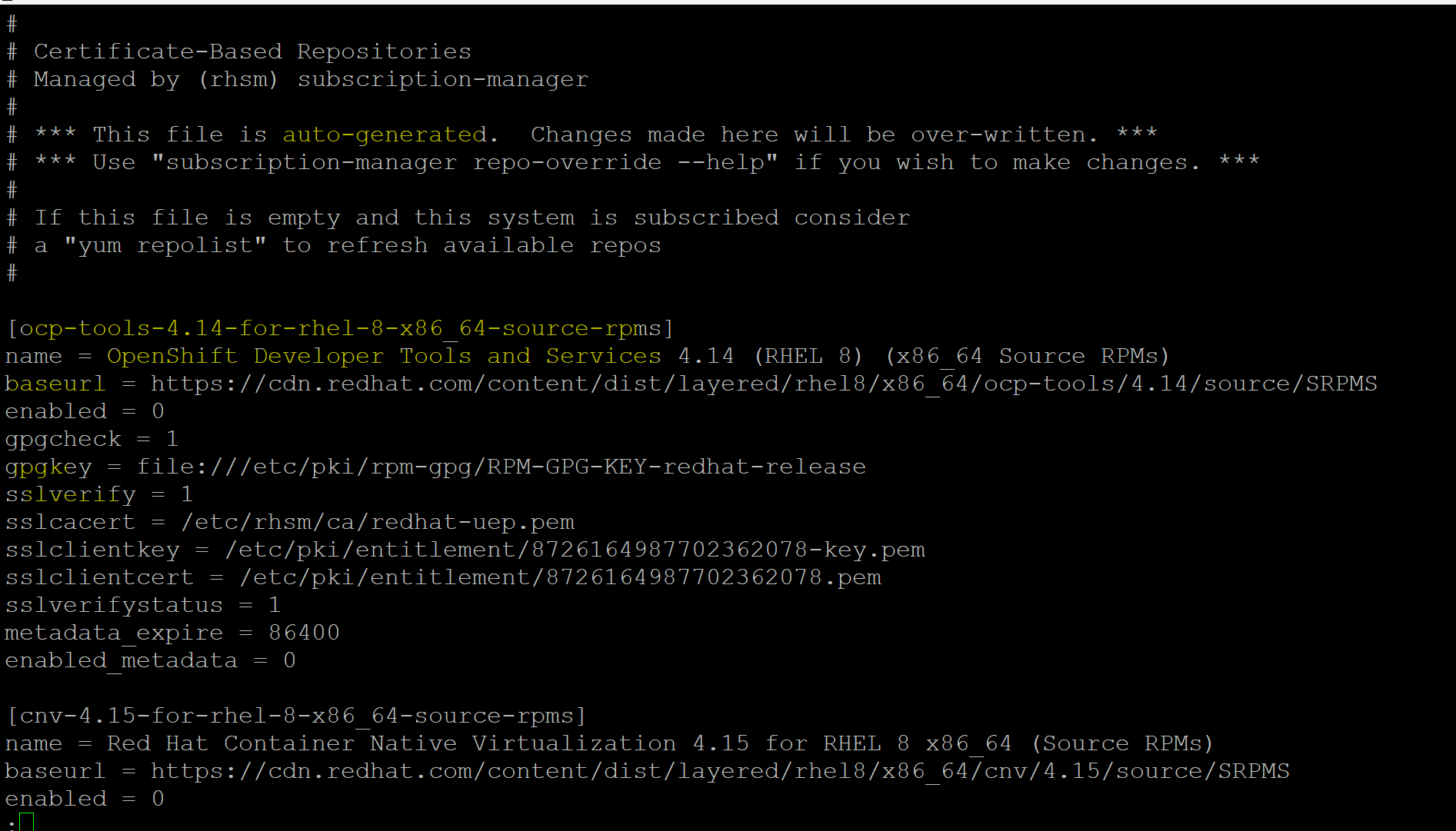
- When issuing
yumcommand, it instructs package manager to go online with the url defined in the configuration file to check, download, and install the package. - Usually
yumcommand requires Internet access- In some cases, repos are setup locally within the network.
Common Command
- Repositories
| CMD | DESC |
|---|---|
yum list |
List all available and installed packages. |
yum list available |
List all packages in the yum repositories available to be installed. |
yum list available --repo=repo_name |
Lists all available packages from a specific repository |
yum list installed |
Lists Installed packages. |
yum list obsoletes |
ist the packages installed on the system that are obsoleted. |
yum check-update |
Lists packages that have updates available. |
yum update -y |
Updates all installed packages to their latest versions. |
yum upgrade -y |
update version of all package and removes outdated packages |
yum info |
Display all info |
yum history |
Displays a history of YUM transactions. |
yum clean all |
Cleans up cached files and metadata. |
yum repolist |
Lists enabled repositories |
- For a specific package
| CMD | DESC |
|---|---|
yum list installed package_name |
List an installed package |
yum search package_name_pattern |
Search for string |
yum info package_name_pattern |
Display info of a package |
yum deplist package_name_pattern |
Display all dependencies of a package |
yum install --downloadonly --downloaddir=dir package_name |
Downloading Packages Without Installing |
yum install -y package_name |
Install package |
yum localinstall /path/to/rpm |
Install a set of local rpm files |
yum reinstall package_name |
Reinstall the identically versioned package |
yum upgrade -y package_name |
Update a package |
yum downgrade -y package_name |
Downgrade a package |
yum remove package_name |
Removes a package and its dependencies. |
yum provide /local/file |
Display the package. |
Repository
repository- a storage location for software packages.
- These repositories are configured to allow yum to fetch, install, update, or remove packages.
-
Types of Repositories:
- Base Repositories: Official repositories provided by the OS vendor (e.g., BaseOS, AppStream in RHEL 8).
- Third-Party Repositories: Provided by external vendors or communities (e.g., EPEL).
- Local Repositories: Hosted on a local network or system, useful for offline systems or custom packages.
Repository Configuration File
- Located in
/etc/yum.repos.d/. -
Each repository has its configuration file with the
.repoextension.- Default cf in rhel9:
redhat.repo
- Default cf in rhel9:
- Sample entry of CF(rhel9)
[satellite-client-6-for-rhel-9-x86_64-eus-source-rpms]
name = Red Hat Satellite Client 6 for RHEL 9 x86_64 - Extended Update Support (Source RPMs)
baseurl = https://cdn.redhat.com/content/eus/rhel9/$releasever/x86_64/sat-client/6/source/SRPMS
enabled = 0
gpgcheck = 1
gpgkey = file:///etc/pki/rpm-gpg/RPM-GPG-KEY-redhat-release
sslverify = 1
sslcacert = /etc/rhsm/ca/redhat-uep.pem
sslclientkey = /etc/pki/entitlement/1175364971612571494-key.pem
sslclientcert = /etc/pki/entitlement/1175364971612571494.pem
sslverifystatus = 1
metadata_expire = 86400
enabled_metadata = 0
[satellite-client-6-for-rhel-9-x86_64-eus-source-rpms]- the unique identifier (repository ID) for this repository.
- used by
yumordnfcommands to reference this specific repository.
name = Red Hat Satellite Client 6 for RHEL 9 x86_64 - Extended Update Support (Source RPMs)- A descriptive name for the repository, which makes it easier for users to identify the repository in
yum repolistordnf repolist.
- A descriptive name for the repository, which makes it easier for users to identify the repository in
baseurl = https://cdn.redhat.com/content/eus/rhel9/$releasever/x86_64/sat-client/6/source/SRPMS- The URL where the repository’s packages are hosted.
- Details:
https://cdn.redhat.com: The Red Hat Content Delivery Network (CDN) URL.$releasever: A placeholder that dynamically expands to the OS release version (9 in this case).x86_64: Specifies the architecture for which the repository is meant.source/SRPMS: Indicates that this repository provides Source RPMs, which contain the source code for software.
enabled = 0- Determines if the repository is enabled for use.
- Value:
0: Disabled (this repository will not be used unless explicitly enabled with--enablerepo).1: Enabled (the repository is active by default).
gpgcheck = 1- Ensures that package signatures are verified using GPG keys before installation.
- Value:
0: Disabled (not recommended for security reasons).1: GPG signature check is enabled.
gpgkey = file:///etc/pki/rpm-gpg/RPM-GPG-KEY-redhat-release- Specifies the file location of the GPG key used to verify packages.
- In this case, the key is stored locally in
/etc/pki/rpm-gpg/.
sslverify = 1- Enables SSL certificate verification to ensure a secure connection to the repository server.
- Value:
0: Disabled (not secure).1: SSL verification is enabled.
sslcacert = /etc/rhsm/ca/redhat-uep.pem- Specifies the location of the Certificate Authority (CA) certificate used for SSL verification.
- ensures that the server’s certificate is trusted.
sslclientkey = /etc/pki/entitlement/1175364971612571494-key.pem- Specifies the private key file used for client authentication.
- This key authenticates the client to the Red Hat CDN server.
sslclientcert = /etc/pki/entitlement/1175364971612571494.pem- Specifies the client certificate file used for authentication.
- This certificate works in conjunction with the private key to verify the client’s identity.
sslverifystatus = 1- Enables verification of the SSL certificate’s revocation status.
- Value:
0: Revocation status is not checked.1: Revocation status is checked (more secure).
metadata_expire = 86400- Defines how long (in seconds) the metadata cache is valid before it is refreshed.
- Value: 86400 seconds (1 day).
enabled_metadata = 0- Determines if metadata updates for this repository are enabled.
- Value:
0: Metadata updates are disabled.1: Metadata updates are enabled.
Common Commands
| CDM | DESC |
|---|---|
yum repolist |
Displays enabled repositories by default. |
yum repolist disabled |
List disabled repositories. |
yum repolist all |
List all repositories (enabled and disabled). |
yum repoinfo |
View information for all enabled repositories |
yum repoinfo repo_id |
Detailed information about a specific repository. |
yum makecache |
Force download of repository metadata |
yum clean all |
Clears all cached data, including package metadata. |
yum clean metadata --enablerepo=repo_id |
Clear metadata for a specific repository |
yum install package_name --enablerepo=repo_id |
Temporarily enable a repository. |
yum install package_name --disablerepo=repo_id |
Temporarily enable a repository. |
- Permanently enable/disable a repository:
- Edit the
.repofile in/etc/yum.repos.d/and set:enabled=1: to enableenabled=0: to disable
- Edit the
Lab: View the Existing Repository
# list enabled repo
yum repolist
# Not root, Subscription Management repositories not updated
# repo id                              repo name
# rhel-9-for-x86_64-appstream-rpms     Red Hat Enterprise Linux 9 for x86_64 - AppStream (RPMs)
# rhel-9-for-x86_64-baseos-rpms        Red Hat Enterprise Linux 9 for x86_64 - BaseOS (RPMs)

# list disabled repo
yum repolist disabled
# Not root, Subscription Management repositories not updated
# repo id                                                       repo name
# amq-clients-3-for-rhel-9-x86_64-debug-rpms                    Red Hat AMQ Clients 3 for RHEL 9 x86_64 (Debug RPMs)
# amq-clients-3-for-rhel-9-x86_64-rpms                          Red Hat AMQ Clients 3 for RHEL 9 x86_64 (RPMs)
# amq-clients-3-for-rhel-9-x86_64-source-rpms                   Red Hat AMQ Clients 3 for RHEL 9 x86_64 (Source RPMs)
# amq-interconnect-textonly-1-for-middleware-rpms               Red Hat AMQ Interconnect Text-Only Advisories
# amq-textonly-1-for-middleware-rpms                            Red Hat JBoss AMQ Text-Only Advisories
# ansible-automation-platform-2.2-for-rhel-9-x86_64-debug-rpms  Red Hat Ansible Automation Platform 2.2 for RHEL 9 x86_64 (Debug RPMs)
# ansible-automation-platform-2.2-for-rhel-9-x86_64-rpms        Red Hat Ansible Automation Platform 2.2 for RHEL 9 x86_64 (RPMs)
# ansible-automation-platform-2.2-for-rhel-9-x86_64-source-rpms Red Hat Ansible Automation Platform 2.2 for RHEL 9 x86_64 (Source RPMs)
# ...


# List all repo
yum repolist all
# Not root, Subscription Management repositories not updated
# repo id                                                       repo name                   status
# amq-clients-3-for-rhel-9-x86_64-debug-rpms                    Red Hat AMQ Clients 3 for R disabled
# amq-clients-3-for-rhel-9-x86_64-rpms                          Red Hat AMQ Clients 3 for R disabled
# amq-clients-3-for-rhel-9-x86_64-source-rpms                   Red Hat AMQ Clients 3 for R disabled
# ...
# rhel-9-for-x86_64-appstream-eus-source-rpms                   Red Hat Enterprise Linux 9  disabled
# rhel-9-for-x86_64-appstream-rpms                              Red Hat Enterprise Linux 9  enabled
# rhel-9-for-x86_64-appstream-source-rpms                       Red Hat Enterprise Linux 9  disabled
# ...
# rhel-9-for-x86_64-baseos-eus-source-rpms                      Red Hat Enterprise Linux 9  disabled
# rhel-9-for-x86_64-baseos-rpms                                 Red Hat Enterprise Linux 9  enabled
# rhel-9-for-x86_64-baseos-source-rpms                          Red Hat Enterprise Linux 9  disabled
# ...


# View information for all enabled repositories
yum repoinfo
# Not root, Subscription Management repositories not updated
# Last metadata expiration check: 0:39:44 ago on Tue 07 Jan 2025 04:57:53 PM EST.
# Repo-id            : rhel-9-for-x86_64-appstream-rpms
# Repo-name          : Red Hat Enterprise Linux 9 for x86_64 - AppStream (RPMs)
# Repo-revision      : 1735784335
# Repo-updated       : Wed 01 Jan 2025 09:18:55 PM EST
# Repo-pkgs          : 21,802
# Repo-available-pkgs: 20,894
# Repo-size          : 77 G
# Repo-baseurl       : https://cdn.redhat.com/content/dist/rhel9/9/x86_64/appstream/os
# Repo-expire        : 86,400 second(s) (last: Tue 07 Jan 2025 04:57:53 PM EST)
# Repo-filename      : /etc/yum.repos.d/redhat.repo

# Repo-id            : rhel-9-for-x86_64-baseos-rpms
# Repo-name          : Red Hat Enterprise Linux 9 for x86_64 - BaseOS (RPMs)
# Repo-revision      : 1734567864
# Repo-updated       : Wed 18 Dec 2024 07:24:24 PM EST
# Repo-pkgs          : 8,246
# Repo-available-pkgs: 8,246
# Repo-size          : 22 G
# Repo-baseurl       : https://cdn.redhat.com/content/dist/rhel9/9/x86_64/baseos/os
# Repo-expire        : 86,400 second(s) (last: Tue 07 Jan 2025 04:57:42 PM EST)
# Repo-filename      : /etc/yum.repos.d/redhat.repo
# Total packages: 30,048

# Info of enabled repos
yum repoinfo rhel-9-for-x86_64-baseos-rpms rhel-9-for-x86_64-appstream-rpms
# Not root, Subscription Management repositories not updated
# Last metadata expiration check: 0:43:17 ago on Tue 07 Jan 2025 04:57:53 PM EST.
# Repo-id            : rhel-9-for-x86_64-appstream-rpms
# Repo-name          : Red Hat Enterprise Linux 9 for x86_64 - AppStream (RPMs)
# Repo-status        : enabled
# Repo-revision      : 1735784335
# Repo-updated       : Wed 01 Jan 2025 09:18:55 PM EST
# Repo-pkgs          : 21,802
# Repo-available-pkgs: 20,894
# Repo-size          : 77 G
# Repo-baseurl       : https://cdn.redhat.com/content/dist/rhel9/9/x86_64/appstream/os
# Repo-expire        : 86,400 second(s) (last: Tue 07 Jan 2025 04:57:53 PM EST)
# Repo-filename      : /etc/yum.repos.d/redhat.repo

# Repo-id            : rhel-9-for-x86_64-baseos-rpms
# Repo-name          : Red Hat Enterprise Linux 9 for x86_64 - BaseOS (RPMs)
# Repo-status        : enabled
# Repo-revision      : 1734567864
# Repo-updated       : Wed 18 Dec 2024 07:24:24 PM EST
# Repo-pkgs          : 8,246
# Repo-available-pkgs: 8,246
# Repo-size          : 22 G
# Repo-baseurl       : https://cdn.redhat.com/content/dist/rhel9/9/x86_64/baseos/os
# Repo-expire        : 86,400 second(s) (last: Tue 07 Jan 2025 04:57:42 PM EST)
# Repo-filename      : /etc/yum.repos.d/redhat.repo
# Total packages: 30,048

# Info of disabled repos
yum repoinfo satellite-client-6-for-rhel-9-x86_64-eus-source-rpms
# Not root, Subscription Management repositories not updated
# Last metadata expiration check: 0:42:25 ago on Tue 07 Jan 2025 04:57:53 PM EST.
# Repo-id            : satellite-client-6-for-rhel-9-x86_64-eus-source-rpms
# Repo-name          : Red Hat Satellite Client 6 for RHEL 9 x86_64 - Extended Update Support
#                    : (Source RPMs)
# Repo-status        : disabled
# Repo-baseurl       : https://cdn.redhat.com/content/eus/rhel9/9/x86_64/sat-client/6/source/SRPMS
# Repo-expire        : 86,400 second(s) (last: unknown)
# Repo-filename      : /etc/yum.repos.d/redhat.repo
# Total packages: 0
Lab: Repository Cached Data
# Get metadata of a repo before cleaning
yum repoinfo rhel-9-for-x86_64-baseos-rpms
# Updating Subscription Management repositories.
# Last metadata expiration check: 0:01:08 ago on Tue 07 Jan 2025 06:23:15 PM EST.
# Repo-id            : rhel-9-for-x86_64-baseos-rpms
# Repo-name          : Red Hat Enterprise Linux 9 for x86_64 - BaseOS (RPMs)
# Repo-status        : enabled
# Repo-revision      : 1734567864
# Repo-updated       : Wed 18 Dec 2024 07:24:24 PM EST
# Repo-pkgs          : 8,246
# Repo-available-pkgs: 8,246
# Repo-size          : 22 G
# Repo-baseurl       : https://cdn.redhat.com/content/dist/rhel9/9/x86_64/baseos/os
# Repo-expire        : 86,400 second(s) (last: Tue 07 Jan 2025 06:23:01 PM EST)
# Repo-filename      : /etc/yum.repos.d/redhat.repo
# Total packages: 8,246

# clean cached meta data of a repo
yum clean metadata --enablerepo=rhel-9-for-x86_64-baseos-rpms
# Updating Subscription Management repositories.
# Cache was expired
# 17 files removed

# Get metadata of a repo after cleaning
# metadata need to download first
yum repoinfo  rhel-9-for-x86_64-baseos-rpms
# Updating Subscription Management repositories.
# Red Hat Enterprise Linux 9 for x86_64 - BaseOS (RPMs)             1.7 MB/s |  40 MB     00:23
# Red Hat Enterprise Linux 9 for x86_64 - AppStream (RPMs)          1.7 MB/s |  47 MB     00:27
# Last metadata expiration check: 0:00:04 ago on Tue 07 Jan 2025 06:26:36 PM EST.
# Repo-id            : rhel-9-for-x86_64-baseos-rpms
# Repo-name          : Red Hat Enterprise Linux 9 for x86_64 - BaseOS (RPMs)
# Repo-status        : enabled
# Repo-revision      : 1734567864
# Repo-updated       : Wed 18 Dec 2024 07:24:24 PM EST
# Repo-pkgs          : 8,246
# Repo-available-pkgs: 8,246
# Repo-size          : 22 G
# Repo-baseurl       : https://cdn.redhat.com/content/dist/rhel9/9/x86_64/baseos/os
# Repo-expire        : 86,400 second(s) (last: Tue 07 Jan 2025 06:26:22 PM EST)
# Repo-filename      : /etc/yum.repos.d/redhat.repo
# Total packages: 8,246

# force to cache metadata
yum makecache
# Red Hat Enterprise Linux 9 for x86_64 - BaseOS (RPMs)             7.8 kB/s | 4.1 kB     00:00
# Red Hat Enterprise Linux 9 for x86_64 - AppStream (RPMs)           17 kB/s | 4.5 kB     00:00
# Metadata cache created.
Lab: Add a New Repository
# Create a .repo file
sudo nano /etc/yum.repos.d/custom.repo

# [ol8-baseos]
# name=Oracle Linux 8 (x86_64) BaseOS Latest
# baseurl=https://yum.oracle.com/repo/OracleLinux/OL8/baseos/latest/x86_64
# enabled=1
# gpgcheck=0

# Verify the new repository
yum repolist
# Updating Subscription Management repositories.
# repo id                              repo name
# ol8-baseos                           Oracle Linux 8 (x86_64) BaseOS Latest
# rhel-9-for-x86_64-appstream-rpms     Red Hat Enterprise Linux 9 for x86_64 - AppStream (RPMs)
# rhel-9-for-x86_64-baseos-rpms        Red Hat Enterprise Linux 9 for x86_64 - BaseOS (RPMs)

# Test repository connectivity
yum repoinfo ol8-baseos
# Updating Subscription Management repositories.
# Oracle Linux 8 (x86_64) BaseOS Latest                             1.7 MB/s |  85 MB     00:48
# Last metadata expiration check: 0:00:08 ago on Tue 07 Jan 2025 06:35:39 PM EST.
# Repo-id            : ol8-baseos
# Repo-name          : Oracle Linux 8 (x86_64) BaseOS Latest
# Repo-status        : enabled
# Repo-revision      : 1736258980
# Repo-updated       : Tue 07 Jan 2025 09:09:46 AM EST
# Repo-pkgs          : 24,180
# Repo-available-pkgs: 24,180
# Repo-size          : 74 G
# Repo-baseurl       : https://yum.oracle.com/repo/OracleLinux/OL8/baseos/latest/x86_64
# Repo-expire        : 172,800 second(s) (last: Tue 07 Jan 2025 06:35:39 PM EST)
# Repo-filename      : /etc/yum.repos.d/custom.repo
# Total packages: 24,180

# get info of a package from the enable repo
yum info nano
# Updating Subscription Management repositories.
# Last metadata expiration check: 0:02:14 ago on Tue 07 Jan 2025 06:35:39 PM EST.
# Installed Packages
# Name         : nano
# Version      : 5.6.1
# Release      : 6.el9
# Architecture : x86_64
# Size         : 2.7 M
# Source       : nano-5.6.1-6.el9.src.rpm
# Repository   : @System
# From repo    : rhel-9-for-x86_64-baseos-rpms
# Summary      : A small text editor
# URL          : https://www.nano-editor.org
# License      : GPLv3+
# Description  : GNU nano is a small and friendly text editor.

# Available Packages
# Name         : nano
# Version      : 2.9.8
# Release      : 3.el8_10
# Architecture : src
# Size         : 2.8 M
# Source       : None
# Repository   : ol8-baseos
# Summary      : A small text editor
# URL          : https://www.nano-editor.org
# License      : GPLv3+
# Description  : GNU nano is a small and friendly text editor.
Lab: Disable a repository
- Disable Temporarily
yum info nano --disablerepo=ol8-baseos
# Updating Subscription Management repositories.
# Last metadata expiration check: 0:04:20 ago on Tue 07 Jan 2025 06:39:53 PM EST.
# Installed Packages
# Name         : nano
# Version      : 5.6.1
# Release      : 6.el9
# Architecture : x86_64
# Size         : 2.7 M
# Source       : nano-5.6.1-6.el9.src.rpm
# Repository   : @System
# From repo    : rhel-9-for-x86_64-baseos-rpms
# Summary      : A small text editor
# URL          : https://www.nano-editor.org
# License      : GPLv3+
# Description  : GNU nano is a small and friendly text editor.
- Disable Permanently
sudo nano /etc/yum.repos.d/custom.repo
# enabled=0

# confirm
yum repolist
# Updating Subscription Management repositories.
# repo id                              repo name
# rhel-9-for-x86_64-appstream-rpms     Red Hat Enterprise Linux 9 for x86_64 - AppStream (RPMs)
# rhel-9-for-x86_64-baseos-rpms        Red Hat Enterprise Linux 9 for x86_64 - BaseOS (RPMs)
- Enable Temporarily
# confirm repo is disabled
yum repolist disabled | grep ol8
# ol8-baseos                                                    Oracle Linux 8 (x86_64) BaseOS Latest

# enable temporarily
yum info nano --enablerepo=ol8-baseos
# Updating Subscription Management repositories.
# Oracle Linux 8 (x86_64) BaseOS Latest                              29 kB/s | 4.3 kB     00:00
# Installed Packages
# Name         : nano
# Version      : 5.6.1
# Release      : 6.el9
# Architecture : x86_64
# Size         : 2.7 M
# Source       : nano-5.6.1-6.el9.src.rpm
# Repository   : @System
# From repo    : rhel-9-for-x86_64-baseos-rpms
# Summary      : A small text editor
# URL          : https://www.nano-editor.org
# License      : GPLv3+
# Description  : GNU nano is a small and friendly text editor.

# Available Packages
# Name         : nano
# Version      : 2.9.8
# Release      : 3.el8_10
# Architecture : src
# Size         : 2.8 M
# Source       : None
# Repository   : ol8-baseos
# Summary      : A small text editor
# URL          : https://www.nano-editor.org
# License      : GPLv3+
# Description  : GNU nano is a small and friendly text editor.
- Remove custom repo
sudo rm /etc/yum.repos.d/custom.repo

# confirm
yum repolist all | grep ol8
Lab: Configure Access to PreBuilt ISO Repositories
df -h | grep mnt
# /dev/sr0               9.9G  9.9G     0 100% /mnt

# create local repo
vi /etc/yum.repos.d/local.repo

[BaseOS]
name=BaseOS
baseurl=file:///mnt/BaseOS
gpgcheck=0

[AppStream]
name=AppStream
baseurl=file:///mnt/AppStream
gpgcheck=0

# confirm
yum repolist
# Updating Subscription Management repositories.
# repo id                              repo name
# AppStream                            AppStream
# BaseOS                               BaseOS
# rhel-9-for-x86_64-appstream-rpms     Red Hat Enterprise Linux 9 for x86_64 - AppStream (RPMs)
# rhel-9-for-x86_64-baseos-rpms        Red Hat Enterprise Linux 9 for x86_64 - BaseOS (RPMs)

# query the repos
yum repoquery
# ...
# zstd-0:1.5.1-2.el9.x86_64
# zziplib-0:0.13.71-11.el9_4.i686
# zziplib-0:0.13.71-11.el9_4.x86_64
# zziplib-0:0.13.71-9.el9.i686
# zziplib-0:0.13.71-9.el9.x86_64
# ...

# query a repo
yum repoquery --repo "BaseOS"
# ...
# zstd-0:1.5.1-2.el9.x86_64
# zziplib-0:0.13.71-11.el9_4.i686
# zziplib-0:0.13.71-11.el9_4.x86_64
# zziplib-0:0.13.71-9.el9.i686
# zziplib-0:0.13.71-9.el9.x86_64
# ...

# query for a package
yum repoquery --repo "BaseOS" | grep zsh
# Last metadata expiration check: 0:02:45 ago on Sun 16 Feb 2025 07:30:53 PM.
# zsh-0:5.8-9.el9.x86_64
Individual Package Management
# list all installed
yum list installed
# list a package in all installed
yum list installed gnome*
# lsit all in repos
yum list
# list all updatable
yum list updates
# list for a package
yum list bc
# list recent added
yum list recent
- Local isntall
yum localinstall /mnt/AppStream/Packages/dcraw-9.28.0-13.el9.x86_64.rpm
Lab: Individual Package Management
# check if installed
yum list installed | grep cifs-utils

# Determine if the cifs-utils package is available
yum repoquery cifs-utils --repo=BaseOS
# Updating Subscription Management repositories.
# Last metadata expiration check: 0:22:32 ago on Sun 16 Feb 2025 07:30:53 PM.
# cifs-utils-0:7.0-1.el9.x86_64

# get info
yum info cifs-utils --repo=BaseOS
# Available Packages
# Name         : cifs-utils
# Version      : 7.0
# Release      : 1.el9
# Architecture : x86_64
# Size         : 103 k
# Source       : cifs-utils-7.0-1.el9.src.rpm
# Repository   : BaseOS
# Summary      : Utilities for mounting and managing CIFS mounts
# URL          : http://linux-cifs.samba.org/cifs-utils/
# License      : GPLv3
# Description  : The SMB/CIFS protocol is a standard file sharing protocol widely deployed
#              : on Microsoft Windows machines. This package contains tools for mounting
#              : shares on Linux using the SMB/CIFS protocol. The tools in this package
#              : work in conjunction with support in the kernel to allow one to mount a
#              : SMB/CIFS share onto a client and use it as if it were a standard Linux
#              : file system.

# install
yum install -y cifs-utils --repo=BaseOS
# Updating Subscription Management repositories.
# Last metadata expiration check: 0:23:44 ago on Sun 16 Feb 2025 07:30:53 PM.
# Dependencies resolved.
# ==================================================================================================
#  Package                  Architecture         Version                 Repository            Size
# ==================================================================================================
# Installing:
#  cifs-utils               x86_64               7.0-1.el9               BaseOS               103 k

# Transaction Summary
# ==================================================================================================
# Install  1 Package

# Total size: 103 k
# Installed size: 220 k
# Downloading Packages:
# Running transaction check
# Transaction check succeeded.
# Running transaction test
# Transaction test succeeded.
# Running transaction
#   Preparing        :                                                                          1/1
#   Installing       : cifs-utils-7.0-1.el9.x86_64                                              1/1
#   Running scriptlet: cifs-utils-7.0-1.el9.x86_64                                              1/1
#   Verifying        : cifs-utils-7.0-1.el9.x86_64                                              1/1
# Installed products updated.

# Installed:
#   cifs-utils-7.0-1.el9.x86_64

# Complete!

# display installed
yum info cifs-utils
# Installed Packages
# Name         : cifs-utils
# Version      : 7.0
# Release      : 1.el9
# Architecture : x86_64
# Size         : 220 k
# Source       : cifs-utils-7.0-1.el9.src.rpm
# Repository   : @System
# From repo    : BaseOS
# Summary      : Utilities for mounting and managing CIFS mounts
# URL          : http://linux-cifs.samba.org/cifs-utils/
# License      : GPLv3
# Description  : The SMB/CIFS protocol is a standard file sharing protocol widely deployed
#              : on Microsoft Windows machines. This package contains tools for mounting
#              : shares on Linux using the SMB/CIFS protocol. The tools in this package
#              : work in conjunction with support in the kernel to allow one to mount a
#              : SMB/CIFS share onto a client and use it as if it were a standard Linux
#              : file system.

# remove
dnf remove -y cifs-utils

# confirm
dnf list installed | grep cifs-utils
Lab: detemine the package of a file
yum provides /etc/passwd
# Updating Subscription Management repositories.
# Last metadata expiration check: 0:28:02 ago on Sun 16 Feb 2025 07:30:53 PM.
# setup-2.13.7-6.el9.noarch : A set of system configuration and setup files
# Repo        : rhel-9-for-x86_64-baseos-rpms
# Matched from:
# Filename    : /etc/passwd

# setup-2.13.7-7.el9.noarch : A set of system configuration and setup files
# Repo        : rhel-9-for-x86_64-baseos-rpms
# Matched from:
# Filename    : /etc/passwd

# search package
yum search system-config
# Updating Subscription Management repositories.
# Last metadata expiration check: 0:29:26 ago on Sun 16 Feb 2025 07:30:53 PM.
# ================================== Name Matched: system-config ===================================
# system-config-printer-libs.noarch : Libraries and shared code for printer administration tool
# system-config-printer-udev.x86_64 : Rules for udev for automatic configuration of USB printers
# ================================= Summary Matched: system-config =================================
# cups-pk-helper.x86_64 : A helper that makes system-config-printer use PolicyKit
Package Group Management
# list all group from all repos
yum group list
# Available Environment Groups:
#    Server
#    Minimal Install
#    Workstation
#    Custom Operating System
#    Virtualization Host
# Installed Environment Groups:
#    Server with GUI
# Installed Groups:
#    Headless Management
#    Container Management
# Available Groups:
#    Legacy UNIX Compatibility
#    Graphical Administration Tools
#    System Tools
#    RPM Development Tools
#    Development Tools
#    .NET Development
#    Security Tools
#    Smart Card Support
#    Console Internet Tools
#    Network Servers
#    Scientific Support

# summary
yum group summary
# Installed Groups: 2
# Available Groups: 11

# include hidden
yum group list hidden

yum group list --installed
# Installed Environment Groups:
#    Server with GUI
# Installed Groups:
#    Headless Management
#    Container Management

yum group info "Network Servers"
# Group: Network Servers
#  Description: These packages include network-based servers such as DHCP, Kerberos and NIS.
#  Optional Packages:
#    dhcp-server
#    dnsmasq
#    freeradius
#    frr
#    idn2
#    krb5-server
#    libreswan
#    radvd
#    rsyslog-gnutls
#    rsyslog-gssapi
#    rsyslog-mysql
#    rsyslog-pgsql
#    rsyslog-relp
#    syslinux
#    tang

# install
yum groupinstall -y "Network Servers"
# Dependencies resolved.
# ==================================================================================================
#  Package                Architecture          Version                Repository              Size
# ==================================================================================================
# Installing Groups:
#  Network Servers

# Transaction Summary
# ==================================================================================================

# Complete!

# update group
yum groupupdate -y "Network Servers"

# remove
yum groupremove -y "Network Servers"
Lab: Package Group Management
# check if installed
yum group list installed
# Installed Environment Groups:
#    Server with GUI
# Installed Groups:
#    Headless Management
#    Container Management

# check if available
yum group list available | grep "System Tools"
  #  System Tools

# get info
yum group info "System Tools"
#  Default Packages:
#    NetworkManager-libreswan
#    chrony
#    cifs-utils
#    libreswan
#    nmap
#    openldap-clients
#    samba-client
#    setserial
#    tigervnc
#    tmux
#    zsh
#  Optional Packages:
#    PackageKit-command-not-found
#    aide
#    autofs
#    bacula-client
#    chrpath
#    convmv
#    createrepo_c
#    environment-modules
#    freerdp
#    fuse
#    gpm
#    hardlink
#    initscripts
#    initscripts-service
#    iotop
#    lzop
#    mc
#    mrtg
#    mtx
#    net-snmp-utils
#    netconsole-service
#    oddjob
#    oddjob-mkhomedir
#    pmdk-convert
#    readonly-root
#    rear
#    speech-dispatcher
#    speech-dispatcher-espeak-ng
#    sysstat
#    wireshark

# isntall
yum group install -y "System Tools"
# ...
# Installed:
#   NetworkManager-libreswan-1.2.22-4.el9_5.x86_64       cifs-utils-7.0-5.el9.x86_64
#   fltk-1.3.8-1.el9.x86_64                              ldns-1.7.1-11.el9.x86_64
#   libreswan-4.15-3.el9.x86_64                          nmap-3:7.92-3.el9.x86_64
#   nss-tools-3.101.0-10.el9_2.x86_64                    openldap-clients-2.6.6-3.el9.x86_64
#   samba-client-4.20.2-2.el9_5.x86_64                   setserial-2.17-54.el9.x86_64
#   tigervnc-1.14.1-1.el9_5.x86_64                       tigervnc-icons-1.14.1-1.el9_5.noarch
#   tigervnc-license-1.14.1-1.el9_5.noarch               tmux-3.2a-5.el9.x86_64
#   unbound-libs-1.16.2-8.el9_5.1.x86_64

# Complete!

# remove
yum group remove -y "system tools"
# Removed:
#   NetworkManager-libreswan-1.2.22-4.el9_5.x86_64       cifs-utils-7.0-5.el9.x86_64
#   fltk-1.3.8-1.el9.x86_64                              ldns-1.7.1-11.el9.x86_64
#   libreswan-4.15-3.el9.x86_64                          nmap-3:7.92-3.el9.x86_64
#   nss-tools-3.101.0-10.el9_2.x86_64                    openldap-clients-2.6.6-3.el9.x86_64
#   samba-client-4.20.2-2.el9_5.x86_64                   setserial-2.17-54.el9.x86_64
#   tigervnc-1.14.1-1.el9_5.x86_64                       tigervnc-icons-1.14.1-1.el9_5.noarch
#   tigervnc-license-1.14.1-1.el9_5.noarch               tmux-3.2a-5.el9.x86_64
#   unbound-libs-1.16.2-8.el9_5.1.x86_64

# Complete!
Module Management
| CMD | DESC |
|---|---|
yum module list |
list all modules |
yum module list nodejs |
list a module |
yum module list nodejs:18 |
list a module of specified stream |
yum module list --enabled |
list all enabled module streams |
yum module list --installed |
list all installed module streams |
yum module install -y nodejs:18 |
Install a module |
yum module update -y nodejs:18 |
update a module |
yum module install -y nodejs:20/common |
install a module of a stream and profile |
yum module info --profile nodejs |
List all profiles |
yum module info --profile nodejs:20 |
List all profiles of a stream |
yum module remove -y nodejs:18 |
Remove a module |
yum module reset nodejs |
Reset a module |
Lab: Manipulate Modules
# check if installed
yum module list postgresql
# AppStream
# Name              Stream        Profiles                 Summary
# postgresql        15            client, server [d]       PostgreSQL server and client module

# Red Hat Enterprise Linux 9 for x86_64 - AppStream (RPMs)
# Name              Stream        Profiles                 Summary
# postgresql        15            client, server [d]       PostgreSQL server and client module
# postgresql        16            client, server [d]       PostgreSQL server and client module

# Hint: [d]efault, [e]nabled, [x]disabled, [i]nstalled

# display info of 16 stream
yum module info postgresql:16
# Updating Subscription Management repositories.
# Last metadata expiration check: 1:15:58 ago on Sun 16 Feb 2025 07:30:53 PM.
# Name             : postgresql
# Stream           : 16
# Version          : 9040020240108131224
# Context          : rhel9
# Architecture     : x86_64
# Profiles         : client, server [d]
# Default profiles : server
# Repo             : rhel-9-for-x86_64-appstream-rpms
# Summary          : PostgreSQL server and client module
# ...

# isntall with default profile
yum module install -y --profile postgresql:16 -y
# ...
# Installed:
#   postgresql-16.6-1.module+el9.5.0+22557+8cb08ba5.x86_64
#   postgresql-private-libs-16.6-1.module+el9.5.0+22557+8cb08ba5.x86_64
#   postgresql-server-16.6-1.module+el9.5.0+22557+8cb08ba5.x86_64

# Complete!

# show info after installed
yum module info postgresql:16
# Name             : postgresql
# Stream           : 16 [e] [a]
# Version          : 9040020240108131224
# Context          : rhel9
# Architecture     : x86_64
# Profiles         : client, server [d] [i]
# Default profiles : server
# ...

# remove
yum module remove -y postgresql:16
# ...
# Removed:
#   postgresql-16.6-1.module+el9.5.0+22557+8cb08ba5.x86_64
#   postgresql-private-libs-16.6-1.module+el9.5.0+22557+8cb08ba5.x86_64
#   postgresql-server-16.6-1.module+el9.5.0+22557+8cb08ba5.x86_64

# Complete!
Lab: Install a Module from an Alternative Stream
# check state of stream
 yum module list nodejs
# AppStream
# Name         Stream       Profiles                                        Summary
# nodejs       18           common [d], development, minimal, s2i           Javascript runtime
# nodejs       20 [e]       common [d] [i], development, minimal, s2i       Javascript runtime

# Red Hat Enterprise Linux 9 for x86_64 - AppStream (RPMs)
# Name         Stream       Profiles                                        Summary
# nodejs       18           common [d], development, minimal, s2i           Javascript runtime
# nodejs       20 [e]       common [d] [i], development, minimal, s2i       Javascript runtime
# nodejs       22           common [d], development, minimal, s2i           Javascript runtime

# Hint: [d]efault, [e]nabled, [x]disabled, [i]nstalled

# remove nodejs 20
yum module remove nodejs -y
# Removed:
#   nodejs-1:20.18.2-1.module+el9.5.0+22758+4ad2c198.x86_64
#   nodejs-docs-1:20.18.2-1.module+el9.5.0+22758+4ad2c198.noarch
#   nodejs-full-i18n-1:20.18.2-1.module+el9.5.0+22758+4ad2c198.x86_64
#   npm-1:10.8.2-1.20.18.2.1.module+el9.5.0+22758+4ad2c198.x86_64

# Complete!

# confirm
yum module list nodejs
# AppStream
# Name          Stream        Profiles                                     Summary
# nodejs        18            common [d], development, minimal, s2i        Javascript runtime
# nodejs        20 [e]        common [d], development, minimal, s2i        Javascript runtime

# Red Hat Enterprise Linux 9 for x86_64 - AppStream (RPMs)
# Name          Stream        Profiles                                     Summary
# nodejs        18            common [d], development, minimal, s2i        Javascript runtime
# nodejs        20 [e]        common [d], development, minimal, s2i        Javascript runtime
# nodejs        22            common [d], development, minimal, s2i        Javascript runtime

# Hint: [d]efault, [e]nabled, [x]disabled, [i]nstalled

# reset module
yum module reset -y nodejs
# Resetting modules:
#  nodejs

# Transaction Summary
# ==================================================================================================

# Complete!

# install nodejs:22/minimal
yum module install -y nodejs:22/minimal --allowerasing
# Installed:
#   nodejs-1:22.11.0-1.module+el9.5.0+22488+08122204.x86_64
#   nodejs-docs-1:22.11.0-1.module+el9.5.0+22488+08122204.noarch
#   nodejs-full-i18n-1:22.11.0-1.module+el9.5.0+22488+08122204.x86_64
#   nodejs-libs-1:22.11.0-1.module+el9.5.0+22488+08122204.x86_64

# Complete!

# confirm
yum module list nodejs
# AppStream
# Name         Stream       Profiles                                        Summary
# nodejs       18           common [d], development, minimal, s2i           Javascript runtime
# nodejs       20           common [d], development, minimal, s2i           Javascript runtime

# Red Hat Enterprise Linux 9 for x86_64 - AppStream (RPMs)
# Name         Stream       Profiles                                        Summary
# nodejs       18           common [d], development, minimal, s2i           Javascript runtime
# nodejs       20           common [d], development, minimal, s2i           Javascript runtime
# nodejs       22 [e]       common [d], development, minimal [i], s2i       Javascript runtime

# Hint: [d]efault, [e]nabled, [x]disabled, [i]nstalled
YUM vs. RPM
| Feature | YUM | RPM |
|---|---|---|
| Dependency Handling | Automatically resolves dependencies | Does not handle dependencies automatically. |
| Repository Support | Fetches packages from repositories | Requires manual download of .rpm files. |
| Usability | More user-friendly | Requires manual management. |
| Internet Access | Required | Not required |
DNF(Dandified Yum)
-
DNF (Dandified YUM):- the next-generation package manager for RPM-based Linux distributions
- replace
YUMin systems like Red Hat Enterprise Linux (RHEL) 8, CentOS 8, and Fedora.
- OS: RHEL 8 / CentOS 8 & Later
- Compatibility with YUM
- Retains compatibility with most YUM commands and repository configurations, easing the transition for users.
Configuration Files
- DNF’s configuration files path:
/etc/dnf/
- Main Configuration File
/etc/dnf/dnf.conf- Controls DNF behavior globally.
[main]
gpgcheck=1
installonly_limit=3
clean_requirements_on_remove=True
best=True
skip_if_unavailable=False
- Repository Configuration path:
/etc/yum.repos.d/(shared with YUM)
Common Command
| CMD | DESC |
|---|---|
dnf system-upgrade |
Upgrading the entire system to a newer release |
dnf list |
Lists available, installed, or upgradable packages. |
dnf history |
Displays the history of DNF transactions. |
dnf clean all |
Cleans cached metadata and packages. |
dnf upgrade -y |
Upgrades all installed packages to the latest versions. |
dnf search keyword |
Searches for packages containing the keyword. |
dnf info package_name_pattern |
Display info |
dnf list installed |
List all installed packages |
dnf list installed package |
List an installed package |
dnf install -y package |
Install package |
dnf upgrade -y package |
Update a package |
dnf remove package |
Remove package |
dnf autoremove |
Keep Your System Clean |
Lab: Install and Remove nginx
- Install
# Check if the package already has been installed
rpm -qa | grep nginx

# confirm Internet connection
ping -c3 google.com


# search package in the remove repositories
# return a list of packages container the target packages name.
dnf search nginx*

# query the package's information
dnf info nginx
# Updating Subscription Management repositories.
# Last metadata expiration check: 0:42:01 ago on Sat 07 Dec 2024 10:53:36 PM EST.
# Available Packages
# Name         : nginx
# Epoch        : 1
# Version      : 1.14.1
# Release      : 9.module+el8.0.0+4108+af250afe
# Architecture : x86_64
# Size         : 570 k
# Source       : nginx-1.14.1-9.module+el8.0.0+4108+af250afe.src.rpm
# Repository   : rhel-8-for-x86_64-appstream-rpms
# Summary      : A high performance web server and reverse proxy server
# URL          : http://nginx.org/
# License      : BSD
# Description  : Nginx is a web server and a reverse proxy server for HTTP, SMTP,
#              : POP3 and IMAP protocols, with a strong focus on high concurrency,
#              : performance and low memory usage.


# install nginx as super user
sudo dnf install -y nginx
# Updating Subscription Management repositories.
# Last metadata expiration check: 0:42:37 ago on Sat 07 Dec 2024 10:53:36 PM EST.
# Dependencies resolved.
# ================================================================================
#  Package                     Arch   Version
#                                          Repository                        Size
# ================================================================================
# Installing:
#  nginx                       x86_64 1:1.14.1-9.module+el8.0.0+4108+af250afe
#                                          rhel-8-for-x86_64-appstream-rpms 570 k
# Installing dependencies:
#  nginx-all-modules           noarch 1:1.14.1-9.module+el8.0.0+4108+af250afe
#                                          rhel-8-for-x86_64-appstream-rpms  24 k
#  nginx-filesystem            noarch 1:1.14.1-9.module+el8.0.0+4108+af250afe
#                                          rhel-8-for-x86_64-appstream-rpms  24 k
#  nginx-mod-http-image-filter x86_64 1:1.14.1-9.module+el8.0.0+4108+af250afe
#                                          rhel-8-for-x86_64-appstream-rpms  35 k
#  nginx-mod-http-perl         x86_64 1:1.14.1-9.module+el8.0.0+4108+af250afe
#                                          rhel-8-for-x86_64-appstream-rpms  46 k
#  nginx-mod-http-xslt-filter  x86_64 1:1.14.1-9.module+el8.0.0+4108+af250afe
#                                          rhel-8-for-x86_64-appstream-rpms  34 k
#  nginx-mod-mail              x86_64 1:1.14.1-9.module+el8.0.0+4108+af250afe
#                                          rhel-8-for-x86_64-appstream-rpms  64 k
#  nginx-mod-stream            x86_64 1:1.14.1-9.module+el8.0.0+4108+af250afe
#                                          rhel-8-for-x86_64-appstream-rpms  85 k
# Enabling module streams:
#  nginx                              1.14

# Transaction Summary
# ================================================================================
# Install  8 Packages

# Total download size: 881 k
# Installed size: 2.0 M
# Downloading Packages:
# (1/8): nginx-filesystem-1.14.1-9.module+el8.0.0  39 kB/s |  24 kB     00:00
# (2/8): nginx-mod-http-image-filter-1.14.1-9.mod 206 kB/s |  35 kB     00:00
# (3/8): nginx-all-modules-1.14.1-9.module+el8.0.  29 kB/s |  24 kB     00:00
# (4/8): nginx-1.14.1-9.module+el8.0.0+4108+af250 607 kB/s | 570 kB     00:00
# (5/8): nginx-mod-http-perl-1.14.1-9.module+el8. 236 kB/s |  46 kB     00:00
# (6/8): nginx-mod-stream-1.14.1-9.module+el8.0.0 270 kB/s |  85 kB     00:00
# (7/8): nginx-mod-http-xslt-filter-1.14.1-9.modu  65 kB/s |  34 kB     00:00
# (8/8): nginx-mod-mail-1.14.1-9.module+el8.0.0+4 128 kB/s |  64 kB     00:00
# --------------------------------------------------------------------------------
# Total                                           610 kB/s | 881 kB     00:01
# Running transaction check
# Transaction check succeeded.
# Running transaction test
# Transaction test succeeded.
# Running transaction
#   Preparing        :                                                        1/1
#   Running scriptlet: nginx-filesystem-1:1.14.1-9.module+el8.0.0+4108+af25   1/8
#   Installing       : nginx-filesystem-1:1.14.1-9.module+el8.0.0+4108+af25   1/8
#   Installing       : nginx-mod-http-image-filter-1:1.14.1-9.module+el8.0.   2/8
#   Running scriptlet: nginx-mod-http-image-filter-1:1.14.1-9.module+el8.0.   2/8
#   Installing       : nginx-mod-http-perl-1:1.14.1-9.module+el8.0.0+4108+a   3/8
#   Running scriptlet: nginx-mod-http-perl-1:1.14.1-9.module+el8.0.0+4108+a   3/8
#   Installing       : nginx-mod-http-xslt-filter-1:1.14.1-9.module+el8.0.0   4/8
#   Running scriptlet: nginx-mod-http-xslt-filter-1:1.14.1-9.module+el8.0.0   4/8
#   Installing       : nginx-mod-mail-1:1.14.1-9.module+el8.0.0+4108+af250a   5/8
#   Running scriptlet: nginx-mod-mail-1:1.14.1-9.module+el8.0.0+4108+af250a   5/8
#   Installing       : nginx-all-modules-1:1.14.1-9.module+el8.0.0+4108+af2   6/8
#   Installing       : nginx-1:1.14.1-9.module+el8.0.0+4108+af250afe.x86_64   7/8
#   Running scriptlet: nginx-1:1.14.1-9.module+el8.0.0+4108+af250afe.x86_64   7/8
#   Installing       : nginx-mod-stream-1:1.14.1-9.module+el8.0.0+4108+af25   8/8
#   Running scriptlet: nginx-mod-stream-1:1.14.1-9.module+el8.0.0+4108+af25   8/8
#   Verifying        : nginx-1:1.14.1-9.module+el8.0.0+4108+af250afe.x86_64   1/8
#   Verifying        : nginx-all-modules-1:1.14.1-9.module+el8.0.0+4108+af2   2/8
#   Verifying        : nginx-filesystem-1:1.14.1-9.module+el8.0.0+4108+af25   3/8
#   Verifying        : nginx-mod-http-image-filter-1:1.14.1-9.module+el8.0.   4/8
#   Verifying        : nginx-mod-http-perl-1:1.14.1-9.module+el8.0.0+4108+a   5/8
#   Verifying        : nginx-mod-http-xslt-filter-1:1.14.1-9.module+el8.0.0   6/8
#   Verifying        : nginx-mod-mail-1:1.14.1-9.module+el8.0.0+4108+af250a   7/8
#   Verifying        : nginx-mod-stream-1:1.14.1-9.module+el8.0.0+4108+af25   8/8
# Installed products updated.

# Installed:
#   nginx-1:1.14.1-9.module+el8.0.0+4108+af250afe.x86_64
#   nginx-all-modules-1:1.14.1-9.module+el8.0.0+4108+af250afe.noarch
#   nginx-filesystem-1:1.14.1-9.module+el8.0.0+4108+af250afe.noarch
#   nginx-mod-http-image-filter-1:1.14.1-9.module+el8.0.0+4108+af250afe.x86_64
#   nginx-mod-http-perl-1:1.14.1-9.module+el8.0.0+4108+af250afe.x86_64
#   nginx-mod-http-xslt-filter-1:1.14.1-9.module+el8.0.0+4108+af250afe.x86_64
#   nginx-mod-mail-1:1.14.1-9.module+el8.0.0+4108+af250afe.x86_64
#   nginx-mod-stream-1:1.14.1-9.module+el8.0.0+4108+af250afe.x86_64

# Complete!


# confirm pacakge has been installed
dnf list installed nginx
# Updating Subscription Management repositories.
# Installed Packages
# nginx.x86_64 1:1.14.1-9.module+el8.0.0+4108+af250afe @rhel-8-for-x86_64-appstream-rpms
which nginx
# /usr/sbin/nginx
- Remove
# remove package
sudo dnf remove -y nginx
# Updating Subscription Management repositories.
# Dependencies resolved.
# ===================================================================================================
#  Package    Arch   Version                                 Repository                         Size
# ===================================================================================================
# Removing:
#  nginx      x86_64 1:1.14.1-9.module+el8.0.0+4108+af250afe @rhel-8-for-x86_64-appstream-rpms 1.7 M
# Removing unused dependencies:
#  nginx-all-modules
#             noarch 1:1.14.1-9.module+el8.0.0+4108+af250afe @rhel-8-for-x86_64-appstream-rpms   0
#  nginx-filesystem
#             noarch 1:1.14.1-9.module+el8.0.0+4108+af250afe @rhel-8-for-x86_64-appstream-rpms   0
#  nginx-mod-http-image-filter
#             x86_64 1:1.14.1-9.module+el8.0.0+4108+af250afe @rhel-8-for-x86_64-appstream-rpms  29 k
#  nginx-mod-http-perl
#             x86_64 1:1.14.1-9.module+el8.0.0+4108+af250afe @rhel-8-for-x86_64-appstream-rpms  61 k
#  nginx-mod-http-xslt-filter
#             x86_64 1:1.14.1-9.module+el8.0.0+4108+af250afe @rhel-8-for-x86_64-appstream-rpms  25 k
#  nginx-mod-mail
#             x86_64 1:1.14.1-9.module+el8.0.0+4108+af250afe @rhel-8-for-x86_64-appstream-rpms 113 k
#  nginx-mod-stream
#             x86_64 1:1.14.1-9.module+el8.0.0+4108+af250afe @rhel-8-for-x86_64-appstream-rpms 171 k

# Transaction Summary
# ===================================================================================================
# Remove  8 Packages

# Freed space: 2.0 M
# Running transaction check
# Transaction check succeeded.
# Running transaction test
# Transaction test succeeded.
# Running transaction
#   Preparing        :                                                                           1/1
#   Running scriptlet: nginx-mod-http-image-filter-1:1.14.1-9.module+el8.0.0+4108+af250afe.x86   1/1
#   Erasing          : nginx-mod-http-image-filter-1:1.14.1-9.module+el8.0.0+4108+af250afe.x86   1/8
#   Erasing          : nginx-mod-http-perl-1:1.14.1-9.module+el8.0.0+4108+af250afe.x86_64        2/8
#   Erasing          : nginx-mod-http-xslt-filter-1:1.14.1-9.module+el8.0.0+4108+af250afe.x86_   3/8
#   Erasing          : nginx-mod-mail-1:1.14.1-9.module+el8.0.0+4108+af250afe.x86_64             4/8
#   Erasing          : nginx-mod-stream-1:1.14.1-9.module+el8.0.0+4108+af250afe.x86_64           5/8
#   Running scriptlet: nginx-1:1.14.1-9.module+el8.0.0+4108+af250afe.x86_64                      6/8
#   Erasing          : nginx-1:1.14.1-9.module+el8.0.0+4108+af250afe.x86_64                      6/8
#   Running scriptlet: nginx-1:1.14.1-9.module+el8.0.0+4108+af250afe.x86_64                      6/8
#   Erasing          : nginx-all-modules-1:1.14.1-9.module+el8.0.0+4108+af250afe.noarch          7/8
#   Erasing          : nginx-filesystem-1:1.14.1-9.module+el8.0.0+4108+af250afe.noarch           8/8
#   Running scriptlet: nginx-filesystem-1:1.14.1-9.module+el8.0.0+4108+af250afe.noarch           8/8
#   Verifying        : nginx-1:1.14.1-9.module+el8.0.0+4108+af250afe.x86_64                      1/8
#   Verifying        : nginx-all-modules-1:1.14.1-9.module+el8.0.0+4108+af250afe.noarch          2/8
#   Verifying        : nginx-filesystem-1:1.14.1-9.module+el8.0.0+4108+af250afe.noarch           3/8
#   Verifying        : nginx-mod-http-image-filter-1:1.14.1-9.module+el8.0.0+4108+af250afe.x86   4/8
#   Verifying        : nginx-mod-http-perl-1:1.14.1-9.module+el8.0.0+4108+af250afe.x86_64        5/8
#   Verifying        : nginx-mod-http-xslt-filter-1:1.14.1-9.module+el8.0.0+4108+af250afe.x86_   6/8
#   Verifying        : nginx-mod-mail-1:1.14.1-9.module+el8.0.0+4108+af250afe.x86_64             7/8
#   Verifying        : nginx-mod-stream-1:1.14.1-9.module+el8.0.0+4108+af250afe.x86_64           8/8
# Installed products updated.

# Removed:
#   nginx-1:1.14.1-9.module+el8.0.0+4108+af250afe.x86_64
#   nginx-all-modules-1:1.14.1-9.module+el8.0.0+4108+af250afe.noarch
#   nginx-filesystem-1:1.14.1-9.module+el8.0.0+4108+af250afe.noarch
#   nginx-mod-http-image-filter-1:1.14.1-9.module+el8.0.0+4108+af250afe.x86_64
#   nginx-mod-http-perl-1:1.14.1-9.module+el8.0.0+4108+af250afe.x86_64
#   nginx-mod-http-xslt-filter-1:1.14.1-9.module+el8.0.0+4108+af250afe.x86_64
#   nginx-mod-mail-1:1.14.1-9.module+el8.0.0+4108+af250afe.x86_64
#   nginx-mod-stream-1:1.14.1-9.module+el8.0.0+4108+af250afe.x86_64

# Complete!

# Confirm
dnf list installed nginx
# Updating Subscription Management repositories.
# Error: No matching Packages to list
DEB Distro
APT: Advanced Packaging Tool
apt- Combination of
apt-cacheandapt-get
- Combination of
| CMD | DESC |
|---|---|
apt |
|
apt-get update |
Update the local list of remote packages |
apt-get upgrade -y |
Upgrade all installed packages |
apt-get install -y package |
Install package |
apt-get remove package |
Remove package, leaving configuration |
apt-get purge package |
Remove package, deleting configuration |
apt-cache search string |
Search for string |
apt-cache show package |
Display information about the package |
apt upgrade -y |
|
apt update -y |
|
apt search package |
|
apt install -y package |
|
apt purge package |
|
apt list --installed |
List all packages |
- Keep Your System Clean
apt autoremove
dpkg: low-level package manager
DPKGDebian Package Manager- a low-level package manager
- allows users to install, build, remove, and manage Debian packages on Debian-based systems.
| CMD | DESC |
|---|---|
dpkg -l |
List the installed packages |
dpkg -S /path/to/file |
List the file’s package |
dpkg -L package |
List all the files in package |
dpkg -i package.deb |
Install the package |
dpkg -r package |
Remove (uninstall) the package |