Note_Tech
All technological notes.
Project maintained by simonangel-fong Hosted on GitHub Pages — Theme by mattgraham
Linux - Software: Process
- Linux - Software: Process
Terminologies
-
Command- refers to an instruction you give to the shell (the command-line interface) to execute a specific task.
- can be a simple program, part of a larger application, or a shell built-in command.
- can be used to invoke programs or trigger scripts to perform actions on the system.
- e.g.,
ls,pwd,cat
-
Script- a series of
commandswritten in a scripting language, - designed to automate tasks.
- e.g.,
- A Bash script (
backup.sh) to back up files
- A Bash script (
- a series of
-
Program- a set of instructions or code written to perform a specific task when executed.
- can be as simple as a script or a compiled binary.
- A program is usually a single executable file, which can be run on its own.
- can be standalone (e.g., a simple utility like cat), or they can form part of a larger application.
- e.g.,
/bin/ls,/usr/bin/vim,myscript.sh.
-
Application- a software designed to perform specific tasks for the user or another application.
- typically includes a user interface and interacts with the operating system or other applications to fulfill its purpose.
- e.g.,
- Web browser (e.g., Chrome, Firefox)
- Word processor (e.g., Microsoft Word)
- Music player (e.g., Spotify)
-
Process- an instance of a program running on a computer.
- Each process has its own memory space and system resources allocated to it.
- A
processis an independent program running in its own memory space
- A
- e.g.,
- A running instance of the
pythoninterpreter. - The
nginxweb server process serving HTTP requests.
- A running instance of the
-
Daemon- a background process that runs continuously to perform specific tasks or services.
- Daemons usually start at boot time and do not interact directly with users.
- Often have names ending with a
d. e.g.,sshd: Handles incoming SSH connections.httpd: Manages web server requests.crond: Schedules tasks to run at specified times.
-
Threads- the smallest unit of execution within a process.
- A process can have multiple threads running concurrently, sharing the same memory space.
- used to perform multiple tasks simultaneously within a single process, making them essential for multitasking and improving the efficiency of programs, especially in multi-core systems.
- e.g.,
- A web browser using multiple threads for rendering pages, handling user input, and downloading files.
- A multithreaded application like a game that processes graphics, audio, and AI logic simultaneously.
-
Job- a task or set of tasks that a system manages and executes.
- In Unix-like systems, jobs often refer to tasks started by the shell and can be managed in the background or foreground.
- e.g.,
- A
wgetcommand downloading a file in the background - A data processing task scheduled by a job scheduler like
cronorat.
- A
-
systemd- a collection of system management daemons, utilities, and libraries which serves as a replacement of System V init daemon.
- the parent process of most of the daemons.
-
systemctl:- a systemd utility that is responsible for controlling the
systemdsystem and service manage. - Services are controlled by
systemctl
- a systemd utility that is responsible for controlling the
daemon vs service
- A
servicecan consist of one or moredaemonsor otherprocessesworking together.
| Aspect | Daemon | Service |
|---|---|---|
| Definition | A background process performing specific tasks. | A system-wide functionality or feature. |
| Relation | A daemon often underpins a service. | A service may consist of one or more daemons. |
| Management | Managed as processes in the OS. | Managed via init systems like systemctl. |
| Examples | sshd, httpd, crond | “SSH service”, “Web Server service” |
- Think of a
daemonas a worker and aserviceas the job they perform. For example:- Daemon:
httpd(Apache daemon). - Service: The web server functionality provided by Apache.
- Daemon:
Process
-
Process- In Linux, a
processis a running instance of a program or command.
- In Linux, a
Process states
-
e five basic process states:
- running,
- sleeping,
- waiting,
- stopped,
- and zombie.
-
Processes can go through different states, including:
Running:- The process is either running or ready to run.
Sleeping:- The process is waiting for a resource to be available.
Interruptible sleep:- The process is waiting on data, such as input from the terminal.
Uninterruptible sleep:- The process is waiting on something, and interrupting could cause major issues.
Stopped:- The process is put on hold and not responsive.
Zombie:- The process is dead but the entry for the process is still present in the table.
top: Display processes
- top (table of processes)
- used for real-time viewing and monitoring of processes and system resources.
| Command | Desc |
|---|---|
top |
Display processes |
top -dNUM |
Set the delay between updates (default: 3 seconds). |
top -nNUM |
Specify the number of updates before exiting. |
top -u username |
Show processes for a specific user. |
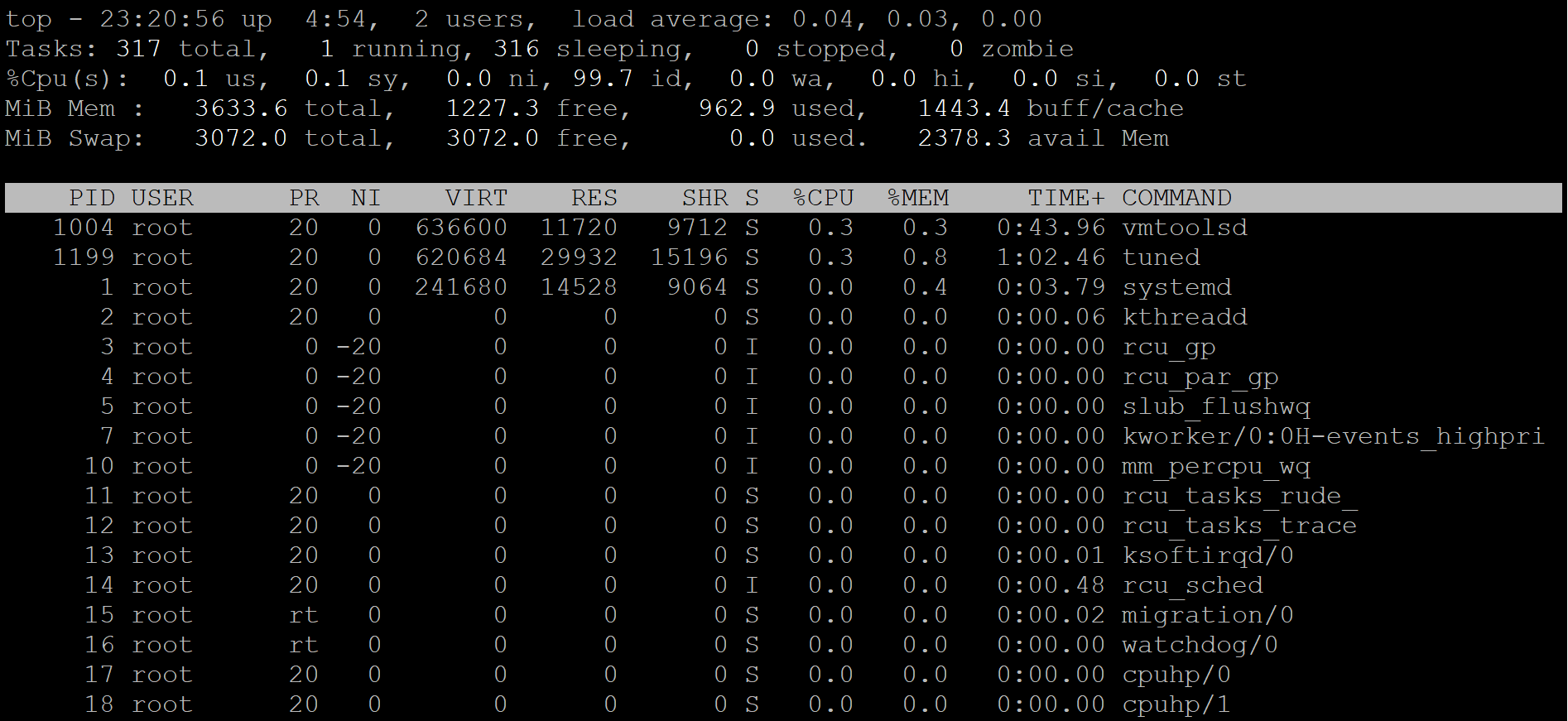
System Summary
- Line 1: uptime info
- current time
- uptime
- number of login users
- average system load over 1, 5, and 15 minutes.
- Line 2: Task info
totalrunningsleepingstoppedzombie
- Line 3: CPU Usage
us: CPU time % spent on user processes.sy: CPU time % spent on system (kernel) processes.ni: CPU time % spent on processes with adjusted niceness.id: CPU time % spent idle.wa: CPU time % waiting for I/O operations.hi: CPU time % spent handling hardware interrupts.si: CPU time % spent handling software interrupts.st: CPU time % stolen from the virtual machine by the host.
- Line 4: Memory Usage Displays total,free, used, and buff/cache.
- Line 5: Swap Usage Displays total, used, free, and available memory.
Process List
| Column | Desc |
|---|---|
PID |
Process ID, a unique identifier for the process. |
USER |
The user who owns the process. |
PR |
The priority of the process (higher numbers mean lower priority). |
NI |
Niceness value, which affects process priority (highest:-20,lowest:19) |
VIRT |
Virtual memory size. |
RES |
Resident memory, the non-swappable physical memory |
SHR |
Shared memory size, the memory shared with other processes. |
S |
Process state |
%CPU |
CPU % being used by the process. |
%MEM |
RAM % being used by the process. |
TIME+ |
Total CPU time consumed by the process (in minutes and seconds). |
COMMAND |
The command name or path that initiated the process. |
- Process state:
R: RunningS: SleepingD: Uninterruptible sleep (usually I/O)T: StoppedZ: Zombie
Useful Interactions (While Running)
| key | desc |
|---|---|
q |
Quit the top command. |
h |
Display help for key bindings. |
k |
Kill a process (prompt for PID). |
P |
Sort processes by CPU usage. |
M |
Sort processes by memory usage. |
T |
Sort processes by runtime. |
r |
Change the priority (renice) of a process. |
s |
Change the refresh rate. |
ps: Display processes information
-
ps (process status)
-
List all
| Command | Desc |
|---|---|
ps |
Display processes with the current terminal |
ps -l |
Displays processes in long format |
ps -ef |
Display every processes in full format. |
ps aux |
Displays detailed information about all processes. |
ps -o comm,pid,ppid,user |
Customized columns. |
- Filter
| Command | Desc |
|---|---|
ps pid |
Display process with a given pid. |
ps -fC command |
Display process with a given command name. |
ps -fu username |
Display processes owned by a specific effective user. |
ps -fU username |
Display processes owned by a specific real user. |
ps -g root / ps -G root |
Display processes owned by a specific group name. |
ps aux \| grep command |
Filters the output to find specific processes. |
ps aux --sort=-%mem \| head -n 10 |
Find the top memory-consuming process |
ps aux --sort=-%cpu \| head -n 10 |
Find the top CPU-consuming process |
- Tree
| Command | Desc |
|---|---|
ps -eH |
Display a process tree. |
ps -e --forest |
Display a process tree. |
pstree |
Display processes in a tree format. |
- Common Commands
# Return top memory-consuming process
ps aux --sort=-%mem | head -n 10
# Find the top CPU-consuming process
ps aux --sort=-%cpu | head -n 10

# search details of a command
ps aux | grep command

# return the pid related to a command
pidof command
# kill process to release resources
kill -9 pid
-
Common columns
PID: Process ID.PPID: Parent Process ID (which process spawned it).UID: User ID of the owner.TTY: Terminal associated with the process.TIME: CPU time consumed by the process.CMD: Command that started the process.
-
Process state:
R: Running.S: Sleeping (idle).D: Uninterruptible sleep (usually IO operations).I: Idle kernel threadT: Stopped or traced.Z: Zombie (terminated but not cleaned up).
Process Common
| CMD | DESC |
|---|---|
pidof sshd |
list only the PID of a specific process. |
pgrep sshd |
list only the PID of a specific process. |
Background and Foreground Processes
- 2 Types of processes:
Foreground processes:- Also known as
interactive processes - these processes depend on the user for input.
- Also known as
Background processes:- Also known as
non-interactiveorautomatic processes - these processes run independently of the user.
- Also known as
Switch between foreground and background processes
| Shortcut | Desc |
|---|---|
command & |
Start command in background. |
Ctrl-c |
Kill the foreground process. |
Ctrl-z |
Suspend the foreground process. |
- Suspend:
- not running in the background, but stop running.
Common commands
| Command | Desc |
|---|---|
bg |
Send the current job to the background. |
bg %num |
Background a suspended process with number. |
fg |
Foreground the last background process. |
fg %num |
Foreground a background process with number |
jobs |
List jobs. |
jobs -l |
List jobs with PID. |
jobs %num |
List a job wit job number. |
kill |
Kill a process by job number or PID. |
- Symbol for jobs:
%%/%+: current job%-: previous job
# list current job
jobs %%
jobs %+

# list previous job
jobs %-
- foreground a bg process
fg %num%num: donot needfg
Killing Processes
| Command | Desc |
|---|---|
kill -l |
Display a list of signals. |
Ctrl-c |
Kills the foreground proc. |
kill %jobnum |
Kill a process with its job num. |
kill pid |
Kill a process by id. |
kill $(pidof crond) |
Kill a process by name. |
pkill crond |
Kill a process by name. |
kill -9 $(pidof crond) |
Send signal 9 to crond. |
pkill -9 crond |
Send signal 9 to crond. |
pkill -s SIGKILL crond |
Send signal 9 to crond. |
killall crond |
Terminate all processes that match a criterion |
- Send a signal to a process.
- default:
kill -15 123=kill -TERM 123=kill 123
kill -9 123
- default:
kill -l
# 1) SIGHUP       2) SIGINT       3) SIGQUIT      4) SIGILL       5) SIGTRAP
# 6) SIGABRT      7) SIGBUS       8) SIGFPE       9) SIGKILL     10) SIGUSR1
# 11) SIGSEGV     12) SIGUSR2     13) SIGPIPE     14) SIGALRM     15) SIGTERM
# 16) SIGSTKFLT   17) SIGCHLD     18) SIGCONT     19) SIGSTOP     20) SIGTSTP
# 21) SIGTTIN     22) SIGTTOU     23) SIGURG      24) SIGXCPU     25) SIGXFSZ
# 26) SIGVTALRM   27) SIGPROF     28) SIGWINCH    29) SIGIO       30) SIGPWR
# 31) SIGSYS      34) SIGRTMIN    35) SIGRTMIN+1  36) SIGRTMIN+2  37) SIGRTMIN+3
# 38) SIGRTMIN+4  39) SIGRTMIN+5  40) SIGRTMIN+6  41) SIGRTMIN+7  42) SIGRTMIN+8
# 43) SIGRTMIN+9  44) SIGRTMIN+10 45) SIGRTMIN+11 46) SIGRTMIN+12 47) SIGRTMIN+13
# 48) SIGRTMIN+14 49) SIGRTMIN+15 50) SIGRTMAX-14 51) SIGRTMAX-13 52) SIGRTMAX-12
# 53) SIGRTMAX-11 54) SIGRTMAX-10 55) SIGRTMAX-9  56) SIGRTMAX-8  57) SIGRTMAX-7
# 58) SIGRTMAX-6  59) SIGRTMAX-5  60) SIGRTMAX-4  61) SIGRTMAX-3  62) SIGRTMAX-2
# 63) SIGRTMAX-1  64) SIGRTMAX
Example: Switch Foreground and Background
Create a long running task.
vi /home/rheladmin/rhcsa/long_running_task.sh
#!/bin/bash

# File to store logs
LOGFILE="task.log"

echo "Starting long-running task..."
echo "Logs will be saved to $LOGFILE"

# Loop for 5 minutes (10 iterations of 30 seconds)
for i in {1..100}; do
    echo "$(date): Iteration $i - Task is running..." >> $LOGFILE
    sleep 30
done

echo "Task completed!" >> $LOGFILE
echo "Task finished. Check $LOGFILE for details."
- Change mode
# Make the Script Executable
chmod +x /home/rheladmin/rhcsa/long_running_task.sh
- Run script in the background
# Run the Script 3 times in Background
./long_running_task.sh &
# [1] 9904
# [rheladmin@rhelhost rhcsa]$ Starting long-running task...
# Logs will be saved to task.log

./long_running_task.sh &
# [2] 9915
# [rheladmin@rhelhost rhcsa]$ Starting long-running task...
# Logs will be saved to task.log

./long_running_task.sh &
# [3] 9935
# [rheladmin@rhelhost rhcsa]$ Starting long-running task...
# Logs will be saved to task.log

# list background jobs
jobs
# [1]   Running                 ./long_running_task.sh &
# [2]-  Running                 ./long_running_task.sh &
# [3]+  Running                 ./long_running_task.sh &

ps -C long_running_task
# PID TTY          TIME CMD
# 9904 pts/0    00:00:00 long_running_ta
# 9915 pts/0    00:00:00 long_running_ta
# 9935 pts/0    00:00:00 long_running_ta
Bring process to Foreground
# send the last jobs fg
fg
# ./long_running_task.sh

# suspend job last jobs
^Z
# [3]+  Stopped                 ./long_running_task.sh

jobs
# [1]   Running                 ./long_running_task.sh &
# [2]-  Running                 ./long_running_task.sh &
# [3]+  Stopped                 ./long_running_task.sh


# bring the job 2 using -
fg -
# ./long_running_task.sh
^Z
# [2]+  Stopped                 ./long_running_task.sh
jobs
# [1]   Running                 ./long_running_task.sh &
# [2]+  Stopped                 ./long_running_task.sh
# [3]-  Stopped                 ./long_running_task.sh

# bring the job 1 using number
fg 1
# ./long_running_task.sh
^Z
# [1]+  Stopped                 ./long_running_task.sh

jobs
# [1]+  Stopped                 ./long_running_task.sh
# [2]-  Stopped                 ./long_running_task.sh
# [3]   Stopped                 ./long_running_task.sh
Send the jobs to Background
# bring the stopped jobs 1 running in bg
bg 1
# [1]+ ./long_running_task.sh &
jobs
# [1]-  Running                 ./long_running_task.sh &
# [2]+  Stopped                 ./long_running_task.sh
# [3]   Stopped                 ./long_running_task.sh

# bring the stopped jobs 2 running in bg
bg +
# [2]+ ./long_running_task.sh &
jobs
# [1]   Running                 ./long_running_task.sh &
# [2]-  Running                 ./long_running_task.sh &
# [3]+  Stopped                 ./long_running_task.sh

# bring the current stopped job running in bg
bg
# [3]+ ./long_running_task.sh &
jobs
# [1]   Running                 ./long_running_task.sh &
# [2]-  Running                 ./long_running_task.sh &
# [3]+  Running                 ./long_running_task.sh &
Terminate the Jobs
kill %1
jobs
# [1]   Terminated              ./long_running_task.sh
# [2]-  Running                 ./long_running_task.sh &
# [3]+  Running                 ./long_running_task.sh &

ps -C long_running_task
# PID TTY          TIME CMD
# 9915 pts/0    00:00:00 long_running_ta
# 9935 pts/0    00:00:00 long_running_ta

kill -9 9915 9935
jobs
# [2]-  Killed                  ./long_running_task.sh
# [3]+  Killed                  ./long_running_task.sh
lsof: list files opened by processes
lsof: provides detailed information about files opened by processes.
| CMD | DESC |
|---|---|
lsof |
List all open files |
lsof -u username |
List open files for a specific user |
lsof -p PID |
List open files for a specific process ID (PID) |
lsof file_name |
List processes using a specific file |
lsof -i:80 |
Find processes using a specific port |
lsof -i |
List network connections |
lsof /dev/sda1 |
List open files on a specific device or filesystem |
- Example
./long_running_task.sh &

lsof long_running_task.sh
# COMMAND     PID      USER   FD   TYPE DEVICE SIZE/OFF     NODE NAME
# long_runn 10407 rheladmin  255r   REG  253,0      373 19764850 long_running_task.sh
Process Niceness
-
40 niceness values,
- default niceness of 0.
- -20 being the highest: most favorable
- +19 being the lowest: the least favorable
-
used by the process scheduler to adjust the execution time of the processes on the CPU.
-
A higher niceness lowers the execution priority of a process, and a lower niceness increases it.
- a process running at a higher priority gets more CPU attention.
-
A child process inherits the niceness of its calling process in its priority calculation.
-
internal mapping between niceness levels and priorities
- Viewing and Changing Process Niceness
ps -efl
Lab: Change process niceness
# default niceness
nice
# 0

# To run the top command at a lower priority with a nice value of +2:
nice -n 2 top
# top - 14:32:57 up  7:35,  1 user,  load average: 0.00, 0.00, 0.00
# Tasks: 271 total,   1 running, 270 sleeping,   0 stopped,   0 zombie
# %Cpu(s):  0.2 us,  0.3 sy,  0.2 ni, 99.3 id,  0.0 wa,  0.0 hi,  0.0 si,  0.0 st
# MiB Mem :   1743.6 total,    204.9 free,    973.8 used,    740.4 buff/cache
# MiB Swap:   2048.0 total,   2045.2 free,      2.8 used.    769.8 avail Mem

#     PID USER      PR  NI    VIRT    RES    SHR S  %CPU  %MEM     TIME+ COMMAND
#     860 root      20   0  456400   8680   7152 S   0.7   0.5   1:01.95 vmtoolsd
#    6333 root      22   2  226016   4300   3412 R   0.3   0.2   0:00.14 top
#       1 root      20   0  172636  16436  10648 S   0.0   0.9   0:02.03 systemd
#       2 root      20   0       0      0      0 S   0.0   0.0   0:00.02 kthreadd

ps -el | grep top
# 4 S     0    6333    5913  0  82   2 - 56504 -      pts/0    00:00:00 top


nice -n -10 top
# top - 14:35:14 up  7:38,  2 users,  load average: 0.04, 0.02, 0.00
# Tasks: 277 total,   1 running, 276 sleeping,   0 stopped,   0 zombie
# %Cpu(s):  0.2 us,  0.2 sy,  0.0 ni, 99.2 id,  0.2 wa,  0.2 hi,  0.2 si,  0.0 st
# MiB Mem :   1743.6 total,    202.2 free,    976.4 used,    740.6 buff/cache
# MiB Swap:   2048.0 total,   2045.2 free,      2.8 used.    767.2 avail Mem

#     PID USER      PR  NI    VIRT    RES    SHR S  %CPU  %MEM     TIME+ COMMAND
#    6403 root      10 -10  226016   4300   3412 R   0.7   0.2   0:00.03 top
#    1712 gdm       20   0  603080  14968   9488 S   0.3   0.8   0:02.15 gsd-smartcard
#       1 root      20   0  172636  16436  10648 S   0.0   0.9   0:02.05 systemd

ps -el | grep top

ps -lC top
# F S   UID     PID    PPID  C PRI  NI ADDR SZ WCHAN  TTY          TIME CMD
# 4 S     0    6403    5913  0  70 -10 - 56504 -      pts/0    00:00:00 top
Lab: Renicing a Running Process
# change the niceness of the running top session from -10 to +5, specify the PID (5572 from column 4 above) with the renice command.

renice 5 6469
# 6469 (process ID) old priority 0, new priority 5

top -p 6469
# top - 14:42:35 up  7:45,  2 users,  load average: 0.00, 0.00, 0.00
# Tasks:   1 total,   0 running,   1 sleeping,   0 stopped,   0 zombie
# %Cpu(s):  0.2 us,  0.2 sy,  0.2 ni, 99.3 id,  0.0 wa,  0.2 hi,  0.0 si,  0.0 st
# MiB Mem :   1743.6 total,    199.1 free,    979.5 used,    740.7 buff/cache
# MiB Swap:   2048.0 total,   2045.2 free,      2.8 used.    764.1 avail Mem

#     PID USER      PR  NI    VIRT    RES    SHR S  %CPU  %MEM     TIME+ COMMAND
#    6469 root      25   5  226016   4296   3408 S   0.7   0.2   0:00.15 top

ps 6469 -l
# F S   UID     PID    PPID  C PRI  NI ADDR SZ WCHAN  TTY        TIME CMD
# 4 S     0    6469    5913  0  85   5 - 56504 do_sel pts/0      0:00 top