Note_Tech
All technological notes.
Project maintained by simonangel-fong Hosted on GitHub Pages — Theme by mattgraham
Linux - Storage: Logical Volume Manager
- Linux - Storage: Logical Volume Manager
Logical Volume Manager (LVM)
-
Logical Volume Manager (LVM)- a Linux storage management tool that allows system administrators to create logical storage volumes, or logical volumes, from physical storage.
-
Advantages
- Flexibility:
- Resize
logical volumesdynamically without unmounting or restarting.
- Resize
- Snapshotting:
- Create snapshots for backups or testing.
- Striping:
- Improve performance by spreading data across multiple disks.
- Disk Management:
- Easily add or remove
physical volumes.
- Easily add or remove
- Better Disk Utilization:
- Allocate storage as needed instead of pre-defining fixed sizes
- Flexibility:
Architecture
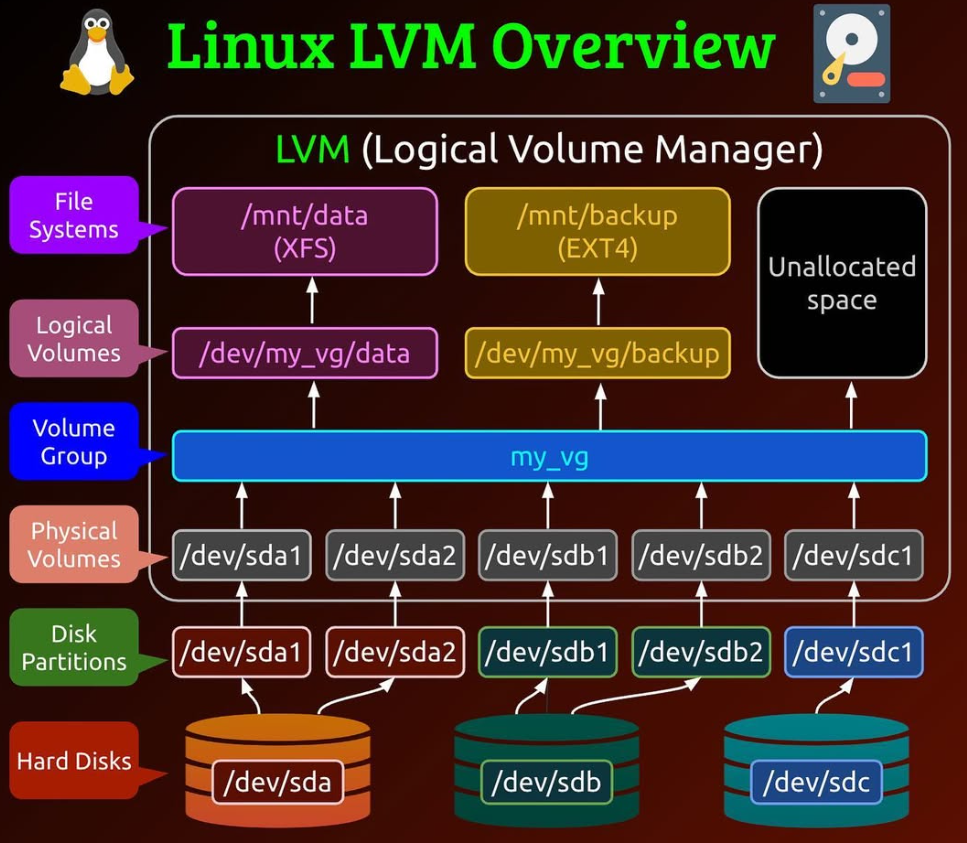
LVMaccumulates spaces taken frompartitionsor entiredisks(calledPhysical Volumes) to form a logical container (calledVolume Group), which is then divided into logical partitions (calledLogical Volumes).
Physical Volume (PV)
-
Physical Volume (PV):- Represents a physical storage device or a partition on a disk.
- Example:
/dev/sda1,/dev/sda2.
PV Commands
| CMD | DESC |
|---|---|
pvdisplay |
Display Physical Volume Information |
pvdisplay device |
Display a specific Physical Volume |
pvs |
Display Physical Volume Statistics |
pvs device |
Display a specific Physical Volume Statistics |
pvcreate device |
Create a Physical Volume |
pvresize device |
Resize a Physical Volume |
pvmove /dev/sdb /dev/sdc |
Move Data Between Physical Volumes |
pvremove device |
Remove a Physical Volume |
Volume Group (VG)
-
Volume Group (VG):- A pool of
physical volumesgrouped together. - Acts as a container for
logical volumes. - Example:
my_vg
- A pool of
-
Physical Extent- the logical pieces which a physical volume are divided into to add to a volume group
- the smallest allocatable unit of space in LVM.
- define when creating a volume group
- default 4MB.
- physical volume size = PE size * extent #
VG Commands
| CMD | DESC |
|---|---|
vgdisplay |
Display all Volume Group |
vgdisplay vg_name |
Display a Volume Group |
vgs |
Display all Volume Group Statistics |
vgs vg_name |
Display a Volume Group Statistics |
vgcreate vg_name pv_name |
Create a Volume Group from a Physical Volume |
vgcreate vg_name pv1 pv2 |
Create a Volume Group from multiple Physical Volumes |
vgcreate -s 8MB vg_name pv_name |
Create a Volume Group with a specific PE |
vgrename old_name new_name |
Rename a Volume Group |
vgextend vg_name pv_name |
Add a Physical Volume to a Volume Group |
vgreduce vg_name pv_name |
Remove a Physical Volume from a Volume Group |
vgchange -a y vg_name |
Activate a Volume Group |
vgchange -a n vg_name |
Deactivate a Volume Group |
vgcfgbackup vg_name |
Backup Volume Group Metadata |
vgcfgrestore vg_name |
Restore Volume Group Metadata |
vgremove vg_name |
Remove a Volume Group |
Logical Volume (LV)
-
Logical Volume (LV):- A virtual partition carved out of a
volume group. - Example:
/dev/my_vg/data.
- A virtual partition carved out of a
-
Logical Extent- A
logical volumeis made up ofLogical Extents (LE). Logical extentsare a set ofphysical extentsallocated to thelogical volume.Logical extentspoint tophysical extents, and they may be random or contiguous.- The larger a
logical volumeis, the morelogical extentsit will have.- normally: PE = LE
- default: 4MB
- LV size = LE size * LE #
- A
LV Commands
| CMD | DESC |
|---|---|
lvdisplay |
Display Logical Volume Information |
lvdisplay lv_path |
Display a Logical Volume Information |
lvs |
Display Logical Volume Metadata |
lvs lv_path |
Display a Logical Volume Metadata |
lvcreate -L 10G -n lv_name vg_name |
Create a Logical Volume |
lvcreate -l 50 -n lv_name vg1 |
Create a lv using a specific extent |
lvcreate -l 60%VG -n lv_name vg_name |
Create a lv using 60% of VG |
lvcreate -l 100%FREE -n lv_name vg1 |
Create a lv using all of VG |
lvrename vg_name old_name new_name |
Rename a Logical Volume |
lvextend -L 120G -r lv_name |
Extend a lv and underlying filesystem to a size |
lvextend -L +40G -r lv_name |
Extend a lv and underlying filesystem by a size |
lvextend -L +100%FREE -r lv_name |
Extend a lv and underlying filesystem to 100% |
lvreduce -L 120G -r lv_name |
Reduce a lv and underlying filesystem to a size |
lvreduce -L -40G -r lv_name |
Reduce a lv and underlying filesystem by a size |
lvresize -L+120G -r lv_path |
Extend a lv and underlying file system |
lvresize -L-120G -r lv_path |
Reduce a lv and underlying file system |
lvcreate -L SIZE -s -n snapshot_name original_lv_name |
Create a Snapshot of a Logical Volume |
lvchange -ay lv_path |
Activate a Logical Volume |
lvchange -an lv_path |
Deactivate a Logical Volume |
lvremove lv_path |
Remove a Logical Volume |
Lab: Add Disk and Create LVM Partition
Add a New Hard Disk
- Add a new disk(1GB IDE)
Identify New Device
lsblk
# NAME                   MAJ:MIN RM SIZE RO TYPE MOUNTPOINT
# sda                      8:0    0   2G  0 disk
# └─sda1                   8:1    0   2G  0 part /data
# sdb                      8:16   0   1G  0 disk
# nvme0n1                259:0    0  30G  0 disk
# ├─nvme0n1p1            259:1    0   1G  0 part /boot
# └─nvme0n1p2            259:2    0  29G  0 part
#   ├─rhel_rhelhost-root 253:0    0  26G  0 lvm  /
#   └─rhel_rhelhost-swap 253:1    0   3G  0 lvm  [SWAP]

fdisk -l
# Disk /dev/nvme0n1: 30 GiB, 32212254720 bytes, 62914560 sectors
# Units: sectors of 1 * 512 = 512 bytes
# Sector size (logical/physical): 512 bytes / 512 bytes
# I/O size (minimum/optimal): 512 bytes / 512 bytes
# Disklabel type: dos
# Disk identifier: 0xed2f4154

# Device         Boot   Start      End  Sectors Size Id Type
# /dev/nvme0n1p1 *       2048  2099199  2097152   1G 83 Linux
# /dev/nvme0n1p2      2099200 62914559 60815360  29G 8e Linux LVM


# Disk /dev/sdb: 1 GiB, 1073741824 bytes, 2097152 sectors
# Units: sectors of 1 * 512 = 512 bytes
# Sector size (logical/physical): 512 bytes / 512 bytes
# I/O size (minimum/optimal): 512 bytes / 512 bytes


# Disk /dev/sda: 2 GiB, 2147483648 bytes, 4194304 sectors
# Units: sectors of 1 * 512 = 512 bytes
# Sector size (logical/physical): 512 bytes / 512 bytes
# I/O size (minimum/optimal): 512 bytes / 512 bytes
# Disklabel type: dos
# Disk identifier: 0xca628ef4

# Device     Boot Start     End Sectors Size Id Type
# /dev/sda1        2048 4194303 4192256   2G 83 Linux


# Disk /dev/mapper/rhel_rhelhost-root: 26 GiB, 27913093120 bytes, 54517760 sectors
# Units: sectors of 1 * 512 = 512 bytes
# Sector size (logical/physical): 512 bytes / 512 bytes
# I/O size (minimum/optimal): 512 bytes / 512 bytes


# Disk /dev/mapper/rhel_rhelhost-swap: 3 GiB, 3221225472 bytes, 6291456 sectors
# Units: sectors of 1 * 512 = 512 bytes
# Sector size (logical/physical): 512 bytes / 512 bytes
# I/O size (minimum/optimal): 512 bytes / 512 bytes
New device is
/dev/sdb
Create New Partition
fdisk /dev/sdb
# create new partion
n
# partition type is primary
p
# Display the partition table
p
# Disk /dev/sdb: 1 GiB, 1073741824 bytes, 2097152 sectors
# Units: sectors of 1 * 512 = 512 bytes
# Sector size (logical/physical): 512 bytes / 512 bytes
# I/O size (minimum/optimal): 512 bytes / 512 bytes
# Disklabel type: dos
# Disk identifier: 0xead41e87

# Device     Boot Start     End Sectors  Size Id Type
# /dev/sdb1        2048 2097151 2095104 1023M 83 Linux
# change partition's id
t
# list all hex codes
L
# 8e  Linux LVM
# Select Linux LVM
8e
# Changed type of partition 'Linux' to 'Linux LVM'.
# confirm
p
# Disk /dev/sdb: 1 GiB, 1073741824 bytes, 2097152 sectors
# Units: sectors of 1 * 512 = 512 bytes
# Sector size (logical/physical): 512 bytes / 512 bytes
# I/O size (minimum/optimal): 512 bytes / 512 bytes
# Disklabel type: dos
# Disk identifier: 0xead41e87

# Device     Boot Start     End Sectors  Size Id Type
# /dev/sdb1        2048 2097151 2095104 1023M 8e Linux LVM
# Save and exit
w
# The partition table has been altered.
# Calling ioctl() to re-read partition table.
# Syncing disks.


# Confirm
fdisk -l
# Disk /dev/sdb: 1 GiB, 1073741824 bytes, 2097152 sectors
# Units: sectors of 1 * 512 = 512 bytes
# Sector size (logical/physical): 512 bytes / 512 bytes
# I/O size (minimum/optimal): 512 bytes / 512 bytes
# Disklabel type: dos
# Disk identifier: 0xead41e87

# Device     Boot Start     End Sectors  Size Id Type
# /dev/sdb1        2048 2097151 2095104 1023M 8e Linux LVM
Create a Physical Volume
# create a PV from a partition
pvcreate /dev/sdb1
#  Physical volume "/dev/sdb1" successfully created.

# confirm
pvdisplay
  # --- Physical volume ---
  # PV Name               /dev/nvme0n1p2
  # VG Name               rhel_rhelhost
  # PV Size               <29.00 GiB / not usable 3.00 MiB
  # Allocatable           yes (but full)
  # PE Size               4.00 MiB
  # Total PE              7423
  # Free PE               0
  # Allocated PE          7423
  # PV UUID               fF9nr1-dLGi-m8Ke-q6sT-cQYQ-Y0bQ-cuDcZM

  # "/dev/sdb1" is a new physical volume of "1023.00 MiB"
  # --- NEW Physical volume ---
  # PV Name               /dev/sdb1
  # VG Name
  # PV Size               1023.00 MiB
  # Allocatable           NO
  # PE Size               0
  # Total PE              0
  # Free PE               0
  # Allocated PE          0
  # PV UUID               FR9v0Z-Gpyu-U3g2-U4Bq-FmDx-N4rV-N56GOk
Create New Volume Group
# create VG from a PV with a name
vgcreate vg_oracle /dev/sdb1
  # Volume group "vg_oracle" successfully created
# confirm
vgdisplay vg_oracle
  # --- Volume group ---
  # VG Name               vg_oracle
  # System ID
  # Format                lvm2
  # Metadata Areas        1
  # Metadata Sequence No  1
  # VG Access             read/write
  # VG Status             resizable
  # MAX LV                0
  # Cur LV                0
  # Open LV               0
  # Max PV                0
  # Cur PV                1
  # Act PV                1
  # VG Size               1020.00 MiB
  # PE Size               4.00 MiB
  # Total PE              255
  # Alloc PE / Size       0 / 0
  # Free  PE / Size       255 / 1020.00 MiB
  # VG UUID               LW1UW4-spXc-DYME-3vW0-5Mth-3Hb3-OkTTYj
Create Logical Volume
# create LV from VG with a name
lvcreate -n lv_oracle --size 1000M vg_oracle
# Logical volume "lv_oracle" created.


# confirm
lvdisplay vg_oracle
  # --- Logical volume ---
  # LV Path                /dev/vg_oracle/lv_oracle
  # LV Name                lv_oracle
  # VG Name                vg_oracle
  # LV UUID                NrxBfX-I9kp-LN7d-43Da-XwFh-2Bgz-cA7OGl
  # LV Write Access        read/write
  # LV Creation host, time serverhost, 2024-12-19 23:09:27 -0500
  # LV Status              available
  # # open                 0
  # LV Size                1000.00 MiB
  # Current LE             250
  # Segments               1
  # Allocation             inherit
  # Read ahead sectors     auto
  # - currently set to     8192
  # Block device           253:2
Format for New Filesystem
mkfs.xfs /dev/vg_oracle/lv_oracle
# meta-data=/dev/vg_oracle/lv_oracle isize=512    agcount=4, agsize=64000 blks
#          =                       sectsz=512   attr=2, projid32bit=1
#          =                       crc=1        finobt=1, sparse=1, rmapbt=0
#          =                       reflink=1    bigtime=0 inobtcount=0
# data     =                       bsize=4096   blocks=256000, imaxpct=25
#          =                       sunit=0      swidth=0 blks
# naming   =version 2              bsize=4096   ascii-ci=0, ftype=1
# log      =internal log           bsize=4096   blocks=1566, version=2
#          =                       sectsz=512   sunit=0 blks, lazy-count=1
# realtime =none                   extsz=4096   blocks=0, rtextents=0
Mount New Filesystem
# create mount point
mkdir /oracle
# mount fs
mount /dev/vg_oracle/lv_oracle /oracle

# confirm
lsblk
# NAME                    MAJ:MIN RM  SIZE RO TYPE MOUNTPOINT
# sda                       8:0    0    2G  0 disk
# └─sda1                    8:1    0    2G  0 part /data
# sdb                       8:16   0    1G  0 disk
# └─sdb1                    8:17   0 1023M  0 part
#   └─vg_oracle-lv_oracle 253:2    0 1000M  0 lvm  /oracle
# nvme0n1                 259:0    0   30G  0 disk
# ├─nvme0n1p1             259:1    0    1G  0 part /boot
# └─nvme0n1p2             259:2    0   29G  0 part
#   ├─rhel_rhelhost-root  253:0    0   26G  0 lvm  /
#   └─rhel_rhelhost-swap  253:1    0    3G  0 lvm  [SWAP]

fdisk -l
# Disk /dev/nvme0n1: 30 GiB, 32212254720 bytes, 62914560 sectors
# Units: sectors of 1 * 512 = 512 bytes
# Sector size (logical/physical): 512 bytes / 512 bytes
# I/O size (minimum/optimal): 512 bytes / 512 bytes
# Disklabel type: dos
# Disk identifier: 0xed2f4154

# Device         Boot   Start      End  Sectors Size Id Type
# /dev/nvme0n1p1 *       2048  2099199  2097152   1G 83 Linux
# /dev/nvme0n1p2      2099200 62914559 60815360  29G 8e Linux LVM


# Disk /dev/sdb: 1 GiB, 1073741824 bytes, 2097152 sectors
# Units: sectors of 1 * 512 = 512 bytes
# Sector size (logical/physical): 512 bytes / 512 bytes
# I/O size (minimum/optimal): 512 bytes / 512 bytes
# Disklabel type: dos
# Disk identifier: 0xead41e87

# Device     Boot Start     End Sectors  Size Id Type
# /dev/sdb1        2048 2097151 2095104 1023M 8e Linux LVM


# Disk /dev/sda: 2 GiB, 2147483648 bytes, 4194304 sectors
# Units: sectors of 1 * 512 = 512 bytes
# Sector size (logical/physical): 512 bytes / 512 bytes
# I/O size (minimum/optimal): 512 bytes / 512 bytes
# Disklabel type: dos
# Disk identifier: 0xca628ef4

# Device     Boot Start     End Sectors Size Id Type
# /dev/sda1        2048 4194303 4192256   2G 83 Linux


# Disk /dev/mapper/rhel_rhelhost-root: 26 GiB, 27913093120 bytes, 54517760 sectors
# Units: sectors of 1 * 512 = 512 bytes
# Sector size (logical/physical): 512 bytes / 512 bytes
# I/O size (minimum/optimal): 512 bytes / 512 bytes


# Disk /dev/mapper/rhel_rhelhost-swap: 3 GiB, 3221225472 bytes, 6291456 sectors
# Units: sectors of 1 * 512 = 512 bytes
# Sector size (logical/physical): 512 bytes / 512 bytes
# I/O size (minimum/optimal): 512 bytes / 512 bytes


# Disk /dev/mapper/vg_oracle-lv_oracle: 1000 MiB, 1048576000 bytes, 2048000 sectors
# Units: sectors of 1 * 512 = 512 bytes
# Sector size (logical/physical): 512 bytes / 512 bytes
# I/O size (minimum/optimal): 512 bytes / 512 bytes
Persist New Filesystem
# add new entry for new fs
vi /etc/fstab
# /dev/mapper/vg_oracle-lv_oracle         /oracle         xfs         defaults      0       0

# load fs from fstab
mount -a
# mount: (hint) your fstab has been modified, but systemd still uses
#        the old version; use 'systemctl daemon-reload' to reload.

# confirm
df -h
# Filesystem                       Size  Used Avail Use% Mounted on
# devtmpfs                         1.8G     0  1.8G   0% /dev
# tmpfs                            1.8G     0  1.8G   0% /dev/shm
# tmpfs                            1.8G  9.6M  1.8G   1% /run
# tmpfs                            1.8G     0  1.8G   0% /sys/fs/cgroup
# /dev/mapper/rhel_rhelhost-root    26G  7.3G   19G  28% /
# /dev/nvme0n1p1                  1014M  362M  653M  36% /boot
# /dev/sda1                        2.0G   24K  1.9G   1% /data
# tmpfs                            364M   12K  364M   1% /run/user/42
# tmpfs                            364M  4.0K  364M   1% /run/user/1001
# /dev/mapper/vg_oracle-lv_oracle  994M   40M  955M   4% /oracle
Lab: Add and Extend Disk with LVM
-
Scenario:
- lv_oracle created and mounted on /oracle
- lv_oracle almost full and require more space
-
Solution:
- Free up disk space by removing obsolete files.
- Add new physical disk and mount on /oracle2
- Create a new virtual disk and mount on /oracle2
- Add new physical disk and extend /oracle via LVM
Add New Disk
- Add 1GB IDE
Identify New Device
lsblk
# NAME                    MAJ:MIN RM  SIZE RO TYPE MOUNTPOINT
# sda                       8:0    0    2G  0 disk
# └─sda1                    8:1    0    2G  0 part /data
# sdb                       8:16   0    1G  0 disk
# └─sdb1                    8:17   0 1023M  0 part
#   └─vg_oracle-lv_oracle 253:2    0 1000M  0 lvm  /oracle
# sdc                       8:32   0    1G  0 disk
# nvme0n1                 259:0    0   30G  0 disk
# ├─nvme0n1p1             259:1    0    1G  0 part /boot
# └─nvme0n1p2             259:2    0   29G  0 part
#   ├─rhel_rhelhost-root  253:0    0   26G  0 lvm  /
#   └─rhel_rhelhost-swap  253:1    0    3G  0 lvm  [SWAP]

fdisk -l
# Disk /dev/sdc: 1 GiB, 1073741824 bytes, 2097152 sectors
# Units: sectors of 1 * 512 = 512 bytes
# Sector size (logical/physical): 512 bytes / 512 bytes
# I/O size (minimum/optimal): 512 bytes / 512 bytes
Create New Partition
fdisk /dev/sdc
n
p
p
# Disk /dev/sdc: 1 GiB, 1073741824 bytes, 2097152 sectors
# Units: sectors of 1 * 512 = 512 bytes
# Sector size (logical/physical): 512 bytes / 512 bytes
# I/O size (minimum/optimal): 512 bytes / 512 bytes
# Disklabel type: dos
# Disk identifier: 0xcf2ae31a

# Device     Boot Start     End Sectors  Size Id Type
# /dev/sdc1        2048 2097151 2095104 1023M 83 Linux

# Change the type
t
L
8e
p
# Disk /dev/sdc: 1 GiB, 1073741824 bytes, 2097152 sectors
# Units: sectors of 1 * 512 = 512 bytes
# Sector size (logical/physical): 512 bytes / 512 bytes
# I/O size (minimum/optimal): 512 bytes / 512 bytes
# Disklabel type: dos
# Disk identifier: 0xcf2ae31a

# Device     Boot Start     End Sectors  Size Id Type
# /dev/sdc1        2048 2097151 2095104 1023M 8e Linux LVM
w

# Confirm
lsblk
# NAME                    MAJ:MIN RM  SIZE RO TYPE MOUNTPOINT
# sda                       8:0    0    2G  0 disk
# └─sda1                    8:1    0    2G  0 part /data
# sdb                       8:16   0    1G  0 disk
# └─sdb1                    8:17   0 1023M  0 part
#   └─vg_oracle-lv_oracle 253:2    0 1000M  0 lvm  /oracle
# sdc                       8:32   0    1G  0 disk
# └─sdc1                    8:33   0 1023M  0 part
# nvme0n1                 259:0    0   30G  0 disk
# ├─nvme0n1p1             259:1    0    1G  0 part /boot
# └─nvme0n1p2             259:2    0   29G  0 part
#   ├─rhel_rhelhost-root  253:0    0   26G  0 lvm  /
#   └─rhel_rhelhost-swap  253:1    0    3G  0 lvm  [SWAP]

fdisk -l
# Disk /dev/sdc: 1 GiB, 1073741824 bytes, 2097152 sectors
# Units: sectors of 1 * 512 = 512 bytes
# Sector size (logical/physical): 512 bytes / 512 bytes
# I/O size (minimum/optimal): 512 bytes / 512 bytes
# Disklabel type: dos
# Disk identifier: 0xcf2ae31a

# Device     Boot Start     End Sectors  Size Id Type
# /dev/sdc1        2048 2097151 2095104 1023M 8e Linux LVM
Create Physical Volume from Partition
pvcreate /dev/sdc1
  # Physical volume "/dev/sdc1" successfully created.

# confirm
pvs
  # PV             VG            Fmt  Attr PSize    PFree
  # /dev/nvme0n1p2 rhel_rhelhost lvm2 a--   <29.00g       0
  # /dev/sdb1      vg_oracle     lvm2 a--  1020.00m   20.00m
  # /dev/sdc1                    lvm2 ---  1023.00m 1023.00m
Identify target Logical Volume and Volume Group to Extend
# identify target LV and VG
df -h
# /dev/mapper/vg_oracle-lv_oracle  994M   40M  955M   4% /oracle

# identify the PV
pvdispay
  # --- Physical volume ---
  # PV Name               /dev/sdb1
  # VG Name               vg_oracle
  # PV Size               1023.00 MiB / not usable 3.00 MiB

pvs
  # PV             VG            Fmt  Attr PSize    PFree
  # /dev/nvme0n1p2 rhel_rhelhost lvm2 a--   <29.00g     0
  # /dev/sdb1      vg_oracle     lvm2 a--  1020.00m 20.00m

# Identify VG
vgdisplay vg_oracle
  # --- Volume group ---
  # VG Name               vg_oracle
  # System ID
  # Format                lvm2
  # VG Size               1020.00 MiB
Extend Volume Group by associating New Physical Volume
# extend target VG
vgextend vg_oracle /dev/sdc1
  # Volume group "vg_oracle" successfully extended

# confirm
vgdisplay
  # --- Volume group ---
  # VG Name               vg_oracle
  # System ID
  # Format                lvm2
  # VG Size               1.99 GiB
Extend target Logical Volume
# list lv before extension
lvs /dev/mapper/vg_oracle-lv_oracle
  # LV        VG        Attr       LSize    Pool Origin Data%  Meta%  Move Log Cpy%Sync Convert
  # lv_oracle vg_oracle -wi-ao---- 1000.00m

# extend LV
lvextend -L+1024M /dev/mapper/vg_oracle-lv_oracle
  # Size of logical volume vg_oracle/lv_oracle changed from 1000.00 MiB (250 extents) to <1.98 GiB (506 extents).
  # Logical volume vg_oracle/lv_oracle successfully resized.

# confirm
lvs /dev/mapper/vg_oracle-lv_oracle
  # LV        VG        Attr       LSize  Pool Origin Data%  Meta%  Move Log Cpy%Sync Convert
  # lv_oracle vg_oracle -wi-ao---- <1.98g
Extend target Filesystem
# before extension
df -h /dev/mapper/vg_oracle-lv_oracle
# Filesystem                       Size  Used Avail Use% Mounted on
# /dev/mapper/vg_oracle-lv_oracle  994M   40M  955M   4% /oracle

# extend fs
xfs_growfs /dev/mapper/vg_oracle-lv_oracle
# meta-data=/dev/mapper/vg_oracle-lv_oracle isize=512    agcount=4, agsize=64000 blks
#          =                       sectsz=512   attr=2, projid32bit=1
#          =                       crc=1        finobt=1, sparse=1, rmapbt=0
#          =                       reflink=1    bigtime=0 inobtcount=0
# data     =                       bsize=4096   blocks=256000, imaxpct=25
#          =                       sunit=0      swidth=0 blks
# naming   =version 2              bsize=4096   ascii-ci=0, ftype=1
# log      =internal log           bsize=4096   blocks=1566, version=2
#          =                       sectsz=512   sunit=0 blks, lazy-count=1
# realtime =none                   extsz=4096   blocks=0, rtextents=0
# data blocks changed from 256000 to 518144

# Confirm
df -h /dev/mapper/vg_oracle-lv_oracle
# Filesystem                       Size  Used Avail Use% Mounted on
# /dev/mapper/vg_oracle-lv_oracle  2.0G   47M  2.0G   3% /oracle
Lab: Create LV from a partition and a disk
- set the PE size of 16MB
- Create a vg from a part and disk
Create PV and VG
# create partition
parted /dev/sda mkpart main 1 256M
parted /dev/sda mkpart second 257M 1024M

# confirm
lsblk
# NAME          MAJ:MIN RM  SIZE RO TYPE MOUNTPOINTS
# sda             8:0    0    1G  0 disk
# ├─sda1          8:1    0  243M  0 part
# └─sda2          8:2    0  732M  0 part
# sdb             8:16   0  512M  0 disk

pvs -v
# PV         VG     Fmt  Attr PSize   PFree   DevSize PV UUID
# /dev/sda1         lvm2 ---  243.00m 243.00m 243.00m 3mfZIg-33cl-o9dk-X4mx-MDcL-A6T5-9t9StN
# /dev/sda2  vgbook lvm2 a--  720.00m 720.00m 732.00m G1YHrH-D1Z6-b3E1-xJGl-fiOs-T5b2-EL6GxU
# /dev/sdb   vgbook lvm2 a--  496.00m 496.00m 512.00m 7iSL6S-OCHw-SI1n-Yk9L-N29s-2Bwa-NyHXZ2

# create pe
pvcreate /dev/sda2 /dev/sdb
# Physical volume "/dev/sda2" successfully created.
# Physical volume "/dev/sdb" successfully created.

# create vg
vgcreate -s 16M -v vgbook /dev/sda2 /dev/sdb
# Wiping signatures on new PV /dev/sda2.
# Wiping signatures on new PV /dev/sdb.
# Adding physical volume '/dev/sda2' to volume group 'vgbook'
# Adding physical volume '/dev/sdb' to volume group 'vgbook'
# Creating volume group backup "/etc/lvm/backup/vgbook" (seqno 1).
# Volume group "vgbook" successfully created

# confirm
vgs -v
# VG     Attr   Ext    #PV #LV #SN VSize  VFree  VG UUID                                VProfile
# vgbook wz--n- 16.00m   2   0   0 <1.19g <1.19g wRPf4K-bYyM-KTia-sbIz-Os04-W6Yi-WU6SVZ

vgdisplay -v vgbook
# --- Volume group ---
# VG Name               vgbook
# System ID
# Format                lvm2
# Metadata Areas        2
# Metadata Sequence No  1
# VG Access             read/write
# VG Status             resizable
# MAX LV                0
# Cur LV                0
# Open LV               0
# Max PV                0
# Cur PV                2
# Act PV                2
# VG Size               <1.19 GiB
# PE Size               16.00 MiB
# Total PE              76
# Alloc PE / Size       0 / 0
# Free  PE / Size       76 / <1.19 GiB
# VG UUID               wRPf4K-bYyM-KTia-sbIz-Os04-W6Yi-WU6SVZ

# --- Physical volumes ---
# PV Name               /dev/sda2
# PV UUID               G1YHrH-D1Z6-b3E1-xJGl-fiOs-T5b2-EL6GxU
# PV Status             allocatable
# Total PE / Free PE    45 / 45

# PV Name               /dev/sdb
# PV UUID               7iSL6S-OCHw-SI1n-Yk9L-N29s-2Bwa-NyHXZ2
# PV Status             allocatable
# Total PE / Free PE    31 / 31
Create LV
- Create lv using LE: 12
- so the size = LE * PE = 16*12 = 192MB
lvcreate -l 12 -n lvbook vgbook

# confirm
lvs
# LV     VG     Attr       LSize   Pool Origin Data%  Meta%  Move Log Cpy%Sync Convert
# lvbook vgbook -wi-a----- 192.00m

lvdisplay /dev/vgbook/lvbook
# --- Logical volume ---
# LV Path                /dev/vgbook/lvbook
# LV Name                lvbook
# VG Name                vgbook
# LV UUID                pXAYaf-uFDt-sw7t-1eFV-EVGD-pZDb-wM1tD9
# LV Write Access        read/write
# LV Creation host, time ServerB, 2025-02-01 18:30:38 -0500
# LV Status              available
# # open                 0
# LV Size                192.00 MiB
# Current LE             12
# Segments               1
# Allocation             inherit
# Read ahead sectors     auto
# - currently set to     256
# Block device           253:2
Extend size
- Add new pv to vg
# add new partition to vg
vgextend vgbook /dev/sda1
# Volume group "vgbook" successfully extended

# confirm
vgs -v
# VG     Attr   Ext    #PV #LV #SN VSize VFree VG UUID                                VProfile
# vgbook wz--n- 16.00m   3   1   0 1.42g 1.23g wRPf4K-bYyM-KTia-sbIz-Os04-W6Yi-WU6SVZ
- Extend lv
# extend lv
lvextend -L +200M /dev/vgbook/lvbook
#  Rounding size to boundary between physical extents: 208.00 MiB.
#   Size of logical volume vgbook/lvbook changed from 192.00 MiB (12 extents) to 400.00 MiB (25 extents).
#   Logical volume vgbook/lvbook successfully resized.

lvs /dev/vgbook/lvbook
  # LV     VG     Attr       LSize   Pool Origin Data%  Meta%  Move Log Cpy%Sync Convert
  # lvbook vgbook -wi-a----- 400.00m
Rename a LV
lvrename /dev/vgbook/lvbook lvbooknew
# Renamed "lvbook" to "lvbooknew" in volume group "vgbook"

# confirm
lvs
# LV        VG     Attr       LSize   Pool Origin Data%  Meta%  Move Log Cpy%Sync Convert
# lvbooknew vgbook -wi-a----- 400.00m
Reduce LV size
lvreduce -L 50M /dev/vgbook/lvbooknew
# Rounding size to boundary between physical extents: 64.00 MiB.
# No file system found on /dev/vgbook/lvbooknew.
# Size of logical volume vgbook/lvbooknew changed from 400.00 MiB (25 extents) to 64.00 MiB (4 extents).
# Logical volume vgbook/lvbooknew successfully resized.

# confirm
lvs
# LV        VG     Attr       LSize  Pool Origin Data%  Meta%  Move Log Cpy%Sync Convert
# lvbooknew vgbook -wi-a----- 64.00m
Resize LV size
lvresize -L +90M /dev/vgbook/lvbooknew
# Rounding size to boundary between physical extents: 96.00 MiB.
#   Size of logical volume vgbook/lvbooknew changed from 64.00 MiB (4 extents) to 160.00 MiB (10 extents).
#   Logical volume vgbook/lvbooknew successfully resized.

# confirm
lvs
# LV        VG     Attr       LSize   Pool Origin Data%  Meta%  Move Log Cpy%Sync Convert
# lvbooknew vgbook -wi-a----- 160.00m
Delete LV
lvremove /dev/vgbook/lvbooknew
# Do you really want to remove active logical volume vgbook/lvbooknew? [y/n]: y
  # Logical volume "lvbooknew" successfully removed.

# confirm
lvs
Remove a PE from a VG
vgreduce vgbook /dev/sda2
#   Removed "/dev/sda2" from volume group "vgbook"

# confirm
vgdisplay vgbook
# --- Volume group ---
#   VG Name               vgbook
#   System ID
#   Format                lvm2
#   Metadata Areas        2
#   Metadata Sequence No  9
#   VG Access             read/write
#   VG Status             resizable
#   MAX LV                0
#   Cur LV                0
#   Open LV               0
#   Max PV                0
#   Cur PV                2
#   Act PV                2
#   VG Size               736.00 MiB
#   PE Size               16.00 MiB
#   Total PE              46
#   Alloc PE / Size       0 / 0
#   Free  PE / Size       46 / 736.00 MiB
#   VG UUID               wRPf4K-bYyM-KTia-sbIz-Os04-W6Yi-WU6SVZ

#   --- Physical volumes ---
#   PV Name               /dev/sdb
#   PV UUID               7iSL6S-OCHw-SI1n-Yk9L-N29s-2Bwa-NyHXZ2
#   PV Status             allocatable
#   Total PE / Free PE    31 / 31

#   PV Name               /dev/sda1
#   PV UUID               3mfZIg-33cl-o9dk-X4mx-MDcL-A6T5-9t9StN
#   PV Status             allocatable
#   Total PE / Free PE    15 / 15
Remove a VG
vgremove vgbook
#  Volume group "vgbook" successfully removed

# confirm
vgs
Remove all PV
pvremove /dev/sda1 /dev/sda2 /dev/sdb
  # Labels on physical volume "/dev/sda1" successfully wiped.
  # Labels on physical volume "/dev/sda2" successfully wiped.
  # Labels on physical volume "/dev/sdb" successfully wiped.

# confirm
pvs
Remove partition
parted /dev/sda print
# Model: ATA VMware Virtual S (scsi)
# Disk /dev/sda: 1074MB
# Sector size (logical/physical): 512B/512B
# Partition Table: gpt
# Disk Flags:

# Number  Start   End     Size   File system  Name    Flags
#  1      1049kB  256MB   255MB               main
#  2      257MB   1024MB  768MB               second

parted /dev/sda rm 1;parted /dev/sda rm 2
# Information: You may need to update /etc/fstab.
# Information: You may need to update /etc/fstab.

# confirm
parted /dev/sda print
# Model: ATA VMware Virtual S (scsi)
# Disk /dev/sda: 1074MB
# Sector size (logical/physical): 512B/512B
# Partition Table: gpt
# Disk Flags:

# Number  Start  End  Size  File system  Name  Flags

lsblk
# NAME          MAJ:MIN RM  SIZE RO TYPE MOUNTPOINTS
# sda             8:0    0    1G  0 disk
# sdb             8:16   0  512M  0 disk