Note_Tech
All technological notes.
Project maintained by simonangel-fong Hosted on GitHub Pages — Theme by mattgraham
Linux - Storage Fundamental
Storage Fundamental
- Types of storage
- Local Storage
- SAN(Storage Area Network)
- NAS(Network Attached Storage)
Storage Management
- A
diskin RHEL can be carved up into severalpartitions. -
partition information- stored on the disk in a small region, which is read by the operating system at boot time.
- This region is
MBRorGPT
- At system boot, the BIOS/UEFI scans all storage devices, detects the presence of MBR/GPT areas, identifies the boot disks, loads the bootloader program in memory from the default boot disk, executes the boot code to read the partition table and identify the /boot partition, loads the kernel in memory, and passes control over to it.
MBR/GPTjob:- store disk partition information and the boot code.
Master Boot Record (MBR)
-
Master Boot Record (MBR)- the region storing partition information on on the BIOS-based systems
- resides on the first sector of the boot disk.
- store partition table information on x86-based computers
- storage space less than
2TB
-
MBR allows the creation of three types of partition:
- primary
- logical
- extended
- only primary and logical can be used for data storage;
- the extended is a mere enclosure for holding the logical partitions and it is not meant for data storage.
- MBR supports creation of up to four primary partitions numbered 1 through 4 at a time.
- In case additional partitions are required, one of the primary partitions must be deleted and replaced with an extended partition to be able to add logical partitions (up to 11) within that extended partition.
GUID Partition Table (GPT)
-
Globally Unique Identifiers (GUID) Partition Table (GPT)- the region storing partition information on on the UEFI-based systems
- ntegrated into the
UEFIfirmware - ability to construct up to 128 partitions
- no concept of extended or logical partitions
Display block device
| Command | Description |
|---|---|
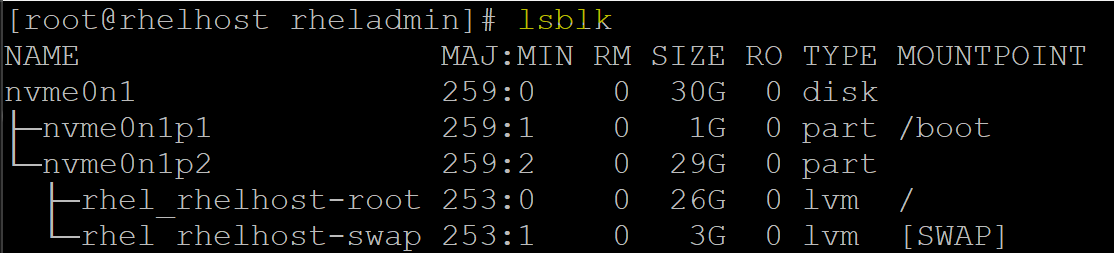
lsblk |
List information about block devices. |
lsblk -l |
Shows a list-style output (each block device on one line). |
lsblk -f |
Displays information about block devices, including filesystem type |
lsblk -o NAME,SIZE,TYPE,MOUNTPOINT |
Customizes output columns (e.g., name, size, type, mountpoint). |
lsblk -d |
Displays information about block devices but excludes their partitions. |
lsblk -r |
Excludes devices that are removable (e.g., USB drives). |
lsblk --output NAME,FSTYPE,UUID |
Displays specified columns (name, filesystem type, and UUID). |
sudo blkid |
Display all block devices attributes. |
sudo blkid /dev/nvme0n1p1 |
Display a specific block device. |

Display disk partitions
| CMD | DESC |
|---|---|
smartctl -a /dev/sda1 |
Display SMART health information for the disk /dev/sda1. |
fdisk -l |
List partition tables of all disks |
fdisk device_name |
Start editing a specific disk |
Display Filesystem Disk Usage
df- Display file system disk space usage
Explanation
df

# Filesystem                     1K-blocks    Used Available Use% Mounted on
# devtmpfs                         1830312       0   1830312   0% /dev
# tmpfs                            1860416       0   1860416   0% /dev/shm
# tmpfs                            1860416    9768   1850648   1% /run
# tmpfs                            1860416       0   1860416   0% /sys/fs/cgroup
# /dev/mapper/rhel_rhelhost-root  27245572 7114196  20131376  27% /
# /dev/nvme0n1p1                   1038336  278688    759648  27% /boot
# tmpfs                             372080      12    372068   1% /run/user/42
# tmpfs                             372080       4    372076   1% /run/user/1000
- Columns
| Col | Desc |
|---|---|
| Filesystem | The file system or disk partition in use. |
| 1K-blocks | Total space in 1K blocks for the file system. |
| Used | The space currently used (in 1K blocks). |
| Available | The space available for use (in 1K blocks). |
| Use% | The percentage of space used. |
| Mounted on | The mount point where the file system is attached in the directory tree. |
- Explanation of Filesystem Names
| Filesystem Name | Type | Purpose | Mounted on |
|---|---|---|---|
/dev/mapper/rhel_rhelhost-root |
ext4 (or LVM) |
The root file system where the operating system and user files reside. | / |
/dev/nvme0n1p1 |
ext4 |
To store boot files like the kernel and initramfs. | /boot |
devtmpfs |
devtmpfs |
for device files created by the kernel. | /dev |
tmpfs |
tmpfs |
shared memory (RAM-based). | /dev/shm |
tmpfs |
tmpfs |
for runtime data like logs and PID files. | /run |
tmpfs |
tmpfs |
for managing control groups (cgroups). | /sys/fs/cgroup |
tmpfs |
tmpfs |
for user-specific runtime data (for user ID 42). | /run/user/42 |
tmpfs |
tmpfs |
for user-specific runtime data (for user ID 1000). | /run/user/1000 |
tmpfstemporary file system- used for storing temporary data in memory (RAM).
- It is a special type of file system that doesn’t store data on disk, but instead resides in volatile memory, which makes it very fast but non-persistent.
- Once the system reboots, the contents of a tmpfs file system are lost.
-
Features:
- RAM-based:
- stores files in memory, so it has very fast read and write operations compared to disk-based file systems.
- Temporary:
- The data is temporary and typically used for system or application runtime data.
- Dynamic Size:
- The size of tmpfs can grow and shrink dynamically based on the data stored in it.
- It doesn’t have a fixed size like other file systems and is limited only by the available system memory.
- RAM-based:
- Examples:
/dev/shm:- used for shared memory, allowing processes to communicate with each other.
/run:- Used for runtime data like system logs, process IDs, or temporary data for running processes.
/run/user/[user_id]:- to store user-specific runtime data that doesn’t need to persist across reboots.
/sys/fs/cgroup- Used for storing cgroup files that manage and limit system resources for processes.
-
devtmpfs- a special type of file system
- used to create and store
device nodes(special files representing hardware devices like disks, USB devices, network interfaces, etc.), which are used to interact with hardware components. - a temporary file system
- it does not persist data across reboots.
- managed directly by the
kernel, which speeds up device initialization and simplifies the process of device node creation.
-
Purpose:
- Dynamic Device Node Creation:
- When a new device is detected (e.g., when you plug in a USB device or add a hard drive),
devtmpfscreates the correspondingdevice nodeautomatically in the/devdirectory. - e.g., if you connect a new USB device, devtmpfs creates a corresponding node like
/dev/sdbor/dev/ttyUSB0for it.
- When a new device is detected (e.g., when you plug in a USB device or add a hard drive),
- System Boot Process:
- During the boot process,
devtmpfsprovides the initial set ofdevice nodesneeded for the system to access devices like theroot file system, essential hardware drivers, and other kernel components.
- During the boot process,
- Integration with
udev:- While
devtmpfsprovides theinitial device nodes, theudev daemontakes over after the system boot to handle additional device events and rules for device node creation, removal, and management.
- While
- Dynamic Device Node Creation:
-
Common Example:
/dev: the path thatdevtmpfsis mounted on and wheredevice filesare stored/dev/null,/dev/zero: Special files used by applications for reading/writing./dev/sda,/dev/sdb: Disk devices./dev/tty0,/dev/ttyUSB0: Terminal devices./dev/random,/dev/urandom: Random number generators.
-
/dev/mapper/rhel_rhelhost-root- a logical volume created using
LVM(Logical Volume Manager) in Linux. - represents a
logical volume (LV)that- is part of a
volume group (VG) - is used to mount the
root file system(/) of the operating system.
- is part of a
- a logical volume created using
-
Breakdown:
/dev/mapper/:- indicates that the device is managed by
LVM (Logical Volume Manager). - The
mapper directorycontains device files forlogical volumes(LVM, encrypted devices, etc.). - The
mapperis a virtual device that represents logical volumes, RAID volumes, and other block-level devices.
- indicates that the device is managed by
rhel_rhelhost:- the name of the
Volume Group (VG)that contains the logical volume. Volume Group- a collection of
physical volumes (PVs)from whichlogical volumes (LVs)are created.
- a collection of
rhel_rhelhost:- the name of the
Volume Groupthat was created during the system installation (likely associated with a Red Hat Enterprise Linux (RHEL) system).
- the name of the
- the name of the
root:- the name of the
Logical Volume (LV)within theVolume Group. - A
logical volumerepresents a virtualized partition or file system. - The
logical volumenamedroottypically contains theroot file system(/), where the operating system files and user data are stored. - It is the main partition that the system boots from.
- the name of the
-
/dev/nvme0n1p1at/boot -
mounted to the
/bootdirectory, indicating its purpose to store files necessary for the system to boot.
Commands
| Command | Description |
|---|---|
df |
Report file system disk usage. |
df -a |
show all disk space usage |
df -h |
Display disk usage in human-readable format. |
df -BM |
Display disk usage in MB size |
df -T |
Include file system type in the output. |
df -h \| sort -k5 -r |
sort disk usage by use% |
Display File Usage
| Command | Description |
|---|---|
du |
Display space usage of the current directory. |
du --max-depth=num |
Display space usage only for num depth |
du target_dir |
Display space usage of the target directory. |
du -sh target_dir |
Summarize size of target directory in human-readable format. |
du target_file |
Display space usage of the target file. |
du -h target_file |
Display space usage of the target file in human-readable format |