Note_Tech
All technological notes.
Project maintained by simonangel-fong Hosted on GitHub Pages — Theme by mattgraham
Linux - System: Tune System Performance
- Linux - System: Tune System Performance
Tune System Performance
Package tuned: Tuning by Profiles
-
tuned- a powerful tool designed for dynamic system performance tuning.
- It optimizes system settings automatically based on predefined profiles tailored for different workloads and hardware configurations
-
Package
rpm -qa | grep tuned
sudo yum install tuned
- Service
tuneddaemon
sudo systemctl status tuned
sudo systemctl enable --now tuned
- CF dir
/etc/tuned
-
Profile locate
-
/usr/lib/tuned
Predefined Profiles
Predefined profiles- used for tuned service to automatically adjust sytem to get the best performance.
| Profile | Description |
|---|---|
balanced |
Default profile balancing performance and power consumption. |
throughput-performance |
Optimized for high throughput workloads (e.g., databases, web servers). |
latency-performance |
Optimized for low latency workloads (e.g., real-time applications). |
powersave |
Minimizes power consumption, suitable for laptops or energy-efficient setups. |
virtual-guest |
Optimized for virtual machines running as guests. |
virtual-host |
Optimized for virtualization hosts managing VMs. |
desktop |
Optimized for desktop systems, improving responsiveness. |
network-latency |
Optimized for low-latency network environments. |
network-throughput |
Optimized for high-throughput network environments. |
oracle |
Optimized for Oracle database workloads. |
hpc-compute |
Optimized for high-performance computing (HPC) environments. |
Command
tuned-adm: command-line interface, allowing administrators to apply, manage, and customize tuning profiles easily.
| CMD | DESC |
|---|---|
tuned-adm list |
List Available Profiles |
tuned-adm active |
Show Current Active Profile |
tuned-adm recommend |
Recommend an Optimal Profile for the System |
tuned-adm profile profile_name |
Switch to a desired Profile |
tuned-adm off |
Turn Off Tuning |
Lab: Tune System Performance by tuned
List all profiles and check active profile
# Check Current Active Profile
tuned-adm active
# Current active profile: virtual-guest

# List Available Profiles
tuned-adm list
# Available profiles:
# - accelerator-performance     - Throughput performance based tuning with disabled higher latency STOP states
# - aws                         - Optimize for aws ec2 instances
# - balanced                    - General non-specialized tuned profile
# - desktop                     - Optimize for the desktop use-case
# - epyc-eda                    - Optimize for EDA compute workloads on AMD EPYC CPUs
# - hpc-compute                 - Optimize for HPC compute workloads
# - intel-sst                   - Configure for Intel Speed Select Base Frequency
# - latency-performance         - Optimize for deterministic performance at the cost of increased power consumption
# - network-latency             - Optimize for deterministic performance at the cost of increased power consumption, focused on low latency network performance
# - network-throughput          - Optimize for streaming network throughput, generally only necessary on older CPUs or 40G+ networks
# - optimize-serial-console     - Optimize for serial console use.
# - powersave                   - Optimize for low power consumption
# - throughput-performance      - Broadly applicable tuning that provides excellent performance across a variety of common server workloads
# - virtual-guest               - Optimize for running inside a virtual guest
# - virtual-host                - Optimize for running KVM guests
# Current active profile: virtual-guest
Swith current profile
# switch to a profile
tuned-adm profile balanced
# confirm
tuned-adm active
# Current active profile: balanced
Tune off and switch to recommended profile
# turn off tuned, means run system manually
tuned-adm off
# confirm, by checking the current profile
tuned-adm active
# No current active profile.

# get the recommended profile
tuned-adm recommend
# virtual-guest

# switch to recommended profile
tuned-adm profile virtual-guest
# confirm
tuned-adm active
# Current active profile: virtual-guest
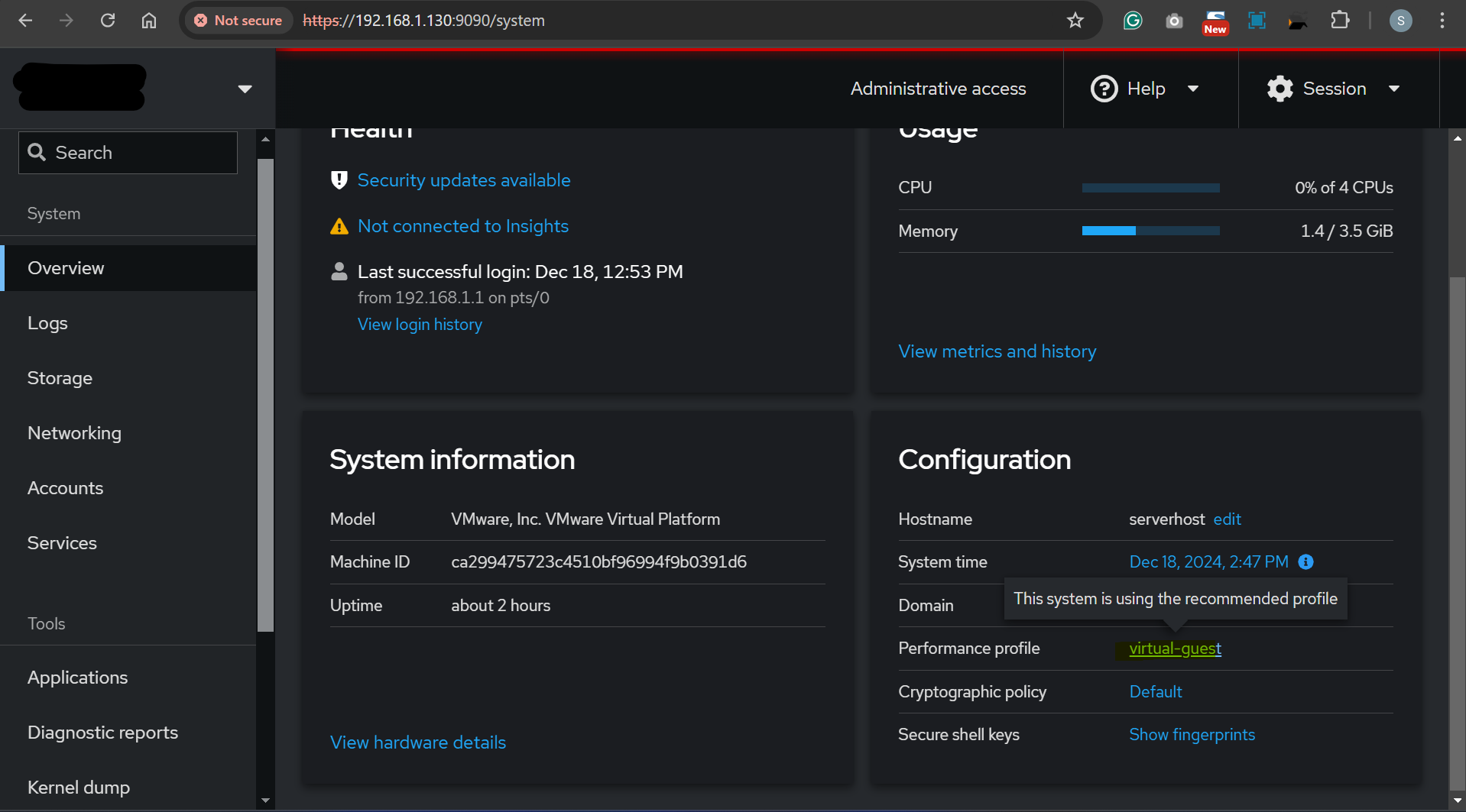
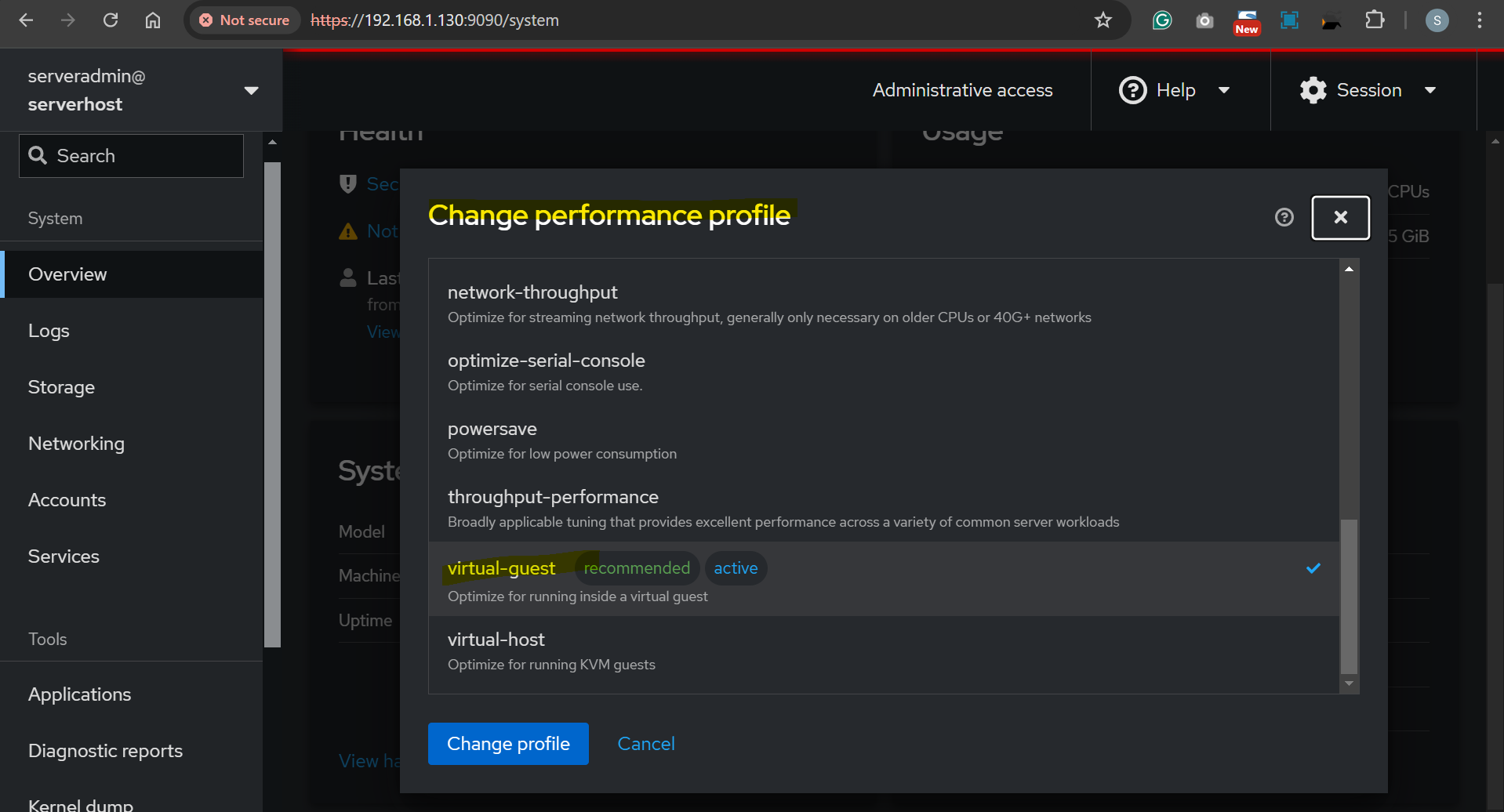
Change profile via web console
- https://ip:9090
Command nice and renice: Tuning by Priority of Processes
-
niceandrenicecommands- used to manage the priority of processes.
- They influence how much CPU time a process gets relative to others by adjusting its “niceness” value.
-
Package:
GNU Coreutils package
Niceness and Priority
-
Niceness Value for a process:
- Default :
0. - Highest niceness:
19 - Higher niceness(e.g., 10, 19): Process runs with lower priority.
- making it less CPU-intensive.
- Lower niceness (e.g., -5, -20): Process runs with higher priority.
- Lowest niceness:
-20
- Default :
-
A higher
niceness valuemeans the process will take less CPU time, while a lowerniceness valuemakes the process more CPU-intensive.
- Priority for a process:
- The kernel calculates the priority of a process based on its niceness value.
Actual priority=Niceness+Base priority(managed by the kernel).
Check Niceness of Running Processes
-
topcommand:NIColumn:Nice Value- priority of the task
- range from -20 to 19
- adjust by
nicecommand
PRcolumn- Priority(priority of the task with the rt values)
- range from -99 to 39
-
pscommand to get Nice Value
ps axo pid,comm,nice,cls --sort=-nice
#   PID COMMAND          NI CLS
#    50 khugepaged       19  TS
#    49 ksmd              5  TS
#   970 rtkit-daemon      1  TS
#     1 systemd           0  TS
#     2 kthreadd          0  TS
#     6 kworker/0:0-eve   0  TS
#    11 rcu_tasks_rude_   0  TS
#    12 rcu_tasks_trace   0  TS
#    13 ksoftirqd/0       0  TS
#    14 rcu_sched         0  TS
#    15 migration/0       -  FF
#    16 watchdog/0        -  FF
#    17 cpuhp/0           0  TS
#    18 cpuhp/1           0  TS
#    19 watchdog/1        -  FF
#    20 migration/1       -  FF
#    21 ksoftirqd/1       0  TS
#    24 cpuhp/2           0  TS
#    25 watchdog/2        -  FF
#    26 migration/2       -  FF
Command
renicecommand:- used to change the niceness value of an already running process.
| CMD | DESC |
|---|---|
nice process_name |
Run a Command with Default Niceness (0) |
nice -n 10 process_name |
Run a Command with a Specific Niceness Value |
renice -n 10 1234 |
Change the Niceness of a Process |
renice 10 -p 1234 |
Change the Niceness of a Process |
renice 5 -p 1234 5678 |
Change Niceness for Multiple Processes |
renice 10 -u username |
Change Niceness for All Processes of a User |
renice 5 -g 123 |
Change Niceness for a Process Group |
-
Privileges:
- Only the
rootuser can:- Start a process with a negative niceness value using
nice. - Decrease (raise the priority) of a process using
renice.
- Start a process with a negative niceness value using
- Regular users can:
- Increase the niceness value (lower the priority) of their own processes.
- Only the
-
Real-World Use Cases
- Backup Jobs:
- Run backups with higher niceness (e.g.,
nice -n 15) to prevent them from affecting other processes.
- Run backups with higher niceness (e.g.,
- Critical Processes:
- Assign lower niceness (e.g.,
nice -n -5) to ensure critical tasks like databases or web servers get sufficient CPU time.
- Assign lower niceness (e.g.,
- Load Management:
- Use renice to adjust priorities dynamically when system resources are under heavy load.
- Backup Jobs:
Lab: Tuning by Prioritize Process
# sets the process niceness to 15, making it less CPU-intensive.
nice -n 15 tar -czf backup.tar.gz /data

# run top by default, NI is 0
top
#     PID USER      PR  NI    VIRT    RES    SHR S  %CPU  %MEM     TIME+ COMMAND
#   11759 root      20   0  264296   4532   3652 R   0.7   0.1   0:00.04 top

# Run a Command with High Priority, NI is -5
sudo nice -n -5 top
#     PID USER      PR  NI    VIRT    RES    SHR S  %CPU  %MEM     TIME+ COMMAND
#   11996 root      15  -5  264296   4656   3776 R   1.0   0.1   0:00.17 top

# adjust priority of a process
renice -n 15 11996
# top display:
#     PID USER      PR  NI    VIRT    RES    SHR S  %CPU  %MEM     TIME+ COMMAND
#   11996 root      35  15  264296   4656   3776 R   0.7   0.1   0:00.35 top