Note_Tech
All technological notes.
Project maintained by simonangel-fong Hosted on GitHub Pages — Theme by mattgraham
Linux - User Management: Password
User Password
User password configuration file: /etc/shadow
-
/etc/shadow:- a system file that stores information about user accounts and their encrypted passwords.
-
Secure Password Storage:
- Passwords in
/etc/shadoware stored as hashed values - Only the root user can read or modify this file, as its permissions are restricted for security.
----------. 1 root root 1426 Nov 19 16:43 /etc/shadow
- Passwords in
-
User-Specific Information:
- It contains additional information related to password expiration, account lockouts, and more.
-
Entry format:
username:password:last_change:min:max:warn:inactive:expire:
| Field | Description |
|---|---|
username |
The username of the account. |
password |
The hashed password (or a special value like ! or * if the account is disabled). |
last_change |
The date of the last password change, stored as days since 01/01/1970. |
min |
Minimum number of days before the password can be changed. |
max |
Maximum number of days the password is valid before the user must change it. |
warn |
Number of days before expiration the user is warned to change the password. |
inactive |
Number of days after password expiration before the account is disabled. |
expire |
Absolute expiration date of the account (in days since 01/01/1970). |
- Special Values in the Password Field:
!or*: Account is locked; the user cannot log in.- Empty field: No password is set (not secure for accounts with shell access).
- The hash algorithm is indicated by the prefix in the password field:
$1$:MD5$5$:SHA-256$6$:SHA-512(default on most modern systems).
Set Password for a user
| CMD | DESC |
|---|---|
usermod username -L |
Lock user’s pwd |
usermod username -U |
Unlock user’s pwd |
passwd |
Modify pwd for the current user |
passwd user |
Modify pwd for a user |
passwd user -l |
Lock a user’s pwd |
passwd user -u |
Unlock a user’s pwd |
passwd user -e |
Expire a user’s pwd |
passwd user -d |
Delete a user’s pwd |
passwd user -f |
Force user to change pwd next login |
Set passwords for multiple users
chpasswdcommand:- reads username-password pairs from standard input (or a file) and updates the passwords for the specified users.
- It’s particularly useful for system administrators when setting or changing passwords for multiple users at once.
- By default, using
SHA-512for encryption
chpasswd [options]
[username]:[password]
| CMD | DESC |
|---|---|
chpasswd |
update passwords in batch mode |
cat pwd.txt \| chpasswd |
update passwords from a file |
cat pwd.txt \| chpasswd -e |
passwords provided are already encrypted (hashed) |
cat pwd.txt \| chpasswd -m |
forces the use of MD5 hashing |
chpasswd -c |
Validates the password before it is stored. |
chpasswd -R |
Specifies the password file location. |
chpasswd -S |
Displays the encrypted password to standard output instead of modifying the password file. |
chpasswd -c |
Specifies the method to be used for encrypting the password. |
chpasswd -p |
Specifies the prefix for the crypt(3) algorithm, e.g.,`. |
chpasswd -s |
Uses the Blowfish encryption algorithm for the password |
-
chpasswd -c:- method for encryption:
MD5,DES,SHA256,SHA512, andNONE
- method for encryption:
-
chpasswd -p:- prefix for crypt(3) algorithm
$6$for SHA512-CRYPT,$5$for SHA256-CRYPT, and$2a$for Blowfish
-
Best Practise:
- Always ensure the input file containing passwords is secured with appropriate permissions (
chmod 600) to prevent unauthorized access. - Use secure hashing mechanisms (e.g.,
SHA-512, which is typically the default) to store passwords securely. - Avoid storing plaintext passwords in files; consider encrypting them before use.
- Always ensure the input file containing passwords is secured with appropriate permissions (
-
Example: import a list of users and passwords
sudo useradd user1
sudo useradd user2
sudo useradd user3

echo -e 'user1:Welcome1234\nuser2:Welcome1234\nuser3:Welcome1234' > /home/rheladmin/pwd.txt
cat /home/rheladmin/pwd.txt
# user1:Welcome1234
# user2:Welcome1234
# user3:Welcome1234

cat /home/rheladmin/pwd.txt | sudo chpasswd

tail -3 /etc/passwd
# user1:x:1003:1003::/home/user1:/bin/bash
# user2:x:1004:1004::/home/user2:/bin/bash
# user3:x:1005:1005::/home/user3:/bin/bash

sudo tail -3 /etc/shadow
Password Aging Management
- Password Age:
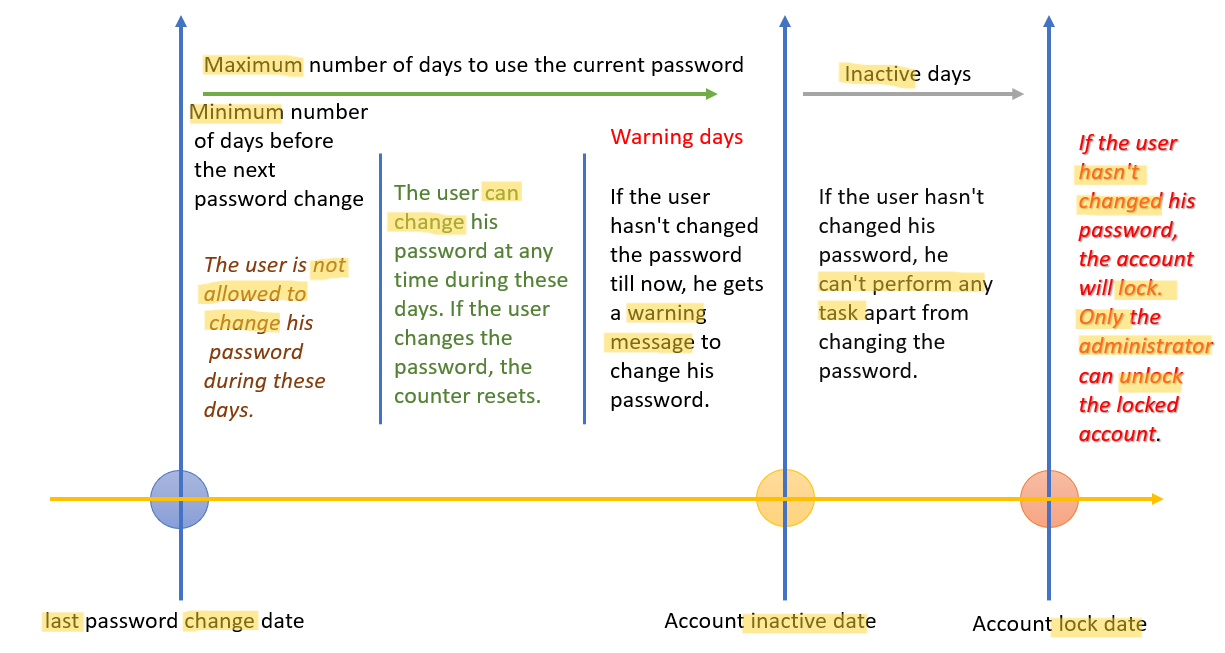
| Command | Description |
|---|---|
chage username -l |
Display the password aging information for the user. |
chage username |
Set password aging info in Interactive Mode |
chage username -d 2024-12-31 |
Set the last password change date (format: YYYY-MM-DD or days since epoch). |
chage username -M 90 |
Set the maximum number of days a password is valid before requiring a change. |
chage username -m 7 |
Set the minimum number of days before a user can change their password. |
chage username -W 10 |
Set the number of days before password expiration that the user will be warned. |
chage username -I 15 |
Set the number of inactive days after password expiration before the account is locked. |
chage username -E 2024-12-31 |
Set the account expiration date (format: YYYY-MM-DD or -1 for no expiration). |
- Example:
sudo useradd user1
echo -e "user1:user1234567" | sudo chpasswd

# display
sudo chage -l user1
# Last password change                                    : Nov 25, 2024
# Password expires                                        : never
# Password inactive                                       : never
# Account expires                                         : never
# Minimum number of days between password change          : 0
# Maximum number of days between password change          : 99999
# Number of days of warning before password expires       : 7

# Set a password age policy for user1
#   minimum password age: 7 days
#   maximum password age: 90 days
#   warning period: 10 day
#   inactive period days after password expiration: 15
sudo chage user1 -m 15 -M 120 -W 30 -I 10

# verify
sudo chage user1 -l
# Last password change                                    : Nov 25, 2024
# Password expires                                        : Mar 25, 2025
# Password inactive                                       : Apr 04, 2025
# Account expires                                         : never
# Minimum number of days between password change          : 15
# Maximum number of days between password change          : 120
# Number of days of warning before password expires       : 30

# verify in /etc/shadow file
grep user1 /etc/shadow
# user1:$6$jAHNMnu7qD/GSP$JaYbHsImlO.k12wCIVFHu7oHIqKRXy2Z/7.86WZ31/8ixkySQTP4nDXO0bh9zNUgcKY05Y96Yl/UlbnwJJkJT1:20052:15:120:30:10::
Lab: Configure aging
configure password aging for user100 using the chage command. You will set mindays to 7, maxdays to 28, and warndays to 5, and verify the new settings. You will then rerun the command and set account expiry to January 31, 2020. You will complete the exercise with another confirmation.
chage -m 7 -M 28 -W 5 user100
chage -E 2020-01-31 user100
chage -l user100
# Last password change                                    : Feb 15, 2025
# Password expires                                        : Mar 15, 2025
# Password inactive                                       : never
# Account expires                                         : Jan 31, 2020
# Minimum number of days between password change          : 7
# Maximum number of days between password change          : 28
# Number of days of warning before password expires       : 5
Lab: Lock and unlock a user account
- Create a user
su -
useradd userpwd
echo "password" | passwd --stdin userpwd

# test login
su - userpwd
whoami
# userpwd
- Lock a user
su -
passwd -S userpwd
# userpwd PS 2025-02-15 0 99999 7 -1 (Password set, SHA512 crypt.)

usermod -L userpwd
# passwd -l userpwd

# confirm
passwd -S userpwd
# userpwd LK 2025-02-15 0 99999 7 -1 (Password locked.)

# note the "!"
grep userpwd /etc/shadow
# userpwd:!$6$An4Ho3jXbHJ1g96p$BhONmv2TC5G/QRS53FodMQ1lmLWP9dZaE0XDAolZNe3rYdverzv02AUxLWHV2LMWG92k7axVgEkIw6mD/JP.D.:20135:0:99999:7:::

# try to login
su - userpwd
# Password:
# su: Authentication failure
- Unlock
usermod -U userpwd
# passwd -u userpwd

# confirm
passwd -S userpwd
# userpwd PS 2025-02-15 0 99999 7 -1 (Password set, SHA512 crypt.)
grep userpwd /etc/shadow
# userpwd:$6$An4Ho3jXbHJ1g96p$BhONmv2TC5G/QRS53FodMQ1lmLWP9dZaE0XDAolZNe3rYdverzv02AUxLWHV2LMWG92k7axVgEkIw6mD/JP.D.:20135:0:99999:7:::

# try to login
su - userpwd
# Password:
whoami
# userpwd
Lab: Expire a password
su -
passwd -S userpwd
# userpwd PS 2025-02-15 0 99999 7 -1 (Password set, SHA512 crypt.)
chage userpwd -l
# Last password change                                    : Feb 16, 2025
# Password expires                                        : never
# Password inactive                                       : never
# Account expires                                         : never
# Minimum number of days between password change          : 0
# Maximum number of days between password change          : 99999
# Number of days of warning before password expires       : 7

passwd -e userpwd
# Expiring password for user userpwd.
# passwd: Success

# confirm
# note the date
passwd -S userpwd
# userpwd PS 1969-12-31 0 99999 7 -1 (Password set, SHA512 crypt.)

chage userpwd -l
# Last password change                                    : password must be changed
# Password expires                                        : password must be changed
# Password inactive                                       : password must be changed
# Account expires                                         : never
# Minimum number of days between password change          : 0
# Maximum number of days between password change          : 99999
# Number of days of warning before password expires       : 7

# try to login
su - userpwd
# Password:
# You are required to change your password immediately (administrator enforced).
# Current password:
# New password:
# Retype new password:

passwd -S userpwd
# userpwd PS 2025-02-15 0 99999 7 -1 (Password set, SHA512 crypt.)
chage userpwd -l
# Last password change                                    : Feb 16, 2025
# Password expires                                        : never
# Password inactive                                       : never
# Account expires                                         : never
# Minimum number of days between password change          : 0
# Maximum number of days between password change          : 99999
# Number of days of warning before password expires       : 7
Set a Default Password Age Policy: Using /etc/login.defs
/etc/login.defsfile’s parameters- used to configure a default password age policy for every user in the system.
-rw-r--r--. 1 root root 3076 Nov 21 2023 /etc/login.defs
| Parameters | Default | Desc |
|---|---|---|
PASS_MAX_DAYS |
99999 |
The maximum number of days a password is valid before it must be changed. |
PASS_MIN_DAYS |
0 |
The minimum number of days required between password changes. |
PASS_WARN_AGE |
7 |
The number of days before password expiration that the user is warned. |
PASS_MIN_LEN |
5 |
Minimum acceptable password length. |