Note_Tech
All technological notes.
Project maintained by simonangel-fong Hosted on GitHub Pages — Theme by mattgraham
CSS - Fundamental
CSS
CSS:- Cascading Style Sheets
- describes how HTML elements should be displayed
Cheatsheet
- Simple selectors
| Selector | Description |
|---|---|
* |
All elements |
#id |
The element with id |
.class |
All elements with class |
ele |
All ele elements |
- Selector list
| Selector | Description |
|---|---|
#id1, #id2 |
The elements with id of id1 and id2 |
.class1, .class2 |
The elements with the class1 and class2 |
el1, el2, el3 |
The el1, el2 and el3 elements |
#id1, .class1, el1 |
The elements with id, class, and element |
- Combinator selectors
| Selector | Description |
|---|---|
parent descendant |
All descendants |
parent > child |
All children |
element + next |
The very next element |
element ~ siblings |
All sibling elements after |
- Attribute selector
| Selector | Description |
|---|---|
[attribute] |
All elements with attribute |
[attribute=value] |
All elements with attribute value equal to “value” |
[attribute!=value] |
All elements with attribute value not equal to “value” |
[attribute$=value] |
All elements with a href attribute value ending with “value” |
[attribute | =value] |
All elements with attribute value equal to “value” or starting with “Tomorrow” followed by a hyphen |
[attribute^=value] |
All elements with attribute value starting with “value” |
[attribute*=value] |
All elements with attribute value containing the word “value” |
[attribute~=value] |
All elements with attribute value containing the specific word “value”, not start with or end with |
- Pseudo-class selectors
| Selector | Description |
|---|---|
:focus |
The element that currently has focus |
:empty |
All elements that are empty |
:hover |
element that the user hovers over an element with the cursor |
:has(selector) |
All elements that have a selector element |
:first-child |
the first element among a group of sibling elements |
:last-child |
the last element among a group of sibling elements |
:nth-child() |
elements based on their position among a group of siblings |
:nth-child(even) |
the even elements among a group of siblings |
:nth-child(odd) |
the odd elements among a group of siblings |
:nth-last-child() |
elements based on their position, counting from the end |
- Pseudo-elements selectors
| Selector | Description |
|---|---|
::after |
creates a pseudo-element that is the last child of the selected element. |
::before |
creates a pseudo-element that is the first child of the selected element. |
::first-letter |
applies styles to the first letter of the first line |
::first-line |
applies styles to the first line of a block-level element. |
::placeholder |
applies styles to the placeholder text |
::selection |
applies styles to the highlighted text |
Syntax
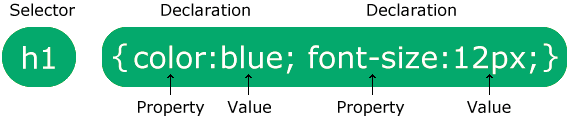
-
selector- points to the HTML element to style.
-
declaration block- contains one or more declarations separated by semicolons.
- Each
declarationincludes a CSSpropertyname and avalue, separated by a colon. - Multiple CSS declarations are separated with semicolons, and declaration blocks are surrounded by curly braces.
CSS Selectors
-
CSS selectors- used to “find” (or select) the HTML elements you want to style.
-
five categories:
-
Simple selectors- based on name, id, class
-
Combinator selectors:- based on a specific relationship between them
-
Attribute selectors- based on an attribute or attribute value
-
Pseudo-class selectors- based on a certain state
-
Pseudo-elements selectors- select and style a part of an element
-
Id Selector: #id
-
The id selector uses the id attribute of an HTML element to select a specific element.
-
The id of an element is unique within a page, so the id selector is used to select one unique element!
-
To select an element with a specific id, write a hash (#) character, followed by the id of the element.
<style>
  #para1 {
    text-align: center;
    color: red;
  }
</style>

<p id="para1">Hello World!</p>
Class Selector: .class / element.class
-
The class selector selects HTML elements with a specific class attribute.
-
To select elements with a specific class, write a period (.) character, followed by the class name.
<!-- specify all HTML elements -->
<style>
  .center {
    text-align: center;
    color: red;
  }
</style>
<h1 class="center">Red and center-aligned heading</h1>
<p class="center">Red and center-aligned paragraph.</p>

<!-- specify that only specific HTML elements -->
<style>
  p.center {
    text-align: center;
    color: red;
  }
</style>
<h1 class="center">Red and center-aligned heading</h1>
<p class="center">Red and center-aligned paragraph.</p>

<!-- HTML elements can also refer to more than one class.-->
<style>
  p.center {
    text-align: center;
    color: red;
  }

  p.large {
    font-size: 300%;
  }
</style>
<h1 class="center">This heading will not be affected</h1>
<p class="center">This paragraph will be red and center-aligned.</p>
<p class="center large">
  This paragraph will be red, center-aligned, and in a large font-size.
</p>
Grouping Selector: element / element,element
- The
grouping selectorselects all the HTML elements with the same style definitions.
<style>
  h1,
  h2,
  p {
    text-align: center;
    color: red;
  }
</style>
Universal Selector: *
- The universal selector (*) selects all HTML elements on the page.
<style>
  * {
    text-align: center;
    color: blue;
  }
</style>
<h1>Hello world!</h1>
<p>Every element on the page will be affected by the style.</p>
<p id="para1">Me too!</p>
<p>And me!</p>
CSS Comments
-
Comments are used to explain the code, and may help when you edit the source code at a later date.
-
Comments are ignored by browsers.
-
A CSS comment is placed inside the
<style>element, and starts with/*and ends with*/:
<style>
  /* comments */
</style>
Insert CSS
-
three ways of inserting a style sheet:
- External CSS
- Internal CSS
- Inline CSS
External CSS
-
With an external style sheet, you can change the look of an entire website by changing just one file!
-
Each HTML page must include a reference to the external style sheet file inside the
<link>element, inside the head section. -
HTML
<!DOCTYPE html>
<html>
  <head>
    <link rel="stylesheet" href="mystyle.css" />
  </head>
  <body>
    <h1>This is a heading</h1>
    <p>This is a paragraph.</p>
  </body>
</html>
- CSS: mystyle.css
body {
  background-color: lightblue;
}

h1 {
  color: navy;
  margin-left: 20px;
}
Internal CSS
-
An internal style sheet may be used if one single HTML page has a unique style.
-
The internal style is defined inside the
<style>element, inside the head section.
<!DOCTYPE html>
<html>
  <head>
    <style>
      body {
        background-color: linen;
      }

      h1 {
        color: maroon;
        margin-left: 40px;
      }
    </style>
  </head>
  <body>
    <h1>This is a heading</h1>
    <p>This is a paragraph.</p>
  </body>
</html>
Inline CSS
-
An inline style may be used to apply a unique style for a single element.
-
To use inline styles, add the style attribute to the relevant element. The style attribute can contain any CSS property.
<!DOCTYPE html>
<html>
  <body>
    <h1 style="color:blue;text-align:center;">This is a heading</h1>
    <p style="color:red;">This is a paragraph.</p>
  </body>
</html>
Multiple Style Sheets
- If some properties have been defined for the same selector (element) in different style sheets, the value from the last read style sheet will be used.
Cascading Order (Specificity)
-
All the styles in a page will “cascade” into a new “virtual” style sheet by the following rules, where number one has the highest priority:
- Inline style (inside an HTML element)
- External and internal style sheets (in the head section)
- Browser default
-
So, an inline style has the highest priority, and will override external and internal styles and browser defaults.