Note_Tech
All technological notes.
Project maintained by simonangel-fong Hosted on GitHub Pages — Theme by mattgraham
Django - Static Files
Cheapsheet
| Development | Deployment | Description |
|---|---|---|
STATIC_URL |
Static files url | |
STATICFILES_DIRS |
Global Static File Physical location | |
STATIC_ROOT |
Physical location for collectstatic |
Static Files
-
Static Files
- additional files to support web application, such as images, JavaScript, or CSS.
-
Django 处理静态文件有两种模式
- App Static Files, APP 专用,静态文件根据约定的文件结构仅用于对应的 APP;
- Global Static Files, 公共静态文件,可以跨 APP 引用。
-
Search Order
- The search starts in the directories listed in
STATICFILES_DIRS, using the order you have provided. - Then, if the file is not found, the search continues in the static folder of each application.
- If you have files with the same name, Django will use the first occurrence of the file.
STATICFILES_DIRS> App Static Folder
- The search starts in the directories listed in
Configuring Static Files During Development
- Debug mode
settings.DEBUG = True
settings.py
-
INSTALLED_APPS: includesdjango.contrib.staticfiles
-
STATIC_URL:
- URL to use when referring to static files located in
STATIC_ROOT. - It must end in a slash if set to a non-empty value.
# by default STATIC_URL = "static/" - 如果缺少该参数,会显示异常
You're using the staticfiles app without having set the required STATIC_URL setting.
-
STATICFILES_DIRS: global static files, if applied.
- list all the directories where Django should look for static files.
-
Example:
from pathlib import Path

STATICFILES_DIRS = [
    BASE_DIR / 'static',
    BASE_DIR / 'collectstatic',
]
Templates
- In templates, use the static template tag to build the URL for the given relative path.
<!-- add at the top of html codes -->
<!-- load static -->

<!-- using static tag to referencing static files -->
<img src="static 'my_app/example.jpg'" alt="My image"> <!-- without {} % signs due to github deploy --->
<link rel="stylesheet" type="text/css" href="static '/Workout/carousel.css' " />
Static Files Folder
-
Store your static files in a folder called
staticin your app. -
约定的文件夹结构 app static file
-
<app_name>/static/<app_name>/: by putting static files inside another directory named for the application itself, namespace issue can be prevented.- css
- img
- js
Alternative
- If
INSTALLED_APPSdoes not havedjango.contrib.staticfiles,django.views.static.serve()can serve static files manually. - 不推荐
from django.conf import settings
from django.conf.urls.static import static

urlpatterns = [
    # ... the rest of your URLconf goes here ...
] + static(settings.STATIC_URL, document_root=settings.STATIC_ROOT)
Configuring Static Files During Deployment(IIS)
settings.pyDEBUG = False
settings.py
-
STATIC_ROOT- The absolute path to the directory where collectstatic will collect static files for deployment.
-
Example:
STATIC_ROOT = "/var/www/example.com/static/"

STATIC_ROOT = BASE_DIR / 'collect_static/'
collectstatic
- Run the
collectstaticmanagement command -
This will copy all files from your static folders into the STATIC_ROOT directory.
$ cd <django_project>
$ python manage.py collectstatic
创建 web.config 文件
- 在
STATIC_ROOT参数指定的文件夹创建设置文件:
<?xml version="1.0" encoding="UTF-8"?>
<configuration>
    <system.webServer>
    <!-- 覆盖FastCGI handler,让IIS访问静态文件 -->
      <handlers>
        <clear/>
        <add name="StaticFile"
             path="*"
             verb="*"
             modules="StaticFileModule"
             resourceType="File"
             requireAccess="Read" />
      </handlers>
    </system.webServer>
</configuration>
代码说明:
- 如果没有该代码,当浏览器打开 static_root 地址时会返回 url 错误的信息;当存在该代码时,会返回 404 的服务器代码,即将 static_root 的访问的路由错误变为服务器的权限错误。
设置 IIS 虚拟目录
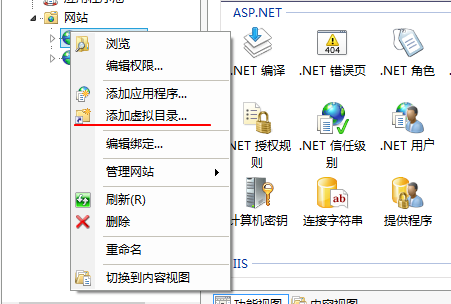
- 打开 IIS
- 点选网站,右键”添加虚拟目录”
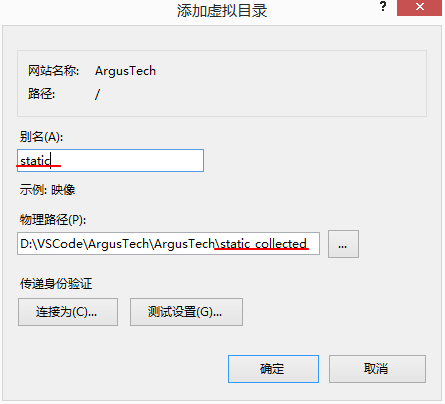
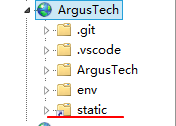
- 设置参数。
- 别名:站点显示的虚拟文件目录名称。
- 物理路径:指定\/static_collected\/文件夹。