Note_Tech
All technological notes.
Project maintained by simonangel-fong Hosted on GitHub Pages — Theme by mattgraham
ArgoCD - Fundamental
traditional deployment flow
- Key steps:
- starts with
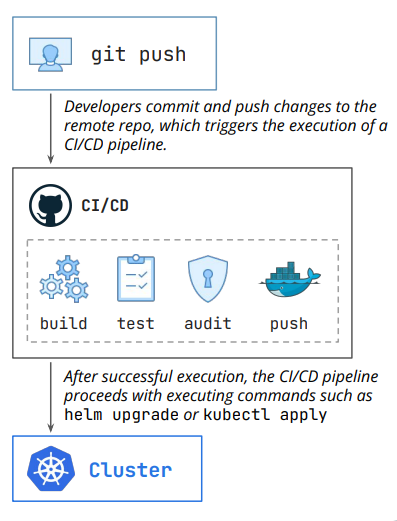
git push- Developers commit and push changes to the remote repo, which triggers the execution of a CI/CD pipeline.
- trigger CI/CD pipeline
- build > test > audit > push
- Apply to cluster
- the CI/CD pipeline proceeds with executing commands such as helm upgrade or kubectl apply
- starts with
- drawbacks
- Configuration Drift
- What happens if a developer runs kubectl scale deployment my-app –replicas=0 directly in the cluster?
- The live state of the cluster is now different from the configuration stored in Git.
- Nobody knows what the real desired state is.
- Git says one thing, but the cluster is doing another.
- What happens if a developer runs kubectl scale deployment my-app –replicas=0 directly in the cluster?
- Poor Auditability
- How do you know who scaled the deployment and why? There’s little to no audit trail.
- The “source of truth” is just the current state of the cluster, with no history.
- Difficult Rollbacks
- Reverting a bad deployment is often not straightforward, especially when multiple services are involved.
- It often requires a high-stress, manual process of finding the last good artifact and re-running a pipeline.
- This is slow and highly prone to human error during an outage.
- Inconsistent Deployments and Configuration
- Since configuration might drift, it becomes increasingly harder to have a clear view of each environment configuration, also opening the door to bigger problems when promoting a certain release from a lower to a higher environment.
- Configuration Drift
- Traditional
- GitOps
GitOps
GitOps- an operational framework that uses
Gitrepositories as the “single source of truth” to define, manage, and deploy infrastructure and applications.
- an operational framework that uses
- Principles of GitOps
- Declarative Infrastructure:
- The desired state of the system is defined declaratively (e.g., Kubernetes YAML files) rather than through manual, imperative commands.
- Versioned and Immutable:
- The desired state is stored in a way that enforces immutability, versioning and retains a complete version history.
- Automated Synchronization:
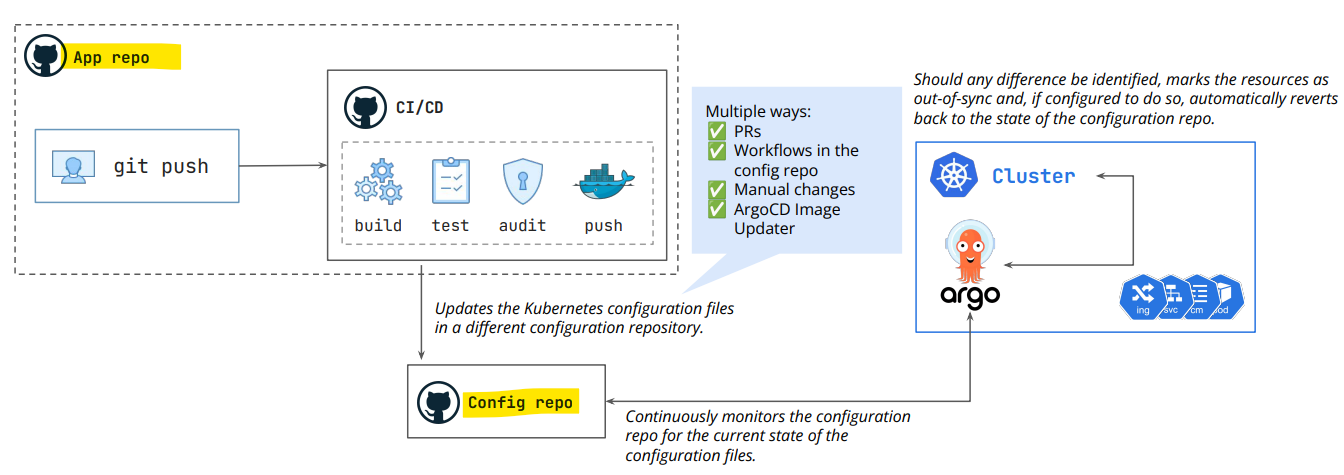
- Software agents (e.g., in the cluster) automatically pull changes from the Git repository and update the live environment, eliminating manual deployment steps.
- Continuous Reconciliation:
- The system constantly monitors for discrepancies between the Git repository and the actual state, automatically correcting any drift to ensure alignment.
- Declarative Infrastructure:
Pull Model
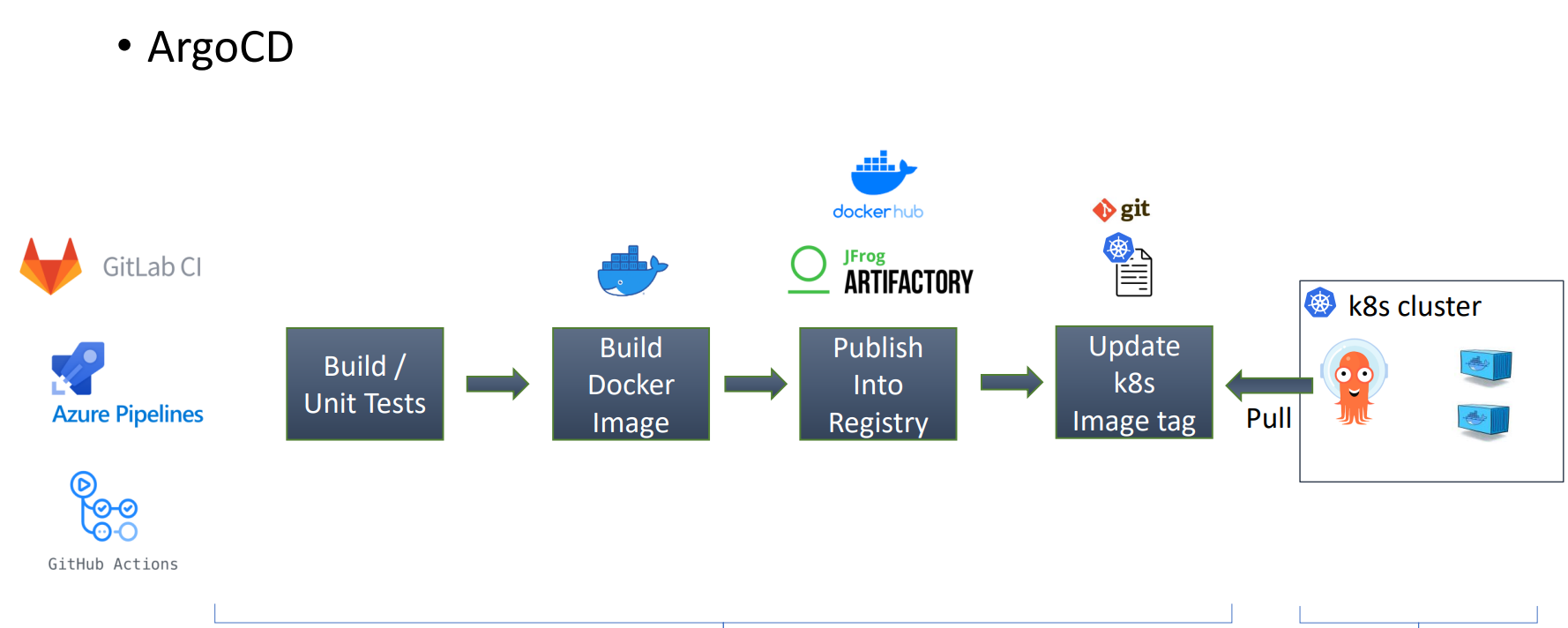
pull model- a deployment strategy where an in-cluster agent (like Argo CD or Flux) continuously monitors a Git repository for changes and pulls them to synchronize the environment’s actual state with the desired state. I
-
Sample flow: Full release
- dev commit changes to main branch
- Trigger main pipeline
- build
- test
- code analysis
- docker build
- docker push
- update test manifests
- Argo sync changes to test env
- postsysnc trigger test-staging pipeline
- integration test
- security test
- dast testing
- update staging manifests
- if pass, create merge request to update staging env
- Argo sync changes to staging env
- postsysnc trigger staging-prod pipeline
- performance test
- pen test
- manual test
- UAT
- update prod manifests
- if pass, create a merge request to update prod env
- if Approval, Argo sync changes to prod env
ArgoCD
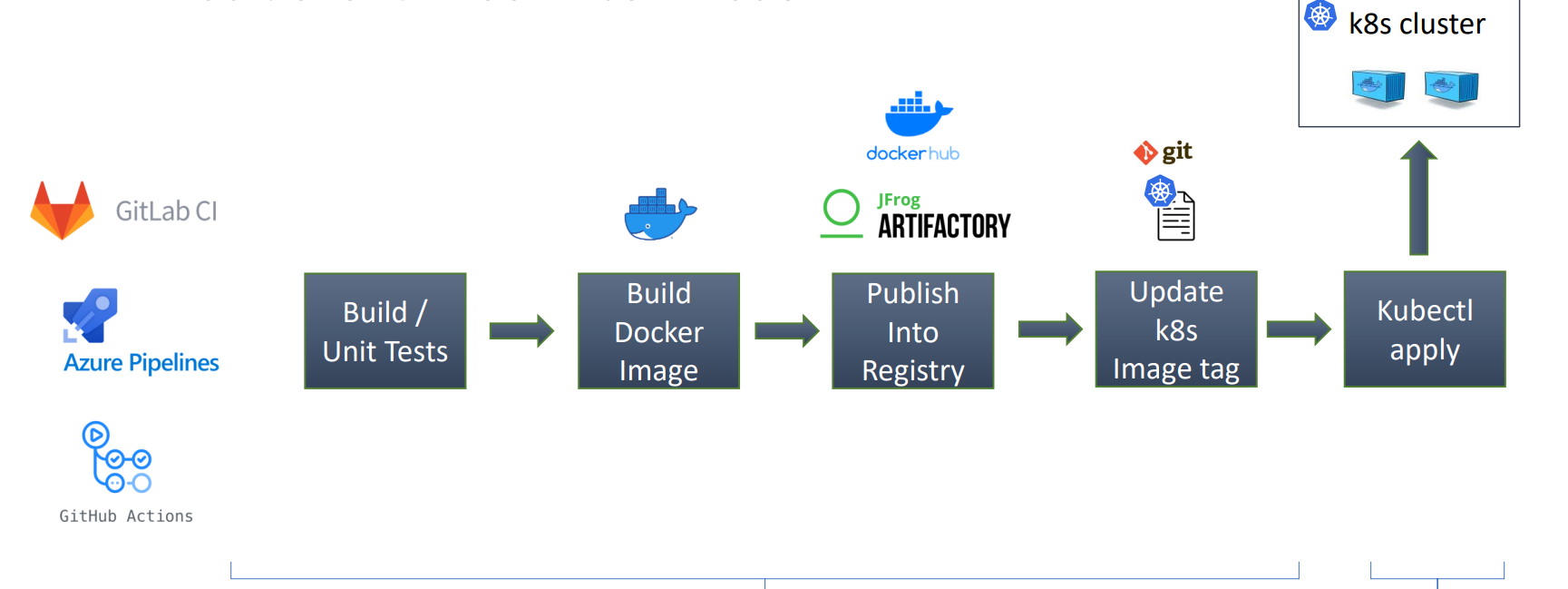
ArgoCD- a GitOps continues delivery tool for Kubernetes.
- Not a CI tool
- Features
Gitas the source of truth.- Developer and DevOps engineer will update the Git code only.
- Keep your cluster in sync with
Git. - Easy rollback.
- More security : Grant access to ArgoCD only.
- Disaster recovery solution : You easily deploy the same apps to any k8s cluster.
Core Concepts
Application- a Kubernetes
Custom Resource Definition (CRD)that defines the desired state of an application in a target cluster, sourcing its configuration (YAML, Helm, Kustomize) from a Git repository. - the unit of deployment and tracking, enabling GitOps by monitoring for differences between the Git repository and the cluster.
- a Kubernetes
- Source :
- Helm charts
- Kustomize application
- k8s manifests
- jsonnet
- Destination: cluster and namespace.
Projects- provide a logical grouping of
applications. - a logical grouping of
applicationsused to organize, restrict, and manage access in multi-tenant environments. - acts as a safety boundary, defining which Git repositories can be used, where applications can be deployed (clusters/namespaces), and which users can perform actions via RBAC.
- provide a logical grouping of
- Use case:
- when ArgoCD is used by multiple teams.
Desired statevsActual stateDesired state:- the definitive version of what Kubernetes resources should look like, as defined by the manifests stored in
Gitrepository.
- the definitive version of what Kubernetes resources should look like, as defined by the manifests stored in
Actual state:- what is currently running in Kubernetes cluster.
Sync- the process that reconciles the
desired stateof anapplication(defined in Git) with itsactual statein a Kubernetes cluster. - makes the live cluster match the
Gitrepository, applying manifest changes, creating new resources, or deleting removed ones. - can be manual or automated.
- the process that reconciles the
Refresh(Compare)- updates the application’s status by comparing the desired Git state with the live cluster state, without changing cluster resources.
- By default, automatically refreshes every 3 minutes.
Remote Cluster
- By default, ArgoCD has the permission to deploy into the local cluster where its running.
- can add remote k8s clusters information including credentials as
k8s secrets.- Each secret must have label of
argocd.argoproj.io/secret-type: cluster
- Each secret must have label of
- Each cluster must have the below data:
- Name.
- Server (cluster api server url).
- Config (an option to authenticate to the cluster).
- namespaces (optional): comma-separated list of namespaces which are accessible in that cluster.
- can add remote clusters declarativly or using cli.
Authentication
- options to authenticate to remote clusters:
- Basic authentication (username and password)
- Bearer token authentication.
- IAM authentication configuration (suitable for cloud k8s clusters).
- External provider command to supply client credentials.
Best Practices
Repositories Separation
Separating application config repo from application code repo
- Cleaner Git history of what changes were made
- The application might consist of services that are distributed in multiple Git repositories, but is deployed as a single unit.
- Separation of access. Maintainers of application source code maybe not be the same as the maintainers of application config.
- Smaller overhead on Argo CD repo-controller, cloning config repo without the source code.
Environments Manifest
Types of environments:
- Static environments:
- Test
- Staging
- Production
- On-demand environments :
- created for a small period for feature testing.
- Can be created once a pull request created and destroyed once the pull request is closed.
How to handle on-demand environments creation/deletion:
- On-demand environments can be created by two options
- Option-1:
- Use
ApplicationSet Pull Request Generator, it will handle creating ArgoCD applications per open pull request. And it will be Argo CD application will be destroyed once Pull request is closed.
- Use
- Option-2:
- Single branch for on-demand environments, and a folder per environment and each folder will contain the related manifests. (You need to write a script using CI pipeline to create theses folders and manifests per Pull request).
- Option-1:
How to handle static environments config?
- Approach #1: Single branch all static environments:
- e.g, Main branch, contains the helm chart values files for-each static environment:
- Values-test.yaml.
- Values-staging.yaml.
- Values-prod.yaml.
- e.g, Main branch, contains the helm chart values files for-each static environment:
- Approach #2: Branch per static environment
- Test branch.
- Staging branch.
- Production branch. (You can use tags or commits SHA for production environments)
Common Practices
- Immutable manifests
- Use immutable manifests in production
- Avoid using
HEADrevision and use tags or commits SHA.
- Replicas and HPA
- If you want HPA to control the number of replicas , then don’t include replicas in Git.
- Plan for secrets management
- Don’t store plain secrets in git.
- There are several solutions for secrets:
- Within Git
Sealed secrets.SOPS
- External secrets store:
Hashicorp VaultExternal Secrets Operator- Cloud secrets store
Aws secret operator
- Within Git
- Plan for ArgoCD Instances
- Use a separated ArgoCD instance for production.
- Use HA setup for production.
- Its recommended to have at least two instances:
- Non-prod instance.
- Prod instance.
- App of Apps and ApplicationSet
- Use
app of appsto manage ArgoCD application. - Use
Application Setand the power of generators to generate applications.
- Use