Note_Tech
All technological notes.
Project maintained by simonangel-fong Hosted on GitHub Pages — Theme by mattgraham
Kubernetes Networking: Service - Headless Service
Headless Service
headless service- a type of Service to return the individual IP addresses of all the
podsthat match its selector, allowing clients to connect to thepodsdirectly. - the
cluster DNSreturns- a
single A recordpointing to theservice’s cluster IP - multiple
A records- one for each
podthat’s part of the service.
- one for each
- a
- Clients can therefore query the DNS to get the IPs of all the pods in the service.
- With this information, the client can then connect directly to the
pods.
- With this information, the client can then connect directly to the
- a type of Service to return the individual IP addresses of all the
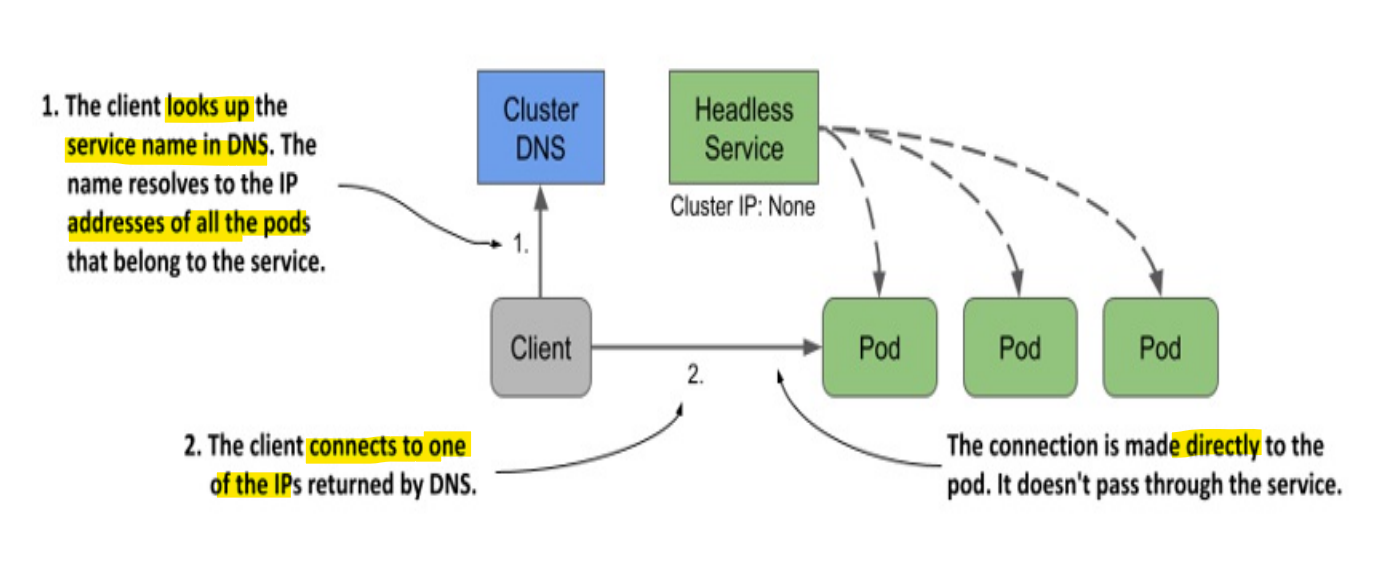
- vs regular service
headless service: connect directly to thePod IPregular services: connect to thecluster IPof the service and connection is forwarded to one of thepods.
Lab: Creating a Headless Service
# demo-headless-svc.yaml
apiVersion: v1
kind: Service
metadata:
  name: demo-headless-svc
spec:
  clusterIP: None # headless
  selector:
    app: nginx
  ports:
    - name: http
      protocol: TCP
      port: 8080
      targetPort: 80
kubectl apply -f demo-headless-svc.yaml
# service/demo-headless-svc created

kubectl get svc -o wide
# NAME                TYPE        CLUSTER-IP     EXTERNAL-IP   PORT(S)          AGE     SELECTOR
# demo-headless-svc   ClusterIP   None           <none>        8080/TCP         45s     app=nginx
# demo-nodeport-svc   NodePort    10.106.98.10   <none>        8080:30506/TCP   7h55m   app=nginx

kubectl describe svc demo-headless-svc
# Name:                     demo-headless-svc
# Namespace:                default
# Labels:                   <none>
# Annotations:              <none>
# Selector:                 app=nginx
# Type:                     ClusterIP
# IP Family Policy:         SingleStack
# IP Families:              IPv4
# IP:                       None
# IPs:                      None
# Port:                     http  8080/TCP
# TargetPort:               80/TCP
# Endpoints:                10.244.2.18:80,10.244.1.13:80
# Session Affinity:         None
# Internal Traffic Policy:  Cluster
# Events:                   <none>
- Confirm headless service return a list IP address of pods
# list ip of pod
kubectl get pod -o wide
# NAME                     READY   STATUS    RESTARTS      AGE     IP            NODE     NOMINATED NODE   READINESS GATES
# nginx-546c7dd8cf-rts7p   2/2     Running   0             7h59m   10.244.2.18   node02   <none>           <none>
# nginx-546c7dd8cf-t5kws   2/2     Running   2 (45m ago)   7h59m   10.244.1.13   node01   <none>           <none>

# run dns test tool
kubectl run -it --rm dns-test --image=giantswarm/tiny-tools

# lookup service
nslookup demo-headless-svc
# Server:         10.96.0.10
# Address:        10.96.0.10#53

# Name:   demo-headless-svc.default.svc.cluster.local
# Address: 10.244.2.18
# Name:   demo-headless-svc.default.svc.cluster.local
# Address: 10.244.1.13

# confirm: service returns content in pod
curl http://demo-headless-svc
# <h1>node01:nginx-546c7dd8cf-t5kws - Mon Dec 29 04:47:53 UTC 2025</h1>

# #######################
# vs regular svc
# #######################
# headless: connect directly to the pod IP
curl --verbose http://demo-headless-svc
# *   Trying 10.244.2.18:80...)
# * Connected to demo-headless-svc (10.244.2.18) port 80 (#0
# > GET / HTTP/1.1
# > Host: demo-headless-svc
# > User-Agent: curl/7.69.1
# > Accept: */*
# >
# * Mark bundle as not supporting multiuse
# < HTTP/1.1 200 OK
# < Server: nginx/1.29.4
# < Date: Mon, 29 Dec 2025 04:48:09 GMT
# < Content-Type: text/html
# < Content-Length: 70
# < Last-Modified: Mon, 29 Dec 2025 04:48:08 GMT
# < Connection: keep-alive
# < ETag: "69520808-46"
# < Accept-Ranges: bytes
# <
# <h1>node02:nginx-546c7dd8cf-rts7p - Mon Dec 29 04:48:08 UTC 2025</h1>
# * Connection #0 to host demo-headless-svc left intact

# nodeport: connect to nodeport(demo-nodeport-svc (10.106.98.10))
curl --verbose http://demo-nodeport-svc:8080
# *   Trying 10.106.98.10:8080...
# * Connected to demo-nodeport-svc (10.106.98.10) port 8080 (#0)
# > GET / HTTP/1.1
# > Host: demo-nodeport-svc:8080
# > User-Agent: curl/7.69.1
# > Accept: */*
# >
# * Mark bundle as not supporting multiuse
# < HTTP/1.1 200 OK
# < Server: nginx/1.29.4
# < Date: Mon, 29 Dec 2025 04:49:59 GMT
# < Content-Type: text/html
# < Content-Length: 70
# < Last-Modified: Mon, 29 Dec 2025 04:49:59 GMT
# < Connection: keep-alive
# < ETag: "69520877-46"
# < Accept-Ranges: bytes
# <
# <h1>node02:nginx-546c7dd8cf-rts7p - Mon Dec 29 04:49:59 UTC 2025</h1>
# * Connection #0 to host demo-nodeport-svc left intact
Headless Services with no Label Selector
- When omitting the
label selectorand set theclusterIPtoNone,- DNS will return an
A/AAAA recordfor each endpoint,
- DNS will return an
Lab: Creating a CNAME alias for an existing service
- Creating an ExternalName service
# demo-dns-cname-extralname.yaml
apiVersion: v1
kind: Service
metadata:
  name: demo-dns-cname-extralname
spec:
  type: ExternalName
  externalName: worldtimeapi.org
- Connecting to an ExternalName service from a pod
kubectl apply -f demo-dns-cname-extralname.yaml
# service/demo-dns-cname-extralname created

kubectl get svc
# NAME                        TYPE           CLUSTER-IP       EXTERNAL-IP        PORT(S)          AGE
# demo-dns-cname-extralname   ExternalName   <none>           worldtimeapi.org   <none>           70s

# test connection within cluster
kubectl run -it --rm dns-teset --image=giantswarm/tiny-tools

curl http://demo-dns-cname-extralname/api/timezone/America/Toronto
# {"utc_offset":"-05:00","timezone":"America/Toronto","day_of_week":1,"day_of_year":363,"datetime":"2025-12-29T14:41:25.859594-05:00","utc_datetime":"2025-12-29T19:41:25.859594+00:00","unixtime":1767037285,"raw_offset":-18000,"week_number":1,"dst":false,"abbreviation":"EST","dst_offset":0,"dst_from":null,"dst_until":null,"client_ip":"99.243.74.50"}

# the service points to worldtimeapi.org.
nslookup demo-dns-cname-extralname
# Server:         10.96.0.10
# Address:        10.96.0.10#53

# demo-dns-cname-extralname.default.svc.cluster.local     canonical name = worldtimeapi.org.
# Name:   worldtimeapi.org
# Address: 213.188.196.246
# Name:   worldtimeapi.org
# Address: 2a09:8280:1::3:e