Note_Tech
All technological notes.
Project maintained by simonangel-fong Hosted on GitHub Pages — Theme by mattgraham
Kubernetes Networking: Service - NodePort
NodePort
-
NodePort- a type of Kubernetes
Servicethat exposesPodsto the outside world by opening a specific port (from 30000–32767) on all nodes in the cluster. - listen to the ports on each
nodeand forward traffic to the rightpot- Any request to
NodeIP:NodePortgets forwarded to theService - The
Servicethen load balances across thePodsbehind it.
- Any request to
- a type of Kubernetes
nodePort:- optional
- default: random port in the range between
30000and32767 - the port on a node to which service is listening
port:- optional
- default: the same as the
targetPort - the port on service that forwarding traffic
-
targetPort: the port on a pod -
a
NodePort serviceis accessible through both- its internal cluster IP
- the
node porton each of the cluster nodes.
- It doesn’t matter which
nodea client connects to- because all the
nodeswill forward the connection to apodthat belongs to theservice, regardless of whichnodeis running the pod.
- because all the
Declarative Manifest
nodePortfield- specify the port expored on each node
- if blank, k8s assign a port to prevent from port conflict.
How It Works
- You define a
Servicewith type:NodePort. - Kubernetes allocates (or you specify) a port in the
30000–32767range. - That port is opened on every
Nodein the cluster. - External clients can access the app using
http://NodeIP:NodePort. -
Traffic Flow
- Client →
NodeIP:NodePort→Service→Pod(s) (load balanced) - If a Node goes down, traffic can still reach the app via any other Node’s IP.
- Under the hood,
kube-proxyhandles the forwarding rules.
- Client →
-
Common User cases
- Quick testing or development.
- Small clusters where cloud load balancers aren’t available.
- Exposes Pods to outside traffic without needing a cloud load balancer.
Imperative Command
| Command | DESC |
|---|---|
kubectl create svc nodeport svc_name --tcp=port:targetPort |
Create a NodePort service |
kubectl expose deploy deploy_name --name=svc_name --type=NodePort --port=80 --target-port=8080 |
Create a NodePort and expose deploy |
kubectl expose pod pod_name --name=svc_name --type=NodePort --port=80 --target-port=8080 |
Create a NodePort and expose pod |
kubectl set selector service SERVICE KEY=VALUE |
Update service selector |
Lifecycle
# nginx-nodeport.yaml
apiVersion: v1
kind: Service
metadata:
  name: nginx-nodeport
spec:
  type: NodePort
  selector:
    app: nginx
  ports:
    - protocol: TCP
      nodePort: 30080 # External port on each Node
      port: 80 # Service port (inside cluster)
      targetPort: 80 # Container port
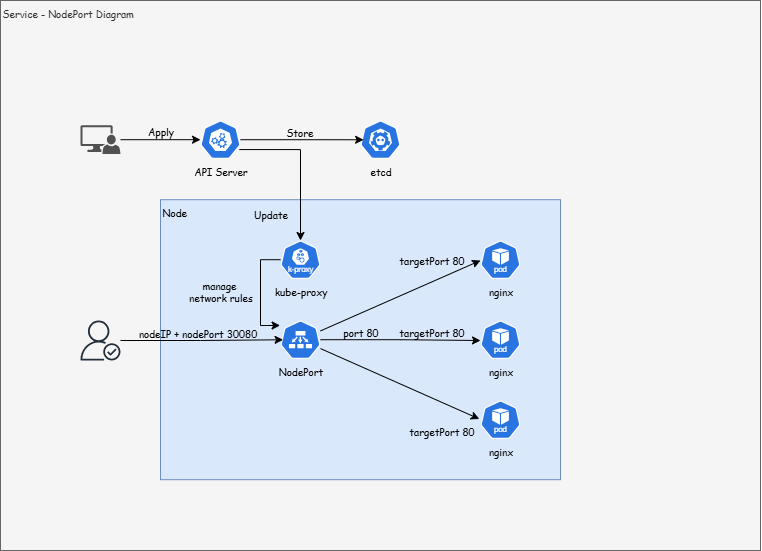
- Service Creation
- cmd:
kubectl apply -f nginx-nodeport.yaml API Serverregisters a newServiceobject namednginx-nodeport.kube-proxy(running on each Node) programs the necessary iptables or IPVS rules so that traffic to :30080 is forwarded to theService.Service’sselector:app=nginxmatchesPodsthat have the label app=nginx.- nodePort (30080): open on every Node externally.
- port (80): the Service’s virtual port inside the cluster.
- targetPort (80): the container port on each Pod.
- cmd:
- Client Sends a Request
- cmd:
curl http://NodeIP:30080 - packet arrives at Node, e.g.,
192.168.45.10, targeting port30080.
- cmd:
kube-proxyHandles Traffic- On that Node,
kube-proxyintercepts traffic to port 30080. kube-proxylooks at the Service → finds the list of backend Pods.kube-proxychooses onePodusing round-robin load balancing (or IPVS if configured).
- On that Node,
- Request Reaches Pod
kube-proxyforwards the packet toPodIP (10.244.2.7:80).- Inside Pod, the container running
Nginxlistens on port 80. Nginxprocesses the HTTP request and prepares a response.
- Response Back to Client
- Nginx sends back an HTTP response (e.g., HTML page).
- The response travels back along the reverse path:
- Pod → Node network → kube-proxy → Node’s external interface → Client.
- The client sees the Nginx page
- Summary:
Servicecreated →kube-proxysets up forwarding rules.Selectormatches Pods → Service knows which Pods are backends.- Ports mapped →
NodePort(30080) →Serviceport (80) →Podport (80).
Lab: Create NodePort with a single pod
- define pod:
pod.yaml
apiVersion: v1
kind: Pod
metadata:
  name: nginx-pod
  labels:
    app: nginx
spec:
  containers:
    - name: nginx
      image: nginx
service-nodeport.yaml
apiVersion: v1
kind: Service
metadata:
  name: mynodeport
spec:
  type: NodePort
  ports:
    - nodePort: 30080
      port: 80
      targetPort: 80
  selector:
    app: nginx
- Create Pod and serice
# create pod and service
kubectl create -f .
# pod/nginx-pod created
# service/mynodeport created

# confirm
kubectl get all
# NAME            READY   STATUS    RESTARTS   AGE
# pod/nginx-pod   1/1     Running   0          2m58s

# NAME                 TYPE        CLUSTER-IP    EXTERNAL-IP   PORT(S)        AGE
# service/kubernetes   ClusterIP   10.96.0.1     <none>        443/TCP        16h
# service/node-port    NodePort    10.98.28.26   <none>        80:30080/TCP   35s

# get nodeport information
kubectl get svc
# NAME         TYPE        CLUSTER-IP      EXTERNAL-IP   PORT(S)        AGE
# kubernetes   ClusterIP   10.96.0.1       <none>        443/TCP        16h
# node-port    NodePort    10.108.54.162   <none>        80:30080/TCP   16s

kubectl describe svc node-port
# Name:                     node-port
# Namespace:                default
# Labels:                   <none>
# Annotations:              <none>
# Selector:                 app=nginx
# Type:                     NodePort
# IP Family Policy:         SingleStack
# IP Families:              IPv4
# IP:                       10.108.54.162
# IPs:                      10.108.54.162
# Port:                     <unset>  80/TCP
# TargetPort:               80/TCP
# NodePort:                 <unset>  30080/TCP
# Endpoints:                10.1.2.148:80
# Session Affinity:         None
# External Traffic Policy:  Cluster
# Internal Traffic Policy:  Cluster
# Events:                   <none>

# confirm accessible
curl localhost:30080
# <!DOCTYPE html>
# <html>
# <head>
# <title>Welcome to nginx!</title>
# <style>
# html { color-scheme: light dark; }
# body { width: 35em; margin: 0 auto;
# font-family: Tahoma, Verdana, Arial, sans-serif; }
# </style>
# </head>
# <body>
# <h1>Welcome to nginx!</h1>
# <p>If you see this page, the nginx web server is successfully installed and
# working. Further configuration is required.</p>

# <p>For online documentation and support please refer to
# <a href="http://nginx.org/">nginx.org</a>.<br/>
# Commercial support is available at
# <a href="http://nginx.com/">nginx.com</a>.</p>

# <p><em>Thank you for using nginx.</em></p>
# </body>
# </html>

# remove
kubectl delete -f .
# pod "nginx-pod" deleted
# service "node-port" deleted
Lab: Create NodePort with Deployment
- Define deployment
deploy-nginx.yaml
apiVersion: apps/v1
kind: Deployment
metadata:
  name: nginx-deploy
spec:
  replicas: 3
  selector:
    matchLabels:
      app: nginx
  template:
    metadata:
      name: nginx-pod
      labels:
        app: nginx
    spec:
      containers:
        - name: nginx
          image: nginx
- Define deployment
service-nodeport.yaml
apiVersion: v1
kind: Service
metadata:
  name: node-port
spec:
  type: NodePort
  ports:
    - nodePort: 30080
      port: 80
      targetPort: 80
  selector:
    app: nginx
- Create
# create deployment
kubectl create -f .
# deployment.apps/nginx-deploy created
# service/node-port created

# confirm
kubectl get svc
# NAME         TYPE        CLUSTER-IP       EXTERNAL-IP   PORT(S)        AGE
# kubernetes   ClusterIP   10.96.0.1        <none>        443/TCP        16h
# node-port    NodePort    10.106.239.228   <none>        80:30080/TCP   31s
kubectl get deploy
# NAME           READY   UP-TO-DATE   AVAILABLE   AGE
# nginx-deploy   3/3     3            3           16s
kubectl get pod
# NAME                            READY   STATUS    RESTARTS   AGE
# nginx-deploy-764bf8c949-csk7v   1/1     Running   0          51s
# nginx-deploy-764bf8c949-dlhf5   1/1     Running   0          51s
# nginx-deploy-764bf8c949-wjf6b   1/1     Running   0          51s


curl localhost:30080
# <!DOCTYPE html>
# <html>
# <head>
# <title>Welcome to nginx!</title>
# <style>
# html { color-scheme: light dark; }
# body { width: 35em; margin: 0 auto;
# font-family: Tahoma, Verdana, Arial, sans-serif; }
# </style>
# </head>
# <body>
# <h1>Welcome to nginx!</h1>
# <p>If you see this page, the nginx web server is successfully installed and
# working. Further configuration is required.</p>

# <p>For online documentation and support please refer to
# <a href="http://nginx.org/">nginx.org</a>.<br/>
# Commercial support is available at
# <a href="http://nginx.com/">nginx.com</a>.</p>

# <p><em>Thank you for using nginx.</em></p>
# </body>
# </html>

# delete resource
kubectl delete -f .
# deployment.apps "nginx-deploy" deleted
# service "node-port" deleted
Lab: Create NodePort with multiple nodes
# demo-nodeport-deploy.yaml
apiVersion: apps/v1
kind: Deployment
metadata:
  name: nginx
spec:
  replicas: 2
  selector:
    matchLabels:
      app: nginx
  template:
    metadata:
      labels:
        app: nginx
    spec:
      volumes:
        - name: shared-data
          emptyDir: {}
      containers:
        - name: nginx
          image: nginx
          volumeMounts:
            - name: shared-data
              mountPath: /usr/share/nginx/html
          ports:
            - containerPort: 80
        - name: busybox
          image: busybox
          volumeMounts:
            - name: shared-data
              mountPath: /html
          env:
            - name: POD_NAME
              valueFrom:
                fieldRef:
                  fieldPath: metadata.name
            - name: NODE_NAME
              valueFrom:
                fieldRef:
                  fieldPath: spec.nodeName
          command:
            - "/bin/sh"
          args:
            - "-c"
            - |
              while true; do
               echo "<h1>$NODE_NAME:$POD_NAME - $(date)</h1>" > /html/index.html;

               sleep 1
              done
kubectl apply -f demo-nodeport-deploy.yaml
# deployment.apps/nginx created

kubectl get deploy -o wide
# NAME    READY   UP-TO-DATE   AVAILABLE   AGE   CONTAINERS      IMAGES          SELECTOR
# nginx   2/2     2            2           31s   nginx,busybox   nginx,busybox   app=nginx

kubectl get pod -o wide
# NAME                     READY   STATUS    RESTARTS   AGE   IP            NODE     NOMINATED NODE   READINESS GATES
# nginx-546c7dd8cf-rts7p   2/2     Running   0          62s   10.244.2.18   node02   <none>           <none>
# nginx-546c7dd8cf-t5kws   2/2     Running   0          62s   10.244.1.12   node01   <none>           <none>
- Create nodeport
# demo-nodeport-svc.yaml
apiVersion: v1
kind: Service
metadata:
  name: demo-nodeport-svc
spec:
  type: NodePort
  selector:
    app: nginx
  ports:
    - name: http
      protocol: TCP
      port: 8080
      targetPort: 80
kubectl apply -f demo-nodeport-svc.yaml
# service/demo-nodeport-svc created

# confirm
kubectl get svc -o wide
# NAME                TYPE        CLUSTER-IP     EXTERNAL-IP   PORT(S)          AGE   SELECTOR
# demo-nodeport-svc   NodePort    10.106.98.10   <none>        8080:30506/TCP   28s   app=nginx

kubectl describe svc demo-nodeport-svc
# Name:                     demo-nodeport-svc
# Namespace:                default
# Labels:                   <none>
# Annotations:              <none>
# Selector:                 app=nginx
# Type:                     NodePort
# IP Family Policy:         SingleStack
# IP Families:              IPv4
# IP:                       10.106.98.10
# IPs:                      10.106.98.10
# Port:                     http  8080/TCP
# TargetPort:               80/TCP
# NodePort:                 http  30506/TCP
# Endpoints:                10.244.1.12:80,10.244.2.18:80
# Session Affinity:         None
# External Traffic Policy:  Cluster
# Internal Traffic Policy:  Cluster
# Events:                   <none>
- confirm node IP+port
kubectl get node -o wide
# NAME           STATUS   ROLES           AGE   VERSION   INTERNAL-IP      EXTERNAL-IP   OS-IMAGE             KERNEL-VERSION      CONTAINER-RUNTIME
# controlplane   Ready    control-plane   32d   v1.33.6   192.168.10.150   <none>        Ubuntu 24.04.3 LTS   6.14.0-36-generic   containerd://1.7.28
# node01         Ready    <none>          32d   v1.33.6   192.168.10.151   <none>        Ubuntu 24.04.3 LTS   6.14.0-36-generic   containerd://1.7.28
# node02         Ready    <none>          32d   v1.33.6   192.168.10.152   <none>        Ubuntu 24.04.3 LTS   6.14.0-36-generic   containerd://1.7.28

# access from control-plane
curl 192.168.10.150:30506
# <h1>node01:nginx-546c7dd8cf-t5kws - Sun Dec 28 20:53:16 UTC 2025</h1>

# access from node01
curl 192.168.10.151:30506
# <h1>node02:nginx-546c7dd8cf-rts7p - Sun Dec 28 20:53:51 UTC 2025</h1>

# access from node02
curl 192.168.10.152:30506
# <h1>node02:nginx-546c7dd8cf-rts7p - Sun Dec 28 20:54:19 UTC 2025</h1>
- Confirm a internal cluster IP
# access from internal container
kubectl exec -it nginx-546c7dd8cf-rts7p -c busybox -- wget -O - http://10.106.98.10:8080
# Connecting to 10.106.98.10:8080 (10.106.98.10:8080)
# writing to stdout
# <h1>node02:nginx-546c7dd8cf-rts7p - Sun Dec 28 21:02:35 UTC 2025</h1>
# -                    100% |**************************************************|    70  0:00:00 ETA
# written to stdout