Note_Tech
All technological notes.
Project maintained by simonangel-fong Hosted on GitHub Pages — Theme by mattgraham
Kubernetes: Storage - Persistent Volume & Persistent Volume Claim
- Kubernetes: Storage -
Persistent Volume\&Persistent Volume Claim
Persistent Volume (PV)
-
Persistent Volume (PV)- an API object that represents a piece of storage in the cluster, provisioned by an administrator or dynamically via
Storage Classes. - object stores the information about the underlying storage
- an API object that represents a piece of storage in the cluster, provisioned by an administrator or dynamically via
-
A
PersistentVolumeobject represents a portion of the disk space that is available to applications within the cluster.- decouples this information from the pod.
-
Manged by
cluster admin -
Feature
- lifecycle:
- Independent of the pod’s existence
- Data Persistence
- Data is retained even after the consuming pod is deleted.
- Scope
- A cluster-wide resource
- can be attached to multiple
podssimultaneously,
- lifecycle:
- If the
volumehas already been used and might contain data, it should be erased before another user claims the volume.- therefore, the status become
RELEASEDwhen the pvc is deleteed. - Should be removed by using
kubectl delete pv
- therefore, the status become
- deleting the
pvobject is equivalent to deleting a data pointer.- Creating the same
pvobject is equivalent to Recreating the data point - the stored data remains.
- Creating the same
- Deletion of a
PVin used- the deletion is blocked.
- fix by delete underlying
PVC
Declarative Manifest
-
accessModesfield:- determines how many nodes, not pods, can attach the volume at a time
- Even if a
volumecan only be attached to a singlenode, it can be mounted in many pods if they all run on that single node.
- Even if a
- values:
ReadWriteOnce/RWO- can be mounted by a single
worker nodeinread/writemode. - While it’s mounted to the node, other nodes can’t mount the volume.
- can be mounted by a single
ReadWriteMany/RWX- can be mounted in
read/writemode on multipleworker nodesat the same time.
- can be mounted in
ReadOnlyMany/ROX- can be mounted on multiple
worker nodessimultaneously inread-onlymode.
- can be mounted on multiple
- determines how many nodes, not pods, can attach the volume at a time
-
persistentVolumeReclaimPolicyfield:Retain- default policy
- the PV retains when it is released.
-
Delete- the underlying storage are automatically deleted upon release.
- efault policy for
dynamically provisioned persistent volumes
- if a PV is released and the policy changes from
RetaintoDelete- underlying storage will be deleted immediately
Imperative Command
| Command | Description |
|---|---|
kubectl get persistentvolume / kubectl get pv |
List all PersistentVolumes in the cluster. |
kubectl get pv <name> |
Show a specific PV (basic info). |
kubectl describe pv <name> |
Show detailed status, events, and spec of a specific PV. |
kubectl delete pv <name> |
Delete a specific PV object (actual storage depends on reclaim policy). |
Lab: Create a Persistent Volume
- Explain
kubectl explain pv.spec.hostPath
# KIND:       PersistentVolume
# VERSION:    v1

# FIELD: hostPath <HostPathVolumeSource>


# DESCRIPTION:
#     hostPath represents a directory on the host. Provisioned by a developer or
#     tester. This is useful for single-node development and testing only! On-host
#     storage is not supported in any way and WILL NOT WORK in a multi-node
#     cluster. More info:
#     https://kubernetes.io/docs/concepts/storage/volumes#hostpath
#     Represents a host path mapped into a pod. Host path volumes do not support
#     ownership management or SELinux relabeling.

# FIELDS:
#   path  <string> -required-
#     path of the directory on the host. If the path is a symlink, it will follow
#     the link to the real path. More info:
#     https://kubernetes.io/docs/concepts/storage/volumes#hostpath

#   type  <string>
#   enum: "", BlockDevice, CharDevice, Directory, ....
#     type for HostPath Volume Defaults to "" More info:
#     https://kubernetes.io/docs/concepts/storage/volumes#hostpath

#     Possible enum values:
#      - `""` For backwards compatible, leave it empty if unset
#      - `"BlockDevice"` A block device must exist at the given path
#      - `"CharDevice"` A character device must exist at the given path
#      - `"Directory"` A directory must exist at the given path
#      - `"DirectoryOrCreate"` If nothing exists at the given path, an empty
#     directory will be created there as needed with file mode 0755, having the
#     same group and ownership with Kubelet.
#      - `"File"` A file must exist at the given path
#      - `"FileOrCreate"` If nothing exists at the given path, an empty file will
#     be created there as needed with file mode 0644, having the same group and
#     ownership with Kubelet.
#      - `"Socket"` A UNIX socket must exist at the given path
- PV
# demo-pv.yaml
apiVersion: v1
kind: PersistentVolume
metadata:
  name: demo-pv
spec:
  capacity:
    storage: 1Gi
  accessModes:
    # - ReadWriteOnce
    - ReadWriteMany
    - ReadOnlyMany
  hostPath:
    path: /var/demo-pv # directory in the worker node’s filesystem
kubectl apply -f demo-pv.yaml
# persistentvolume/demo-pv created

kubectl get pv
# NAME      CAPACITY   ACCESS MODES   RECLAIM POLICY   STATUS      CLAIM   STORAGECLASS   VOLUMEATTRIBUTESCLASS   REASON   AGE
# demo-pv   1Gi        RWO,ROX        Retain           Available                          <unset>                          20s

kubectl get pv -o wide
# NAME      CAPACITY   ACCESS MODES   RECLAIM POLICY   STATUS      CLAIM   STORAGECLASS   VOLUMEATTRIBUTESCLASS   REASON   AGE   VOLUMEMODE
# demo-pv   1Gi        RWO,ROX        Retain           Available                          <unset>                          62s   Filesystem

kubectl describe pv demo-pv
# Name:            demo-pv
# Labels:          <none>
# Annotations:     pv.kubernetes.io/bound-by-controller: yes
# Finalizers:      [kubernetes.io/pv-protection]
# StorageClass:
# Status:          Bound
# Claim:           default/demo-pvc
# Reclaim Policy:  Retain
# Access Modes:    RWO,ROX
# VolumeMode:      Filesystem
# Capacity:        1Gi
# Node Affinity:   <none>
# Message:
# Source:
#     Type:          HostPath (bare host directory volume)
#     Path:          /var/demo-pv
#     HostPathType:
# Events:            <none>
Persistent Volume Claims (PVC)
-
persistent volume claims(PVC)- the object represents application request for storage that is the persistent volume
- the ownership of the persistent volume
- lifecycle not tied to a pod
- Created before a pod use the
persistent volume - Remain the ownership after pod deletion.
- release volume when pvc delete.
- Created before a pod use the
- lifecycle not tied to a pod
-
Multiple
podacross the nodes can reference to the onePVC -
Benefits of using PV + PVC
- the infrastructure-specific details are now decoupled from the application represented by the
pod.- cluster admin create the
PersistentVolumeobjects with all their infrastructure-related low-level details. - software developers focus solely on describing the applications and their needs via the
PodandPersistentVolumeClaimobjects.- only needs to know the
pvname
- only needs to know the
- cluster admin create the
- the infrastructure-specific details are now decoupled from the application represented by the
-
Managed by the
app dev -
with
persistentVolume- By claiming the
persistent volume, thepodsnow have the exclusive right to use thevolume. - No one else can claim it until it is released by deleting the
PersistentVolumeClaimobject.
- By claiming the
- The deletion of
PVCin use- Status stays
Terminating - the pod stays running.
- fix: delete the underlying pod
- Status stays
Declarative Manifest
volumeNamefield:- the name of persistent volume
- if empty, k8s randomly choose one of the persistent volumes whose capacity and access modes match the claim
volumeModefield:- defines what type of volume is required by the claim.
- default:
Filesystem
Imperative Command
| Command | Description |
|---|---|
kubectl get persistentvolumeclaim / kubectl get pvc |
List all PersistentVolumeClaims in the current namespace. |
kubectl get pvc -n <namespace> |
List PVCs in a specific namespace. |
kubectl describe pvc <name> |
Show detailed status, events, and spec of a specific PVC. |
kubectl delete pvc <name> |
Delete a specific PVC. |
Lab: Explain PersistentVolumeClaim
kubectl explain pvc.spec
# KIND:       PersistentVolumeClaim
# VERSION:    v1

# FIELD: spec <PersistentVolumeClaimSpec>


# DESCRIPTION:
#     spec defines the desired characteristics of a volume requested by a pod
#     author. More info:
#     https://kubernetes.io/docs/concepts/storage/persistent-volumes#persistentvolumeclaims
#     PersistentVolumeClaimSpec describes the common attributes of storage devices
#     and allows a Source for provider-specific attributes

# FIELDS:
#   accessModes   <[]string>
#     accessModes contains the desired access modes the volume should have. More
#     info:
#     https://kubernetes.io/docs/concepts/storage/persistent-volumes#access-modes-1

#   dataSource    <TypedLocalObjectReference>
#     dataSource field can be used to specify either: * An existing VolumeSnapshot
#     object (snapshot.storage.k8s.io/VolumeSnapshot) * An existing PVC
#     (PersistentVolumeClaim) If the provisioner or an external controller can
#     support the specified data source, it will create a new volume based on the
#     contents of the specified data source. When the AnyVolumeDataSource feature
#     gate is enabled, dataSource contents will be copied to dataSourceRef, and
#     dataSourceRef contents will be copied to dataSource when
#     dataSourceRef.namespace is not specified. If the namespace is specified,
#     then dataSourceRef will not be copied to dataSource.

#   dataSourceRef <TypedObjectReference>
#     dataSourceRef specifies the object from which to populate the volume with
#     data, if a non-empty volume is desired. This may be any object from a
#     non-empty API group (non core object) or a PersistentVolumeClaim object.
#     When this field is specified, volume binding will only succeed if the type
#     of the specified object matches some installed volume populator or dynamic
#     provisioner. This field will replace the functionality of the dataSource
#     field and as such if both fields are non-empty, they must have the same
#     value. For backwards compatibility, when namespace isn't specified in
#     dataSourceRef, both fields (dataSource and dataSourceRef) will be set to the
#     same value automatically if one of them is empty and the other is non-empty.
#     When namespace is specified in dataSourceRef, dataSource isn't set to the
#     same value and must be empty. There are three important differences between
#     dataSource and dataSourceRef: * While dataSource only allows two specific
#     types of objects, dataSourceRef
#       allows any non-core object, as well as PersistentVolumeClaim objects.
#     * While dataSource ignores disallowed values (dropping them), dataSourceRef
#       preserves all values, and generates an error if a disallowed value is
#       specified.
#     * While dataSource only allows local objects, dataSourceRef allows objects
#       in any namespaces.
#     (Beta) Using this field requires the AnyVolumeDataSource feature gate to be
#     enabled. (Alpha) Using the namespace field of dataSourceRef requires the
#     CrossNamespaceVolumeDataSource feature gate to be enabled.

#   resources     <VolumeResourceRequirements>
#     resources represents the minimum resources the volume should have. If
#     RecoverVolumeExpansionFailure feature is enabled users are allowed to
#     specify resource requirements that are lower than previous value but must
#     still be higher than capacity recorded in the status field of the claim.
#     More info:
#     https://kubernetes.io/docs/concepts/storage/persistent-volumes#resources

#   selector      <LabelSelector>
#     selector is a label query over volumes to consider for binding.

#   storageClassName      <string>
#     storageClassName is the name of the StorageClass required by the claim. More
#     info: https://kubernetes.io/docs/concepts/storage/persistent-volumes#class-1

#   volumeAttributesClassName     <string>
#     volumeAttributesClassName may be used to set the VolumeAttributesClass used
#     by this claim. If specified, the CSI driver will create or update the volume
#     with the attributes defined in the corresponding VolumeAttributesClass. This
#     has a different purpose than storageClassName, it can be changed after the
#     claim is created. An empty string or nil value indicates that no
#     VolumeAttributesClass will be applied to the claim. If the claim enters an
#     Infeasible error state, this field can be reset to its previous value
#     (including nil) to cancel the modification. If the resource referred to by
#     volumeAttributesClass does not exist, this PersistentVolumeClaim will be set
#     to a Pending state, as reflected by the modifyVolumeStatus field, until such
#     as a resource exists. More info:
#     https://kubernetes.io/docs/concepts/storage/volume-attributes-classes/

#   volumeMode    <string>
#   enum: Block, Filesystem
#     volumeMode defines what type of volume is required by the claim. Value of
#     Filesystem is implied when not included in claim spec.

#     Possible enum values:
#      - `"Block"` means the volume will not be formatted with a filesystem and
#     will remain a raw block device.
#      - `"Filesystem"` means the volume will be or is formatted with a
#     filesystem.

#   volumeName    <string>
#     volumeName is the binding reference to the PersistentVolume backing this
#     claim.
Lab: Persistent Volume Claim
Create PVC
# demo-pvc.yaml
apiVersion: v1
kind: PersistentVolumeClaim
metadata:
  name: demo-pvc
spec:
  resources:
    requests:
      storage: 1Gi
  accessModes:
    - ReadWriteOnce
    # - ReadWriteMany
  storageClassName: ""
  volumeName: demo-pv
kubectl apply -f demo-pvc.yaml
# persistentvolumeclaim/demo-pvc created

# confirm pvc bound
kubectl get pvc
# NAME       STATUS   VOLUME    CAPACITY   ACCESS MODES   STORAGECLASS   VOLUMEATTRIBUTESCLASS   AGE
# demo-pvc   Bound    demo-pv   1Gi        RWO,ROX                       <unset>                 88s

kubectl get pvc -o wide
# NAME       STATUS   VOLUME    CAPACITY   ACCESS MODES   STORAGECLASS   VOLUMEATTRIBUTESCLASS   AGE    VOLUMEMODE
# demo-pvc   Bound    demo-pv   1Gi        RWO,ROX                       <unset>                 2m7s   Filesystem

kubectl describe pvc demo-pvc
# Name:          demo-pvc
# Namespace:     default
# StorageClass:
# Status:        Bound
# Volume:        demo-pv
# Labels:        <none>
# Annotations:   pv.kubernetes.io/bind-completed: yes
# Finalizers:    [kubernetes.io/pvc-protection]
# Capacity:      1Gi
# Access Modes:  RWO,ROX
# VolumeMode:    Filesystem
# Used By:       <none>
# Events:        <none>
- confirm pv status bound
kubectl get pv
# NAME      CAPACITY   ACCESS MODES   RECLAIM POLICY   STATUS   CLAIM              STORAGECLASS   VOLUMEATTRIBUTESCLASS   REASON   AGE
# demo-pv   1Gi        RWO,ROX        Retain           Bound    default/demo-pvc                  <unset>                          76m
Mount PVC
- Mount a pod
# demo-pod-pvc.yaml
apiVersion: v1
kind: Pod
metadata:
  name: demo-pod-pvc
spec:
  volumes:
    - name: db # volume name
      persistentVolumeClaim:
        claimName: demo-pvc # pvc name
  containers:
    - name: nginx
      image: nginx
      ports:
        - name: http
          containerPort: 80
    - name: mongo
      image: mongo
      volumeMounts:
        - name: db # volume name
          mountPath: /data/db
kubectl apply -f demo-pod-pvc.yaml
# pod/demo-pod-pvc created

# confirm
kubectl get pod/demo-pod-pvc
# NAME           READY   STATUS    RESTARTS   AGE
# demo-pod-pvc   2/2     Running   0          46s

kubectl describe pod/demo-pod-pvc
# Volumes:
#   db:
#     Type:       PersistentVolumeClaim (a reference to a PersistentVolumeClaim in the same namespace)
#     ClaimName:  demo-pvc
#     ReadOnly:   false
- Insert data
# insert data
kubectl exec -it demo-pod-pvc -c mongo -- mongosh -eval "db.telemetry.insertOne({device_id: 1, x: 1, y: 2});"
# {
#   acknowledged: true,
#   insertedId: ObjectId('694c3fe4487ac8f7fb8de666')
# }

kubectl exec -it demo-pod-pvc -c mongo -- mongosh -eval "db.telemetry.find()"
# [
#   {
#     _id: ObjectId('694c3fe4487ac8f7fb8de666'),
#     device_id: 1,
#     x: 1,
#     y: 2
#   }
# ]
Survive from Pod Restart
# Delete Pod
kubectl delete pod demo-pod-pvc
# pod "demo-pod-pvc" deleted from default namespace

kubectl get pvc
# NAME       STATUS   VOLUME    CAPACITY   ACCESS MODES   STORAGECLASS   VOLUMEATTRIBUTESCLASS   AGE
# demo-pvc   Bound    demo-pv   1Gi        RWO,ROX                       <unset>                 85m

kubectl apply -f demo-pod-pvc.yaml
# pod/demo-pod-pvc created

# confirm
kubectl exec -it demo-pod-pvc -c mongo -- mongosh -eval "db.telemetry.find()"
# [
#   {
#     _id: ObjectId('694c3fe4487ac8f7fb8de666'),
#     device_id: 1,
#     x: 1,
#     y: 2
#   }
# ]
Delete PVC
kubectl delete pod demo-pod-pvc
# pod "demo-pod-pvc" deleted from default namespace

kubectl delete pvc demo-pvc
# persistentvolumeclaim "demo-pvc" deleted from default namespace
- recreate pvc
kubectl apply -f demo-pvc.yaml
# persistentvolumeclaim/demo-pvc created

# confirm pv: released status
kubectl get pv
# NAME      CAPACITY   ACCESS MODES   RECLAIM POLICY   STATUS     CLAIM              STORAGECLASS   VOLUMEATTRIBUTESCLASS   REASON   AGE
# demo-pv   1Gi        RWO,ROX        Retain           Released   default/demo-pvc                  <unset>                          70s

# confirm status: pending
kubectl get pvc
# NAME       STATUS    VOLUME    CAPACITY   ACCESS MODES   STORAGECLASS   VOLUMEATTRIBUTESCLASS   AGE
# demo-pvc   Pending   demo-pv   0                                        <unset>                 36s
- Delete PVC and PV
kubectl delete pvc demo-pvc
# persistentvolumeclaim "demo-pvc" deleted from default namespace

kubectl delete pv demo-pv
# persistentvolume "demo-pv" deleted
Recreate PV, PVC, and pod
kubectl apply -f demo-pv.yaml
# persistentvolume/demo-pv created

kubectl apply -f demo-pvc.yaml
# persistentvolumeclaim/demo-pvc created

# confirm
kubectl get pv
# NAME      CAPACITY   ACCESS MODES   RECLAIM POLICY   STATUS   CLAIM              STORAGECLASS   VOLUMEATTRIBUTESCLASS   REASON   AGE
# demo-pv   1Gi        RWO,ROX        Retain           Bound    default/demo-pvc                  <unset>                          41s

kubectl get pvc
# NAME       STATUS   VOLUME    CAPACITY   ACCESS MODES   STORAGECLASS   VOLUMEATTRIBUTESCLASS   AGE
# demo-pvc   Bound    demo-pv   1Gi        RWO,ROX                       <unset>                 35s

# create pod
kubectl apply -f demo-pod-pvc.yaml
# pod/demo-pod-pvc created

# confirm data
kubectl exec -it demo-pod-pvc -c mongo -- mongosh -eval "db.telemetry.find()"
# [
#   {
#     _id: ObjectId('694c3fe4487ac8f7fb8de666'),
#     device_id: 1,
#     x: 1,
#     y: 2
#   }
# ]
deletion of pv, pvc will not remove the stored ddata.
Delete PVC in use
kubectl get pv
# NAME      CAPACITY   ACCESS MODES   RECLAIM POLICY   STATUS   CLAIM              STORAGECLASS   VOLUMEATTRIBUTESCLASS   REASON   AGE
# demo-pv   1Gi        RWO,ROX        Retain           Bound    default/demo-pvc                  <unset>                          21m

kubectl get pvc
# NAME       STATUS   VOLUME    CAPACITY   ACCESS MODES   STORAGECLASS   VOLUMEATTRIBUTESCLASS   AGE
# demo-pvc   Bound    demo-pv   1Gi        RWO,ROX                       <unset>                 21m

kubectl get pod
# NAME           READY   STATUS    RESTARTS   AGE
# demo-pod-pvc   2/2     Running   0          19m

# delete pvc
kubectl delete pvc demo-pvc
# persistentvolumeclaim "demo-pvc" deleted from default namespace

# pvc status: pending
kubectl get pvc
# NAME       STATUS        VOLUME    CAPACITY   ACCESS MODES   STORAGECLASS   VOLUMEATTRIBUTESCLASS   AGE
# demo-pvc   Terminating   demo-pv   1Gi        RWO,ROX                       <unset>                 22m

# ========== fix ============

# delete pod
kubectl delete pod demo-pod-pvc
# pod "demo-pod-pvc" deleted from default namespace

# confirm
kubectl get pvc
# No resources found in default namespace.

kubectl get pv
# NAME      CAPACITY   ACCESS MODES   RECLAIM POLICY   STATUS     CLAIM              STORAGECLASS   VOLUMEATTRIBUTESCLASS   REASON   AGE
# demo-pv   1Gi        RWO,ROX        Retain           Released   default/demo-pvc                  <unset>                          25m
Delete PV in use
# recreate pvc
kubectl apply -f demo-pv.yaml
# recreate pv
kubectl apply -f demo-pvc.yaml
# persistentvolumeclaim/demo-pvc created

kubectl get pv
# NAME      CAPACITY   ACCESS MODES   RECLAIM POLICY   STATUS   CLAIM              STORAGECLASS   VOLUMEATTRIBUTESCLASS   REASON   AGE
# demo-pv   1Gi        RWO,ROX        Retain           Bound    default/demo-pvc                  <unset>                          14s
kubectl get pvc
# NAME       STATUS   VOLUME    CAPACITY   ACCESS MODES   STORAGECLASS   VOLUMEATTRIBUTESCLASS   AGE
# demo-pvc   Bound    demo-pv   1Gi        RWO,ROX                       <unset>                 22s

#  delete pv in use: get stuck
kubectl delete pv demo-pv
# persistentvolume "demo-pv" deleted

kubectl get pv
# NAME      CAPACITY   ACCESS MODES   RECLAIM POLICY   STATUS        CLAIM              STORAGECLASS   VOLUMEATTRIBUTESCLASS   REASON   AGE
# demo-pv   1Gi        RWO,ROX        Retain           Terminating   default/demo-pvc                  <unset>                          85s

# ======== fix ========

# remove pvc
kubectl delete pvc demo-pvc
# persistentvolumeclaim "demo-pvc" deleted from default namespace

# confirm
kubectl get pv
# No resources found
Lab: Share PV with Multiple pods
# demo-share-pv.yaml
apiVersion: v1
kind: PersistentVolume
metadata:
  name: demo-share-pv
spec:
  capacity:
    storage: 1Gi
  accessModes:
    - ReadWriteOnce
    - ReadOnlyMany # share
  hostPath:
    path: /var/demo-share-pv # directory in the worker node’s filesystem
# demo-share-pvc.yaml
apiVersion: v1
kind: PersistentVolumeClaim
metadata:
  name: demo-share-pvc
spec:
  resources:
    requests:
      storage: 1Gi
  accessModes:
    - ReadWriteOnce
    # - ReadWriteMany
  storageClassName: ""
  volumeName: demo-share-pv
# demo-pod-share-pvc-writer.yaml
apiVersion: v1
kind: Pod
metadata:
  name: demo-pod-share-pvc-writer
spec:
  volumes:
    - name: share-data
      persistentVolumeClaim:
        claimName: demo-share-pvc
  containers:
    - name: writer
      image: busybox
      command:
        - sh
        - -c
        - |
          while true; do
            echo "<h1>Hello from the data writer container!$(date)</h1>" > /share/index.html;
            sleep 1;
          done
      volumeMounts:
        - name: share-data
          mountPath: /share
# demo-pod-share-pvc-nginx.yaml
apiVersion: v1
kind: Pod
metadata:
  generateName: demo-pod-share-pvc-nginx
spec:
  volumes:
    - name: share-data
      persistentVolumeClaim:
        claimName: demo-share-pvc
        readOnly: true
  containers:
    - name: nginx
      image: nginx:alpine
      volumeMounts:
        - name: share-data
          mountPath: /usr/share/nginx/html
      ports:
        - containerPort: 80
kubectl apply -f demo-share-pv.yaml
# persistentvolume/demo-share-pv created

kubectl get pv
# NAME            CAPACITY   ACCESS MODES   RECLAIM POLICY   STATUS   CLAIM                    STORAGECLASS   VOLUMEATTRIBUTESCLASS   REASON   AGE
# demo-share-pv   1Gi        RWO,ROX        Retain           Bound    default/demo-share-pvc                  <unset>                          75s

kubectl apply -f demo-share-pvc.yaml
# persistentvolumeclaim/demo-share-pvc created

kubectl get pvc
# NAME             STATUS   VOLUME          CAPACITY   ACCESS MODES   STORAGECLASS   VOLUMEATTRIBUTESCLASS   AGE
# demo-share-pvc   Bound    demo-share-pv   1Gi        RWO,ROX                       <unset>                 23s

kubectl apply -f demo-pod-share-pvc-writer.yaml
# pod/demo-pod-share-pvc-writer created

kubectl create -f demo-pod-share-pvc-nginx.yaml
# pod/demo-pod-share-pvc-nginx created

kubectl get pod
# NAME                        READY   STATUS    RESTARTS   AGE
# demo-pod-share-pvc-nginx    1/1     Running   0          13s
# demo-pod-share-pvc-writer   1/1     Running   0          117s

kubectl port-forward demo-pod-share-pvc-nginx 8080:80
# Forwarding from 127.0.0.1:8080 -> 80
# Forwarding from [::1]:8080 -> 80

curl http://localhost:8080/
# <h1>Hello from the data writer container!Wed Dec 24 23:07:24 UTC 2025</h1>
Liftcycle: Persistent Volume & Persistent Volume Claim
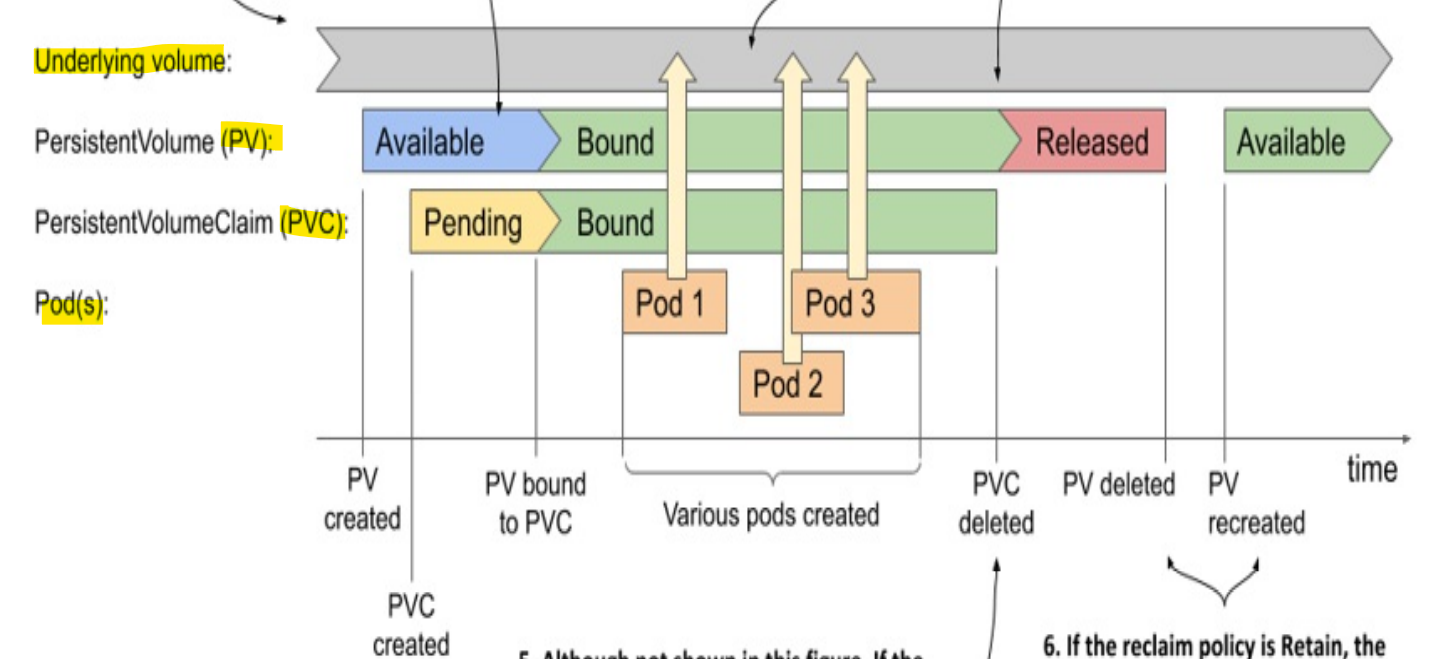
-
underlying volume- created beforehand
- e.g., device, nfs
-
Mannually provisioned
PVstatusAvailable: Created/RecreatedBound: a PVC createdReleased: PVC deleted- manually provisioned
persistent volumesis decoupled withunderlying volume
-
PVC:Pending: When created, befor bound to a PVBound: Bound to a PV
-
If the PVC policy ==
Delete:- PVC, PV, and underlying volumes are deleted.