Note_Tech
All technological notes.
Project maintained by simonangel-fong Hosted on GitHub Pages — Theme by mattgraham
Kubernetes - DaemonSets
- Kubernetes - DaemonSets
DaemonSet
-
DaemonSet-
an API object that ensures that exactly one replica of a Pod is running on each cluster node.
- By default,
daemon Podsare deployed on every node - can use a
node selectorto restrict deployment to some of the nodes.
- By default,
- don’t specify the desired number of replicas
- a workload controller that replicates a particular Pod across the Nodes
- As
nodesjoin/leave the cluster, theDaemonSetautomatically adds/removes thePodon thosenodes.
-
-
By default,
DaemonSetswill attempt to run on all nodes that are not tainted to prevent scheduling, such as control plane nodes. -
Feature
- Automatic Pod Creation
- automatically schedules one instance of its defined Pod on each eligible node in the cluster.
- Node Addition Handling
- automatically detects and schedules a new Pod on that newly added node.
- Node Removal Handling:
- If a node is removed from the cluster, the DaemonSet controller detects this and automatically garbage collects (deletes) the corresponding Pod running on that removed node.
- Automatic Pod Creation
-
Common use cases
- networking:
kube-proxy, an agent used to set up Service forwarding on each node.calico, an agent for networking solution
- Monitoring and logging:
- log shippers (Fluent Bit/Fluentd),
- metrics (node-exporter),
- security/EBPF agents (Falco),
- backup daemons
- CNI/CNI add-ons, CSI node plugins
- networking:
DaemonSet controller
-
DaemonSet controller- finds the Pods that match the
label selector, - checks that each node has exactly one matching Pod,
- creates or removes Pods to ensure that this is the case.
- finds the Pods that match the
- When adding a
Nodeto the cluster, theDaemonSet controllercreates anew Podand associates it with that Node. - When removing a
Node, theDaemonSet controllerdeletes the Pod object associated with it. - If one of these daemon Pods disappears, for example, because it was deleted manually, the
controllerimmediately recreates it. -
If an additional Pod appears, for example, if you create a Pod that matches the label selector in the
DaemonSet, thecontrollerimmediately deletes it. - The
DaemonSet controllerwatchesDaemonSetPodNode
How does it work
- Before v1.12
- use the nodeName in the pode to schedule on each node
- v1.12
- use Default Scheduler + NodeAffinity
DaemonSet vs ReplicaSet vs Deployment
- If need one per node:
DaemonSet. - If need N replicas with rollouts & rollback:
Deployment. - Use
ReplicaSetdirectly only for niche cases (e.g., custom controllers, teaching) — most users should use Deployments.
Additional Label
pod-template-generation:- obsolete
- replaced by
controller-revision-hash
controller-revision-hash:- allows the controller to distinguish between Pods created with the old and the new Pod template during updates.
Scheduling
-
by default, a
DaemonSetdeploys Pods to allnodesthat don’t havetaintsthat the Pod doesn’ttolerate, -
spec.nodeAffinityfield- used by
DaemonSet Controllerto ensure that the Pod is scheduled to each Node. - then
Schedulerschedules the pod to specific node.
- used by
-
spec.template.spec.nodeSelectorfield- mutable
- can update the selector any time.
- specify the node on which the pod runs
- pod is created only on the node that matches the node selector.
- e.g.,
- node with label
gpu:cuda - ds to monitor specify node selector with
gpu:cuda
- node with label
- mutable
Specify Priority Classes
- By default, Pods deployed via a
DaemonSetare no more important than Pods deployed viaDeploymentsorStatefulSets. -
priority is represented by the
PriorityClassobject -
priorityClassNamefield- specify which
priority classa Pod belongs to
- specify which
- Example
spec:
  template:
    spec:
      priorityClassName: system-node-critical
Imperatives Commands
- CRUD
| Command | Description |
|---|---|
kubectl explain ds |
See field docs (spec, updateStrategy, etc.). |
kubectl get ds -A |
List all DaemonSets across namespaces. |
kubectl get ds |
List all DaemonSets in current namespaces. |
kubectl get ds ds_name -n ns_name |
Show a DaemonSet. |
kubectl get ds ds_name -n ns_name -o wide |
Show a DaemonSet with node, images, and selectors. |
kubectl describe ds ds_name -n ns_name |
Detailed spec, events (great for scheduling/taints issues). |
kubectl apply -f ds.yaml |
Create/update from a manifest file. |
kubectl edit ds ds_name -n ns_name |
Edit the DaemonSet live (opens your editor). |
kubectl delete ds ds_name -n ns_name |
Delete the DaemonSet (Pods will be removed). |
- Manage
| Command | Description |
|---|---|
kubectl label ds/ds_name key=value -n ns_name |
Add or change labels. |
kubectl set image ds/ds_name con_name=image:tag -n ns_name |
Update container image (triggers rolling update). |
kubectl set env ds/ds_name KEY=VALUE --containers=<ctr> -n ns_name |
Add/change env vars. |
kubectl annotate ds/ds_name key=value -n ns_name |
Add or change annotations. |
kubectl patch ds/ds_name -n ns_name -p '<json/strategic merge>' |
Quick, targeted spec changes. |
kubectl rollout status ds/ds_name -n ns_name |
Watch rollout progress. |
kubectl rollout history ds/ds_name -n ns_name |
See past revisions. |
kubectl rollout undo ds/ds_name -n ns_name [--to-revision=N] |
Roll back to a prior revision. |
kubectl rollout restart ds/ds_name -n ns_name |
Restart Pods managed by the DaemonSet. |
kubectl get pods -l <selector> -n ns_name -o wide |
List the DaemonSet’s Pods (one per node). |
kubectl logs -l <selector> -n ns_name --all-containers |
Stream logs from all matching Pods. |
kubectl drain <node> --ignore-daemonsets |
Drain a node without evicting DaemonSet Pods (node maintenance). |
Declarative Manifest
apiVersion: apps/v1
kind: DaemonSet
metadata:
  name: monitoring-daemon
spec:
  selector:
    matchLabels:
      app: monitoring-agent
  template:
    spec:
      containers:
        - name: monitoring-agent
          image: monitoring-agent
Lab: DaemonSet
Default DS
# list all ds
kubectl get ds -A
# NAMESPACE     NAME         DESIRED   CURRENT   READY   UP-TO-DATE   AVAILABLE   NODE SELECTOR            AGE
# kube-system   kube-proxy   1         1         1       1            1           kubernetes.io/os=linux   16d

# list ds in system ns
kubectl get ds kube-proxy -n kube-system
# NAME         DESIRED   CURRENT   READY   UP-TO-DATE   AVAILABLE   NODE SELECTOR            AGE
# kube-proxy   1         1         1       1            1           kubernetes.io/os=linux   16d

# with pod, image ans selector
kubectl get ds kube-proxy -n kube-system -o wide
# NAME         DESIRED   CURRENT   READY   UP-TO-DATE   AVAILABLE   NODE SELECTOR            AGE   CONTAINERS   IMAGES                               SELECTOR
# kube-proxy   1         1         1       1            1           kubernetes.io/os=linux   16d   kube-proxy   registry.k8s.io/kube-proxy:v1.34.1   k8s-app=kube-proxy

# show details
kubectl describe ds kube-proxy -n kube-system
# Name:           kube-proxy
# Namespace:      kube-system
# Selector:       k8s-app=kube-proxy
# Node-Selector:  kubernetes.io/os=linux
# Labels:         k8s-app=kube-proxy
# Annotations:    deprecated.daemonset.template.generation: 1
# Desired Number of Nodes Scheduled: 1
# Current Number of Nodes Scheduled: 1
# Number of Nodes Scheduled with Up-to-date Pods: 1
# Number of Nodes Scheduled with Available Pods: 1
# Number of Nodes Misscheduled: 0
# Pods Status:  1 Running / 0 Waiting / 0 Succeeded / 0 Failed

# show tolerate
kubectl get ds kube-proxy -n kube-system -o yaml
# spec:
#   template:
#     spec:
#       tolerations:
#       - operator: Exists
Create ds
# demo-ds.yaml
apiVersion: apps/v1
kind: DaemonSet
metadata:
  name: demo-ds
spec:
  selector:
    matchLabels:
      app: monitor
  template:
    metadata:
      labels:
        app: monitor
  spec:
    containers:
      - name: monitor
        image: busybox
        command:
          - sleep
          - infinity
kubectl get ndoe
# NAME           STATUS   ROLES           AGE   VERSION
# controlplane   Ready    control-plane   34d   v1.33.6
# node01         Ready    <none>          34d   v1.33.6
# node02         Ready    <none>          34d   v1.33.6

# get the existing ds
kubectl get ds -A
# NAMESPACE      NAME              DESIRED   CURRENT   READY   UP-TO-DATE   AVAILABLE   NODE SELECTOR            AGE
# kube-flannel   kube-flannel-ds   3         3         3       3            3           <none>                   34d
# kube-system    kube-proxy        3         3         3       3            3           kubernetes.io/os=linux   34d


kubectl apply -f demo-ds.yaml
# daemonset.apps/demo-ds created

kubectl get ds
# NAME      DESIRED   CURRENT   READY   UP-TO-DATE   AVAILABLE   NODE SELECTOR   AGE
# demo-ds   2         2         2       2            2           <none>          16s

kubectl get ds -o wide
# NAME      DESIRED   CURRENT   READY   UP-TO-DATE   AVAILABLE   NODE SELECTOR   AGE   CONTAINERS   IMAGES    SELECTOR
# demo-ds   2         2         2       2            2           <none>          27s   monitor      busybox   app=monitor

kubectl describe ds demo-ds
# Name:           demo-ds
# Namespace:      default
# Selector:       app=monitor
# Node-Selector:  <none>
# Labels:         <none>
# Annotations:    deprecated.daemonset.template.generation: 1
# Desired Number of Nodes Scheduled: 2
# Current Number of Nodes Scheduled: 2
# Number of Nodes Scheduled with Up-to-date Pods: 2
# Number of Nodes Scheduled with Available Pods: 2
# Number of Nodes Misscheduled: 0
# Pods Status:  2 Running / 0 Waiting / 0 Succeeded / 0 Failed
# Pod Template:
#   Labels:  app=monitor
#   Containers:
#    monitor:
#     Image:      busybox
#     Port:       <none>
#     Host Port:  <none>
#     Command:
#       sleep
#       infinity
#     Environment:   <none>
#     Mounts:        <none>
#   Volumes:         <none>
#   Node-Selectors:  <none>
#   Tolerations:     <none>
# Events:
#   Type    Reason            Age   From                  Message
#   ----    ------            ----  ----                  -------
#   Normal  SuccessfulCreate  86s   daemonset-controller  Created pod: demo-ds-rqgbp
#   Normal  SuccessfulCreate  86s   daemonset-controller  Created pod: demo-ds-vwll7


kubectl get ds demo-ds -o yaml
# status:
#   currentNumberScheduled: 2
#   desiredNumberScheduled: 2
#   numberAvailable: 2
#   numberMisscheduled: 0
#   numberReady: 2
#   observedGeneration: 1
#   updatedNumberScheduled: 2

kubectl get pod
# NAME            READY   STATUS    RESTARTS   AGE
# demo-ds-rqgbp   1/1     Running   0          51s
# demo-ds-vwll7   1/1     Running   0          51s

# confirm:
#  ds has label controller-revision-hash, pod-template-generation
kubectl describe pod demo-ds-rqgbp
# Node:             node02/192.168.10.152
# Start Time:       Thu, 01 Jan 2026 18:40:12 -0500
# Labels:           app=monitor
#                   controller-revision-hash=696f9dcc75
#                   pod-template-generation=1
# Controlled By:  DaemonSet/demo-ds
# Node-Selectors:              <none>
# Tolerations:                 node.kubernetes.io/disk-pressure:NoSchedule op=Exists
#                              node.kubernetes.io/memory-pressure:NoSchedule op=Exists
#                              node.kubernetes.io/not-ready:NoExecute op=Exists
#                              node.kubernetes.io/pid-pressure:NoSchedule op=Exists
#                              node.kubernetes.io/unreachable:NoExecute op=Exists
#                              node.kubernetes.io/unschedulable:NoSchedule op=Exists

# confirm affinity
kubectl get pod demo-ds-rqgbp -o yaml
# spec:
#   affinity:
#     nodeAffinity:
#       requiredDuringSchedulingIgnoredDuringExecution:
#         nodeSelectorTerms:
#         - matchFields:
#           - key: metadata.name
#             operator: In
#             values:
#             - node02
#   tolerations:
#   - effect: NoExecute
#     key: node.kubernetes.io/not-ready
#     operator: Exists
#   - effect: NoExecute
#     key: node.kubernetes.io/unreachable
#     operator: Exists
#   - effect: NoSchedule
#     key: node.kubernetes.io/disk-pressure
#     operator: Exists
#   - effect: NoSchedule
#     key: node.kubernetes.io/memory-pressure
#     operator: Exists
#   - effect: NoSchedule
#     key: node.kubernetes.io/pid-pressure
#     operator: Exists
#   - effect: NoSchedule
#     key: node.kubernetes.io/unschedulable
#     operator: Exists
Lab: DaemonSet with Node Selector
# demo-ds-nodeselector.yaml
apiVersion: apps/v1
kind: DaemonSet
metadata:
  name: demo-ds
spec:
  selector:
    matchLabels:
      app: monitor
  template:
    metadata:
      labels:
        app: monitor
    spec:
      nodeSelector:
        node-role: front-end
      containers:
        - name: monitor
          image: busybox
          command:
            - sleep
            - infinity
kubectl apply -f demo-ds-nodeselector.yaml
# daemonset.apps/demo-ds created

kubectl get node -L node-role
# NAME           STATUS   ROLES           AGE   VERSION   NODE-ROLE
# controlplane   Ready    control-plane   37d   v1.33.6
# node01         Ready    <none>          37d   v1.33.6   front-end
# node02         Ready    <none>          37d   v1.33.6

kubectl get ds
# NAME      DESIRED   CURRENT   READY   UP-TO-DATE   AVAILABLE   NODE SELECTOR         AGE
# demo-ds   1         1         1       1            1           node-role=front-end   30s

kubectl get pod -o wide
# NAME            READY   STATUS    RESTARTS   AGE     IP            NODE     NOMINATED NODE   READINESS GATES
# demo-ds-gj4hj   1/1     Running   0          2m36s   10.244.1.18   node01   <none>           <none>
- Update node label
kubectl label node node02 node-role=front-end
# node/node02 labeled

# confirm ds add 1
kubectl get ds
# NAME      DESIRED   CURRENT   READY   UP-TO-DATE   AVAILABLE   NODE SELECTOR         AGE
# demo-ds   2         2         2       2            2           node-role=front-end   8m38s

# confirm pod
kubectl get pod -o wide
# NAME            READY   STATUS    RESTARTS   AGE     IP            NODE     NOMINATED NODE   READINESS GATES
# demo-ds-gj4hj   1/1     Running   0          9m13s   10.244.1.18   node01   <none>           <none>
# demo-ds-r8pqz   1/1     Running   0          61s     10.244.2.20   node02   <none>           <none>
- Remove node label
kubectl label node node01 node-role-
# node/node01 unlabeled

# confirm ds -1
kubectl get ds
# NAME      DESIRED   CURRENT   READY   UP-TO-DATE   AVAILABLE   NODE SELECTOR         AGE
# demo-ds   1         1         1       1            1           node-role=front-end   10m

# confirm pod
kubectl get pod -o wide
# NAME            READY   STATUS    RESTARTS   AGE     IP            NODE     NOMINATED NODE   READINESS GATES
# demo-ds-r8pqz   1/1     Running   0          2m22s   10.244.2.20   node02   <none>           <none>
- update node selector
- Use standard k8s label
- monitor os=linux
# update:
#     spec:
#       nodeSelector:
#         kubernetes.io/os: linux
kubectl apply -f demo-ds-nodeselector.yaml
# daemonset.apps/demo-ds configured

kubectl get ds
# NAME      DESIRED   CURRENT   READY   UP-TO-DATE   AVAILABLE   NODE SELECTOR            AGE
# demo-ds   2         2         2       1            2           kubernetes.io/os=linux   18m

 kubectl get pod -o wide
# NAME            READY   STATUS    RESTARTS   AGE   IP            NODE     NOMINATED NODE   READINESS GATES
# demo-ds-fgqkh   1/1     Running   0          24s   10.244.2.21   node02   <none>           <none>
# demo-ds-wqqvw   1/1     Running   0          59s   10.244.1.19   node01   <none>           <none>
- delete nodeSelector
kubectl patch ds demo-ds --type='json' -p='[{ "op": "remove", "path": "/spec/template/spec/nodeSelector"}]'
# daemonset.apps/demo-ds patched

kubectl get ds
# NAME      DESIRED   CURRENT   READY   UP-TO-DATE   AVAILABLE   NODE SELECTOR   AGE
# demo-ds   2         2         2       0            2           <none>          26m
DaemonSet with Privileged Access
-
node agents and daemons typically require greater access to the node
- can be achieved in two ways:
privileged container, give the container full access to the kernel- Giving a container access to specific capabilities
- can be achieved in two ways:
Grant containers access to the OS kernel
-
privileged container- a container have full access to the kernel
-
example
# kube-proxy
spec:
  template:
    spec:
      containers:
        - name: kube-proxy
          securityContext:
            privileged: true
-
Giving a container access to specific capabilities
- a
node agentordaemontypically only needs access to a subset of thesystem callsprovided by the kernel. - should grant the workload access to only the minimum set of
system callsit needs to do its job.
- a
-
example:
# kubectl get ds kube-flannel-ds -n kube-flannel -o yaml
spec:
  template:
    spec:
      containers:
        name: kube-flannel
        securityContext:
          capabilities:
            add:
              - NET_ADMIN
              - NET_RAW
          privileged: false
NET_RAWcapability:
- allows the container to use special socket types and bind to any address
NET_ADMINcapability:
- allows various privileged network-related operations such as interface configuration, firewall management, changing routing tables, and so on.
- Both help in setting up the networking for all other
Podson aNode.
Gran access to the node’s filesystem
-
A
node agentordaemonmay need to access the host node’sfile system.- e.g., a
node agentdeployed through aDaemonSetcould be used to install software packages on all cluster nodes. - access to the host node’s file system via the
hostPath volume
- e.g., a
-
Example
# kubectl get ds kube-proxy -n kube-system -o yaml
spec:
  template:
    spec:
      volumes:
        - hostPath:
            path: /run/xtables.lock
            type: FileOrCreate
          name: xtables-lock
        - hostPath:
            path: /lib/modules
            type: ""
          name: lib-modules
hostPath.path: /run/xtables.lock:
- allows the process in the kube-proxy daemon Pod to access the node’s
xtables.lock file, which is used by theiptablesornftablestools that the process uses to manipulate the node’s IP packet filtering.hostPath.path: /lib/modules:
- allows the process to access the kernel modules that are installed on the node.
Access to the node’s network and other namespaces
- Pod deployed by DS can access to node’s network
-
template.spec.hostNetwork=true:- enable pod to use the host Node’s network environment (devices, stacks, and ports)
- act like process that run directly on the node that use the Node’s address(es)
- the pod also use its own namespace to remain isolated from the node in other respects
- use their own
IPCandPIDnamespaces - can’t see the other processes or communicate with them via inter-process communication.
- use their own
-
hostIPCandhostPID:- specify the IPC and PID to enable a daemon Pod to use the node’s
IPCandPIDnamespaces
- specify the IPC and PID to enable a daemon Pod to use the node’s
- Example
# kubectl get ds kube-proxy -n kube-system -o yaml

spec:
  template:
    spec:
      dnsPolicy: ClusterFirst
      hostNetwork: true # access to host network
# get node ip: 192.168.10.150
ip a
2: ens33: <BROADCAST,MULTICAST,UP,LOWER_UP> mtu 1500 qdisc fq_codel state UP group default qlen 1000
    link/ether 00:0c:29:81:e1:09 brd ff:ff:ff:ff:ff:ff
    altname enp2s1
    inet 192.168.10.150/24 brd 192.168.10.255 scope global ens33
       valid_lft forever preferred_lft forever
    inet 192.168.10.107/24 metric 100 brd 192.168.10.255 scope global secondary dynamic ens33
       valid_lft 1590sec preferred_lft 1590sec
    inet6 fe80::20c:29ff:fe81:e109/64 scope link
       valid_lft forever preferred_lft forever

# confirm kube-proxy ip = host ip
kubectl -n kube-system get po -o wide
# NAME                                   READY   STATUS    RESTARTS       AGE   IP               NODE           NOMINATED NODE   READINESS GATES
# kube-proxy-8rr2r                       1/1     Running   5 (4d3h ago)   37d   192.168.10.150   controlplane   <none>           <none>
Connect with the local daemon Pod
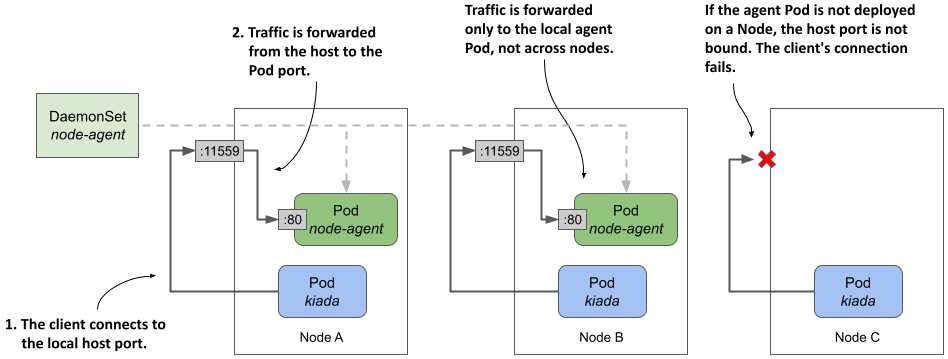
hostPort method
- The way to ensure a pod communicate with the local daemon pod, not the one on another node
- forward a network port on the host node to a port on the daemon Pod and configure the client to connect to it.
-
ds.spec.template.containers.ports.hostPortfield- specify the desired port number of the host node
- the clent connects to the local host port, which forward traffic to the daemon container
- example
apiVersion: apps/v1
kind: DaemonSet
metadata:
  name: node-agent
spec:
  template:
    spec:
      containers:
        - name: node-agent
          image: luksa/node-agent:0.1
          args:
            - --listen-address
            - :80
          ports:
            - name: http
              containerPort: 80
              hostPort: 11559
- containers within the node-agent exposes on
port 80, which bind tohostPortof the node.
- traffic received by the host Node on port 11559 is forwarded to port 80 within the node-agent container
- Can test the
daemon podbycurl node_ip:11559
- vs NodePort Service
NodePort Service:- traffic received by
nodePortforwards to randompodmatched withservice’s selector - if one pod fails, traffic can be sent to another pod
- traffic received by
nodePort DaemonSet Pod:- traffic received by
nodePortforwards only to localDaemon Pod - if the local
Daemon Podfails, the connection fails.
- traffic received by
-
Pointing the Kiada application to the agent via the Node’s IP address
-
With previous section, a
daemon podis bind to anode port- How the application (pod / deployment) connect to the
daemon pod?
- How the application (pod / deployment) connect to the
-
using the
downward APIto specify thenode IPof the node where the individual pod is scheduled. -
Example
kind: Deployment
spec:
  template:
    spec:
      containers:
        env:
          - name: NODE_IP
            valueFrom:
              fieldRef:
                fieldPath: status.hostIP
          - name: NODE_AGENT_URL
            value: http://$(NODE_IP):11559
the app using the
NODE_AGENT_URLcan communicate with the localdaemon pod
hostNetwork method
-
A similar approach to the previous section is for the agent Pod to directly use the Node’s network environment instead of having its own.
- the agent is reachable through the node’s IP address via the port to which it binds.
- client Pods can connect to the agent through this port on the node’s network interface
-
Example
kind: DaemonSet
spec:
  template:
    spec:
      hostNetwork: true # use node’s network interface(s)
      containers:
        - name: node-agent
          ports:
            - name: http
              containerPort: 11559 # bound directly to port 11559.
          readinessProbe:
            failureThreshold: 1
            httpGet:
              port: 11559
              scheme: HTTP
- For client pod, it can also use the downward api to get the nodeIP and specify the binding port
local Service method
-
Limitation of the previous nodeip + port
- client pods must look up the Node’s IP address.
- don’t prevent external clients from accessing the agent.
-
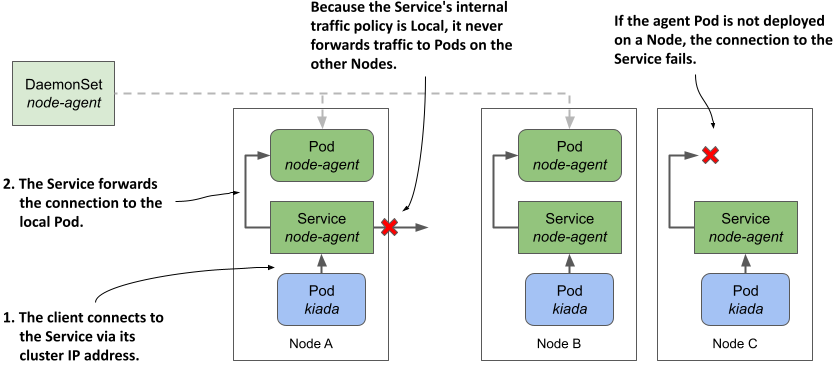
svc.spec.internalTrafficPolicy=Local:- specify a
Serviceto forward traffic only within the same node
- specify a
-
If the
DaemonSetthrough which agent Pods are deployed uses a Node selector, some Nodes may not have an agent running.- If a
ServicewithinternalTrafficPolicyset toLocalis used to expose the local agent, a client’s connection to the Service on that Node will fail.
- If a
- example
- service
apiVersion: v1
kind: Service
metadata:
  name: node-agent
  labels:
    app: node-agent
spec:
  internalTrafficPolicy: Local # a local service
  selector:
    app: node-agent # only select the ds pod
  ports:
    - name: http
      port: 80 # macth the ds pod port
- client pod
kind: Deployment
spec:
  template:
    spec:
      containers:
        env:
          - name: NODE_AGENT_URL
            value: http://node-agent # match the service name
Deciding which approach to use
local Service:- the cleanest and least invasive
- doesn’t affect the node’s network and doesn’t require special permissions.
hostPortorhostNetwork- only if you need to reach the agent from outside the cluster.
hostNetwork:- If the agent exposes multiple ports
- don’t have to forward each port individually
- could be potentially enabling man-in-the-middle attacks
- attacker can use the Pod to bind to any port on the Node