Note_Tech
All technological notes.
Project maintained by simonangel-fong Hosted on GitHub Pages — Theme by mattgraham
Kubernetes Workload: Debugging
- Kubernetes Workload: Debugging
-
[netstat -plan grep kube-proxy](#netstat–plan–grep-kube-proxy)
App Failure
-
Classic app model
- db pod -> db service -> web pod -> web service -> user
-
Debugging
- Check user connectivity
curl url
- Check if web service endpoint point to web pod ip and port
kubectl describe svc web-svc;- check endpoint pod and port
- Check web pod status == running
kubectl get pod web;- check if restarts
kubectl describe pod web- check events
kubectl logs web -f --previous- check for error
- Check if db service’s endpoint
kubectl describe svc db-svc;
- Check db pod status
kubectl get pod dbkubectl describe pod dbkubectl logs db -f --previous
- Check user connectivity
Lab: Debug 2 tiers app
- get to know the app
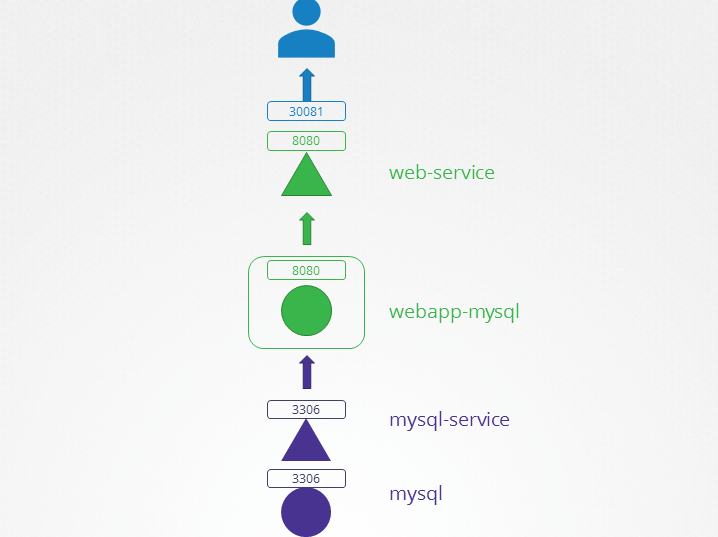
# set default context by swithing context
kubectl config set-context --current --namespace=alpha
# Context "default" modified.

k get deploy
# NAME           READY   UP-TO-DATE   AVAILABLE   AGE
# webapp-mysql   1/1     1            1           86s

k get svc
# NAME          TYPE        CLUSTER-IP      EXTERNAL-IP   PORT(S)          AGE
# mysql         ClusterIP   10.43.94.140    <none>        3306/TCP         2m37s
# web-service   NodePort    10.43.249.112   <none>        8080:30081/TCP   2m37s

k get pod
# NAME                            READY   STATUS    RESTARTS   AGE
# mysql                           1/1     Running   0          3m17s
# webapp-mysql-7b5d66665c-mfsfx   1/1     Running   0          3m17s
- debug
# test user connectivity
curl http://localhost:30081
# <!doctype html>
# <title>Hello from Flask</title>
# <body style="background: #ff3f3f;"></body>
# <div style="color: #e4e4e4;
# text-align: center;
# height: 90px;
# vertical-align: middle;">
# <img src="/static/img/failed.png">
# <!-- <h1> DATABASE CONNECTION FAILED !!</h1> -->
# <h2> Environment Variables: DB_Host=mysql-service; DB_Database=Not Set; DB_User=root; DB_Password=paswrd; 2003: Can't connect to MySQL server on 'mysql-service:3306' (-2 Name does not resolve) </h2>
# <p> From webapp-mysql-7b5d66665c-mfsfx!</p>
# </div>
# check service endpoint
kubectl describe svc web-service
# Selector: name=webapp-mysql
# TargetPort: 8080/TCP
# NodePort: <unset> 30081/TCP
# Endpoints: 10.22.0.10:8080
# check web pod
kubectl describe pod webapp-mysql-7b5d66665c-mfsfx
# Containers:
# webapp-mysql:
# Port: 8080/TCP
# Environment:
# DB_Host: mysql-service
# DB_User: root
# DB_Password: paswrd
# Events:
# Type Reason Age From Message
# ---- ------ ---- ---- -------
# Normal Scheduled 8m5s default-scheduler Successfully assigned alpha/webapp-mysql-7b5d66665c-mfsfx to controlplane
# Normal Pulling 8m5s kubelet Pulling image "mmumshad/simple-webapp-mysql"
# Normal Pulled 8m2s kubelet Successfully pulled image "mmumshad/simple-webapp-mysql" in 2.813s (2.813s including waiting). Image size: 36428415 bytes.
# Normal Created 8m2s kubelet Created container: webapp-mysql
# Normal Started 8m2s kubelet Started container webapp-mysql
# check db service
kubectl logs webapp-mysql-7b5d66665c-mfsfx
# * Serving Flask app "app" (lazy loading)
# * Environment: production
# WARNING: Do not use the development server in a production environment.
# Use a production WSGI server instead.
# * Debug mode: off
# * Running on http://0.0.0.0:8080/ (Press CTRL+C to quit)
# 10.22.0.1 - - [06/Dec/2025 18:56:14] "GET / HTTP/1.1" 200 -
# 10.22.0.1 - - [06/Dec/2025 18:56:14] "GET /static/img/failed.png HTTP/1.1" 200 -
# 10.22.0.1 - - [06/Dec/2025 18:59:54] "GET / HTTP/1.1" 200 -
# check db service
kubectl describe svc mysql
# Name: mysql
# Namespace: alpha
# TargetPort: 3306/TCP
# check db pod
kubectl describe pod mysql
# Containers:
# mysql:
# Port: 3306/TCP
# State: Running
# Events:
# Type Reason Age From Message
# ---- ------ ---- ---- -------
# Normal Scheduled 14m default-scheduler Successfully assigned alpha/mysql to controlplane
# Normal Pulling 14m kubelet Pulling image "mysql:5.6"
# Normal Pulled 14m kubelet Successfully pulled image "mysql:5.6" in 5.248s (5.248s including waiting). Image size: 102984033 bytes.
# Normal Created 14m kubelet Created container: mysql
# Normal Started 14m kubelet Started container mysql
-
Idenify problem:
- web pod
- DB_Host: mysql-service
- but service name: mysql
- web pod
-
Solution:
- rename service name
# rename svc name
kubectl get svc mysql -o yaml > db.yaml

# remove and recreate svc
kubectl delete svc mysql
kubectl create -f db.yaml

# confirm
kubectl get svc
# NAME           TYPE        CLUSTER-IP      EXTERNAL-IP   PORT(S)          AGE
# mysql-serive   ClusterIP   10.43.94.140    <none>        3306/TCP         52s
# web-service    NodePort    10.43.249.112   <none>        8080:30081/TCP   20m
- Common issue:
- port number:
- svc != pod
- pod env:
- db host != db service name
- db pwd/root
- pod selector
- port number:
Control Plane Debugging
-
Debugging
- Check components status on master node
systemctl kube-apiserver statussystemctl kube-controller-manager statussystemctl kube-scheduler status
- Check log of component on master node
sudo journalctl -u kube-apiserversudo journalctl -u kube-controller-managersudo journalctl -u kube-scheduler
- Check components status on worker node
systemctl kubelet statussystemctl kube-proxy status
- Check log of component on worker node
sudo journalctl -u kubeletsudo journalctl -u kube-proxy
- Check if pods running
kubectl get pods -n kube-system
- Check the log of the pod for error
kubectl logs kube-apiserver-master -n kube-system
- Check components status on master node
Lab:
# check the node
kubectl get node
# NAME           STATUS   ROLES           AGE   VERSION
# controlplane   Ready    control-plane   16m   v1.34.0

kubectl get pod
# NAME                                   READY   STATUS             RESTARTS      AGE
# coredns-6678bcd974-cgfnn               1/1     Running            0             10m
# coredns-6678bcd974-nxf2t               1/1     Running            0             10m
# etcd-controlplane                      1/1     Running            0             10m
# kube-apiserver-controlplane            1/1     Running            0             10m
# kube-controller-manager-controlplane   1/1     Running            0             10m
# kube-proxy-jcnwp                       1/1     Running            0             10m
# kube-scheduler-controlplane            0/1     CrashLoopBackOff   4 (39s ago)   2m29s

kubectl describe pod kube-scheduler-controlplane
# Events:
#   Type     Reason   Age                   From     Message
#   ----     ------   ----                  ----     -------
#   Normal   Pulled   83s (x5 over 3m12s)   kubelet  Container image "registry.k8s.io/kube-scheduler:v1.34.0" already present on machine
#   Normal   Created  83s (x5 over 3m11s)   kubelet  Created container: kube-scheduler
#   Warning  Failed   82s (x5 over 3m11s)   kubelet  Error: failed to create containerd task: failed to create shim task: OCI runtime create failed: runc create failed: unable to start container process: exec: "kube-schedulerrrr": executable file not found in $PATH: unknown
#   Warning  BackOff  32s (x20 over 3m10s)  kubelet  Back-off restarting failed container kube-scheduler in pod kube-scheduler-controlplane_kube-system(39977019bc92a9d8ced12088e4be3124)
- Sign of controlplane issue:
- app logs/events seem ok but pending
- app scale up/down but no action
- Common Issues:
- config file error:
/etc/kubernetes/manifests/
- volume mount path incorrect
- config file error:
Worker node failure
-
Debugging
- Check if the node is ready
kubectl get node
- Check details of the node
kubectl describe node node_name- check Ready flag
- if status == unknown, check the last of heart beat
- Check the node status
top: cpufree: memorydf -h: disk
- Check if the
kubeletrunningsystemctl status kubeletsudo journalctl -u kubelet -n 20 --no-pager
- Check
kubeletcertopenssl x509 -in /var/lib/kubelet/worker-node01.crt -text- Issuer: ca name
- Subject: group name
- Validity: expired date
- Check if the node is ready
- Common issue:
kubeletservice stopkubeletservice config file error:/var/lib/kubelet/config.yaml
kubeletserivces running but connect: connection refused- master node port (6443) error in config file
/etc/kubernetes/kubelet.conf
Debuging: Network
-
Check daemonset
kube-proxykubectl get ds kube-proxy -n kube-system
-
Check pod
kube-proxykubectl descrbe pod kube-proxy_pod -n kube-system
-
Common issue:
- networking plugin not install
- kube-proxy config
kubectl -n kube-system get ds kube-proxy -o yaml | grep -A4 "command"/var/lib/kube-proxy/kubeconfig.conf- Check the volume mount
Network Troubleshooting Network Plugin in Kubernetes
There are several plugins available and these are some.
- Weave Net:
To install,
kubectl apply -f https://github.com/weaveworks/weave/releases/download/v2.8.1/weave-daemonset-k8s.yaml
You can find details about the network plugins in the following documentation :
https://kubernetes.io/docs/concepts/cluster-administration/addons/#networking-and-network-policy
- Flannel :
To install,
kubectl apply -f https://raw.githubusercontent.com/coreos/flannel/2140ac876ef134e0ed5af15c65e414cf26827915/Documentation/kube-flannel.yml
Note: As of now flannel does not support kubernetes network policies.
-
Calico :
To install,
curl https://raw.githubusercontent.com/projectcalico/calico/v3.25.0/manifests/calico.yaml -O
Apply the manifest using the following command.
kubectl apply -f calico.yaml
Calico is said to have most advanced cni network plugin.
In CKA and CKAD exam, you won’t be asked to install the CNI plugin. But if asked you will be provided with the exact URL to install it.
Note: If there are multiple CNI configuration files in the directory, the kubelet uses the configuration file that comes first by name in lexicographic order.
DNS in Kubernetes
Kubernetes uses CoreDNS. CoreDNS is a flexible, extensible DNS server that can serve as the Kubernetes cluster DNS.
Memory and Pods
In large scale Kubernetes clusters, CoreDNS’s memory usage is predominantly affected by the number of Pods and Services in the cluster. Other factors include the size of the filled DNS answer cache, and the rate of queries received (QPS) per CoreDNS instance.
Kubernetes resources for coreDNS are:
a service account named coredns,
cluster-roles named coredns and kube-dns
clusterrolebindings named coredns and kube-dns,
a deployment named coredns,
a configmap named coredns and a
service named kube-dns.
While analyzing the coreDNS deployment you can see that the the Corefile plugin consists of important configuration which is defined as a configmap.
Port 53 is used for for DNS resolution.
kubernetes cluster.local in-addr.arpa ip6.arpa {
   pods insecure
   fallthrough in-addr.arpa ip6.arpa
   ttl 30
}
This is the backend to k8s for cluster.local and reverse domains.
proxy . /etc/resolv.conf
Forward out of cluster domains directly to right authoritative DNS server.
Troubleshooting issues related to coreDNS
-
If you find CoreDNS pods in pending state first check network plugin is installed.
-
coredns pods have CrashLoopBackOff or Error state
If you have nodes that are running SELinux with an older version of Docker you might experience a scenario where the coredns pods are not starting. To solve that you can try one of the following options:
a)Upgrade to a newer version of Docker.
b)Disable SELinux.
c)Modify the coredns deployment to set allowPrivilegeEscalation to true:
kubectl -n kube-system get deployment coredns -o yaml |
sed ‘s/allowPrivilegeEscalation: false/allowPrivilegeEscalation: true/g’ |
kubectl apply -f -
d)Another cause for CoreDNS to have CrashLoopBackOff is when a CoreDNS Pod deployed in Kubernetes detects a loop.
There are many ways to work around this issue, some are listed here:
Add the following to your kubelet config yaml: resolvConf:
Disable the local DNS cache on host nodes, and restore /etc/resolv.conf to the original.
A quick fix is to edit your Corefile, replacing forward . /etc/resolv.conf with the IP address of your upstream DNS, for example forward . 8.8.8.8. But this only fixes the issue for CoreDNS, kubelet will continue to forward the invalid resolv.conf to all default dnsPolicy Pods, leaving them unable to resolve DNS.
-
If CoreDNS pods and the kube-dns service is working fine, check the kube-dns service has valid endpoints.
kubectl -n kube-system get ep kube-dns
If there are no endpoints for the service, inspect the service and make sure it uses the correct selectors and ports.
Kube-Proxy
kube-proxy is a network proxy that runs on each node in the cluster. kube-proxy maintains network rules on nodes. These network rules allow network communication to the Pods from network sessions inside or outside of the cluster.
In a cluster configured with kubeadm, you can find kube-proxy as a daemonset.
kubeproxy is responsible for watching services and endpoint associated with each service. When the client is going to connect to the service using the virtual IP the kubeproxy is responsible for sending traffic to actual pods.
If you run a kubectl describe ds kube-proxy -n kube-system you can see that the kube-proxy binary runs with following command inside the kube-proxy container.
Command:
  /usr/local/bin/kube-proxy
  --config=/var/lib/kube-proxy/config.conf
  --hostname-override=$(NODE_NAME)


So it fetches the configuration from a configuration file ie, /var/lib/kube-proxy/config.conf and we can override the hostname with the node name of at which the pod is running.
In the config file we define the clusterCIDR, kubeproxy mode, ipvs, iptables, bindaddress, kube-config etc.
Troubleshooting issues related to kube-proxy
-
Check kube-proxy pod in the kube-system namespace is running.
-
Check kube-proxy logs.
-
Check configmap is correctly defined and the config file for running kube-proxy binary is correct.
-
kube-config is defined in the config map.
-
check kube-proxy is running inside the container
netstat -plan | grep kube-proxy
tcp 0 0 0.0.0.0:30081 0.0.0.0:_ LISTEN 1/kube-proxy tcp 0 0 127.0.0.1:10249 0.0.0.0:_ LISTEN 1/kube-proxy tcp 0 0 172.17.0.12:33706 172.17.0.12:6443 ESTABLISHED 1/kube-proxy tcp6 0 0 :::10256 :::* LISTEN 1/kube-proxy
References:
Debug Service issues:
https://kubernetes.io/docs/tasks/debug-application-cluster/debug-service/
DNS Troubleshooting:
https://kubernetes.io/docs/tasks/administer-cluster/dns-debugging-resolution/