Note_Tech
All technological notes.
Project maintained by simonangel-fong Hosted on GitHub Pages — Theme by mattgraham
Kubernetes - ReplicaSet
- Kubernetes - ReplicaSet
ReplicaSet
-
ReplicaSet- the API Object that represents a group of identical Pods to be managed as a unit.
- used to replce the old technology
Replication Controller
-
Enable highly available.
- If a
Podfails, is deleted, or a node crashes,ReplicaSetcreates a replacement Pod. - If there are too many Pods,
ReplicaSetremoves extra ones.
- If a
-
Naming
- rs name + five random alphanumeric characters
- Pod ownership:
- stand alone pod: has no “controlled by”
- pod matches label selector of rs
- become the
dependentof the rs- has “controlled by RS_NAME”
- owned by RS
- become the
-
garbage collector- automatically deletes
dependentobjects when theirowneris deleted.
- automatically deletes
- the update won’t apply automatically
- only affect the new created pod.
- e.g., adding new label to the template; the labels within the existing pods remain the same; only the new created pod has the new lable.
- only affect the new created pod.
Replicaset Controller
-
Replicaset Controller- the controller that detects and processes
Replicasetobjects- e.g., Create and delete when scaling the
ReplicaSet - create associated
Eventobjects
- e.g., Create and delete when scaling the
- the controller that detects and processes
Reconciliation Loop
reconciliation loop- a process of observe, compare, and update
- The
controllerobserves the state of both theownerand thedependentobjects. - After each change in this state, the
controllercompares the state of thedependentobjects with the desired state specified in theowningobject. - If these two states differ, the
controllermakes changes to thedependentobject(s) to reconcile the two states.- actual state ==> desired state
- The
- a process of observe, compare, and update
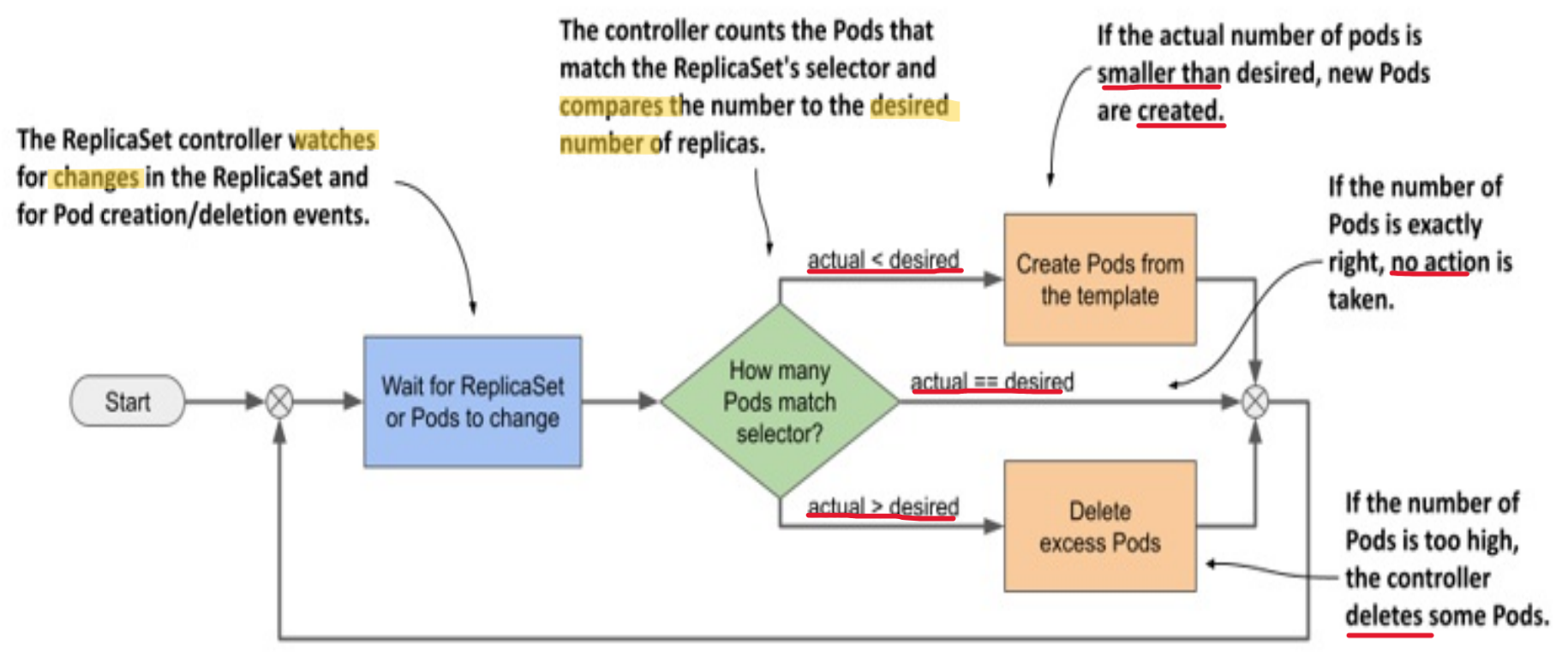
- the changed number of
replicascauses thecontrollerto take the necessary action- However, the update of pod template update the existing Pods.
With Liveness Probe
-
Replicaset Controllerensure the actual replica number match the desired replica number- it does not guarantee always has the desired number of healthy pod
-
If a container’s
liveness probefails, the container is restarted.- If the
probefails multiple times, theexponential backoff mechanismleads to a significant time delay before thecontaineris restarted.
- If the
With Readiness Probe
- If the container fails the
readiness rather, thecontainerkeep waiting instead of restarting.ReplicaSet controllerdoesn’t delete and replace the pod.- showing the
DESIREDandCURRENTnumbers that match the desired nuber; but theREADY< desired number
- FIX:
- option 1: scale up and scale down back
- option 2:
- identify the faulty pod, and change the label; Controller automatically create a new pod;
- figure out the problem with the faulty pod;
- confirm
ReplicaSetobject is removed from the Pod’sownerReferencesfield before deletion - delete the faulty pod
Preserve Pods in Deletion
Garbage collectionensure thedependent podsare delete whenrsobject is removed.kubectl delete rs kiada --cascade=orphan: Preserve old pods- then recreate the
rswith the updated labels. - label the
orphan podswith the updated labels- the orphan pods become the pod of new rs, because the new labels match the updated labels.
- then recreate the
Imperarive Commands
| Command | Description |
|---|---|
kubectl explain rs |
Show document of rs |
kubectl get rs |
List all ReplicaSets in the current namespace. |
kubectl describe rs rs_name |
Show detailed information about a specific ReplicaSet. |
kubectl logs rs/NAME |
View logs of one pod in rs |
kubectl logs rs/NAME -c CONTAINER |
View logs of a container in one pod of rs |
kubectl logs -l KEY=VALUE |
View logs of all pod matching label selector |
kubectl logs -l KEY=VALUE --all-containers --prefix |
View logs of all pod and all container, prefix with name |
kubectl create -f yaml_file |
Create a ReplicaSet from a YAML file. |
kubectl replace -f yaml_file |
Replace a ReplicaSet with a new one from a YAML file. |
kubectl edit rs rs_name |
Live edit resources |
kubectl delete rs rs_name |
Delete a ReplicaSet by name. |
kubectl scale rs rs_name --replicas=rs_num |
Scale the number of replicas for a ReplicaSet. |
kubectl rollout status rs/rs_name |
Check the status of a rollout for the ReplicaSet. |
kubectl rollout history rs/rs_name |
View the rollout history of changes to the ReplicaSet. |
kubectl rollout undo rs/rs_name |
Rollback to the previous version of the ReplicaSet. |
Declarative Manifest
Key Fiedls
spec.selector:- required; immutable
- the label selector
- can include the label created before the rs.
- the
matchLablesmust match at least one of the labels defined in metadata; Otherwise, cannot create rs. spec.selector.matchLabels: a map of labelsspec.selector.matchExpressions: a list of label selector requirements
spec.template:- required
- the template to define pod
spec.replicas:- optional;
- default = 1;
- the desired number of pod
Update Replicas Number
- opt1:
- update the
replicasin yaml file kubectl apply -f yaml_file
- update the
- opt2:
kubectl scale -f yaml_file --replicas=6- the nubmer of replicas in the file remain unchanged
- opt3:
kubectl scale rs rs_name --replicas=6
Lab: ReplicaSets
Explain
kubectl explain rs
# GROUP:      apps
# KIND:       ReplicaSet
# VERSION:    v1

# DESCRIPTION:
#     ReplicaSet ensures that a specified number of pod replicas are running at
#     any given time.

# FIELDS:
#   apiVersion    <string>
#     APIVersion defines the versioned schema of this representation of an object.
#     Servers should convert recognized schemas to the latest internal value, and
#     may reject unrecognized values. More info:
#     https://git.k8s.io/community/contributors/devel/sig-architecture/api-conventions.md#resources

#   kind  <string>
#     Kind is a string value representing the REST resource this object
#     represents. Servers may infer this from the endpoint the client submits
#     requests to. Cannot be updated. In CamelCase. More info:
#     https://git.k8s.io/community/contributors/devel/sig-architecture/api-conventions.md#types-kinds

#   metadata      <ObjectMeta>
#     If the Labels of a ReplicaSet are empty, they are defaulted to be the same
#     as the Pod(s) that the ReplicaSet manages. Standard object's metadata. More
#     info:
#     https://git.k8s.io/community/contributors/devel/sig-architecture/api-conventions.md#metadata

#   spec  <ReplicaSetSpec>
#     Spec defines the specification of the desired behavior of the ReplicaSet.
#     More info:
#     https://git.k8s.io/community/contributors/devel/sig-architecture/api-conventions.md#spec-and-status

#   status        <ReplicaSetStatus>
#     Status is the most recently observed status of the ReplicaSet. This data may
#     be out of date by some window of time. Populated by the system. Read-only.
#     More info:
#     https://git.k8s.io/community/contributors/devel/sig-architecture/api-conventions.md#spec-and-status

kubectl explain rs.spec
# ROUP:      apps
# KIND:       ReplicaSet
# VERSION:    v1

# FIELD: spec <ReplicaSetSpec>


# DESCRIPTION:
#     Spec defines the specification of the desired behavior of the ReplicaSet.
#     More info:
#     https://git.k8s.io/community/contributors/devel/sig-architecture/api-conventions.md#spec-and-status
#     ReplicaSetSpec is the specification of a ReplicaSet.

# FIELDS:
#   minReadySeconds       <integer>
#     Minimum number of seconds for which a newly created pod should be ready
#     without any of its container crashing, for it to be considered available.
#     Defaults to 0 (pod will be considered available as soon as it is ready)

#   replicas      <integer>
#     Replicas is the number of desired pods. This is a pointer to distinguish
#     between explicit zero and unspecified. Defaults to 1. More info:
#     https://kubernetes.io/docs/concepts/workloads/controllers/replicaset

#   selector      <LabelSelector> -required-
#     Selector is a label query over pods that should match the replica count.
#     Label keys and values that must match in order to be controlled by this
#     replica set. It must match the pod template's labels. More info:
#     https://kubernetes.io/docs/concepts/overview/working-with-objects/labels/#label-selectors

#   template      <PodTemplateSpec>
#     Template is the object that describes the pod that will be created if
#     insufficient replicas are detected. More info:
#     https://kubernetes.io/docs/concepts/workloads/controllers/replicaset/#pod-template
Default replicas value
# demo-rs-default-replicas.yaml
apiVersion: apps/v1
kind: ReplicaSet
metadata:
  name: demo-rs-default-replicas
spec:
  selector:
    matchLabels:
      app: nginx
  template:
    metadata:
      labels:
        app: nginx
        tier: front-end
    spec:
      containers:
        - name: nginx
          image: nginx
- create pod
# create
kubectl create -f demo-rs-default-replicas.yaml
# replicaset.apps/demo-rs-default-replicas created

kubectl get rs
# NAME                       DESIRED   CURRENT   READY   AGE
# demo-rs-default-replicas   1         1         1       17s

kubectl get rs -o wide
# NAME                       DESIRED   CURRENT   READY   AGE   CONTAINERS   IMAGES   SELECTOR
# demo-rs-default-replicas   1         1         1       11s   nginx        nginx    app=nginx

kubectl describe rs demo-rs-default-replicas
# Name:         demo-rs-default-replicas
# Namespace:    default
# Selector:     app=nginx
# Labels:       <none>
# Annotations:  <none>
# Replicas:     1 current / 1 desired
# Pods Status:  1 Running / 0 Waiting / 0 Succeeded / 0 Failed
# Pod Template:
#   Labels:  app=nginx
#            tier=front-end
#   Containers:
#    nginx:
#     Image:         nginx
#     Port:          <none>
#     Host Port:     <none>
#     Environment:   <none>
#     Mounts:        <none>
#   Volumes:         <none>
#   Node-Selectors:  <none>
#   Tolerations:     <none>
# Events:
#   Type    Reason            Age   From                   Message
#   ----    ------            ----  ----                   -------
#   Normal  SuccessfulCreate  12s   replicaset-controller  Created pod: demo-rs-default-replicas-jz2q4

kubectl get pod -L app,tier
# NAME                             READY   STATUS    RESTARTS   AGE    APP     TIER
# demo-rs-default-replicas-2lsbc   1/1     Running   0          118s   nginx   front-end

# check logs
kubectl logs rs/demo-rs-default-replicas
# /docker-entrypoint.sh: /docker-entrypoint.d/ is not empty, will attempt to perform configuration
# /docker-entrypoint.sh: Looking for shell scripts in /docker-entrypoint.d/
# /docker-entrypoint.sh: Launching /docker-entrypoint.d/10-listen-on-ipv6-by-default.sh
# 10-listen-on-ipv6-by-default.sh: info: Getting the checksum of /etc/nginx/conf.d/default.conf
# 10-listen-on-ipv6-by-default.sh: info: Enabled listen on IPv6 in /etc/nginx/conf.d/default.conf
# /docker-entrypoint.sh: Sourcing /docker-entrypoint.d/15-local-resolvers.envsh
# /docker-entrypoint.sh: Launching /docker-entrypoint.d/20-envsubst-on-templates.sh
# /docker-entrypoint.sh: Launching /docker-entrypoint.d/30-tune-worker-processes.sh
# /docker-entrypoint.sh: Configuration complete; ready for start up
# 2025/12/30 19:59:20 [notice] 1#1: using the "epoll" event method
# 2025/12/30 19:59:20 [notice] 1#1: nginx/1.29.4
# 2025/12/30 19:59:20 [notice] 1#1: built by gcc 14.2.0 (Debian 14.2.0-19)
# 2025/12/30 19:59:20 [notice] 1#1: OS: Linux 5.15.153.1-microsoft-standard-WSL2
# 2025/12/30 19:59:20 [notice] 1#1: getrlimit(RLIMIT_NOFILE): 1048576:1048576
# 2025/12/30 19:59:20 [notice] 1#1: start worker processes
# 2025/12/30 19:59:20 [notice] 1#1: start worker process 29
# 2025/12/30 19:59:20 [notice] 1#1: start worker process 30
# 2025/12/30 19:59:20 [notice] 1#1: start worker process 31
# 2025/12/30 19:59:20 [notice] 1#1: start worker process 32
# 2025/12/30 19:59:20 [notice] 1#1: start worker process 33
# 2025/12/30 19:59:20 [notice] 1#1: start worker process 34
# 2025/12/30 19:59:20 [notice] 1#1: start worker process 35
# 2025/12/30 19:59:20 [notice] 1#1: start worker process 36
# 2025/12/30 19:59:20 [notice] 1#1: start worker process 37
# 2025/12/30 19:59:20 [notice] 1#1: start worker process 38
# 2025/12/30 19:59:20 [notice] 1#1: start worker process 39
# 2025/12/30 19:59:20 [notice] 1#1: start worker process 40
Existing pod with matching labels
-
To explore what happen if pod with matched label exists before rs.
-
create 3 existing pods
kubectl run web01 --image=nginx -l app=nginx
# pod/web01 created
kubectl run web02 --image=nginx -l app=nginx
# pod/web02 created
kubectl run web03 --image=nginx -l app=nginx
# pod/web03 created

kubectl get pods --show-labels
# NAME    READY   STATUS    RESTARTS   AGE   LABELS
# web01   1/1     Running   0          75s   app=nginx
# web02   1/1     Running   0          69s   app=nginx
# web03   1/1     Running   0          62s   app=nginx

# confirm pod withouth "Controlled By"
kubectl describe pod/web03
- Create rs
# demo-rs-existing.yaml
apiVersion: apps/v1
kind: ReplicaSet
metadata:
  name: demo-rs-existing
spec:
  replicas: 2 # only 2, less than existing pod
  selector:
    matchLabels:
      app: nginx
  template:
    metadata:
      name: demo-rs
      labels:
        app: nginx
        tier: front-end
    spec:
      containers:
        - name: nginx
          image: nginx
kubectl apply -f demo-rs-existing.yaml
# replicaset.apps/demo-rs-existing created

# confirm: only 2 pods, matching the replicas number
kubectl get pod --show-labels
# NAME    READY   STATUS    RESTARTS   AGE    LABELS
# web02   1/1     Running   0          2m5s   app=nginx
# web03   1/1     Running   0          2m2s   app=nginx

# confirm: pod is controlled by rs
kubectl describe pod web03
# Controlled By:  ReplicaSet/demo-rs-existing

# delete
kubectl delete rs demo-rs-existing
# replicaset.apps "demo-rs-existing" deleted from default namespace

# confirm: the existing pod get deleteed as well
kubectl get pod --show-labels
# No resources found in default namespace.
Scale ReplicaSet
# demo-rs-scale.yaml
apiVersion: apps/v1
kind: ReplicaSet
metadata:
  name: demo-rs-scale
spec:
  replicas: 3
  selector:
    matchLabels:
      app: nginx
  template:
    metadata:
      labels:
        app: nginx
        tier: front-end
    spec:
      containers:
        - name: nginx
          image: nginx
kubectl apply -f demo-rs-scale.yaml
# replicaset.apps/demo-rs-scale created

# scale up
kubectl scale rs demo-rs-scale --replicas=7
# replicaset.apps/demo-rs-scale scaled

kubectl get rs
# NAME            DESIRED   CURRENT   READY   AGE
# demo-rs-scale   7         7         4       89s

kubectl get pod
# NAME                  READY   STATUS    RESTARTS   AGE
# demo-rs-scale-6f87f   1/1     Running   0          23s
# demo-rs-scale-7hgv6   1/1     Running   0          23s
# demo-rs-scale-dm9cp   1/1     Running   0          104s
# demo-rs-scale-fd5qk   1/1     Running   0          104s
# demo-rs-scale-hvsjz   1/1     Running   0          23s
# demo-rs-scale-phrh2   1/1     Running   0          104s
# demo-rs-scale-pjtts   1/1     Running   0          23s

# scale down
kubectl scale rs demo-rs-scale --replicas=1
# replicaset.apps/demo-rs-scale scaled

kubectl get rs
# NAME            DESIRED   CURRENT   READY   AGE
# demo-rs-scale   1         1         1       2m32s

# scale down to zero
kubectl scale rs demo-rs-scale --replicas=0
# replicaset.apps/demo-rs-scale scaled

kubectl get rs
# NAME            DESIRED   CURRENT   READY   AGE
# demo-rs-scale   0         0         0       3m15s

kubectl get pod
# No resources found in default namespace.
Delete a pod to test pod auto creation
# scale up to 3
kubectl scale rs myapp-replicaset --replicas=3
# replicaset.apps/myapp-replicaset scaled

kubectl get pods
# NAME                     READY   STATUS    RESTARTS   AGE
# myapp-replicaset-dcrqj   1/1     Running   0          9s
# myapp-replicaset-kgxq2   1/1     Running   0          9s
# myapp-replicaset-vjlj7   1/1     Running   0          9s

# delete a pod manually
kubectl delete pod myapp-replicaset-vjlj7
# pod "myapp-replicaset-vjlj7" deleted from default namespace

# list pods
kubectl get pods
# NAME                     READY   STATUS    RESTARTS   AGE
# myapp-replicaset-64qrn   1/1     Running   0          11s
# myapp-replicaset-dcrqj   1/1     Running   0          43s
# myapp-replicaset-kgxq2   1/1     Running   0          43s
# one pod has been created automatically.

# confirm in details
kubectl describe rs myapp-replicaset
# Name:         myapp-replicaset
# Namespace:    default
# Selector:     type=front-end
# Labels:       app=myapp
#               type=front-end
# Annotations:  <none>
# Replicas:     3 current / 3 desired
# Pods Status:  3 Running / 0 Waiting / 0 Succeeded / 0 Failed
# Pod Template:
#   Labels:  app=myapp
#            type=front-end
#   Containers:
#    nginx-controller:
#     Image:         nginx
#     Port:          <none>
#     Host Port:     <none>
#     Environment:   <none>
#     Mounts:        <none>
#   Volumes:         <none>
#   Node-Selectors:  <none>
#   Tolerations:     <none>
# Events:
#   Type    Reason            Age   From                   Message
#   ----    ------            ----  ----                   -------
#   Normal  SuccessfulCreate  4m2s  replicaset-controller  Created pod: myapp-replicaset-b9w2c
#   Normal  SuccessfulCreate  4m2s  replicaset-controller  Created pod: myapp-replicaset-n44vm
#   Normal  SuccessfulCreate  4m2s  replicaset-controller  Created pod: myapp-replicaset-gj8sd
#   Normal  SuccessfulCreate  107s  replicaset-controller  Created pod: myapp-replicaset-hrkpg
Create new pod manually to test rs
# create yaml
tee > pod.yaml <<EOF
apiVersion: v1
kind: Pod
metadata: # metadata of pod
  name: myapp-pod
  labels:
    app: myapp
    type: front-end
spec: # specification of pod
  containers:
    - name: nginx-controller
      image: nginx
EOF

# create pod with same labels
kubectl create -f pod.yaml
# pod/myapp-pod created

# confirm, remain 3 pods
kubectl get pods
# NAME                     READY   STATUS    RESTARTS   AGE
# myapp-replicaset-64qrn   1/1     Running   0          98s
# myapp-replicaset-dcrqj   1/1     Running   0          2m10s
# myapp-replicaset-kgxq2   1/1     Running   0          2m10s

# check details, event shows pod deletion
kubectl describe rs myapp-replicaset
# Name:         myapp-replicaset
# Namespace:    default
# Selector:     type=front-end
# Labels:       app=myapp
#               type=front-end
# Annotations:  <none>
# Replicas:     3 current / 3 desired
# Pods Status:  3 Running / 0 Waiting / 0 Succeeded / 0 Failed
# Pod Template:
#   Labels:  app=myapp
#            type=front-end
#   Containers:
#    nginx-controller:
#     Image:         nginx
#     Port:          <none>
#     Host Port:     <none>
#     Environment:   <none>
#     Mounts:        <none>
#   Volumes:         <none>
#   Node-Selectors:  <none>
#   Tolerations:     <none>
# Events:
#   Type    Reason            Age    From                   Message
#   ----    ------            ----   ----                   -------
#   Normal  SuccessfulCreate  9m43s  replicaset-controller  Created pod: myapp-replicaset-b9w2c
#   Normal  SuccessfulCreate  9m43s  replicaset-controller  Created pod: myapp-replicaset-n44vm
#   Normal  SuccessfulCreate  9m43s  replicaset-controller  Created pod: myapp-replicaset-gj8sd
#   Normal  SuccessfulCreate  7m28s  replicaset-controller  Created pod: myapp-replicaset-hrkpg
#   Normal  SuccessfulDelete  54s    replicaset-controller  Deleted pod: myapp-pod
Change replica number in temp file
- the original yaml file remain unchanged
# edit temp file
kubectl edit rs myapp-replicaset
# spec:
#   replicas: 4

# confirm
kubectl get pods
# NAME                     READY   STATUS    RESTARTS   AGE
# myapp-replicaset-gj8sd   1/1     Running   0          15m
# myapp-replicaset-hrkpg   1/1     Running   0          12m
# myapp-replicaset-mg82w   1/1     Running   0          58s
# myapp-replicaset-n44vm   1/1     Running   0          15m
Delete RS
kubectl delete rs myapp-replicaset
# replicaset.apps "myapp-replicaset" deleted from default namespace

kubectl get rs
# No resources found in default namespace.